PC Randomly Restarts


DuoMaxwell007

Member
Local time
3:06 PM
Posts
9
OS
Windows 11
sometimes after a few hours my pc will randomly restart and I dont know why, Im not getting a BSOD or anything it just restarts, and way to find out why? Also on a different note if youre doing something that causes 70% of your GPU at 70-80 degrees Celsius and 30% of your memory to be used for prolong periods of time during the day is that safe for your pc?
 
Windows Build/Version
Windows 11

My Computer

System One

  • OS
    Windows 11
    Computer type
    PC/Desktop
    CPU
    11th gen Intel i9-11900k 3.50GHz
    Motherboard
    Asus Rog Strix Z590E Gaming Wifi
    Memory
    64GB
    Graphics Card(s)
    NVidia Geforce RTX 3080 Ti
    Screen Resolution
    4k
Hi, welcome.

You could try looking into event viewer

Open Event Viewer:

• Press Win + R to open the Run dialog
• Type: eventvwr.msc and press Enter
• Event Viewer will open

Where to Look:

• In the left pane, expand Windows Logs > System
• Scroll or filter for events around the time of the restart

Key Event IDs to look for:
  • There are images below to show you how to filter for restart events
    • Filter by the Event ID 41
  • 41Kernel-Power (unexpected restart, power loss, crash)
  • 1074 – Clean shutdown/restart initiated by a process (Windows Update, user, or software)
  • 6006 – Event log service stopped (normal shutdown)
  • 6008 – Unexpected shutdown (system didn’t shut down cleanly)
  • 6005 – Event log service started (system boot)
  • Use Filter Current Log (right‑click System > Filter) to narrow by Event ID (e.g. 41)
  • Cross‑check the timestamp with when the restart occurred
  • If you see Event ID 41 without a matching 1074, it usually means a crash, forced reset, or power issue
  • If you see 1074, the restart was intentional (update, user action, or software)

Win-1934.webp


Win-1932.webp


Win-1935.webp


ALTERNATIVELY: For a simplified view, you could check Custom Views > Administrative Events
  • Open Custom Views Administrative Events, sort Event ID and look for Event ID 41
  • Please don't be alarmed by all the Red Icons ! Everyone has events like these.

Win-1936.webp


.
 
Last edited:

My Computers

System One System Two

  • OS
    Windows 11 Pro 25H2 Build 26200.8655
    Computer type
    PC/Desktop
    Manufacturer/Model
    Sin-built 2013
    CPU
    Intel(R) Core(TM) i7-4770K CPU @ 3.50GHz
    Motherboard
    ASUS ROG Maximus VI Formula
    Memory
    32.0 GB of I forget and the box is in storage.
    Graphics Card(s)
    Gigabyte nVidia GeForce GTX 1660 Super OC 6GB
    Sound Card
    Onboard thingy
    Monitor(s) Displays
    5 x LG 25MS500-B - 1 x 24MK430H-B - 1 x Wacom Pro 22" Touch Screen Tablet
    Screen Resolution
    All over the place
    Hard Drives
    Too many to list.
    OS on Samsung 1TB 870 QVO SATA
    PSU
    Silverstone 1500
    Case
    NZXT Phantom 820 Full-Tower Case
    Cooling
    Noctua NH-D15 Elite Class Dual Tower CPU Cooler / 6 x EziDIY 120mm / 2 x Corsair 140mm somethings / 1 x 140mm Thermaltake something / 2 x 200mm Corsair.
    Keyboard
    Corsair K95 / Logitech diNovo Edge Wireless
    Mouse
    Logitech: G402 / G502 / Mx Masters / Mx Air Cordless
    Internet Speed
    2000/500Mbps
    Browser
    All sorts
    Antivirus
    Kaspersky Premium
    Other Info
    ㅤㅤㅤㅤㅤㅤㅤㅤㅤㅤㅤㅤㅤㅤㅤㅤㅤㅤㅤㅤㅤㅤㅤㅤㅤㅤㅤㅤㅤㅤㅤㅤㅤㅤㅤㅤㅤㅤㅤㅤ⠀⠀⠀⠀⠀⠀⠀⠀⠀⠀
    TP-Link BE9300 WiFi 7 Bluetooth 5.4 (Archer TBE550E)
    TP-Link TX201 V1 2.5GB Lan

    Grandstream HT812 - VoIP
    ASUS DSL-AX82U - Mesh
    ASUS RT-AC68U - Mesh
    ASUS RT-BE88U Router

    Brother MFC-L2880DW Printer

    I’m on a horse.
  • Operating System
    Windows 11 Pro 25H2 Build 26200.8655
    Computer type
    Laptop
    Manufacturer/Model
    LENOVO Yoga 7 14IRL8 - 7i EVO OLED 14" Touchscreen i5 12 Core 16GB/512GB
    CPU
    Intel Core 12th Gen i5-1240P Processor (1.7 - 4.4GHz)
    Memory
    16GB LPDDR5 RAM
    Graphics card(s)
    Intel Iris Xe Graphics Processor
    Sound Card
    Optimized with Dolby Atmos®
    Screen Resolution
    QHD 2880 x 1800 OLED
    Hard Drives
    M.2 512GB
    Antivirus
    Defender / Malwarebytes
    Other Info
    …still on a horse.
on a different note if youre doing something that causes 70% of your GPU at 70-80 degrees Celsius and 30% of your memory to be used for prolong periods of time during the day is that safe for your pc?

A PC will restart if it overheats, as far as I remember.
 

My Computers

System One System Two

  • OS
    Windows 11 Pro 25H2 Build 26200.8655
    Computer type
    PC/Desktop
    Manufacturer/Model
    Sin-built 2013
    CPU
    Intel(R) Core(TM) i7-4770K CPU @ 3.50GHz
    Motherboard
    ASUS ROG Maximus VI Formula
    Memory
    32.0 GB of I forget and the box is in storage.
    Graphics Card(s)
    Gigabyte nVidia GeForce GTX 1660 Super OC 6GB
    Sound Card
    Onboard thingy
    Monitor(s) Displays
    5 x LG 25MS500-B - 1 x 24MK430H-B - 1 x Wacom Pro 22" Touch Screen Tablet
    Screen Resolution
    All over the place
    Hard Drives
    Too many to list.
    OS on Samsung 1TB 870 QVO SATA
    PSU
    Silverstone 1500
    Case
    NZXT Phantom 820 Full-Tower Case
    Cooling
    Noctua NH-D15 Elite Class Dual Tower CPU Cooler / 6 x EziDIY 120mm / 2 x Corsair 140mm somethings / 1 x 140mm Thermaltake something / 2 x 200mm Corsair.
    Keyboard
    Corsair K95 / Logitech diNovo Edge Wireless
    Mouse
    Logitech: G402 / G502 / Mx Masters / Mx Air Cordless
    Internet Speed
    2000/500Mbps
    Browser
    All sorts
    Antivirus
    Kaspersky Premium
    Other Info
    ㅤㅤㅤㅤㅤㅤㅤㅤㅤㅤㅤㅤㅤㅤㅤㅤㅤㅤㅤㅤㅤㅤㅤㅤㅤㅤㅤㅤㅤㅤㅤㅤㅤㅤㅤㅤㅤㅤㅤㅤ⠀⠀⠀⠀⠀⠀⠀⠀⠀⠀
    TP-Link BE9300 WiFi 7 Bluetooth 5.4 (Archer TBE550E)
    TP-Link TX201 V1 2.5GB Lan

    Grandstream HT812 - VoIP
    ASUS DSL-AX82U - Mesh
    ASUS RT-AC68U - Mesh
    ASUS RT-BE88U Router

    Brother MFC-L2880DW Printer

    I’m on a horse.
  • Operating System
    Windows 11 Pro 25H2 Build 26200.8655
    Computer type
    Laptop
    Manufacturer/Model
    LENOVO Yoga 7 14IRL8 - 7i EVO OLED 14" Touchscreen i5 12 Core 16GB/512GB
    CPU
    Intel Core 12th Gen i5-1240P Processor (1.7 - 4.4GHz)
    Memory
    16GB LPDDR5 RAM
    Graphics card(s)
    Intel Iris Xe Graphics Processor
    Sound Card
    Optimized with Dolby Atmos®
    Screen Resolution
    QHD 2880 x 1800 OLED
    Hard Drives
    M.2 512GB
    Antivirus
    Defender / Malwarebytes
    Other Info
    …still on a horse.
A PC will restart if it overheats, as far as I remember.


well yes a PC will definitely restart to prevent overheating, but the question is are those normal operating temps or not, because Ive heard 70-80 celsius is quite normal, I mean right no w its at 60 just idle and not being used
 

My Computer

System One

  • OS
    Windows 11
    Computer type
    PC/Desktop
    CPU
    11th gen Intel i9-11900k 3.50GHz
    Motherboard
    Asus Rog Strix Z590E Gaming Wifi
    Memory
    64GB
    Graphics Card(s)
    NVidia Geforce RTX 3080 Ti
    Screen Resolution
    4k
well yes a PC will definitely restart to prevent overheating, but the question is are those normal operating temps or not, because Ive heard 70-80 celsius is quite normal, I mean right no w its at 60 just idle and not being used

These may vary depending where or who you read.

ComponentSafe Temp RangeCaution ZoneUnsafe Temp
CPU (Idle)30–45°C46–55°C>55°C
CPU (Load)60–80°C81–90°C>90°C
GPU (Idle)30–50°C51–60°C>60°C
GPU (Load)65–85°C86–95°C>95°C
Motherboard25–50°C51–60°C>60°C
SSD0–50°C51–70°C>70°C
HDD20–45°C46–55°C>55°C
VRAM30–80°C81–95°C>95°C
 

My Computers

System One System Two

  • OS
    Windows 11 Pro 25H2 Build 26200.8655
    Computer type
    PC/Desktop
    Manufacturer/Model
    Sin-built 2013
    CPU
    Intel(R) Core(TM) i7-4770K CPU @ 3.50GHz
    Motherboard
    ASUS ROG Maximus VI Formula
    Memory
    32.0 GB of I forget and the box is in storage.
    Graphics Card(s)
    Gigabyte nVidia GeForce GTX 1660 Super OC 6GB
    Sound Card
    Onboard thingy
    Monitor(s) Displays
    5 x LG 25MS500-B - 1 x 24MK430H-B - 1 x Wacom Pro 22" Touch Screen Tablet
    Screen Resolution
    All over the place
    Hard Drives
    Too many to list.
    OS on Samsung 1TB 870 QVO SATA
    PSU
    Silverstone 1500
    Case
    NZXT Phantom 820 Full-Tower Case
    Cooling
    Noctua NH-D15 Elite Class Dual Tower CPU Cooler / 6 x EziDIY 120mm / 2 x Corsair 140mm somethings / 1 x 140mm Thermaltake something / 2 x 200mm Corsair.
    Keyboard
    Corsair K95 / Logitech diNovo Edge Wireless
    Mouse
    Logitech: G402 / G502 / Mx Masters / Mx Air Cordless
    Internet Speed
    2000/500Mbps
    Browser
    All sorts
    Antivirus
    Kaspersky Premium
    Other Info
    ㅤㅤㅤㅤㅤㅤㅤㅤㅤㅤㅤㅤㅤㅤㅤㅤㅤㅤㅤㅤㅤㅤㅤㅤㅤㅤㅤㅤㅤㅤㅤㅤㅤㅤㅤㅤㅤㅤㅤㅤ⠀⠀⠀⠀⠀⠀⠀⠀⠀⠀
    TP-Link BE9300 WiFi 7 Bluetooth 5.4 (Archer TBE550E)
    TP-Link TX201 V1 2.5GB Lan

    Grandstream HT812 - VoIP
    ASUS DSL-AX82U - Mesh
    ASUS RT-AC68U - Mesh
    ASUS RT-BE88U Router

    Brother MFC-L2880DW Printer

    I’m on a horse.
  • Operating System
    Windows 11 Pro 25H2 Build 26200.8655
    Computer type
    Laptop
    Manufacturer/Model
    LENOVO Yoga 7 14IRL8 - 7i EVO OLED 14" Touchscreen i5 12 Core 16GB/512GB
    CPU
    Intel Core 12th Gen i5-1240P Processor (1.7 - 4.4GHz)
    Memory
    16GB LPDDR5 RAM
    Graphics card(s)
    Intel Iris Xe Graphics Processor
    Sound Card
    Optimized with Dolby Atmos®
    Screen Resolution
    QHD 2880 x 1800 OLED
    Hard Drives
    M.2 512GB
    Antivirus
    Defender / Malwarebytes
    Other Info
    …still on a horse.
so I do have a few error 41s but those are pretty widespread... the most recent one however (a restart that happens right before this post) is showing event 1 and event 1001, talking about a fatal hardware error WHEA and the other is the computer rebooted from a bug check
 

My Computer

System One

  • OS
    Windows 11
    Computer type
    PC/Desktop
    CPU
    11th gen Intel i9-11900k 3.50GHz
    Motherboard
    Asus Rog Strix Z590E Gaming Wifi
    Memory
    64GB
    Graphics Card(s)
    NVidia Geforce RTX 3080 Ti
    Screen Resolution
    4k
talking about a fatal hardware error WHEA

Event ID 1 – WHEA-Logger
• Reports a fatal hardware error.
• Usually flags CPU, RAM, motherboard, or PCIe device issues.
• The “Processor Core” or “Bank” info in the XML can hint at which component triggered it.


the other is the computer rebooted from a bug check


Event ID 1001 – BugCheck
  • Confirms a blue screen (BSOD) occurred.
  • Includes the STOP code and parameters — crucial for debugging.
Do you have the BugCheck code and parameters?
 

My Computers

System One System Two

  • OS
    Windows 11 Pro 25H2 Build 26200.8655
    Computer type
    PC/Desktop
    Manufacturer/Model
    Sin-built 2013
    CPU
    Intel(R) Core(TM) i7-4770K CPU @ 3.50GHz
    Motherboard
    ASUS ROG Maximus VI Formula
    Memory
    32.0 GB of I forget and the box is in storage.
    Graphics Card(s)
    Gigabyte nVidia GeForce GTX 1660 Super OC 6GB
    Sound Card
    Onboard thingy
    Monitor(s) Displays
    5 x LG 25MS500-B - 1 x 24MK430H-B - 1 x Wacom Pro 22" Touch Screen Tablet
    Screen Resolution
    All over the place
    Hard Drives
    Too many to list.
    OS on Samsung 1TB 870 QVO SATA
    PSU
    Silverstone 1500
    Case
    NZXT Phantom 820 Full-Tower Case
    Cooling
    Noctua NH-D15 Elite Class Dual Tower CPU Cooler / 6 x EziDIY 120mm / 2 x Corsair 140mm somethings / 1 x 140mm Thermaltake something / 2 x 200mm Corsair.
    Keyboard
    Corsair K95 / Logitech diNovo Edge Wireless
    Mouse
    Logitech: G402 / G502 / Mx Masters / Mx Air Cordless
    Internet Speed
    2000/500Mbps
    Browser
    All sorts
    Antivirus
    Kaspersky Premium
    Other Info
    ㅤㅤㅤㅤㅤㅤㅤㅤㅤㅤㅤㅤㅤㅤㅤㅤㅤㅤㅤㅤㅤㅤㅤㅤㅤㅤㅤㅤㅤㅤㅤㅤㅤㅤㅤㅤㅤㅤㅤㅤ⠀⠀⠀⠀⠀⠀⠀⠀⠀⠀
    TP-Link BE9300 WiFi 7 Bluetooth 5.4 (Archer TBE550E)
    TP-Link TX201 V1 2.5GB Lan

    Grandstream HT812 - VoIP
    ASUS DSL-AX82U - Mesh
    ASUS RT-AC68U - Mesh
    ASUS RT-BE88U Router

    Brother MFC-L2880DW Printer

    I’m on a horse.
  • Operating System
    Windows 11 Pro 25H2 Build 26200.8655
    Computer type
    Laptop
    Manufacturer/Model
    LENOVO Yoga 7 14IRL8 - 7i EVO OLED 14" Touchscreen i5 12 Core 16GB/512GB
    CPU
    Intel Core 12th Gen i5-1240P Processor (1.7 - 4.4GHz)
    Memory
    16GB LPDDR5 RAM
    Graphics card(s)
    Intel Iris Xe Graphics Processor
    Sound Card
    Optimized with Dolby Atmos®
    Screen Resolution
    QHD 2880 x 1800 OLED
    Hard Drives
    M.2 512GB
    Antivirus
    Defender / Malwarebytes
    Other Info
    …still on a horse.
These may vary depending where or who you read.

ComponentSafe Temp RangeCaution ZoneUnsafe Temp
CPU (Idle)30–45°C46–55°C>55°C
CPU (Load)60–80°C81–90°C>90°C
GPU (Idle)30–50°C51–60°C>60°C
GPU (Load)65–85°C86–95°C>95°C
Motherboard25–50°C51–60°C>60°C
SSD0–50°C51–70°C>70°C
HDD20–45°C46–55°C>55°C
VRAM30–80°C81–95°C>95°C


so based on that if task manager is to be believed by GPU is currently at caution zone idling temp (60) and and when its under heavy load (and by heavy load i mean my pc running 6 copies of the same game at the same time) its never exceed 80 C which according to that is safe temp. My CPU doesnt show temps so I dunno about that one
 

My Computer

System One

  • OS
    Windows 11
    Computer type
    PC/Desktop
    CPU
    11th gen Intel i9-11900k 3.50GHz
    Motherboard
    Asus Rog Strix Z590E Gaming Wifi
    Memory
    64GB
    Graphics Card(s)
    NVidia Geforce RTX 3080 Ti
    Screen Resolution
    4k

My Computers

System One System Two

  • OS
    Windows 11 Pro 25H2 Build 26200.8655
    Computer type
    PC/Desktop
    Manufacturer/Model
    Sin-built 2013
    CPU
    Intel(R) Core(TM) i7-4770K CPU @ 3.50GHz
    Motherboard
    ASUS ROG Maximus VI Formula
    Memory
    32.0 GB of I forget and the box is in storage.
    Graphics Card(s)
    Gigabyte nVidia GeForce GTX 1660 Super OC 6GB
    Sound Card
    Onboard thingy
    Monitor(s) Displays
    5 x LG 25MS500-B - 1 x 24MK430H-B - 1 x Wacom Pro 22" Touch Screen Tablet
    Screen Resolution
    All over the place
    Hard Drives
    Too many to list.
    OS on Samsung 1TB 870 QVO SATA
    PSU
    Silverstone 1500
    Case
    NZXT Phantom 820 Full-Tower Case
    Cooling
    Noctua NH-D15 Elite Class Dual Tower CPU Cooler / 6 x EziDIY 120mm / 2 x Corsair 140mm somethings / 1 x 140mm Thermaltake something / 2 x 200mm Corsair.
    Keyboard
    Corsair K95 / Logitech diNovo Edge Wireless
    Mouse
    Logitech: G402 / G502 / Mx Masters / Mx Air Cordless
    Internet Speed
    2000/500Mbps
    Browser
    All sorts
    Antivirus
    Kaspersky Premium
    Other Info
    ㅤㅤㅤㅤㅤㅤㅤㅤㅤㅤㅤㅤㅤㅤㅤㅤㅤㅤㅤㅤㅤㅤㅤㅤㅤㅤㅤㅤㅤㅤㅤㅤㅤㅤㅤㅤㅤㅤㅤㅤ⠀⠀⠀⠀⠀⠀⠀⠀⠀⠀
    TP-Link BE9300 WiFi 7 Bluetooth 5.4 (Archer TBE550E)
    TP-Link TX201 V1 2.5GB Lan

    Grandstream HT812 - VoIP
    ASUS DSL-AX82U - Mesh
    ASUS RT-AC68U - Mesh
    ASUS RT-BE88U Router

    Brother MFC-L2880DW Printer

    I’m on a horse.
  • Operating System
    Windows 11 Pro 25H2 Build 26200.8655
    Computer type
    Laptop
    Manufacturer/Model
    LENOVO Yoga 7 14IRL8 - 7i EVO OLED 14" Touchscreen i5 12 Core 16GB/512GB
    CPU
    Intel Core 12th Gen i5-1240P Processor (1.7 - 4.4GHz)
    Memory
    16GB LPDDR5 RAM
    Graphics card(s)
    Intel Iris Xe Graphics Processor
    Sound Card
    Optimized with Dolby Atmos®
    Screen Resolution
    QHD 2880 x 1800 OLED
    Hard Drives
    M.2 512GB
    Antivirus
    Defender / Malwarebytes
    Other Info
    …still on a horse.
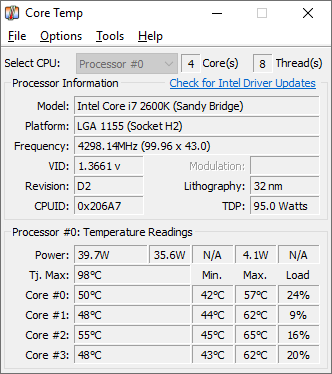
Core Temp – Focused on CPU temps per core.


My Computers

System One System Two

  • OS
    Windows 11 Pro 25H2 Build 26200.8655
    Computer type
    PC/Desktop
    Manufacturer/Model
    Sin-built 2013
    CPU
    Intel(R) Core(TM) i7-4770K CPU @ 3.50GHz
    Motherboard
    ASUS ROG Maximus VI Formula
    Memory
    32.0 GB of I forget and the box is in storage.
    Graphics Card(s)
    Gigabyte nVidia GeForce GTX 1660 Super OC 6GB
    Sound Card
    Onboard thingy
    Monitor(s) Displays
    5 x LG 25MS500-B - 1 x 24MK430H-B - 1 x Wacom Pro 22" Touch Screen Tablet
    Screen Resolution
    All over the place
    Hard Drives
    Too many to list.
    OS on Samsung 1TB 870 QVO SATA
    PSU
    Silverstone 1500
    Case
    NZXT Phantom 820 Full-Tower Case
    Cooling
    Noctua NH-D15 Elite Class Dual Tower CPU Cooler / 6 x EziDIY 120mm / 2 x Corsair 140mm somethings / 1 x 140mm Thermaltake something / 2 x 200mm Corsair.
    Keyboard
    Corsair K95 / Logitech diNovo Edge Wireless
    Mouse
    Logitech: G402 / G502 / Mx Masters / Mx Air Cordless
    Internet Speed
    2000/500Mbps
    Browser
    All sorts
    Antivirus
    Kaspersky Premium
    Other Info
    ㅤㅤㅤㅤㅤㅤㅤㅤㅤㅤㅤㅤㅤㅤㅤㅤㅤㅤㅤㅤㅤㅤㅤㅤㅤㅤㅤㅤㅤㅤㅤㅤㅤㅤㅤㅤㅤㅤㅤㅤ⠀⠀⠀⠀⠀⠀⠀⠀⠀⠀
    TP-Link BE9300 WiFi 7 Bluetooth 5.4 (Archer TBE550E)
    TP-Link TX201 V1 2.5GB Lan

    Grandstream HT812 - VoIP
    ASUS DSL-AX82U - Mesh
    ASUS RT-AC68U - Mesh
    ASUS RT-BE88U Router

    Brother MFC-L2880DW Printer

    I’m on a horse.
  • Operating System
    Windows 11 Pro 25H2 Build 26200.8655
    Computer type
    Laptop
    Manufacturer/Model
    LENOVO Yoga 7 14IRL8 - 7i EVO OLED 14" Touchscreen i5 12 Core 16GB/512GB
    CPU
    Intel Core 12th Gen i5-1240P Processor (1.7 - 4.4GHz)
    Memory
    16GB LPDDR5 RAM
    Graphics card(s)
    Intel Iris Xe Graphics Processor
    Sound Card
    Optimized with Dolby Atmos®
    Screen Resolution
    QHD 2880 x 1800 OLED
    Hard Drives
    M.2 512GB
    Antivirus
    Defender / Malwarebytes
    Other Info
    …still on a horse.
Event ID 1 – WHEA-Logger
• Reports a fatal hardware error.
• Usually flags CPU, RAM, motherboard, or PCIe device issues.
• The “Processor Core” or “Bank” info in the XML can hint at which component triggered it.


Event ID 1001 – BugCheck
  • Confirms a blue screen (BSOD) occurred.
  • Includes the STOP code and parameters — crucial for debugging.
Do you have the BugCheck code and parameters?
So the WHEA doesnt have a processor core or Bank in the XML just this:

- <Event xmlns=" ">


- <System>


<Provider Name="Microsoft-Windows-WHEA-Logger" Guid="{c26c4f3c-3f66-4e99-8f8a-39405cfed220}" />


<EventID>1</EventID>


<Version>0</Version>


<Level>2</Level>


<Task>0</Task>


<Opcode>0</Opcode>


<Keywords>0x8000000000000002</Keywords>


<TimeCreated SystemTime="2025-10-16T02:46:39.9045808Z" />


<EventRecordID>44017</EventRecordID>


<Correlation ActivityID="{def5e50c-905e-4a20-b5be-83ac48a6572c}" />


<Execution ProcessID="6520" ThreadID="7316" />


<Channel>System</Channel>


<Computer>NewNamek</Computer>


<Security UserID="S-1-5-19" />


</System>


- <EventData>


<Data Name="Length">744</Data>


<Data Name="RawData">435045521002FFFFFFFF01000100000002000000E8020000142E0200100A19140000000000000000000000000000000000000000000000000000000000000000BDC407CF89B7184EB3C41F732CB5713166A4613D40AB9A40A698F362D464B38FCE8C9B0C473EDC01020000000000000000000000000000000000000000000000C8000000200200000003000000000000962A2181ED09964994718D729C8E69ED000000000000000000000000000000000100000000000000000000000000000000000000000000000202000000000000000000000000000011F3878F98C99E4DA0C46065518C4F6D01C1001180000000000000006C3C01FE0000000031EC0C180E260000A8ED0C180F26000094EE0C180E26000094EF0C180F26000080F00C181026000090F10C180E26000031F30C180F2600001DF40C180726000078F50C1802000000002000011B2E9C20142000006A2F9C200F260000266FD316102600003670D3160E260000D771D3160F260000C372D3160E2600007174D3160F2600005D75D3160E2600005D76D3160F2600004977D316102600005978D3160E260000FA79D3160F260000E67AD3160E260000947CD3160F260000807DD3160E260000807ED3160F2600006C7FD316102600007C80D3160E2600001D82D3160F2600000983D3160E2600008084D3160F2600006C85D3160E2600006C86D3160F2600005887D316102600006888D3160E260000098AD3160F260000F58AD31607260000508CD31613200000BA8ED3160426000054C80C1805260000B9D00C1806260000D5D40C180E260000E4D50C180F260000D0D60C180E260000D0D70C180F260000BCD80C1810260000CCD90C180E2600006DDB0C180F26000059DC0C180E260000D0DD0C180F260000BCDE0C180E260000BCDF0C180F260000A8E00C1810260000B8E10C180E26000059E30C180F26000045E40C180E260000BCE50C180F260000A8E60C180E260000A8E70C180F26000094E80C1810260000A4E90C180E26000045EB0C180F260000</Data>


</EventData>


</Event>


As for the bugcheck theres this:


- <Event xmlns=" ">


- <System>


<Provider Name="Microsoft-Windows-WER-SystemErrorReporting" Guid="{abce23e7-de45-4366-8631-84fa6c525952}" />


<EventID>1001</EventID>


<Version>1</Version>


<Level>2</Level>


<Task>0</Task>


<Opcode>0</Opcode>


<Keywords>0x8000000000000000</Keywords>


<TimeCreated SystemTime="2025-10-16T02:46:48.0601656Z" />


<EventRecordID>44033</EventRecordID>


<Correlation />


<Execution ProcessID="1492" ThreadID="1496" />


<Channel>System</Channel>


<Computer>NewNamek</Computer>


<Security UserID="S-1-5-18" />


</System>


- <EventData>


<Data Name="param1">0x00000101 (0x000000000000000c, 0x0000000000000000, 0xffffa9812e132180, 0x0000000000000006)</Data>


<Data Name="param2">C:\WINDOWS\MEMORY.DMP</Data>


<Data Name="param3">d38f8100-fd37-49a0-8fad-5b328463c979</Data>


</EventData>


</Event>

 

My Computer

System One

  • OS
    Windows 11
    Computer type
    PC/Desktop
    CPU
    11th gen Intel i9-11900k 3.50GHz
    Motherboard
    Asus Rog Strix Z590E Gaming Wifi
    Memory
    64GB
    Graphics Card(s)
    NVidia Geforce RTX 3080 Ti
    Screen Resolution
    4k
so I do have a few error 41s but those are pretty widespread... the most recent one however (a restart that happens right before this post) is showing event 1 and event 1001, talking about a fatal hardware error WHEA and the other is the computer rebooted from a bug check

Those are BSODs.
 

My Computer

System One

  • OS
    Windows 10
    Computer type
    Laptop
    Manufacturer/Model
    HP
    CPU
    Intel(R) Core(TM) i7-4800MQ CPU @ 2.70GHz
    Motherboard
    Product : 190A Version : KBC Version 94.56
    Memory
    16 GB Total: Manufacturer : Samsung MemoryType : DDR3 FormFactor : SODIMM Capacity : 8GB Speed : 1600
    Graphics Card(s)
    NVIDIA Quadro K3100M; Intel(R) HD Graphics 4600
    Sound Card
    IDT High Definition Audio CODEC; PNP Device ID HDAUDIO\FUNC_01&VEN_111D&DEV_76E0
    Hard Drives
    Model Hitachi HTS727575A9E364
    Antivirus
    Microsoft Defender
    Other Info
    Mobile Workstation
Please run the V2 log collector > post a share link


My Computer

System One

  • OS
    Windows 10
    Computer type
    Laptop
    Manufacturer/Model
    HP
    CPU
    Intel(R) Core(TM) i7-4800MQ CPU @ 2.70GHz
    Motherboard
    Product : 190A Version : KBC Version 94.56
    Memory
    16 GB Total: Manufacturer : Samsung MemoryType : DDR3 FormFactor : SODIMM Capacity : 8GB Speed : 1600
    Graphics Card(s)
    NVIDIA Quadro K3100M; Intel(R) HD Graphics 4600
    Sound Card
    IDT High Definition Audio CODEC; PNP Device ID HDAUDIO\FUNC_01&VEN_111D&DEV_76E0
    Hard Drives
    Model Hitachi HTS727575A9E364
    Antivirus
    Microsoft Defender
    Other Info
    Mobile Workstation
So the WHEA doesnt have a processor core or Bank in the XML just this:
- <Event xmlns=" ">


- <System>


<Provider Name="Microsoft-Windows-WHEA-Logger" Guid="{c26c4f3c-3f66-4e99-8f8a-39405cfed220}" />


<EventID>1</EventID>


<Version>0</Version>


<Level>2</Level>


<Task>0</Task>


<Opcode>0</Opcode>


<Keywords>0x8000000000000002</Keywords>


<TimeCreated SystemTime="2025-10-16T02:46:39.9045808Z" />


<EventRecordID>44017</EventRecordID>


<Correlation ActivityID="{def5e50c-905e-4a20-b5be-83ac48a6572c}" />


<Execution ProcessID="6520" ThreadID="7316" />


<Channel>System</Channel>


<Computer>NewNamek</Computer>


<Security UserID="S-1-5-19" />


</System>


- <EventData>


<Data Name="Length">744</Data>


<Data Name="RawData">435045521002FFFFFFFF01000100000002000000E8020000142E0200100A19140000000000000000000000000000000000000000000000000000000000000000BDC407CF89B7184EB3C41F732CB5713166A4613D40AB9A40A698F362D464B38FCE8C9B0C473EDC01020000000000000000000000000000000000000000000000C8000000200200000003000000000000962A2181ED09964994718D729C8E69ED000000000000000000000000000000000100000000000000000000000000000000000000000000000202000000000000000000000000000011F3878F98C99E4DA0C46065518C4F6D01C1001180000000000000006C3C01FE0000000031EC0C180E260000A8ED0C180F26000094EE0C180E26000094EF0C180F26000080F00C181026000090F10C180E26000031F30C180F2600001DF40C180726000078F50C1802000000002000011B2E9C20142000006A2F9C200F260000266FD316102600003670D3160E260000D771D3160F260000C372D3160E2600007174D3160F2600005D75D3160E2600005D76D3160F2600004977D316102600005978D3160E260000FA79D3160F260000E67AD3160E260000947CD3160F260000807DD3160E260000807ED3160F2600006C7FD316102600007C80D3160E2600001D82D3160F2600000983D3160E2600008084D3160F2600006C85D3160E2600006C86D3160F2600005887D316102600006888D3160E260000098AD3160F260000F58AD31607260000508CD31613200000BA8ED3160426000054C80C1805260000B9D00C1806260000D5D40C180E260000E4D50C180F260000D0D60C180E260000D0D70C180F260000BCD80C1810260000CCD90C180E2600006DDB0C180F26000059DC0C180E260000D0DD0C180F260000BCDE0C180E260000BCDF0C180F260000A8E00C1810260000B8E10C180E26000059E30C180F26000045E40C180E260000BCE50C180F260000A8E60C180E260000A8E70C180F26000094E80C1810260000A4E90C180E26000045EB0C180F260000</Data>


</EventData>


</Event>


As for the bugcheck theres this:


- <Event xmlns=" ">


- <System>


<Provider Name="Microsoft-Windows-WER-SystemErrorReporting" Guid="{abce23e7-de45-4366-8631-84fa6c525952}" />


<EventID>1001</EventID>


<Version>1</Version>


<Level>2</Level>


<Task>0</Task>


<Opcode>0</Opcode>


<Keywords>0x8000000000000000</Keywords>


<TimeCreated SystemTime="2025-10-16T02:46:48.0601656Z" />


<EventRecordID>44033</EventRecordID>


<Correlation />


<Execution ProcessID="1492" ThreadID="1496" />


<Channel>System</Channel>


<Computer>NewNamek</Computer>


<Security UserID="S-1-5-18" />


</System>


- <EventData>


<Data Name="param1">0x00000101 (0x000000000000000c, 0x0000000000000000, 0xffffa9812e132180, 0x0000000000000006)</Data>


<Data Name="param2">C:\WINDOWS\MEMORY.DMP</Data>


<Data Name="param3">d38f8100-fd37-49a0-8fad-5b328463c979</Data>


</EventData>


</Event>


I don't know what you feel about AI, but if you post that result into Copilot, interesting reading.
 

My Computers

System One System Two

  • OS
    Windows 11 Pro 25H2 Build 26200.8655
    Computer type
    PC/Desktop
    Manufacturer/Model
    Sin-built 2013
    CPU
    Intel(R) Core(TM) i7-4770K CPU @ 3.50GHz
    Motherboard
    ASUS ROG Maximus VI Formula
    Memory
    32.0 GB of I forget and the box is in storage.
    Graphics Card(s)
    Gigabyte nVidia GeForce GTX 1660 Super OC 6GB
    Sound Card
    Onboard thingy
    Monitor(s) Displays
    5 x LG 25MS500-B - 1 x 24MK430H-B - 1 x Wacom Pro 22" Touch Screen Tablet
    Screen Resolution
    All over the place
    Hard Drives
    Too many to list.
    OS on Samsung 1TB 870 QVO SATA
    PSU
    Silverstone 1500
    Case
    NZXT Phantom 820 Full-Tower Case
    Cooling
    Noctua NH-D15 Elite Class Dual Tower CPU Cooler / 6 x EziDIY 120mm / 2 x Corsair 140mm somethings / 1 x 140mm Thermaltake something / 2 x 200mm Corsair.
    Keyboard
    Corsair K95 / Logitech diNovo Edge Wireless
    Mouse
    Logitech: G402 / G502 / Mx Masters / Mx Air Cordless
    Internet Speed
    2000/500Mbps
    Browser
    All sorts
    Antivirus
    Kaspersky Premium
    Other Info
    ㅤㅤㅤㅤㅤㅤㅤㅤㅤㅤㅤㅤㅤㅤㅤㅤㅤㅤㅤㅤㅤㅤㅤㅤㅤㅤㅤㅤㅤㅤㅤㅤㅤㅤㅤㅤㅤㅤㅤㅤ⠀⠀⠀⠀⠀⠀⠀⠀⠀⠀
    TP-Link BE9300 WiFi 7 Bluetooth 5.4 (Archer TBE550E)
    TP-Link TX201 V1 2.5GB Lan

    Grandstream HT812 - VoIP
    ASUS DSL-AX82U - Mesh
    ASUS RT-AC68U - Mesh
    ASUS RT-BE88U Router

    Brother MFC-L2880DW Printer

    I’m on a horse.
  • Operating System
    Windows 11 Pro 25H2 Build 26200.8655
    Computer type
    Laptop
    Manufacturer/Model
    LENOVO Yoga 7 14IRL8 - 7i EVO OLED 14" Touchscreen i5 12 Core 16GB/512GB
    CPU
    Intel Core 12th Gen i5-1240P Processor (1.7 - 4.4GHz)
    Memory
    16GB LPDDR5 RAM
    Graphics card(s)
    Intel Iris Xe Graphics Processor
    Sound Card
    Optimized with Dolby Atmos®
    Screen Resolution
    QHD 2880 x 1800 OLED
    Hard Drives
    M.2 512GB
    Antivirus
    Defender / Malwarebytes
    Other Info
    …still on a horse.
Whatever it is, it looks like you have hardware issues (obviously)

Be patient, follow zbooks instructions to try and figure it out. I think it's well worth going through the process.
 

My Computers

System One System Two

  • OS
    Windows 11 Pro 25H2 Build 26200.8655
    Computer type
    PC/Desktop
    Manufacturer/Model
    Sin-built 2013
    CPU
    Intel(R) Core(TM) i7-4770K CPU @ 3.50GHz
    Motherboard
    ASUS ROG Maximus VI Formula
    Memory
    32.0 GB of I forget and the box is in storage.
    Graphics Card(s)
    Gigabyte nVidia GeForce GTX 1660 Super OC 6GB
    Sound Card
    Onboard thingy
    Monitor(s) Displays
    5 x LG 25MS500-B - 1 x 24MK430H-B - 1 x Wacom Pro 22" Touch Screen Tablet
    Screen Resolution
    All over the place
    Hard Drives
    Too many to list.
    OS on Samsung 1TB 870 QVO SATA
    PSU
    Silverstone 1500
    Case
    NZXT Phantom 820 Full-Tower Case
    Cooling
    Noctua NH-D15 Elite Class Dual Tower CPU Cooler / 6 x EziDIY 120mm / 2 x Corsair 140mm somethings / 1 x 140mm Thermaltake something / 2 x 200mm Corsair.
    Keyboard
    Corsair K95 / Logitech diNovo Edge Wireless
    Mouse
    Logitech: G402 / G502 / Mx Masters / Mx Air Cordless
    Internet Speed
    2000/500Mbps
    Browser
    All sorts
    Antivirus
    Kaspersky Premium
    Other Info
    ㅤㅤㅤㅤㅤㅤㅤㅤㅤㅤㅤㅤㅤㅤㅤㅤㅤㅤㅤㅤㅤㅤㅤㅤㅤㅤㅤㅤㅤㅤㅤㅤㅤㅤㅤㅤㅤㅤㅤㅤ⠀⠀⠀⠀⠀⠀⠀⠀⠀⠀
    TP-Link BE9300 WiFi 7 Bluetooth 5.4 (Archer TBE550E)
    TP-Link TX201 V1 2.5GB Lan

    Grandstream HT812 - VoIP
    ASUS DSL-AX82U - Mesh
    ASUS RT-AC68U - Mesh
    ASUS RT-BE88U Router

    Brother MFC-L2880DW Printer

    I’m on a horse.
  • Operating System
    Windows 11 Pro 25H2 Build 26200.8655
    Computer type
    Laptop
    Manufacturer/Model
    LENOVO Yoga 7 14IRL8 - 7i EVO OLED 14" Touchscreen i5 12 Core 16GB/512GB
    CPU
    Intel Core 12th Gen i5-1240P Processor (1.7 - 4.4GHz)
    Memory
    16GB LPDDR5 RAM
    Graphics card(s)
    Intel Iris Xe Graphics Processor
    Sound Card
    Optimized with Dolby Atmos®
    Screen Resolution
    QHD 2880 x 1800 OLED
    Hard Drives
    M.2 512GB
    Antivirus
    Defender / Malwarebytes
    Other Info
    …still on a horse.
1) Please add WMIC

Code:
DISM /Online /Add-Capability /CapabilityName:WMIC~~~~


2) Run Tuneup plus > post a share link


3) Choose one of the temperature monitoring software applications: Speecy, HW monitor, Speed fan:

Speccy - Free Download - Piriform: Speccy - System Information - Free

HWMONITOR | Softwares | CPUID: HWMONITOR | Softwares | CPUID

SpeedFan - Access temperature sensor in your computer: SpeedFan - Access temperature sensor in your computer
 

My Computer

System One

  • OS
    Windows 10
    Computer type
    Laptop
    Manufacturer/Model
    HP
    CPU
    Intel(R) Core(TM) i7-4800MQ CPU @ 2.70GHz
    Motherboard
    Product : 190A Version : KBC Version 94.56
    Memory
    16 GB Total: Manufacturer : Samsung MemoryType : DDR3 FormFactor : SODIMM Capacity : 8GB Speed : 1600
    Graphics Card(s)
    NVIDIA Quadro K3100M; Intel(R) HD Graphics 4600
    Sound Card
    IDT High Definition Audio CODEC; PNP Device ID HDAUDIO\FUNC_01&VEN_111D&DEV_76E0
    Hard Drives
    Model Hitachi HTS727575A9E364
    Antivirus
    Microsoft Defender
    Other Info
    Mobile Workstation

Also the post with the bsod dump files is still waiting for moderator approval
 

My Computer

System One

  • OS
    Windows 11
    Computer type
    PC/Desktop
    CPU
    11th gen Intel i9-11900k 3.50GHz
    Motherboard
    Asus Rog Strix Z590E Gaming Wifi
    Memory
    64GB
    Graphics Card(s)
    NVidia Geforce RTX 3080 Ti
    Screen Resolution
    4k
Please reboot > perform Windows / defender updates > rerun Tuneup plus > post a share link into the newest post

After posting the new Tuneup plus > rerun V2 > post a share link into the newest post


Code:
Beginning system scan.  
This process will take some time.
There is a system repair pending which requires reboot to complete.  
RestartWindows and run sfc again.
 

My Computer

System One

  • OS
    Windows 10
    Computer type
    Laptop
    Manufacturer/Model
    HP
    CPU
    Intel(R) Core(TM) i7-4800MQ CPU @ 2.70GHz
    Motherboard
    Product : 190A Version : KBC Version 94.56
    Memory
    16 GB Total: Manufacturer : Samsung MemoryType : DDR3 FormFactor : SODIMM Capacity : 8GB Speed : 1600
    Graphics Card(s)
    NVIDIA Quadro K3100M; Intel(R) HD Graphics 4600
    Sound Card
    IDT High Definition Audio CODEC; PNP Device ID HDAUDIO\FUNC_01&VEN_111D&DEV_76E0
    Hard Drives
    Model Hitachi HTS727575A9E364
    Antivirus
    Microsoft Defender
    Other Info
    Mobile Workstation
I couldnt get Defender updated because according to microsoft.com it required downloading files (which I did) then doing something in Powershell to install said files which I couldnt do. Windows is updated though and heres the new links


My Computer

System One

  • OS
    Windows 11
    Computer type
    PC/Desktop
    CPU
    11th gen Intel i9-11900k 3.50GHz
    Motherboard
    Asus Rog Strix Z590E Gaming Wifi
    Memory
    64GB
    Graphics Card(s)
    NVidia Geforce RTX 3080 Ti
    Screen Resolution
    4k
Back
Top Bottom