Solved Persistent File Explorer Column Layout in Windows 11 Pro


VinceB

Active member
Member
Local time
2:29 PM
Posts
82
OS
Windows 11 Pro, 25H2, 10.0.26200 Build 26200
Problem
I am unable to configure File Explorer (FM) column headings to persist across all folder views in Windows 11 Pro. I cannot recall the correct method to make my preferred column layout "stick" permanently.

Expected Behavior
I want all File Explorer listings to consistently display the following column headings, in this exact order, from left to right:
* Attributes
* Name
* Date Modified
* Type
* Size

This layout should apply universally, always appearing after selecting any folder for on-screen viewing.

Actual Behavior
The File Explorer column heading layout does not retain my preference after navigating to different folders or restarting File Explorer.

What I'm Seeking
I am looking for the specific steps or configuration method in Windows 11 Pro to ensure my desired File Explorer column heading layout persists for all folder displays.

Extra Details
Operating System: Windows 11 Pro
 

My Computers My Computers

  • At a glance

    Windows 11 Pro, 25H2, 10.0.26200 Build 26200Intel, i964 GB RAMIntel UHD Graphics 770 on motherboard
    OS
    Windows 11 Pro, 25H2, 10.0.26200 Build 26200
    Computer type
    PC/Desktop
    Manufacturer/Model
    DELL XPS-8960
    CPU
    Intel, i9
    Memory
    64 GB RAM
    Graphics Card(s)
    Intel UHD Graphics 770 on motherboard
    Sound Card
    Realtek Audio on motherboard
    Monitor(s) Displays
    DELL P2314T, DELL 15 inch
    Screen Resolution
    1920 x 1080 x 60 Hz
    Hard Drives
    4 TB SSD,
    WD Passport USB HDD, 2TB
    SEAGATE USB HDD & HUB, 4TB
    Case
    XPS tower
    Cooling
    within 2 ft of casement window
    Keyboard
    MS Enhanced
    Mouse
    UINEER wired mouse, model U6W
    Internet Speed
    Ethernet 802.3
    Browser
    Chrome, Firefox
    Antivirus
    Win11 Pro
    Other Info
    EPSON ET-4950 Series; Print, Scan, FAX
  • At a glance

    Windows 10 HomeIntel i712 GBGeForce
    Operating System
    Windows 10 Home
    Computer type
    PC/Desktop
    Manufacturer/Model
    DELL
    CPU
    Intel i7
    Memory
    12 GB
    Graphics card(s)
    GeForce
    Monitor(s) Displays
    DELL P1705
    Hard Drives
    540 HDD
    Case
    XPS tower
    Browser
    Chrome, Firefox
@VinceB

Dis what you need....


The author of WinSetView, is the guy that posted the topic I linked.
 
Last edited:

My Computers My Computers

  • At a glance

    Win 11 Home ♦♦♦26200.8737 ♦♦♦♦♦♦♦25H2AMD Ryzen 7 3700XG.Skill (F4-3200C14D-16GTZKW)EVGA RTX 2070 (08G-P4-2171-KR)
    OS
    Win 11 Home ♦♦♦26200.8737 ♦♦♦♦♦♦♦25H2
    Computer type
    PC/Desktop
    Manufacturer/Model
    Built by Ghot® [May 2020]
    CPU
    AMD Ryzen 7 3700X
    Motherboard
    Asus Pro WS X570-ACE (BIOS 5302)
    Memory
    G.Skill (F4-3200C14D-16GTZKW)
    Graphics Card(s)
    EVGA RTX 2070 (08G-P4-2171-KR)
    Sound Card
    Realtek ALC1220P / ALC S1220A
    Monitor(s) Displays
    Dell U3011 30"
    Screen Resolution
    2560 x 1600
    Hard Drives
    2x Samsung 860 EVO 500GB,
    WD 4TB Black FZBX - SATA III,
    WD 8TB Black FZBX - SATA III,
    DRW-24B1ST CD/DVD Burner
    PSU
    PC Power & Cooling 750W Quad EPS12V
    Case
    Cooler Master ATCS 840 Tower
    Cooling
    CM Hyper 212 EVO (push/pull)
    Keyboard
    Ducky DK9008 Shine II Blue LED
    Mouse
    Logitech Optical M-100
    Internet Speed
    300/300
    Browser
    Firefox (latest)
    Antivirus
    Bitdefender Total Security
    Other Info
    Speakers: Klipsch Pro Media 2.1
  • At a glance

    Windows XP Pro 32bit w/SP3AMD Athlon 64 X2 5000+ (OC'd @ 3.2Ghz)TWIN2X2048-6400C4DHX (2 x 1GB, DDR2 800)EVGA 256-P2-N758-TR GeForce 8600GT SSC
    Operating System
    Windows XP Pro 32bit w/SP3
    Computer type
    PC/Desktop
    Manufacturer/Model
    Built by Ghot® (not in use)
    CPU
    AMD Athlon 64 X2 5000+ (OC'd @ 3.2Ghz)
    Motherboard
    ASUS M2N32-SLI Deluxe Wireless Edition
    Memory
    TWIN2X2048-6400C4DHX (2 x 1GB, DDR2 800)
    Graphics card(s)
    EVGA 256-P2-N758-TR GeForce 8600GT SSC
    Sound Card
    Onboard
    Monitor(s) Displays
    ViewSonic G90FB Black 19" Professional (CRT)
    Screen Resolution
    up to 2048 x 1536
    Hard Drives
    WD 36GB 10,000rpm Raptor SATA
    Seagate 80GB 7200rpm SATA
    Lite-On LTR-52246S CD/RW
    Lite-On LH-18A1P CD/DVD Burner
    PSU
    PC Power & Cooling Silencer 750 Quad EPS12V
    Case
    Generic Beige case, 80mm fans
    Cooling
    ZALMAN 9500A 92mm CPU Cooler
    Keyboard
    Logitech Classic Keybooard 200
    Mouse
    Logitech Optical M-BT96a
    Internet Speed
    300/300
    Browser
    Firefox 3.x ??
    Antivirus
    Symantec (Norton)
    Other Info
    Still assembled, still runs. Haven't turned it on for 15 years?
Problem
I am unable to configure File Explorer (FM) column headings to persist across all folder views in Windows 11 Pro. I cannot recall the correct method to make my preferred column layout "stick" permanently.


What I'm Seeking
I am looking for the specific steps or configuration method in Windows 11 Pro to ensure my desired File Explorer column heading layout persists for all folder displays.
With all due respect: Can this be done with native Windows11 Pro? I rather not use an external app. When I previously had this problem, an external app was not required.
 

My Computers My Computers

  • At a glance

    Windows 11 Pro, 25H2, 10.0.26200 Build 26200Intel, i964 GB RAMIntel UHD Graphics 770 on motherboard
    OS
    Windows 11 Pro, 25H2, 10.0.26200 Build 26200
    Computer type
    PC/Desktop
    Manufacturer/Model
    DELL XPS-8960
    CPU
    Intel, i9
    Memory
    64 GB RAM
    Graphics Card(s)
    Intel UHD Graphics 770 on motherboard
    Sound Card
    Realtek Audio on motherboard
    Monitor(s) Displays
    DELL P2314T, DELL 15 inch
    Screen Resolution
    1920 x 1080 x 60 Hz
    Hard Drives
    4 TB SSD,
    WD Passport USB HDD, 2TB
    SEAGATE USB HDD & HUB, 4TB
    Case
    XPS tower
    Cooling
    within 2 ft of casement window
    Keyboard
    MS Enhanced
    Mouse
    UINEER wired mouse, model U6W
    Internet Speed
    Ethernet 802.3
    Browser
    Chrome, Firefox
    Antivirus
    Win11 Pro
    Other Info
    EPSON ET-4950 Series; Print, Scan, FAX
  • At a glance

    Windows 10 HomeIntel i712 GBGeForce
    Operating System
    Windows 10 Home
    Computer type
    PC/Desktop
    Manufacturer/Model
    DELL
    CPU
    Intel i7
    Memory
    12 GB
    Graphics card(s)
    GeForce
    Monitor(s) Displays
    DELL P1705
    Hard Drives
    540 HDD
    Case
    XPS tower
    Browser
    Chrome, Firefox
Can this be done with native Windows11 Pro?


MS has been trying to do that, unsuccessfully since the XP days.
You can get close, but sooner or later it will fail.

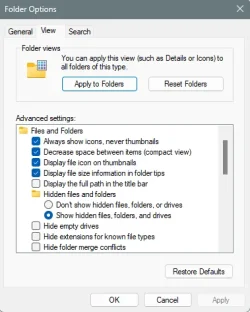
About the best that can be done is to set files and folders as you like, then click "Apply to Folders" 2 or 3 times, then click Apply and OK.

Image1.webp


But... the only way to really do it, is by using WinSetView.
 

My Computers My Computers

  • At a glance

    Win 11 Home ♦♦♦26200.8737 ♦♦♦♦♦♦♦25H2AMD Ryzen 7 3700XG.Skill (F4-3200C14D-16GTZKW)EVGA RTX 2070 (08G-P4-2171-KR)
    OS
    Win 11 Home ♦♦♦26200.8737 ♦♦♦♦♦♦♦25H2
    Computer type
    PC/Desktop
    Manufacturer/Model
    Built by Ghot® [May 2020]
    CPU
    AMD Ryzen 7 3700X
    Motherboard
    Asus Pro WS X570-ACE (BIOS 5302)
    Memory
    G.Skill (F4-3200C14D-16GTZKW)
    Graphics Card(s)
    EVGA RTX 2070 (08G-P4-2171-KR)
    Sound Card
    Realtek ALC1220P / ALC S1220A
    Monitor(s) Displays
    Dell U3011 30"
    Screen Resolution
    2560 x 1600
    Hard Drives
    2x Samsung 860 EVO 500GB,
    WD 4TB Black FZBX - SATA III,
    WD 8TB Black FZBX - SATA III,
    DRW-24B1ST CD/DVD Burner
    PSU
    PC Power & Cooling 750W Quad EPS12V
    Case
    Cooler Master ATCS 840 Tower
    Cooling
    CM Hyper 212 EVO (push/pull)
    Keyboard
    Ducky DK9008 Shine II Blue LED
    Mouse
    Logitech Optical M-100
    Internet Speed
    300/300
    Browser
    Firefox (latest)
    Antivirus
    Bitdefender Total Security
    Other Info
    Speakers: Klipsch Pro Media 2.1
  • At a glance

    Windows XP Pro 32bit w/SP3AMD Athlon 64 X2 5000+ (OC'd @ 3.2Ghz)TWIN2X2048-6400C4DHX (2 x 1GB, DDR2 800)EVGA 256-P2-N758-TR GeForce 8600GT SSC
    Operating System
    Windows XP Pro 32bit w/SP3
    Computer type
    PC/Desktop
    Manufacturer/Model
    Built by Ghot® (not in use)
    CPU
    AMD Athlon 64 X2 5000+ (OC'd @ 3.2Ghz)
    Motherboard
    ASUS M2N32-SLI Deluxe Wireless Edition
    Memory
    TWIN2X2048-6400C4DHX (2 x 1GB, DDR2 800)
    Graphics card(s)
    EVGA 256-P2-N758-TR GeForce 8600GT SSC
    Sound Card
    Onboard
    Monitor(s) Displays
    ViewSonic G90FB Black 19" Professional (CRT)
    Screen Resolution
    up to 2048 x 1536
    Hard Drives
    WD 36GB 10,000rpm Raptor SATA
    Seagate 80GB 7200rpm SATA
    Lite-On LTR-52246S CD/RW
    Lite-On LH-18A1P CD/DVD Burner
    PSU
    PC Power & Cooling Silencer 750 Quad EPS12V
    Case
    Generic Beige case, 80mm fans
    Cooling
    ZALMAN 9500A 92mm CPU Cooler
    Keyboard
    Logitech Classic Keybooard 200
    Mouse
    Logitech Optical M-BT96a
    Internet Speed
    300/300
    Browser
    Firefox 3.x ??
    Antivirus
    Symantec (Norton)
    Other Info
    Still assembled, still runs. Haven't turned it on for 15 years?
Can this be done with native Windows11 Pro?
Natively, without the use of a 3rd party app? Yes!
But first, you have to make some sacrifices/changes:
First, you have to change all folder types to General Items, including subfolders, in Properties/Customize...

12968.webp

... then set your columns and sizes, in each folder type...

12970.webp

... in Options/View click Apply to Folders then Yes, in each folder type...

12969.webp

Note:
- there are a few folder types where this won't work, eg. This PC
- don't use Libraries cuz it probably won't stick

Does it survive an Explorer Restart? Yes!
Does it survive a Reboot? Yes!
 

My Computers My Computers

  • At a glance

    Windows 11 Pro
    OS
    Windows 11 Pro
    Computer type
    PC/Desktop
    Manufacturer/Model
    ASUS ROG Strix
  • At a glance

    Windows 11 Pro
    Operating System
    Windows 11 Pro
    Computer type
    Laptop
    Manufacturer/Model
    ASUS VivoBook
  • ASUS VivoBook 'Lite' ~ Windows 11 Home
About the best that can be done is to set files and folders as you like, then click "Apply to Folders" 2 or 3 times, then click Apply and OK.

View attachment 170595
Your suggested method (above) is what I was unable to recall, and is the same as I was doing on my Win10 Home machine. I have tried it, and seems to be working now in Win11 Pro. TNX.
 

My Computers My Computers

  • At a glance

    Windows 11 Pro, 25H2, 10.0.26200 Build 26200Intel, i964 GB RAMIntel UHD Graphics 770 on motherboard
    OS
    Windows 11 Pro, 25H2, 10.0.26200 Build 26200
    Computer type
    PC/Desktop
    Manufacturer/Model
    DELL XPS-8960
    CPU
    Intel, i9
    Memory
    64 GB RAM
    Graphics Card(s)
    Intel UHD Graphics 770 on motherboard
    Sound Card
    Realtek Audio on motherboard
    Monitor(s) Displays
    DELL P2314T, DELL 15 inch
    Screen Resolution
    1920 x 1080 x 60 Hz
    Hard Drives
    4 TB SSD,
    WD Passport USB HDD, 2TB
    SEAGATE USB HDD & HUB, 4TB
    Case
    XPS tower
    Cooling
    within 2 ft of casement window
    Keyboard
    MS Enhanced
    Mouse
    UINEER wired mouse, model U6W
    Internet Speed
    Ethernet 802.3
    Browser
    Chrome, Firefox
    Antivirus
    Win11 Pro
    Other Info
    EPSON ET-4950 Series; Print, Scan, FAX
  • At a glance

    Windows 10 HomeIntel i712 GBGeForce
    Operating System
    Windows 10 Home
    Computer type
    PC/Desktop
    Manufacturer/Model
    DELL
    CPU
    Intel i7
    Memory
    12 GB
    Graphics card(s)
    GeForce
    Monitor(s) Displays
    DELL P1705
    Hard Drives
    540 HDD
    Case
    XPS tower
    Browser
    Chrome, Firefox
But... the only way to really do it, is by using WinSetView.
Have read about WinSetView and now have it downloaded. Will give it a try. TNX.
 

My Computers My Computers

  • At a glance

    Windows 11 Pro, 25H2, 10.0.26200 Build 26200Intel, i964 GB RAMIntel UHD Graphics 770 on motherboard
    OS
    Windows 11 Pro, 25H2, 10.0.26200 Build 26200
    Computer type
    PC/Desktop
    Manufacturer/Model
    DELL XPS-8960
    CPU
    Intel, i9
    Memory
    64 GB RAM
    Graphics Card(s)
    Intel UHD Graphics 770 on motherboard
    Sound Card
    Realtek Audio on motherboard
    Monitor(s) Displays
    DELL P2314T, DELL 15 inch
    Screen Resolution
    1920 x 1080 x 60 Hz
    Hard Drives
    4 TB SSD,
    WD Passport USB HDD, 2TB
    SEAGATE USB HDD & HUB, 4TB
    Case
    XPS tower
    Cooling
    within 2 ft of casement window
    Keyboard
    MS Enhanced
    Mouse
    UINEER wired mouse, model U6W
    Internet Speed
    Ethernet 802.3
    Browser
    Chrome, Firefox
    Antivirus
    Win11 Pro
    Other Info
    EPSON ET-4950 Series; Print, Scan, FAX
  • At a glance

    Windows 10 HomeIntel i712 GBGeForce
    Operating System
    Windows 10 Home
    Computer type
    PC/Desktop
    Manufacturer/Model
    DELL
    CPU
    Intel i7
    Memory
    12 GB
    Graphics card(s)
    GeForce
    Monitor(s) Displays
    DELL P1705
    Hard Drives
    540 HDD
    Case
    XPS tower
    Browser
    Chrome, Firefox
I ran SUBMIT in WinSetView; just one issue.

How do I rearrange (globally) the sequence of the columns?
I would like to have Attributes at the far lefthand side.

EDITed: Use the re-order button. :-)
 
Last edited:

My Computers My Computers

  • At a glance

    Windows 11 Pro, 25H2, 10.0.26200 Build 26200Intel, i964 GB RAMIntel UHD Graphics 770 on motherboard
    OS
    Windows 11 Pro, 25H2, 10.0.26200 Build 26200
    Computer type
    PC/Desktop
    Manufacturer/Model
    DELL XPS-8960
    CPU
    Intel, i9
    Memory
    64 GB RAM
    Graphics Card(s)
    Intel UHD Graphics 770 on motherboard
    Sound Card
    Realtek Audio on motherboard
    Monitor(s) Displays
    DELL P2314T, DELL 15 inch
    Screen Resolution
    1920 x 1080 x 60 Hz
    Hard Drives
    4 TB SSD,
    WD Passport USB HDD, 2TB
    SEAGATE USB HDD & HUB, 4TB
    Case
    XPS tower
    Cooling
    within 2 ft of casement window
    Keyboard
    MS Enhanced
    Mouse
    UINEER wired mouse, model U6W
    Internet Speed
    Ethernet 802.3
    Browser
    Chrome, Firefox
    Antivirus
    Win11 Pro
    Other Info
    EPSON ET-4950 Series; Print, Scan, FAX
  • At a glance

    Windows 10 HomeIntel i712 GBGeForce
    Operating System
    Windows 10 Home
    Computer type
    PC/Desktop
    Manufacturer/Model
    DELL
    CPU
    Intel i7
    Memory
    12 GB
    Graphics card(s)
    GeForce
    Monitor(s) Displays
    DELL P1705
    Hard Drives
    540 HDD
    Case
    XPS tower
    Browser
    Chrome, Firefox
Back
Top Bottom