- Local time
- 6:31 PM
- Posts
- 82
- OS
- Windows 11 Pro, 25H2, 10.0.26200 Build 26200
Problem
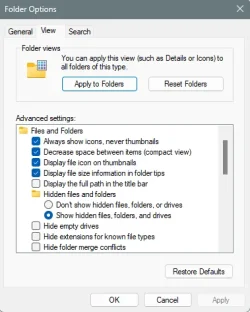
I am unable to configure File Explorer (FM) column headings to persist across all folder views in Windows 11 Pro. I cannot recall the correct method to make my preferred column layout "stick" permanently.
Expected Behavior
I want all File Explorer listings to consistently display the following column headings, in this exact order, from left to right:
* Attributes
* Name
* Date Modified
* Type
* Size
This layout should apply universally, always appearing after selecting any folder for on-screen viewing.
Actual Behavior
The File Explorer column heading layout does not retain my preference after navigating to different folders or restarting File Explorer.
What I'm Seeking
I am looking for the specific steps or configuration method in Windows 11 Pro to ensure my desired File Explorer column heading layout persists for all folder displays.
Extra Details
Operating System: Windows 11 Pro
I am unable to configure File Explorer (FM) column headings to persist across all folder views in Windows 11 Pro. I cannot recall the correct method to make my preferred column layout "stick" permanently.
Expected Behavior
I want all File Explorer listings to consistently display the following column headings, in this exact order, from left to right:
* Attributes
* Name
* Date Modified
* Type
* Size
This layout should apply universally, always appearing after selecting any folder for on-screen viewing.
Actual Behavior
The File Explorer column heading layout does not retain my preference after navigating to different folders or restarting File Explorer.
What I'm Seeking
I am looking for the specific steps or configuration method in Windows 11 Pro to ensure my desired File Explorer column heading layout persists for all folder displays.
Extra Details
Operating System: Windows 11 Pro
My Computers
-
At a glance
Windows 11 Pro, 25H2, 10.0.26200 Build 26200Intel, i964 GB RAMIntel UHD Graphics 770 on motherboard- OS
- Windows 11 Pro, 25H2, 10.0.26200 Build 26200
- Computer type
- PC/Desktop
- Manufacturer/Model
- DELL XPS-8960
- CPU
- Intel, i9
- Memory
- 64 GB RAM
- Graphics Card(s)
- Intel UHD Graphics 770 on motherboard
- Sound Card
- Realtek Audio on motherboard
- Monitor(s) Displays
- DELL P2314T, DELL 15 inch
- Screen Resolution
- 1920 x 1080 x 60 Hz
- Hard Drives
- 4 TB SSD,
WD Passport USB HDD, 2TB
SEAGATE USB HDD & HUB, 4TB
- Case
- XPS tower
- Cooling
- within 2 ft of casement window
- Keyboard
- MS Enhanced
- Mouse
- UINEER wired mouse, model U6W
- Internet Speed
- Ethernet 802.3
- Browser
- Chrome, Firefox
- Antivirus
- Win11 Pro
- Other Info
- EPSON ET-4950 Series; Print, Scan, FAX
-
At a glance
Windows 10 HomeIntel i712 GBGeForce- Operating System
- Windows 10 Home
- Computer type
- PC/Desktop
- Manufacturer/Model
- DELL
- CPU
- Intel i7
- Memory
- 12 GB
- Graphics card(s)
- GeForce
- Monitor(s) Displays
- DELL P1705
- Hard Drives
- 540 HDD
- Case
- XPS tower
- Browser
- Chrome, Firefox