Phase1_Initialization_Failure BSOD - BCD, EFI partition issues?


When using Command Prompt to fix boot-related issues, it is common to face the “bootrec /fixboot Access is denied” error. There are many possible reasons for this problem to occur on your computer. In this video, i will help you troubleshoot this error.


My Computer My Computer

At a glance

Windows 11AMD Ryzen 7 5700GMicron Technology DDR4-3200 16GBNVIDIA GeForce RTX 3060
OS
Windows 11
Computer type
PC/Desktop
Manufacturer/Model
HP Pavilion
CPU
AMD Ryzen 7 5700G
Motherboard
Erica6
Memory
Micron Technology DDR4-3200 16GB
Graphics Card(s)
NVIDIA GeForce RTX 3060
Sound Card
Realtek ALC671
Monitor(s) Displays
Samsung SyncMaster U28E590
Screen Resolution
3840 x 2160
Hard Drives
SAMSUNG MZVLQ1T0HALB-000H1

Looked multiple times for your reply earlier in the day.
It's 2:19 am here so I'm heading to bed.


There were 6 disks.

Which was the new cloned drive?

Which was the drive in which the clone was made from?

What was done to the drive in which the clone was made from?


Report what was done to each partition of each drive.


Disk 0: CT2000T500SSD5

Disk 1: Micron MTFDKCD512QFM-1BD1AABLA

Disk 2 Online 894 GB 862 GB<br>
Disk 3 Online 1907 MB 1792 KB<br>
Disk 4 Online 115 GB 0 B *<br>
Disk 5 Online 14 GB 0 B

Disk 0 is the new cloned disk (C:/). Disk 1 is the original factory SSD from which the clone was made.
I deleted everything inside Disk 1 since I already transferred all files to Disk 0 after clone.

On Disk 0 after having startup repair boot loop and error code of phase1 i figured based on the internet info that I have issues with boot configuration, so that's when I ran several commands to reformat EFI partition and recreate boot files but without any success.

Do not use the following commands.

bootrec /fixmbr
bootrec /fixboot x)
bootrec /scanos
bootrec /rebuildbcd

That's all outdated stuff not used on UEFI/GPT based systems.

x) This command has been blocked by Microsoft: "Access is denied" - Windows 10 version 1709 (October 17, 2017) and newer installation media. And Windows 11 installation media.


Try the commands below.

diskpart
list volume (check your EFI system partition number)
select volume # (replace # with the EFI system partition number)
format quick fs=fat32 (optional: format your EFI system partition)
assign letter=z
list volume (check the volume letter of your Windows partition)
exit

bcdboot x:\windows /s z: /f uefi

- replace "x" with the volume letter of the Windows partition
- z: is your EFI system partition you assigned above

View attachment 121828
I formatted the EFI partition on the main C: disk, assigned letter Z, ran command:

bcdboot C:\windows /s Z: /f UEFI

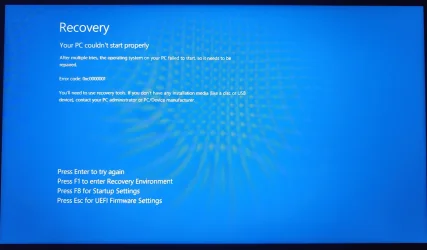
Booted from C: disk, but without any success. The same "Your PC couldn't start properly" screen with error code 0xc0000001

BLUEscreen.webp

When using Command Prompt to fix boot-related issues, it is common to face the “bootrec /fixboot Access is denied” error. There are many possible reasons for this problem to occur on your computer. In this video, i will help you troubleshoot this error.

Aubergine above said that this command isn't being used anymore on UEFI ?

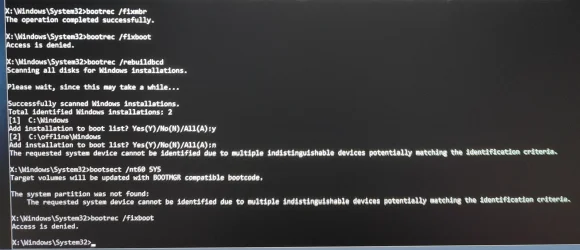
I've tried it already before. I tried it again, but now bootsect /nt60 sys doesn't show any partitions at all (previously it did).

1000050160.webp


Currently backing up all the files and program appdata. I think clean install is the only way at this point since it's impossible to diagnose what is the cause and what problem exactly is occuring.
 

My Computer My Computer

At a glance

Windows
OS
Windows
Computer type
Laptop
When using Command Prompt to fix boot-related issues, it is common to face the “bootrec /fixboot Access is denied” error. There are many possible reasons for this problem to occur on your computer. In this video, i will help you troubleshoot this error.

bootrec /fixboot ===> Access is denied.

It's not an error message, it just means that the command has been blocked. Both with Windows 10 (from version 1709) and Windows 11 installation media.

My new laptop has the same "problem" (image below).

IMG_2651.webp
 

My Computers My Computers

  • At a glance

    Windows 11 ProAMD Ryzen 9 9950X3DKingston FURY Beast 64GB (2x32GB) DDR5 6000MT/sASUS TUF Gaming Radeon RX 9070 OC Edition 16G...
    OS
    Windows 11 Pro
    Computer type
    PC/Desktop
    CPU
    AMD Ryzen 9 9950X3D
    Motherboard
    ASRock B650E Taichi Lite
    Memory
    Kingston FURY Beast 64GB (2x32GB) DDR5 6000MT/s
    Graphics Card(s)
    ASUS TUF Gaming Radeon RX 9070 OC Edition 16GB GDDR6
    Hard Drives
    Solidigm P44 Pro 2TB M.2 NVMe SSD
  • At a glance

    Windows 11 HomeIntel Core Ultra 9 275HX64GB (2x 32GB) DDR5-6400NVIDIA GeForce RTX 5080 16GB GDDR7 Laptop GPU
    Operating System
    Windows 11 Home
    Computer type
    Laptop
    Manufacturer/Model
    Lenovo Legion Pro 7i Gen 10 16"
    CPU
    Intel Core Ultra 9 275HX
    Memory
    64GB (2x 32GB) DDR5-6400
    Graphics card(s)
    NVIDIA GeForce RTX 5080 16GB GDDR7 Laptop GPU
    Hard Drives
    2x 1TB M.2 NVMe SSD (SK Hynix)
These are some trial and error steps:

a) boot windows RE > Type:

bootsect /nt60 all
shrink querymax
reg query "HKLM\System\CurrentControlSet\Control /v PEFirmwareType"

> post a share link > reboot > post new error message or code


b) perform a new startup repair > post a srttrail.txt


c) boot to BIOS > alternate reboots with IDE and AHCI > post new error messages or codes


d) reset the BIOS (remove and reseat the CMOS battery) > post new error message or code


e) repeat Macrium boot repair
 
Last edited:

My Computer My Computer

At a glance

Windows 10Intel(R) Core(TM) i7-4800MQ CPU @ 2.70GHz16 GB Total: Manufacturer : Samsung MemoryTyp...NVIDIA Quadro K3100M; Intel(R) HD Graphics 4600
OS
Windows 10
Computer type
Laptop
Manufacturer/Model
HP
CPU
Intel(R) Core(TM) i7-4800MQ CPU @ 2.70GHz
Motherboard
Product : 190A Version : KBC Version 94.56
Memory
16 GB Total: Manufacturer : Samsung MemoryType : DDR3 FormFactor : SODIMM Capacity : 8GB Speed : 1600
Graphics Card(s)
NVIDIA Quadro K3100M; Intel(R) HD Graphics 4600
Sound Card
IDT High Definition Audio CODEC; PNP Device ID HDAUDIO\FUNC_01&VEN_111D&DEV_76E0
Hard Drives
Model Hitachi HTS727575A9E364
Antivirus
Microsoft Defender
Other Info
Mobile Workstation

Latest Support Threads

Back
Top Bottom