Phone link sends message to receiver and sender


Orlodoffa

New member
Local time
9:30 AM
Posts
3
OS
Windows 11
One week ago phone link started to send my message both to the receiver and back to myself. Also - if the receiver previously had been on a send list with multiple receivers - all of those got a copy of a message even if I sent it to only one person.
The problem is only when sending from phone link
Tried to a) repair the app b) reset c) update d) remove sms history from the phone but the problem persist - anyone know how to fix?
(Android 13 in the phone)
 
Windows Build/Version
Windows 11 23H2

My Computer

System One

  • OS
    Windows 11
    Computer type
    Laptop
    Manufacturer/Model
    Acer
I have the same issue, although I noticed this when i connected my new mobile phone to Phone Link. I've also done the phone link repair, reset, etc... paired again and still have the same issue. I'm on Win11 23H2, Phone Link for Windows 1.24112.11.0 and Samsung S24+ Android 14

This is driving me nuts!!
 

My Computer

System One

  • OS
    Windows 11
    Computer type
    Laptop
    Manufacturer/Model
    Dell
Updated to latest Windows 11 today - problem seems to be fixed
 

My Computer

System One

  • OS
    Windows 11
    Computer type
    Laptop
    Manufacturer/Model
    Acer
It would be great to know what this mystery update is or was, because I've had this problem for weeks, essentially making the SMS capability of the Phone Link app completely useless, and everything is up-to-date.
 

My Computer

System One

  • OS
    Windows 11
Actually - I was mistaken - the problem was either not solved or reappeared. I am not a frequent sms user so cant tell exactly what happened, but the first sms I sent after the Win 11 update seemed to go ok without sending it back to me.
 

My Computer

System One

  • OS
    Windows 11
    Computer type
    Laptop
    Manufacturer/Model
    Acer
Have any of you found a solution yet? I'm having the same problem.
 

My Computer

System One

  • OS
    Windows 11
    Computer type
    Laptop
    Manufacturer/Model
    Acer Aspire

My Computers

System One System Two

  • OS
    Windows 11 Pro
    Computer type
    PC/Desktop
    Manufacturer/Model
    ASUS ROG Strix
  • Operating System
    Windows 11 Pro
    Computer type
    Laptop
    Manufacturer/Model
    ASUS VivoBook
Having exactly the same problem and done all the recommended fixes but still have SMS written and sent from my Phonelink going to groups when sending a message to one of a previous group. Also send the SMS to myself. Using a Galaxy A55 on Win 11 for over a year on the same Asus Zenbook without any issues. Now cannot use Phonelink for SMS which is what I need it for! Anyone any advice, please?
 

My Computer

System One

  • OS
    Windows 11 Home
    Computer type
    Laptop
    Manufacturer/Model
    Asus Zenbook 14
    CPU
    Intel® Core™ i7-1165G7 Processor 2.8 GHz (12M Cache, up
    Memory
    16GB PDDR4X on board - Max Total system memory up to:16GB *Supports dual-channel memory.
    Graphics Card(s)
    Intel® Iris Xe Graphics 154481 *Intel Iris Xᵉ Graphics is only available in models with Intel® Core™ i5/i7/i9 processors with up to 80 graphics execution units (EUs) and dual-channel memory.
    Sound Card
    Audio by ICEpower®\nBuilt-in speaker\nBuilt-in array microphone, harman/kardon (Premium), with Cortana voice-recognition support
    Monitor(s) Displays
    13.3-inch, FHD (1920 x 1080) OLED 16:9 aspect ratio, 0.2ms response time, 60Hz refresh rate, 550nits HDR peak brightness, DCI-P3: 100%, 1,000,000:1, VESA CERTIFIED Display HDR True Black 500, 1.07 billion colors, PANTONE Validated, Glossy display, 70% less harmful blue light, SGS Eye Care Display, - (Screen-to-body ratio)88%
    Hard Drives
    512GB M.2 NVMe™ PCIe® 3.0 SSD
    Keyboard
    Wired
    Mouse
    Wired
    Internet Speed
    53Mbps download
    Browser
    Chrome
    Antivirus
    MS Defender
    Other Info
    Laptop using an Asus monitor when not travelling
Edwin, Are you suggesting that I switch to Google Messages and give up on PhoneLink entirely?
 

My Computer

System One

  • OS
    Windows 11
    Computer type
    Laptop
    Manufacturer/Model
    Acer Aspire
Actually - I was mistaken - the problem was either not solved or reappeared. I am not a frequent sms user so cant tell exactly what happened, but the first sms I sent after the Win 11 update seemed to go ok without sending it back to me.
I tried that, too, Orlodoffa, with the same result. I updated Windows and the problem appeared to be fixed with my first test message, but that didn't last.
 

My Computer

System One

  • OS
    Windows 11
    Computer type
    Laptop
    Manufacturer/Model
    Acer Aspire
I posted this to Windows feedback. If you are so inclinded, please go there (Windows Key + F) and search for my topic. "PhoneLink sends my outgoing messages back to me". If you find it, give it an upvote.
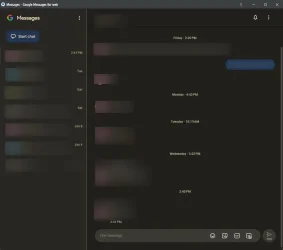
That said, I am probably going to try Google Messages.
 

My Computer

System One

  • OS
    Windows 11
    Computer type
    Laptop
    Manufacturer/Model
    Acer Aspire
Edwin, Are you suggesting that I switch to Google Messages and give up on PhoneLink entirely?
Not necessarily, but, it is a solution!
It's what I did. Phone Link is just too screwed up and unreliable. 🤷‍♂️
 

My Computers

System One System Two

  • OS
    Windows 11 Pro
    Computer type
    PC/Desktop
    Manufacturer/Model
    ASUS ROG Strix
  • Operating System
    Windows 11 Pro
    Computer type
    Laptop
    Manufacturer/Model
    ASUS VivoBook
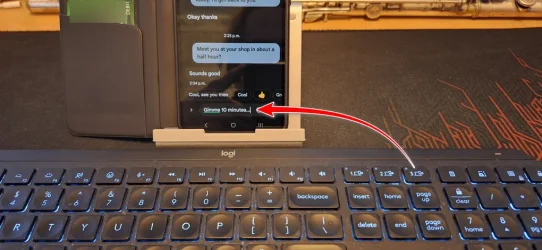
An even better, less cumbersome solution...,
a pair-able keyboard...

k.webp
 

My Computers

System One System Two

  • OS
    Windows 11 Pro
    Computer type
    PC/Desktop
    Manufacturer/Model
    ASUS ROG Strix
  • Operating System
    Windows 11 Pro
    Computer type
    Laptop
    Manufacturer/Model
    ASUS VivoBook
An even better, less cumbersome solution...,
a pair-able keyboard...
That would work. I have a wireless Logitech now, but it requires a USB receiver. With the keyboard option and Google messages, I would miss the phone link feature that links pictures. It's pretty convenient to save pictures directly from my phone to my laptop. I have a USB cable I can use, now that I think of it. I'd have to get a new keyboard--one with direct bluetooth. Thank you for the suggestion.
 

My Computer

System One

  • OS
    Windows 11
    Computer type
    Laptop
    Manufacturer/Model
    Acer Aspire
Back
Top Bottom