'Pin to Start' no longer available - how do I fix?


22ww

Member
Local time
10:26 PM
Posts
16
OS
11
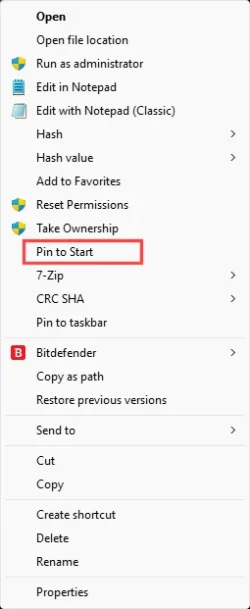
When I type in 'control panel' in search it pops up... but when i right-click on it theres no option to "Pin to Start." It never happened before. I dont get it. How do i fix this???
 

My Computer My Computer

At a glance

11Intel i516 gbNvidia gtx 1060
OS
11
Computer type
PC/Desktop
Manufacturer/Model
MSI
CPU
Intel i5
Motherboard
MSI H110M GAMING
Memory
16 gb
Graphics Card(s)
Nvidia gtx 1060
Mouse
wired logitech m500
Browser
firefox
If you have Open Shell, you'll also have a pin to Open Shell Start Menu offered.
 
Last edited:

My Computers My Computers

  • At a glance

    Windows 11 Education For 25H2Intel® Core i7 5500u8 GBIntel HD Family Graphics 5500 AMD Firepro 4150M
    OS
    Windows 11 Education For 25H2
    Computer type
    Laptop
    Manufacturer/Model
    HP ZBook G2
    CPU
    Intel® Core i7 5500u
    Motherboard
    HP
    Memory
    8 GB
    Graphics Card(s)
    Intel HD Family Graphics 5500 AMD Firepro 4150M
    Sound Card
    Realtek High Audio
    Hard Drives
    1 TB SSD
    Mouse
    HP USB Mouse
    Antivirus
    Windows Defender
  • At a glance

    Windows 11 Pro For Workstations 25H2Xeon 1535m v632 GBAMD Quadro Pro 4100
    Operating System
    Windows 11 Pro For Workstations 25H2
    Computer type
    Laptop
    Manufacturer/Model
    HP Zbook G4
    CPU
    Xeon 1535m v6
    Motherboard
    HP
    Memory
    32 GB
    Graphics card(s)
    AMD Quadro Pro 4100
    Sound Card
    Bang and Olufson Audio
    Hard Drives
    1TB SSD
    Mouse
    HP USB Mouse
    Antivirus
    Windows Defender
When I type in 'control panel' in search it pops up... but when i right-click on it theres no option to "Pin to Start." It never happened before. I dont get it. How do i fix this???
Open the Control Panel and drag the words 'Control Panel' from the address bar to your desktop. You can then pin that shortcut to the start menu.
 

My Computer My Computer

At a glance

Windows 11 25H212th Gen i9 -12900K64GBIntel UHD Graphics
OS
Windows 11 25H2
Computer type
PC/Desktop
Manufacturer/Model
Dell
CPU
12th Gen i9 -12900K
Memory
64GB
Graphics Card(s)
Intel UHD Graphics
Monitor(s) Displays
Dual Dell U2717D
Screen Resolution
2560x1440
Hard Drives
2TB Lexar SSD, 2TB Crucial SSD, 2TB Kingston SSD
Browse to C:\Windows\System32\. Find control.exe. Right click on it and pin to taskbar.
 

My Computers My Computers

  • At a glance

    Windows 11 Pro 25H2 26200.8655i9-10900 10 core 20 threads32 gbnone-Intel UHD Graphics 630
    OS
    Windows 11 Pro 25H2 26200.8655
    Computer type
    PC/Desktop
    Manufacturer/Model
    Dell Optiplex 7080
    CPU
    i9-10900 10 core 20 threads
    Motherboard
    DELL 0J37VM
    Memory
    32 gb
    Graphics Card(s)
    none-Intel UHD Graphics 630
    Sound Card
    Integrated Realtek
    Monitor(s) Displays
    Benq 27
    Screen Resolution
    2560x1440
    Hard Drives
    2x1tb Solidigm m.2 nvme /External drives 512gb Samsung m.2 sata+2tb Kingston m2.nvme
    PSU
    500w
    Case
    MT
    Cooling
    Dell Premium
    Keyboard
    Logitech wired
    Mouse
    Logitech wireless
    Internet Speed
    so slow I'm too embarrassed to tell
    Browser
    #1 Edge #2 Firefox
    Antivirus
    Defender+MWB Premium
  • At a glance

    Windows 11 Pro 24H2 26200.8457AMD Ryzen 7 6800U32 gbintegrated
    Operating System
    Windows 11 Pro 24H2 26200.8457
    Computer type
    PC/Desktop
    Manufacturer/Model
    Beelink Mini PC SER5
    CPU
    AMD Ryzen 7 6800U
    Memory
    32 gb
    Graphics card(s)
    integrated
    Sound Card
    integrated
    Monitor(s) Displays
    Benq 27
    Screen Resolution
    2560x1440
    Hard Drives
    1TB Crucial nvme
    Keyboard
    Logitech wired
    Mouse
    Logitech wireless
    Internet Speed
    still too embarrassed to tell
    Browser
    Firefox
    Antivirus
    Defender
    Other Info
    System 3 is non compliant Dell 9020 i7-4770/24gb ram Win11 PRO 26200.8457
Supergirl rides again :devilish:
 

My Computers My Computers

  • At a glance

    Win 11 x 64 HomeAMD Ryzen 5 7600 6-Core ProcessorDDR 5. 32GB (2 x16GB)GeForce RTX 5060i
    OS
    Win 11 x 64 Home
    Computer type
    PC/Desktop
    Manufacturer/Model
    pc specialists build (updated various times)
    CPU
    AMD Ryzen 5 7600 6-Core Processor
    Motherboard
    Gigabyte Technology Co., Ltd. Product:B650M K
    Memory
    DDR 5. 32GB (2 x16GB)
    Graphics Card(s)
    GeForce RTX 5060i
    Sound Card
    2 channel HD Audio + Mic/Hphone jack
    Monitor(s) Displays
    coolermaster 27 inch
    Screen Resolution
    1920 x 1080
    Hard Drives
    three external 3TBs, 4 TBs and 5tb. (Storage) Samsung SSD 970 (C).
    Case
    Coolermaster
    Cooling
    internal fans
    Keyboard
    Logi K270 & Logitech gamer G213
    Mouse
    M310 and Logi Gamer G203
    Internet Speed
    530.85mbps download. 52.70 upload
    Browser
    Opera, Vivaldi, Chrome & Firefox
    Antivirus
    Kaspersky Premium
    Other Info
    Build: 26100.ge_release 240331-1435
  • At a glance

    Android
    Operating System
    Android
    Computer type
    Tablet
    Manufacturer/Model
    Samsung
    Keyboard
    logi K270, when in use.
    Mouse
    Logi M220
    Internet Speed
    500
    Browser
    Opera.Edge. Chrome.Vivaldi
    Antivirus
    Kaspersky Premium
or go to Shell:Desktop. should be able to right click it there and pin to Start as well
 

My Computer My Computer

At a glance

Windows 11 Pro
OS
Windows 11 Pro
While workarounds are OK it may be better to try and troubleshoot why pin to start is missing.

Should be there in the start menu search for control panel.

Screenshot 2026-06-20 115202.webp

So is it missing for all programs or just trying to pin the control panel?

If missing for all programs then there may be a start menu cache corruption issue and resetting the start menu may fix this.


Or there could be a policy in affect locking down the start menu.
 

My Computer My Computer

At a glance

Windows 11 Pro
OS
Windows 11 Pro
To pin to START in Windows, it has to be a .lnk file (shortcut not an .exe) as far as I remember.

Browse to C:\Windows\System32\ and right click on the .exe C:\Windows\System32\control.exe and select "Create Shortcut"
Windows will tell you it cannot create a shortcut in the System32 folder and ask if you want it on the desktop.
Select Yes
Go to the desktop and Find the Control Panel link and select "Pin to Start"
You can delete the icon from the desktop.
 

My Computers My Computers

  • At a glance

    Windows 11 Pro 25H2 Build 26200.8655Intel(R) Core(TM) i7-4770K CPU @ 3.50GHz32.0 GB of I forget and the box is in storage.Gigabyte nVidia GeForce GTX 1660 Super OC 6GB
    OS
    Windows 11 Pro 25H2 Build 26200.8655
    Computer type
    PC/Desktop
    Manufacturer/Model
    Sin-built 2013
    CPU
    Intel(R) Core(TM) i7-4770K CPU @ 3.50GHz
    Motherboard
    ASUS ROG Maximus VI Formula
    Memory
    32.0 GB of I forget and the box is in storage.
    Graphics Card(s)
    Gigabyte nVidia GeForce GTX 1660 Super OC 6GB
    Sound Card
    ROG SupremeFX Formula 8-Channel High Definition Audio
    Monitor(s) Displays
    5 x LG 25MS500-B - 1 x 24MK430H-B - 1 x Wacom Pro 22" Touch Screen Tablet
    Screen Resolution
    All over the place
    Hard Drives
    Too many to list. OS on Samsung 1TB 870 QVO SATA
    PSU
    Silverstone 1500
    Case
    NZXT Phantom 820 Full-Tower Case
    Cooling
    Noctua NH-D15 Elite Class Dual Tower CPU Cooler / 6 x EziDIY 120mm / 2 x Corsair 140mm somethings / 1 x 140mm Thermaltake something / 2 x 200mm Corsair.
    Keyboard
    Corsair K95 / Logitech diNovo Edge Wireless
    Mouse
    Logitech: G402 / G502 / Mx Masters / Mx Air Cordless
    Internet Speed
    2000/500Mbps
    Browser
    All sorts
    Antivirus
    Kaspersky Premium
    Other Info
    ㅤㅤㅤㅤㅤㅤㅤㅤㅤㅤㅤㅤㅤㅤㅤㅤㅤㅤㅤㅤㅤㅤㅤㅤㅤㅤㅤㅤㅤㅤㅤㅤㅤㅤㅤㅤㅤㅤㅤㅤ⠀⠀⠀⠀⠀⠀⠀⠀⠀⠀
    TP-Link BE9300 WiFi 7 Bluetooth 5.4 (Archer TBE550E)
    TP-Link TX201 V1 2.5GB Lan

    Grandstream HT812 - VoIP
    ASUS DSL-AX82U - Mesh
    ASUS RT-AC68U - Mesh
    ASUS RT-BE88U Router

    Brother MFC-L2880DW Printer

    I’m on a horse.
  • At a glance

    Windows 11 Pro 25H2 Build 26200.8655 (Wifes)13th Generation Intel® Core™ i5-1340P Process...16GB LPDDR5-52001x Intel® Iris® Xe Graphics
    Operating System
    Windows 11 Pro 25H2 Build 26200.8655 (Wifes)
    Computer type
    Laptop
    Manufacturer/Model
    LENOVO Yoga 7 14IRL8 - Type 82YL
    CPU
    13th Generation Intel® Core™ i5-1340P Processor(Core™ i5-1340P)
    Memory
    16GB LPDDR5-5200
    Graphics card(s)
    1x Intel® Iris® Xe Graphics
    Sound Card
    Optimized with Dolby Atmos®
    Screen Resolution
    QHD 2880 x 1800 OLED
    Hard Drives
    M.2 512 GB SSD PCIe
    Mouse
    Logiteck MX Master 3S
    Internet Speed
    2000/500
    Antivirus
    Defender / Malwarebytes
    Other Info
    …still on a horse.


    Wireless Network: Wi-Fi 6E 2x2 AX; Bluetooth® 5.1 or above
    Ports: 1x 1 Novo button; 2 in 1 Audio Combo jack; Micro SD Card Reader; HDMI 1.4b; 2 x USB Type-C (TBT4)
    USB 3.2 Gen 2 DP 1.4a
    PD 3.0); 1 x USB 3.2 Gen1 Type A
    Camera
    1x 1080P FHD IR/RGB Hybrid with Privacy Shutter and Dual Array Microphone
    Graphics
    1x Intel® Iris® Xe Graphics
    Monitor
    14" WUXGA
    Form Factor
    Convertible Notebook
  • Windows 11 Pro 25H2 Build 26200.8655 (Wifes)

    Yoga 7 2-in-1 14IML9 - Type 83DJ

    Processor: Intel® Core™ Ultra 7 155H Processor(Core™ Ultra 7 155H)

    Memory: 32GB LPD5X-7467

    Hard Drive: 1 TB SSD PCIe

    Wireless Network: 1x Wi-Fi 6E 2x2 AX; Bluetooth® 5.1 or above

    Ports: 1 x HDMI 2.1 TMDS; 1 x Novo Button; 1 x Combo Audio Jack
    2 x USB-C (USB 4.0)
    1 x USB-A 3.2 Gen 1

    Camera: 1080P FHD IR Hybrid with Dual Microphone

    Graphics: Intel® Arc™ Graphics

    Monitor: 14" 2.8K

    ...Where's my horse?
While workarounds are OK it may be better to try and troubleshoot why pin to start is missing.

Should be there in the start menu search for control panel.

View attachment 174770

So is it missing for all programs or just trying to pin the control panel?

If missing for all programs then there may be a start menu cache corruption issue and resetting the start menu may fix this.


Or there could be a policy in affect locking down the start menu.

For some reason I'm able to now see the pint to start option when right clicking on a program. Strange. But I also do believe this is some corruption since most of the pinned icons on my start menu disappeared and were replaced by default icons. This happened several times in the past 4 months.
 

My Computer My Computer

At a glance

11Intel i516 gbNvidia gtx 1060
OS
11
Computer type
PC/Desktop
Manufacturer/Model
MSI
CPU
Intel i5
Motherboard
MSI H110M GAMING
Memory
16 gb
Graphics Card(s)
Nvidia gtx 1060
Mouse
wired logitech m500
Browser
firefox
But I also do believe this is some corruption since most of the pinned icons on my start menu disappeared and were replaced by default icons. This happened several times in the past 4 months.

If/when you get the start menu the way you want it you can back it up with this program which would allow you to easily restore it again should it get messed up again.


My Computer My Computer

At a glance

Windows 11 Pro
OS
Windows 11 Pro
If/when you get the start menu the way you want it you can back it up with this program which would allow you to easily restore it again should it get messed up again.

Appreciate it
 

My Computer My Computer

At a glance

11Intel i516 gbNvidia gtx 1060
OS
11
Computer type
PC/Desktop
Manufacturer/Model
MSI
CPU
Intel i5
Motherboard
MSI H110M GAMING
Memory
16 gb
Graphics Card(s)
Nvidia gtx 1060
Mouse
wired logitech m500
Browser
firefox
It never happened before.
Nothing new here, It probably did happen before, but only for certain icons/programs (i.e. ones you haven't bothered with previously)

I've come across this with several components from Windows Tools System. My preferred solution : Pin to Taskbar > then on Taskbar icon, Pin to Start menu > delete Taskbar icon, if not required

Or

As described by @HTA and @glasskuter above
 

My Computers My Computers

  • At a glance

    Windows 11 2xH2 (latest update ... forever anal)Intel i5-124008GBNVIDIA GeForce GT730
    OS
    Windows 11 2xH2 (latest update ... forever anal)
    Computer type
    PC/Desktop
    Manufacturer/Model
    HP Slim S01
    CPU
    Intel i5-12400
    Memory
    8GB
    Graphics Card(s)
    NVIDIA GeForce GT730
    Sound Card
    OOBE
    Monitor(s) Displays
    Acer 32"
    Screen Resolution
    1920x1080
    Hard Drives
    512GB KIOXIA NVMe
    1TB SATA SSD
    PSU
    OOBE
    Case
    OOBE
    Cooling
    OOBE
    Keyboard
    BT
    Mouse
    BT
    Browser
    Brave FFox Chrome Opera
    Antivirus
    KIS
  • At a glance

    Windows 11 Pro 2xH2 (latest update ... 4ever ...i7-1165G7 @ 2.80GHzIntel Iris Xe Graphics
    Operating System
    Windows 11 Pro 2xH2 (latest update ... 4ever anal)
    Computer type
    Laptop
    Manufacturer/Model
    HP Pavillion 15
    CPU
    i7-1165G7 @ 2.80GHz
    Graphics card(s)
    Intel Iris Xe Graphics
    Hard Drives
    Samsung NVMe 512GB
    + numerous/multiple SSD Type C USB enclosures
    Internet Speed
    NBN FTTN 50
    Browser
    Brave
    Antivirus
    KIS
Back
Top Bottom