Solved Playing YouTube videos in Media Player Classic (MPC)


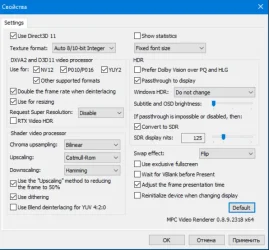
When installing a new version of MPC BE or MPC-HC check your settings. Some are returned to their default values and you need to configure them again.
 

My Computers

System One System Two

  • OS
    Windows 11 Pro 23H2 (5699), 25H2 (8655)
    Computer type
    Laptop
    Manufacturer/Model
    Acer Extensa 5630EZ
    CPU
    Mobile DualCore Intel Core 2 Duo T7250, 2000 MHz
    Motherboard
    Acer Extensa 5630
    Memory
    4GB
    Graphics Card(s)
    Mobile Intel(R) GMA 4500M (Mobile 4 series)
    Sound Card
    Realtek ALC268 @ Intel 82801IB ICH9 - High Definition Audio Controller
    Monitor(s) Displays
    1
    Screen Resolution
    1280x800
    Hard Drives
    Samsung SSD 850 EVO 250GB SATA Device (250 GB, SATA-III)
    Internet Speed
    VDSL 50 Mbps
    Browser
    MICROSOFT EDGE
    Antivirus
    WINDOWS DEFENDER
    Other Info
    Legacy MBR installation, no TPM, no Secure Boot, no WDDM 2.0 graphics drivers, no SSE4.2, cannot get more unsupported ;) This is only my test laptop. I had installed Windows 11 here before upgrading my main PC. For my main PC I use everyday see my 2nd system specs.
  • Operating System
    Windows 11 Pro v25H2 (build 26200.8655)
    Computer type
    PC/Desktop
    Manufacturer/Model
    Custom-built PC
    CPU
    Intel Core-i7 3770 3.40GHz s1155 (3rd generation)
    Motherboard
    Asus P8H61 s1155 ATX
    Memory
    2x Kingston Hyper-X Blu 8GB DDR3-1600
    Graphics card(s)
    GIGABYTE GeForce RTX 3050 WINDFORCE OC V2 6GB (GV-N3050WF2OCV2-6GD)
    Sound Card
    Realtek HD audio (ALC887)
    Monitor(s) Displays
    Sony Bravia KDL-19L4000 19" LCD TV via VGA
    Screen Resolution
    1440x900 32-bit 60Hz
    Hard Drives
    WD Blue SA510 2.5 1000GB SSD as system disk, Western Digital Caviar Purple 4TB SATA III (WD40PURZ) as second
    PSU
    Thermaltake Litepower RGB 550W Full Wired
    Case
    SUPERCASE MIDI-TOWER
    Cooling
    Deepcool Gamma Archer CPU cooler, 1x 8cm fan at the back
    Keyboard
    Mitsumi 101-key PS/2
    Mouse
    Sunnyline OptiEye PS/2
    Internet Speed
    100Mbps
    Browser
    Microsoft Edge, Mozilla Firefox
    Antivirus
    Microsoft Windows Defender
    Other Info
    Legacy BIOS (MBR) installation, no TPM, no Secure Boot, WDDM 3.0 graphics drivers, WEI score 7.4
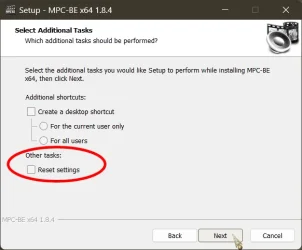
When installing a new version of MPC BE or MPC-HC check your settings. Some are returned to their default values and you need to configure them again.
All good here..., as long as you don't check this box:

9275.webp
 

My Computers

System One System Two

  • OS
    Windows 11 Pro
    Computer type
    PC/Desktop
    Manufacturer/Model
    ASUS ROG Strix
  • Operating System
    Windows 11 Pro
    Computer type
    Laptop
    Manufacturer/Model
    ASUS VivoBook
I don't, but I have done several changes to LAV Video Decoder and other filters and not all are retained.
 

My Computers

System One System Two

  • OS
    Windows 11 Pro 23H2 (5699), 25H2 (8655)
    Computer type
    Laptop
    Manufacturer/Model
    Acer Extensa 5630EZ
    CPU
    Mobile DualCore Intel Core 2 Duo T7250, 2000 MHz
    Motherboard
    Acer Extensa 5630
    Memory
    4GB
    Graphics Card(s)
    Mobile Intel(R) GMA 4500M (Mobile 4 series)
    Sound Card
    Realtek ALC268 @ Intel 82801IB ICH9 - High Definition Audio Controller
    Monitor(s) Displays
    1
    Screen Resolution
    1280x800
    Hard Drives
    Samsung SSD 850 EVO 250GB SATA Device (250 GB, SATA-III)
    Internet Speed
    VDSL 50 Mbps
    Browser
    MICROSOFT EDGE
    Antivirus
    WINDOWS DEFENDER
    Other Info
    Legacy MBR installation, no TPM, no Secure Boot, no WDDM 2.0 graphics drivers, no SSE4.2, cannot get more unsupported ;) This is only my test laptop. I had installed Windows 11 here before upgrading my main PC. For my main PC I use everyday see my 2nd system specs.
  • Operating System
    Windows 11 Pro v25H2 (build 26200.8655)
    Computer type
    PC/Desktop
    Manufacturer/Model
    Custom-built PC
    CPU
    Intel Core-i7 3770 3.40GHz s1155 (3rd generation)
    Motherboard
    Asus P8H61 s1155 ATX
    Memory
    2x Kingston Hyper-X Blu 8GB DDR3-1600
    Graphics card(s)
    GIGABYTE GeForce RTX 3050 WINDFORCE OC V2 6GB (GV-N3050WF2OCV2-6GD)
    Sound Card
    Realtek HD audio (ALC887)
    Monitor(s) Displays
    Sony Bravia KDL-19L4000 19" LCD TV via VGA
    Screen Resolution
    1440x900 32-bit 60Hz
    Hard Drives
    WD Blue SA510 2.5 1000GB SSD as system disk, Western Digital Caviar Purple 4TB SATA III (WD40PURZ) as second
    PSU
    Thermaltake Litepower RGB 550W Full Wired
    Case
    SUPERCASE MIDI-TOWER
    Cooling
    Deepcool Gamma Archer CPU cooler, 1x 8cm fan at the back
    Keyboard
    Mitsumi 101-key PS/2
    Mouse
    Sunnyline OptiEye PS/2
    Internet Speed
    100Mbps
    Browser
    Microsoft Edge, Mozilla Firefox
    Antivirus
    Microsoft Windows Defender
    Other Info
    Legacy BIOS (MBR) installation, no TPM, no Secure Boot, WDDM 3.0 graphics drivers, WEI score 7.4
I'm also working on this problem. I want to read from streams, but this also works for YouTube. I use yt-dlp and pipe it to a player. The player can be VideoLAN/VLC, MPV, FFPLAY, or MPC.

This works for me:

yt-dlp --quiet --progress --ignore-errors --no-live-from-start --skip-unavailable-fragments --keep-fragments ^
--no-check-certificates --console-title --socket-timeout 4 -f 3321
"https://amg01258-raycomsports-powernationau-samsungau-18bwc.amagi.tv/playlist.m3u8" -o - | "C:\Program Files (x86)\K-Lite Codec Pack\MPC-HC64\mpc-hc64.exe" -

The reason for using yt-dlp and all of the options instead of just using MPC directly is because some streams are very erratic, and yt-dlp is able to compensate for that. And, as mentioned, yt-dlp can still download from YouTube and a wide variety of other sources. This also allows watching a video in 'real' time without having to wait for it to download and store it on your drive.

(If anyone cares I can post examples for the other players).

However, I also have a question. I want to also pass commands to MPC at the same time as the video to do things like set or change the window size, but I can't figure out if MPC allows that. (I also have to admit that I've run into a lot of problems because I keep confusing mpv with mpc.) Is it possible to start MPC-HC64 from the command line and pass commands or qualifiers at the same time? It doesn't have any problems picking up the video stream as input.
 

My Computer

System One

  • OS
    Windows 7, Windows 10 (sometimes Linux)
    Computer type
    PC/Desktop
    Manufacturer/Model
    Lenovo, Dell, HP
Screenshot 2025-12-10 203355.webp-

In MPC -BE the above settings work for me.
 

My Computers

System One System Two

  • OS
    Windows11 Pro 26200.8655
    Computer type
    PC/Desktop
    Manufacturer/Model
    Dell Alienware Aurora R16
    CPU
    Intel Core i9 14900F (24 -Core, 68 MB Total Cache)
    Motherboard
    Dell Alienware
    Memory
    32GB DDR5
    Graphics Card(s)
    RTX 4080 Super w/581.95
    Sound Card
    Realtec
    Monitor(s) Displays
    Corsair XENEON 32QHD165
    Screen Resolution
    2560 X 1440
    Hard Drives
    1-2TB Samsung 990 Pro PCIe NVMe M2 SSD
    1-4TB Samsung 990 Pro PCIe NVMe M2 SSD
    PSU
    1000 Watt Platinum Dell
    Case
    Alienware
    Cooling
    Liquid Closed Loop
    Keyboard
    Corsair Strafe RGB
    Mouse
    Logitech MK270 Wireless
    Internet Speed
    100Gb's Down-20 Up
    Browser
    Firefox 151.0.4
    Antivirus
    Defender
    Other Info
    Very Quiet And Fast
    CyberPower UPS CP1500PFCLCD
  • Operating System
    PClinuxOS Mate (2025.7)
    Computer type
    PC/Desktop
    Manufacturer/Model
    Intel
    CPU
    13th Gen Inter(R) Core(TM) i3-1315U
    Motherboard
    Intel
    Memory
    64 GB DDR4 @3200 MHz.
    Graphics card(s)
    Internal
    Sound Card
    None
    Monitor(s) Displays
    Dell 2419HGCF
    Screen Resolution
    1920 X 1080
    Hard Drives
    SAMSUNG 980 PRO SSD 2TB, PCIe 4.0 M.2 2280
    PSU
    Chicony 30 Watt
    Case
    Small
    Keyboard
    Dell
    Mouse
    Razor
    Internet Speed
    1GB
    Browser
    Slimjet
I'm sorry, but I don't understand what you are saying here. Perhaps I didn't explain properly, but nothing on the settings page seems relevant to this topic to me, and I already have those settings.

What I'm doing now is this (stripped down to the basics):

yt-dlp http://somethinglaythis -o - | "C:\Program Files (x86)\K-Lite Codec Pack\MPC-HC64\mpc-hc64.exe" -

What I want to do is something like this:

yt-dlp http://somethinglaythis -o - | "C:\Program Files (x86)\K-Lite Codec Pack\MPC-HC64\mpc-hc64.exe" volume 50 -

So far I haven't found a way to add commands or qualifiers from the command line to change how MPC plays.
 

My Computer

System One

  • OS
    Windows 7, Windows 10 (sometimes Linux)
    Computer type
    PC/Desktop
    Manufacturer/Model
    Lenovo, Dell, HP
I don't use yt-dlp, but have you seen the Command line switches for MPC, in the MPC Menu > Help > Command Line Switches?
eg: from that help panel volume is set using "/volume N Set Volume, where N is a range from 0 to 100"
maybe something like this (though I don't know if it works or not)
yt-dlp http://somethinglaythis -o - | "C:\Program Files (x86)\K-Lite Codec Pack\MPC-HC64\mpc-hc64.exe" /volume 50
 

My Computer

System One

  • OS
    Win 11 25H2
    Computer type
    PC/Desktop
    Manufacturer/Model
    custom
    CPU
    intel i7-8700
    Motherboard
    Asus Z370 TUF Gaming
    Memory
    32Gb
    Graphics Card(s)
    Intel iGPU
    Sound Card
    Realtek
    Hard Drives
    Samsung
    PSU
    Corsair
    Cooling
    Fans
I've only tried one qualifier, but now it looks like it is finally working. Thanks for the pointer: I think the manual web page I read didn't make it clear how to format the different options as some start with - or -- and just assume you know the others start with / (or I'm just not reading it properly). I'm also still confusing the different players.

I think it was worth the effort. Using yt-dlp as the "front end" really opens up many possibility, like being able to supply login credentials to YouTube, or being able to select the YouTube stream size you want with the '-f' option, or being able to automatically re-connect to a stream when there is a 'glitch'.

This is not in any way meant to criticize MPC: YouTube is a challenge to download or stream properly, and many internet streams are not formatted very well (some are downright bizarre) and require special handling that the creators of MPC could never have anticipated.

Could you please suggest the web page that has the clearest list of the options?
 

My Computer

System One

  • OS
    Windows 7, Windows 10 (sometimes Linux)
    Computer type
    PC/Desktop
    Manufacturer/Model
    Lenovo, Dell, HP
I'm also working on this problem. I want to read from streams, but this also works for YouTube. I use yt-dlp and pipe it to a player. The player can be VideoLAN/VLC, MPV, FFPLAY, or MPC.

This works for me:

yt-dlp --quiet --progress --ignore-errors --no-live-from-start --skip-unavailable-fragments --keep-fragments ^
--no-check-certificates --console-title --socket-timeout 4 -f 3321
"https://amg01258-raycomsports-powernationau-samsungau-18bwc.amagi.tv/playlist.m3u8" -o - | "C:\Program Files (x86)\K-Lite Codec Pack\MPC-HC64\mpc-hc64.exe" -

The reason for using yt-dlp and all of the options instead of just using MPC directly is because some streams are very erratic, and yt-dlp is able to compensate for that. And, as mentioned, yt-dlp can still download from YouTube and a wide variety of other sources. This also allows watching a video in 'real' time without having to wait for it to download and store it on your drive.

(If anyone cares I can post examples for the other players).

However, I also have a question. I want to also pass commands to MPC at the same time as the video to do things like set or change the window size, but I can't figure out if MPC allows that. (I also have to admit that I've run into a lot of problems because I keep confusing mpv with mpc.) Is it possible to start MPC-HC64 from the command line and pass commands or qualifiers at the same time? It doesn't have any problems picking up the video stream as input.
Download yt-dlp and Deno and put a copy in the MPC-HC folder. Every time you copy-paste a video URL it will open and play as if it was a local video with the settings you want. The video can be almost any site, not only YouTube. Dailymotion, Facebook, TV channel website. Then you can go File -> Save a copy and download it.


PS: If some day you cannot open YouTube or other site, you have to update yt-dlp and Deno to work again. They change code from time to time to prevent downloading videos.
 

My Computers

System One System Two

  • OS
    Windows 11 Pro 23H2 (5699), 25H2 (8655)
    Computer type
    Laptop
    Manufacturer/Model
    Acer Extensa 5630EZ
    CPU
    Mobile DualCore Intel Core 2 Duo T7250, 2000 MHz
    Motherboard
    Acer Extensa 5630
    Memory
    4GB
    Graphics Card(s)
    Mobile Intel(R) GMA 4500M (Mobile 4 series)
    Sound Card
    Realtek ALC268 @ Intel 82801IB ICH9 - High Definition Audio Controller
    Monitor(s) Displays
    1
    Screen Resolution
    1280x800
    Hard Drives
    Samsung SSD 850 EVO 250GB SATA Device (250 GB, SATA-III)
    Internet Speed
    VDSL 50 Mbps
    Browser
    MICROSOFT EDGE
    Antivirus
    WINDOWS DEFENDER
    Other Info
    Legacy MBR installation, no TPM, no Secure Boot, no WDDM 2.0 graphics drivers, no SSE4.2, cannot get more unsupported ;) This is only my test laptop. I had installed Windows 11 here before upgrading my main PC. For my main PC I use everyday see my 2nd system specs.
  • Operating System
    Windows 11 Pro v25H2 (build 26200.8655)
    Computer type
    PC/Desktop
    Manufacturer/Model
    Custom-built PC
    CPU
    Intel Core-i7 3770 3.40GHz s1155 (3rd generation)
    Motherboard
    Asus P8H61 s1155 ATX
    Memory
    2x Kingston Hyper-X Blu 8GB DDR3-1600
    Graphics card(s)
    GIGABYTE GeForce RTX 3050 WINDFORCE OC V2 6GB (GV-N3050WF2OCV2-6GD)
    Sound Card
    Realtek HD audio (ALC887)
    Monitor(s) Displays
    Sony Bravia KDL-19L4000 19" LCD TV via VGA
    Screen Resolution
    1440x900 32-bit 60Hz
    Hard Drives
    WD Blue SA510 2.5 1000GB SSD as system disk, Western Digital Caviar Purple 4TB SATA III (WD40PURZ) as second
    PSU
    Thermaltake Litepower RGB 550W Full Wired
    Case
    SUPERCASE MIDI-TOWER
    Cooling
    Deepcool Gamma Archer CPU cooler, 1x 8cm fan at the back
    Keyboard
    Mitsumi 101-key PS/2
    Mouse
    Sunnyline OptiEye PS/2
    Internet Speed
    100Mbps
    Browser
    Microsoft Edge, Mozilla Firefox
    Antivirus
    Microsoft Windows Defender
    Other Info
    Legacy BIOS (MBR) installation, no TPM, no Secure Boot, WDDM 3.0 graphics drivers, WEI score 7.4

Latest Support Threads

Back
Top Bottom