Solved pnputil won’t uninstall drivers


Baeolophus

Well-known member
Member
Local time
10:56 PM
Posts
162
OS
macOS Sequoia
I just upgraded an old system from Windows 10 to Windows 11. Now there are drivers (some from as far back as 2013) that are incompatible with Core Isolation. I turned Core Isolation off to try to remove the one that threw up an error alert. Now I cannot turn the feature back on, before all the other incompatible driver issues are resolved. Part of the problem is that I migrated from one piece of hardware to another. Most of the hardware using those drivers no longer exists.

The command
Powershell:
pnputil /delete-driver <example.inf> /uninstall
throws up this error: “Failed to delete driver package: The system cannot find the path specified.”

How do I get rid of those drivers permanently?
 
Windows Build/Version
26100.5061

My Computer My Computer

At a glance

macOS SequoiaM1 Max Apple Silicon32 GB
OS
macOS Sequoia
Computer type
Laptop
Manufacturer/Model
Apple
CPU
M1 Max Apple Silicon
Memory
32 GB
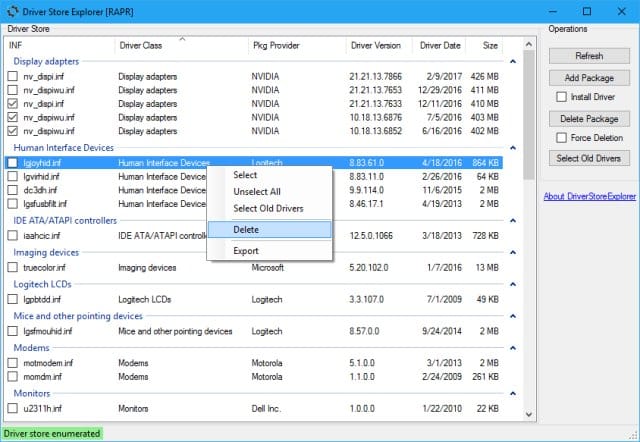
driver store explorer...it's a standalone app. no insttalling
 

My Computers My Computers

  • At a glance

    Windows 11 Pro 25H2 26200.8655i9-10900 10 core 20 threads32 gbnone-Intel UHD Graphics 630
    OS
    Windows 11 Pro 25H2 26200.8655
    Computer type
    PC/Desktop
    Manufacturer/Model
    Dell Optiplex 7080
    CPU
    i9-10900 10 core 20 threads
    Motherboard
    DELL 0J37VM
    Memory
    32 gb
    Graphics Card(s)
    none-Intel UHD Graphics 630
    Sound Card
    Integrated Realtek
    Monitor(s) Displays
    Benq 27
    Screen Resolution
    2560x1440
    Hard Drives
    2x1tb Solidigm m.2 nvme /External drives 512gb Samsung m.2 sata+2tb Kingston m2.nvme
    PSU
    500w
    Case
    MT
    Cooling
    Dell Premium
    Keyboard
    Logitech wired
    Mouse
    Logitech wireless
    Internet Speed
    so slow I'm too embarrassed to tell
    Browser
    #1 Edge #2 Firefox
    Antivirus
    Defender+MWB Premium
  • At a glance

    Windows 11 Pro 24H2 26200.8457AMD Ryzen 7 6800U32 gbintegrated
    Operating System
    Windows 11 Pro 24H2 26200.8457
    Computer type
    PC/Desktop
    Manufacturer/Model
    Beelink Mini PC SER5
    CPU
    AMD Ryzen 7 6800U
    Memory
    32 gb
    Graphics card(s)
    integrated
    Sound Card
    integrated
    Monitor(s) Displays
    Benq 27
    Screen Resolution
    2560x1440
    Hard Drives
    1TB Crucial nvme
    Keyboard
    Logitech wired
    Mouse
    Logitech wireless
    Internet Speed
    still too embarrassed to tell
    Browser
    Firefox
    Antivirus
    Defender
    Other Info
    System 3 is non compliant Dell 9020 i7-4770/24gb ram Win11 PRO 26200.8457
Back
Top Bottom