Poll on Backup software


Which imaging program do you use for backups?


  • Total voters
    433
I’m curious as to why the focus on backup time. My MR backups are scheduled to run when I’m not using my laptop so I honestly don’t care about the backup time, as long as they aren’t unusually long. I really don’t even know how long they take although I suppose I could look in the MR logs if I needed to know.
3 important indicators: backup time, image size, and restore reliability.

Restore reliability is important to everyone, but I only have a simple virtual machine and can't fully test it. And I think this is the most basic functionality and no one fails in my virtual machine.

Whether the backup time is important depends on your usage habits. If you are used to backing up before going to bed and set up to automatically shut down after the backup is completed, then the backup time is not important. If it is during working hours then the backup time is important.

Image size has value for everyone, especially those who don't have a lot of free space.
 

My Computer My Computer

At a glance

windows 11AMD Ryzen 7 5800X32GB DDR4Nvidia RTX 3070 Ti
OS
windows 11
Computer type
PC/Desktop
Manufacturer/Model
DIY
CPU
AMD Ryzen 7 5800X
Motherboard
B550
Memory
32GB DDR4
Graphics Card(s)
Nvidia RTX 3070 Ti
Monitor(s) Displays
27-inch
Screen Resolution
4K
Hard Drives
1TB M.2 NVMe
Also, check out the lifetime sub for AOMEI, including any promos.
 

My Computer My Computer

At a glance

Windows 11 Proi5-13400F16 GBRTX 4060
OS
Windows 11 Pro
Computer type
PC/Desktop
Manufacturer/Model
Custom Build
CPU
i5-13400F
Motherboard
Gigabyte B-760M
Memory
16 GB
Graphics Card(s)
RTX 4060
Sound Card
internal
Monitor(s) Displays
AOC 27 gaming
Screen Resolution
1920 x 1080
Hard Drives
Kingston 2 TB M.2
PSU
Thermaltake 700W
Case
DarkFlash C285P
Cooling
Kingsman KA-R240 ARGB Liquid Cooling
Keyboard
Redragon Kala
Mouse
Marvo G945
Internet Speed
400 Mbps DL/UL
Browser
Firefox, Mullvad
Antivirus
Kaspersky Standard
Other Info
Adguard for Desktop, Kerish PC Doctor, PerfectDisk Pro with OptiWrite, AOMEI Backupper Pro, Open-Shell, ExplorerPatcher
I personally don’t even pretend to know what’s best for anyone else no less what’s in their mind or their thought processes. I’ll leave that to those more omniscient than I…
What's best for everyone (myself included) is to make informed decisions rather than jump to all sorts of ridiculous conclusions I hope, and, you don't need to be a scientist to be able to figure that out. Speaking of science, computer science is still about science, albeit dealing with Microsoft for prolonged periods of time can very often tend to make a person feel like it's got more to do with Black Magic of course. 🤣
 

My Computers My Computers

  • At a glance

    11 Homei7 13650HX16GB DDR5GeForce RTX 4060 Mobile
    OS
    11 Home
    Computer type
    Laptop
    Manufacturer/Model
    Asus TUF Gaming F16 (2024)
    CPU
    i7 13650HX
    Memory
    16GB DDR5
    Graphics Card(s)
    GeForce RTX 4060 Mobile
    Sound Card
    Eastern Electric MiniMax DAC Supreme; Emotiva UMC-200; Astell & Kern AK240
    Monitor(s) Displays
    Sony Bravia XR-55X90J
    Screen Resolution
    3840×2160
    Hard Drives
    512GB SSD internal
    37TB external
    PSU
    Li-ion
    Cooling
    2× Arc Flow Fans, 4× exhaust vents, 5× heatpipes
    Keyboard
    Logitech K800
    Mouse
    Logitech G402
    Internet Speed
    30Mbit/s up, 500Mbit/s down
    Browser
    FF
    Antivirus
    What's an antivirus?
  • At a glance

    11 Homei5 1135G716GB DDR4Intel Iris Xe
    Operating System
    11 Home
    Computer type
    Laptop
    Manufacturer/Model
    Medion S15450
    CPU
    i5 1135G7
    Memory
    16GB DDR4
    Graphics card(s)
    Intel Iris Xe
    Sound Card
    Eastern Electric MiniMax DAC Supreme; Emotiva UMC-200; Astell & Kern AK240
    Monitor(s) Displays
    Sony Bravia XR-55X90J
    Screen Resolution
    3840×2160
    Hard Drives
    2TB SSD internal
    37TB external
    PSU
    Li-ion
    Keyboard
    Logitech K800
    Mouse
    Logitech G402
    Internet Speed
    30Mbit/s up, 500Mbit/s down
    Browser
    FF
Whether the backup time is important depends on your usage habits. If you are used to backing up before going to bed and set up to automatically shut down after the backup is completed, then the backup time is not important. If it is during working hours then the backup time is important.
Maybe or maybe not. With MR (do not know about others) the PC can be used while the backup is running as it uses VSS. Yes there could be performance issue if the normal working activities require serious processor or drive resources.
 

My Computer My Computer

At a glance

Windows 11 ProIntel Core Ultra16GBIntel(R) Arc Graphics
OS
Windows 11 Pro
Computer type
Laptop
Manufacturer/Model
ASUS Zenbook 14 OLED
CPU
Intel Core Ultra
Memory
16GB
Graphics Card(s)
Intel(R) Arc Graphics
Sound Card
Realtek High Definition Audio(SST)
Screen Resolution
2880 x 1800
Hard Drives
500 GB NVMe SSD
Internet Speed
1,500Mbps
Browser
Firefox, Edge
Antivirus
Windows Defender
Maybe or maybe not. With MR (do not know about others) the PC can be used while the backup is running as it uses VSS. Yes there could be performance issue if the normal working activities require serious processor or drive resources.
This. Normally my MR BUs are set to run when I'm normally not using my laptop but their have been a few times when I was. Honestly except for the notification I would have not known it was running.
 

My Computer My Computer

At a glance

Windows 11 Pro13th Gen Intel(R) Core(TM) i9-13900H 2.60 GHz32 GB, 2 x 16 GB, DDR5, 4800 MT/s, dual-channelIntel(R) Iris(R) Xe Graphics, NVIDIA GeForce ...
OS
Windows 11 Pro
Computer type
Laptop
Manufacturer/Model
Dell/XPS 15 9530
CPU
13th Gen Intel(R) Core(TM) i9-13900H 2.60 GHz
Motherboard
Manufacturer Dell Inc. Model 00KH17 Version A00
Memory
32 GB, 2 x 16 GB, DDR5, 4800 MT/s, dual-channel
Graphics Card(s)
Intel(R) Iris(R) Xe Graphics, NVIDIA GeForce RTX 4070 Laptop GPU
Monitor(s) Displays
Dell S2722QC
Hard Drives
1 TB M.2 2280 solid-state drive
Keyboard
Logitech Illuminated Keyboard K740
Mouse
Logitech BT M557
Internet Speed
200/10
Browser
Chrome, FireFox
Antivirus
Microsoft Defender
Can someone suggest a backup solution for me? 🤣
 

My Computer My Computer

At a glance

Windows XP (Stable, iconic) 7/8.1/10/ Tiny11 ...Intel i7 4790K32GB DDR3 1600 MHzATI Radeon HD 7770 2GB GDDR5
OS
Windows XP (Stable, iconic) 7/8.1/10/ Tiny11 25H2
Computer type
PC/Desktop
Manufacturer/Model
Alienware PC
CPU
Intel i7 4790K
Motherboard
ASROCK Z97 EXTREME4
Memory
32GB DDR3 1600 MHz
Graphics Card(s)
ATI Radeon HD 7770 2GB GDDR5
Sound Card
Onboard
Monitor(s) Displays
SAMSUNG UE57 Series 28-Inch 4K UHD
Hard Drives
SAMSUNG 860 EVO 250 gigabyte SSD
PSU
EVGA 850 watt
Case
Alienware Area 51 Black Tower Case
Keyboard
HyperX - Alloy Elite 2 Mechanical Gaming Keyboard.
Mouse
Microsoft Wireless
Internet Speed
1.2 GHz
Browser
Chrome..Edge..Firefox

My Computers My Computers

  • At a glance

    Windows 11 Pro - Windows 7 HP 64 - Lubuntui5 6600K - 800MHz to 4400MHz4+4G GSkill DDR4 3000IG - Intel 530
    OS
    Windows 11 Pro - Windows 7 HP 64 - Lubuntu
    Computer type
    PC/Desktop
    Manufacturer/Model
    custom build
    CPU
    i5 6600K - 800MHz to 4400MHz
    Motherboard
    GA-Z170-HD3P
    Memory
    4+4G GSkill DDR4 3000
    Graphics Card(s)
    IG - Intel 530
    Monitor(s) Displays
    Samsung 226BW
    Screen Resolution
    1680x1050
    Hard Drives
    (1) -1 SM951 – 128GB M.2 AHCI PCIe SSD drive for Win 11
    (2) -1 WD SATA 3 - 1T for Data
    (3) -1 WD SATA 3 - 1T for backup
    (4) -1 BX500 SSD - 256G for Windows 7 and Lubuntu
    PSU
    Thermaltake 450W TR2 gold
    Keyboard
    Old and good Chicony mechanical keyboard
    Mouse
    Logitech mX performance - 9 buttons (had to disable some)
    Internet Speed
    500 Mb/s
    Browser
    Firefox 64
  • At a glance

    Windows 11 Proi7-4500U 800- 3000MHz(4+4)G DDR3 1600IG intel 4400 + NVIDIA GeForce GT 745M
    Operating System
    Windows 11 Pro
    Computer type
    Laptop
    Manufacturer/Model
    Asus Q550LF
    CPU
    i7-4500U 800- 3000MHz
    Motherboard
    Asus Q550LF
    Memory
    (4+4)G DDR3 1600
    Graphics card(s)
    IG intel 4400 + NVIDIA GeForce GT 745M
    Sound Card
    Realtek
    Monitor(s) Displays
    LG Display LP156WF4-SPH1
    Screen Resolution
    1920 x 1080
    Hard Drives
    BX500 120G SSD for Windows and programs
    & 1T HDD for data
    Internet Speed
    500 Mb/s
    Browser
    Firefox 64

My Computer My Computer

At a glance

Windows XP (Stable, iconic) 7/8.1/10/ Tiny11 ...Intel i7 4790K32GB DDR3 1600 MHzATI Radeon HD 7770 2GB GDDR5
OS
Windows XP (Stable, iconic) 7/8.1/10/ Tiny11 25H2
Computer type
PC/Desktop
Manufacturer/Model
Alienware PC
CPU
Intel i7 4790K
Motherboard
ASROCK Z97 EXTREME4
Memory
32GB DDR3 1600 MHz
Graphics Card(s)
ATI Radeon HD 7770 2GB GDDR5
Sound Card
Onboard
Monitor(s) Displays
SAMSUNG UE57 Series 28-Inch 4K UHD
Hard Drives
SAMSUNG 860 EVO 250 gigabyte SSD
PSU
EVGA 850 watt
Case
Alienware Area 51 Black Tower Case
Keyboard
HyperX - Alloy Elite 2 Mechanical Gaming Keyboard.
Mouse
Microsoft Wireless
Internet Speed
1.2 GHz
Browser
Chrome..Edge..Firefox
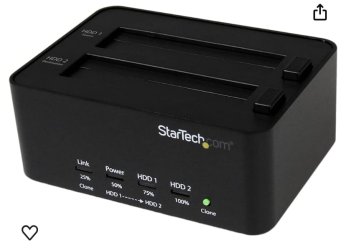
What about a duplicator? Those any good?
What do you mean by duplicator? Do you mean a software that clones a drive into another?
If yes, that is one of the options of the software I mentioned.
 

My Computers My Computers

  • At a glance

    Windows 11 Pro - Windows 7 HP 64 - Lubuntui5 6600K - 800MHz to 4400MHz4+4G GSkill DDR4 3000IG - Intel 530
    OS
    Windows 11 Pro - Windows 7 HP 64 - Lubuntu
    Computer type
    PC/Desktop
    Manufacturer/Model
    custom build
    CPU
    i5 6600K - 800MHz to 4400MHz
    Motherboard
    GA-Z170-HD3P
    Memory
    4+4G GSkill DDR4 3000
    Graphics Card(s)
    IG - Intel 530
    Monitor(s) Displays
    Samsung 226BW
    Screen Resolution
    1680x1050
    Hard Drives
    (1) -1 SM951 – 128GB M.2 AHCI PCIe SSD drive for Win 11
    (2) -1 WD SATA 3 - 1T for Data
    (3) -1 WD SATA 3 - 1T for backup
    (4) -1 BX500 SSD - 256G for Windows 7 and Lubuntu
    PSU
    Thermaltake 450W TR2 gold
    Keyboard
    Old and good Chicony mechanical keyboard
    Mouse
    Logitech mX performance - 9 buttons (had to disable some)
    Internet Speed
    500 Mb/s
    Browser
    Firefox 64
  • At a glance

    Windows 11 Proi7-4500U 800- 3000MHz(4+4)G DDR3 1600IG intel 4400 + NVIDIA GeForce GT 745M
    Operating System
    Windows 11 Pro
    Computer type
    Laptop
    Manufacturer/Model
    Asus Q550LF
    CPU
    i7-4500U 800- 3000MHz
    Motherboard
    Asus Q550LF
    Memory
    (4+4)G DDR3 1600
    Graphics card(s)
    IG intel 4400 + NVIDIA GeForce GT 745M
    Sound Card
    Realtek
    Monitor(s) Displays
    LG Display LP156WF4-SPH1
    Screen Resolution
    1920 x 1080
    Hard Drives
    BX500 120G SSD for Windows and programs
    & 1T HDD for data
    Internet Speed
    500 Mb/s
    Browser
    Firefox 64
What do you mean by duplicator? Do you mean a software that clones a drive into another?
If yes, that is one of the options of the software I mentioned.
 

Attachments

  • IMG_0715.jpeg
    IMG_0715.jpeg
    25.5 KB · Views: 9

My Computer My Computer

At a glance

Windows XP (Stable, iconic) 7/8.1/10/ Tiny11 ...Intel i7 4790K32GB DDR3 1600 MHzATI Radeon HD 7770 2GB GDDR5
OS
Windows XP (Stable, iconic) 7/8.1/10/ Tiny11 25H2
Computer type
PC/Desktop
Manufacturer/Model
Alienware PC
CPU
Intel i7 4790K
Motherboard
ASROCK Z97 EXTREME4
Memory
32GB DDR3 1600 MHz
Graphics Card(s)
ATI Radeon HD 7770 2GB GDDR5
Sound Card
Onboard
Monitor(s) Displays
SAMSUNG UE57 Series 28-Inch 4K UHD
Hard Drives
SAMSUNG 860 EVO 250 gigabyte SSD
PSU
EVGA 850 watt
Case
Alienware Area 51 Black Tower Case
Keyboard
HyperX - Alloy Elite 2 Mechanical Gaming Keyboard.
Mouse
Microsoft Wireless
Internet Speed
1.2 GHz
Browser
Chrome..Edge..Firefox
As you have a desktop you don't need a hardware to duplicate a HDD and I don't know if it can clone a M.2 or 2.5" SSD.
With a desktop all you need is a good software.

img_0715-jpeg.91835
 

My Computers My Computers

  • At a glance

    Windows 11 Pro - Windows 7 HP 64 - Lubuntui5 6600K - 800MHz to 4400MHz4+4G GSkill DDR4 3000IG - Intel 530
    OS
    Windows 11 Pro - Windows 7 HP 64 - Lubuntu
    Computer type
    PC/Desktop
    Manufacturer/Model
    custom build
    CPU
    i5 6600K - 800MHz to 4400MHz
    Motherboard
    GA-Z170-HD3P
    Memory
    4+4G GSkill DDR4 3000
    Graphics Card(s)
    IG - Intel 530
    Monitor(s) Displays
    Samsung 226BW
    Screen Resolution
    1680x1050
    Hard Drives
    (1) -1 SM951 – 128GB M.2 AHCI PCIe SSD drive for Win 11
    (2) -1 WD SATA 3 - 1T for Data
    (3) -1 WD SATA 3 - 1T for backup
    (4) -1 BX500 SSD - 256G for Windows 7 and Lubuntu
    PSU
    Thermaltake 450W TR2 gold
    Keyboard
    Old and good Chicony mechanical keyboard
    Mouse
    Logitech mX performance - 9 buttons (had to disable some)
    Internet Speed
    500 Mb/s
    Browser
    Firefox 64
  • At a glance

    Windows 11 Proi7-4500U 800- 3000MHz(4+4)G DDR3 1600IG intel 4400 + NVIDIA GeForce GT 745M
    Operating System
    Windows 11 Pro
    Computer type
    Laptop
    Manufacturer/Model
    Asus Q550LF
    CPU
    i7-4500U 800- 3000MHz
    Motherboard
    Asus Q550LF
    Memory
    (4+4)G DDR3 1600
    Graphics card(s)
    IG intel 4400 + NVIDIA GeForce GT 745M
    Sound Card
    Realtek
    Monitor(s) Displays
    LG Display LP156WF4-SPH1
    Screen Resolution
    1920 x 1080
    Hard Drives
    BX500 120G SSD for Windows and programs
    & 1T HDD for data
    Internet Speed
    500 Mb/s
    Browser
    Firefox 64
As you have a desktop you don't need a hardware to duplicate a HDD and I don't know if it can clone a M.2 or 2.5" SSD.
With a desktop all you need is a good software.

img_0715-jpeg.91835
I have this duplicator, and I also have one for M.2, they work fast and flawlessly. If a person ever goes to stand alone duplicator's, they will never go back to software backup programs again.
 

My Computer My Computer

At a glance

Windows XP (Stable, iconic) 7/8.1/10/ Tiny11 ...Intel i7 4790K32GB DDR3 1600 MHzATI Radeon HD 7770 2GB GDDR5
OS
Windows XP (Stable, iconic) 7/8.1/10/ Tiny11 25H2
Computer type
PC/Desktop
Manufacturer/Model
Alienware PC
CPU
Intel i7 4790K
Motherboard
ASROCK Z97 EXTREME4
Memory
32GB DDR3 1600 MHz
Graphics Card(s)
ATI Radeon HD 7770 2GB GDDR5
Sound Card
Onboard
Monitor(s) Displays
SAMSUNG UE57 Series 28-Inch 4K UHD
Hard Drives
SAMSUNG 860 EVO 250 gigabyte SSD
PSU
EVGA 850 watt
Case
Alienware Area 51 Black Tower Case
Keyboard
HyperX - Alloy Elite 2 Mechanical Gaming Keyboard.
Mouse
Microsoft Wireless
Internet Speed
1.2 GHz
Browser
Chrome..Edge..Firefox
If a person ever goes to stand alone duplicator's, they will never go back to software backup programs again.
You are comparing oranges and bananas.

Duplicators are hardware cloning devices and rather elaborate for most persons use. In the end, they are still only cloning devices.

Software image backup tools primary function is to allow a user to restore OS on INSTALLED drives in event of an issue on installed OS/Programs. This is by far a more common requirement.
You can store multiple backups on one drive (assuming reasonable capacity).

A hardware duplicator is not much use in above usage.
 

My Computer My Computer

At a glance

Windows 11 Pro + Win11 Canary VM.I9 13th gen i9-13900H 2.60 GHZ16 GB solderedIntegrated Intel Iris XE
OS
Windows 11 Pro + Win11 Canary VM.
Computer type
Laptop
Manufacturer/Model
ASUS Zenbook 14
CPU
I9 13th gen i9-13900H 2.60 GHZ
Motherboard
Yep, Laptop has one.
Memory
16 GB soldered
Graphics Card(s)
Integrated Intel Iris XE
Sound Card
Realtek built in
Monitor(s) Displays
laptop OLED screen
Screen Resolution
2880x1800 touchscreen
Hard Drives
1 TB NVME SSD (only weakness is only one slot)
PSU
Internal + 65W thunderbolt USB4 charger
Case
Yep, got one
Cooling
Stella Artois (UK pint cans - 568 ml) - extra cost.
Keyboard
Built in UK keybd
Mouse
Bluetooth , wireless dongled, wired
Internet Speed
900 mbs (ethernet), wifi 6 typical 350-450 mb/s both up and down
Browser
Edge
Antivirus
Defender
Other Info
TPM 2.0, 2xUSB4 thunderbolt, 1xUsb3 (usb a), 1xUsb-c, hdmi out, 3.5 mm audio out/in combo, ASUS backlit trackpad (inc. switchable number pad)

Macrium Reflect Home V8
Office 365 Family (6 users each 1TB onedrive space)
Hyper-V (a vm runs almost as fast as my older laptop)
You are comparing oranges and bananas.

Duplicators are hardware cloning devices and rather elaborate for most persons use. In the end, they are still only cloning devices.

Software image backup tools primary function is to allow a user to restore OS on INSTALLED drives in event of an issue on installed OS/Programs. This is by far a more common requirement.
You can store multiple backups on one drive (assuming reasonable capacity).

A hardware duplicator is not much use in above usage.
Ok, I respect your opinion, so let’s just agree to disagree. Software methods rely on the performance and stability of the operating system and the cloning software itself, there is a chance that glitches or conflicts may occur during the cloning process. This can lead to incomplete or corrupted duplicates, causing data loss or rendering the cloned disks unusable. I understand no software or hardware based backup/clone is beyond a glitch, I just choose to use the hardware based.
 
Last edited:

My Computer My Computer

At a glance

Windows XP (Stable, iconic) 7/8.1/10/ Tiny11 ...Intel i7 4790K32GB DDR3 1600 MHzATI Radeon HD 7770 2GB GDDR5
OS
Windows XP (Stable, iconic) 7/8.1/10/ Tiny11 25H2
Computer type
PC/Desktop
Manufacturer/Model
Alienware PC
CPU
Intel i7 4790K
Motherboard
ASROCK Z97 EXTREME4
Memory
32GB DDR3 1600 MHz
Graphics Card(s)
ATI Radeon HD 7770 2GB GDDR5
Sound Card
Onboard
Monitor(s) Displays
SAMSUNG UE57 Series 28-Inch 4K UHD
Hard Drives
SAMSUNG 860 EVO 250 gigabyte SSD
PSU
EVGA 850 watt
Case
Alienware Area 51 Black Tower Case
Keyboard
HyperX - Alloy Elite 2 Mechanical Gaming Keyboard.
Mouse
Microsoft Wireless
Internet Speed
1.2 GHz
Browser
Chrome..Edge..Firefox
Can someone suggest a backup solution for me? 🤣
Ok, I respect your opinion, so let’s just agree to disagree. Software methods rely on the performance and stability of the operating system and the cloning software itself, there is a chance that glitches or conflicts may occur during the cloning process. This can lead to incomplete or corrupted duplicates, causing data loss or rendering the cloned disks unusable. I understand no software or hardware based backup/clone is beyond a glitch, I just choose to use the hardware based.
If you think duplicators it is the best backup solution why did you ask for a recommendation for a backup solution?
 

My Computers My Computers

  • At a glance

    Windows 11 Pro - Windows 7 HP 64 - Lubuntui5 6600K - 800MHz to 4400MHz4+4G GSkill DDR4 3000IG - Intel 530
    OS
    Windows 11 Pro - Windows 7 HP 64 - Lubuntu
    Computer type
    PC/Desktop
    Manufacturer/Model
    custom build
    CPU
    i5 6600K - 800MHz to 4400MHz
    Motherboard
    GA-Z170-HD3P
    Memory
    4+4G GSkill DDR4 3000
    Graphics Card(s)
    IG - Intel 530
    Monitor(s) Displays
    Samsung 226BW
    Screen Resolution
    1680x1050
    Hard Drives
    (1) -1 SM951 – 128GB M.2 AHCI PCIe SSD drive for Win 11
    (2) -1 WD SATA 3 - 1T for Data
    (3) -1 WD SATA 3 - 1T for backup
    (4) -1 BX500 SSD - 256G for Windows 7 and Lubuntu
    PSU
    Thermaltake 450W TR2 gold
    Keyboard
    Old and good Chicony mechanical keyboard
    Mouse
    Logitech mX performance - 9 buttons (had to disable some)
    Internet Speed
    500 Mb/s
    Browser
    Firefox 64
  • At a glance

    Windows 11 Proi7-4500U 800- 3000MHz(4+4)G DDR3 1600IG intel 4400 + NVIDIA GeForce GT 745M
    Operating System
    Windows 11 Pro
    Computer type
    Laptop
    Manufacturer/Model
    Asus Q550LF
    CPU
    i7-4500U 800- 3000MHz
    Motherboard
    Asus Q550LF
    Memory
    (4+4)G DDR3 1600
    Graphics card(s)
    IG intel 4400 + NVIDIA GeForce GT 745M
    Sound Card
    Realtek
    Monitor(s) Displays
    LG Display LP156WF4-SPH1
    Screen Resolution
    1920 x 1080
    Hard Drives
    BX500 120G SSD for Windows and programs
    & 1T HDD for data
    Internet Speed
    500 Mb/s
    Browser
    Firefox 64
Ok, I respect your opinion, so let’s just agree to disagree. Software methods rely on the performance and stability of the operating system and the cloning software itself, there is a chance that glitches or conflicts may occur during the cloning process. This can lead to incomplete or corrupted duplicates, causing data loss or rendering the cloned disks unusable. I understand no software or hardware based backup/clone is beyond a glitch, I just choose to use the hardware based.
What is there to agree or disagree. Your hardware solves one solution but not image backups.

If that suits you fine but it does not suit anybody who wants to use image backups.

As I said "Oranges and Bananas'
 

My Computer My Computer

At a glance

Windows 11 Pro + Win11 Canary VM.I9 13th gen i9-13900H 2.60 GHZ16 GB solderedIntegrated Intel Iris XE
OS
Windows 11 Pro + Win11 Canary VM.
Computer type
Laptop
Manufacturer/Model
ASUS Zenbook 14
CPU
I9 13th gen i9-13900H 2.60 GHZ
Motherboard
Yep, Laptop has one.
Memory
16 GB soldered
Graphics Card(s)
Integrated Intel Iris XE
Sound Card
Realtek built in
Monitor(s) Displays
laptop OLED screen
Screen Resolution
2880x1800 touchscreen
Hard Drives
1 TB NVME SSD (only weakness is only one slot)
PSU
Internal + 65W thunderbolt USB4 charger
Case
Yep, got one
Cooling
Stella Artois (UK pint cans - 568 ml) - extra cost.
Keyboard
Built in UK keybd
Mouse
Bluetooth , wireless dongled, wired
Internet Speed
900 mbs (ethernet), wifi 6 typical 350-450 mb/s both up and down
Browser
Edge
Antivirus
Defender
Other Info
TPM 2.0, 2xUSB4 thunderbolt, 1xUsb3 (usb a), 1xUsb-c, hdmi out, 3.5 mm audio out/in combo, ASUS backlit trackpad (inc. switchable number pad)

Macrium Reflect Home V8
Office 365 Family (6 users each 1TB onedrive space)
Hyper-V (a vm runs almost as fast as my older laptop)
Both are fruits, but they look and taste differently. 😄
 

My Computers My Computers

  • At a glance

    Win 11 Pro 25H2 26200.8894 / Linux Mint 22.3Ryzen 7 2700U Pro32GBiGPU Vega 10
    OS
    Win 11 Pro 25H2 26200.8894 / Linux Mint 22.3
    Computer type
    Laptop
    Manufacturer/Model
    Lenovo A485
    CPU
    Ryzen 7 2700U Pro
    Motherboard
    Lenovo (WiFi/BT module upgraded to Intel Wireless-AC-9260)
    Memory
    32GB
    Graphics Card(s)
    iGPU Vega 10
    Sound Card
    Realtek
    Monitor(s) Displays
    14" FHD (built-in) + 14" Lenovo Thinkvision M14t (touch+pen) + 32" Asus PB328
    Screen Resolution
    FHD + FHD + 1440p
    Hard Drives
    Intel 660p m.2 nVME PCIe3.0 x2 512GB
    PSU
    125W(Dock)/65W(Travel Adapter)
    Keyboard
    Thinkpad / Logitech MX Keys
    Mouse
    Logitech MX Master 2S
    Internet Speed
    1/1Gbit
    Browser
    Firefox
    Antivirus
    Windows Defender
    Other Info
    SecureBoot: Enabled
    TPM2.0: Enabled
    AMD-V: Enabled
  • At a glance

    Win 11 Pro 25H2 26200.8968(RP)i7-7700k @4.8GHz32GB 2x16GB 2133MHz CL15EVGA GTX1080Ti FTW 11GB
    Operating System
    Win 11 Pro 25H2 26200.8968(RP)
    Computer type
    PC/Desktop
    Manufacturer/Model
    Custom
    CPU
    i7-7700k @4.8GHz
    Motherboard
    Asus PRIME Z270-A
    Memory
    32GB 2x16GB 2133MHz CL15
    Graphics card(s)
    EVGA GTX1080Ti FTW 11GB
    Sound Card
    Integrated
    Monitor(s) Displays
    32" 10-bit Asus PB328Q
    Screen Resolution
    WQHD 2560x1440
    Hard Drives
    512GB ADATA SX8000NP NVMe PCIe Gen 3 x4
    PSU
    850W
    Case
    Fractal Design Define 7
    Cooling
    Noctua NH-D15 chromax.black
    Keyboard
    Logitech MX Keys
    Mouse
    Logitech MX Master 2S
    Internet Speed
    1/1Gbit
    Browser
    Firefox
    Antivirus
    Windows Defender
    Other Info
    AC WiFi Card
  • Asus U46SV (laptop), i5-2410M, 8GB RAM, 500GB SSD, 750GB HDD, Windows 10. (used as a local Minecraft server and data dump)
Software methods rely on the performance and stability of the operating system and the cloning software itself, there is a chance that glitches or conflicts may occur during the cloning process. This can lead to incomplete or corrupted duplicates, causing data loss or rendering the cloned disks unusable. I understand no software or hardware based backup/clone is beyond a glitch, I just choose to use the hardware based.
The OS [and apps installed and/or running on it] doesn't come into play in that regard if choosing to use only the bootable rescue environment (e.g., the bootable Rescue Media ISO of Acronis True Image 2021, which is what I still prefer to use for making full/incremental system backups). Also, the bootable rescue environment software itself is much less prone to glitches or conflicts especially when compared to using an app that is running on Windows whilst relying on the Volume Shadow Copy service (VSS) for capturing an image of the actual Windows system partition itself (i.e., the partition on which Windows is actively running during this specific type of backup task, which is also commonly referred to as a "hot backup"). Bootable rescue environment software generally adds significantly fewer complexities that can go wrong, and, also generally, is easier to test for reliability.

Further, one method type does not necessarily have to exclude the other type, as you could always decide to use some combination of both disk cloning through (a) software based feature(s) and disk cloning trough "hardware-only" type of solutions commonly referred to as "duplicators". Due to the fact that each different method can still fail, and can potentially turn out to have its own unique risks like weak points that other methods either might not have or might make you a lot less susceptible somehow, it makes all the perfect sense in the world to rely on the general concept of redundancy also in this regard. That is, not just aim for redundancy solely by choosing to store multiple redundant copies of the same data (typically at least 3, albeit the "3" in "3-2-1 backup" includes the original, or "master" from which the other 2 are copied, i.e. unlike the "3" in "3-2-1-1-0 backup", as the latter "3" does not include the original, I digress...) on various different storage media types, but at the same time also choosing to apply the traditional-old redundancy principle in a broader sense. For reasons that should be completely obvious, like I previously tried to point out, experienced backup specialists don't make these kinds of choices at random excepting only maybe if they plan to sabotage you.

That being said, some (often a bit more expensive) duplicators such as, e.g., the EZ Dupe Leopardo series let you choose between cloning a whole disk and other cloning modes like cloning only the partitioned space or cloning only those specific portions of the partitions that actually are used by the filesystem that it recognizes on each partition or cloning only a specified range. What it doesn't have is the ability to exclude specified folders and files from the cloning. The bootable Rescue Media ISO of Acronis True Image 2021 does have that ability, and it also is possible to use wildcards to specify these exclusions.

Finally, one of the main reasons why I don't use a duplicator is because there exist other reliable ways to verify that there are no incomplete or corrupted duplicates. As a matter of fact, the bootable Rescue Media ISO of Acronis True Image 2021 also has that ability, as it has the option to, as an additional last step in the image creation task, verify it by comparing the data in the newly created image file to the original data i.e. by actually reading all of the data again, to be perfectly sure as opposed to cut some corners during verification to desperately try and make up for belonging in the slow camp (like Macrium Reflect, but let's keep this secret).

 

My Computers My Computers

  • At a glance

    11 Homei7 13650HX16GB DDR5GeForce RTX 4060 Mobile
    OS
    11 Home
    Computer type
    Laptop
    Manufacturer/Model
    Asus TUF Gaming F16 (2024)
    CPU
    i7 13650HX
    Memory
    16GB DDR5
    Graphics Card(s)
    GeForce RTX 4060 Mobile
    Sound Card
    Eastern Electric MiniMax DAC Supreme; Emotiva UMC-200; Astell & Kern AK240
    Monitor(s) Displays
    Sony Bravia XR-55X90J
    Screen Resolution
    3840×2160
    Hard Drives
    512GB SSD internal
    37TB external
    PSU
    Li-ion
    Cooling
    2× Arc Flow Fans, 4× exhaust vents, 5× heatpipes
    Keyboard
    Logitech K800
    Mouse
    Logitech G402
    Internet Speed
    30Mbit/s up, 500Mbit/s down
    Browser
    FF
    Antivirus
    What's an antivirus?
  • At a glance

    11 Homei5 1135G716GB DDR4Intel Iris Xe
    Operating System
    11 Home
    Computer type
    Laptop
    Manufacturer/Model
    Medion S15450
    CPU
    i5 1135G7
    Memory
    16GB DDR4
    Graphics card(s)
    Intel Iris Xe
    Sound Card
    Eastern Electric MiniMax DAC Supreme; Emotiva UMC-200; Astell & Kern AK240
    Monitor(s) Displays
    Sony Bravia XR-55X90J
    Screen Resolution
    3840×2160
    Hard Drives
    2TB SSD internal
    37TB external
    PSU
    Li-ion
    Keyboard
    Logitech K800
    Mouse
    Logitech G402
    Internet Speed
    30Mbit/s up, 500Mbit/s down
    Browser
    FF
If you think duplicators it is the best backup solution why did you ask for a recommendation for a backup solution?
I was trying to break up the monotony here with a little humor, is humor still ok today? :D
 

My Computer My Computer

At a glance

Windows XP (Stable, iconic) 7/8.1/10/ Tiny11 ...Intel i7 4790K32GB DDR3 1600 MHzATI Radeon HD 7770 2GB GDDR5
OS
Windows XP (Stable, iconic) 7/8.1/10/ Tiny11 25H2
Computer type
PC/Desktop
Manufacturer/Model
Alienware PC
CPU
Intel i7 4790K
Motherboard
ASROCK Z97 EXTREME4
Memory
32GB DDR3 1600 MHz
Graphics Card(s)
ATI Radeon HD 7770 2GB GDDR5
Sound Card
Onboard
Monitor(s) Displays
SAMSUNG UE57 Series 28-Inch 4K UHD
Hard Drives
SAMSUNG 860 EVO 250 gigabyte SSD
PSU
EVGA 850 watt
Case
Alienware Area 51 Black Tower Case
Keyboard
HyperX - Alloy Elite 2 Mechanical Gaming Keyboard.
Mouse
Microsoft Wireless
Internet Speed
1.2 GHz
Browser
Chrome..Edge..Firefox
The OS [and apps installed and/or running on it] doesn't come into play in that regard if choosing to use only the bootable rescue environment (e.g., the bootable Rescue Media ISO of Acronis True Image 2021, which is what I still prefer to use for making full/incremental system backups). Also, the bootable rescue environment software itself is much less prone to glitches or conflicts especially when compared to using an app that is running on Windows whilst relying on the Volume Shadow Copy service (VSS) for capturing an image of the actual Windows system partition itself (i.e., the partition on which Windows is actively running during this specific type of backup task, which is also commonly referred to as a "hot backup"). Bootable rescue environment software generally adds significantly fewer complexities that can go wrong, and, also generally, is easier to test for reliability.

Further, one method type does not necessarily have to exclude the other type, as you could always decide to use some combination of both disk cloning through (a) software based feature(s) and disk cloning trough "hardware-only" type of solutions commonly referred to as "duplicators". Due to the fact that each different method can still fail, and can potentially turn out to have its own unique risks like weak points that other methods either might not have or might make you a lot less susceptible somehow, it makes all the perfect sense in the world to rely on the general concept of redundancy also in this regard. That is, not just aim for redundancy solely by choosing to store multiple redundant copies of the same data (typically at least 3, albeit the "3" in "3-2-1 backup" includes the original, or "master" from which the other 2 are copied, i.e. unlike the "3" in "3-2-1-1-0 backup", as the latter "3" does not include the original, I digress...) on various different storage media types, but at the same time also choosing to apply the traditional-old redundancy principle in a broader sense. For reasons that should be completely obvious, like I previously tried to point out, experienced backup specialists don't make these kinds of choices at random excepting only maybe if they plan to sabotage you.

That being said, some (often a bit more expensive) duplicators such as, e.g., the EZ Dupe Leopardo series let you choose between cloning a whole disk and other cloning modes like cloning only the partitioned space or cloning only those specific portions of the partitions that actually are used by the filesystem that it recognizes on each partition or cloning only a specified range. What it doesn't have is the ability to exclude specified folders and files from the cloning. The bootable Rescue Media ISO of Acronis True Image 2021 does have that ability, and it also is possible to use wildcards to specify these exclusions.

Finally, one of the main reasons why I don't use a duplicator is because there exist other reliable ways to verify that there are no incomplete or corrupted duplicates. As a matter of fact, the bootable Rescue Media ISO of Acronis True Image 2021 also has that ability, as it has the option to, as an additional last step in the image creation task, verify it by comparing the data in the newly created image file to the original data i.e. by actually reading all of the data again, to be perfectly sure as opposed to cut some corners during verification to desperately try and make up for belonging in the slow camp (like Macrium Reflect, but let's keep this secret).
I understand all of that, so what happens if you encounter a power surge, or lighting strike to the home or business, and it fries your PC and everything in it? Do you unplug the drive/drives you backup to? if not a cloud based backup would be your only savior. I have nothing to sell here, or I have no horse in this race, and I respect whatever anyone wants to use, even a hammer,chisel and stone tablet. I'm just saying the duplicators work best for me personally, I'm certainly not trying to change anyone minds on the backup devices they want to use. Just seems there's a lot of bias here, use what works best for you, personally I switched to stand alone duplicators after to many failed recoveries, so I solved that problem with the duplicators.
 

My Computer My Computer

At a glance

Windows XP (Stable, iconic) 7/8.1/10/ Tiny11 ...Intel i7 4790K32GB DDR3 1600 MHzATI Radeon HD 7770 2GB GDDR5
OS
Windows XP (Stable, iconic) 7/8.1/10/ Tiny11 25H2
Computer type
PC/Desktop
Manufacturer/Model
Alienware PC
CPU
Intel i7 4790K
Motherboard
ASROCK Z97 EXTREME4
Memory
32GB DDR3 1600 MHz
Graphics Card(s)
ATI Radeon HD 7770 2GB GDDR5
Sound Card
Onboard
Monitor(s) Displays
SAMSUNG UE57 Series 28-Inch 4K UHD
Hard Drives
SAMSUNG 860 EVO 250 gigabyte SSD
PSU
EVGA 850 watt
Case
Alienware Area 51 Black Tower Case
Keyboard
HyperX - Alloy Elite 2 Mechanical Gaming Keyboard.
Mouse
Microsoft Wireless
Internet Speed
1.2 GHz
Browser
Chrome..Edge..Firefox
Back
Top Bottom