Possible to add one specific context menu entry? I don't want to revert to Win 10, or use tools.


alan999

New member
Local time
1:08 PM
Posts
14
OS
Windows 11 Pro
Have been reading tons about the wider subject of the right click context menu in Windows 11. Please note that I don't wish to revert it, expand it or use tools if possible. I'd like to add just one specific action or option, I'll explain:

Finally managed to sort out a network server for my music files on another PC (Linux, not Windows). Now I can see this share in my file explorer menu under "network locations" and "media devices". So it's quick enough to click on that and have file explorer open the location.

I should perhaps mention that my entire music library is organised as "folder-album-tracks". All I want/need to do is to be able to navigate to the desired folder in file explorer, and then right click and have some option to "play files" or "send to playlist". At present it requires me to open this folder, and then select all the tracks individually, at which point "play with media player" is an option. But one can quickly see that (because I organised my files as per CD or album i.e. "Disc 1" and "Disc 2" etc are inside the parent folder) it won't work for multi-disc albums. So, I'd really love a way to simply be able to "play" media at the level of a parent folder.

From reading around I know that the latest Media Player is not an .exe so can't be linked to directly. I'm also aware that trying to link to the media player app is via a shell...

Anyone have any ideas or guidance as to whether this would be possible?

many thanks in advance
 
Windows Build/Version
25H2, 26200.7922

My Computer

System One

  • OS
    Windows 11 Pro
    Computer type
    PC/Desktop
    Manufacturer/Model
    minisforum
    CPU
    Amd Ryzen 7
yes, the newer one
 

My Computer

System One

  • OS
    Windows 11 Pro
    Computer type
    PC/Desktop
    Manufacturer/Model
    minisforum
    CPU
    Amd Ryzen 7

My Computers

System One System Two

  • OS
    Windows 11 Pro
    Computer type
    PC/Desktop
    Manufacturer/Model
    ASUS ROG Strix
  • Operating System
    Windows 11 Pro
    Computer type
    Laptop
    Manufacturer/Model
    ASUS VivoBook
yes, the newer one
When you right click on a directory/folder, and use the extended/classic (show more) context menu, does it not have the add to media player playlist entry? Maybe I’m thinking of media player legacy or vlc…
 

My Computer

System One

  • OS
    Windows 11 Pro
I've researched the possibility extensively, and I have come to the conclusion that it's not possible with the New Media Player, not yet anyway!

I don't wish to revert it, expand it or use tools if possible.
Have you considered using the Legacy Windows Media Player, or some thing else?

12699.webp 12700.webp
my entire music library is organised as "folder-album-tracks".
If you will allow me to make a suggestion:
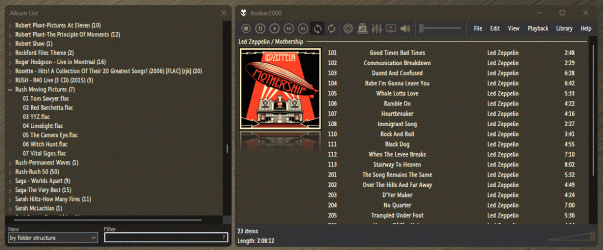
Foobar2000 does pretty much exactly what you desire within it's own UI, sort by Folder Structure, etc...
Just wheel-click a folder to play...

12711.gif
 

My Computers

System One System Two

  • OS
    Windows 11 Pro
    Computer type
    PC/Desktop
    Manufacturer/Model
    ASUS ROG Strix
  • Operating System
    Windows 11 Pro
    Computer type
    Laptop
    Manufacturer/Model
    ASUS VivoBook
I've researched the possibility extensively, and I have come to the conclusion that it's not possible with the New Media Player, not yet anyway!

well, this will do for me! I spent some time reading about, looking at what I could, but I will accept that this is another of those things that Windows "obviously should" do but doesn't!

Don't want to use the legacy version. It doesn't handle FLAC files very well (or at all) and since the served files number well in excess of 50,000 it seems hideously slow.

I tried Foobar and Musicbee but couldn't find any way to connect them to the shared source (e.g. Network drive) so I gave up.
 

My Computer

System One

  • OS
    Windows 11 Pro
    Computer type
    PC/Desktop
    Manufacturer/Model
    minisforum
    CPU
    Amd Ryzen 7
It doesn't handle FLAC files very well (or at all) and since the served files number well in excess of 50,000

How did you come to obtain “well in excess of 50,000” songs?
 

My Computers

System One System Two

  • OS
    Windows 11 Pro 25H2 Build 26200.8524
    Computer type
    PC/Desktop
    Manufacturer/Model
    Sin-built 2013
    CPU
    Intel(R) Core(TM) i7-4770K CPU @ 3.50GHz
    Motherboard
    ASUS ROG Maximus VI Formula
    Memory
    32.0 GB of I forget and the box is in storage.
    Graphics Card(s)
    Gigabyte nVidia GeForce GTX 1660 Super OC 6GB
    Sound Card
    Onboard thingy
    Monitor(s) Displays
    5 x LG 25MS500-B - 1 x 24MK430H-B - 1 x Wacom Pro 22" Touch Screen Tablet
    Screen Resolution
    All over the place
    Hard Drives
    Too many to list.
    OS on Samsung 1TB 870 QVO SATA
    PSU
    Silverstone 1500
    Case
    NZXT Phantom 820 Full-Tower Case
    Cooling
    Noctua NH-D15 Elite Class Dual Tower CPU Cooler / 6 x EziDIY 120mm / 2 x Corsair 140mm somethings / 1 x 140mm Thermaltake something / 2 x 200mm Corsair.
    Keyboard
    Corsair K95 / Logitech diNovo Edge Wireless
    Mouse
    Logitech: G402 / G502 / Mx Masters / Mx Air Cordless
    Internet Speed
    2000/500Mbps
    Browser
    All sorts
    Antivirus
    Kaspersky Premium
    Other Info
    ㅤㅤㅤㅤㅤㅤㅤㅤㅤㅤㅤㅤㅤㅤㅤㅤㅤㅤㅤㅤㅤㅤㅤㅤㅤㅤㅤㅤㅤㅤㅤㅤㅤㅤㅤㅤㅤㅤㅤㅤ⠀⠀⠀⠀⠀⠀⠀⠀⠀⠀
    TP-Link BE9300 WiFi 7 Bluetooth 5.4 (Archer TBE550E)
    TP-Link TX201 V1 2.5GB Lan

    Grandstream HT812 - VoIP
    ASUS DSL-AX82U - Mesh
    ASUS RT-AC68U - Mesh
    ASUS RT-BE88U Router

    Brother MFC-L2880DW Printer

    I’m on a horse.
  • Operating System
    Windows 11 Pro 25H2 Build 26200.8524
    Computer type
    Laptop
    Manufacturer/Model
    LENOVO Yoga 7 14IRL8 - 7i EVO OLED 14" Touchscreen i5 12 Core 16GB/512GB
    CPU
    Intel Core 12th Gen i5-1240P Processor (1.7 - 4.4GHz)
    Memory
    16GB LPDDR5 RAM
    Graphics card(s)
    Intel Iris Xe Graphics Processor
    Sound Card
    Optimized with Dolby Atmos®
    Screen Resolution
    QHD 2880 x 1800 OLED
    Hard Drives
    M.2 512GB
    Antivirus
    Defender / Malwarebytes
    Other Info
    …still on a horse.
How did you come to obtain “well in excess of 50,000” songs?

Because I've been collecting music for a long time? I began by ripping my CDs - some of them as replacements for a large vinyl collection (since sold). And since then I've been buying music from sites like Amazon and Bandcamp. I also like to visit the secondhand CD stores, and rip those too.

Doesn't take long :)
 

My Computer

System One

  • OS
    Windows 11 Pro
    Computer type
    PC/Desktop
    Manufacturer/Model
    minisforum
    CPU
    Amd Ryzen 7
Just following up a bit... did a bit more digging around, and found the github for the "Custom Context Menu" (available in the Microsoft Store). I installed it and followed instructions, and indeed it is possible to get as far as adding a custom right click menu, and launching Media Player (note that I mean the latest version, not WMPlayer.exe which is retired).

There's a few hurdles though. It launches Media Player correctly but not in "play" mode. Interestingly, since doing this, I now have the native Windows context menu appear for the exact same thing! And this (naturally) works correctly.

My point in adding this? a) because there is a solution of sorts available and b) I think my 'issue' is now slightly different:

If I right click over any media content inside Windows (meaning internal or connected drives 'seen' under Windows) my right click menus operate as expected. However, when I open a NAS share in Windows (not actually a NAS, it's the directory served from Linux using a music server), NONE of the expected right click options exist.

So I'm now thinking this is a "context" issue?
 

My Computer

System One

  • OS
    Windows 11 Pro
    Computer type
    PC/Desktop
    Manufacturer/Model
    minisforum
    CPU
    Amd Ryzen 7
To handle FLAC and many more formats in Media Player (either classic or modern) and other players you can install a codec pack. I recommend K-Lite codec pack which also includes Media Player Classic Home Cinema (MPC-HC, not related to Microsoft Media Player, it simply looks like it). You can use the audio codecs to play most formats in Media Player, although I strongly recommend to use MPC-HC instead. Yes, it also has the option to add files to the playlist by right-clicking. I am not sure about folders, haven't used this option, but it should.
 

My Computers

System One System Two

  • OS
    Windows 11 Pro 23H2 (5699), 25H2 (8457)
    Computer type
    Laptop
    Manufacturer/Model
    Acer Extensa 5630EZ
    CPU
    Mobile DualCore Intel Core 2 Duo T7250, 2000 MHz
    Motherboard
    Acer Extensa 5630
    Memory
    4GB
    Graphics Card(s)
    Mobile Intel(R) GMA 4500M (Mobile 4 series)
    Sound Card
    Realtek ALC268 @ Intel 82801IB ICH9 - High Definition Audio Controller
    Monitor(s) Displays
    1
    Screen Resolution
    1280x800
    Hard Drives
    Samsung SSD 850 EVO 250GB SATA Device (250 GB, SATA-III)
    Internet Speed
    VDSL 50 Mbps
    Browser
    MICROSOFT EDGE
    Antivirus
    WINDOWS DEFENDER
    Other Info
    Legacy MBR installation, no TPM, no Secure Boot, no WDDM 2.0 graphics drivers, no SSE4.2, cannot get more unsupported ;) This is only my test laptop. I had installed Windows 11 here before upgrading my main PC. For my main PC I use everyday see my 2nd system specs.
  • Operating System
    Windows 11 Pro v25H2 (build 26200.8457)
    Computer type
    PC/Desktop
    Manufacturer/Model
    Custom-built PC
    CPU
    Intel Core-i7 3770 3.40GHz s1155 (3rd generation)
    Motherboard
    Asus P8H61 s1155 ATX
    Memory
    2x Kingston Hyper-X Blu 8GB DDR3-1600
    Graphics card(s)
    GIGABYTE GeForce RTX 3050 WINDFORCE OC V2 6GB (GV-N3050WF2OCV2-6GD)
    Sound Card
    Realtek HD audio (ALC887)
    Monitor(s) Displays
    Sony Bravia KDL-19L4000 19" LCD TV via VGA
    Screen Resolution
    1440x900 32-bit 60Hz
    Hard Drives
    WD Blue SA510 2.5 1000GB SSD as system disk, Western Digital Caviar Purple 4TB SATA III (WD40PURZ) as second
    PSU
    Thermaltake Litepower RGB 550W Full Wired
    Case
    SUPERCASE MIDI-TOWER
    Cooling
    Deepcool Gamma Archer CPU cooler, 1x 8cm fan at the back
    Keyboard
    Mitsumi 101-key PS/2
    Mouse
    Sunnyline OptiEye PS/2
    Internet Speed
    100Mbps
    Browser
    Microsoft Edge, Mozilla Firefox
    Antivirus
    Microsoft Windows Defender
    Other Info
    Legacy BIOS (MBR) installation, no TPM, no Secure Boot, WDDM 3.0 graphics drivers, WEI score 7.4
Hi, probable explanation as to why the Store UWP media player app does not support such a context menu entry:

The new media player app is a Store UWP app.
UWP apps don't, as far as I know, take parameters, unlike traditional exe/dll programs.
Context menus rely on using parameters (fields after the exe file name).

I still have the 'Legacy' playlist option, and as said above, other non-Store/UWP players you can download and install will add such a playlist option.

This is why, for example, the old Mail app never worked with Sendto, Mail recipient, for example.
 

My Computer

System One

  • OS
    Windows 11 Pro
    Computer type
    Laptop
    Manufacturer/Model
    Lenovo t480s
    CPU
    i7-8650U
    Memory
    16GB
    Graphics Card(s)
    Intel UHD 620
    Screen Resolution
    1920x1080
    Hard Drives
    C SN810 SDCPNRY-512G-1006
    Browser
    Edge, Firefox
    Antivirus
    Defender
Hi, probable explanation as to why the Store UWP media player app does not support such a context menu entry:

The new media player app is a Store UWP app.
UWP apps don't, as far as I know, take parameters, unlike traditional exe/dll programs.
Context menus rely on using parameters (fields after the exe file name).

I still have the 'Legacy' playlist option, and as said above, other non-Store/UWP players you can download and install will add such a playlist option.

This is why, for example, the old Mail app never worked with Sendto, Mail recipient, for example.
That's why I prefer the "traditional" desktop versions over the modern UWP (aka Metro interface) versions. Not only have an ugly interface, but usually have less features than the desktop versions. Compare regular Internet Explorer 11 vs the very limited modern app version in Windows 8, Windows Photo Viewer vs the modern Photo app etc. Not sure about the functionality of modern OneDrive app, but I find the desktop version nicer, so I use that instead. Same for the Skype, the desktop version is much nicer.
 

My Computers

System One System Two

  • OS
    Windows 11 Pro 23H2 (5699), 25H2 (8457)
    Computer type
    Laptop
    Manufacturer/Model
    Acer Extensa 5630EZ
    CPU
    Mobile DualCore Intel Core 2 Duo T7250, 2000 MHz
    Motherboard
    Acer Extensa 5630
    Memory
    4GB
    Graphics Card(s)
    Mobile Intel(R) GMA 4500M (Mobile 4 series)
    Sound Card
    Realtek ALC268 @ Intel 82801IB ICH9 - High Definition Audio Controller
    Monitor(s) Displays
    1
    Screen Resolution
    1280x800
    Hard Drives
    Samsung SSD 850 EVO 250GB SATA Device (250 GB, SATA-III)
    Internet Speed
    VDSL 50 Mbps
    Browser
    MICROSOFT EDGE
    Antivirus
    WINDOWS DEFENDER
    Other Info
    Legacy MBR installation, no TPM, no Secure Boot, no WDDM 2.0 graphics drivers, no SSE4.2, cannot get more unsupported ;) This is only my test laptop. I had installed Windows 11 here before upgrading my main PC. For my main PC I use everyday see my 2nd system specs.
  • Operating System
    Windows 11 Pro v25H2 (build 26200.8457)
    Computer type
    PC/Desktop
    Manufacturer/Model
    Custom-built PC
    CPU
    Intel Core-i7 3770 3.40GHz s1155 (3rd generation)
    Motherboard
    Asus P8H61 s1155 ATX
    Memory
    2x Kingston Hyper-X Blu 8GB DDR3-1600
    Graphics card(s)
    GIGABYTE GeForce RTX 3050 WINDFORCE OC V2 6GB (GV-N3050WF2OCV2-6GD)
    Sound Card
    Realtek HD audio (ALC887)
    Monitor(s) Displays
    Sony Bravia KDL-19L4000 19" LCD TV via VGA
    Screen Resolution
    1440x900 32-bit 60Hz
    Hard Drives
    WD Blue SA510 2.5 1000GB SSD as system disk, Western Digital Caviar Purple 4TB SATA III (WD40PURZ) as second
    PSU
    Thermaltake Litepower RGB 550W Full Wired
    Case
    SUPERCASE MIDI-TOWER
    Cooling
    Deepcool Gamma Archer CPU cooler, 1x 8cm fan at the back
    Keyboard
    Mitsumi 101-key PS/2
    Mouse
    Sunnyline OptiEye PS/2
    Internet Speed
    100Mbps
    Browser
    Microsoft Edge, Mozilla Firefox
    Antivirus
    Microsoft Windows Defender
    Other Info
    Legacy BIOS (MBR) installation, no TPM, no Secure Boot, WDDM 3.0 graphics drivers, WEI score 7.4
so, not sure if this belongs here or in a new thread (mods please feel free).

Still digging around a bit with my music server/file share. Leaving aside my initial remarks about the Media Player and queueing files etc. I've noticed something else but am again a bit stuck.

I've configured the server side (Linux box) and everything's great. My control point app shows me that the music library is indexed and served exactly as desired. One (perhaps obvious) case is that if I open any album inside my control point app, the album tracks are numbered, and listed numerically - as one would expect.

If I open this same album (folder) or indeed any other from File Explorer, while I see all the tracks, there are no track numbers displayed - they're all just arranged alphabetically.

Once a track is playing inside Media Player I can right click "properties". This is where it gets interesting/puzzling:

according to this properties information, my music file is listed as
Code:
pfs://4CA4EAF20DC0714C/Bad%20Boys.mp3

I've been trying to find out what the
Code:
pfs://
prefix is. Best I can come up with (and I may be wrong) was a post on another forum about subnet routing in a WLAN?

I've got basic firewall rules running on both the Linux (server) box and this local Windows 11 machine. But if this is the area I should be looking, or indeed if not, can anyone please shed any light on any of this? It would be quite nice (and the current aim) to have File Explorer present the served files in the exact same way as the control point app i.e. including track numbers, and in the case of "Various Artists" include the artist not just the track title.
 

My Computer

System One

  • OS
    Windows 11 Pro
    Computer type
    PC/Desktop
    Manufacturer/Model
    minisforum
    CPU
    Amd Ryzen 7
Usually the tracks are written in the order they are numbered, so if you sort by date, the song corresponding to track 1 should appear first, then the track 2 and so on.
 

My Computers

System One System Two

  • OS
    Windows 11 Pro 23H2 (5699), 25H2 (8457)
    Computer type
    Laptop
    Manufacturer/Model
    Acer Extensa 5630EZ
    CPU
    Mobile DualCore Intel Core 2 Duo T7250, 2000 MHz
    Motherboard
    Acer Extensa 5630
    Memory
    4GB
    Graphics Card(s)
    Mobile Intel(R) GMA 4500M (Mobile 4 series)
    Sound Card
    Realtek ALC268 @ Intel 82801IB ICH9 - High Definition Audio Controller
    Monitor(s) Displays
    1
    Screen Resolution
    1280x800
    Hard Drives
    Samsung SSD 850 EVO 250GB SATA Device (250 GB, SATA-III)
    Internet Speed
    VDSL 50 Mbps
    Browser
    MICROSOFT EDGE
    Antivirus
    WINDOWS DEFENDER
    Other Info
    Legacy MBR installation, no TPM, no Secure Boot, no WDDM 2.0 graphics drivers, no SSE4.2, cannot get more unsupported ;) This is only my test laptop. I had installed Windows 11 here before upgrading my main PC. For my main PC I use everyday see my 2nd system specs.
  • Operating System
    Windows 11 Pro v25H2 (build 26200.8457)
    Computer type
    PC/Desktop
    Manufacturer/Model
    Custom-built PC
    CPU
    Intel Core-i7 3770 3.40GHz s1155 (3rd generation)
    Motherboard
    Asus P8H61 s1155 ATX
    Memory
    2x Kingston Hyper-X Blu 8GB DDR3-1600
    Graphics card(s)
    GIGABYTE GeForce RTX 3050 WINDFORCE OC V2 6GB (GV-N3050WF2OCV2-6GD)
    Sound Card
    Realtek HD audio (ALC887)
    Monitor(s) Displays
    Sony Bravia KDL-19L4000 19" LCD TV via VGA
    Screen Resolution
    1440x900 32-bit 60Hz
    Hard Drives
    WD Blue SA510 2.5 1000GB SSD as system disk, Western Digital Caviar Purple 4TB SATA III (WD40PURZ) as second
    PSU
    Thermaltake Litepower RGB 550W Full Wired
    Case
    SUPERCASE MIDI-TOWER
    Cooling
    Deepcool Gamma Archer CPU cooler, 1x 8cm fan at the back
    Keyboard
    Mitsumi 101-key PS/2
    Mouse
    Sunnyline OptiEye PS/2
    Internet Speed
    100Mbps
    Browser
    Microsoft Edge, Mozilla Firefox
    Antivirus
    Microsoft Windows Defender
    Other Info
    Legacy BIOS (MBR) installation, no TPM, no Secure Boot, WDDM 3.0 graphics drivers, WEI score 7.4
Usually the tracks are written in the order they are numbered, so if you sort by date, the song corresponding to track 1 should appear first, then the track 2 and so on.
I realise this, but - in case I didn't explain fully above - while all this information displays correctly via my control point app (in my case BubbleUPnP), open the exact same shared folder inside File Explorer in Win11 simply does not display this information. There are no track numbers visible.

You have helped greatly though, as if I sort by "#" this seems to be "track no."

I don't have any artist names visible for "Various Artists" (there's no artist name visible anywhere, but for a single artist album this is obviously implied).

Would still like to know more about this pfs:// business :-)
 

My Computer

System One

  • OS
    Windows 11 Pro
    Computer type
    PC/Desktop
    Manufacturer/Model
    minisforum
    CPU
    Amd Ryzen 7
I understand. No track numbers, but File Explorer should show them in order if you sort by date.
 

My Computers

System One System Two

  • OS
    Windows 11 Pro 23H2 (5699), 25H2 (8457)
    Computer type
    Laptop
    Manufacturer/Model
    Acer Extensa 5630EZ
    CPU
    Mobile DualCore Intel Core 2 Duo T7250, 2000 MHz
    Motherboard
    Acer Extensa 5630
    Memory
    4GB
    Graphics Card(s)
    Mobile Intel(R) GMA 4500M (Mobile 4 series)
    Sound Card
    Realtek ALC268 @ Intel 82801IB ICH9 - High Definition Audio Controller
    Monitor(s) Displays
    1
    Screen Resolution
    1280x800
    Hard Drives
    Samsung SSD 850 EVO 250GB SATA Device (250 GB, SATA-III)
    Internet Speed
    VDSL 50 Mbps
    Browser
    MICROSOFT EDGE
    Antivirus
    WINDOWS DEFENDER
    Other Info
    Legacy MBR installation, no TPM, no Secure Boot, no WDDM 2.0 graphics drivers, no SSE4.2, cannot get more unsupported ;) This is only my test laptop. I had installed Windows 11 here before upgrading my main PC. For my main PC I use everyday see my 2nd system specs.
  • Operating System
    Windows 11 Pro v25H2 (build 26200.8457)
    Computer type
    PC/Desktop
    Manufacturer/Model
    Custom-built PC
    CPU
    Intel Core-i7 3770 3.40GHz s1155 (3rd generation)
    Motherboard
    Asus P8H61 s1155 ATX
    Memory
    2x Kingston Hyper-X Blu 8GB DDR3-1600
    Graphics card(s)
    GIGABYTE GeForce RTX 3050 WINDFORCE OC V2 6GB (GV-N3050WF2OCV2-6GD)
    Sound Card
    Realtek HD audio (ALC887)
    Monitor(s) Displays
    Sony Bravia KDL-19L4000 19" LCD TV via VGA
    Screen Resolution
    1440x900 32-bit 60Hz
    Hard Drives
    WD Blue SA510 2.5 1000GB SSD as system disk, Western Digital Caviar Purple 4TB SATA III (WD40PURZ) as second
    PSU
    Thermaltake Litepower RGB 550W Full Wired
    Case
    SUPERCASE MIDI-TOWER
    Cooling
    Deepcool Gamma Archer CPU cooler, 1x 8cm fan at the back
    Keyboard
    Mitsumi 101-key PS/2
    Mouse
    Sunnyline OptiEye PS/2
    Internet Speed
    100Mbps
    Browser
    Microsoft Edge, Mozilla Firefox
    Antivirus
    Microsoft Windows Defender
    Other Info
    Legacy BIOS (MBR) installation, no TPM, no Secure Boot, WDDM 3.0 graphics drivers, WEI score 7.4
I understand. No track numbers, but File Explorer should show them in order if you sort by date.
Can confirm that it doesn't. Only using "#" does the trick. No idea why, but I suspect this may be related in some manner to the way the sharing exists?

Did some expected checks... can ping the server both by IP and name. I have no idea at all why File Explorer behaves this way.
 

My Computer

System One

  • OS
    Windows 11 Pro
    Computer type
    PC/Desktop
    Manufacturer/Model
    minisforum
    CPU
    Amd Ryzen 7
That's why I always add description to my audio and video files in the filename, such as Artist - Album - 1 track name. Next song is Artist - Album - 2 track name and so on. For series I set Series name - SnEn episode name, where Sn is the season sumber and En is the episode number.
 

My Computers

System One System Two

  • OS
    Windows 11 Pro 23H2 (5699), 25H2 (8457)
    Computer type
    Laptop
    Manufacturer/Model
    Acer Extensa 5630EZ
    CPU
    Mobile DualCore Intel Core 2 Duo T7250, 2000 MHz
    Motherboard
    Acer Extensa 5630
    Memory
    4GB
    Graphics Card(s)
    Mobile Intel(R) GMA 4500M (Mobile 4 series)
    Sound Card
    Realtek ALC268 @ Intel 82801IB ICH9 - High Definition Audio Controller
    Monitor(s) Displays
    1
    Screen Resolution
    1280x800
    Hard Drives
    Samsung SSD 850 EVO 250GB SATA Device (250 GB, SATA-III)
    Internet Speed
    VDSL 50 Mbps
    Browser
    MICROSOFT EDGE
    Antivirus
    WINDOWS DEFENDER
    Other Info
    Legacy MBR installation, no TPM, no Secure Boot, no WDDM 2.0 graphics drivers, no SSE4.2, cannot get more unsupported ;) This is only my test laptop. I had installed Windows 11 here before upgrading my main PC. For my main PC I use everyday see my 2nd system specs.
  • Operating System
    Windows 11 Pro v25H2 (build 26200.8457)
    Computer type
    PC/Desktop
    Manufacturer/Model
    Custom-built PC
    CPU
    Intel Core-i7 3770 3.40GHz s1155 (3rd generation)
    Motherboard
    Asus P8H61 s1155 ATX
    Memory
    2x Kingston Hyper-X Blu 8GB DDR3-1600
    Graphics card(s)
    GIGABYTE GeForce RTX 3050 WINDFORCE OC V2 6GB (GV-N3050WF2OCV2-6GD)
    Sound Card
    Realtek HD audio (ALC887)
    Monitor(s) Displays
    Sony Bravia KDL-19L4000 19" LCD TV via VGA
    Screen Resolution
    1440x900 32-bit 60Hz
    Hard Drives
    WD Blue SA510 2.5 1000GB SSD as system disk, Western Digital Caviar Purple 4TB SATA III (WD40PURZ) as second
    PSU
    Thermaltake Litepower RGB 550W Full Wired
    Case
    SUPERCASE MIDI-TOWER
    Cooling
    Deepcool Gamma Archer CPU cooler, 1x 8cm fan at the back
    Keyboard
    Mitsumi 101-key PS/2
    Mouse
    Sunnyline OptiEye PS/2
    Internet Speed
    100Mbps
    Browser
    Microsoft Edge, Mozilla Firefox
    Antivirus
    Microsoft Windows Defender
    Other Info
    Legacy BIOS (MBR) installation, no TPM, no Secure Boot, WDDM 3.0 graphics drivers, WEI score 7.4
That's why I always add description to my audio and video files in the filename, such as Artist - Album - 1 track name. Next song is Artist - Album - 2 track name and so on. For series I set Series name - SnEn episode name, where Sn is the season sumber and En is the episode number.
I appreciate you trying to help but it seems we're at slightly cross-purposes here?

You should note that I stated clearly above that the shared files all appear correctly in my control point app. By "correctly" I mean that they contain all the necessary/expected information.

This information is not picked up or displayed inside File Explorer: information that is already in the files.
 

My Computer

System One

  • OS
    Windows 11 Pro
    Computer type
    PC/Desktop
    Manufacturer/Model
    minisforum
    CPU
    Amd Ryzen 7
Back
Top Bottom