Preboot troubles


If the computer is able to boot (normal boot, safe mode, clean boot, or select boot) then run the V2 log collector > post a share link



If possible, post share links for event viewer system and application.


Run the Dell advanced preboot diagnostics > take pictures > post share links displaying the tests performed with results

(quick, thorough, system info, and logs)

(see video in these links)


Last edited:

My Computer

System One

  • OS
    Windows 10
    Computer type
    Laptop
    Manufacturer/Model
    HP
    CPU
    Intel(R) Core(TM) i7-4800MQ CPU @ 2.70GHz
    Motherboard
    Product : 190A Version : KBC Version 94.56
    Memory
    16 GB Total: Manufacturer : Samsung MemoryType : DDR3 FormFactor : SODIMM Capacity : 8GB Speed : 1600
    Graphics Card(s)
    NVIDIA Quadro K3100M; Intel(R) HD Graphics 4600
    Sound Card
    IDT High Definition Audio CODEC; PNP Device ID HDAUDIO\FUNC_01&VEN_111D&DEV_76E0
    Hard Drives
    Model Hitachi HTS727575A9E364
    Antivirus
    Microsoft Defender
    Other Info
    Mobile Workstation

After running the SK Hynix Drive Manager tool, it confirmed both my SSD's to be in perfect health (status 100%). However, one of my other drives is showing as unresponsive. All the drives I use are working normally, so I am guessing this probably refers to an old HDD that is built-in to my office desk which I have not used in the last 16 years. The notification it gave said:
19:26:03 Drive 2. Read Device Info failed. SCSI Error detected. Status : 0x02 CHECK CONDITION Sense Key : 0x05 ILLEGAL REQUEST ASC : 0x20 ASCQ : 0x0

How can I check the condition? In diskmgmt, all my drives are showing as healthy. There is no mention of any non-responsive drive.

View attachment 163516
My view would be to disconnect/remove the faulty drive and see if booting improves. The BIOS/UEFI might be stalling on this failed device.

Regarding how to check the condition of that faulty drive, you will also require its manufacturers official tool for it. As the laptop cannot read the disk to determine the drive information you will have to physically view the disk to find out who made it.
 

My Computer

System One

  • OS
    Windows 11 Pro / LTSC 2024
After running the SK Hynix Drive Manager tool, it confirmed both my SSD's to be in perfect health (status 100%). However, one of my other drives is showing as unresponsive. All the drives I use are working normally, so I am guessing this probably refers to an old HDD that is built-in to my office desk which I have not used in the last 16 years. The notification it gave said:
19:26:03 Drive 2. Read Device Info failed. SCSI Error detected. Status : 0x02 CHECK CONDITION Sense Key : 0x05 ILLEGAL REQUEST ASC : 0x20 ASCQ : 0x0

How can I check the condition? In diskmgmt, all my drives are showing as healthy. There is no mention of any non-responsive drive.

View attachment 163516
The first thing I would do is disconnect all those external hard drives you have connected to the laptop and try rebooting with just the internal drives.
 

My Computer

System One

  • OS
    Windows 11 25H2
    Computer type
    PC/Desktop
    Manufacturer/Model
    EVGA home brew
    CPU
    Broadwell-e 6850K 4.5ghz @1.36v
    Motherboard
    EVGA X99 FTW K
    Memory
    32GB Corsair LPM 3600 C16
    Graphics Card(s)
    EVGA RTX 3080Ti FTW
    Sound Card
    Asus Centurion true 7.1 headset. (5 speakers in each earpeice)
    Monitor(s) Displays
    LG C4 55"
    Screen Resolution
    4K 144hz
    Hard Drives
    Various models of SSDs ~10TB No HDDs installed.
    PSU
    be quiet! BN516 Straight Power 12-1000w 80 Plus Platinum
    Case
    Corsair 780T modified to dual 200mm intake fans
    Cooling
    Corsair H110i
    Keyboard
    Corsair K95 Platinum
    Mouse
    Corsair M65 RGB Elite
    Internet Speed
    50Mbs
After a hard shutdown, it lit as red and continued restarting every 15 to 20 seconds until the screen finally lit and the boot procedure began.
Just throwing this out there. No way of knowing if it's related to your problem or not. Feb. windows update KB5077181 is causing boot loops for some.

You might try going into recovery and see if you can remove the update. If you can not enter recovery by holding down SHIFT (keep it held) during the boot process, you can boot from a Windows install usb drive. To remove a Windows update via the Recovery Environment (WinRE) using installation media, boot from a USB drive, select "Repair your computer," navigate to Troubleshoot > Advanced options > Uninstall Updates, and choose to remove either the latest quality or feature update.


My Computers

System One System Two

  • OS
    Windows 11 Pro 25H2 26200.8655
    Computer type
    PC/Desktop
    Manufacturer/Model
    Dell Optiplex 7080
    CPU
    i9-10900 10 core 20 threads
    Motherboard
    DELL 0J37VM
    Memory
    32 gb
    Graphics Card(s)
    none-Intel UHD Graphics 630
    Sound Card
    Integrated Realtek
    Monitor(s) Displays
    Benq 27
    Screen Resolution
    2560x1440
    Hard Drives
    2x1tb Solidigm m.2 nvme /External drives 512gb Samsung m.2 sata+2tb Kingston m2.nvme
    PSU
    500w
    Case
    MT
    Cooling
    Dell Premium
    Keyboard
    Logitech wired
    Mouse
    Logitech wireless
    Internet Speed
    so slow I'm too embarrassed to tell
    Browser
    #1 Edge #2 Firefox
    Antivirus
    Defender+MWB Premium
  • Operating System
    Windows 11 Pro 24H2 26200.8457
    Computer type
    PC/Desktop
    Manufacturer/Model
    Beelink Mini PC SER5
    CPU
    AMD Ryzen 7 6800U
    Memory
    32 gb
    Graphics card(s)
    integrated
    Sound Card
    integrated
    Monitor(s) Displays
    Benq 27
    Screen Resolution
    2560x1440
    Hard Drives
    1TB Crucial nvme
    Keyboard
    Logitech wired
    Mouse
    Logitech wireless
    Internet Speed
    still too embarrassed to tell
    Browser
    Firefox
    Antivirus
    Defender
    Other Info
    System 3 is non compliant Dell 9020 i7-4770/24gb ram Win11 PRO 26200.8457
Just throwing this out there. No way of knowing if it's related to your problem or not. Feb. windows update KB5077181 is causing boot loops for some.

You might try going into recovery and see if you can remove the update. If you can not enter recovery by holding down SHIFT (keep it held) during the boot process, you can boot from a Windows install usb drive. To remove a Windows update via the Recovery Environment (WinRE) using installation media, boot from a USB drive, select "Repair your computer," navigate to Troubleshoot > Advanced options > Uninstall Updates, and choose to remove either the latest quality or feature update.

I thought about that but he said that his initial problems started in January, or prior to the update.
 

My Computer

System One

  • OS
    Windows 11 25H2
    Computer type
    PC/Desktop
    Manufacturer/Model
    EVGA home brew
    CPU
    Broadwell-e 6850K 4.5ghz @1.36v
    Motherboard
    EVGA X99 FTW K
    Memory
    32GB Corsair LPM 3600 C16
    Graphics Card(s)
    EVGA RTX 3080Ti FTW
    Sound Card
    Asus Centurion true 7.1 headset. (5 speakers in each earpeice)
    Monitor(s) Displays
    LG C4 55"
    Screen Resolution
    4K 144hz
    Hard Drives
    Various models of SSDs ~10TB No HDDs installed.
    PSU
    be quiet! BN516 Straight Power 12-1000w 80 Plus Platinum
    Case
    Corsair 780T modified to dual 200mm intake fans
    Cooling
    Corsair H110i
    Keyboard
    Corsair K95 Platinum
    Mouse
    Corsair M65 RGB Elite
    Internet Speed
    50Mbs
The first thing I would do is disconnect all those external hard drives you have connected to the laptop and try rebooting with just the internal drives.
If the suggestion from @HeavyHemi works try connecting the external drives one at a time to see if you can find faulty drive. With that many drives I'm assuming your using a USB hub. If I'm correct, that could be the cause of your problem.
 

My Computers

System One System Two

  • OS
    Windows 11 Pro 25H2
    Computer type
    PC/Desktop
    Manufacturer/Model
    PowerSpec B746
    CPU
    Intel Core i7-10700K
    Motherboard
    ASRock Z490 Phantom Gaming 4/ax
    Memory
    16GB (8GB PC4-19200 DDR4 SDRAM x2)
    Graphics Card(s)
    NVIDIA GeForce GTX 1050 TI
    Sound Card
    Realtek Audio
    Monitor(s) Displays
    #1. LG ULTRAWIDE 34" #2. AOC Q32G2WG3 32"
    Screen Resolution
    #1. 3440 X 1440 #2. 1920 x 1080
    Hard Drives
    NVMe WDC WDS100T2B0C-00PXH0 1TB
    Samsung SSD 860 EVO 1TB
    PSU
    750 Watts (62.5A)
    Case
    PowerSpec/Lian Li ATX 205
    Keyboard
    Logitech K270
    Mouse
    Logitech M185
    Browser
    Microsoft Edge and Firefox
    Antivirus
    Webroot SecureAnywhere CE 26.1
  • Operating System
    Windows 11 Canary Channel
    Computer type
    PC/Desktop
    Manufacturer/Model
    PowerSpec G156
    CPU
    Intel Core i5-8400 CPU @ 2.80GHz
    Motherboard
    AsusTeK Prime B360M-A
    Memory
    16 MB DDR 4-2666
    Monitor(s) Displays
    23" Speptre HDMI 75Hz
    Screen Resolution
    1920x1080
    Hard Drives
    Samsung 970 EVO 500GB NVMe
    Keyboard
    Logitek K270
    Mouse
    Logitek M185
    Browser
    Firefox, Edge and Edge Canary
    Antivirus
    Windows Defender
I have yet to test it again. When booting this morning, the only pattern I could see was the power button (Alien head logo) oscillating between red and mauve. It was definitely mauve, not blue or cyan. After a hard shutdown, it lit as red and continued restarting every 15 to 20 seconds until the screen finally lit and the boot procedure began.
Try removing the second drive that can't be read. I have seen bad drives cause boot problems in the past. See if it boots with just the system drive installed.
 

My Computer

System One

  • Computer type
    PC/Desktop
    Manufacturer/Model
    MSI
    CPU
    Ryzen 5800X
    Motherboard
    MSI X570S Carbon Pro
    Memory
    64GB GSkill DDR4
    Graphics Card(s)
    MSI RX6750 XT OC
    Monitor(s) Displays
    Dell U2711
    Screen Resolution
    1920 x 1080
    Hard Drives
    Nexstorage NN4LE 2TB2C
    PSU
    850 watt
    Cooling
    Corsair H100i
Actually, The Jan. update had a bug that caused black-screen crashes with a 'security check failure' error for some hardware configurations. The Feb. update was supposed to fix that but instead caused the reboot loop issue. It's a big ol' mess that doesn't affect everyone.
 

My Computers

System One System Two

  • OS
    Windows 11 Pro 25H2 26200.8655
    Computer type
    PC/Desktop
    Manufacturer/Model
    Dell Optiplex 7080
    CPU
    i9-10900 10 core 20 threads
    Motherboard
    DELL 0J37VM
    Memory
    32 gb
    Graphics Card(s)
    none-Intel UHD Graphics 630
    Sound Card
    Integrated Realtek
    Monitor(s) Displays
    Benq 27
    Screen Resolution
    2560x1440
    Hard Drives
    2x1tb Solidigm m.2 nvme /External drives 512gb Samsung m.2 sata+2tb Kingston m2.nvme
    PSU
    500w
    Case
    MT
    Cooling
    Dell Premium
    Keyboard
    Logitech wired
    Mouse
    Logitech wireless
    Internet Speed
    so slow I'm too embarrassed to tell
    Browser
    #1 Edge #2 Firefox
    Antivirus
    Defender+MWB Premium
  • Operating System
    Windows 11 Pro 24H2 26200.8457
    Computer type
    PC/Desktop
    Manufacturer/Model
    Beelink Mini PC SER5
    CPU
    AMD Ryzen 7 6800U
    Memory
    32 gb
    Graphics card(s)
    integrated
    Sound Card
    integrated
    Monitor(s) Displays
    Benq 27
    Screen Resolution
    2560x1440
    Hard Drives
    1TB Crucial nvme
    Keyboard
    Logitech wired
    Mouse
    Logitech wireless
    Internet Speed
    still too embarrassed to tell
    Browser
    Firefox
    Antivirus
    Defender
    Other Info
    System 3 is non compliant Dell 9020 i7-4770/24gb ram Win11 PRO 26200.8457
I've long thought that people who apply for a driver's license or for membership in a golf club should be required to take an IQ test, and people who buy computers should be required to use Disk Imaging :D :D
 

My Computer

System One

  • OS
    W11
    Computer type
    PC/Desktop
    Manufacturer/Model
    2 HP Desktops, 1 Dell Desktop, 2 Dell XPS Laptops, 1 HP Laptop
    Keyboard
    Logitech
    Mouse
    Logitech MX Master 4 & 3
    Internet Speed
    500 mps
    Browser
    Firefox
    Antivirus
    Bitdefender

My Computer

System One

  • OS
    Windows 11
    Computer type
    Laptop
    Manufacturer/Model
    Alienware A51M R2
    CPU
    Intel(R) Core(TM) i9-10900K CPU @ 3.70GHz
    Memory
    32,0 GB
    Graphics Card(s)
    Nvidia GeForce RTX2080 Super
    Sound Card
    Realtek
    Screen Resolution
    4K
    Hard Drives
    2TB (2x 1TB PCle M.2 SSD) RAID 0 [Boot] + 2TB (2x 1TB
    PCle M.2 SSD) Non-Raid [Storage]
The first thing I would do is disconnect all those external hard drives you have connected to the laptop and try rebooting with just the internal drives.
I already tried that. It made no difference.
 

My Computer

System One

  • OS
    Windows 11
    Computer type
    Laptop
    Manufacturer/Model
    Alienware A51M R2
    CPU
    Intel(R) Core(TM) i9-10900K CPU @ 3.70GHz
    Memory
    32,0 GB
    Graphics Card(s)
    Nvidia GeForce RTX2080 Super
    Sound Card
    Realtek
    Screen Resolution
    4K
    Hard Drives
    2TB (2x 1TB PCle M.2 SSD) RAID 0 [Boot] + 2TB (2x 1TB
    PCle M.2 SSD) Non-Raid [Storage]
1) If the computer cannot boot to run V2 in safe mode then post images or share links for the Dell preboot diagnostics so that the tests performed with results are displayed.


2) Find flash drives that can be formatted and a working Windows computer.


3) Run the Sea Tools bootable Long generic test > take a picture > post a share link


4) Run Memtest86+ for 8 or more passes > take pictures > post images or share links

Memtest86+ | The Open-Source Memory Testing Tool

Just 1 error is a test fail and testing can be aborted.

The more the passes the better the testing conditions.

It sometimes takes passes into the 20's to detect malfunctioning RAM.

The RAM can be tested all at one time or one at a time in the same DIMM.

Memtest86+ | The Open-Source Memory Testing Tool

MemTest86+ - Test RAM
 

My Computer

System One

  • OS
    Windows 10
    Computer type
    Laptop
    Manufacturer/Model
    HP
    CPU
    Intel(R) Core(TM) i7-4800MQ CPU @ 2.70GHz
    Motherboard
    Product : 190A Version : KBC Version 94.56
    Memory
    16 GB Total: Manufacturer : Samsung MemoryType : DDR3 FormFactor : SODIMM Capacity : 8GB Speed : 1600
    Graphics Card(s)
    NVIDIA Quadro K3100M; Intel(R) HD Graphics 4600
    Sound Card
    IDT High Definition Audio CODEC; PNP Device ID HDAUDIO\FUNC_01&VEN_111D&DEV_76E0
    Hard Drives
    Model Hitachi HTS727575A9E364
    Antivirus
    Microsoft Defender
    Other Info
    Mobile Workstation

Just throwing this out there. No way of knowing if it's related to your problem or not. Feb. windows update KB5077181 is causing boot loops for some.

You might try going into recovery and see if you can remove the update. If you can not enter recovery by holding down SHIFT (keep it held) during the boot process, you can boot from a Windows install usb drive. To remove a Windows update via the Recovery Environment (WinRE) using installation media, boot from a USB drive, select "Repair your computer," navigate to Troubleshoot > Advanced options > Uninstall Updates, and choose to remove either the latest quality or feature update.

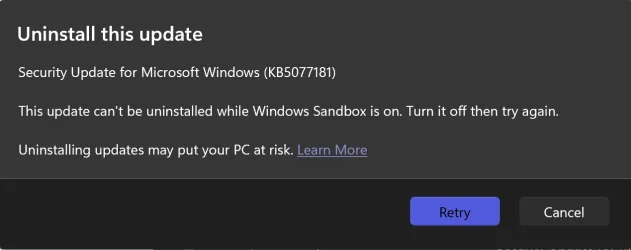
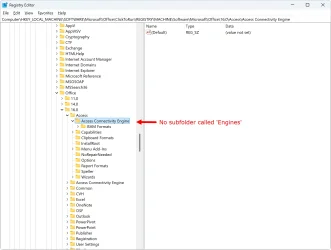
This sounds like the most likely cause because the problem started the day following the install of this update. Unfortunately, I am unable to uninstall it because Windows says I need to turn off Windows Sandbox first, however following the instructions at Turn sandbox mode on or off to disable macros - Microsoft Support, there is no such folder as Engines in regedit.

KB5077181_uninstall_fail.webp

regedit.webp

I have Macrium Reflect installed. It has an up to date rescue media flash drive. Would that allow me to access Win RE to uninstall this update?
 

My Computer

System One

  • OS
    Windows 11
    Computer type
    Laptop
    Manufacturer/Model
    Alienware A51M R2
    CPU
    Intel(R) Core(TM) i9-10900K CPU @ 3.70GHz
    Memory
    32,0 GB
    Graphics Card(s)
    Nvidia GeForce RTX2080 Super
    Sound Card
    Realtek
    Screen Resolution
    4K
    Hard Drives
    2TB (2x 1TB PCle M.2 SSD) RAID 0 [Boot] + 2TB (2x 1TB
    PCle M.2 SSD) Non-Raid [Storage]
Try removing the second drive that can't be read. I have seen bad drives cause boot problems in the past. See if it boots with just the system drive installed.
I regret, I am unable to find any drive connected to either the laptop or hubs that are not working.
A few months ago, I had an issue with disk management reporting a drive that needed reinitialising. It turned out to be a phantom drive that was not even connected but the applicable registry key was still present. Maybe the Hynix Drive Manager app has latched onto another outdated reg key?
 

My Computer

System One

  • OS
    Windows 11
    Computer type
    Laptop
    Manufacturer/Model
    Alienware A51M R2
    CPU
    Intel(R) Core(TM) i9-10900K CPU @ 3.70GHz
    Memory
    32,0 GB
    Graphics Card(s)
    Nvidia GeForce RTX2080 Super
    Sound Card
    Realtek
    Screen Resolution
    4K
    Hard Drives
    2TB (2x 1TB PCle M.2 SSD) RAID 0 [Boot] + 2TB (2x 1TB
    PCle M.2 SSD) Non-Raid [Storage]
1) If the computer cannot boot to run V2 in safe mode then post images or share links for the Dell preboot diagnostics so that the tests performed with results are displayed.


2) Find flash drives that can be formatted and a working Windows computer.


3) Run the Sea Tools bootable Long generic test > take a picture > post a share link


4) Run Memtest86+ for 8 or more passes > take pictures > post images or share links

Memtest86+ | The Open-Source Memory Testing Tool

Just 1 error is a test fail and testing can be aborted.

The more the passes the better the testing conditions.

It sometimes takes passes into the 20's to detect malfunctioning RAM.

The RAM can be tested all at one time or one at a time in the same DIMM.

Memtest86+ | The Open-Source Memory Testing Tool

MemTest86+ - Test RAM
Hi,
Sorry it has taken me so long to reply. I had to take my car to the garage for a repair this morning and have only just returned. Anyway, I checked out the MemTest86+ site and decided not to use it for the moment because I feel the problem is most likely linked to the rogue Windows security update KB5077181. I need to get that off my machine to see if it solves the problem before doing anything else.

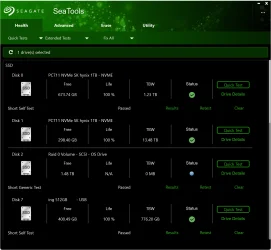
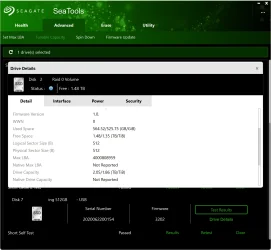
I did however install the Seagate utility you suggested. It gave all drives a pass including drive 2, but the detailed result for that leaves me with questions. Perhaps you can make sense of this?

seagate.webp

seagate2.webp
 

My Computer

System One

  • OS
    Windows 11
    Computer type
    Laptop
    Manufacturer/Model
    Alienware A51M R2
    CPU
    Intel(R) Core(TM) i9-10900K CPU @ 3.70GHz
    Memory
    32,0 GB
    Graphics Card(s)
    Nvidia GeForce RTX2080 Super
    Sound Card
    Realtek
    Screen Resolution
    4K
    Hard Drives
    2TB (2x 1TB PCle M.2 SSD) RAID 0 [Boot] + 2TB (2x 1TB
    PCle M.2 SSD) Non-Raid [Storage]
1) Please turn off windows fast startup:
I finally managed to uninstall the KB5077181 update and have paused updates for 2 weeks. The boot loop issue only happens when the machine is cold, so I will have to wait until tomorrow morning to see if that did the trick. Should I now re-enable fast startup?
 

My Computer

System One

  • OS
    Windows 11
    Computer type
    Laptop
    Manufacturer/Model
    Alienware A51M R2
    CPU
    Intel(R) Core(TM) i9-10900K CPU @ 3.70GHz
    Memory
    32,0 GB
    Graphics Card(s)
    Nvidia GeForce RTX2080 Super
    Sound Card
    Realtek
    Screen Resolution
    4K
    Hard Drives
    2TB (2x 1TB PCle M.2 SSD) RAID 0 [Boot] + 2TB (2x 1TB
    PCle M.2 SSD) Non-Raid [Storage]
I would not. Do only one thing at a time.
 

My Computers

System One System Two

  • OS
    Windows 11 Pro 25H2 26200.8655
    Computer type
    PC/Desktop
    Manufacturer/Model
    Dell Optiplex 7080
    CPU
    i9-10900 10 core 20 threads
    Motherboard
    DELL 0J37VM
    Memory
    32 gb
    Graphics Card(s)
    none-Intel UHD Graphics 630
    Sound Card
    Integrated Realtek
    Monitor(s) Displays
    Benq 27
    Screen Resolution
    2560x1440
    Hard Drives
    2x1tb Solidigm m.2 nvme /External drives 512gb Samsung m.2 sata+2tb Kingston m2.nvme
    PSU
    500w
    Case
    MT
    Cooling
    Dell Premium
    Keyboard
    Logitech wired
    Mouse
    Logitech wireless
    Internet Speed
    so slow I'm too embarrassed to tell
    Browser
    #1 Edge #2 Firefox
    Antivirus
    Defender+MWB Premium
  • Operating System
    Windows 11 Pro 24H2 26200.8457
    Computer type
    PC/Desktop
    Manufacturer/Model
    Beelink Mini PC SER5
    CPU
    AMD Ryzen 7 6800U
    Memory
    32 gb
    Graphics card(s)
    integrated
    Sound Card
    integrated
    Monitor(s) Displays
    Benq 27
    Screen Resolution
    2560x1440
    Hard Drives
    1TB Crucial nvme
    Keyboard
    Logitech wired
    Mouse
    Logitech wireless
    Internet Speed
    still too embarrassed to tell
    Browser
    Firefox
    Antivirus
    Defender
    Other Info
    System 3 is non compliant Dell 9020 i7-4770/24gb ram Win11 PRO 26200.8457
Over 4 hours work went straight down the toilet. Despite having paused updates for 2 weeks, when I shut down last night Windows reinstalled this rogue update. I really have no idea what to do now, because you can't stop it from installing an update. Will Microsoft even attempt to fix the problem they caused? I'm not optimistic on that score seeing as they deny it is even happening.
 

My Computer

System One

  • OS
    Windows 11
    Computer type
    Laptop
    Manufacturer/Model
    Alienware A51M R2
    CPU
    Intel(R) Core(TM) i9-10900K CPU @ 3.70GHz
    Memory
    32,0 GB
    Graphics Card(s)
    Nvidia GeForce RTX2080 Super
    Sound Card
    Realtek
    Screen Resolution
    4K
    Hard Drives
    2TB (2x 1TB PCle M.2 SSD) RAID 0 [Boot] + 2TB (2x 1TB
    PCle M.2 SSD) Non-Raid [Storage]

My Computer

System One

  • OS
    W11
    Computer type
    PC/Desktop
    Manufacturer/Model
    2 HP Desktops, 1 Dell Desktop, 2 Dell XPS Laptops, 1 HP Laptop
    Keyboard
    Logitech
    Mouse
    Logitech MX Master 4 & 3
    Internet Speed
    500 mps
    Browser
    Firefox
    Antivirus
    Bitdefender
Back
Top Bottom