- Local time
- 4:52 AM
- Posts
- 296
- OS
- Window 11 v24H2 Build 26100.2033
Hello everyone,
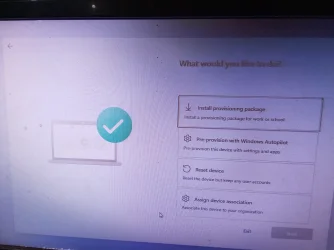
During installation of Windows 11Home v26H2 os build 26300.9457 on internal ssd partition 2, I pressesd Windows logo key on keyboard(mechanical) 5 times. The image of the screen appeared is attached below.
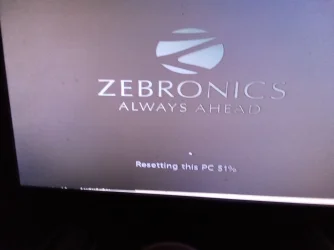
Just for curiosity, I clicked reset this pc option.
My desktop pc has 128 gb ssd(internal) with two partitions, Pro on first and has installed Home on second(55gb) partition.
Home edition yet to complete. Waiting for result.
It is resetting this pc..
During installation of Windows 11Home v26H2 os build 26300.9457 on internal ssd partition 2, I pressesd Windows logo key on keyboard(mechanical) 5 times. The image of the screen appeared is attached below.
Just for curiosity, I clicked reset this pc option.
My desktop pc has 128 gb ssd(internal) with two partitions, Pro on first and has installed Home on second(55gb) partition.
Home edition yet to complete. Waiting for result.
It is resetting this pc..
Attachments

My Computer
At a glance
Window 11 v24H2 Build 26100.2033Intel(R) Core(TM) i3-2100 CPU @ 3.10GHz 3.10 GHz4.00 GB (3.89 GB usable)Onboard
- OS
- Window 11 v24H2 Build 26100.2033
- Computer type
- PC/Desktop
- Manufacturer/Model
- ASSEMMBLED
- CPU
- Intel(R) Core(TM) i3-2100 CPU @ 3.10GHz 3.10 GHz
- Motherboard
- ZEBRONICS
- Memory
- 4.00 GB (3.89 GB usable)
- Graphics Card(s)
- Onboard
- Sound Card
- Onboard
- Monitor(s) Displays
- LG
- Screen Resolution
- 1366x768
- Hard Drives
- Toshiba HDD 1 TB
- Keyboard
- Mechanical
- Mouse
- Mechanical
- Internet Speed
- 700 kb/s
- Browser
- Microsoft EDGE, CHROME
- Antivirus
- Microsoft Defender