

LarsK1
Member
- Local time
- 5:09 AM
- Posts
- 1
- OS
- Windows 11
Hey there,
I have bought an Xerox C600DN a few days ago. I installed the driver a first time, but missed to give the printer the correct ip. THerefore I uninstalled and reinstalled the printer (incluive driver) for the new ip. Since then I have a problem - when opening the printer settings I now get the Windows view:
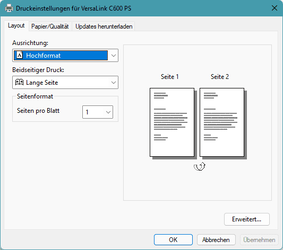 . Instead I should see
  .
.
I already tried uninstalling everything and also followed this guide (Remove or Uninstall a Printer Driver from Windows 10) without any luck.
Do you have any idea, how I may get my "old" driver back?
Thanks for your help in advance,
Lars
I have bought an Xerox C600DN a few days ago. I installed the driver a first time, but missed to give the printer the correct ip. THerefore I uninstalled and reinstalled the printer (incluive driver) for the new ip. Since then I have a problem - when opening the printer settings I now get the Windows view:
. Instead I should see .I already tried uninstalling everything and also followed this guide (Remove or Uninstall a Printer Driver from Windows 10) without any luck.
Do you have any idea, how I may get my "old" driver back?
Thanks for your help in advance,
Lars
- Windows Build/Version
- 22000.282
My Computer
At a glance
Windows 11Intel Core i9-10900K32Gb DDR4TUF-GTX1650-4G-GAMING
- OS
- Windows 11
- Computer type
- PC/Desktop
- CPU
- Intel Core i9-10900K
- Motherboard
- Asus TUF gaming z490-plus wifi
- Memory
- 32Gb DDR4
- Graphics Card(s)
- TUF-GTX1650-4G-GAMING
- PSU
- BeQuiet 700W






