Solved Printer problems


Guys, I seem to have been premature with my praise. Just tried to print a page from LibreOffice, did not print, ping did not go through.
Looks like I'm back to square one, sorry. Ping does not seem to get past the router.
 
Last edited:

My Computer

System One

  • OS
    win 11
    Computer type
    PC/Desktop
    Manufacturer/Model
    Home build
    CPU
    Ryzen 5600G
    Motherboard
    B450 Tomahawk Max
    Memory
    32 GB DDR4
    Graphics Card(s)
    on board
    Monitor(s) Displays
    LG 27MR400
    Screen Resolution
    1280 x 1024
    Hard Drives
    SSD
    Internet Speed
    3MB/s
    Browser
    Opera
    Antivirus
    Windows
I've ordered new ethernet cables, just in case. This printer drives me nuts and the wife is breathing down my neck, her laptop stopped printing again.
 

My Computer

System One

  • OS
    win 11
    Computer type
    PC/Desktop
    Manufacturer/Model
    Home build
    CPU
    Ryzen 5600G
    Motherboard
    B450 Tomahawk Max
    Memory
    32 GB DDR4
    Graphics Card(s)
    on board
    Monitor(s) Displays
    LG 27MR400
    Screen Resolution
    1280 x 1024
    Hard Drives
    SSD
    Internet Speed
    3MB/s
    Browser
    Opera
    Antivirus
    Windows
Just noticed a strange thing: when I ping 192.168.1.7 (printer) the return says
Pinging 192.168.1.7 with 32 bytes of data:
Reply from 192.168.1.4: Destination host unreachable.
The last digit is erroneous, right?
 

My Computer

System One

  • OS
    win 11
    Computer type
    PC/Desktop
    Manufacturer/Model
    Home build
    CPU
    Ryzen 5600G
    Motherboard
    B450 Tomahawk Max
    Memory
    32 GB DDR4
    Graphics Card(s)
    on board
    Monitor(s) Displays
    LG 27MR400
    Screen Resolution
    1280 x 1024
    Hard Drives
    SSD
    Internet Speed
    3MB/s
    Browser
    Opera
    Antivirus
    Windows
Just noticed a strange thing: when I ping 192.168.1.7 (printer) the return says
Pinging 192.168.1.7 with 32 bytes of data:
Reply from 192.168.1.4: Destination host unreachable.
The last digit is erroneous, right?


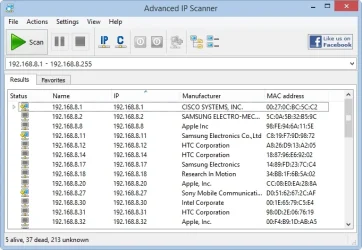
use this (can run as portable). scan your network - ensure its in the correct range - and see what is returned... .4 or .7

1781213570084.webp
 

My Computer

System One

  • OS
    Windows 11 Pro
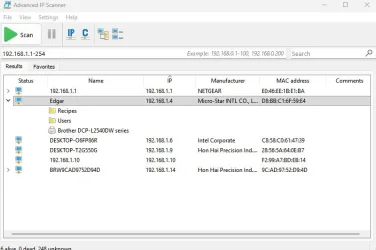
OK, ran the IP scanner, here's the result:
Network.webp
The printer is listed under the mobo, it doesn't even show a separate IP address. I don't understand it.
 

My Computer

System One

  • OS
    win 11
    Computer type
    PC/Desktop
    Manufacturer/Model
    Home build
    CPU
    Ryzen 5600G
    Motherboard
    B450 Tomahawk Max
    Memory
    32 GB DDR4
    Graphics Card(s)
    on board
    Monitor(s) Displays
    LG 27MR400
    Screen Resolution
    1280 x 1024
    Hard Drives
    SSD
    Internet Speed
    3MB/s
    Browser
    Opera
    Antivirus
    Windows
It looks like it but I'm not really sure, how can I find out? The reason why I have the printer under 192.168.1.7 is because it is on the network configuration page that the printer produced.
 

My Computer

System One

  • OS
    win 11
    Computer type
    PC/Desktop
    Manufacturer/Model
    Home build
    CPU
    Ryzen 5600G
    Motherboard
    B450 Tomahawk Max
    Memory
    32 GB DDR4
    Graphics Card(s)
    on board
    Monitor(s) Displays
    LG 27MR400
    Screen Resolution
    1280 x 1024
    Hard Drives
    SSD
    Internet Speed
    3MB/s
    Browser
    Opera
    Antivirus
    Windows
It looks like it but I'm not really sure, how can I find out? The reason why I have the printer under 192.168.1.7 is because it is on the network configuration page that the printer produced.
I think there is still some confusion about how the printer is connected. I am not sure but seeing two different IP addresses may indicate that one is for Ethernet and the other for WiFi. You should be able to verify that in the printer configuration menu. You need to stick with one connection and stick with that.

In your case then I would stick to Ethernet since it is already connected that way. I would be less confusing if you turned off Wi-Fi on the printer until you sort things out. Note that if your printer is connected with Ethernet then any computer on your network can print to it. That is true even for a laptop that is connected with Wi-Fi.

Once you have the Ethernet connection only then run the Brother printer setup program on each computer. During the setup it should find the printer. Make sure to select it. Doing this on each computer will give full functionality using the printer.
 

My Computers

System One System Two

  • OS
    Windows 11 Pro 25H2 (26200.6901)
    Computer type
    Laptop
    Manufacturer/Model
    ASUS TUF Gaming A15 (2022)
    CPU
    AMD Ryzen 7 6800H with Radeon 680M GPU (486MB RAM)
    Memory
    Crucial DDR5-4800 (2400MHz) 32GB (2 x 16GB)
    Graphics Card(s)
    NVIDIA RTX 3060 Laptop (6GB RAM)
    Sound Card
    n/a
    Monitor(s) Displays
    15.6-inch
    Screen Resolution
    1920x1080 300Hz
    Hard Drives
    2 x Samsung 990 Evo Plus (2TB M.2 NVME SSD)
    PSU
    n/a
    Mouse
    Wireless Mouse M510
    Internet Speed
    2100Mbps/300Mbps
    Browser
    Firefox
    Antivirus
    Malwarebytes
  • Operating System
    Windows 11 Pro 25H2 (26200.8246)
    Computer type
    PC/Desktop
    Manufacturer/Model
    Custom build
    CPU
    AMD Ryzen 7 5700X3D
    Motherboard
    ASUS ROG Strix B550-F Gaming WiFi II
    Memory
    G.SKILL Flare X 32GB (2x16GB) DDR4
    Graphics card(s)
    ASUS ROG-STRIX-RTX3060TI-08G-V2-GAMING (RTX 3060-Ti, 8GB RAM)
    Monitor(s) Displays
    Samsung G50D IPS 27"
    Screen Resolution
    1440p/180Hz
    Hard Drives
    SAMSUNG 990 EVO Plus (2TB] M.2 NVME SSD
    SAMSUNG 990 EVO Plus (4TB) M.2 NVME SSD
    PSU
    Corsair RM750x (750 watts)
    Case
    Cooler Master MasterCase 5
    Cooling
    Scythe Mugen 6
    Keyboard
    Logitech K520 (MK540 keyboard/mouse combo)
    Mouse
    Logitech M310 (MK540 keyboard/mouse combo)
    Internet Speed
    2100 Mbps down / 300 Mbps up
    Browser
    Firefox, Edge, Chrome
    Antivirus
    Malwarebytes (Premium)
    Other Info
    ASUS Blu-ray Burner BW-16D1HT (SATA) || Western Digital Easystore 20TB USB 3.0 external hard drive used with Acronis True Image 2025 backup software || HP OfficeJet Pro 6975 Printer/Scanner
MisterEd: Are you saying my wife's laptop (via Wi-Fi) could print with Wi-Fi on the printer turned off?
I did not know that.
 

My Computer

System One

  • OS
    win 11
    Computer type
    PC/Desktop
    Manufacturer/Model
    Home build
    CPU
    Ryzen 5600G
    Motherboard
    B450 Tomahawk Max
    Memory
    32 GB DDR4
    Graphics Card(s)
    on board
    Monitor(s) Displays
    LG 27MR400
    Screen Resolution
    1280 x 1024
    Hard Drives
    SSD
    Internet Speed
    3MB/s
    Browser
    Opera
    Antivirus
    Windows
Correct. As long as they are all on the same LAN (or VLAN), you can connect to it (granted to explicit deny rules are in place). I concur with disconnecting the Ethernet cable from the printer, connecting it to your WiFi, deleting it from the PCs and then re-add it via Printer wizard as a network printer.
 

My Computer

System One

  • OS
    Windows 11 Pro
OK, I have turned off Wi-Fi on the printer, removed the printer from my PC, reinstalled it, installed the driver, no test page. Sorry for apparently a bit dense guys, my bad.
 

My Computer

System One

  • OS
    win 11
    Computer type
    PC/Desktop
    Manufacturer/Model
    Home build
    CPU
    Ryzen 5600G
    Motherboard
    B450 Tomahawk Max
    Memory
    32 GB DDR4
    Graphics Card(s)
    on board
    Monitor(s) Displays
    LG 27MR400
    Screen Resolution
    1280 x 1024
    Hard Drives
    SSD
    Internet Speed
    3MB/s
    Browser
    Opera
    Antivirus
    Windows
OK, I have turned off Wi-Fi on the printer, removed the printer from my PC, reinstalled it, installed the driver, no test page. Sorry for apparently a bit dense guys, my bad.
just to narrow some things down for troubleshooting... what if you do that vice-versa and connect via wifi without hardline? same result?
 

My Computer

System One

  • OS
    Windows 11 Pro
My PC has no wifi card installed, can't connect via wifi.
Btw, is there any way to connect the MAC address to the actual hardware?
 

My Computer

System One

  • OS
    win 11
    Computer type
    PC/Desktop
    Manufacturer/Model
    Home build
    CPU
    Ryzen 5600G
    Motherboard
    B450 Tomahawk Max
    Memory
    32 GB DDR4
    Graphics Card(s)
    on board
    Monitor(s) Displays
    LG 27MR400
    Screen Resolution
    1280 x 1024
    Hard Drives
    SSD
    Internet Speed
    3MB/s
    Browser
    Opera
    Antivirus
    Windows
your pc does not need wifi. if the printer is on your wifi and your pc is hardlined to the same LAN, they can connect. try that.
 

My Computer

System One

  • OS
    Windows 11 Pro
Guys, you know what really confuses me: the many IP addresses of that darn printer. The printer's network configuration sheet show 192.168.1.7, the IP scanner shows .4 at the end. The printer properties in win 11 show the printer on 2 ports with 2 other IP addresses. When I try to edit one of them to the .4 address it refuses because that printer is "in use". No wonder the the PC doesn't know what to do.
I'd like to erase all traces of that printer from my PC and start from scratch if that would be the solution.
 

My Computer

System One

  • OS
    win 11
    Computer type
    PC/Desktop
    Manufacturer/Model
    Home build
    CPU
    Ryzen 5600G
    Motherboard
    B450 Tomahawk Max
    Memory
    32 GB DDR4
    Graphics Card(s)
    on board
    Monitor(s) Displays
    LG 27MR400
    Screen Resolution
    1280 x 1024
    Hard Drives
    SSD
    Internet Speed
    3MB/s
    Browser
    Opera
    Antivirus
    Windows
Like I said if the printer is connect by wired (Ethernet) then turn off the printers Wi-Fi to avoid confusion. Once connected it doesn't make any difference what its IP address is. If you are curious then the setup menu on the printer should show you what it is.

You can connect the printer using wired (Ethernet) or wireless (Wi-Fi). If it already connected with wired then leave it that way. Once it is connected then you can print to it from any computer. As long as a computer is connected to your network it doesn't make any difference how it is connected.

For example, over the years I have connected the printer by wired or wireless. It didn't make any difference to the computers on the network. I could print from the desktop computers with a wired connection the same as the laptop computers with a wireless connection. What mattered was they were on the same network.
 

My Computers

System One System Two

  • OS
    Windows 11 Pro 25H2 (26200.6901)
    Computer type
    Laptop
    Manufacturer/Model
    ASUS TUF Gaming A15 (2022)
    CPU
    AMD Ryzen 7 6800H with Radeon 680M GPU (486MB RAM)
    Memory
    Crucial DDR5-4800 (2400MHz) 32GB (2 x 16GB)
    Graphics Card(s)
    NVIDIA RTX 3060 Laptop (6GB RAM)
    Sound Card
    n/a
    Monitor(s) Displays
    15.6-inch
    Screen Resolution
    1920x1080 300Hz
    Hard Drives
    2 x Samsung 990 Evo Plus (2TB M.2 NVME SSD)
    PSU
    n/a
    Mouse
    Wireless Mouse M510
    Internet Speed
    2100Mbps/300Mbps
    Browser
    Firefox
    Antivirus
    Malwarebytes
  • Operating System
    Windows 11 Pro 25H2 (26200.8246)
    Computer type
    PC/Desktop
    Manufacturer/Model
    Custom build
    CPU
    AMD Ryzen 7 5700X3D
    Motherboard
    ASUS ROG Strix B550-F Gaming WiFi II
    Memory
    G.SKILL Flare X 32GB (2x16GB) DDR4
    Graphics card(s)
    ASUS ROG-STRIX-RTX3060TI-08G-V2-GAMING (RTX 3060-Ti, 8GB RAM)
    Monitor(s) Displays
    Samsung G50D IPS 27"
    Screen Resolution
    1440p/180Hz
    Hard Drives
    SAMSUNG 990 EVO Plus (2TB] M.2 NVME SSD
    SAMSUNG 990 EVO Plus (4TB) M.2 NVME SSD
    PSU
    Corsair RM750x (750 watts)
    Case
    Cooler Master MasterCase 5
    Cooling
    Scythe Mugen 6
    Keyboard
    Logitech K520 (MK540 keyboard/mouse combo)
    Mouse
    Logitech M310 (MK540 keyboard/mouse combo)
    Internet Speed
    2100 Mbps down / 300 Mbps up
    Browser
    Firefox, Edge, Chrome
    Antivirus
    Malwarebytes (Premium)
    Other Info
    ASUS Blu-ray Burner BW-16D1HT (SATA) || Western Digital Easystore 20TB USB 3.0 external hard drive used with Acronis True Image 2025 backup software || HP OfficeJet Pro 6975 Printer/Scanner
Like I said if the printer is connect by wired (Ethernet) then turn off the printers Wi-Fi to avoid confusion. Once connected it doesn't make any difference what its IP address is. If you are curious then the setup menu on the printer should show you what it is.

You can connect the printer using wired (Ethernet) or wireless (Wi-Fi). If it already connected with wired then leave it that way. Once it is connected then you can print to it from any computer. As long as a computer is connected to your network it doesn't make any difference how it is connected.

For example, over the years I have connected the printer by wired or wireless. It didn't make any difference to the computers on the network. I could print from the desktop computers with a wired connection the same as the laptop computers with a wireless connection. What mattered was they were on the same network.
It's how I have my ancient (2009) Canon MP990 connected. It's plugged into the router. Any device that can access the router whether wired or wireless can use it.
 

My Computer

System One

  • OS
    Windows 11 25H2
    Computer type
    PC/Desktop
    Manufacturer/Model
    EVGA home brew
    CPU
    Broadwell-e 6850K 4.5ghz @1.36v
    Motherboard
    EVGA X99 FTW K
    Memory
    32GB Corsair LPM 3600 C16
    Graphics Card(s)
    EVGA RTX 3080Ti FTW
    Sound Card
    Asus Centurion true 7.1 headset. (5 speakers in each earpeice)
    Monitor(s) Displays
    LG C4 55"
    Screen Resolution
    4K 144hz
    Hard Drives
    Various models of SSDs ~10TB No HDDs installed.
    PSU
    be quiet! BN516 Straight Power 12-1000w 80 Plus Platinum
    Case
    Corsair 780T modified to dual 200mm intake fans
    Cooling
    Corsair H110i
    Keyboard
    Corsair K95 Platinum
    Mouse
    Corsair M65 RGB Elite
    Internet Speed
    50Mbs
Back
Top Bottom