Solved Printer problems


Guys, I seem to have been premature with my praise. Just tried to print a page from LibreOffice, did not print, ping did not go through.
Looks like I'm back to square one, sorry. Ping does not seem to get past the router.
 
Last edited:

My Computer My Computer

At a glance

win 11Ryzen 5600G32 GB DDR4on board
OS
win 11
Computer type
PC/Desktop
Manufacturer/Model
Home build
CPU
Ryzen 5600G
Motherboard
B450 Tomahawk Max
Memory
32 GB DDR4
Graphics Card(s)
on board
Monitor(s) Displays
LG 27MR400
Screen Resolution
1280 x 1024
Hard Drives
SSD
Internet Speed
3MB/s
Browser
Opera
Antivirus
Windows
I've ordered new ethernet cables, just in case. This printer drives me nuts and the wife is breathing down my neck, her laptop stopped printing again.
 

My Computer My Computer

At a glance

win 11Ryzen 5600G32 GB DDR4on board
OS
win 11
Computer type
PC/Desktop
Manufacturer/Model
Home build
CPU
Ryzen 5600G
Motherboard
B450 Tomahawk Max
Memory
32 GB DDR4
Graphics Card(s)
on board
Monitor(s) Displays
LG 27MR400
Screen Resolution
1280 x 1024
Hard Drives
SSD
Internet Speed
3MB/s
Browser
Opera
Antivirus
Windows
Just noticed a strange thing: when I ping 192.168.1.7 (printer) the return says
Pinging 192.168.1.7 with 32 bytes of data:
Reply from 192.168.1.4: Destination host unreachable.
The last digit is erroneous, right?
 

My Computer My Computer

At a glance

win 11Ryzen 5600G32 GB DDR4on board
OS
win 11
Computer type
PC/Desktop
Manufacturer/Model
Home build
CPU
Ryzen 5600G
Motherboard
B450 Tomahawk Max
Memory
32 GB DDR4
Graphics Card(s)
on board
Monitor(s) Displays
LG 27MR400
Screen Resolution
1280 x 1024
Hard Drives
SSD
Internet Speed
3MB/s
Browser
Opera
Antivirus
Windows
Just noticed a strange thing: when I ping 192.168.1.7 (printer) the return says
Pinging 192.168.1.7 with 32 bytes of data:
Reply from 192.168.1.4: Destination host unreachable.
The last digit is erroneous, right?


use this (can run as portable). scan your network - ensure its in the correct range - and see what is returned... .4 or .7

1781213570084.webp
 

My Computer My Computer

At a glance

Windows 11 Pro
OS
Windows 11 Pro
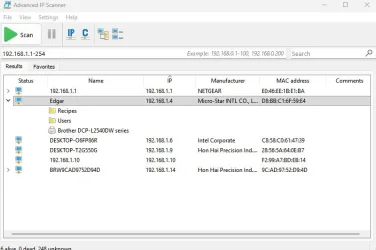
OK, ran the IP scanner, here's the result:
Network.webp
The printer is listed under the mobo, it doesn't even show a separate IP address. I don't understand it.
 

My Computer My Computer

At a glance

win 11Ryzen 5600G32 GB DDR4on board
OS
win 11
Computer type
PC/Desktop
Manufacturer/Model
Home build
CPU
Ryzen 5600G
Motherboard
B450 Tomahawk Max
Memory
32 GB DDR4
Graphics Card(s)
on board
Monitor(s) Displays
LG 27MR400
Screen Resolution
1280 x 1024
Hard Drives
SSD
Internet Speed
3MB/s
Browser
Opera
Antivirus
Windows
what is the brw9c... is that a printer too?
 

My Computer My Computer

At a glance

Windows 11 Pro
OS
Windows 11 Pro
It looks like it but I'm not really sure, how can I find out? The reason why I have the printer under 192.168.1.7 is because it is on the network configuration page that the printer produced.
 

My Computer My Computer

At a glance

win 11Ryzen 5600G32 GB DDR4on board
OS
win 11
Computer type
PC/Desktop
Manufacturer/Model
Home build
CPU
Ryzen 5600G
Motherboard
B450 Tomahawk Max
Memory
32 GB DDR4
Graphics Card(s)
on board
Monitor(s) Displays
LG 27MR400
Screen Resolution
1280 x 1024
Hard Drives
SSD
Internet Speed
3MB/s
Browser
Opera
Antivirus
Windows
It looks like it but I'm not really sure, how can I find out? The reason why I have the printer under 192.168.1.7 is because it is on the network configuration page that the printer produced.
I think there is still some confusion about how the printer is connected. I am not sure but seeing two different IP addresses may indicate that one is for Ethernet and the other for WiFi. You should be able to verify that in the printer configuration menu. You need to stick with one connection and stick with that.

In your case then I would stick to Ethernet since it is already connected that way. I would be less confusing if you turned off Wi-Fi on the printer until you sort things out. Note that if your printer is connected with Ethernet then any computer on your network can print to it. That is true even for a laptop that is connected with Wi-Fi.

Once you have the Ethernet connection only then run the Brother printer setup program on each computer. During the setup it should find the printer. Make sure to select it. Doing this on each computer will give full functionality using the printer.
 

My Computers My Computers

  • At a glance

    Windows 11 Pro 25H2 (26200.6901)AMD Ryzen 7 6800H with Radeon 680M GPU (486MB...Crucial DDR5-4800 (2400MHz) 32GB (2 x 16GB)NVIDIA RTX 3060 Laptop (6GB RAM)
    OS
    Windows 11 Pro 25H2 (26200.6901)
    Computer type
    Laptop
    Manufacturer/Model
    ASUS TUF Gaming A15 (2022)
    CPU
    AMD Ryzen 7 6800H with Radeon 680M GPU (486MB RAM)
    Memory
    Crucial DDR5-4800 (2400MHz) 32GB (2 x 16GB)
    Graphics Card(s)
    NVIDIA RTX 3060 Laptop (6GB RAM)
    Sound Card
    n/a
    Monitor(s) Displays
    15.6-inch
    Screen Resolution
    1920x1080 300Hz
    Hard Drives
    2 x Samsung 990 Evo Plus (2TB M.2 NVME SSD)
    PSU
    n/a
    Mouse
    Wireless Mouse M510
    Internet Speed
    2100Mbps/300Mbps
    Browser
    Firefox
    Antivirus
    Malwarebytes
  • At a glance

    Windows 11 Pro 25H2 (26200.8246)AMD Ryzen 7 5700X3DG.SKILL Flare X 32GB (2x16GB) DDR4ASUS ROG-STRIX-RTX3060TI-08G-V2-GAMING (RTX 3...
    Operating System
    Windows 11 Pro 25H2 (26200.8246)
    Computer type
    PC/Desktop
    Manufacturer/Model
    Custom build
    CPU
    AMD Ryzen 7 5700X3D
    Motherboard
    ASUS ROG Strix B550-F Gaming WiFi II
    Memory
    G.SKILL Flare X 32GB (2x16GB) DDR4
    Graphics card(s)
    ASUS ROG-STRIX-RTX3060TI-08G-V2-GAMING (RTX 3060-Ti, 8GB RAM)
    Monitor(s) Displays
    Samsung G50D IPS 27"
    Screen Resolution
    1440p/180Hz
    Hard Drives
    SAMSUNG 990 EVO Plus (2TB] M.2 NVME SSD
    SAMSUNG 990 EVO Plus (4TB) M.2 NVME SSD
    PSU
    Corsair RM750x (750 watts)
    Case
    Cooler Master MasterCase 5
    Cooling
    Scythe Mugen 6
    Keyboard
    Logitech K520 (MK540 keyboard/mouse combo)
    Mouse
    Logitech M310 (MK540 keyboard/mouse combo)
    Internet Speed
    2100 Mbps down / 300 Mbps up
    Browser
    Firefox, Edge, Chrome
    Antivirus
    Malwarebytes (Premium)
    Other Info
    ASUS Blu-ray Burner BW-16D1HT (SATA) || Western Digital Easystore 20TB USB 3.0 external hard drive used with Acronis True Image 2025 backup software || HP OfficeJet Pro 6975 Printer/Scanner
MisterEd: Are you saying my wife's laptop (via Wi-Fi) could print with Wi-Fi on the printer turned off?
I did not know that.
 

My Computer My Computer

At a glance

win 11Ryzen 5600G32 GB DDR4on board
OS
win 11
Computer type
PC/Desktop
Manufacturer/Model
Home build
CPU
Ryzen 5600G
Motherboard
B450 Tomahawk Max
Memory
32 GB DDR4
Graphics Card(s)
on board
Monitor(s) Displays
LG 27MR400
Screen Resolution
1280 x 1024
Hard Drives
SSD
Internet Speed
3MB/s
Browser
Opera
Antivirus
Windows
Correct. As long as they are all on the same LAN (or VLAN), you can connect to it (granted to explicit deny rules are in place). I concur with disconnecting the Ethernet cable from the printer, connecting it to your WiFi, deleting it from the PCs and then re-add it via Printer wizard as a network printer.
 

My Computer My Computer

At a glance

Windows 11 Pro
OS
Windows 11 Pro
OK, I have turned off Wi-Fi on the printer, removed the printer from my PC, reinstalled it, installed the driver, no test page. Sorry for apparently a bit dense guys, my bad.
 

My Computer My Computer

At a glance

win 11Ryzen 5600G32 GB DDR4on board
OS
win 11
Computer type
PC/Desktop
Manufacturer/Model
Home build
CPU
Ryzen 5600G
Motherboard
B450 Tomahawk Max
Memory
32 GB DDR4
Graphics Card(s)
on board
Monitor(s) Displays
LG 27MR400
Screen Resolution
1280 x 1024
Hard Drives
SSD
Internet Speed
3MB/s
Browser
Opera
Antivirus
Windows
OK, I have turned off Wi-Fi on the printer, removed the printer from my PC, reinstalled it, installed the driver, no test page. Sorry for apparently a bit dense guys, my bad.
just to narrow some things down for troubleshooting... what if you do that vice-versa and connect via wifi without hardline? same result?
 

My Computer My Computer

At a glance

Windows 11 Pro
OS
Windows 11 Pro
My PC has no wifi card installed, can't connect via wifi.
Btw, is there any way to connect the MAC address to the actual hardware?
 

My Computer My Computer

At a glance

win 11Ryzen 5600G32 GB DDR4on board
OS
win 11
Computer type
PC/Desktop
Manufacturer/Model
Home build
CPU
Ryzen 5600G
Motherboard
B450 Tomahawk Max
Memory
32 GB DDR4
Graphics Card(s)
on board
Monitor(s) Displays
LG 27MR400
Screen Resolution
1280 x 1024
Hard Drives
SSD
Internet Speed
3MB/s
Browser
Opera
Antivirus
Windows
your pc does not need wifi. if the printer is on your wifi and your pc is hardlined to the same LAN, they can connect. try that.
 

My Computer My Computer

At a glance

Windows 11 Pro
OS
Windows 11 Pro
Guys, you know what really confuses me: the many IP addresses of that darn printer. The printer's network configuration sheet show 192.168.1.7, the IP scanner shows .4 at the end. The printer properties in win 11 show the printer on 2 ports with 2 other IP addresses. When I try to edit one of them to the .4 address it refuses because that printer is "in use". No wonder the the PC doesn't know what to do.
I'd like to erase all traces of that printer from my PC and start from scratch if that would be the solution.
 

My Computer My Computer

At a glance

win 11Ryzen 5600G32 GB DDR4on board
OS
win 11
Computer type
PC/Desktop
Manufacturer/Model
Home build
CPU
Ryzen 5600G
Motherboard
B450 Tomahawk Max
Memory
32 GB DDR4
Graphics Card(s)
on board
Monitor(s) Displays
LG 27MR400
Screen Resolution
1280 x 1024
Hard Drives
SSD
Internet Speed
3MB/s
Browser
Opera
Antivirus
Windows
Like I said if the printer is connect by wired (Ethernet) then turn off the printers Wi-Fi to avoid confusion. Once connected it doesn't make any difference what its IP address is. If you are curious then the setup menu on the printer should show you what it is.

You can connect the printer using wired (Ethernet) or wireless (Wi-Fi). If it already connected with wired then leave it that way. Once it is connected then you can print to it from any computer. As long as a computer is connected to your network it doesn't make any difference how it is connected.

For example, over the years I have connected the printer by wired or wireless. It didn't make any difference to the computers on the network. I could print from the desktop computers with a wired connection the same as the laptop computers with a wireless connection. What mattered was they were on the same network.
 

My Computers My Computers

  • At a glance

    Windows 11 Pro 25H2 (26200.6901)AMD Ryzen 7 6800H with Radeon 680M GPU (486MB...Crucial DDR5-4800 (2400MHz) 32GB (2 x 16GB)NVIDIA RTX 3060 Laptop (6GB RAM)
    OS
    Windows 11 Pro 25H2 (26200.6901)
    Computer type
    Laptop
    Manufacturer/Model
    ASUS TUF Gaming A15 (2022)
    CPU
    AMD Ryzen 7 6800H with Radeon 680M GPU (486MB RAM)
    Memory
    Crucial DDR5-4800 (2400MHz) 32GB (2 x 16GB)
    Graphics Card(s)
    NVIDIA RTX 3060 Laptop (6GB RAM)
    Sound Card
    n/a
    Monitor(s) Displays
    15.6-inch
    Screen Resolution
    1920x1080 300Hz
    Hard Drives
    2 x Samsung 990 Evo Plus (2TB M.2 NVME SSD)
    PSU
    n/a
    Mouse
    Wireless Mouse M510
    Internet Speed
    2100Mbps/300Mbps
    Browser
    Firefox
    Antivirus
    Malwarebytes
  • At a glance

    Windows 11 Pro 25H2 (26200.8246)AMD Ryzen 7 5700X3DG.SKILL Flare X 32GB (2x16GB) DDR4ASUS ROG-STRIX-RTX3060TI-08G-V2-GAMING (RTX 3...
    Operating System
    Windows 11 Pro 25H2 (26200.8246)
    Computer type
    PC/Desktop
    Manufacturer/Model
    Custom build
    CPU
    AMD Ryzen 7 5700X3D
    Motherboard
    ASUS ROG Strix B550-F Gaming WiFi II
    Memory
    G.SKILL Flare X 32GB (2x16GB) DDR4
    Graphics card(s)
    ASUS ROG-STRIX-RTX3060TI-08G-V2-GAMING (RTX 3060-Ti, 8GB RAM)
    Monitor(s) Displays
    Samsung G50D IPS 27"
    Screen Resolution
    1440p/180Hz
    Hard Drives
    SAMSUNG 990 EVO Plus (2TB] M.2 NVME SSD
    SAMSUNG 990 EVO Plus (4TB) M.2 NVME SSD
    PSU
    Corsair RM750x (750 watts)
    Case
    Cooler Master MasterCase 5
    Cooling
    Scythe Mugen 6
    Keyboard
    Logitech K520 (MK540 keyboard/mouse combo)
    Mouse
    Logitech M310 (MK540 keyboard/mouse combo)
    Internet Speed
    2100 Mbps down / 300 Mbps up
    Browser
    Firefox, Edge, Chrome
    Antivirus
    Malwarebytes (Premium)
    Other Info
    ASUS Blu-ray Burner BW-16D1HT (SATA) || Western Digital Easystore 20TB USB 3.0 external hard drive used with Acronis True Image 2025 backup software || HP OfficeJet Pro 6975 Printer/Scanner
Like I said if the printer is connect by wired (Ethernet) then turn off the printers Wi-Fi to avoid confusion. Once connected it doesn't make any difference what its IP address is. If you are curious then the setup menu on the printer should show you what it is.

You can connect the printer using wired (Ethernet) or wireless (Wi-Fi). If it already connected with wired then leave it that way. Once it is connected then you can print to it from any computer. As long as a computer is connected to your network it doesn't make any difference how it is connected.

For example, over the years I have connected the printer by wired or wireless. It didn't make any difference to the computers on the network. I could print from the desktop computers with a wired connection the same as the laptop computers with a wireless connection. What mattered was they were on the same network.
It's how I have my ancient (2009) Canon MP990 connected. It's plugged into the router. Any device that can access the router whether wired or wireless can use it.
 

My Computer My Computer

At a glance

Windows 11 25H2Broadwell-e 6850K 4.5ghz @1.36v32GB Corsair LPM 3600 C16EVGA RTX 3080Ti FTW
OS
Windows 11 25H2
Computer type
PC/Desktop
Manufacturer/Model
EVGA home brew
CPU
Broadwell-e 6850K 4.5ghz @1.36v
Motherboard
EVGA X99 FTW K
Memory
32GB Corsair LPM 3600 C16
Graphics Card(s)
EVGA RTX 3080Ti FTW
Sound Card
Asus Centurion true 7.1 headset. (5 speakers in each earpeice)
Monitor(s) Displays
LG C4 55"
Screen Resolution
4K 144hz
Hard Drives
Various models of SSDs ~10TB No HDDs installed.
PSU
be quiet! BN516 Straight Power 12-1000w 80 Plus Platinum
Case
Corsair 780T modified to dual 200mm intake fans
Cooling
Corsair H110i
Keyboard
Corsair K95 Platinum
Mouse
Corsair M65 RGB Elite
Internet Speed
50Mbs
Yes, I understand all that. The printer IS connected via Ethernet and it still doesn't print!
 

My Computer My Computer

At a glance

win 11Ryzen 5600G32 GB DDR4on board
OS
win 11
Computer type
PC/Desktop
Manufacturer/Model
Home build
CPU
Ryzen 5600G
Motherboard
B450 Tomahawk Max
Memory
32 GB DDR4
Graphics Card(s)
on board
Monitor(s) Displays
LG 27MR400
Screen Resolution
1280 x 1024
Hard Drives
SSD
Internet Speed
3MB/s
Browser
Opera
Antivirus
Windows
Yes, I understand all that. The printer IS connected via Ethernet and it still doesn't print!
If your printer is STILL connect to the network via Wifi AND ethernet, you are going to have problems. As far as I can tell, you have never confirmed you have corrected that issue.
It might be because one person is telling you to disconnect ethernet and connect only with Wifi and the other is saying to turn off Wifi and connect only with ethernet on the printer. The preferred method is to disable wifi on the printer and connect the printer directly to the router via ethernet.
 

My Computer My Computer

At a glance

Windows 11 25H2Broadwell-e 6850K 4.5ghz @1.36v32GB Corsair LPM 3600 C16EVGA RTX 3080Ti FTW
OS
Windows 11 25H2
Computer type
PC/Desktop
Manufacturer/Model
EVGA home brew
CPU
Broadwell-e 6850K 4.5ghz @1.36v
Motherboard
EVGA X99 FTW K
Memory
32GB Corsair LPM 3600 C16
Graphics Card(s)
EVGA RTX 3080Ti FTW
Sound Card
Asus Centurion true 7.1 headset. (5 speakers in each earpeice)
Monitor(s) Displays
LG C4 55"
Screen Resolution
4K 144hz
Hard Drives
Various models of SSDs ~10TB No HDDs installed.
PSU
be quiet! BN516 Straight Power 12-1000w 80 Plus Platinum
Case
Corsair 780T modified to dual 200mm intake fans
Cooling
Corsair H110i
Keyboard
Corsair K95 Platinum
Mouse
Corsair M65 RGB Elite
Internet Speed
50Mbs
You can have both wired Ethernet and wireless Wi-Fi access on a modern printer (works for me).

The real problem is most users don't understand networking concepts and assign both printer IP addresses on the same subnet. This causes network routing issues because either your client PC or the router gets confused on which path to send the network packets.

For example:
192.168.1.10 (wired printer)
192.168.1.12 (Wi-Fi printer)

This is why you got:
Reply from 192.168.1.4: Destination host unreachable.

If you have an Ethernet-based network switch or router, and the printer only has the Ethernet port configured, the network knows how to get packets from the PC to the printer.

If you only have the Wi-Fi configured, then your router also knows how to get packets relayed from wired PC's to wireless clients.

When you want to have both at the same time, you can't assign the printer's two interfaces on the same subnet. Now, you may already have configured your Wi-Fi network to be bridged (sharing the same network as the wired Ethernet). In that case, don't use both interfaces at the same time.

Disable the printer's Wi-Fi port. To have both interfaces at the same time, the Wi-Fi network must not the be the same as the Ethernet's.

For example:
192.168.1.10 (wired)
192.168.2.10 (Wi-Fi)

Either change the Wi-Fi's subnet, or disable the Wi-Fi interface.

 

My Computer My Computer

At a glance

Windows 7
OS
Windows 7

Latest Support Threads

Back
Top Bottom