Solved Printer still detected after.....


kevinboardley

Well-known member
Member
Local time
5:15 AM
Posts
202
OS
Windows 11 Pro (retail) 23H2 / 26100.4946
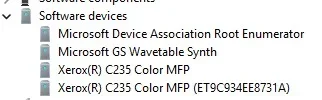
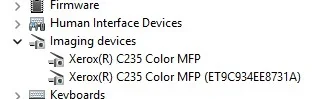
...resetting to factory defaults (which removed wifi connection), unplugging usb cable. Also cleared all entries from device manager for print and imaging devices. On restart device manager is still listing two entries under imaging devices for the printer!

Found an idle entry in the router under network devices so deleted that too

I am trying to clear down to reinstall firmware, drivers and app because if issues with the print functionality.

Can anyone think of anything that I have missed. Although I cannot see how windows is now detecting this totally disconnected device...

Any thoughts much appreciated...

Just thought that this machine is also used with another identical printer in a different location but again cannot see how that is detected...
 

Attachments
  • Screenshot 2026-08-06 185750.webp
    Screenshot 2026-08-06 185750.webp
    6.8 KB · Views: 1

My Computers My Computers

  • At a glance

    Windows 11 Pro (retail) 23H2 / 26100.4946AMD Ryzen 7 5700G 3.8GHz 8C/16T 65w AM4Corsair Vengeance LPX 64GB (2x32GB) DDR4 3200MHzIntegrated AMD Radeon
    OS
    Windows 11 Pro (retail) 23H2 / 26100.4946
    Computer type
    PC/Desktop
    Manufacturer/Model
    Custom (Quiet PC)
    CPU
    AMD Ryzen 7 5700G 3.8GHz 8C/16T 65w AM4
    Motherboard
    ASUSTeK TUF gaming B550M (WI-FI) AM4 Micro-ATX Motherboard
    Memory
    Corsair Vengeance LPX 64GB (2x32GB) DDR4 3200MHz
    Graphics Card(s)
    Integrated AMD Radeon
    Sound Card
    Integrated
    Monitor(s) Displays
    NEC 2470WNX
    Screen Resolution
    1920 x 1200
    Hard Drives
    Samsung 970 EVOPlus 500GB M.2 NVMe SSD (3500/3200) [operating system]
    Samsung 970 EVOPlus 1TB M.2 NVMe SSD (3500/3200) [Data]
    Samsung 870 EVOPlus 1TB SATA/600 [Data]
    Plus external Samsung 1TB for additional data copies and for Sonos stream
    PSU
    Pure Power 11 400w Quiet PSU PLUS Gold
    Case
    S400 Silencio mATX Quiet PC
    Cooling
    Noctua NF-P12 Redux 12v 900RPM 120mm x2
    Keyboard
    Dell corded usb
    Mouse
    Logitech corded optical
    Internet Speed
    35 Mbps / 9 Mbps
    Browser
    Firefox, Opera, Edge
    Antivirus
    Windows Security with Malware Bytes
    Other Info
    FTTC 35 Mbps / 9 Mbps
  • At a glance

    Windows 10 Pro (standalone licence)Intel Core 5 120U 1.4GHz16GBIntel Integrated
    Operating System
    Windows 10 Pro (standalone licence)
    Computer type
    Laptop
    Manufacturer/Model
    Dell DC16250
    CPU
    Intel Core 5 120U 1.4GHz
    Memory
    16GB
    Graphics card(s)
    Intel Integrated
    Sound Card
    Intel Integrated
    Monitor(s) Displays
    External Philips 230C
    Screen Resolution
    1920 x 1200
    Hard Drives
    Storage 2TB Crucial SSD
    PSU
    -
    Case
    -
    Cooling
    -
    Keyboard
    -
    Mouse
    -
Can anyone think of anything that I have missed.


Maybe search File Explorer and then the registry for "Xerox" without the quotes.

Or... re-install the printer software and then use REVO Uninstaller to remove it.
Make sure you do the "Scan" for leftovers and delete them as well.

REVO gets ALL the leftovers.


My Computers My Computers

  • At a glance

    Win 11 Home ♦♦♦26200.9168 ♦♦♦♦♦♦♦25H2AMD Ryzen 7 3700XG.Skill (F4-3200C14D-16GTZKW)EVGA RTX 2070 (08G-P4-2171-KR)
    OS
    Win 11 Home ♦♦♦26200.9168 ♦♦♦♦♦♦♦25H2
    Computer type
    PC/Desktop
    Manufacturer/Model
    Built by Ghot® [May 2020]
    CPU
    AMD Ryzen 7 3700X
    Motherboard
    Asus Pro WS X570-ACE (BIOS 5302)
    Memory
    G.Skill (F4-3200C14D-16GTZKW)
    Graphics Card(s)
    EVGA RTX 2070 (08G-P4-2171-KR)
    Sound Card
    Realtek ALC1220P / ALC S1220A
    Monitor(s) Displays
    Dell U3011 30"
    Screen Resolution
    2560 x 1600
    Hard Drives
    2x Samsung 860 EVO 500GB,
    WD 4TB Black FZBX - SATA III,
    WD 8TB Black FZBX - SATA III,
    DRW-24B1ST CD/DVD Burner
    PSU
    PC Power & Cooling 750W Quad EPS12V
    Case
    Cooler Master ATCS 840 Tower
    Cooling
    CM Hyper 212 EVO (push/pull)
    Keyboard
    Ducky DK9008 Shine II Blue LED
    Mouse
    Logitech Optical M-100
    Internet Speed
    300/300
    Browser
    Firefox (latest)
    Antivirus
    Bitdefender Total Security
    Other Info
    Speakers: Klipsch Pro Media 2.1
  • At a glance

    Windows XP Pro 32bit w/SP3AMD Athlon 64 X2 5000+ (OC'd @ 3.2Ghz)TWIN2X2048-6400C4DHX (2 x 1GB, DDR2 800)EVGA 256-P2-N758-TR GeForce 8600GT SSC
    Operating System
    Windows XP Pro 32bit w/SP3
    Computer type
    PC/Desktop
    Manufacturer/Model
    Built by Ghot® (not in use)
    CPU
    AMD Athlon 64 X2 5000+ (OC'd @ 3.2Ghz)
    Motherboard
    ASUS M2N32-SLI Deluxe Wireless Edition
    Memory
    TWIN2X2048-6400C4DHX (2 x 1GB, DDR2 800)
    Graphics card(s)
    EVGA 256-P2-N758-TR GeForce 8600GT SSC
    Sound Card
    Onboard
    Monitor(s) Displays
    ViewSonic G90FB Black 19" Professional (CRT)
    Screen Resolution
    up to 2048 x 1536
    Hard Drives
    WD 36GB 10,000rpm Raptor SATA
    Seagate 80GB 7200rpm SATA
    Lite-On LTR-52246S CD/RW
    Lite-On LH-18A1P CD/DVD Burner
    PSU
    PC Power & Cooling Silencer 750 Quad EPS12V
    Case
    Generic Beige case, 80mm fans
    Cooling
    ZALMAN 9500A 92mm CPU Cooler
    Keyboard
    Logitech Classic Keybooard 200
    Mouse
    Logitech Optical M-BT96a
    Internet Speed
    300/300
    Browser
    Firefox 3.x ??
    Antivirus
    Symantec (Norton)
    Other Info
    Still assembled, still runs. Haven't turned it on for 15 years?
UPDATE: Also found in device manager another entry for the printer under 'Software Devices' Deleting that as well and restarted > entries back in device manager under imaging and software devices (not print). The second entry in both locations disappears shortly after restart leaving just the one entry under imaging and software devices.
 

Attachments

  • Screenshot 2026-08-06 190330.webp
    Screenshot 2026-08-06 190330.webp
    7.5 KB · Views: 1

My Computers My Computers

  • At a glance

    Windows 11 Pro (retail) 23H2 / 26100.4946AMD Ryzen 7 5700G 3.8GHz 8C/16T 65w AM4Corsair Vengeance LPX 64GB (2x32GB) DDR4 3200MHzIntegrated AMD Radeon
    OS
    Windows 11 Pro (retail) 23H2 / 26100.4946
    Computer type
    PC/Desktop
    Manufacturer/Model
    Custom (Quiet PC)
    CPU
    AMD Ryzen 7 5700G 3.8GHz 8C/16T 65w AM4
    Motherboard
    ASUSTeK TUF gaming B550M (WI-FI) AM4 Micro-ATX Motherboard
    Memory
    Corsair Vengeance LPX 64GB (2x32GB) DDR4 3200MHz
    Graphics Card(s)
    Integrated AMD Radeon
    Sound Card
    Integrated
    Monitor(s) Displays
    NEC 2470WNX
    Screen Resolution
    1920 x 1200
    Hard Drives
    Samsung 970 EVOPlus 500GB M.2 NVMe SSD (3500/3200) [operating system]
    Samsung 970 EVOPlus 1TB M.2 NVMe SSD (3500/3200) [Data]
    Samsung 870 EVOPlus 1TB SATA/600 [Data]
    Plus external Samsung 1TB for additional data copies and for Sonos stream
    PSU
    Pure Power 11 400w Quiet PSU PLUS Gold
    Case
    S400 Silencio mATX Quiet PC
    Cooling
    Noctua NF-P12 Redux 12v 900RPM 120mm x2
    Keyboard
    Dell corded usb
    Mouse
    Logitech corded optical
    Internet Speed
    35 Mbps / 9 Mbps
    Browser
    Firefox, Opera, Edge
    Antivirus
    Windows Security with Malware Bytes
    Other Info
    FTTC 35 Mbps / 9 Mbps
  • At a glance

    Windows 10 Pro (standalone licence)Intel Core 5 120U 1.4GHz16GBIntel Integrated
    Operating System
    Windows 10 Pro (standalone licence)
    Computer type
    Laptop
    Manufacturer/Model
    Dell DC16250
    CPU
    Intel Core 5 120U 1.4GHz
    Memory
    16GB
    Graphics card(s)
    Intel Integrated
    Sound Card
    Intel Integrated
    Monitor(s) Displays
    External Philips 230C
    Screen Resolution
    1920 x 1200
    Hard Drives
    Storage 2TB Crucial SSD
    PSU
    -
    Case
    -
    Cooling
    -
    Keyboard
    -
    Mouse
    -
Maybe search File Explorer and then the registry for "Xerox" without the quotes.

Or... re-install the printer software and then use REVO Uninstaller to remove it.
Make sure you do the "Scan" for leftovers and delete them as well.

REVO gets ALL the leftovers.

Ta, will give that a go and post back.
 

My Computers My Computers

  • At a glance

    Windows 11 Pro (retail) 23H2 / 26100.4946AMD Ryzen 7 5700G 3.8GHz 8C/16T 65w AM4Corsair Vengeance LPX 64GB (2x32GB) DDR4 3200MHzIntegrated AMD Radeon
    OS
    Windows 11 Pro (retail) 23H2 / 26100.4946
    Computer type
    PC/Desktop
    Manufacturer/Model
    Custom (Quiet PC)
    CPU
    AMD Ryzen 7 5700G 3.8GHz 8C/16T 65w AM4
    Motherboard
    ASUSTeK TUF gaming B550M (WI-FI) AM4 Micro-ATX Motherboard
    Memory
    Corsair Vengeance LPX 64GB (2x32GB) DDR4 3200MHz
    Graphics Card(s)
    Integrated AMD Radeon
    Sound Card
    Integrated
    Monitor(s) Displays
    NEC 2470WNX
    Screen Resolution
    1920 x 1200
    Hard Drives
    Samsung 970 EVOPlus 500GB M.2 NVMe SSD (3500/3200) [operating system]
    Samsung 970 EVOPlus 1TB M.2 NVMe SSD (3500/3200) [Data]
    Samsung 870 EVOPlus 1TB SATA/600 [Data]
    Plus external Samsung 1TB for additional data copies and for Sonos stream
    PSU
    Pure Power 11 400w Quiet PSU PLUS Gold
    Case
    S400 Silencio mATX Quiet PC
    Cooling
    Noctua NF-P12 Redux 12v 900RPM 120mm x2
    Keyboard
    Dell corded usb
    Mouse
    Logitech corded optical
    Internet Speed
    35 Mbps / 9 Mbps
    Browser
    Firefox, Opera, Edge
    Antivirus
    Windows Security with Malware Bytes
    Other Info
    FTTC 35 Mbps / 9 Mbps
  • At a glance

    Windows 10 Pro (standalone licence)Intel Core 5 120U 1.4GHz16GBIntel Integrated
    Operating System
    Windows 10 Pro (standalone licence)
    Computer type
    Laptop
    Manufacturer/Model
    Dell DC16250
    CPU
    Intel Core 5 120U 1.4GHz
    Memory
    16GB
    Graphics card(s)
    Intel Integrated
    Sound Card
    Intel Integrated
    Monitor(s) Displays
    External Philips 230C
    Screen Resolution
    1920 x 1200
    Hard Drives
    Storage 2TB Crucial SSD
    PSU
    -
    Case
    -
    Cooling
    -
    Keyboard
    -
    Mouse
    -

Attachments

Last edited:

My Computers My Computers

  • At a glance

    Win 11 Home ♦♦♦26200.9168 ♦♦♦♦♦♦♦25H2AMD Ryzen 7 3700XG.Skill (F4-3200C14D-16GTZKW)EVGA RTX 2070 (08G-P4-2171-KR)
    OS
    Win 11 Home ♦♦♦26200.9168 ♦♦♦♦♦♦♦25H2
    Computer type
    PC/Desktop
    Manufacturer/Model
    Built by Ghot® [May 2020]
    CPU
    AMD Ryzen 7 3700X
    Motherboard
    Asus Pro WS X570-ACE (BIOS 5302)
    Memory
    G.Skill (F4-3200C14D-16GTZKW)
    Graphics Card(s)
    EVGA RTX 2070 (08G-P4-2171-KR)
    Sound Card
    Realtek ALC1220P / ALC S1220A
    Monitor(s) Displays
    Dell U3011 30"
    Screen Resolution
    2560 x 1600
    Hard Drives
    2x Samsung 860 EVO 500GB,
    WD 4TB Black FZBX - SATA III,
    WD 8TB Black FZBX - SATA III,
    DRW-24B1ST CD/DVD Burner
    PSU
    PC Power & Cooling 750W Quad EPS12V
    Case
    Cooler Master ATCS 840 Tower
    Cooling
    CM Hyper 212 EVO (push/pull)
    Keyboard
    Ducky DK9008 Shine II Blue LED
    Mouse
    Logitech Optical M-100
    Internet Speed
    300/300
    Browser
    Firefox (latest)
    Antivirus
    Bitdefender Total Security
    Other Info
    Speakers: Klipsch Pro Media 2.1
  • At a glance

    Windows XP Pro 32bit w/SP3AMD Athlon 64 X2 5000+ (OC'd @ 3.2Ghz)TWIN2X2048-6400C4DHX (2 x 1GB, DDR2 800)EVGA 256-P2-N758-TR GeForce 8600GT SSC
    Operating System
    Windows XP Pro 32bit w/SP3
    Computer type
    PC/Desktop
    Manufacturer/Model
    Built by Ghot® (not in use)
    CPU
    AMD Athlon 64 X2 5000+ (OC'd @ 3.2Ghz)
    Motherboard
    ASUS M2N32-SLI Deluxe Wireless Edition
    Memory
    TWIN2X2048-6400C4DHX (2 x 1GB, DDR2 800)
    Graphics card(s)
    EVGA 256-P2-N758-TR GeForce 8600GT SSC
    Sound Card
    Onboard
    Monitor(s) Displays
    ViewSonic G90FB Black 19" Professional (CRT)
    Screen Resolution
    up to 2048 x 1536
    Hard Drives
    WD 36GB 10,000rpm Raptor SATA
    Seagate 80GB 7200rpm SATA
    Lite-On LTR-52246S CD/RW
    Lite-On LH-18A1P CD/DVD Burner
    PSU
    PC Power & Cooling Silencer 750 Quad EPS12V
    Case
    Generic Beige case, 80mm fans
    Cooling
    ZALMAN 9500A 92mm CPU Cooler
    Keyboard
    Logitech Classic Keybooard 200
    Mouse
    Logitech Optical M-BT96a
    Internet Speed
    300/300
    Browser
    Firefox 3.x ??
    Antivirus
    Symantec (Norton)
    Other Info
    Still assembled, still runs. Haven't turned it on for 15 years?

My Computers My Computers

  • At a glance

    Windows 11 Pro 25H2 26200.9168i9-10900 10 core 20 threads32 gbnone-Intel UHD Graphics 630
    OS
    Windows 11 Pro 25H2 26200.9168
    Computer type
    PC/Desktop
    Manufacturer/Model
    Dell Optiplex 7080
    CPU
    i9-10900 10 core 20 threads
    Motherboard
    DELL 0J37VM
    Memory
    32 gb
    Graphics Card(s)
    none-Intel UHD Graphics 630
    Sound Card
    Integrated Realtek
    Monitor(s) Displays
    Benq 27
    Screen Resolution
    2560x1440
    Hard Drives
    2x1tb Solidigm m.2 nvme /External drives 512gb Samsung m.2 sata+2tb Kingston m2.nvme
    PSU
    500w
    Case
    MT
    Cooling
    Dell Premium
    Keyboard
    Logitech wired
    Mouse
    Logitech wireless
    Internet Speed
    so slow I'm too embarrassed to tell
    Browser
    #1 Edge #2 Firefox
    Antivirus
    Defender+MWB Premium
  • At a glance

    Windows 11 Pro 24H2 26200.9168AMD Ryzen 7 6800U32 gbintegrated
    Operating System
    Windows 11 Pro 24H2 26200.9168
    Computer type
    PC/Desktop
    Manufacturer/Model
    Beelink Mini PC SER5
    CPU
    AMD Ryzen 7 6800U
    Memory
    32 gb
    Graphics card(s)
    integrated
    Sound Card
    integrated
    Monitor(s) Displays
    Benq 27
    Screen Resolution
    2560x1440
    Hard Drives
    1TB Crucial nvme
    Keyboard
    Logitech wired
    Mouse
    Logitech wireless
    Internet Speed
    still too embarrassed to tell
    Browser
    Firefox
    Antivirus
    Defender
  • System 3 is non compliant Dell 9020 i7-4770/24gb ram Win11 PRO 26200.9168
I was installing a couple of USB label printers on a small mini computer so I could network them. I the process I renamed them twice because I didn't like what I did the first time.

BOY! Talk about a PITA, I finally had to scrub the registry of all the names, and then uninstall and reinstall the drivers!
 

My Computers My Computers

  • At a glance

    Win 11 Pro 25H2, Build 26200.9168Intel Core i5 14500, 14th Generation64GB DDR4GeForce RTX 4060
    OS
    Win 11 Pro 25H2, Build 26200.9168
    Computer type
    PC/Desktop
    Manufacturer/Model
    Home Brew
    CPU
    Intel Core i5 14500, 14th Generation
    Motherboard
    Gigabyte B760M G P WIFI
    Memory
    64GB DDR4
    Graphics Card(s)
    GeForce RTX 4060
    Sound Card
    Chipset Realtek
    Monitor(s) Displays
    LG 45" Ultragear & Acer 24" 1080p
    Screen Resolution
    5120x1440 & 1920x1080
    Hard Drives
    Crucial P310 2TB 2280 PCIe Gen4 3D NAND NVMe M.2 SSD (O/S)
    Silicon Power 2TB US75 NVMe PCIe Gen4 M.2 2280 SSD (backup)
    Crucial BX500 2TB 3D NAND (2nd backup)
    Seagate 4TB Ironwolf, rotating HDD archive files
    External off-line backup Drives: 2 NVMe 4TB drives in external enclosures
    PSU
    Thermaltake Toughpower GF3 750W
    Case
    LIAN LI LANCOOL 216 E-ATX PC Case
    Cooling
    Lots of fans!
    Keyboard
    Microsoft Comfort Curve 2000
    Mouse
    Logitech G305
    Internet Speed
    Verizon FiOS 1GB
    Browser
    Firefox
    Antivirus
    Malware Bytes & Windows Defender Security
  • At a glance

    Win 11 Pro 25H2, Build 26200.9168Intel Core i5 1440032GB DDR5Intel 700 Embedded GPU
    Operating System
    Win 11 Pro 25H2, Build 26200.9168
    Computer type
    PC/Desktop
    Manufacturer/Model
    Home Brew
    CPU
    Intel Core i5 14400
    Motherboard
    Gigabyte B760M DS3H AX
    Memory
    32GB DDR5
    Graphics card(s)
    Intel 700 Embedded GPU
    Sound Card
    Realtek Embedded
    Monitor(s) Displays
    27" HP 1080p
    Screen Resolution
    1920x1080
    Hard Drives
    Crucial P310 2TB 2280 PCIe Gen4 eD NAND PCIe SSD
    Samsung EVO 990 2TB NVMe Gen4 SSD
    Samsung 2TB SATA SSD
    PSU
    Thermaltake Smart BM3 650W
    Case
    Okinos Micro ATX Case
    Cooling
    Fans
    Keyboard
    Microsoft Comfort Curve 2000
    Mouse
    Logitech G305
    Internet Speed
    Verizon FiOS 1GB
    Browser
    Firefox
    Antivirus
    Malware Bytes & Windows Defender Security
  • Nimo N171 17" Laptop, (Intel i3-1215U, 16GB RAM, 2TB NVMe, Win11 Pro)
    Acemagic Vista Mini PC V1 (Intel N150, 16GB RAM, 1TB NVMe, Win11 Pro)
    HP ENVY h8-1540t, (24GB RAM, 2TB SSD, 2TB HDD, Win11 Pro)
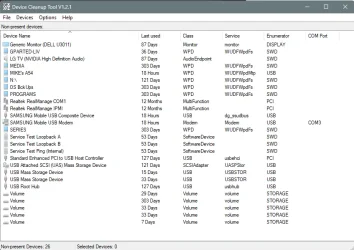
Here, I finally found it. I don't think you have "ghost" devices, but if you do, this will remove them...
Credit to @Ed Tittel for finding this. :-)


It will remove non-ghost devices too.

Actual ghost devices will look greyed out. Just hold Ctrl key and select the devices you want removed, and click...
Devices > Remove selected

View attachment 178808 View attachment 178809
Thanks for this....still struggling so will give this a go ass well.
 

My Computers My Computers

  • At a glance

    Windows 11 Pro (retail) 23H2 / 26100.4946AMD Ryzen 7 5700G 3.8GHz 8C/16T 65w AM4Corsair Vengeance LPX 64GB (2x32GB) DDR4 3200MHzIntegrated AMD Radeon
    OS
    Windows 11 Pro (retail) 23H2 / 26100.4946
    Computer type
    PC/Desktop
    Manufacturer/Model
    Custom (Quiet PC)
    CPU
    AMD Ryzen 7 5700G 3.8GHz 8C/16T 65w AM4
    Motherboard
    ASUSTeK TUF gaming B550M (WI-FI) AM4 Micro-ATX Motherboard
    Memory
    Corsair Vengeance LPX 64GB (2x32GB) DDR4 3200MHz
    Graphics Card(s)
    Integrated AMD Radeon
    Sound Card
    Integrated
    Monitor(s) Displays
    NEC 2470WNX
    Screen Resolution
    1920 x 1200
    Hard Drives
    Samsung 970 EVOPlus 500GB M.2 NVMe SSD (3500/3200) [operating system]
    Samsung 970 EVOPlus 1TB M.2 NVMe SSD (3500/3200) [Data]
    Samsung 870 EVOPlus 1TB SATA/600 [Data]
    Plus external Samsung 1TB for additional data copies and for Sonos stream
    PSU
    Pure Power 11 400w Quiet PSU PLUS Gold
    Case
    S400 Silencio mATX Quiet PC
    Cooling
    Noctua NF-P12 Redux 12v 900RPM 120mm x2
    Keyboard
    Dell corded usb
    Mouse
    Logitech corded optical
    Internet Speed
    35 Mbps / 9 Mbps
    Browser
    Firefox, Opera, Edge
    Antivirus
    Windows Security with Malware Bytes
    Other Info
    FTTC 35 Mbps / 9 Mbps
  • At a glance

    Windows 10 Pro (standalone licence)Intel Core 5 120U 1.4GHz16GBIntel Integrated
    Operating System
    Windows 10 Pro (standalone licence)
    Computer type
    Laptop
    Manufacturer/Model
    Dell DC16250
    CPU
    Intel Core 5 120U 1.4GHz
    Memory
    16GB
    Graphics card(s)
    Intel Integrated
    Sound Card
    Intel Integrated
    Monitor(s) Displays
    External Philips 230C
    Screen Resolution
    1920 x 1200
    Hard Drives
    Storage 2TB Crucial SSD
    PSU
    -
    Case
    -
    Cooling
    -
    Keyboard
    -
    Mouse
    -

My Computers My Computers

  • At a glance

    Windows 11 Pro (retail) 23H2 / 26100.4946AMD Ryzen 7 5700G 3.8GHz 8C/16T 65w AM4Corsair Vengeance LPX 64GB (2x32GB) DDR4 3200MHzIntegrated AMD Radeon
    OS
    Windows 11 Pro (retail) 23H2 / 26100.4946
    Computer type
    PC/Desktop
    Manufacturer/Model
    Custom (Quiet PC)
    CPU
    AMD Ryzen 7 5700G 3.8GHz 8C/16T 65w AM4
    Motherboard
    ASUSTeK TUF gaming B550M (WI-FI) AM4 Micro-ATX Motherboard
    Memory
    Corsair Vengeance LPX 64GB (2x32GB) DDR4 3200MHz
    Graphics Card(s)
    Integrated AMD Radeon
    Sound Card
    Integrated
    Monitor(s) Displays
    NEC 2470WNX
    Screen Resolution
    1920 x 1200
    Hard Drives
    Samsung 970 EVOPlus 500GB M.2 NVMe SSD (3500/3200) [operating system]
    Samsung 970 EVOPlus 1TB M.2 NVMe SSD (3500/3200) [Data]
    Samsung 870 EVOPlus 1TB SATA/600 [Data]
    Plus external Samsung 1TB for additional data copies and for Sonos stream
    PSU
    Pure Power 11 400w Quiet PSU PLUS Gold
    Case
    S400 Silencio mATX Quiet PC
    Cooling
    Noctua NF-P12 Redux 12v 900RPM 120mm x2
    Keyboard
    Dell corded usb
    Mouse
    Logitech corded optical
    Internet Speed
    35 Mbps / 9 Mbps
    Browser
    Firefox, Opera, Edge
    Antivirus
    Windows Security with Malware Bytes
    Other Info
    FTTC 35 Mbps / 9 Mbps
  • At a glance

    Windows 10 Pro (standalone licence)Intel Core 5 120U 1.4GHz16GBIntel Integrated
    Operating System
    Windows 10 Pro (standalone licence)
    Computer type
    Laptop
    Manufacturer/Model
    Dell DC16250
    CPU
    Intel Core 5 120U 1.4GHz
    Memory
    16GB
    Graphics card(s)
    Intel Integrated
    Sound Card
    Intel Integrated
    Monitor(s) Displays
    External Philips 230C
    Screen Resolution
    1920 x 1200
    Hard Drives
    Storage 2TB Crucial SSD
    PSU
    -
    Case
    -
    Cooling
    -
    Keyboard
    -
    Mouse
    -
I was installing a couple of USB label printers on a small mini computer so I could network them. I the process I renamed them twice because I didn't like what I did the first time.

BOY! Talk about a PITA, I finally had to scrub the registry of all the names, and then uninstall and reinstall the drivers!
Interesting I think I remember renaming the default that came up for the printer when networked and maybe that is where all this started. May have even done it a couple of times. PITA is the right phrase.
 

My Computers My Computers

  • At a glance

    Windows 11 Pro (retail) 23H2 / 26100.4946AMD Ryzen 7 5700G 3.8GHz 8C/16T 65w AM4Corsair Vengeance LPX 64GB (2x32GB) DDR4 3200MHzIntegrated AMD Radeon
    OS
    Windows 11 Pro (retail) 23H2 / 26100.4946
    Computer type
    PC/Desktop
    Manufacturer/Model
    Custom (Quiet PC)
    CPU
    AMD Ryzen 7 5700G 3.8GHz 8C/16T 65w AM4
    Motherboard
    ASUSTeK TUF gaming B550M (WI-FI) AM4 Micro-ATX Motherboard
    Memory
    Corsair Vengeance LPX 64GB (2x32GB) DDR4 3200MHz
    Graphics Card(s)
    Integrated AMD Radeon
    Sound Card
    Integrated
    Monitor(s) Displays
    NEC 2470WNX
    Screen Resolution
    1920 x 1200
    Hard Drives
    Samsung 970 EVOPlus 500GB M.2 NVMe SSD (3500/3200) [operating system]
    Samsung 970 EVOPlus 1TB M.2 NVMe SSD (3500/3200) [Data]
    Samsung 870 EVOPlus 1TB SATA/600 [Data]
    Plus external Samsung 1TB for additional data copies and for Sonos stream
    PSU
    Pure Power 11 400w Quiet PSU PLUS Gold
    Case
    S400 Silencio mATX Quiet PC
    Cooling
    Noctua NF-P12 Redux 12v 900RPM 120mm x2
    Keyboard
    Dell corded usb
    Mouse
    Logitech corded optical
    Internet Speed
    35 Mbps / 9 Mbps
    Browser
    Firefox, Opera, Edge
    Antivirus
    Windows Security with Malware Bytes
    Other Info
    FTTC 35 Mbps / 9 Mbps
  • At a glance

    Windows 10 Pro (standalone licence)Intel Core 5 120U 1.4GHz16GBIntel Integrated
    Operating System
    Windows 10 Pro (standalone licence)
    Computer type
    Laptop
    Manufacturer/Model
    Dell DC16250
    CPU
    Intel Core 5 120U 1.4GHz
    Memory
    16GB
    Graphics card(s)
    Intel Integrated
    Sound Card
    Intel Integrated
    Monitor(s) Displays
    External Philips 230C
    Screen Resolution
    1920 x 1200
    Hard Drives
    Storage 2TB Crucial SSD
    PSU
    -
    Case
    -
    Cooling
    -
    Keyboard
    -
    Mouse
    -
So, I deleted a lot of registry entries that related to Xerox. But I think I have screwed it. I didn’t do a reg backup as I thought that it was probably a mess anyway. Big (and stupid) mistake probably.

I think I may be looking at reinstalling the windows again to start afresh :(

I also replaced the long USB cable (with a short one) which I had unplugged because it never worked. I had resorted to wifi connection to the printer.

Managed to reinstall the Xerox drivers for USB and software using Xerox Smart Start which is meant to install all that is needed but on this machine always says it can't find any devices - even running it again now is says it cannot find the device that it previously installed and is still connected by USB and is recognised by the xerox print software. Really don't understand any of this! I can now print again via USB but cannot scan. Trying to run the Xerox print and scan experience software gives an error:
Screenshot 2026-08-07 094515.webp
 

My Computers My Computers

  • At a glance

    Windows 11 Pro (retail) 23H2 / 26100.4946AMD Ryzen 7 5700G 3.8GHz 8C/16T 65w AM4Corsair Vengeance LPX 64GB (2x32GB) DDR4 3200MHzIntegrated AMD Radeon
    OS
    Windows 11 Pro (retail) 23H2 / 26100.4946
    Computer type
    PC/Desktop
    Manufacturer/Model
    Custom (Quiet PC)
    CPU
    AMD Ryzen 7 5700G 3.8GHz 8C/16T 65w AM4
    Motherboard
    ASUSTeK TUF gaming B550M (WI-FI) AM4 Micro-ATX Motherboard
    Memory
    Corsair Vengeance LPX 64GB (2x32GB) DDR4 3200MHz
    Graphics Card(s)
    Integrated AMD Radeon
    Sound Card
    Integrated
    Monitor(s) Displays
    NEC 2470WNX
    Screen Resolution
    1920 x 1200
    Hard Drives
    Samsung 970 EVOPlus 500GB M.2 NVMe SSD (3500/3200) [operating system]
    Samsung 970 EVOPlus 1TB M.2 NVMe SSD (3500/3200) [Data]
    Samsung 870 EVOPlus 1TB SATA/600 [Data]
    Plus external Samsung 1TB for additional data copies and for Sonos stream
    PSU
    Pure Power 11 400w Quiet PSU PLUS Gold
    Case
    S400 Silencio mATX Quiet PC
    Cooling
    Noctua NF-P12 Redux 12v 900RPM 120mm x2
    Keyboard
    Dell corded usb
    Mouse
    Logitech corded optical
    Internet Speed
    35 Mbps / 9 Mbps
    Browser
    Firefox, Opera, Edge
    Antivirus
    Windows Security with Malware Bytes
    Other Info
    FTTC 35 Mbps / 9 Mbps
  • At a glance

    Windows 10 Pro (standalone licence)Intel Core 5 120U 1.4GHz16GBIntel Integrated
    Operating System
    Windows 10 Pro (standalone licence)
    Computer type
    Laptop
    Manufacturer/Model
    Dell DC16250
    CPU
    Intel Core 5 120U 1.4GHz
    Memory
    16GB
    Graphics card(s)
    Intel Integrated
    Sound Card
    Intel Integrated
    Monitor(s) Displays
    External Philips 230C
    Screen Resolution
    1920 x 1200
    Hard Drives
    Storage 2TB Crucial SSD
    PSU
    -
    Case
    -
    Cooling
    -
    Keyboard
    -
    Mouse
    -
Just uninstall the Xerox drivers and install them again. I saw the exact same thing when I got too frisky removing the printer stuff. 🤣
 

My Computers My Computers

  • At a glance

    Win 11 Pro 25H2, Build 26200.9168Intel Core i5 14500, 14th Generation64GB DDR4GeForce RTX 4060
    OS
    Win 11 Pro 25H2, Build 26200.9168
    Computer type
    PC/Desktop
    Manufacturer/Model
    Home Brew
    CPU
    Intel Core i5 14500, 14th Generation
    Motherboard
    Gigabyte B760M G P WIFI
    Memory
    64GB DDR4
    Graphics Card(s)
    GeForce RTX 4060
    Sound Card
    Chipset Realtek
    Monitor(s) Displays
    LG 45" Ultragear & Acer 24" 1080p
    Screen Resolution
    5120x1440 & 1920x1080
    Hard Drives
    Crucial P310 2TB 2280 PCIe Gen4 3D NAND NVMe M.2 SSD (O/S)
    Silicon Power 2TB US75 NVMe PCIe Gen4 M.2 2280 SSD (backup)
    Crucial BX500 2TB 3D NAND (2nd backup)
    Seagate 4TB Ironwolf, rotating HDD archive files
    External off-line backup Drives: 2 NVMe 4TB drives in external enclosures
    PSU
    Thermaltake Toughpower GF3 750W
    Case
    LIAN LI LANCOOL 216 E-ATX PC Case
    Cooling
    Lots of fans!
    Keyboard
    Microsoft Comfort Curve 2000
    Mouse
    Logitech G305
    Internet Speed
    Verizon FiOS 1GB
    Browser
    Firefox
    Antivirus
    Malware Bytes & Windows Defender Security
  • At a glance

    Win 11 Pro 25H2, Build 26200.9168Intel Core i5 1440032GB DDR5Intel 700 Embedded GPU
    Operating System
    Win 11 Pro 25H2, Build 26200.9168
    Computer type
    PC/Desktop
    Manufacturer/Model
    Home Brew
    CPU
    Intel Core i5 14400
    Motherboard
    Gigabyte B760M DS3H AX
    Memory
    32GB DDR5
    Graphics card(s)
    Intel 700 Embedded GPU
    Sound Card
    Realtek Embedded
    Monitor(s) Displays
    27" HP 1080p
    Screen Resolution
    1920x1080
    Hard Drives
    Crucial P310 2TB 2280 PCIe Gen4 eD NAND PCIe SSD
    Samsung EVO 990 2TB NVMe Gen4 SSD
    Samsung 2TB SATA SSD
    PSU
    Thermaltake Smart BM3 650W
    Case
    Okinos Micro ATX Case
    Cooling
    Fans
    Keyboard
    Microsoft Comfort Curve 2000
    Mouse
    Logitech G305
    Internet Speed
    Verizon FiOS 1GB
    Browser
    Firefox
    Antivirus
    Malware Bytes & Windows Defender Security
  • Nimo N171 17" Laptop, (Intel i3-1215U, 16GB RAM, 2TB NVMe, Win11 Pro)
    Acemagic Vista Mini PC V1 (Intel N150, 16GB RAM, 1TB NVMe, Win11 Pro)
    HP ENVY h8-1540t, (24GB RAM, 2TB SSD, 2TB HDD, Win11 Pro)
After this I removed the three entries for Xerox again in device manager and restarted
Just uninstall the Xerox drivers and install them again. I saw the exact same thing when I got too frisky removing the printer stuff. 🤣
Thanks. That's reassuring....except that trying to run that print and scan experience download is still giving the error.

However a quick summary of today (a few hours of my life I will never get back) 🤣. Just in case it helps anyone else - I would be surprised!)

  • I ran DISM restore health (restore completed successfully having repaired some files) because thought it may help with something I may have 'friskily' screwed the regsitry.
  • I ran SFC (found nothing)
  • Multiple tries to remove all instances xerox related entries from device manager directly and DeviceCleanup tool
  • Had to go around a few times as entries kept reappearing even though machine was disconnected from network and usb
  • Changed usb cable and powered printer on and off
  • Device manager then clear except for two entries under imaging devices - nothing under print queue or software device
  • The IPP class driver under printer in device manager also showed error. At some point in all this I had uninstalled that after running XrxSetup_8.158.0.0_x64 (xerox print experience)...I think as it offered to remove this before reinstalling (maybe a bad move).
  • Running the XrxSetup_8.158.0.0_x64 (xerox print experience) - didn't change anything else in device manager
  • Printer listed in Windows Printer and Devices but unable to print to it or print test page...?
  • Struggled to install a IPP print queue manually (which I have never had to do before).
  • Struggled adding printer manually to windows until I realised I had to select 'my printer is older'. It's not that old!
  • Decided then to connect printer back to network over wifi
  • The entries in device manager are not very helpful in terms of distinguishing which relates to which type of connection
  • This then showed instances for Xerox in device manager for both USB and Wifi connections under imaging and software devices (now renamed!), and just the wifi instance of the printer under Print queues - nothing for the USB connection
  • Running XPSE (Xerox Print and Scan Experience app) still giving me 'Invalid Value for Registry Error'
  • Now seem to have entries in device manager under Imaging and Print Queues and Software Devices for both instances of the printer (wifi and USB)
  • Plus have a microsoft IPP driver installed under Printers
  • Before trying to tackle this issue today I had given up on usb the connection (that may have been the cable and was relying on wifi). I can now print using either instance of the printer (wifi or usb)
  • Tried running the Xerox StartSmart again and this time it recognised the printer where it had failed before and it offered the option of installing XPSE YAY (which still cannot be run from the exe (appinstaler) as I have always done before)
  • A right royal PITA. But having said that I don't really understand all this stuff and have almost forgotten where I started 🤣

Thanks for the suggestions and help today. I am sure they have helped me although I couldnot definitely say how and where in this process whic is sort fo 'solved'.
 

My Computers My Computers

  • At a glance

    Windows 11 Pro (retail) 23H2 / 26100.4946AMD Ryzen 7 5700G 3.8GHz 8C/16T 65w AM4Corsair Vengeance LPX 64GB (2x32GB) DDR4 3200MHzIntegrated AMD Radeon
    OS
    Windows 11 Pro (retail) 23H2 / 26100.4946
    Computer type
    PC/Desktop
    Manufacturer/Model
    Custom (Quiet PC)
    CPU
    AMD Ryzen 7 5700G 3.8GHz 8C/16T 65w AM4
    Motherboard
    ASUSTeK TUF gaming B550M (WI-FI) AM4 Micro-ATX Motherboard
    Memory
    Corsair Vengeance LPX 64GB (2x32GB) DDR4 3200MHz
    Graphics Card(s)
    Integrated AMD Radeon
    Sound Card
    Integrated
    Monitor(s) Displays
    NEC 2470WNX
    Screen Resolution
    1920 x 1200
    Hard Drives
    Samsung 970 EVOPlus 500GB M.2 NVMe SSD (3500/3200) [operating system]
    Samsung 970 EVOPlus 1TB M.2 NVMe SSD (3500/3200) [Data]
    Samsung 870 EVOPlus 1TB SATA/600 [Data]
    Plus external Samsung 1TB for additional data copies and for Sonos stream
    PSU
    Pure Power 11 400w Quiet PSU PLUS Gold
    Case
    S400 Silencio mATX Quiet PC
    Cooling
    Noctua NF-P12 Redux 12v 900RPM 120mm x2
    Keyboard
    Dell corded usb
    Mouse
    Logitech corded optical
    Internet Speed
    35 Mbps / 9 Mbps
    Browser
    Firefox, Opera, Edge
    Antivirus
    Windows Security with Malware Bytes
    Other Info
    FTTC 35 Mbps / 9 Mbps
  • At a glance

    Windows 10 Pro (standalone licence)Intel Core 5 120U 1.4GHz16GBIntel Integrated
    Operating System
    Windows 10 Pro (standalone licence)
    Computer type
    Laptop
    Manufacturer/Model
    Dell DC16250
    CPU
    Intel Core 5 120U 1.4GHz
    Memory
    16GB
    Graphics card(s)
    Intel Integrated
    Sound Card
    Intel Integrated
    Monitor(s) Displays
    External Philips 230C
    Screen Resolution
    1920 x 1200
    Hard Drives
    Storage 2TB Crucial SSD
    PSU
    -
    Case
    -
    Cooling
    -
    Keyboard
    -
    Mouse
    -
Just uninstall the Xerox drivers and install them again. I saw the exact same thing when I got too frisky removing the printer stuff. 🤣
Thanks for that. However I still cannot install the XPSE from the downloaded file.

A quick summary of today (a few hours of my life I will never get back) 🤣. Just in case it helps anyone else - I would be surprised!

  • I ran DISM restore health (restore completed successfully having repaired some files) because thought it may help with something I may have 'friskily' screwed the regsitry.
  • I ran SFC (found nothing)
  • Multiple tries to remove all instances xerox related entries from device manager directly and DeviceCleanup tool
  • Had to go around a few times as entries kept reappearing even though machine was disconnected from network and usb
  • Changed usb cable and powered printer on and off
  • Device manager then clear except for two entries under imaging devices - nothing under print queue or software device
  • The IPP class driver under printer in device manager also showed error. At some point in all this I had uninstalled that after running XrxSetup_8.158.0.0_x64 (xerox print experience)...I think as it offered to remove this before reinstalling (maybe a bad move).
  • Running the XrxSetup_8.158.0.0_x64 (xerox print experience) - didn't change anything else in device manager
  • Printer listed in Windows Printer and Devices but unable to print to it or print test page...?
  • Struggled to install a IPP print queue manually (which I have never had to do before).
  • Struggled adding printer manually to windows until I realised I had to select 'my printer is older'. It's not that old!
  • Decided then to connect printer back to network over wifi
  • The entries in device manager are not very helpful in terms of distinguishing which relates to which type of connection
  • This then showed instances for Xerox in device manager for both USB and Wifi connections under imaging and software devices (now renamed!), and just the wifi instance of the printer under Print queues - nothing for the USB connection
  • Running XPSE (Xerox Print and Scan Experience app) still giving me 'Invalid Value for Registry Error'
  • Now seem to have entries in device manager under Imaging and Print Queues and Software Devices for both instances of the printer (wifi and USB)
  • Plus have a microsoft IPP driver installed under Printers
  • Before trying to tackle this issue today I had given up on usb the connection (that may have been the cable and was relying on wifi). I can now print using either instance of the printer (wifi or usb)
  • Tried running the Xerox StartSmart again and this time it recognised the printer where it had failed before and it offered the option of installing XPSE YAY (which still cannot be run from the exe (appinstaler) as I have always done before)
  • A right royal PITA. But having said that I don't really understand all this stuff and have almost forgotten where I started 🤣

Thanks for the suggestions and help today. I am sure they have helped me although I couldnot definitely say how and where in this process whic is sort fo 'solved'.
 
Last edited:

My Computers My Computers

  • At a glance

    Windows 11 Pro (retail) 23H2 / 26100.4946AMD Ryzen 7 5700G 3.8GHz 8C/16T 65w AM4Corsair Vengeance LPX 64GB (2x32GB) DDR4 3200MHzIntegrated AMD Radeon
    OS
    Windows 11 Pro (retail) 23H2 / 26100.4946
    Computer type
    PC/Desktop
    Manufacturer/Model
    Custom (Quiet PC)
    CPU
    AMD Ryzen 7 5700G 3.8GHz 8C/16T 65w AM4
    Motherboard
    ASUSTeK TUF gaming B550M (WI-FI) AM4 Micro-ATX Motherboard
    Memory
    Corsair Vengeance LPX 64GB (2x32GB) DDR4 3200MHz
    Graphics Card(s)
    Integrated AMD Radeon
    Sound Card
    Integrated
    Monitor(s) Displays
    NEC 2470WNX
    Screen Resolution
    1920 x 1200
    Hard Drives
    Samsung 970 EVOPlus 500GB M.2 NVMe SSD (3500/3200) [operating system]
    Samsung 970 EVOPlus 1TB M.2 NVMe SSD (3500/3200) [Data]
    Samsung 870 EVOPlus 1TB SATA/600 [Data]
    Plus external Samsung 1TB for additional data copies and for Sonos stream
    PSU
    Pure Power 11 400w Quiet PSU PLUS Gold
    Case
    S400 Silencio mATX Quiet PC
    Cooling
    Noctua NF-P12 Redux 12v 900RPM 120mm x2
    Keyboard
    Dell corded usb
    Mouse
    Logitech corded optical
    Internet Speed
    35 Mbps / 9 Mbps
    Browser
    Firefox, Opera, Edge
    Antivirus
    Windows Security with Malware Bytes
    Other Info
    FTTC 35 Mbps / 9 Mbps
  • At a glance

    Windows 10 Pro (standalone licence)Intel Core 5 120U 1.4GHz16GBIntel Integrated
    Operating System
    Windows 10 Pro (standalone licence)
    Computer type
    Laptop
    Manufacturer/Model
    Dell DC16250
    CPU
    Intel Core 5 120U 1.4GHz
    Memory
    16GB
    Graphics card(s)
    Intel Integrated
    Sound Card
    Intel Integrated
    Monitor(s) Displays
    External Philips 230C
    Screen Resolution
    1920 x 1200
    Hard Drives
    Storage 2TB Crucial SSD
    PSU
    -
    Case
    -
    Cooling
    -
    Keyboard
    -
    Mouse
    -
Just to be clear though, I have installed this in the past with no issues on this and another system. 🤔 🥴
 

My Computers My Computers

  • At a glance

    Windows 11 Pro (retail) 23H2 / 26100.4946AMD Ryzen 7 5700G 3.8GHz 8C/16T 65w AM4Corsair Vengeance LPX 64GB (2x32GB) DDR4 3200MHzIntegrated AMD Radeon
    OS
    Windows 11 Pro (retail) 23H2 / 26100.4946
    Computer type
    PC/Desktop
    Manufacturer/Model
    Custom (Quiet PC)
    CPU
    AMD Ryzen 7 5700G 3.8GHz 8C/16T 65w AM4
    Motherboard
    ASUSTeK TUF gaming B550M (WI-FI) AM4 Micro-ATX Motherboard
    Memory
    Corsair Vengeance LPX 64GB (2x32GB) DDR4 3200MHz
    Graphics Card(s)
    Integrated AMD Radeon
    Sound Card
    Integrated
    Monitor(s) Displays
    NEC 2470WNX
    Screen Resolution
    1920 x 1200
    Hard Drives
    Samsung 970 EVOPlus 500GB M.2 NVMe SSD (3500/3200) [operating system]
    Samsung 970 EVOPlus 1TB M.2 NVMe SSD (3500/3200) [Data]
    Samsung 870 EVOPlus 1TB SATA/600 [Data]
    Plus external Samsung 1TB for additional data copies and for Sonos stream
    PSU
    Pure Power 11 400w Quiet PSU PLUS Gold
    Case
    S400 Silencio mATX Quiet PC
    Cooling
    Noctua NF-P12 Redux 12v 900RPM 120mm x2
    Keyboard
    Dell corded usb
    Mouse
    Logitech corded optical
    Internet Speed
    35 Mbps / 9 Mbps
    Browser
    Firefox, Opera, Edge
    Antivirus
    Windows Security with Malware Bytes
    Other Info
    FTTC 35 Mbps / 9 Mbps
  • At a glance

    Windows 10 Pro (standalone licence)Intel Core 5 120U 1.4GHz16GBIntel Integrated
    Operating System
    Windows 10 Pro (standalone licence)
    Computer type
    Laptop
    Manufacturer/Model
    Dell DC16250
    CPU
    Intel Core 5 120U 1.4GHz
    Memory
    16GB
    Graphics card(s)
    Intel Integrated
    Sound Card
    Intel Integrated
    Monitor(s) Displays
    External Philips 230C
    Screen Resolution
    1920 x 1200
    Hard Drives
    Storage 2TB Crucial SSD
    PSU
    -
    Case
    -
    Cooling
    -
    Keyboard
    -
    Mouse
    -
If Windows wasn't cranky at times, there's be no need for support people! 😛😛🤣
 

My Computers My Computers

  • At a glance

    Win 11 Pro 25H2, Build 26200.9168Intel Core i5 14500, 14th Generation64GB DDR4GeForce RTX 4060
    OS
    Win 11 Pro 25H2, Build 26200.9168
    Computer type
    PC/Desktop
    Manufacturer/Model
    Home Brew
    CPU
    Intel Core i5 14500, 14th Generation
    Motherboard
    Gigabyte B760M G P WIFI
    Memory
    64GB DDR4
    Graphics Card(s)
    GeForce RTX 4060
    Sound Card
    Chipset Realtek
    Monitor(s) Displays
    LG 45" Ultragear & Acer 24" 1080p
    Screen Resolution
    5120x1440 & 1920x1080
    Hard Drives
    Crucial P310 2TB 2280 PCIe Gen4 3D NAND NVMe M.2 SSD (O/S)
    Silicon Power 2TB US75 NVMe PCIe Gen4 M.2 2280 SSD (backup)
    Crucial BX500 2TB 3D NAND (2nd backup)
    Seagate 4TB Ironwolf, rotating HDD archive files
    External off-line backup Drives: 2 NVMe 4TB drives in external enclosures
    PSU
    Thermaltake Toughpower GF3 750W
    Case
    LIAN LI LANCOOL 216 E-ATX PC Case
    Cooling
    Lots of fans!
    Keyboard
    Microsoft Comfort Curve 2000
    Mouse
    Logitech G305
    Internet Speed
    Verizon FiOS 1GB
    Browser
    Firefox
    Antivirus
    Malware Bytes & Windows Defender Security
  • At a glance

    Win 11 Pro 25H2, Build 26200.9168Intel Core i5 1440032GB DDR5Intel 700 Embedded GPU
    Operating System
    Win 11 Pro 25H2, Build 26200.9168
    Computer type
    PC/Desktop
    Manufacturer/Model
    Home Brew
    CPU
    Intel Core i5 14400
    Motherboard
    Gigabyte B760M DS3H AX
    Memory
    32GB DDR5
    Graphics card(s)
    Intel 700 Embedded GPU
    Sound Card
    Realtek Embedded
    Monitor(s) Displays
    27" HP 1080p
    Screen Resolution
    1920x1080
    Hard Drives
    Crucial P310 2TB 2280 PCIe Gen4 eD NAND PCIe SSD
    Samsung EVO 990 2TB NVMe Gen4 SSD
    Samsung 2TB SATA SSD
    PSU
    Thermaltake Smart BM3 650W
    Case
    Okinos Micro ATX Case
    Cooling
    Fans
    Keyboard
    Microsoft Comfort Curve 2000
    Mouse
    Logitech G305
    Internet Speed
    Verizon FiOS 1GB
    Browser
    Firefox
    Antivirus
    Malware Bytes & Windows Defender Security
  • Nimo N171 17" Laptop, (Intel i3-1215U, 16GB RAM, 2TB NVMe, Win11 Pro)
    Acemagic Vista Mini PC V1 (Intel N150, 16GB RAM, 1TB NVMe, Win11 Pro)
    HP ENVY h8-1540t, (24GB RAM, 2TB SSD, 2TB HDD, Win11 Pro)
If Windows wasn't cranky at times, there's be no need for support people! 😛😛🤣
Cranky (Windows) plus (Frisky user) not a good combo. 🙏

The Xerox Print and Scan Experience is now working faster than it has done in a long time. Both printer instances recognised immediately on starting it up rather than the delay that had become the norm. So something has gone right today out of all slog.
 

My Computers My Computers

  • At a glance

    Windows 11 Pro (retail) 23H2 / 26100.4946AMD Ryzen 7 5700G 3.8GHz 8C/16T 65w AM4Corsair Vengeance LPX 64GB (2x32GB) DDR4 3200MHzIntegrated AMD Radeon
    OS
    Windows 11 Pro (retail) 23H2 / 26100.4946
    Computer type
    PC/Desktop
    Manufacturer/Model
    Custom (Quiet PC)
    CPU
    AMD Ryzen 7 5700G 3.8GHz 8C/16T 65w AM4
    Motherboard
    ASUSTeK TUF gaming B550M (WI-FI) AM4 Micro-ATX Motherboard
    Memory
    Corsair Vengeance LPX 64GB (2x32GB) DDR4 3200MHz
    Graphics Card(s)
    Integrated AMD Radeon
    Sound Card
    Integrated
    Monitor(s) Displays
    NEC 2470WNX
    Screen Resolution
    1920 x 1200
    Hard Drives
    Samsung 970 EVOPlus 500GB M.2 NVMe SSD (3500/3200) [operating system]
    Samsung 970 EVOPlus 1TB M.2 NVMe SSD (3500/3200) [Data]
    Samsung 870 EVOPlus 1TB SATA/600 [Data]
    Plus external Samsung 1TB for additional data copies and for Sonos stream
    PSU
    Pure Power 11 400w Quiet PSU PLUS Gold
    Case
    S400 Silencio mATX Quiet PC
    Cooling
    Noctua NF-P12 Redux 12v 900RPM 120mm x2
    Keyboard
    Dell corded usb
    Mouse
    Logitech corded optical
    Internet Speed
    35 Mbps / 9 Mbps
    Browser
    Firefox, Opera, Edge
    Antivirus
    Windows Security with Malware Bytes
    Other Info
    FTTC 35 Mbps / 9 Mbps
  • At a glance

    Windows 10 Pro (standalone licence)Intel Core 5 120U 1.4GHz16GBIntel Integrated
    Operating System
    Windows 10 Pro (standalone licence)
    Computer type
    Laptop
    Manufacturer/Model
    Dell DC16250
    CPU
    Intel Core 5 120U 1.4GHz
    Memory
    16GB
    Graphics card(s)
    Intel Integrated
    Sound Card
    Intel Integrated
    Monitor(s) Displays
    External Philips 230C
    Screen Resolution
    1920 x 1200
    Hard Drives
    Storage 2TB Crucial SSD
    PSU
    -
    Case
    -
    Cooling
    -
    Keyboard
    -
    Mouse
    -

Latest Support Threads

Back
Top Bottom