Solved Problem changing icons for similar file extensions.


BackSpace

Well-known member
Member
Local time
2:12 PM
Posts
26
Location
Vancouver, B.C.
OS
Version 21H2 (OS Build 22000.2538)
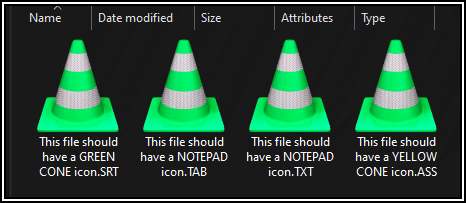
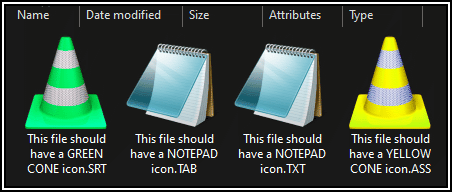
At one time, I had different homemade icons for each of ... .txt .srt .vtt .ass etc. Then, out of the blue, if I now change any one of them, the system will change all the others as well. Just because they are all simple text files, Windows thinks I want the same icon for each.

Standing by for your registry bashing advice.
Thank you
Peter
 

My Computer

System One

  • OS
    Version 21H2 (OS Build 22000.2538)
    Computer type
    PC/Desktop
    Manufacturer/Model
    Dell Inc. OptiPlex 9020 01
    CPU
    Intel(R) Core(TM) i7-4770 CPU @ 3.40GHz
    Motherboard
    Dell Inc. 0PC5F7 A03
    Memory
    32 Gigabytes
    Graphics Card(s)
    Intel(R) HD Graphics 4600
    Sound Card
    Realtek High Definition Audio
    Monitor(s) Displays
    (#1) Samsung SMS27A550H, (#2) Samsung S24D330, (#3) Samsung SyncMaster SA550
    Screen Resolution
    (#1) 3840x2160, (#2) 1920x1080, (#3) 1920x1080
    Hard Drives
    C: D: Fanxiang S101Q 1TB (1024.2 GB) ssd
    E: WDC WDS100T2B0A-00SM50 (1000.2 GB) ssd
    F: WDC WD10SPZX-21Z10T0 (1000.2 GB) hdd
    G: HAJAAN HS512E 512GB (512.1 GB) ssd
    PSU
    Standard 255 Watt
    Case
    Tower
    Cooling
    Fans
    Keyboard
    PS/2
    Mouse
    PS/2
    Internet Speed
    955 Mbps Down, 18 Mbps Up
    Browser
    Firefox 150.0 (64-bit)
    Antivirus
    Malwarebytes
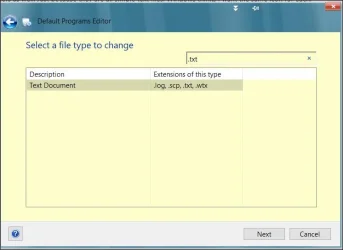
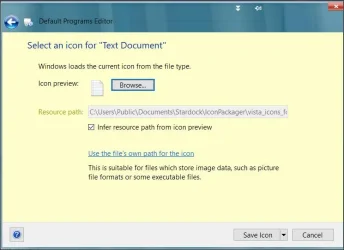
Hi, suggest you start by having a look at this useful free program.
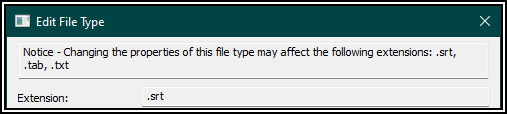
These are successive dialogues related to changing an icon for a file type.
1.webp

2.webp

Dealing with icons for file types is just one thing it can do.
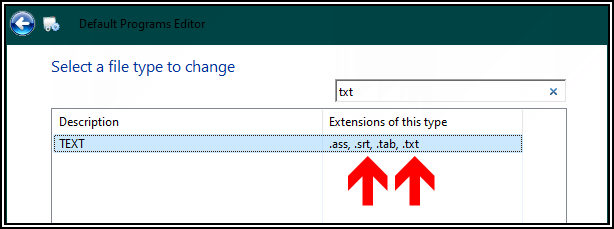
You can also see the correlation between a group of file types as I show above.

You could also consider Nirsoft's Filetypesman.

(Are you really still on the build shown under your avatar?)
 

My Computer

System One

  • OS
    Windows 11 Pro
    Computer type
    Laptop
    Manufacturer/Model
    Lenovo t480s
    CPU
    i7-8650U
    Memory
    16GB
    Graphics Card(s)
    Intel UHD 620
    Screen Resolution
    1920x1080
    Hard Drives
    C SN810 SDCPNRY-512G-1006
    Browser
    Edge, Firefox
    Antivirus
    Defender
Hi dalchina

Thanks for stopping by. I like your recommendation however the problem remains.
I need to know how to break up the mandatory relationship between the various text
files with differing extensions. This program is a ..."Change one and they all change".

(2026.04.26)__23.21.22.gif

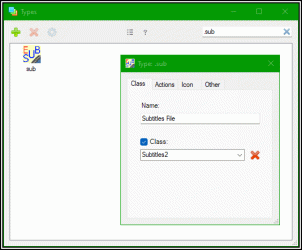
Re: Nirsoft's Filetypesman. Yes, I'm a big fan of FileTypesMan and his very old icon changer
called Types which I've been using successfully until now.

Re: Are you really still on the build shown under your avatar?
Unfortunately, yes. After an unsolvable problem, and a complete rollback of partition C:,
I've never been able to get beyond ...

(2026.04.26)__23.12.26.gif

And then, nothing but the security updates ever comes down the pipe. I just gave up and live with it.

Peter
 

My Computer

System One

  • OS
    Version 21H2 (OS Build 22000.2538)
    Computer type
    PC/Desktop
    Manufacturer/Model
    Dell Inc. OptiPlex 9020 01
    CPU
    Intel(R) Core(TM) i7-4770 CPU @ 3.40GHz
    Motherboard
    Dell Inc. 0PC5F7 A03
    Memory
    32 Gigabytes
    Graphics Card(s)
    Intel(R) HD Graphics 4600
    Sound Card
    Realtek High Definition Audio
    Monitor(s) Displays
    (#1) Samsung SMS27A550H, (#2) Samsung S24D330, (#3) Samsung SyncMaster SA550
    Screen Resolution
    (#1) 3840x2160, (#2) 1920x1080, (#3) 1920x1080
    Hard Drives
    C: D: Fanxiang S101Q 1TB (1024.2 GB) ssd
    E: WDC WDS100T2B0A-00SM50 (1000.2 GB) ssd
    F: WDC WD10SPZX-21Z10T0 (1000.2 GB) hdd
    G: HAJAAN HS512E 512GB (512.1 GB) ssd
    PSU
    Standard 255 Watt
    Case
    Tower
    Cooling
    Fans
    Keyboard
    PS/2
    Mouse
    PS/2
    Internet Speed
    955 Mbps Down, 18 Mbps Up
    Browser
    Firefox 150.0 (64-bit)
    Antivirus
    Malwarebytes
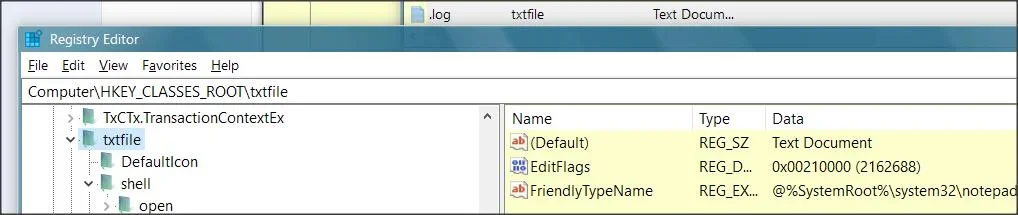
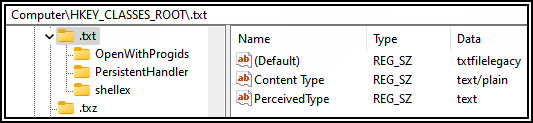
The common element to those is txtfile.
To override this, and override applications assigning an icon to a file type see:

N.B. before making such changes ensure you have appropriate backups. Best to experiment in a VM (virtual machine).

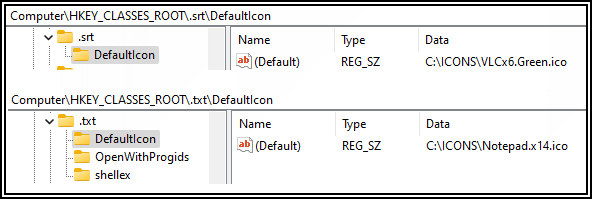
See e.g. these for two of those file types, where you can see how the default icon is allocated.

1.webp2.webp

I believe the reason you're not automatically offered a build upgrade is because the PC (shown in your specs) is old and 'not Win 11 compatible' in MS's terms.

The only way to do that is a manual build upgrade using an appropriate iso file.
 
Last edited:

My Computer

System One

  • OS
    Windows 11 Pro
    Computer type
    Laptop
    Manufacturer/Model
    Lenovo t480s
    CPU
    i7-8650U
    Memory
    16GB
    Graphics Card(s)
    Intel UHD 620
    Screen Resolution
    1920x1080
    Hard Drives
    C SN810 SDCPNRY-512G-1006
    Browser
    Edge, Firefox
    Antivirus
    Defender
Well, as it turns out, I don't even have a HKEY_CLASSES_ROOT\txtfile
But the .txt has ...

(2026.04.27)__18.41.37.gif

After a backup, I deleted HKEY_CLASSES_ROOT\.txt and all the others that pointed
to the same application with the idea of reconstructing them from scratch.
SURPRISE: Nothing changed at all (!?)

Re: ... the PC (shown in your specs) is old and 'not Win 11 compatible' ...
I'm sure your right.
 

My Computer

System One

  • OS
    Version 21H2 (OS Build 22000.2538)
    Computer type
    PC/Desktop
    Manufacturer/Model
    Dell Inc. OptiPlex 9020 01
    CPU
    Intel(R) Core(TM) i7-4770 CPU @ 3.40GHz
    Motherboard
    Dell Inc. 0PC5F7 A03
    Memory
    32 Gigabytes
    Graphics Card(s)
    Intel(R) HD Graphics 4600
    Sound Card
    Realtek High Definition Audio
    Monitor(s) Displays
    (#1) Samsung SMS27A550H, (#2) Samsung S24D330, (#3) Samsung SyncMaster SA550
    Screen Resolution
    (#1) 3840x2160, (#2) 1920x1080, (#3) 1920x1080
    Hard Drives
    C: D: Fanxiang S101Q 1TB (1024.2 GB) ssd
    E: WDC WDS100T2B0A-00SM50 (1000.2 GB) ssd
    F: WDC WD10SPZX-21Z10T0 (1000.2 GB) hdd
    G: HAJAAN HS512E 512GB (512.1 GB) ssd
    PSU
    Standard 255 Watt
    Case
    Tower
    Cooling
    Fans
    Keyboard
    PS/2
    Mouse
    PS/2
    Internet Speed
    955 Mbps Down, 18 Mbps Up
    Browser
    Firefox 150.0 (64-bit)
    Antivirus
    Malwarebytes
What you say you've done is wrong... and you have completely ignored the link from MS which I posted for you.
 

My Computer

System One

  • OS
    Windows 11 Pro
    Computer type
    Laptop
    Manufacturer/Model
    Lenovo t480s
    CPU
    i7-8650U
    Memory
    16GB
    Graphics Card(s)
    Intel UHD 620
    Screen Resolution
    1920x1080
    Hard Drives
    C SN810 SDCPNRY-512G-1006
    Browser
    Edge, Firefox
    Antivirus
    Defender
Re: ... completely ignored the link from MS ...
No. I went to the link and then I force-fed the following ...

(2026.04.28)__03.15.14.gif
I also noticed that the link said "Icons can also be assigned on an application-specific basis".
I see the word "can". Not the word "must". But, like it says in FileTypesMan ...

(2026.04.28)__03.37.58.gif
So true. Thus any changes I make are ignored and I still haven't found where
to turn OFF this wannabe-helpful feature.

(2026.04.28)__03.35.40.gif
Ain't life beautiful when all I have is to complain about the wrong icon
on a file?
 

My Computer

System One

  • OS
    Version 21H2 (OS Build 22000.2538)
    Computer type
    PC/Desktop
    Manufacturer/Model
    Dell Inc. OptiPlex 9020 01
    CPU
    Intel(R) Core(TM) i7-4770 CPU @ 3.40GHz
    Motherboard
    Dell Inc. 0PC5F7 A03
    Memory
    32 Gigabytes
    Graphics Card(s)
    Intel(R) HD Graphics 4600
    Sound Card
    Realtek High Definition Audio
    Monitor(s) Displays
    (#1) Samsung SMS27A550H, (#2) Samsung S24D330, (#3) Samsung SyncMaster SA550
    Screen Resolution
    (#1) 3840x2160, (#2) 1920x1080, (#3) 1920x1080
    Hard Drives
    C: D: Fanxiang S101Q 1TB (1024.2 GB) ssd
    E: WDC WDS100T2B0A-00SM50 (1000.2 GB) ssd
    F: WDC WD10SPZX-21Z10T0 (1000.2 GB) hdd
    G: HAJAAN HS512E 512GB (512.1 GB) ssd
    PSU
    Standard 255 Watt
    Case
    Tower
    Cooling
    Fans
    Keyboard
    PS/2
    Mouse
    PS/2
    Internet Speed
    955 Mbps Down, 18 Mbps Up
    Browser
    Firefox 150.0 (64-bit)
    Antivirus
    Malwarebytes
Did you do this?

Step 1:​


Create a subkey named DefaultIcon in one of the following two locations:


  • For a file-type assignment, HKEY_CLASSES_ROOT\.extension
  • For an application assignment, HKEY_CLASSES_ROOT\ProgID

Step 2:​


Assign the DefaultIcon subkey a default value of type REG_SZ that specifies the fully qualified path for the file that contains the icon.

- that's adding to HKEY_CLASSES_ROOT\.txt
- when you say
I deleted HKEY_CLASSES_ROOT\.txt

Disclaimer: I only offer this on the basis of what I've read- never tried it myself.
 

My Computer

System One

  • OS
    Windows 11 Pro
    Computer type
    Laptop
    Manufacturer/Model
    Lenovo t480s
    CPU
    i7-8650U
    Memory
    16GB
    Graphics Card(s)
    Intel UHD 620
    Screen Resolution
    1920x1080
    Hard Drives
    C SN810 SDCPNRY-512G-1006
    Browser
    Edge, Firefox
    Antivirus
    Defender
I also noticed that the link said "Icons can also be assigned on an application-specific basis".
I see the word "can". Not the word "must". But, like it says in FileTypesMan ...
It seems that the extensions whose icon you can't change have an icon assigned to a ProgID that they share. The default value of the .ext registry entry is the ProgID. So look at that for each extension. If they are all the same and the ProgID has a default icon, then that's the explanation. You might want to figure out how this happened. DefaultProgramsEditor could do that.
 

My Computers

System One System Two

  • OS
    Windows 11 25H2 Pro Build 26200
    Computer type
    PC/Desktop
    Manufacturer/Model
    MSI PRO ADL-U Cubi 5 (MS-B0A8)
    CPU
    i3-1215U
    Memory
    8GB
    Monitor(s) Displays
    Sony 43" 4k TV
    Screen Resolution
    3840x2160
    Hard Drives
    250GB NVMe M.2 PCIe Gen 3 SSD
    PSU
    External 65W
    Case
    Mini PC
    Browser
    FireFox
    Antivirus
    MS
  • Operating System
    Windows 11 Pro 25H2
    Computer type
    PC/Desktop
    Manufacturer/Model
    Dell Optiplex 3070 SFF
    CPU
    Intel i3-9100
    Memory
    16GB DDR4
    Monitor(s) Displays
    Dell S2721
    Screen Resolution
    3840 x 2160
    Hard Drives
    Samsung 500GB nvMe
    Case
    Dell small form factor
    Keyboard
    Cherry mechanical (Blue)
    Mouse
    Microsoft
    Antivirus
    MS Defender
To give each extension its own icon, the user must:
  1. Create a unique ProgID for each extension
  2. Point each extension to its new ProgID
  3. Add a DefaultIcon entry under each ProgID
Windows will then treat them as separate file types

Windows 11 21H2 has older file association behavior so am not sure if this applies or is even done the same way in 21h2.

IMO it's definitely not worth the effort all for the sake of an icon.
 

My Computers

System One System Two

  • OS
    Windows 11 Pro 25H2 26200.8655
    Computer type
    PC/Desktop
    Manufacturer/Model
    Dell Optiplex 7080
    CPU
    i9-10900 10 core 20 threads
    Motherboard
    DELL 0J37VM
    Memory
    32 gb
    Graphics Card(s)
    none-Intel UHD Graphics 630
    Sound Card
    Integrated Realtek
    Monitor(s) Displays
    Benq 27
    Screen Resolution
    2560x1440
    Hard Drives
    2x1tb Solidigm m.2 nvme /External drives 512gb Samsung m.2 sata+2tb Kingston m2.nvme
    PSU
    500w
    Case
    MT
    Cooling
    Dell Premium
    Keyboard
    Logitech wired
    Mouse
    Logitech wireless
    Internet Speed
    so slow I'm too embarrassed to tell
    Browser
    #1 Edge #2 Firefox
    Antivirus
    Defender+MWB Premium
  • Operating System
    Windows 11 Pro 24H2 26200.8457
    Computer type
    PC/Desktop
    Manufacturer/Model
    Beelink Mini PC SER5
    CPU
    AMD Ryzen 7 6800U
    Memory
    32 gb
    Graphics card(s)
    integrated
    Sound Card
    integrated
    Monitor(s) Displays
    Benq 27
    Screen Resolution
    2560x1440
    Hard Drives
    1TB Crucial nvme
    Keyboard
    Logitech wired
    Mouse
    Logitech wireless
    Internet Speed
    still too embarrassed to tell
    Browser
    Firefox
    Antivirus
    Defender
    Other Info
    System 3 is non compliant Dell 9020 i7-4770/24gb ram Win11 PRO 26200.8457
By using a very old program called Types, I was able to eliminate the Class
and the Perceived Type of the troublesome extensions. In turn, the icon assigned
to a particular extension no longer effects the icons of files with similar content.

(2026.04.28)__12.36.40.gif

Ergo, I'm happy again.

(2026.04.28)__12.19.40.gif
 

My Computer

System One

  • OS
    Version 21H2 (OS Build 22000.2538)
    Computer type
    PC/Desktop
    Manufacturer/Model
    Dell Inc. OptiPlex 9020 01
    CPU
    Intel(R) Core(TM) i7-4770 CPU @ 3.40GHz
    Motherboard
    Dell Inc. 0PC5F7 A03
    Memory
    32 Gigabytes
    Graphics Card(s)
    Intel(R) HD Graphics 4600
    Sound Card
    Realtek High Definition Audio
    Monitor(s) Displays
    (#1) Samsung SMS27A550H, (#2) Samsung S24D330, (#3) Samsung SyncMaster SA550
    Screen Resolution
    (#1) 3840x2160, (#2) 1920x1080, (#3) 1920x1080
    Hard Drives
    C: D: Fanxiang S101Q 1TB (1024.2 GB) ssd
    E: WDC WDS100T2B0A-00SM50 (1000.2 GB) ssd
    F: WDC WD10SPZX-21Z10T0 (1000.2 GB) hdd
    G: HAJAAN HS512E 512GB (512.1 GB) ssd
    PSU
    Standard 255 Watt
    Case
    Tower
    Cooling
    Fans
    Keyboard
    PS/2
    Mouse
    PS/2
    Internet Speed
    955 Mbps Down, 18 Mbps Up
    Browser
    Firefox 150.0 (64-bit)
    Antivirus
    Malwarebytes

Latest Support Threads

Back
Top Bottom