Solved Problem with Miracast


pewe

Member
Member
Local time
3:17 PM
Posts
37
OS
WIndows 11
I want to cast my screen to another PC (both running Windows 11).
For this to work I need to set this up according to MS instructions as shown in the attached image.
miracast to pc.webp

However, when I follow this and get to C) this is what I see
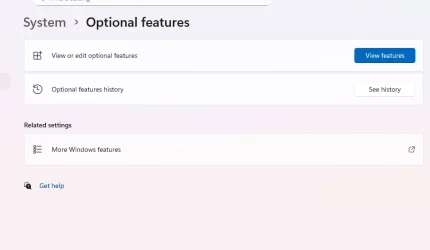
miracast to pc2.webp

Neither here, nor in the ;View features' is wireless mentioned.

What am I missing, how do I set up my PC's to accept Casting.
 
Windows Build/Version
Windows 11 Pro /24H2

My Computer My Computer

At a glance

WIndows 11
OS
WIndows 11
Computer type
Laptop
Manufacturer/Model
HP
Hello, :alien:

Double check using the tutorial below for adding the Wireless Display feature on each PC.


You will also need to enable Projecting to this PC on each PC.


My Computers My Computers

  • At a glance

    Windows 11 Pro for WorkstationsIntel i7-8700K 5 GHz64 GB (4x16GB) G.SKILL TridentZ RGB DDR4 3600...ASUS ROG-STRIX-GTX1080TI-O11G-GAMING (11GB GD...
    OS
    Windows 11 Pro for Workstations
    Computer type
    PC/Desktop
    Manufacturer/Model
    Custom self build
    CPU
    Intel i7-8700K 5 GHz
    Motherboard
    ASUS ROG Maximus XI Formula Z390
    Memory
    64 GB (4x16GB) G.SKILL TridentZ RGB DDR4 3600 MHz (F4-3600C18D-32GTZR)
    Graphics Card(s)
    ASUS ROG-STRIX-GTX1080TI-O11G-GAMING (11GB GDDR5X)
    Sound Card
    Integrated Digital Audio (S/PDIF)
    Monitor(s) Displays
    2 x Samsung Odyssey G75 27"
    Screen Resolution
    2560x1440
    Hard Drives
    1TB Samsung 990 PRO M.2,
    4TB Samsung 990 PRO M.2,
    TerraMaster F8 SSD Plus NAS
    PSU
    Seasonic Prime Titanium 850W
    Case
    Thermaltake Core P3 wall mounted
    Cooling
    Corsair Hydro H115i
    Keyboard
    Amazon Basics Wired Full Keyboard MD005
    Mouse
    Logitech MX Master 4
    Internet Speed
    2 Gbps Download and 100 Mbps Upload
    Browser
    Chrome and Edge
    Antivirus
    Microsoft Defender
    Other Info
    Logitech Z625 speaker system,
    Logitech BRIO 4K Pro webcam,
    HP Color LaserJet Pro MFP M477fdn,
    CyberPower CP1500PFCLCD
    Galaxy S23 Plus phone
  • At a glance

    Windows 11 ProSnapdragon X Elite (12 core) 3.42 GHz16 GB LPDDR5x-7467 MHz
    Operating System
    Windows 11 Pro
    Computer type
    Laptop
    Manufacturer/Model
    Surface Laptop 7 Copilot+ PC
    CPU
    Snapdragon X Elite (12 core) 3.42 GHz
    Memory
    16 GB LPDDR5x-7467 MHz
    Monitor(s) Displays
    15" HDR
    Screen Resolution
    2496 x 1664
    Hard Drives
    1 TB SSD
    Internet Speed
    Wi-Fi 7 and Bluetooth 5.4
    Browser
    Chrome and Edge
    Antivirus
    Microsoft Defender
Thanks - that worked, sort of.

Following the info I set it up and tested casting to and from my laptop to my PC.

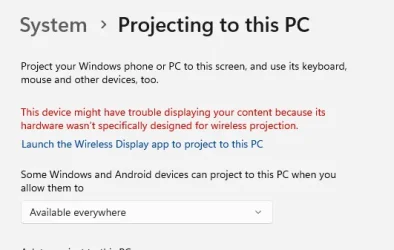
When I tried to use it today I had a problem trying to cats from the PC, and found this error when I went into 'System/Projecting'

casting error.webp

So if it worked 2 days ago why would Windows now say the hardware isn't designed for it.
it's a HP 'all-in-one' 18 months old running Windows 11.
 

My Computer My Computer

At a glance

WIndows 11
OS
WIndows 11
Computer type
Laptop
Manufacturer/Model
HP
Basically Laptops or some AIOs that use Laptop type boards cannot be projected to because of their integrated design presumably of the display panel and associated hardware, even if Miracast optional features is installed.

This is for my Laptop which gives a similar message but specifically mentions Miracast. The Miracast feature option is installed.

View attachment 143605
 

My Computer My Computer

At a glance

Windows 11
OS
Windows 11
Basically Laptops or some AIOs that use Laptop type boards cannot be projected to because of their integrated design presumably of the display panel and associated hardware, even if Miracast optional features is installed.

This is for my Laptop which gives a similar message but specifically mentions Miracast. The Miracast feature option is installed.
I appreciate what you say about some boards not being capable of casting - but my AIO worked 2 days ago when receiving and casting to my laptop, and it worked a few months ago casting to my TV - there have been no hardware changes - yet the message I posted has now come up.
 

My Computer My Computer

At a glance

WIndows 11
OS
WIndows 11
Computer type
Laptop
Manufacturer/Model
HP
Basically Laptops or some AIOs that use Laptop type boards cannot be projected to because of their integrated design presumably of the display panel and associated hardware....
The only real hardware restriction is one that applies equally to laptops and desktops. Older WiFi adapters may not be capable of WiFi Direct.
....my AIO worked 2 days ago when receiving and casting to my laptop, and it worked a few months ago casting to my TV - there have been no hardware changes - yet the message I posted has now come up...
The remaining restrictions are more to do with the drivers than the actual hardware. Have you had any driver updates recently?

Miracast requirements:
  • Graphics driver must support Windows Display Driver Model WDDM 1.3 with Miracast support
  • Wi-Fi driver must support Network Driver Interface Specification (NDIS) 6.30 and Wi-Fi Direct

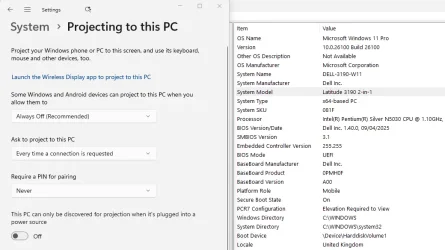
Some of my laptops are Miracast capable, some others are not (generally the older ones). Here's my System Five (see: My Computers/Other Info) a Dell Latitude 3190 2-in-one convertible, that is Miracast capable....


1756463607862.webp
 

My Computers My Computers

  • At a glance

    Windows 11 HomeAMD Athlon Silver 3050U8GBRadeon Graphics
    OS
    Windows 11 Home
    Computer type
    Laptop
    Manufacturer/Model
    Acer Aspire 3 A315-23-R9VY
    CPU
    AMD Athlon Silver 3050U
    Memory
    8GB
    Graphics Card(s)
    Radeon Graphics
    Monitor(s) Displays
    laptop screen
    Screen Resolution
    1366x768 native resolution, up to 2560x1440 with Radeon Virtual Super Resolution
    Hard Drives
    1TB Samsung EVO 870 SSD (from April 2026: 250GB EVO 850)
    Internet Speed
    150 Mbps
    Browser
    Edge, Firefox
    Antivirus
    Defender
    Other Info
    fully 'Windows 11 ready' laptop. Windows 10 C: partition migrated from my old unsupported 'main machine' then upgraded to 11. A test migration ran Insider builds for 2 months. When 11 was released on 5th October 2021 it was re-imaged back to 10 and was offered the upgrade in Windows Update on 20th October. Windows Update offered the 22H2 Feature Update on 20th September 2022. It got the 23H2 Feature Update on 4th November 2023 through Windows Update, 24H2 on 3rd October 2024 through Windows Update by setting the Target Release Version for 24H2, and 25H2 on 30th September 2025 through Windows Update by setting the Target Release Version for 25H2.

    UPDATE - 11 April 2026: due to mechanical deterioration this PC has been retired from active duty. The OS with all software and files has been migrated to my System Seven in 'Other systems' to carry on as my general purpose 'main machine'.

    I've now clean installed 25H2 and used Garlin's scripts to update Secure Boot to CA 2023 and revoke the PCA 2011 certificates. It's new role is to test secure boot issues.
  • At a glance

    Windows 11 ProIntel® Core™ i5-520M8GB(integrated graphics) Intel HD Graphics
    Operating System
    Windows 11 Pro
    Computer type
    Laptop
    Manufacturer/Model
    Dell Latitude E4310
    CPU
    Intel® Core™ i5-520M
    Motherboard
    0T6M8G
    Memory
    8GB
    Graphics card(s)
    (integrated graphics) Intel HD Graphics
    Screen Resolution
    1366x768
    Hard Drives
    500GB Crucial MX500 SSD
    Browser
    Firefox, Edge
    Antivirus
    Defender
    Other Info
    unsupported machine: Legacy bios, MBR, TPM 1.2, upgraded from W10 to W11 using W10/W11 hybrid install media workaround.

    In-place upgrade to 22H2 using ISO and a workaround.
    Feature Update to 23H2 by manually installing the Enablement Package.
    In-place upgrade to 24H2 using hybrid 23H2/24H2 install media.
    Upgraded to 25H2 by Enablement Package.

    Also running Insider Dev, and Canary builds and Windows 10 as native boot .vhdx.
  • My SYSTEM THREE is a Dell Latitude 5410, i7-10610U, 32GB RAM, 512GB NVMe ssd, supported device running Windows 11 Pro.

    My SYSTEM FOUR is a 2-in-1 convertible Lenovo Yoga 11e 20DA, Celeron N2930, 8GB RAM, 256GB ssd. Unsupported device: currently running Win10 Pro, plus Win11 Pro RTM and Insider Dev, Beta, and RP 24H2 as native boot vhdx.

    My SYSTEM FIVE is a Dell Latitude 3190 2-in-1, Pentium Silver N5030, 8GB RAM, 1TB NVMe ssd, supported device running Windows 11 Pro, plus Insider Beta, Dev, and Canary builds (and a few others) as a native boot .vhdx.

    My SYSTEM SIX is a Dell Latitude 5550, Core Ultra 7 165H, 64GB RAM, 1TB NVMe SSD, supported device, Windows 11 Pro 24H2, Hyper-V host machine. Updated to 25H2 on 30th September 2025.

    My SYSTEM SEVEN is a Lenovo Thinkpad T580, Intel Core i7-8650U, 16GB RAM, 512GB NVMe SSD + 2nd 512GB NVMe SSD, a supported device for Windows 11. This is my current general purpose 'main machine'. The installed Windows 11 Home from my System One has been migrated to this machine.
Have you done some hardware checks

Is the WiFi adapter certified for WiFi display/Miracast ?
Does the WiFi card manufacturer data sheet show compatibility ?
Have you used DXDIAG, you have to save the text file for Miracast compatibility info ?

Mine is contradictory, these are the relevant extracts:

System - Miracast: Available, with HDCP
iGPU - Miracast: Not Supported
dGPU - Miracast: Not Supported

Those are only 2 elements, WiFi card and the 2 GPUs but there is more hardware requirements, no clue about those.

I thought based on System it might work, thus installed the WiFi display/Miracast option, but it does not.

"The only real hardware restriction is one that applies equally to laptops and desktops."

That is not the case, Laptops do not use say HDMI or DisplayPort interfaces for their monitor/display panel it is another digital interface, I forget the name, there maybe additional differences.
 

My Computer My Computer

At a glance

Windows 11
OS
Windows 11
The only real hardware restriction is one that applies equally to laptops and desktops. Older WiFi adapters may not be capable of WiFi Direct.

The remaining restrictions are more to do with the drivers than the actual hardware. Have you had any driver updates recently?

The remaining restrictions are more to do with the drivers than the actual hardware. Have you had any driver updates recently?
Actually I was having a problem with my wifi disconnecting and in another post I was given a link to update the driver. After updating the driver I discovered it was a different problem.
The other day was the first time I tried casting after updating the wifi driver - so that could be the problem.
I now need to find a way, if it's possible. to revert to the original driver and see if that cures the casting problem.
 

My Computer My Computer

At a glance

WIndows 11
OS
WIndows 11
Computer type
Laptop
Manufacturer/Model
HP
I now need to find a way, if it's possible. to revert to the original driver and see if that cures the casting problem.
In device manager you can roll back to the previous driver.
 

My Computers My Computers

  • At a glance

    Windows 11 HomeAMD Athlon Silver 3050U8GBRadeon Graphics
    OS
    Windows 11 Home
    Computer type
    Laptop
    Manufacturer/Model
    Acer Aspire 3 A315-23-R9VY
    CPU
    AMD Athlon Silver 3050U
    Memory
    8GB
    Graphics Card(s)
    Radeon Graphics
    Monitor(s) Displays
    laptop screen
    Screen Resolution
    1366x768 native resolution, up to 2560x1440 with Radeon Virtual Super Resolution
    Hard Drives
    1TB Samsung EVO 870 SSD (from April 2026: 250GB EVO 850)
    Internet Speed
    150 Mbps
    Browser
    Edge, Firefox
    Antivirus
    Defender
    Other Info
    fully 'Windows 11 ready' laptop. Windows 10 C: partition migrated from my old unsupported 'main machine' then upgraded to 11. A test migration ran Insider builds for 2 months. When 11 was released on 5th October 2021 it was re-imaged back to 10 and was offered the upgrade in Windows Update on 20th October. Windows Update offered the 22H2 Feature Update on 20th September 2022. It got the 23H2 Feature Update on 4th November 2023 through Windows Update, 24H2 on 3rd October 2024 through Windows Update by setting the Target Release Version for 24H2, and 25H2 on 30th September 2025 through Windows Update by setting the Target Release Version for 25H2.

    UPDATE - 11 April 2026: due to mechanical deterioration this PC has been retired from active duty. The OS with all software and files has been migrated to my System Seven in 'Other systems' to carry on as my general purpose 'main machine'.

    I've now clean installed 25H2 and used Garlin's scripts to update Secure Boot to CA 2023 and revoke the PCA 2011 certificates. It's new role is to test secure boot issues.
  • At a glance

    Windows 11 ProIntel® Core™ i5-520M8GB(integrated graphics) Intel HD Graphics
    Operating System
    Windows 11 Pro
    Computer type
    Laptop
    Manufacturer/Model
    Dell Latitude E4310
    CPU
    Intel® Core™ i5-520M
    Motherboard
    0T6M8G
    Memory
    8GB
    Graphics card(s)
    (integrated graphics) Intel HD Graphics
    Screen Resolution
    1366x768
    Hard Drives
    500GB Crucial MX500 SSD
    Browser
    Firefox, Edge
    Antivirus
    Defender
    Other Info
    unsupported machine: Legacy bios, MBR, TPM 1.2, upgraded from W10 to W11 using W10/W11 hybrid install media workaround.

    In-place upgrade to 22H2 using ISO and a workaround.
    Feature Update to 23H2 by manually installing the Enablement Package.
    In-place upgrade to 24H2 using hybrid 23H2/24H2 install media.
    Upgraded to 25H2 by Enablement Package.

    Also running Insider Dev, and Canary builds and Windows 10 as native boot .vhdx.
  • My SYSTEM THREE is a Dell Latitude 5410, i7-10610U, 32GB RAM, 512GB NVMe ssd, supported device running Windows 11 Pro.

    My SYSTEM FOUR is a 2-in-1 convertible Lenovo Yoga 11e 20DA, Celeron N2930, 8GB RAM, 256GB ssd. Unsupported device: currently running Win10 Pro, plus Win11 Pro RTM and Insider Dev, Beta, and RP 24H2 as native boot vhdx.

    My SYSTEM FIVE is a Dell Latitude 3190 2-in-1, Pentium Silver N5030, 8GB RAM, 1TB NVMe ssd, supported device running Windows 11 Pro, plus Insider Beta, Dev, and Canary builds (and a few others) as a native boot .vhdx.

    My SYSTEM SIX is a Dell Latitude 5550, Core Ultra 7 165H, 64GB RAM, 1TB NVMe SSD, supported device, Windows 11 Pro 24H2, Hyper-V host machine. Updated to 25H2 on 30th September 2025.

    My SYSTEM SEVEN is a Lenovo Thinkpad T580, Intel Core i7-8650U, 16GB RAM, 512GB NVMe SSD + 2nd 512GB NVMe SSD, a supported device for Windows 11. This is my current general purpose 'main machine'. The installed Windows 11 Home from my System One has been migrated to this machine.
Thanks for the headsup re the wifi driver guys.
Have downgraded the wifi driver to the previous version and casting works again.
(y)(y)
 

My Computer My Computer

At a glance

WIndows 11
OS
WIndows 11
Computer type
Laptop
Manufacturer/Model
HP

Latest Support Threads

Back
Top Bottom