Project Not Cumulative


jen1

Well-known member
Member
Local time
6:52 AM
Posts
96
OS
Windows 11 vmware
# Project Not Cumulative

Project Not Cumulative is an alternative approach to Windows cumulative updates designed to reduce update size, speed up installation, lower storage usage, and reduce unnecessary wear on hardware.

Instead of downloading a full cumulative MSU package from Microsoft every month, users can download a much smaller ESD package containing only the files updated since the previous Patch Tuesday release.

The goal of this project is to make Windows updates cleaner, faster, and more efficient for everyone, especially users with limited hardware, low storage capacity, or slower internet connections. It also benefits users with high-end hardware by reducing unnecessary disk activity and installation time.

At the moment, I am releasing Project Not Cumulative updates only for Windows 25H2 because it is the version I currently use and test regularly.

---

# Why This Project Exists

Traditional cumulative updates continue growing over time because they include large amounts of previously released content. This increases:

- Download size
- Installation time
- SSD and storage wear
- Temporary disk usage
- Bandwidth consumption

Project Not Cumulative reduces these problems by delivering only the updated files needed since the last Patch Tuesday update already installed on the system.

---

# How It Works

Instead of downloading a full 5 GB cumulative MSU package, users can download a much smaller ESD package, usually around 1 GB.

The ESD package contains only the new or modified files released after the previous Patch Tuesday update.

This update method works only if the system is already running the previous Patch Tuesday release.

Example:

- You already installed April Patch Tuesday
- You download the May Project Not Cumulative ESD package
- Only the files changed between April and May are installed

---

# Benefits


- Faster update installation
- Smaller downloads
- Lower disk space usage
- Reduced SSD wear
- Less bandwidth usage
- Cleaner update process
- Better experience for low-end hardware
- More efficient even on high-end systems

---

# Safety

The installation process is designed to remain safe because DISM installs only files officially distributed and digitally signed by Microsoft.

Unsigned or modified system files will not be accepted.

Even if Secure Boot is disabled or antivirus software is turned off, the installation process remains secure because only valid Microsoft-signed files can be installed.

---

## Transparency

The ESD package can be opened and inspected easily using tools such as 7-Zip. Users can review the contents of the package without requiring special or proprietary tools.

---

# Frequently Asked Questions

## Is this safe to install?


Yes. DISM installs only files officially distributed and digitally signed by Microsoft.

## Does this replace Windows Update?

No. This is an alternative update delivery method.

## Will this work on every Windows version?

No. Project Not Cumulative currently supports only Windows versions based on build 26100, including Windows 11 24H2 and 25H2.

## Why use ESD instead of MSU?

ESD packages are smaller and more efficient for distributing only modified files.

## Why is it called “Project Not Cumulative”?
Because the project focuses on delivering only the necessary updated files instead of massive cumulative update packages.
The name may sound unusual, but it describes the project’s goal very directly.
 

My Computer My Computer

At a glance

Windows 11 vmwareI9 13950hx128GBNVIDIA 4090
OS
Windows 11 vmware
Computer type
Laptop
Manufacturer/Model
Dell
CPU
I9 13950hx
Memory
128GB
Graphics Card(s)
NVIDIA 4090
Sound Card
Realtek
# Preview Release

Version: Windows 11 25H2 (Build 26200.8521)
Update: KB5089573

Link: 1.12 GB folder on MEGA

This release will work only if your system is already running build 26200.8457.

## Installation

Run the following commands as Administrator:


DISM /Online /Add-Package /PackagePath:"(path)\SSU-26100.8519-x64.cab" DISM /Online /Add-Package /PackagePath:"(path)\Windows11-KB5089573-x64.esd"


## File Hashes (SHA-256)

SSU-26100.8519-x64.cab
SHA-256: ba070ddbb2416b299e088de882ac09944fcd3beee86f8d521d055d00d4414f40

Windows11-KB5089573-x64.esd
SHA-256: 5c01a5a1cd061d9a309507d41495be9f5ffbd790eb4ab411f6ad53338d8a9e6a
 

My Computer My Computer

At a glance

Windows 11 vmwareI9 13950hx128GBNVIDIA 4090
OS
Windows 11 vmware
Computer type
Laptop
Manufacturer/Model
Dell
CPU
I9 13950hx
Memory
128GB
Graphics Card(s)
NVIDIA 4090
Sound Card
Realtek

My Computer My Computer

At a glance

Windows 11 vmwareI9 13950hx128GBNVIDIA 4090
OS
Windows 11 vmware
Computer type
Laptop
Manufacturer/Model
Dell
CPU
I9 13950hx
Memory
128GB
Graphics Card(s)
NVIDIA 4090
Sound Card
Realtek
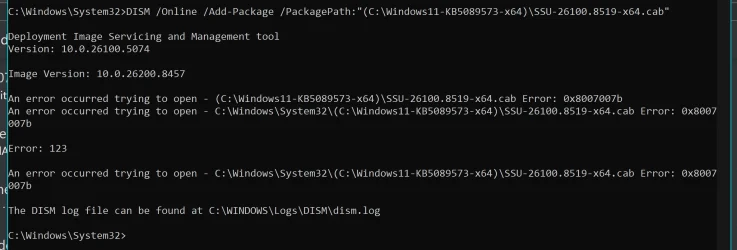
Hi Jen, try installing KB5089573 using above method but keeps getting error 123.
Please advise what to do next, thanks...
 

Attachments

  • Error 123.webp
    Error 123.webp
    107.6 KB · Views: 2

My Computer My Computer

At a glance

Windows 11Intel I5-11400Adata XPG 2x8gb DDR4-3600Gigagbyte GTX 1080
OS
Windows 11
Computer type
PC/Desktop
Manufacturer/Model
Personal Build
CPU
Intel I5-11400
Motherboard
MSI MAG B560M MORTAR
Memory
Adata XPG 2x8gb DDR4-3600
Graphics Card(s)
Gigagbyte GTX 1080
Sound Card
NA
Monitor(s) Displays
Samsung UHD 4K TV
Screen Resolution
3840x2160
Hard Drives
1TB M.2 NVME ssd
PSU
FSP 600w
Case
ANTEC Tower
Download these two files:

* `SSU-26100.8519-x64.cab`
* `Windows11.0-KB5089573-x64.esd`

The instructions say to replace the package path with the actual location of the files on your computer. The easiest way is:

1. Right-click the first file (`SSU-26100.8519-x64.cab`) and select Copy as path.

2. Open Command Prompt (CMD) as Administrator.

3. Type, or better copy paste:

DISM /Online /Add-Package /PackagePath:

4. After the colon, right-click inside CMD to paste the copied file path.

The full command should look something like this:

DISM /Online /Add-Package /PackagePath:"C:\Users\YourUser\Downloads\SSU-26100.8519-x64.cab"

Run that command first.

After the CAB file installs successfully, repeat the same process for the ESD file:

1. Right-click `Windows11.0-KB5089573-x64.esd`
2. Select Copy as path
3. Paste it after:

DISM /Online /Add-Package /PackagePath:

Example:

DISM /Online /Add-Package /PackagePath:"C:\Users\YourUser\Downloads\Windows11.0-KB5089573-x64.esd"
 
Last edited:

My Computer My Computer

At a glance

Windows 11 vmwareI9 13950hx128GBNVIDIA 4090
OS
Windows 11 vmware
Computer type
Laptop
Manufacturer/Model
Dell
CPU
I9 13950hx
Memory
128GB
Graphics Card(s)
NVIDIA 4090
Sound Card
Realtek
Hi Jen, try installing KB5089573 using above method but keeps getting error 123.
Please advise what to do next, thanks...
Looked at the command in your screenshot. The issue is the parentheses around the folder path.

You entered:

DISM /Online /Add-Package /PackagePath:"(C:\Windows11-KB5089573-x64)\SSU-26100.8519-x64.cab"

It should be:

DISM /Online /Add-Package /PackagePath:"C:\Windows11-KB5089573-x64\SSU-26100.8519-x64.cab"

Remove both parentheses: the `(` before `C:` and the `)` after `x64`. Keep the quotation marks.

It’s usually easier to right-click the file, select Copy as path, and then paste it into Command Prompt. That avoids typing mistakes in the file path :)
 
Last edited:

My Computer My Computer

At a glance

Windows 11 vmwareI9 13950hx128GBNVIDIA 4090
OS
Windows 11 vmware
Computer type
Laptop
Manufacturer/Model
Dell
CPU
I9 13950hx
Memory
128GB
Graphics Card(s)
NVIDIA 4090
Sound Card
Realtek
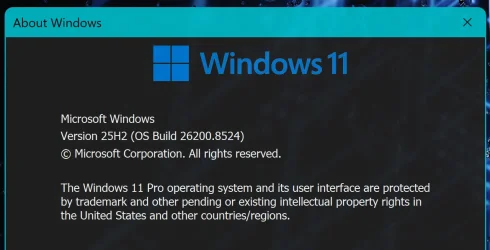
Hi Jen, thanks for pointing out my mistake. Managed to updates windows with correct command line.
I must said, with this method the updates process is much much faster, smoother & the file size is much smaller.
Thanks again for creating this project & keep up the good work...
 

Attachments

  • Build 9524.webp
    Build 9524.webp
    52.8 KB · Views: 1

My Computer My Computer

At a glance

Windows 11Intel I5-11400Adata XPG 2x8gb DDR4-3600Gigagbyte GTX 1080
OS
Windows 11
Computer type
PC/Desktop
Manufacturer/Model
Personal Build
CPU
Intel I5-11400
Motherboard
MSI MAG B560M MORTAR
Memory
Adata XPG 2x8gb DDR4-3600
Graphics Card(s)
Gigagbyte GTX 1080
Sound Card
NA
Monitor(s) Displays
Samsung UHD 4K TV
Screen Resolution
3840x2160
Hard Drives
1TB M.2 NVME ssd
PSU
FSP 600w
Case
ANTEC Tower
No need to thank me. I’m making these updates for myself, and I’m only sharing them publicly now.

In fact, I’ll only share the updates that I personally make and use, so there’s really nothing to thank me for. The main reason I share them is because I care about the environment.

Based on my calculations, if all Microsoft users switched to these Not Cumulative updates, it could save at least 100 gigawatts of power every month. Of course, I don’t want to take credit for that, since realistically only a small number of people will use these updates.

But if Microsoft ever adopts this method officially, I hope the saved energy and resources can be used for something meaningful, helping people affected by crises and war zones around the world.
 

My Computer My Computer

At a glance

Windows 11 vmwareI9 13950hx128GBNVIDIA 4090
OS
Windows 11 vmware
Computer type
Laptop
Manufacturer/Model
Dell
CPU
I9 13950hx
Memory
128GB
Graphics Card(s)
NVIDIA 4090
Sound Card
Realtek
I'm curious how this is better than the previous express update methods, or the forward/reverse differentials in current versions of Windows 11.
 

My Computer My Computer

At a glance

Windows 11 Pro 25H212th Gen Core i7-1260P64 GB Micron PC4-25600Intel Iris Xe Graphics
OS
Windows 11 Pro 25H2
Computer type
PC/Desktop
Manufacturer/Model
Intel NUC12WSHi7
CPU
12th Gen Core i7-1260P
Motherboard
NUC12WSBi7
Memory
64 GB Micron PC4-25600
Graphics Card(s)
Intel Iris Xe Graphics
Sound Card
on-board Realtek HD Audio
Monitor(s) Displays
Dell U3219Q
Screen Resolution
3840 x 2160
Hard Drives
Samsung SSD 990 PRO 1TB
Crucial MX500 2 TB
Antivirus
Microsoft Defender
A good approach. It will not fix updates that break third party software, notably Explorer Patcher.
 

My Computers My Computers

  • At a glance

    Windows 11 Education For 25H2Intel® Core i7 5500u8 GBIntel HD Family Graphics 5500 AMD Firepro 4150M
    OS
    Windows 11 Education For 25H2
    Computer type
    Laptop
    Manufacturer/Model
    HP ZBook G2
    CPU
    Intel® Core i7 5500u
    Motherboard
    HP
    Memory
    8 GB
    Graphics Card(s)
    Intel HD Family Graphics 5500 AMD Firepro 4150M
    Sound Card
    Realtek High Audio
    Hard Drives
    1 TB SSD
    Mouse
    HP USB Mouse
    Antivirus
    Windows Defender
  • At a glance

    Windows 11 Pro For Workstations 25H2Xeon 1535m v632 GBAMD Quadro Pro 4100
    Operating System
    Windows 11 Pro For Workstations 25H2
    Computer type
    Laptop
    Manufacturer/Model
    HP Zbook G4
    CPU
    Xeon 1535m v6
    Motherboard
    HP
    Memory
    32 GB
    Graphics card(s)
    AMD Quadro Pro 4100
    Sound Card
    Bang and Olufson Audio
    Hard Drives
    1TB SSD
    Mouse
    HP USB Mouse
    Antivirus
    Windows Defender
Hi Jen, gotta say, totally painless and quick (y). Every place possibe shows I'm on 8524 but when I open Windows Update it still shows

Preview Update is available, download and install. Any idea why it's still showing up?
After a few hours it finally disappeared, all good.
 
Last edited:

My Computer My Computer

At a glance

Windows 11 Pro 64-bit 25H2 26200.8655Intel(R) Core(TM) i5-9400 CPU @ 2.90GHzx2 DDR4-3200 SDRAM Kingston 8.00GB @ 1600MHzIntel UHD Graphics 630 31.0.101.2125
OS
Windows 11 Pro 64-bit 25H2 26200.8655
Computer type
PC/Desktop
Manufacturer/Model
ASUStek Computer
CPU
Intel(R) Core(TM) i5-9400 CPU @ 2.90GHz
Motherboard
ASUSTeK COMPUTER INC. D540MA-C (LGA1151)
Memory
x2 DDR4-3200 SDRAM Kingston 8.00GB @ 1600MHz
Graphics Card(s)
Intel UHD Graphics 630 31.0.101.2125
Sound Card
Realtek High Definition Audio 6.0.9915.1
Monitor(s) Displays
Sense 27" M2786HVB
Screen Resolution
1920 x 1080
Hard Drives
238GB Western Digital WDC PC SN520 SDAPNUW-256G-1002
447GB Hitachi HS-SSD-C100 480G (SATA (SSD))
Case
ASUS
Keyboard
Logitech K370 for business
Mouse
Logitech M240 for business
Internet Speed
1GB
Browser
Edge 149.0.4022.80
Antivirus
Eset Antivirus 19.1.14
Other Info
NIC Realtek PCIe GbE Family Controller 1168.29.50.202
@pseymour

These are the same files that are included in the standard Windows update. This project is essentially identical to the official Windows update, except that older files from previous versions have been removed because they already exist on your system. In other words, this is not a special update, it's the same update package.

@fringe53

My method uses DISM to install the new version directly. The Windows Update page in Settings, however, relies on the Update Orchestrator service and the Windows Update service to detect and track installed updates. Those services start later during the boot process, so it can take some time for them to recognize that the update has already been installed.

Because of that, it's normal for Windows Update to continue showing the update as available for a while, even after you've installed it using my method. DISM installs the update immediately, but Windows Update still needs time to verify and synchronize its status through its own services.

So if the update still appears in Windows Update right after installation, that's expected behavior. Just pause or ignore the update and give Windows some time to catch up. Do not install or uninstall it a second time, as that is unnecessary.

To be fair, Microsoft's update system is not always the most efficient. It relies on multiple services that don't always communicate immediately, which can make the update status appear incorrect for a while even when everything is working properly.
 

My Computer My Computer

At a glance

Windows 11 vmwareI9 13950hx128GBNVIDIA 4090
OS
Windows 11 vmware
Computer type
Laptop
Manufacturer/Model
Dell
CPU
I9 13950hx
Memory
128GB
Graphics Card(s)
NVIDIA 4090
Sound Card
Realtek
Okay so if it’s the same update package, it’s just getting it from
someone’s Mega instead of Microsoft. Seems like an odd thing to do.
 

My Computer My Computer

At a glance

Windows 11 Pro 25H212th Gen Core i7-1260P64 GB Micron PC4-25600Intel Iris Xe Graphics
OS
Windows 11 Pro 25H2
Computer type
PC/Desktop
Manufacturer/Model
Intel NUC12WSHi7
CPU
12th Gen Core i7-1260P
Motherboard
NUC12WSBi7
Memory
64 GB Micron PC4-25600
Graphics Card(s)
Intel Iris Xe Graphics
Sound Card
on-board Realtek HD Audio
Monitor(s) Displays
Dell U3219Q
Screen Resolution
3840 x 2160
Hard Drives
Samsung SSD 990 PRO 1TB
Crucial MX500 2 TB
Antivirus
Microsoft Defender
Okay so if it’s the same update package, it’s just getting it from
someone’s Mega instead of Microsoft. Seems like an odd thing to do.
I suggested to Microsoft that they provide smaller, non-cumulative updates that are faster to download and install, but they didn't seem to take the idea seriously. They'd rather spend time making better emojis.

The updates I'm sharing are my own work, not Microsoft's. I'm making them available for users who want an alternative approach. Nobody is required to use them, if they're useful to you, great. If not, you can simply stick with the official updates.
 

My Computer My Computer

At a glance

Windows 11 vmwareI9 13950hx128GBNVIDIA 4090
OS
Windows 11 vmware
Computer type
Laptop
Manufacturer/Model
Dell
CPU
I9 13950hx
Memory
128GB
Graphics Card(s)
NVIDIA 4090
Sound Card
Realtek
Windows Update does not download the entire update either. No need to get offended; I just don’t see the point of this if, as you said, “it's the same update package.”
 

My Computer My Computer

At a glance

Windows 11 Pro 25H212th Gen Core i7-1260P64 GB Micron PC4-25600Intel Iris Xe Graphics
OS
Windows 11 Pro 25H2
Computer type
PC/Desktop
Manufacturer/Model
Intel NUC12WSHi7
CPU
12th Gen Core i7-1260P
Motherboard
NUC12WSBi7
Memory
64 GB Micron PC4-25600
Graphics Card(s)
Intel Iris Xe Graphics
Sound Card
on-board Realtek HD Audio
Monitor(s) Displays
Dell U3219Q
Screen Resolution
3840 x 2160
Hard Drives
Samsung SSD 990 PRO 1TB
Crucial MX500 2 TB
Antivirus
Microsoft Defender
A Windows Update package is typically a little over 2 GB and contains around 400,000 files. This package is only 1 GB and currently contains about 80,000 files; sometimes it's even smaller, around 500 MB or less with roughly 20,000 files.

Unlike this package, Microsoft updates usually include all previous updates. If you read the original post carefully, you'll understand what this is about. Downloading 1 GB instead of ~2 GB and processing ~80,000 files instead of ~400,000 files is significantly faster.
 

My Computer My Computer

At a glance

Windows 11 vmwareI9 13950hx128GBNVIDIA 4090
OS
Windows 11 vmware
Computer type
Laptop
Manufacturer/Model
Dell
CPU
I9 13950hx
Memory
128GB
Graphics Card(s)
NVIDIA 4090
Sound Card
Realtek
I have read the original post. I also know how Windows Update client downloads content, and it does not download the entire update each month. I’m not just opinionated; I’m informed.

When I said I was curious how this method was better, you could have provided actual comparison data, not incorrect claims about how WU works.
 

My Computer My Computer

At a glance

Windows 11 Pro 25H212th Gen Core i7-1260P64 GB Micron PC4-25600Intel Iris Xe Graphics
OS
Windows 11 Pro 25H2
Computer type
PC/Desktop
Manufacturer/Model
Intel NUC12WSHi7
CPU
12th Gen Core i7-1260P
Motherboard
NUC12WSBi7
Memory
64 GB Micron PC4-25600
Graphics Card(s)
Intel Iris Xe Graphics
Sound Card
on-board Realtek HD Audio
Monitor(s) Displays
Dell U3219Q
Screen Resolution
3840 x 2160
Hard Drives
Samsung SSD 990 PRO 1TB
Crucial MX500 2 TB
Antivirus
Microsoft Defender
I have read the original post. I also know how Windows Update client downloads content, and it does not download the entire update each month. I’m not just opinionated; I’m informed.

When I said I was curious how this method was better, you could have provided actual comparison data, not incorrect claims about how WU works.
I tested this in a virtual machine, and you were correct: Windows Update does not download the full MSU package or the full PSF/WIM files, which can be around 2 GB or more. Instead, it appears to download a special PSF package containing only the files needed for the update.

What gets confusing is what happens after extraction. When I download the full MSU package (around 5 GB), extract it, and keep only the non-cumulative update files, I end up with about 1.4 GB spread across roughly 80,000 files. However, Windows Update extracts only about 26,000 files, yet those files occupy around 4.6 GB. That result doesn't seem to make much sense to me.

One possible explanation is that Windows Update may only extract and process the packages that are actually installed on the system, while skipping optional packages and features that are not present. In contrast, the full MSU package appears to contain and install all packages, including optional components, regardless of whether they are currently installed on the system. If that's the case, it could explain some of the difference in both file count and extracted size, although I'm not certain that this is how it works.

That still doesn't explain the discrepancy between 1.4 GB across 80,000 files and 4.6 GB across only 26,000 files.


As for the actual download size, I think you're right that Windows Update downloads only about 700–900 MB. I haven't measured it precisely, though, I was only observing network activity, and there were also downloads occurring from the Microsoft Store, so my estimate could be off.

In any case, the download size is clearly much smaller than downloading the entire package manually, even if the extraction process is difficult to understand.

I've actually been using this non-cumulative update method since I wrote my script in August of last year. I'm not sure when Microsoft started distributing updates this way, but from my experience it has been noticeably slower than using an ESD based approach.

Thanks for the explanation. The way these updates are packaged and extracted still doesn't make much sense to me, but at least the reduced download size now makes more sense.

As a result of this, I'll be stopping public distribution of these update packages for now. However, I'll continue generating them for my own use, since they're much faster to deploy and share across my local network than downloading full packages repeatedly.

Unfortunately, anyone using the manual-download approach will still need to download the complete MSU package, which is currently around 5 GB. Given what I've learned about how Windows Update handles these packages internally, continuing to distribute my custom packages doesn't seem to provide the benefits I originally thought it did.

I hope the feedback I provided helped Microsoft move toward this method.
 

My Computer My Computer

At a glance

Windows 11 vmwareI9 13950hx128GBNVIDIA 4090
OS
Windows 11 vmware
Computer type
Laptop
Manufacturer/Model
Dell
CPU
I9 13950hx
Memory
128GB
Graphics Card(s)
NVIDIA 4090
Sound Card
Realtek
This may help, or steer you toward more topics.


And by the way, I encourage exploration and salute your efforts. Also, I have been told by my employees that I ask an annoying amount of questions, so there's that.

Just to add on to what you already confirmed, I installed the 24H2 March 2026 ISO. Confirmed revision was 26100.8037 (March 10). Setup did its normal OOBE updates, but nothing else, as I had updates paused during a late stage of setup.

I reset my router's stats and installed a bandwidth monitor on the PC. I then installed all Windows Updates. Confirmed revision was 26100.8457, the May 12, 2026 revision.

The router and monitor app showed I had downloaded basically the same amount, about 2,060 MB. These are the updates I downloaded, along with their sizes from the catalog.

KB5089549 - 5,232.8 MB
KB5087054 - 73.6 MB

Defender:

KB4052623 - ~80 MB
KB2267602 - ~3,200 MB
KB5007651 - ~44 MB

KB890830 - ~82 MB

For a total of about 8,712 MB. So 6,600 MB+ just didn't happen.
 

My Computer My Computer

At a glance

Windows 11 Pro 25H212th Gen Core i7-1260P64 GB Micron PC4-25600Intel Iris Xe Graphics
OS
Windows 11 Pro 25H2
Computer type
PC/Desktop
Manufacturer/Model
Intel NUC12WSHi7
CPU
12th Gen Core i7-1260P
Motherboard
NUC12WSBi7
Memory
64 GB Micron PC4-25600
Graphics Card(s)
Intel Iris Xe Graphics
Sound Card
on-board Realtek HD Audio
Monitor(s) Displays
Dell U3219Q
Screen Resolution
3840 x 2160
Hard Drives
Samsung SSD 990 PRO 1TB
Crucial MX500 2 TB
Antivirus
Microsoft Defender
Back
Top Bottom