PUR AuthenticationFailure


izzyforeal

I hate peer pressure and you should too.
Member
Local time
11:24 AM
Posts
118
Location
Ohio
OS
Windows 11 Home
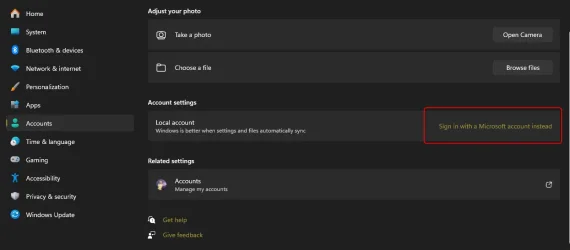
Hello all, having a strange issue. I created only a local account on my laptop when I set it up. And although I've done it in the past if I logged into my microsoft account on the Microsoft Store, I could still download anything I wanted. So the store was the only place I was logged in with microsoft. Now I am getting a PURAuthentification Error when trying to download anything, So I went to log into my microsoft account on the laptop and the login box flashes for a second and then dissappears so I can't login anywhere on my laptop with microsoft. Any help would be great.

As info I have already done a WSRESET, checked my Time and Region settings and did a Network Reset. All with no success. Thanks in advance for any help you can provide. -Izzy.
 
Windows Build/Version
24H2 (OS Build 26100.4946)

Attachments
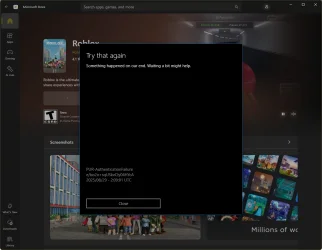
  • 2025-08-28_22h09_12.webp
    2025-08-28_22h09_12.webp
    53.8 KB · Views: 2
  • 2025-08-28_22h10_30.webp
    2025-08-28_22h10_30.webp
    21.8 KB · Views: 3

My Computer

System One

  • OS
    Windows 11 Home
    Computer type
    Laptop
    Manufacturer/Model
    Dell Inspiron 7445 2in1
    CPU
    AMD Ryzen 7 8840HS
    Motherboard
    0MT90K
    Memory
    Kingston FURY Impact 32GB (2x16GB) 5600MT/s DDR5
    Graphics Card(s)
    AMD Radeon 780M Graphics
    Sound Card
    AMD High Definition Audio Device
    Monitor(s) Displays
    Dell 27"
    Screen Resolution
    2560x1440
    Hard Drives
    EG6 KIOXIA 1TB (NVMe)
    PSU
    6-Cell 97WHr Integrated
    Case
    Platinum Silver
    Keyboard
    Arteck 5.1
    Mouse
    Logitech M650
    Internet Speed
    1000 | 25
    Browser
    Google Chrome
    Antivirus
    Windows Defender
    Other Info
    If you listen cartefully, you can hear me not caring.
please try
settings > accounts > email & accounts
and add your hotmail/outlook email account there.

this should then give access to any Microsoft account including the store
Microsoft seem to want everybody permanently signed in to access anything.

best of luck, Steve ..
 

My Computers

System One System Two

  • OS
    Debian 13 Trixie .. Windows 11 Home
    Computer type
    PC/Desktop
    Manufacturer/Model
    HP 24" AiO
    CPU
    Ryzen 7 5825u
    Motherboard
    HP
    Memory
    64GB DDR4 3200
    Graphics Card(s)
    Ryzen 7 5825u
    Sound Card
    RealTek
    Monitor(s) Displays
    24" HP AiO
    Screen Resolution
    1920 x 1080 @60 Hz
    Hard Drives
    1TB WD Blue SN580 M2 SSD Partitioned.
    2x 1TB USB HDD External Backup/Storage.
    PSU
    90W external power brick
    Case
    24" All in One
    Cooling
    Default Air Cooling
    Keyboard
    HP WiFi UK extended
    Mouse
    HP WiFi 3 Button
    Internet Speed
    1GB full fibre
    Browser
    Edge & Firefox
    Antivirus
    AVG Internet Security/Windows Defender
    Other Info
    Mainly Open Source Software
  • Operating System
    Ubuntu 22.04.5 LTS
    Computer type
    Laptop
    Manufacturer/Model
    Dell 13" Latitude 2017
    CPU
    i5 7200u
    Motherboard
    Dell
    Memory
    16GB DDR4
    Graphics card(s)
    Intel
    Sound Card
    Intel
    Monitor(s) Displays
    13" Dell Laptop
    Hard Drives
    250GB Crucial 2.5" SSD
    Mouse
    Generic WiFi 3 button
    Internet Speed
    WiFi only
    Browser
    Firefox
    Antivirus
    ClamAV TK
    Other Info
    Mainly Open Source Software
please try
settings > accounts > email & accounts
and add your hotmail/outlook email account there.

this should then give access to any Microsoft account including the store
Microsoft seem to want everybody permanently signed in to access anything.

best of luck, Steve ..
Thanks for the response Steve but no luck. The window opens like it's going to let me login and then disappears. Thanks for the response.
 

My Computer

System One

  • OS
    Windows 11 Home
    Computer type
    Laptop
    Manufacturer/Model
    Dell Inspiron 7445 2in1
    CPU
    AMD Ryzen 7 8840HS
    Motherboard
    0MT90K
    Memory
    Kingston FURY Impact 32GB (2x16GB) 5600MT/s DDR5
    Graphics Card(s)
    AMD Radeon 780M Graphics
    Sound Card
    AMD High Definition Audio Device
    Monitor(s) Displays
    Dell 27"
    Screen Resolution
    2560x1440
    Hard Drives
    EG6 KIOXIA 1TB (NVMe)
    PSU
    6-Cell 97WHr Integrated
    Case
    Platinum Silver
    Keyboard
    Arteck 5.1
    Mouse
    Logitech M650
    Internet Speed
    1000 | 25
    Browser
    Google Chrome
    Antivirus
    Windows Defender
    Other Info
    If you listen cartefully, you can hear me not caring.
Thanks for the response Steve but no luck. The window opens like it's going to let me login and then disappears. Thanks for the response.
Hi,
Do you have UAC disabled?
A second-long flashing sign-in pane usually appears when UAC is disabled.
 

My Computers

System One System Two

  • OS
    All Branches but Release
    Computer type
    Laptop
    Manufacturer/Model
    Acer Nitro ANV15-51
    CPU
    AMD Ryzen 7 7735HS 3200-4500 Mhz 8 cores x 2
    Motherboard
    Sportage_RBH
    Memory
    32 GB DDR5
    Graphics Card(s)
    Radeon Graphic / NVIDIA GeForce RTX 4060 8 GB GDDR6
    Sound Card
    AMD/Realtek(R) Audio
    Monitor(s) Displays
    Integrated Monitor (15.3"vis)
    Screen Resolution
    FHD 1920X1080 16:9 144Hz
    Hard Drives
    KINGSTON OM8SEP4512Q-AA 1TB
    Western Digital 256GB
    PSU
    19V DC 6.32 A 120 W
    Cooling
    Dual Fans
    Mouse
    MS Bluetooth
    Internet Speed
    Fiber 1GB Cox -us & 1GB Orange-fr
    Browser
    Edge Canary- Firefox Nightly-Chrome Dev-Chrome Dev
    Antivirus
    Windows Defender
  • Operating System
    Windows 11 Beta
    Computer type
    Laptop
    Manufacturer/Model
    Asus X751BP
    CPU
    AMD A9-9420
    Memory
    8 GB of DDR4
    Graphics card(s)
    AMD Radeon R5
    Screen Resolution
    1600x900
    Hard Drives
    Seagate 1 TB
Hi,
Do you have UAC disabled?
A second-long flashing sign-in pane usually appears when UAC is disabled.
OAT, Yes I did have it off. I enabled it, restarted but still no luck. Thanks for the response.
 

My Computer

System One

  • OS
    Windows 11 Home
    Computer type
    Laptop
    Manufacturer/Model
    Dell Inspiron 7445 2in1
    CPU
    AMD Ryzen 7 8840HS
    Motherboard
    0MT90K
    Memory
    Kingston FURY Impact 32GB (2x16GB) 5600MT/s DDR5
    Graphics Card(s)
    AMD Radeon 780M Graphics
    Sound Card
    AMD High Definition Audio Device
    Monitor(s) Displays
    Dell 27"
    Screen Resolution
    2560x1440
    Hard Drives
    EG6 KIOXIA 1TB (NVMe)
    PSU
    6-Cell 97WHr Integrated
    Case
    Platinum Silver
    Keyboard
    Arteck 5.1
    Mouse
    Logitech M650
    Internet Speed
    1000 | 25
    Browser
    Google Chrome
    Antivirus
    Windows Defender
    Other Info
    If you listen cartefully, you can hear me not caring.
have a look at this to uninstall and reinstall the Microsoft store.

best of luck, Steve ..
 

My Computers

System One System Two

  • OS
    Debian 13 Trixie .. Windows 11 Home
    Computer type
    PC/Desktop
    Manufacturer/Model
    HP 24" AiO
    CPU
    Ryzen 7 5825u
    Motherboard
    HP
    Memory
    64GB DDR4 3200
    Graphics Card(s)
    Ryzen 7 5825u
    Sound Card
    RealTek
    Monitor(s) Displays
    24" HP AiO
    Screen Resolution
    1920 x 1080 @60 Hz
    Hard Drives
    1TB WD Blue SN580 M2 SSD Partitioned.
    2x 1TB USB HDD External Backup/Storage.
    PSU
    90W external power brick
    Case
    24" All in One
    Cooling
    Default Air Cooling
    Keyboard
    HP WiFi UK extended
    Mouse
    HP WiFi 3 Button
    Internet Speed
    1GB full fibre
    Browser
    Edge & Firefox
    Antivirus
    AVG Internet Security/Windows Defender
    Other Info
    Mainly Open Source Software
  • Operating System
    Ubuntu 22.04.5 LTS
    Computer type
    Laptop
    Manufacturer/Model
    Dell 13" Latitude 2017
    CPU
    i5 7200u
    Motherboard
    Dell
    Memory
    16GB DDR4
    Graphics card(s)
    Intel
    Sound Card
    Intel
    Monitor(s) Displays
    13" Dell Laptop
    Hard Drives
    250GB Crucial 2.5" SSD
    Mouse
    Generic WiFi 3 button
    Internet Speed
    WiFi only
    Browser
    Firefox
    Antivirus
    ClamAV TK
    Other Info
    Mainly Open Source Software
have a look at this to uninstall and reinstall the Microsoft store.

best of luck, Steve ..
Sadly I already did that too. Thanks Steve.
 

My Computer

System One

  • OS
    Windows 11 Home
    Computer type
    Laptop
    Manufacturer/Model
    Dell Inspiron 7445 2in1
    CPU
    AMD Ryzen 7 8840HS
    Motherboard
    0MT90K
    Memory
    Kingston FURY Impact 32GB (2x16GB) 5600MT/s DDR5
    Graphics Card(s)
    AMD Radeon 780M Graphics
    Sound Card
    AMD High Definition Audio Device
    Monitor(s) Displays
    Dell 27"
    Screen Resolution
    2560x1440
    Hard Drives
    EG6 KIOXIA 1TB (NVMe)
    PSU
    6-Cell 97WHr Integrated
    Case
    Platinum Silver
    Keyboard
    Arteck 5.1
    Mouse
    Logitech M650
    Internet Speed
    1000 | 25
    Browser
    Google Chrome
    Antivirus
    Windows Defender
    Other Info
    If you listen cartefully, you can hear me not caring.
A couple of ideas from Copilot for what it's worth:

✅ Fixes you can try:
• Run the Windows Store Apps troubleshooter: Go to Settings > System > Troubleshoot > Other troubleshooters and run the one for Microsoft Store.
• Reset the Store cache: Press Win+R, type wsreset.exe, and hit Enter.
 

My Computer

System One

  • OS
    Windows 11 Professional 25H2
    Computer type
    PC/Desktop
    Manufacturer/Model
    Digital Storm VELOX
    CPU
    Intel Core i9 11900K
    Motherboard
    ASUS PRIME Z590-P
    Memory
    64GB
    Graphics Card(s)
    NVIDIA GeForce GTX 1650
    Sound Card
    Realtek onboard
    Monitor(s) Displays
    Acer R221Q 21.5"
    Screen Resolution
    1920 x 1080
    Hard Drives
    2 x Samsung SSD 990 EVO Plus (1 TB)
    2 x Seagate ST4000NE001 (4 TB)
    PSU
    None
    Case
    VELOX
    Cooling
    Cooler Master
    Keyboard
    Logitech
    Mouse
    Kensington trackball
    Browser
    Firefox, Chrome
    Antivirus
    Windows Defender, Malwarebytes
A couple of ideas from Copilot for what it's worth:

✅ Fixes you can try:
• Run the Windows Store Apps troubleshooter: Go to Settings > System > Troubleshoot > Other troubleshooters and run the one for Microsoft Store.
• Reset the Store cache: Press Win+R, type wsreset.exe, and hit Enter.
Hello OldMainFramGuy. Thank you for the input but I've tried those fixes without success.
 

My Computer

System One

  • OS
    Windows 11 Home
    Computer type
    Laptop
    Manufacturer/Model
    Dell Inspiron 7445 2in1
    CPU
    AMD Ryzen 7 8840HS
    Motherboard
    0MT90K
    Memory
    Kingston FURY Impact 32GB (2x16GB) 5600MT/s DDR5
    Graphics Card(s)
    AMD Radeon 780M Graphics
    Sound Card
    AMD High Definition Audio Device
    Monitor(s) Displays
    Dell 27"
    Screen Resolution
    2560x1440
    Hard Drives
    EG6 KIOXIA 1TB (NVMe)
    PSU
    6-Cell 97WHr Integrated
    Case
    Platinum Silver
    Keyboard
    Arteck 5.1
    Mouse
    Logitech M650
    Internet Speed
    1000 | 25
    Browser
    Google Chrome
    Antivirus
    Windows Defender
    Other Info
    If you listen cartefully, you can hear me not caring.
on another device, try going to and logging into https://accounts.microsoft.com
If that fails, use forgot password or use the Microsoft Authenticator app.
 

My Computer

System One

  • OS
    Windows 11 Pro Insider 64 bit 25H2 26200.5742
    Computer type
    PC/Desktop
    Manufacturer/Model
    Gigabyte Z390 UD
    CPU
    Intel Core i7 9700K 3.60
    Motherboard
    Gigabyte Z390 UD
    Memory
    16 GB
    Graphics Card(s)
    nVidia GEForce RTX 2060 Super
    Sound Card
    onboard
    Monitor(s) Displays
    Two 27" Dell 4K monitors
    Screen Resolution
    3840 x 2160
    Hard Drives
    M.2 NVME SSD, 500 GB; Two 2TB Mechanical HDD's
    PSU
    850w PSU
    Case
    Cyberpower PC
    Cooling
    Water cooled
    Keyboard
    Backlit Cyberpower gaming keyboard
    Mouse
    Backlit Cyberpower gaming mouse
    Internet Speed
    1 GB mbps
    Browser
    Brave
    Antivirus
    Windows Security
6. Enable Microsoft Account Sign-in Assistant
• Open Services ()
• Find Microsoft Account Sign-in Assistant, set it to Automatic, and start the service

Another try from CoPilot
 

My Computers

System One System Two

  • OS
    Windows11 Pro 26200.8524
    Computer type
    PC/Desktop
    Manufacturer/Model
    Dell Alienware Aurora R16
    CPU
    Intel Core i9 14900F (24 -Core, 68 MB Total Cache)
    Motherboard
    Dell Alienware
    Memory
    32GB DDR5
    Graphics Card(s)
    RTX 4080 Super w/581.95
    Sound Card
    Realtec
    Monitor(s) Displays
    Corsair XENEON 32QHD165
    Screen Resolution
    2560 X 1440
    Hard Drives
    1-2TB Samsung 990 Pro PCIe NVMe M2 SSD
    1-4TB Samsung 990 Pro PCIe NVMe M2 SSD
    PSU
    1000 Watt Platinum Dell
    Case
    Alienware
    Cooling
    Liquid Closed Loop
    Keyboard
    Logitech MK270 Wireless Keyboard
    Mouse
    Logitech MK270 Wireless
    Internet Speed
    100Gb's Down-20 Up
    Browser
    Firefox 151.0.2
    Antivirus
    Defender
    Other Info
    Very Quiet And Fast
    CyberPower UPS CP1500PFCLCD
  • Operating System
    PClinuxOS Mate (2025.7)
    Computer type
    PC/Desktop
    Manufacturer/Model
    Intel
    CPU
    13th Gen Inter(R) Core(TM) i3-1315U
    Motherboard
    Intel
    Memory
    64 GB DDR4 @3200 MHz.
    Graphics card(s)
    Internal
    Sound Card
    None
    Monitor(s) Displays
    Dell 2419HGCF
    Screen Resolution
    1920 X 1080
    Hard Drives
    SAMSUNG 980 PRO SSD 2TB, PCIe 4.0 M.2 2280
    PSU
    Chicony 30 Watt
    Case
    Small
    Keyboard
    Dell
    Mouse
    Razor
    Internet Speed
    1GB
    Browser
    Slimjet
on another device, try going to and logging into https://accounts.microsoft.com
If that fails, use forgot password or use the Microsoft Authenticator app.
Thank Spunk, already tried and failed. As info to all I created a new admin account in CMD prompt successfully. However, still got the same error at the store.
 

My Computer

System One

  • OS
    Windows 11 Home
    Computer type
    Laptop
    Manufacturer/Model
    Dell Inspiron 7445 2in1
    CPU
    AMD Ryzen 7 8840HS
    Motherboard
    0MT90K
    Memory
    Kingston FURY Impact 32GB (2x16GB) 5600MT/s DDR5
    Graphics Card(s)
    AMD Radeon 780M Graphics
    Sound Card
    AMD High Definition Audio Device
    Monitor(s) Displays
    Dell 27"
    Screen Resolution
    2560x1440
    Hard Drives
    EG6 KIOXIA 1TB (NVMe)
    PSU
    6-Cell 97WHr Integrated
    Case
    Platinum Silver
    Keyboard
    Arteck 5.1
    Mouse
    Logitech M650
    Internet Speed
    1000 | 25
    Browser
    Google Chrome
    Antivirus
    Windows Defender
    Other Info
    If you listen cartefully, you can hear me not caring.
Hello all, having a strange issue. I created only a local account on my laptop when I set it up. And although I've done it in the past if I logged into my microsoft account on the Microsoft Store, I could still download anything I wanted. So the store was the only place I was logged in with microsoft. Now I am getting a PURAuthentification Error when trying to download anything, So I went to log into my microsoft account on the laptop and the login box flashes for a second and then dissappears so I can't login anywhere on my laptop with microsoft. Any help would be great.

As info I have already done a WSRESET, checked my Time and Region settings and did a Network Reset. All with no success. Thanks in advance for any help you can provide. -Izzy.
Downloading Windows 11 Media Creation Tool and reinstalling Windows. Sucks but that's about all I have left in the gun. Thank you all for the assistance.
 

My Computer

System One

  • OS
    Windows 11 Home
    Computer type
    Laptop
    Manufacturer/Model
    Dell Inspiron 7445 2in1
    CPU
    AMD Ryzen 7 8840HS
    Motherboard
    0MT90K
    Memory
    Kingston FURY Impact 32GB (2x16GB) 5600MT/s DDR5
    Graphics Card(s)
    AMD Radeon 780M Graphics
    Sound Card
    AMD High Definition Audio Device
    Monitor(s) Displays
    Dell 27"
    Screen Resolution
    2560x1440
    Hard Drives
    EG6 KIOXIA 1TB (NVMe)
    PSU
    6-Cell 97WHr Integrated
    Case
    Platinum Silver
    Keyboard
    Arteck 5.1
    Mouse
    Logitech M650
    Internet Speed
    1000 | 25
    Browser
    Google Chrome
    Antivirus
    Windows Defender
    Other Info
    If you listen cartefully, you can hear me not caring.
Press the Windows key +I in Settings, go to System/Recovery/Reset this PC. Choose Keep My Files.
It should reset without loosing any of your files.
 

My Computer

System One

  • OS
    Windows 11 Pro Insider 64 bit 25H2 26200.5742
    Computer type
    PC/Desktop
    Manufacturer/Model
    Gigabyte Z390 UD
    CPU
    Intel Core i7 9700K 3.60
    Motherboard
    Gigabyte Z390 UD
    Memory
    16 GB
    Graphics Card(s)
    nVidia GEForce RTX 2060 Super
    Sound Card
    onboard
    Monitor(s) Displays
    Two 27" Dell 4K monitors
    Screen Resolution
    3840 x 2160
    Hard Drives
    M.2 NVME SSD, 500 GB; Two 2TB Mechanical HDD's
    PSU
    850w PSU
    Case
    Cyberpower PC
    Cooling
    Water cooled
    Keyboard
    Backlit Cyberpower gaming keyboard
    Mouse
    Backlit Cyberpower gaming mouse
    Internet Speed
    1 GB mbps
    Browser
    Brave
    Antivirus
    Windows Security
Press the Windows key +I in Settings, go to System/Recovery/Reset this PC. Choose Keep My Files.
It should reset without loosing any of your files.
Oh ok, cool. I was unaware of that. Thank you Spunk.
 

My Computer

System One

  • OS
    Windows 11 Home
    Computer type
    Laptop
    Manufacturer/Model
    Dell Inspiron 7445 2in1
    CPU
    AMD Ryzen 7 8840HS
    Motherboard
    0MT90K
    Memory
    Kingston FURY Impact 32GB (2x16GB) 5600MT/s DDR5
    Graphics Card(s)
    AMD Radeon 780M Graphics
    Sound Card
    AMD High Definition Audio Device
    Monitor(s) Displays
    Dell 27"
    Screen Resolution
    2560x1440
    Hard Drives
    EG6 KIOXIA 1TB (NVMe)
    PSU
    6-Cell 97WHr Integrated
    Case
    Platinum Silver
    Keyboard
    Arteck 5.1
    Mouse
    Logitech M650
    Internet Speed
    1000 | 25
    Browser
    Google Chrome
    Antivirus
    Windows Defender
    Other Info
    If you listen cartefully, you can hear me not caring.
Press the Windows key +I in Settings, go to System/Recovery/Reset this PC. Choose Keep My Files.
It should reset without loosing any of your files.
Spunk, the reset lets me keep my files but deletes my apps so just reinstalling Windows.
 

My Computer

System One

  • OS
    Windows 11 Home
    Computer type
    Laptop
    Manufacturer/Model
    Dell Inspiron 7445 2in1
    CPU
    AMD Ryzen 7 8840HS
    Motherboard
    0MT90K
    Memory
    Kingston FURY Impact 32GB (2x16GB) 5600MT/s DDR5
    Graphics Card(s)
    AMD Radeon 780M Graphics
    Sound Card
    AMD High Definition Audio Device
    Monitor(s) Displays
    Dell 27"
    Screen Resolution
    2560x1440
    Hard Drives
    EG6 KIOXIA 1TB (NVMe)
    PSU
    6-Cell 97WHr Integrated
    Case
    Platinum Silver
    Keyboard
    Arteck 5.1
    Mouse
    Logitech M650
    Internet Speed
    1000 | 25
    Browser
    Google Chrome
    Antivirus
    Windows Defender
    Other Info
    If you listen cartefully, you can hear me not caring.
It is just reinstalling Windows, but it keeps your personal files if they are not backed up somewhere else, that is the difference.
It should keep your apps as well, some apps may need to be reinstalled.
 

My Computer

System One

  • OS
    Windows 11 Pro Insider 64 bit 25H2 26200.5742
    Computer type
    PC/Desktop
    Manufacturer/Model
    Gigabyte Z390 UD
    CPU
    Intel Core i7 9700K 3.60
    Motherboard
    Gigabyte Z390 UD
    Memory
    16 GB
    Graphics Card(s)
    nVidia GEForce RTX 2060 Super
    Sound Card
    onboard
    Monitor(s) Displays
    Two 27" Dell 4K monitors
    Screen Resolution
    3840 x 2160
    Hard Drives
    M.2 NVME SSD, 500 GB; Two 2TB Mechanical HDD's
    PSU
    850w PSU
    Case
    Cyberpower PC
    Cooling
    Water cooled
    Keyboard
    Backlit Cyberpower gaming keyboard
    Mouse
    Backlit Cyberpower gaming mouse
    Internet Speed
    1 GB mbps
    Browser
    Brave
    Antivirus
    Windows Security
Well reinstalling fixed everything!
 

My Computer

System One

  • OS
    Windows 11 Home
    Computer type
    Laptop
    Manufacturer/Model
    Dell Inspiron 7445 2in1
    CPU
    AMD Ryzen 7 8840HS
    Motherboard
    0MT90K
    Memory
    Kingston FURY Impact 32GB (2x16GB) 5600MT/s DDR5
    Graphics Card(s)
    AMD Radeon 780M Graphics
    Sound Card
    AMD High Definition Audio Device
    Monitor(s) Displays
    Dell 27"
    Screen Resolution
    2560x1440
    Hard Drives
    EG6 KIOXIA 1TB (NVMe)
    PSU
    6-Cell 97WHr Integrated
    Case
    Platinum Silver
    Keyboard
    Arteck 5.1
    Mouse
    Logitech M650
    Internet Speed
    1000 | 25
    Browser
    Google Chrome
    Antivirus
    Windows Defender
    Other Info
    If you listen cartefully, you can hear me not caring.
Well reinstalling fixed everything!
Congratulations. Thinking back, a friend once had an issue with Microsoft Store on Windows 10; every time he tried to use it he got a non-helpful "Something went wrong" message. I tried all of the remedies but ended up doing a repair install to fix it. Microsoft Store seems a bit fragile at times.
 

My Computer

System One

  • OS
    Windows 11 Professional 25H2
    Computer type
    PC/Desktop
    Manufacturer/Model
    Digital Storm VELOX
    CPU
    Intel Core i9 11900K
    Motherboard
    ASUS PRIME Z590-P
    Memory
    64GB
    Graphics Card(s)
    NVIDIA GeForce GTX 1650
    Sound Card
    Realtek onboard
    Monitor(s) Displays
    Acer R221Q 21.5"
    Screen Resolution
    1920 x 1080
    Hard Drives
    2 x Samsung SSD 990 EVO Plus (1 TB)
    2 x Seagate ST4000NE001 (4 TB)
    PSU
    None
    Case
    VELOX
    Cooling
    Cooler Master
    Keyboard
    Logitech
    Mouse
    Kensington trackball
    Browser
    Firefox, Chrome
    Antivirus
    Windows Defender, Malwarebytes
Congratulations. Thinking back, a friend once had an issue with Microsoft Store on Windows 10; every time he tried to use it he got a non-helpful "Something went wrong" message. I tried all of the remedies but ended up doing a repair install to fix it. Microsoft Store seems a bit fragile at times.
It’s very fickle like my fat exwife.
 

My Computer

System One

  • OS
    Windows 11 Home
    Computer type
    Laptop
    Manufacturer/Model
    Dell Inspiron 7445 2in1
    CPU
    AMD Ryzen 7 8840HS
    Motherboard
    0MT90K
    Memory
    Kingston FURY Impact 32GB (2x16GB) 5600MT/s DDR5
    Graphics Card(s)
    AMD Radeon 780M Graphics
    Sound Card
    AMD High Definition Audio Device
    Monitor(s) Displays
    Dell 27"
    Screen Resolution
    2560x1440
    Hard Drives
    EG6 KIOXIA 1TB (NVMe)
    PSU
    6-Cell 97WHr Integrated
    Case
    Platinum Silver
    Keyboard
    Arteck 5.1
    Mouse
    Logitech M650
    Internet Speed
    1000 | 25
    Browser
    Google Chrome
    Antivirus
    Windows Defender
    Other Info
    If you listen cartefully, you can hear me not caring.

Latest Support Threads

Back
Top Bottom