Solved PxHlpa64.sys preventing Memory Integrity


JJB

Active member
Local time
9:12 AM
Posts
21
OS
Windows 11
I am having problems uninstalling the above driver.

I have tried the following without success...


Any solutions?

regards

John
 

My Computer My Computer

At a glance

Windows 11
OS
Windows 11
Can you open the Properties of the file and check the Details tab?
Take note of the Product Name or Copyright to see which company it belongs to.
Or to save time, are you the one who posted in the Microsoft link you provided?
 

My Computer My Computer

At a glance

Windows 11
OS
Windows 11
Bizarre,

No, I did not post the MS link, just found it while investigating a solution.

Rovi Corporation

Version 3.0.096.0


Believe it is a DVD driver, but my laptop does not have that device.

regards

John
 

My Computer My Computer

At a glance

Windows 11
OS
Windows 11
According to file.net, it belongs to software PxHelp64 or Roxio Burn by Sonic Solutions.
Seeing that it's not from Microsoft, do you still have the program installed on your system?
Or is it just that specific driver/file left installed in your system?
 

My Computer My Computer

At a glance

Windows 11
OS
Windows 11
Bizarre,

Possibly still some files installed somewhere.

I copied over my C drive from my old laptop to the new one few weeks ago.

But I cannot recall having this programme. But the old laptop was 11 years old!

I have tried the MS link solution and get the message that the driver has been uninstalled but still get the message from MS Security App that it is stopping Memory Integrity.

Done search for Sonic but there are 765 files that contain that word and 4 files for Roxie.

regards

John
 

My Computer My Computer

At a glance

Windows 11
OS
Windows 11
If it's just a leftover file, then you just need to disable it in the registry or rename it.
Can you open the registry editor and go to HKLM\SYSTEM\CurrentControlSet\Services, then search for the file PxHlpa64.sys.
Once you find the registry key it resides in, look for a REG_DWORD called Start, then double-click it and replace the value with 4.
When you are done editing, exit the registry editor and restart your computer. After the restart, check if the file is still running.

P.S. Take note where it's located just in case it's still able to run.

 

My Computer My Computer

At a glance

Windows 11
OS
Windows 11
Solved...

I have found the file and manually deleted it, MS security has allowed Memory Integrity.

Thanks..


John
 

My Computer My Computer

At a glance

Windows 11
OS
Windows 11
No problem. I'm glad to hear you were able to resolve the issue without any hassle (y)
 

My Computer My Computer

At a glance

Windows 11
OS
Windows 11
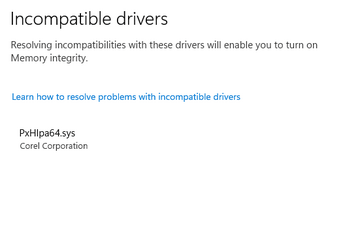
I am having the same issue. PxHlpa64.sys is preventing activation of memory integrity. Windows 11 22H2 22621.608 on (incompatible) Mobo ASUS H81M-plus. I was able to upgrade to Windows 11 thanks to the excellent guides on this forum. THANK you all.

Incomp Driver.png

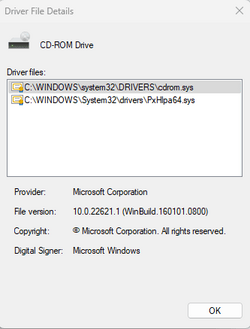
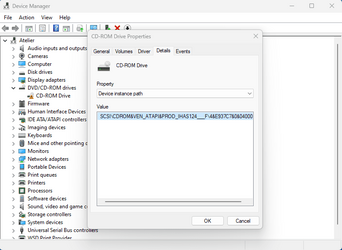
This driver seems to be for the DVD drive, an IHAS124F


Device Manager.png

Next I followed the procedure outlined in this post and stopped the driver from starting. Upon restart I am getting an error message in device manager because the driver is missing

Screenshot 2022-10-14 132559.png

I have never installed Roxio Burn on this machine, which is cited in other threads as the source of the driver PxHlpa64.sys

Is it possible that the standard Micrososft driver for IHAS124F is not compatible with Windows 11? Or is there an updated driver I could use?
Thanks a lot for any help
 

My Computer My Computer

At a glance

Windows 11 25H2i7-12700FCORSAIR Vengeance LPX - DDR4 - kit - 32 GB: 2...NVIDIA GeForce GTX 1050 Ti
OS
Windows 11 25H2
Computer type
PC/Desktop
Manufacturer/Model
MSI
CPU
i7-12700F
Motherboard
MSI PRO B660-A DDR4
Memory
CORSAIR Vengeance LPX - DDR4 - kit - 32 GB: 2 x 16 GB
Graphics Card(s)
NVIDIA GeForce GTX 1050 Ti
Sound Card
onboard
Monitor(s) Displays
ASUS PA32UCX
Screen Resolution
3840x2160
Hard Drives
ADATA SP900
AVAGO MR9361-8i SCSI with 3x Exos X20
PSU
Corsair RM650X
Case
Fractal Design Define R5 Blackout Edition
Cooling
Noctua CPU and Case Fans
Keyboard
Unicomp Model M
Mouse
Logitech MX Master
Internet Speed
1Gb/s
Browser
MS Edge
Antivirus
Microsoft Defender
EDIT: I was able to solve the issue following the instructions here
I have not yet tested whether I can burn DVDs, but the DVD drive does not show any errors in device manager. So far so good
 

My Computer My Computer

At a glance

Windows 11 25H2i7-12700FCORSAIR Vengeance LPX - DDR4 - kit - 32 GB: 2...NVIDIA GeForce GTX 1050 Ti
OS
Windows 11 25H2
Computer type
PC/Desktop
Manufacturer/Model
MSI
CPU
i7-12700F
Motherboard
MSI PRO B660-A DDR4
Memory
CORSAIR Vengeance LPX - DDR4 - kit - 32 GB: 2 x 16 GB
Graphics Card(s)
NVIDIA GeForce GTX 1050 Ti
Sound Card
onboard
Monitor(s) Displays
ASUS PA32UCX
Screen Resolution
3840x2160
Hard Drives
ADATA SP900
AVAGO MR9361-8i SCSI with 3x Exos X20
PSU
Corsair RM650X
Case
Fractal Design Define R5 Blackout Edition
Cooling
Noctua CPU and Case Fans
Keyboard
Unicomp Model M
Mouse
Logitech MX Master
Internet Speed
1Gb/s
Browser
MS Edge
Antivirus
Microsoft Defender

Latest Support Threads

Back
Top Bottom