Solved QTTabBar


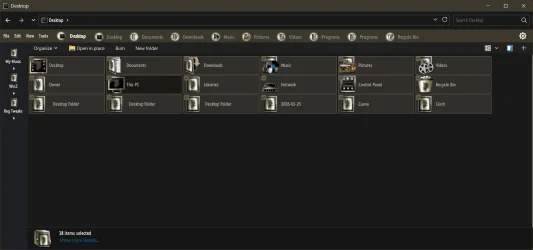
Ok, there's definitely a correlation between the extra view left and the vertical command bar.
First, I found I was back to normal after enabling, then disabling the extra view left.
2nd, changing that bar's background colour to green (random!) gave me a black background int the vertical command bar. Not what I'd expect at all,
 

My Computer My Computer

At a glance

Windows 11 Proi7-8650U16GBIntel UHD 620
OS
Windows 11 Pro
Computer type
Laptop
Manufacturer/Model
Lenovo t480s
CPU
i7-8650U
Memory
16GB
Graphics Card(s)
Intel UHD 620
Screen Resolution
1920x1080
Hard Drives
C SN810 SDCPNRY-512G-1006
Browser
Edge, Firefox
Antivirus
Defender
Ok, there's definitely a correlation between the extra view left and the vertical command bar.
First, I found I was back to normal after enabling, then disabling the extra view left.
Yeah, I experience lots of glitches when enabling and disabling certain Toolbars!
 

My Computers My Computers

  • At a glance

    Windows 11 Pro
    OS
    Windows 11 Pro
    Computer type
    PC/Desktop
    Manufacturer/Model
    ASUS ROG Strix
  • At a glance

    Windows 11 Pro
    Operating System
    Windows 11 Pro
    Computer type
    Laptop
    Manufacturer/Model
    ASUS VivoBook
  • ASUS VivoBook 'Lite' ~ Windows 11 Home
@Edwin one step closer to eliminating qttabbar lol


My Computer My Computer

At a glance

Windows 11 Pro
OS
Windows 11 Pro
Tabs never worked in Explorer. I'm happy to sacrifice them for speed,
 

My Computers My Computers

  • At a glance

    Windows 11 Education For 25H2Intel® Core i7 5500u8 GBIntel HD Family Graphics 5500 AMD Firepro 4150M
    OS
    Windows 11 Education For 25H2
    Computer type
    Laptop
    Manufacturer/Model
    HP ZBook G2
    CPU
    Intel® Core i7 5500u
    Motherboard
    HP
    Memory
    8 GB
    Graphics Card(s)
    Intel HD Family Graphics 5500 AMD Firepro 4150M
    Sound Card
    Realtek High Audio
    Hard Drives
    1 TB SSD
    Mouse
    HP USB Mouse
    Antivirus
    Windows Defender
  • At a glance

    Windows 11 Pro For Workstations 25H2Xeon 1535m v632 GBAMD Quadro Pro 4100
    Operating System
    Windows 11 Pro For Workstations 25H2
    Computer type
    Laptop
    Manufacturer/Model
    HP Zbook G4
    CPU
    Xeon 1535m v6
    Motherboard
    HP
    Memory
    32 GB
    Graphics card(s)
    AMD Quadro Pro 4100
    Sound Card
    Bang and Olufson Audio
    Hard Drives
    1TB SSD
    Mouse
    HP USB Mouse
    Antivirus
    Windows Defender
The native dual pane of Explorer is slow to draw and open. Going back to the classic single configuration speeds things up. If you need tabs, go third party.
 

My Computers My Computers

  • At a glance

    Windows 11 Education For 25H2Intel® Core i7 5500u8 GBIntel HD Family Graphics 5500 AMD Firepro 4150M
    OS
    Windows 11 Education For 25H2
    Computer type
    Laptop
    Manufacturer/Model
    HP ZBook G2
    CPU
    Intel® Core i7 5500u
    Motherboard
    HP
    Memory
    8 GB
    Graphics Card(s)
    Intel HD Family Graphics 5500 AMD Firepro 4150M
    Sound Card
    Realtek High Audio
    Hard Drives
    1 TB SSD
    Mouse
    HP USB Mouse
    Antivirus
    Windows Defender
  • At a glance

    Windows 11 Pro For Workstations 25H2Xeon 1535m v632 GBAMD Quadro Pro 4100
    Operating System
    Windows 11 Pro For Workstations 25H2
    Computer type
    Laptop
    Manufacturer/Model
    HP Zbook G4
    CPU
    Xeon 1535m v6
    Motherboard
    HP
    Memory
    32 GB
    Graphics card(s)
    AMD Quadro Pro 4100
    Sound Card
    Bang and Olufson Audio
    Hard Drives
    1TB SSD
    Mouse
    HP USB Mouse
    Antivirus
    Windows Defender
must be specs. mine runs just fine
 

My Computer My Computer

At a glance

Windows 11 Pro
OS
Windows 11 Pro

My Computers My Computers

  • At a glance

    Windows 11 Pro
    OS
    Windows 11 Pro
    Computer type
    PC/Desktop
    Manufacturer/Model
    ASUS ROG Strix
  • At a glance

    Windows 11 Pro
    Operating System
    Windows 11 Pro
    Computer type
    Laptop
    Manufacturer/Model
    ASUS VivoBook
  • ASUS VivoBook 'Lite' ~ Windows 11 Home

My Computers My Computers

  • At a glance

    Windows 11 Pro
    OS
    Windows 11 Pro
    Computer type
    PC/Desktop
    Manufacturer/Model
    ASUS ROG Strix
  • At a glance

    Windows 11 Pro
    Operating System
    Windows 11 Pro
    Computer type
    Laptop
    Manufacturer/Model
    ASUS VivoBook
  • ASUS VivoBook 'Lite' ~ Windows 11 Home

My Computers My Computers

  • At a glance

    Windows 11 Pro
    OS
    Windows 11 Pro
    Computer type
    PC/Desktop
    Manufacturer/Model
    ASUS ROG Strix
  • At a glance

    Windows 11 Pro
    Operating System
    Windows 11 Pro
    Computer type
    Laptop
    Manufacturer/Model
    ASUS VivoBook
  • ASUS VivoBook 'Lite' ~ Windows 11 Home

My Computer My Computer

At a glance

Windows 11 Pro
OS
Windows 11 Pro

My Computers My Computers

  • At a glance

    Windows 11 Pro
    OS
    Windows 11 Pro
    Computer type
    PC/Desktop
    Manufacturer/Model
    ASUS ROG Strix
  • At a glance

    Windows 11 Pro
    Operating System
    Windows 11 Pro
    Computer type
    Laptop
    Manufacturer/Model
    ASUS VivoBook
  • ASUS VivoBook 'Lite' ~ Windows 11 Home
Does anyone have a clue as to why the "Select an app to open this .QTTabGroup file" pop-up appears when first booting the PC up, even while QTTabBar is installed? I've only ever seen this pop-up when I'm doing an uninstall + fresh install, but never while it's still installed.

Also, QTTabBar seems to have some weird delay when starting up, which might explain why this pop-up is appearing, even though it's installed.
I'm running Windows 11 25H2 build 26200.8737, alongside StartAllBack (current version) as well as TranslucentTB. But this combo of software runs fine on other PCs, except on this new and recently installed laptop. Any insight would be appreciated.
 

My Computers My Computers

  • At a glance

    Windows 11 Pro 25H2Ryzen 9 5900XG.Skill F4-3600C16D Ripjaws V 32GB (8GB x 4) ...Gigabyte Nvidia GeForce RTX 3090 Eagle 24GB
    OS
    Windows 11 Pro 25H2
    Computer type
    PC/Desktop
    Manufacturer/Model
    Custom Build
    CPU
    Ryzen 9 5900X
    Motherboard
    ASUS ROG STRIX B550-A GAMING
    Memory
    G.Skill F4-3600C16D Ripjaws V 32GB (8GB x 4) DDR4 3600MHz
    Graphics Card(s)
    Gigabyte Nvidia GeForce RTX 3090 Eagle 24GB
    Sound Card
    Onboard
    Monitor(s) Displays
    Dell P3222QE 32" UHD 4K
    Screen Resolution
    4K (3840x2160)
    Hard Drives
    Mushkin Vortex 1TB PCIe 4.0 x4 NVMe M.2 2280 SSD (Primary)
    Seagate Barracuda 2TB HDD (Secondary)
    PSU
    Super Flower Leadex III ARGB Gold 850W 80 Plus Gold Fully Modular
    Case
    Phanteks Eclipse P300A Tempered Glass Black Steel ATX Mid Tower
    Cooling
    ID-Cooling FrostFlow X 240 Lite 240mm Liquid CPU Cooler
    Keyboard
    Logitech K520 Keyboard (Combo)
    Mouse
    Logitech K520 Mouse (Combo)
    Internet Speed
    100Mbps
    Browser
    Chrome, Firefox
    Antivirus
    Windows Defender
  • At a glance

    Windows 11 Pro 25H2Ryzen 9 7900XG.Skill F5-6000J3040G32GX2-TZ5N Trident Z5 NE...Palit GeForce RTX 3080 GamingPro LHR Edition
    Operating System
    Windows 11 Pro 25H2
    Computer type
    PC/Desktop
    Manufacturer/Model
    Custom Build
    CPU
    Ryzen 9 7900X
    Motherboard
    MSI X670E GAMING PLUS WIFI
    Memory
    G.Skill F5-6000J3040G32GX2-TZ5N Trident Z5 NEO 64GB (2x32GB)
    Graphics card(s)
    Palit GeForce RTX 3080 GamingPro LHR Edition
    Sound Card
    Onboard
    Monitor(s) Displays
    Dell G2724D 27" (x 2)
    Screen Resolution
    WQHD (2560x1440) 165Hz 1ms
    Hard Drives
    Samsung 990 PRO 2TB M.2 NVMe SSD (Primary)
    XPG GAMMIX S70 BLADE 2TB M.2 NVMe (Secondary)
    Seagate Ironwolf 4TB HDD (Tertiary)
    PSU
    Super Flower SF-1000F14PE Leadex VI Platinum Pro 1000W 80 Plus Platinum
    Case
    Montech AIR 903 MAX Black RGB
    Cooling
    ID-Cooling FX360 PRO 360mm + Case Fans
    Keyboard
    Redragon Devarajas K556 RGB Mechanical Gaming
    Mouse
    Redragon M810 Taipan Pro
    Internet Speed
    150Mbps
    Browser
    Chrome, Firefox
    Antivirus
    Windows Defender
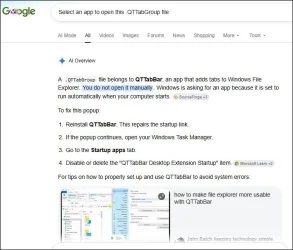
Hi perhaps

1.webp

- as it's an AI answer, large pinch of salt of course.
 

My Computer My Computer

At a glance

Windows 11 Proi7-8650U16GBIntel UHD 620
OS
Windows 11 Pro
Computer type
Laptop
Manufacturer/Model
Lenovo t480s
CPU
i7-8650U
Memory
16GB
Graphics Card(s)
Intel UHD 620
Screen Resolution
1920x1080
Hard Drives
C SN810 SDCPNRY-512G-1006
Browser
Edge, Firefox
Antivirus
Defender
Hi perhaps

View attachment 176072

- as it's an AI answer, large pinch of salt of course.
Yeah, I've done the clean reinstall, and it persists. I didn't realise AI was so skilled that it would allow me to delete a file created when installing the application. :LOL: Anyway, I'll give this a shot, since it's no train smash if anything breaks. I have other troubleshooting steps to try if it doesn't help. Thanks all the same. ;-)
 

My Computers My Computers

  • At a glance

    Windows 11 Pro 25H2Ryzen 9 5900XG.Skill F4-3600C16D Ripjaws V 32GB (8GB x 4) ...Gigabyte Nvidia GeForce RTX 3090 Eagle 24GB
    OS
    Windows 11 Pro 25H2
    Computer type
    PC/Desktop
    Manufacturer/Model
    Custom Build
    CPU
    Ryzen 9 5900X
    Motherboard
    ASUS ROG STRIX B550-A GAMING
    Memory
    G.Skill F4-3600C16D Ripjaws V 32GB (8GB x 4) DDR4 3600MHz
    Graphics Card(s)
    Gigabyte Nvidia GeForce RTX 3090 Eagle 24GB
    Sound Card
    Onboard
    Monitor(s) Displays
    Dell P3222QE 32" UHD 4K
    Screen Resolution
    4K (3840x2160)
    Hard Drives
    Mushkin Vortex 1TB PCIe 4.0 x4 NVMe M.2 2280 SSD (Primary)
    Seagate Barracuda 2TB HDD (Secondary)
    PSU
    Super Flower Leadex III ARGB Gold 850W 80 Plus Gold Fully Modular
    Case
    Phanteks Eclipse P300A Tempered Glass Black Steel ATX Mid Tower
    Cooling
    ID-Cooling FrostFlow X 240 Lite 240mm Liquid CPU Cooler
    Keyboard
    Logitech K520 Keyboard (Combo)
    Mouse
    Logitech K520 Mouse (Combo)
    Internet Speed
    100Mbps
    Browser
    Chrome, Firefox
    Antivirus
    Windows Defender
  • At a glance

    Windows 11 Pro 25H2Ryzen 9 7900XG.Skill F5-6000J3040G32GX2-TZ5N Trident Z5 NE...Palit GeForce RTX 3080 GamingPro LHR Edition
    Operating System
    Windows 11 Pro 25H2
    Computer type
    PC/Desktop
    Manufacturer/Model
    Custom Build
    CPU
    Ryzen 9 7900X
    Motherboard
    MSI X670E GAMING PLUS WIFI
    Memory
    G.Skill F5-6000J3040G32GX2-TZ5N Trident Z5 NEO 64GB (2x32GB)
    Graphics card(s)
    Palit GeForce RTX 3080 GamingPro LHR Edition
    Sound Card
    Onboard
    Monitor(s) Displays
    Dell G2724D 27" (x 2)
    Screen Resolution
    WQHD (2560x1440) 165Hz 1ms
    Hard Drives
    Samsung 990 PRO 2TB M.2 NVMe SSD (Primary)
    XPG GAMMIX S70 BLADE 2TB M.2 NVMe (Secondary)
    Seagate Ironwolf 4TB HDD (Tertiary)
    PSU
    Super Flower SF-1000F14PE Leadex VI Platinum Pro 1000W 80 Plus Platinum
    Case
    Montech AIR 903 MAX Black RGB
    Cooling
    ID-Cooling FX360 PRO 360mm + Case Fans
    Keyboard
    Redragon Devarajas K556 RGB Mechanical Gaming
    Mouse
    Redragon M810 Taipan Pro
    Internet Speed
    150Mbps
    Browser
    Chrome, Firefox
    Antivirus
    Windows Defender
Clue: A .QTTabGroup file is a saved shortcut created by QTTabBar.

So if you have one lurking around somewhere- presumably that's what's triggering this.

I don't know when such things are created - not seen one myself.

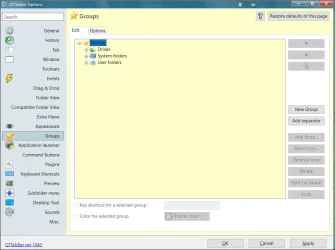
There's an option to create a shortcut here - don't know if that's related though.
1.webp
 

My Computer My Computer

At a glance

Windows 11 Proi7-8650U16GBIntel UHD 620
OS
Windows 11 Pro
Computer type
Laptop
Manufacturer/Model
Lenovo t480s
CPU
i7-8650U
Memory
16GB
Graphics Card(s)
Intel UHD 620
Screen Resolution
1920x1080
Hard Drives
C SN810 SDCPNRY-512G-1006
Browser
Edge, Firefox
Antivirus
Defender
Clue: A .QTTabGroup file is a saved shortcut created by QTTabBar.

So if you have one lurking around somewhere- presumably that's what's triggering this.

I don't know when such things are created - not seen one myself.

There's an option to create a shortcut here - don't know if that's related though.
View attachment 176081
That shortcut that triggers the pop-up exists on 3 other PCs, and is located over here: C:\Users\UserName\AppData\Roaming\Microsoft\Windows\Start Menu\Programs\Startup. But I always thought it was a default thing that is created when installing, but only ever shows up after a clean uninstall of QTTabBar. But now, it appears while QTTabBar is fully installed, which is strange.
 

My Computers My Computers

  • At a glance

    Windows 11 Pro 25H2Ryzen 9 5900XG.Skill F4-3600C16D Ripjaws V 32GB (8GB x 4) ...Gigabyte Nvidia GeForce RTX 3090 Eagle 24GB
    OS
    Windows 11 Pro 25H2
    Computer type
    PC/Desktop
    Manufacturer/Model
    Custom Build
    CPU
    Ryzen 9 5900X
    Motherboard
    ASUS ROG STRIX B550-A GAMING
    Memory
    G.Skill F4-3600C16D Ripjaws V 32GB (8GB x 4) DDR4 3600MHz
    Graphics Card(s)
    Gigabyte Nvidia GeForce RTX 3090 Eagle 24GB
    Sound Card
    Onboard
    Monitor(s) Displays
    Dell P3222QE 32" UHD 4K
    Screen Resolution
    4K (3840x2160)
    Hard Drives
    Mushkin Vortex 1TB PCIe 4.0 x4 NVMe M.2 2280 SSD (Primary)
    Seagate Barracuda 2TB HDD (Secondary)
    PSU
    Super Flower Leadex III ARGB Gold 850W 80 Plus Gold Fully Modular
    Case
    Phanteks Eclipse P300A Tempered Glass Black Steel ATX Mid Tower
    Cooling
    ID-Cooling FrostFlow X 240 Lite 240mm Liquid CPU Cooler
    Keyboard
    Logitech K520 Keyboard (Combo)
    Mouse
    Logitech K520 Mouse (Combo)
    Internet Speed
    100Mbps
    Browser
    Chrome, Firefox
    Antivirus
    Windows Defender
  • At a glance

    Windows 11 Pro 25H2Ryzen 9 7900XG.Skill F5-6000J3040G32GX2-TZ5N Trident Z5 NE...Palit GeForce RTX 3080 GamingPro LHR Edition
    Operating System
    Windows 11 Pro 25H2
    Computer type
    PC/Desktop
    Manufacturer/Model
    Custom Build
    CPU
    Ryzen 9 7900X
    Motherboard
    MSI X670E GAMING PLUS WIFI
    Memory
    G.Skill F5-6000J3040G32GX2-TZ5N Trident Z5 NEO 64GB (2x32GB)
    Graphics card(s)
    Palit GeForce RTX 3080 GamingPro LHR Edition
    Sound Card
    Onboard
    Monitor(s) Displays
    Dell G2724D 27" (x 2)
    Screen Resolution
    WQHD (2560x1440) 165Hz 1ms
    Hard Drives
    Samsung 990 PRO 2TB M.2 NVMe SSD (Primary)
    XPG GAMMIX S70 BLADE 2TB M.2 NVMe (Secondary)
    Seagate Ironwolf 4TB HDD (Tertiary)
    PSU
    Super Flower SF-1000F14PE Leadex VI Platinum Pro 1000W 80 Plus Platinum
    Case
    Montech AIR 903 MAX Black RGB
    Cooling
    ID-Cooling FX360 PRO 360mm + Case Fans
    Keyboard
    Redragon Devarajas K556 RGB Mechanical Gaming
    Mouse
    Redragon M810 Taipan Pro
    Internet Speed
    150Mbps
    Browser
    Chrome, Firefox
    Antivirus
    Windows Defender
I do not have such a thing there on mine.

Suggest you move it as a test and if ok delete it as a cautious approach.
 

My Computer My Computer

At a glance

Windows 11 Proi7-8650U16GBIntel UHD 620
OS
Windows 11 Pro
Computer type
Laptop
Manufacturer/Model
Lenovo t480s
CPU
i7-8650U
Memory
16GB
Graphics Card(s)
Intel UHD 620
Screen Resolution
1920x1080
Hard Drives
C SN810 SDCPNRY-512G-1006
Browser
Edge, Firefox
Antivirus
Defender
I do not have such a thing there on mine.

Suggest you move it as a test and if ok delete it as a cautious approach.
Thanks for checking. I'll give it a shot. Thanks. (y)
Edit 1: All issues [APPEARED] fixed using an in-place Windows 11 Pro installation, and the boot/startup times are shorter, with all apps loading within those few seconds. BUT (see Edit 2 below).
Edit 2: Since the in-place update, it appears that Windows 11 Pro in-place install removes the previously applied Vivetool commands, including the "QTTabBarFixTool.exe" fix that was applied to get the tabs to show on Windows 11 Pro 25H2 build 26200.8737. On this new PC's fresh install of the mentioned Windows build, applying the "QTTabBarFixTool.exe" fix reduces the time it takes for TranslucentTB to appear, and QTTabBar also doesn't become active and also shows the annoying pop-up even while installed. So, it seems I need to dig further.

Or, if anyone has a way to get around not using the "QTTabBarFixTool.exe", which appears to slow startup times, that info would be a great help.
 
Last edited:

My Computers My Computers

  • At a glance

    Windows 11 Pro 25H2Ryzen 9 5900XG.Skill F4-3600C16D Ripjaws V 32GB (8GB x 4) ...Gigabyte Nvidia GeForce RTX 3090 Eagle 24GB
    OS
    Windows 11 Pro 25H2
    Computer type
    PC/Desktop
    Manufacturer/Model
    Custom Build
    CPU
    Ryzen 9 5900X
    Motherboard
    ASUS ROG STRIX B550-A GAMING
    Memory
    G.Skill F4-3600C16D Ripjaws V 32GB (8GB x 4) DDR4 3600MHz
    Graphics Card(s)
    Gigabyte Nvidia GeForce RTX 3090 Eagle 24GB
    Sound Card
    Onboard
    Monitor(s) Displays
    Dell P3222QE 32" UHD 4K
    Screen Resolution
    4K (3840x2160)
    Hard Drives
    Mushkin Vortex 1TB PCIe 4.0 x4 NVMe M.2 2280 SSD (Primary)
    Seagate Barracuda 2TB HDD (Secondary)
    PSU
    Super Flower Leadex III ARGB Gold 850W 80 Plus Gold Fully Modular
    Case
    Phanteks Eclipse P300A Tempered Glass Black Steel ATX Mid Tower
    Cooling
    ID-Cooling FrostFlow X 240 Lite 240mm Liquid CPU Cooler
    Keyboard
    Logitech K520 Keyboard (Combo)
    Mouse
    Logitech K520 Mouse (Combo)
    Internet Speed
    100Mbps
    Browser
    Chrome, Firefox
    Antivirus
    Windows Defender
  • At a glance

    Windows 11 Pro 25H2Ryzen 9 7900XG.Skill F5-6000J3040G32GX2-TZ5N Trident Z5 NE...Palit GeForce RTX 3080 GamingPro LHR Edition
    Operating System
    Windows 11 Pro 25H2
    Computer type
    PC/Desktop
    Manufacturer/Model
    Custom Build
    CPU
    Ryzen 9 7900X
    Motherboard
    MSI X670E GAMING PLUS WIFI
    Memory
    G.Skill F5-6000J3040G32GX2-TZ5N Trident Z5 NEO 64GB (2x32GB)
    Graphics card(s)
    Palit GeForce RTX 3080 GamingPro LHR Edition
    Sound Card
    Onboard
    Monitor(s) Displays
    Dell G2724D 27" (x 2)
    Screen Resolution
    WQHD (2560x1440) 165Hz 1ms
    Hard Drives
    Samsung 990 PRO 2TB M.2 NVMe SSD (Primary)
    XPG GAMMIX S70 BLADE 2TB M.2 NVMe (Secondary)
    Seagate Ironwolf 4TB HDD (Tertiary)
    PSU
    Super Flower SF-1000F14PE Leadex VI Platinum Pro 1000W 80 Plus Platinum
    Case
    Montech AIR 903 MAX Black RGB
    Cooling
    ID-Cooling FX360 PRO 360mm + Case Fans
    Keyboard
    Redragon Devarajas K556 RGB Mechanical Gaming
    Mouse
    Redragon M810 Taipan Pro
    Internet Speed
    150Mbps
    Browser
    Chrome, Firefox
    Antivirus
    Windows Defender
Back
Top Bottom