
Question on how to read HWiNFO results


Smalltown

Well-known member
Member
VIP
Local time
6:34 AM
Posts
112
Location
Western, Maine USA
OS
Windows 11
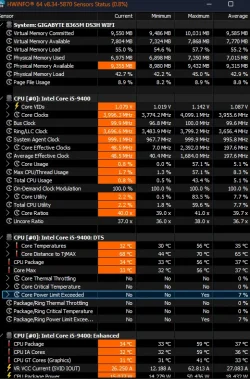
Just curious as I'm chasing a sudden shutdown problem. I don't have any thermal past to redo my CPU at the moment but was wondering about my CPU thermals.
Does this (arrow) indicate that my processor has exceeded its thermals and shutdown?
Plans to replace the power supply and install a different (used) GPU coming quickly and will post about that on another thread.
 

Attachments
  • Screenshot 2025-11-21 082025.webp
    Screenshot 2025-11-21 082025.webp
    97.1 KB · Views: 4

My Computer My Computer

At a glance

Windows 11Intel i5 940016GB tforceASUS Geforce 2060 Phoenix version
OS
Windows 11
Computer type
PC/Desktop
Manufacturer/Model
Home built
CPU
Intel i5 9400
Motherboard
Gigabyte B365M D3SH WIFI
Memory
16GB tforce
Graphics Card(s)
ASUS Geforce 2060 Phoenix version
Monitor(s) Displays
View Sonic VX 3216 32" curved screen
Screen Resolution
1920 x 1080
Hard Drives
Crucial 250GB, Western Digital 6TB
PSU
MSI MAG A1000GL PCIE5
Cooling
standard Intel fan
Keyboard
Microsoft 3000 version 2
Mouse
Microsoft 3000
Internet Speed
symmetrical 50Mb fiber feed
Browser
Edge and Chrome
Antivirus
using Windows Defender
Your temps look fine to me. I suggest you follow the following instructions. Gather the required logs, put them all in a folder, zip the folder. Upload the zipped folder to any cloud provider and post a shared link here. When @zbook comes on line he will analyze your logfiles.
 

My Computers My Computers

  • At a glance

    Windows 11 Pro 25H2 26200.8875i9-10900 10 core 20 threads32 gbnone-Intel UHD Graphics 630
    OS
    Windows 11 Pro 25H2 26200.8875
    Computer type
    PC/Desktop
    Manufacturer/Model
    Dell Optiplex 7080
    CPU
    i9-10900 10 core 20 threads
    Motherboard
    DELL 0J37VM
    Memory
    32 gb
    Graphics Card(s)
    none-Intel UHD Graphics 630
    Sound Card
    Integrated Realtek
    Monitor(s) Displays
    Benq 27
    Screen Resolution
    2560x1440
    Hard Drives
    2x1tb Solidigm m.2 nvme /External drives 512gb Samsung m.2 sata+2tb Kingston m2.nvme
    PSU
    500w
    Case
    MT
    Cooling
    Dell Premium
    Keyboard
    Logitech wired
    Mouse
    Logitech wireless
    Internet Speed
    so slow I'm too embarrassed to tell
    Browser
    #1 Edge #2 Firefox
    Antivirus
    Defender+MWB Premium
  • At a glance

    Windows 11 Pro 24H2 26200.8875AMD Ryzen 7 6800U32 gbintegrated
    Operating System
    Windows 11 Pro 24H2 26200.8875
    Computer type
    PC/Desktop
    Manufacturer/Model
    Beelink Mini PC SER5
    CPU
    AMD Ryzen 7 6800U
    Memory
    32 gb
    Graphics card(s)
    integrated
    Sound Card
    integrated
    Monitor(s) Displays
    Benq 27
    Screen Resolution
    2560x1440
    Hard Drives
    1TB Crucial nvme
    Keyboard
    Logitech wired
    Mouse
    Logitech wireless
    Internet Speed
    still too embarrassed to tell
    Browser
    Firefox
    Antivirus
    Defender
    Other Info
    System 3 is non compliant Dell 9020 i7-4770/24gb ram Win11 PRO 26200.8875
  • Like
Reactions: Gas
I don't get a BSOD just an immediate shutdown followed by a reboot to where I was prior to the shutdown.
Thank you glasscutter for the link you posted.
 

My Computer My Computer

At a glance

Windows 11Intel i5 940016GB tforceASUS Geforce 2060 Phoenix version
OS
Windows 11
Computer type
PC/Desktop
Manufacturer/Model
Home built
CPU
Intel i5 9400
Motherboard
Gigabyte B365M D3SH WIFI
Memory
16GB tforce
Graphics Card(s)
ASUS Geforce 2060 Phoenix version
Monitor(s) Displays
View Sonic VX 3216 32" curved screen
Screen Resolution
1920 x 1080
Hard Drives
Crucial 250GB, Western Digital 6TB
PSU
MSI MAG A1000GL PCIE5
Cooling
standard Intel fan
Keyboard
Microsoft 3000 version 2
Mouse
Microsoft 3000
Internet Speed
symmetrical 50Mb fiber feed
Browser
Edge and Chrome
Antivirus
using Windows Defender
Have you added any new hardware recently? Like a more powerful GPU?
 

My Computers My Computers

  • At a glance

    Windows 11 ProRyzen 7 5700 X3D64 GB DDR4 3600mhz Gskill Ripjaws VRTX 4070 Super , 12GB VRAM Asus EVO Overclock
    OS
    Windows 11 Pro
    Computer type
    PC/Desktop
    Manufacturer/Model
    Custom Built
    CPU
    Ryzen 7 5700 X3D
    Motherboard
    MSI MPG B550 GAMING PLUS
    Memory
    64 GB DDR4 3600mhz Gskill Ripjaws V
    Graphics Card(s)
    RTX 4070 Super , 12GB VRAM Asus EVO Overclock
    Monitor(s) Displays
    Gigabyte M27Q (rev. 2.0) 2560 x 1440 @ 170hz HDR
    Hard Drives
    2TB Samsung nvme ssd
    4TB Western Digital nvme ssd
    PSU
    CORSAIR RMx SHIFT Series™ RM750x 80 PLUS Gold Fully Modular ATX Power Supply
    Case
    CORSAIR 3500X ARGB Mid-Tower ATX PC Case – Black
    Cooling
    ID-COOLING FROSTFLOW X 240 CPU Water Cooler
    Keyboard
    Logitech G213
    Mouse
    Logitech G203
    Internet Speed
    1.2gbps Fiber 😎
  • At a glance

    Chrome OSIntel Pentium Quad Core4GB LPDDR4
    Operating System
    Chrome OS
    Computer type
    Laptop
    Manufacturer/Model
    HP Chromebook
    CPU
    Intel Pentium Quad Core
    Memory
    4GB LPDDR4
    Monitor(s) Displays
    14 Inch HD SVA anti glare micro edge display
    Hard Drives
    64 GB emmc

My Computers My Computers

  • At a glance

    Windows 11 Pro 25H2 26200.8875i9-10900 10 core 20 threads32 gbnone-Intel UHD Graphics 630
    OS
    Windows 11 Pro 25H2 26200.8875
    Computer type
    PC/Desktop
    Manufacturer/Model
    Dell Optiplex 7080
    CPU
    i9-10900 10 core 20 threads
    Motherboard
    DELL 0J37VM
    Memory
    32 gb
    Graphics Card(s)
    none-Intel UHD Graphics 630
    Sound Card
    Integrated Realtek
    Monitor(s) Displays
    Benq 27
    Screen Resolution
    2560x1440
    Hard Drives
    2x1tb Solidigm m.2 nvme /External drives 512gb Samsung m.2 sata+2tb Kingston m2.nvme
    PSU
    500w
    Case
    MT
    Cooling
    Dell Premium
    Keyboard
    Logitech wired
    Mouse
    Logitech wireless
    Internet Speed
    so slow I'm too embarrassed to tell
    Browser
    #1 Edge #2 Firefox
    Antivirus
    Defender+MWB Premium
  • At a glance

    Windows 11 Pro 24H2 26200.8875AMD Ryzen 7 6800U32 gbintegrated
    Operating System
    Windows 11 Pro 24H2 26200.8875
    Computer type
    PC/Desktop
    Manufacturer/Model
    Beelink Mini PC SER5
    CPU
    AMD Ryzen 7 6800U
    Memory
    32 gb
    Graphics card(s)
    integrated
    Sound Card
    integrated
    Monitor(s) Displays
    Benq 27
    Screen Resolution
    2560x1440
    Hard Drives
    1TB Crucial nvme
    Keyboard
    Logitech wired
    Mouse
    Logitech wireless
    Internet Speed
    still too embarrassed to tell
    Browser
    Firefox
    Antivirus
    Defender
    Other Info
    System 3 is non compliant Dell 9020 i7-4770/24gb ram Win11 PRO 26200.8875
I also suggest you make sure you are running latest drivers and bios.
 

My Computers My Computers

  • At a glance

    Windows 11 Pro 25H2 26200.8875i9-10900 10 core 20 threads32 gbnone-Intel UHD Graphics 630
    OS
    Windows 11 Pro 25H2 26200.8875
    Computer type
    PC/Desktop
    Manufacturer/Model
    Dell Optiplex 7080
    CPU
    i9-10900 10 core 20 threads
    Motherboard
    DELL 0J37VM
    Memory
    32 gb
    Graphics Card(s)
    none-Intel UHD Graphics 630
    Sound Card
    Integrated Realtek
    Monitor(s) Displays
    Benq 27
    Screen Resolution
    2560x1440
    Hard Drives
    2x1tb Solidigm m.2 nvme /External drives 512gb Samsung m.2 sata+2tb Kingston m2.nvme
    PSU
    500w
    Case
    MT
    Cooling
    Dell Premium
    Keyboard
    Logitech wired
    Mouse
    Logitech wireless
    Internet Speed
    so slow I'm too embarrassed to tell
    Browser
    #1 Edge #2 Firefox
    Antivirus
    Defender+MWB Premium
  • At a glance

    Windows 11 Pro 24H2 26200.8875AMD Ryzen 7 6800U32 gbintegrated
    Operating System
    Windows 11 Pro 24H2 26200.8875
    Computer type
    PC/Desktop
    Manufacturer/Model
    Beelink Mini PC SER5
    CPU
    AMD Ryzen 7 6800U
    Memory
    32 gb
    Graphics card(s)
    integrated
    Sound Card
    integrated
    Monitor(s) Displays
    Benq 27
    Screen Resolution
    2560x1440
    Hard Drives
    1TB Crucial nvme
    Keyboard
    Logitech wired
    Mouse
    Logitech wireless
    Internet Speed
    still too embarrassed to tell
    Browser
    Firefox
    Antivirus
    Defender
    Other Info
    System 3 is non compliant Dell 9020 i7-4770/24gb ram Win11 PRO 26200.8875
I did check my bios and I'm not running the latest. I'm on F2B and I think F7 was available I wanted to contact Gigabyte to see if I can jump from F2B all the way to F7. Plus, I'm nervous about updating the bios and having a shutdown during the Bios update leaving me with a nice-looking brick
 

My Computer My Computer

At a glance

Windows 11Intel i5 940016GB tforceASUS Geforce 2060 Phoenix version
OS
Windows 11
Computer type
PC/Desktop
Manufacturer/Model
Home built
CPU
Intel i5 9400
Motherboard
Gigabyte B365M D3SH WIFI
Memory
16GB tforce
Graphics Card(s)
ASUS Geforce 2060 Phoenix version
Monitor(s) Displays
View Sonic VX 3216 32" curved screen
Screen Resolution
1920 x 1080
Hard Drives
Crucial 250GB, Western Digital 6TB
PSU
MSI MAG A1000GL PCIE5
Cooling
standard Intel fan
Keyboard
Microsoft 3000 version 2
Mouse
Microsoft 3000
Internet Speed
symmetrical 50Mb fiber feed
Browser
Edge and Chrome
Antivirus
using Windows Defender

andrew129260 no I'm using my old GeForce GTX950. That's another reason for wanting to try the newer (longer) to me ASUS ROC card.​

By the way love the avatar is that from Gears?
 

My Computer My Computer

At a glance

Windows 11Intel i5 940016GB tforceASUS Geforce 2060 Phoenix version
OS
Windows 11
Computer type
PC/Desktop
Manufacturer/Model
Home built
CPU
Intel i5 9400
Motherboard
Gigabyte B365M D3SH WIFI
Memory
16GB tforce
Graphics Card(s)
ASUS Geforce 2060 Phoenix version
Monitor(s) Displays
View Sonic VX 3216 32" curved screen
Screen Resolution
1920 x 1080
Hard Drives
Crucial 250GB, Western Digital 6TB
PSU
MSI MAG A1000GL PCIE5
Cooling
standard Intel fan
Keyboard
Microsoft 3000 version 2
Mouse
Microsoft 3000
Internet Speed
symmetrical 50Mb fiber feed
Browser
Edge and Chrome
Antivirus
using Windows Defender
Avatar is from killzone actually haha.

I asked about new hardware as you have a 500 watt power supply and based on the hardware you have I don't think you have much budget to expand to newer stuff. Updating the bios is usually a good idea. It's pretty rare to get a brick. That motherboard also seems to have fallback.

I will say that the best way to find out what's going in is trying out furmark or some other stress tests to see if that triggers the problem. If it does, it's probably power related or temps or faulty hardware. If your temps are fine which they seem to be I would look more at the power supply or possibly the gpu.

Event viewer under system can sometimes give clues.
 

My Computers My Computers

  • At a glance

    Windows 11 ProRyzen 7 5700 X3D64 GB DDR4 3600mhz Gskill Ripjaws VRTX 4070 Super , 12GB VRAM Asus EVO Overclock
    OS
    Windows 11 Pro
    Computer type
    PC/Desktop
    Manufacturer/Model
    Custom Built
    CPU
    Ryzen 7 5700 X3D
    Motherboard
    MSI MPG B550 GAMING PLUS
    Memory
    64 GB DDR4 3600mhz Gskill Ripjaws V
    Graphics Card(s)
    RTX 4070 Super , 12GB VRAM Asus EVO Overclock
    Monitor(s) Displays
    Gigabyte M27Q (rev. 2.0) 2560 x 1440 @ 170hz HDR
    Hard Drives
    2TB Samsung nvme ssd
    4TB Western Digital nvme ssd
    PSU
    CORSAIR RMx SHIFT Series™ RM750x 80 PLUS Gold Fully Modular ATX Power Supply
    Case
    CORSAIR 3500X ARGB Mid-Tower ATX PC Case – Black
    Cooling
    ID-COOLING FROSTFLOW X 240 CPU Water Cooler
    Keyboard
    Logitech G213
    Mouse
    Logitech G203
    Internet Speed
    1.2gbps Fiber 😎
  • At a glance

    Chrome OSIntel Pentium Quad Core4GB LPDDR4
    Operating System
    Chrome OS
    Computer type
    Laptop
    Manufacturer/Model
    HP Chromebook
    CPU
    Intel Pentium Quad Core
    Memory
    4GB LPDDR4
    Monitor(s) Displays
    14 Inch HD SVA anti glare micro edge display
    Hard Drives
    64 GB emmc
Back
Top Bottom





