
Solved Question regarding CLONING a drive


Lou

Well-known member
Member
Local time
1:15 PM
Posts
134
Location
East Coast
OS
WIN11 HOME Version 24H2
I'm using the freeware version of Macrium and have a question pertaining to CLONING.
I use Marcium for normal BACK-UPS and IMAGES and store these files on a portable 5TB drive.
I've purchased a replacement SSD for my Desktop--it's an OE replacement from DELL. It's the same capacity but is the larger size (2280 verses the existing 2230) and made by a different manufacturer. Long story but I'm chasing a hardware issue with my desktop.
QUESTION-
When cloning the existing SSD, in my desktop, can I set the destination drive to my portable 5TB drive.
When I was attempting to clone a message popped up stating that all data on the destination drive would be lost. At this point I stopped the process..
Does this mean I need to have another portable drive to save a clone.
NO laughing now---this is all very new to me.
 

My Computer My Computer

At a glance

WIN11 HOME Version 24H211th Gen Intel(R) Core(TM) i7-11700 @ 2.50GHz...32GBNVIDIA GeForce GTX 1650 SUPER
OS
WIN11 HOME Version 24H2
Computer type
PC/Desktop
Manufacturer/Model
DELL XPS 8940
CPU
11th Gen Intel(R) Core(TM) i7-11700 @ 2.50GHz 2.50 GH
Motherboard
Dell OE
Memory
32GB
Graphics Card(s)
NVIDIA GeForce GTX 1650 SUPER
Sound Card
Realtek Audio (on board)
Monitor(s) Displays
(2) DELL 2007FP
Screen Resolution
1600 X 1200
Hard Drives
C: (OS and APPS) 512GB SSD
D: (data) 1TB SATA
PSU
360W
Case
DELL OE
Cooling
Noctua NF-A9 PWM 92mm case fan and NH-D9L CPU Cooler with 92mm fan
Keyboard
Dell
Mouse
Logitech M705
Internet Speed
1Gb DWN 1Gb UP
Browser
FIREFOX- once in a great while will use EDGE
Antivirus
MS
Other Info
The case fan and CPU cooler were after purchase upgrades...the i7 cpu runs hot and the OE solution can best be described as marginal when CPU intensive apps are used.
ALSO added VRM and SSD passive heatsinks.
Hi,
You wouldn't want to clone to a storage device
Clones are just that pretty much a replacement of what's on the device
You could try,
Make a folder/ name it and point to it to place a system image or in your case clone into it.
But you're better off just creating a system image and restoring it to the new ssd.
 

My Computer My Computer

At a glance

Win-7-10-11Pro's10900k & 9940x & 5930kTrident-Z Royal 4000c16 2x16gb & Trident-Z 36...Titan Xp & 1080ti FTW3 & evga 980ti gaming
OS
Win-7-10-11Pro's
Computer type
PC/Desktop
Manufacturer/Model
Acer 17" Nitro 7840sn/ 2x16gb 5600c40/ 4060/ stock 1tb-os/ 4tb sn850x
CPU
10900k & 9940x & 5930k
Motherboard
z490-Apex & x299-Apex & x99-Sabertooth
Memory
Trident-Z Royal 4000c16 2x16gb & Trident-Z 3600c16 4x8gb & 3200c14 4x8gb
Graphics Card(s)
Titan Xp & 1080ti FTW3 & evga 980ti gaming
Sound Card
Onboard Realtek x3
Monitor(s) Displays
1-AOC G2460PG 24"G-Sync 144Hz/ 2nd 1-ASUS VG248QE 24"/ 3rd LG 43" series
Screen Resolution
1920-1080 not sure what the t.v is besides 43" class scales from 1920-1080 perfectly
Hard Drives
2-WD-sn850x 4tb/ 970evo+500gb/ 980 pro 2tb.
PSU
1000p2 & 1200p2 & 850p2
Case
D450 x2 & 1 Test bench in cherry Entertainment center
Cooling
Custom water loops x3 with 2x mora 360mm rads only 980ti gaming air cooled
Keyboard
G710+x3
Mouse
Redragon x3
Internet Speed
xfinity gigabyte
Browser
Firefox
Antivirus
mbam pro
I tried to load my latest IMAGE to the new SSD and it didn't work---The PC would not boot up.
That's the reason for my question on CLONING---the folks on the DELL forum advised that I need a CLONE not an image
FWIW-
I tested my ability to use MACRIUM to restore my PC with an IMAGE a week earlier(no change in the desktop SSD)---It worked then.
 

My Computer My Computer

At a glance

WIN11 HOME Version 24H211th Gen Intel(R) Core(TM) i7-11700 @ 2.50GHz...32GBNVIDIA GeForce GTX 1650 SUPER
OS
WIN11 HOME Version 24H2
Computer type
PC/Desktop
Manufacturer/Model
DELL XPS 8940
CPU
11th Gen Intel(R) Core(TM) i7-11700 @ 2.50GHz 2.50 GH
Motherboard
Dell OE
Memory
32GB
Graphics Card(s)
NVIDIA GeForce GTX 1650 SUPER
Sound Card
Realtek Audio (on board)
Monitor(s) Displays
(2) DELL 2007FP
Screen Resolution
1600 X 1200
Hard Drives
C: (OS and APPS) 512GB SSD
D: (data) 1TB SATA
PSU
360W
Case
DELL OE
Cooling
Noctua NF-A9 PWM 92mm case fan and NH-D9L CPU Cooler with 92mm fan
Keyboard
Dell
Mouse
Logitech M705
Internet Speed
1Gb DWN 1Gb UP
Browser
FIREFOX- once in a great while will use EDGE
Antivirus
MS
Other Info
The case fan and CPU cooler were after purchase upgrades...the i7 cpu runs hot and the OE solution can best be described as marginal when CPU intensive apps are used.
ALSO added VRM and SSD passive heatsinks.
I tried to load my latest IMAGE to the new SSD and it didn't work---The PC would not boot up.
That's the reason for my question on CLONING---the folks on the DELL forum advised that I need a CLONE not an image
FWIW-
I tested my ability to use MACRIUM to restore my PC with an IMAGE a week earlier(no change in the desktop SSD)---It worked then.
How did you try to load your image? Did you boot off a Macrium rescue USB and restore from there?
 

My Computers My Computers

  • At a glance

    Windows 11 build 26200.8973 / WSL 2 running U...Intel i7-1355U16GBIntel Iris XE
    OS
    Windows 11 build 26200.8973 / WSL 2 running Ubuntu
    Computer type
    Laptop
    Manufacturer/Model
    Dell Inspiron 14 5430
    CPU
    Intel i7-1355U
    Motherboard
    Dell 0GMW80
    Memory
    16GB
    Graphics Card(s)
    Intel Iris XE
    Sound Card
    Realtek
    Monitor(s) Displays
    Dell 14", LG 32" Curved Wide screen monitor and LG Ultrawide 26"
    Screen Resolution
    1920 x 1200 @ 60Hz, 1920 x 1080 @ 100Hz and 2560 x 1080 @ 60Hz
    Hard Drives
    Samsung 990 Pro 1TB NVME Gen 4 M.2 SSD
    PSU
    Dell
    Case
    Dell
    Cooling
    Dell
    Keyboard
    Dell KM3322W
    Mouse
    Dell Trackpad or Dell KM3322W
    Internet Speed
    900mb down / 400mb up FTTP
    Browser
    Edge 151.0.4129.59
    Antivirus
    Windows Defender
    Other Info
    Windows 365
    1Password
    1TB OneDrive
    Outlook Classic
    Visual Studio Code running in WSL
    Python 3.14
    Samsung Magician
    Garmin Express
    Dell TB16 Thunderbolt dock
    WSL
    WEI Score: 8.3
  • At a glance

    Windows 11Core i5 - 1035G48GBIntel Iris Plus
    Operating System
    Windows 11
    Computer type
    Tablet
    Manufacturer/Model
    Microsoft Surface Pro 7
    CPU
    Core i5 - 1035G4
    Motherboard
    Microsoft
    Memory
    8GB
    Graphics card(s)
    Intel Iris Plus
    Monitor(s) Displays
    Surface touch
    Screen Resolution
    2736 x 1824
    Hard Drives
    128GB
    PSU
    Microsoft
    Case
    Microsoft Keyboard
    Cooling
    None
    Keyboard
    Microsoft Surface Keyboard
    Mouse
    Microsoft Arc Intellimouse
    Internet Speed
    900mb / 400mb FTTP
    Browser
    Edge
    Antivirus
    Windows Defender
I tried to load my latest IMAGE to the new SSD and it didn't work---The PC would not boot up.
That's the reason for my question on CLONING---the folks on the DELL forum advised that I need a CLONE not an image
FWIW-
I tested my ability to use MACRIUM to restore my PC with an IMAGE a week earlier(no change in the desktop SSD)---It worked then.
I also have a Dell Inspiron and when I upgraded the OEM SSD with a Samsung 2280 NVME 990 Pro, I simply boot from a Macrium rescue USB and then restore the image from my external storage.
 

My Computers My Computers

  • At a glance

    Windows 11 build 26200.8973 / WSL 2 running U...Intel i7-1355U16GBIntel Iris XE
    OS
    Windows 11 build 26200.8973 / WSL 2 running Ubuntu
    Computer type
    Laptop
    Manufacturer/Model
    Dell Inspiron 14 5430
    CPU
    Intel i7-1355U
    Motherboard
    Dell 0GMW80
    Memory
    16GB
    Graphics Card(s)
    Intel Iris XE
    Sound Card
    Realtek
    Monitor(s) Displays
    Dell 14", LG 32" Curved Wide screen monitor and LG Ultrawide 26"
    Screen Resolution
    1920 x 1200 @ 60Hz, 1920 x 1080 @ 100Hz and 2560 x 1080 @ 60Hz
    Hard Drives
    Samsung 990 Pro 1TB NVME Gen 4 M.2 SSD
    PSU
    Dell
    Case
    Dell
    Cooling
    Dell
    Keyboard
    Dell KM3322W
    Mouse
    Dell Trackpad or Dell KM3322W
    Internet Speed
    900mb down / 400mb up FTTP
    Browser
    Edge 151.0.4129.59
    Antivirus
    Windows Defender
    Other Info
    Windows 365
    1Password
    1TB OneDrive
    Outlook Classic
    Visual Studio Code running in WSL
    Python 3.14
    Samsung Magician
    Garmin Express
    Dell TB16 Thunderbolt dock
    WSL
    WEI Score: 8.3
  • At a glance

    Windows 11Core i5 - 1035G48GBIntel Iris Plus
    Operating System
    Windows 11
    Computer type
    Tablet
    Manufacturer/Model
    Microsoft Surface Pro 7
    CPU
    Core i5 - 1035G4
    Motherboard
    Microsoft
    Memory
    8GB
    Graphics card(s)
    Intel Iris Plus
    Monitor(s) Displays
    Surface touch
    Screen Resolution
    2736 x 1824
    Hard Drives
    128GB
    PSU
    Microsoft
    Case
    Microsoft Keyboard
    Cooling
    None
    Keyboard
    Microsoft Surface Keyboard
    Mouse
    Microsoft Arc Intellimouse
    Internet Speed
    900mb / 400mb FTTP
    Browser
    Edge
    Antivirus
    Windows Defender
I tried to load my latest IMAGE to the new SSD and it didn't work---The PC would not boot up.
That's the reason for my question on CLONING---the folks on the DELL forum advised that I need a CLONE not an image
FWIW-
I tested my ability to use MACRIUM to restore my PC with an IMAGE a week earlier(no change in the desktop SSD)---It worked then.
Hi,
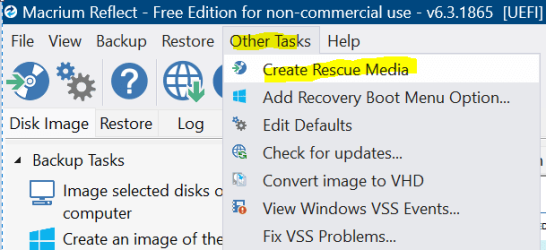
Use the reflect winpe recovery media to create and then restore the system image to the new.

Doing a clone in the os windows disabled the duplicate boot loader is why you couldn't boot
You'd need to use the winpe and use startup repair

Rule #1 of cloning is power off after the clone has completed.

Then swap out the drives.
 

My Computer My Computer

At a glance

Win-7-10-11Pro's10900k & 9940x & 5930kTrident-Z Royal 4000c16 2x16gb & Trident-Z 36...Titan Xp & 1080ti FTW3 & evga 980ti gaming
OS
Win-7-10-11Pro's
Computer type
PC/Desktop
Manufacturer/Model
Acer 17" Nitro 7840sn/ 2x16gb 5600c40/ 4060/ stock 1tb-os/ 4tb sn850x
CPU
10900k & 9940x & 5930k
Motherboard
z490-Apex & x299-Apex & x99-Sabertooth
Memory
Trident-Z Royal 4000c16 2x16gb & Trident-Z 3600c16 4x8gb & 3200c14 4x8gb
Graphics Card(s)
Titan Xp & 1080ti FTW3 & evga 980ti gaming
Sound Card
Onboard Realtek x3
Monitor(s) Displays
1-AOC G2460PG 24"G-Sync 144Hz/ 2nd 1-ASUS VG248QE 24"/ 3rd LG 43" series
Screen Resolution
1920-1080 not sure what the t.v is besides 43" class scales from 1920-1080 perfectly
Hard Drives
2-WD-sn850x 4tb/ 970evo+500gb/ 980 pro 2tb.
PSU
1000p2 & 1200p2 & 850p2
Case
D450 x2 & 1 Test bench in cherry Entertainment center
Cooling
Custom water loops x3 with 2x mora 360mm rads only 980ti gaming air cooled
Keyboard
G710+x3
Mouse
Redragon x3
Internet Speed
xfinity gigabyte
Browser
Firefox
Antivirus
mbam pro
OK-
I must have done something VERY wrong--I'll have to try using an IMAGE again
Is there a DETAILED tutorial (for dummies) I can follow...Not sure how I got things to work a week ago.....
Some more questions--
How do I get to WINPE
ALSO
Can I use an existing portable drive for a clone without losing the data already on that portable drive
I guess I don't know the difference between a clone and an image and when to use which...
Like I said---This is all new to me......
PS-
"Did you boot off a Macrium rescue USB and restore from there?"---YES I did...
REALLY appreciate the input here--THANK-YOU all
 
Last edited:

My Computer My Computer

At a glance

WIN11 HOME Version 24H211th Gen Intel(R) Core(TM) i7-11700 @ 2.50GHz...32GBNVIDIA GeForce GTX 1650 SUPER
OS
WIN11 HOME Version 24H2
Computer type
PC/Desktop
Manufacturer/Model
DELL XPS 8940
CPU
11th Gen Intel(R) Core(TM) i7-11700 @ 2.50GHz 2.50 GH
Motherboard
Dell OE
Memory
32GB
Graphics Card(s)
NVIDIA GeForce GTX 1650 SUPER
Sound Card
Realtek Audio (on board)
Monitor(s) Displays
(2) DELL 2007FP
Screen Resolution
1600 X 1200
Hard Drives
C: (OS and APPS) 512GB SSD
D: (data) 1TB SATA
PSU
360W
Case
DELL OE
Cooling
Noctua NF-A9 PWM 92mm case fan and NH-D9L CPU Cooler with 92mm fan
Keyboard
Dell
Mouse
Logitech M705
Internet Speed
1Gb DWN 1Gb UP
Browser
FIREFOX- once in a great while will use EDGE
Antivirus
MS
Other Info
The case fan and CPU cooler were after purchase upgrades...the i7 cpu runs hot and the OE solution can best be described as marginal when CPU intensive apps are used.
ALSO added VRM and SSD passive heatsinks.
Hi,
Have a usb flash drive ready it can be as small as 1gb default fat32
1710933288985.png
 

My Computer My Computer

At a glance

Win-7-10-11Pro's10900k & 9940x & 5930kTrident-Z Royal 4000c16 2x16gb & Trident-Z 36...Titan Xp & 1080ti FTW3 & evga 980ti gaming
OS
Win-7-10-11Pro's
Computer type
PC/Desktop
Manufacturer/Model
Acer 17" Nitro 7840sn/ 2x16gb 5600c40/ 4060/ stock 1tb-os/ 4tb sn850x
CPU
10900k & 9940x & 5930k
Motherboard
z490-Apex & x299-Apex & x99-Sabertooth
Memory
Trident-Z Royal 4000c16 2x16gb & Trident-Z 3600c16 4x8gb & 3200c14 4x8gb
Graphics Card(s)
Titan Xp & 1080ti FTW3 & evga 980ti gaming
Sound Card
Onboard Realtek x3
Monitor(s) Displays
1-AOC G2460PG 24"G-Sync 144Hz/ 2nd 1-ASUS VG248QE 24"/ 3rd LG 43" series
Screen Resolution
1920-1080 not sure what the t.v is besides 43" class scales from 1920-1080 perfectly
Hard Drives
2-WD-sn850x 4tb/ 970evo+500gb/ 980 pro 2tb.
PSU
1000p2 & 1200p2 & 850p2
Case
D450 x2 & 1 Test bench in cherry Entertainment center
Cooling
Custom water loops x3 with 2x mora 360mm rads only 980ti gaming air cooled
Keyboard
G710+x3
Mouse
Redragon x3
Internet Speed
xfinity gigabyte
Browser
Firefox
Antivirus
mbam pro

My Computer My Computer

At a glance

Win-7-10-11Pro's10900k & 9940x & 5930kTrident-Z Royal 4000c16 2x16gb & Trident-Z 36...Titan Xp & 1080ti FTW3 & evga 980ti gaming
OS
Win-7-10-11Pro's
Computer type
PC/Desktop
Manufacturer/Model
Acer 17" Nitro 7840sn/ 2x16gb 5600c40/ 4060/ stock 1tb-os/ 4tb sn850x
CPU
10900k & 9940x & 5930k
Motherboard
z490-Apex & x299-Apex & x99-Sabertooth
Memory
Trident-Z Royal 4000c16 2x16gb & Trident-Z 3600c16 4x8gb & 3200c14 4x8gb
Graphics Card(s)
Titan Xp & 1080ti FTW3 & evga 980ti gaming
Sound Card
Onboard Realtek x3
Monitor(s) Displays
1-AOC G2460PG 24"G-Sync 144Hz/ 2nd 1-ASUS VG248QE 24"/ 3rd LG 43" series
Screen Resolution
1920-1080 not sure what the t.v is besides 43" class scales from 1920-1080 perfectly
Hard Drives
2-WD-sn850x 4tb/ 970evo+500gb/ 980 pro 2tb.
PSU
1000p2 & 1200p2 & 850p2
Case
D450 x2 & 1 Test bench in cherry Entertainment center
Cooling
Custom water loops x3 with 2x mora 360mm rads only 980ti gaming air cooled
Keyboard
G710+x3
Mouse
Redragon x3
Internet Speed
xfinity gigabyte
Browser
Firefox
Antivirus
mbam pro
OK-
I need to do somemore reading---I'll post a follow-up
THANKS folks for your guidance here
 

My Computer My Computer

At a glance

WIN11 HOME Version 24H211th Gen Intel(R) Core(TM) i7-11700 @ 2.50GHz...32GBNVIDIA GeForce GTX 1650 SUPER
OS
WIN11 HOME Version 24H2
Computer type
PC/Desktop
Manufacturer/Model
DELL XPS 8940
CPU
11th Gen Intel(R) Core(TM) i7-11700 @ 2.50GHz 2.50 GH
Motherboard
Dell OE
Memory
32GB
Graphics Card(s)
NVIDIA GeForce GTX 1650 SUPER
Sound Card
Realtek Audio (on board)
Monitor(s) Displays
(2) DELL 2007FP
Screen Resolution
1600 X 1200
Hard Drives
C: (OS and APPS) 512GB SSD
D: (data) 1TB SATA
PSU
360W
Case
DELL OE
Cooling
Noctua NF-A9 PWM 92mm case fan and NH-D9L CPU Cooler with 92mm fan
Keyboard
Dell
Mouse
Logitech M705
Internet Speed
1Gb DWN 1Gb UP
Browser
FIREFOX- once in a great while will use EDGE
Antivirus
MS
Other Info
The case fan and CPU cooler were after purchase upgrades...the i7 cpu runs hot and the OE solution can best be described as marginal when CPU intensive apps are used.
ALSO added VRM and SSD passive heatsinks.

My Computer My Computer

At a glance

Win-7-10-11Pro's10900k & 9940x & 5930kTrident-Z Royal 4000c16 2x16gb & Trident-Z 36...Titan Xp & 1080ti FTW3 & evga 980ti gaming
OS
Win-7-10-11Pro's
Computer type
PC/Desktop
Manufacturer/Model
Acer 17" Nitro 7840sn/ 2x16gb 5600c40/ 4060/ stock 1tb-os/ 4tb sn850x
CPU
10900k & 9940x & 5930k
Motherboard
z490-Apex & x299-Apex & x99-Sabertooth
Memory
Trident-Z Royal 4000c16 2x16gb & Trident-Z 3600c16 4x8gb & 3200c14 4x8gb
Graphics Card(s)
Titan Xp & 1080ti FTW3 & evga 980ti gaming
Sound Card
Onboard Realtek x3
Monitor(s) Displays
1-AOC G2460PG 24"G-Sync 144Hz/ 2nd 1-ASUS VG248QE 24"/ 3rd LG 43" series
Screen Resolution
1920-1080 not sure what the t.v is besides 43" class scales from 1920-1080 perfectly
Hard Drives
2-WD-sn850x 4tb/ 970evo+500gb/ 980 pro 2tb.
PSU
1000p2 & 1200p2 & 850p2
Case
D450 x2 & 1 Test bench in cherry Entertainment center
Cooling
Custom water loops x3 with 2x mora 360mm rads only 980ti gaming air cooled
Keyboard
G710+x3
Mouse
Redragon x3
Internet Speed
xfinity gigabyte
Browser
Firefox
Antivirus
mbam pro
Follow-up---I'm doing this from my desktop with it's new SSD.
Boy am I a bit slooooow.
The image restore indeed works when the source is correctly chosen....DAMN
I did that wrong TWICE
We're all set here---THANKS folks for you time and help here!!!!!
 

My Computer My Computer

At a glance

WIN11 HOME Version 24H211th Gen Intel(R) Core(TM) i7-11700 @ 2.50GHz...32GBNVIDIA GeForce GTX 1650 SUPER
OS
WIN11 HOME Version 24H2
Computer type
PC/Desktop
Manufacturer/Model
DELL XPS 8940
CPU
11th Gen Intel(R) Core(TM) i7-11700 @ 2.50GHz 2.50 GH
Motherboard
Dell OE
Memory
32GB
Graphics Card(s)
NVIDIA GeForce GTX 1650 SUPER
Sound Card
Realtek Audio (on board)
Monitor(s) Displays
(2) DELL 2007FP
Screen Resolution
1600 X 1200
Hard Drives
C: (OS and APPS) 512GB SSD
D: (data) 1TB SATA
PSU
360W
Case
DELL OE
Cooling
Noctua NF-A9 PWM 92mm case fan and NH-D9L CPU Cooler with 92mm fan
Keyboard
Dell
Mouse
Logitech M705
Internet Speed
1Gb DWN 1Gb UP
Browser
FIREFOX- once in a great while will use EDGE
Antivirus
MS
Other Info
The case fan and CPU cooler were after purchase upgrades...the i7 cpu runs hot and the OE solution can best be described as marginal when CPU intensive apps are used.
ALSO added VRM and SSD passive heatsinks.
Hi,
Yep selecting the entire disk source and to the correct destination helps :cool:
 

My Computer My Computer

At a glance

Win-7-10-11Pro's10900k & 9940x & 5930kTrident-Z Royal 4000c16 2x16gb & Trident-Z 36...Titan Xp & 1080ti FTW3 & evga 980ti gaming
OS
Win-7-10-11Pro's
Computer type
PC/Desktop
Manufacturer/Model
Acer 17" Nitro 7840sn/ 2x16gb 5600c40/ 4060/ stock 1tb-os/ 4tb sn850x
CPU
10900k & 9940x & 5930k
Motherboard
z490-Apex & x299-Apex & x99-Sabertooth
Memory
Trident-Z Royal 4000c16 2x16gb & Trident-Z 3600c16 4x8gb & 3200c14 4x8gb
Graphics Card(s)
Titan Xp & 1080ti FTW3 & evga 980ti gaming
Sound Card
Onboard Realtek x3
Monitor(s) Displays
1-AOC G2460PG 24"G-Sync 144Hz/ 2nd 1-ASUS VG248QE 24"/ 3rd LG 43" series
Screen Resolution
1920-1080 not sure what the t.v is besides 43" class scales from 1920-1080 perfectly
Hard Drives
2-WD-sn850x 4tb/ 970evo+500gb/ 980 pro 2tb.
PSU
1000p2 & 1200p2 & 850p2
Case
D450 x2 & 1 Test bench in cherry Entertainment center
Cooling
Custom water loops x3 with 2x mora 360mm rads only 980ti gaming air cooled
Keyboard
G710+x3
Mouse
Redragon x3
Internet Speed
xfinity gigabyte
Browser
Firefox
Antivirus
mbam pro
Back
Top Bottom




