Questions about Windows To Go installation of Windows10 and 11 on external drives.


Hello everyone,
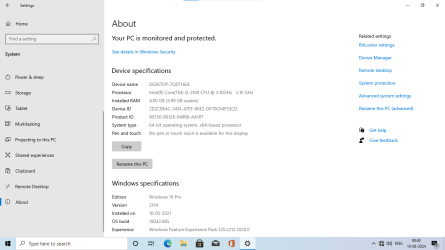
1. Used Macrium Reflect free version 8 to clone WTG with Windows 10 Pro on 128 GB to internal 128 GB SSD in my desktop pc.
2. On booting from ssd , blue screen error occured.
3. I used a tool developed by @SIW2 , "add to wim". Here is the link Creating WIN11 Bootable USB drive with Rufus.
4. Already I had bootable usb prepared using this tool . I booted from it, loaded the partitions , noted the drive letter of corrupt windows on internal ssd wherein I have cloned windows 10 pro from WTG 128 GB. And clicked on "BCDBOOTDISK" "LOAD PARTITIONS" "Fix OS Letter" in sequence.
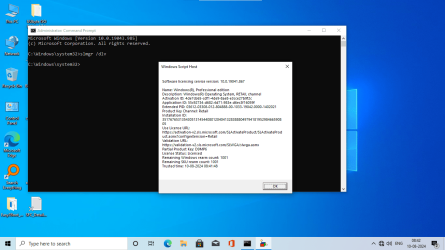
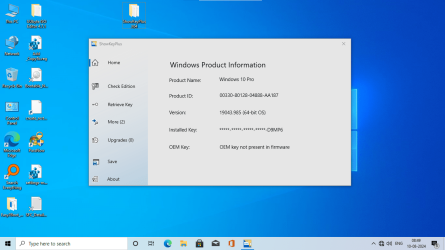
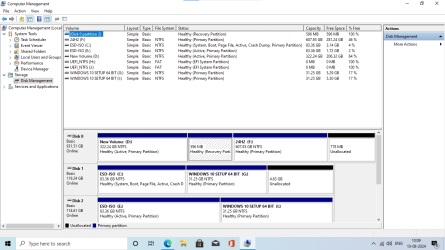
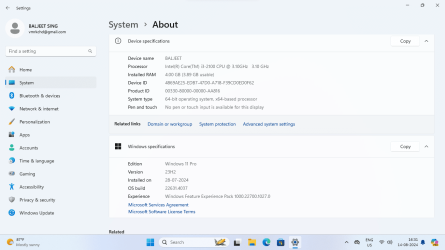
5. This cleared blue screen error and I logged into cloned Windows 10 Pro, same version, os build, with activated windows having digital license linked to my old microsoft account. Also Macrium Reflect kept all data on WTG and SSD WITHOUT ANY LOSS. Please see DIsk Management view.
Disk 1 is 128 GB SSD and Disk 2 is WTG usb 128 GB drive.
6. Thanks to @SIW2 for this very useful tool.
6. I have attached the images , please see if interested. Please download this very important tool by @SIW2 from link Creating WIN11 Bootable USB drive with Rufus post #21.
7. Thank you all very much.
 

Attachments
  • Annotation 2024-08-10 084105.png
    Annotation 2024-08-10 084105.png
    30.5 KB · Views: 1
  • Annotation 2024-08-10 084258.png
    Annotation 2024-08-10 084258.png
    154.6 KB · Views: 1
  • Annotation 2024-08-10 084954.png
    Annotation 2024-08-10 084954.png
    180.5 KB · Views: 1
  • Annotation 2024-08-10 100921.png
    Annotation 2024-08-10 100921.png
    35.7 KB · Views: 1
Last edited:

My Computer My Computer

At a glance

Window 11 v24H2 Build 26100.2033Intel(R) Core(TM) i3-2100 CPU @ 3.10GHz 3.10 GHz4.00 GB (3.89 GB usable)Onboard
OS
Window 11 v24H2 Build 26100.2033
Computer type
PC/Desktop
Manufacturer/Model
ASSEMMBLED
CPU
Intel(R) Core(TM) i3-2100 CPU @ 3.10GHz 3.10 GHz
Motherboard
ZEBRONICS
Memory
4.00 GB (3.89 GB usable)
Graphics Card(s)
Onboard
Sound Card
Onboard
Monitor(s) Displays
LG
Screen Resolution
1366x768
Hard Drives
Toshiba HDD 1 TB
Keyboard
Mechanical
Mouse
Mechanical
Internet Speed
700 kb/s
Browser
Microsoft EDGE, CHROME
Antivirus
Microsoft Defender
Next...
I want to migrate this WTG portable OS on another ssd or internal ssd/hdd keeping windows os with WTG as it is. This is for verification.
What should I use for this transfer/copy?
Macrium freeware or portable minitool wizard?
Thanks.
@Ramesh Sharma

First if moving to INTERNAL HDD don't forget to change the PortableOS registry key to '0' and if using this OS for cloning re-boot it.

Then simply use any software that clones disks -- Macrium Free is as good as any, bootable Gparted will clone a disk or any Linux live distro and use DD command etc etc.

Don't forget to remove the WTG drive before booting the cloned to Internal drive though. If you don't do that the partitions have the same UUID's so it's a lottery which will boot !!!!!

(I wouldn't recommend this if you don't like the command line -- but you can CHANGE the partition UUID's with Gparted, then with windows either from an install media or from your WTG system run bcdboot.exe to recreate the boot files on the internal disk you've changed the UUID's on --then you can boot either system).

Cheers
jimbo
 

My Computer My Computer

At a glance

Windows XP,11 Linux Fedora Rawhide pre-releas...2 X Intel i7
OS
Windows XP,11 Linux Fedora Rawhide pre-release 45
Computer type
PC/Desktop
CPU
2 X Intel i7
Screen Resolution
4KUHD X 2
Thanks @jimbo45 for very important suggestions.
1. Migration of os from portable WTG drive requires native boot.(from WTG)
2. The condition of usb portable WTG should be top.
3. So I prefered cloning to migration which may take a long period for migration. I followed all your instructions. But usb drive is old.
4. Should I know from you which commands to be used for migration like xcopy <source>*.* <destination> /e /c /r /h /y /k?
5. Can migration by msdos commands make target drive bootable with windows installations?
Thanks.
 
Last edited:

My Computer My Computer

At a glance

Window 11 v24H2 Build 26100.2033Intel(R) Core(TM) i3-2100 CPU @ 3.10GHz 3.10 GHz4.00 GB (3.89 GB usable)Onboard
OS
Window 11 v24H2 Build 26100.2033
Computer type
PC/Desktop
Manufacturer/Model
ASSEMMBLED
CPU
Intel(R) Core(TM) i3-2100 CPU @ 3.10GHz 3.10 GHz
Motherboard
ZEBRONICS
Memory
4.00 GB (3.89 GB usable)
Graphics Card(s)
Onboard
Sound Card
Onboard
Monitor(s) Displays
LG
Screen Resolution
1366x768
Hard Drives
Toshiba HDD 1 TB
Keyboard
Mechanical
Mouse
Mechanical
Internet Speed
700 kb/s
Browser
Microsoft EDGE, CHROME
Antivirus
Microsoft Defender
Thanks @jimbo45 for very important suggestions.
1. Migration of os from portable WTG drive requires native boot.(from WTG)
2. The condition of usb portable WTG should be top.
3. So I prefered cloning to migration which may take a long period for migration. I followed all your instructions. But usb drive is old.
4. Should I know from you which commands to be used for migration like xcopy <source>*.* <destination> /e /c /r /h /y /k?
5. Can migration by msdos commands make target drive bootable with windows installations?
Thanks.
@Ramesh Sharma

I'll look at this over the weekend.

Watching the Evening session of Paris Olympic Games tonight.

Cheers
jimbo
 

My Computer My Computer

At a glance

Windows XP,11 Linux Fedora Rawhide pre-releas...2 X Intel i7
OS
Windows XP,11 Linux Fedora Rawhide pre-release 45
Computer type
PC/Desktop
CPU
2 X Intel i7
Screen Resolution
4KUHD X 2
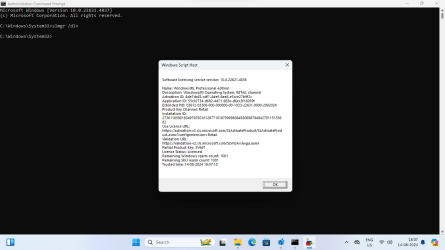
Hello everyone
About WTG of Windows 11 Pro installed on micro sd card 128 gb,
1. Cloned/copied two partitions on internal ssd having 128 gb using Macrium Reflect free version.
2. It is working with full activation on internal ssd in desktop pc.
3. I have had tested the same WTG on laptop successfully with activation status .
4. WTG portable os if updated regularly with that of main OS on pc, can be a good backup and restore source for Windows user.
5. I have attached the images regarding with activation status of cloned ssd.
 

Attachments

  • Screenshot 2024-08-14 163119.png
    Screenshot 2024-08-14 163119.png
    59.7 KB · Views: 3
  • Screenshot 2024-08-14 180741.png
    Screenshot 2024-08-14 180741.png
    35.4 KB · Views: 3
  • Screenshot 2024-08-14 193653.png
    Screenshot 2024-08-14 193653.png
    40.6 KB · Views: 3

My Computer My Computer

At a glance

Window 11 v24H2 Build 26100.2033Intel(R) Core(TM) i3-2100 CPU @ 3.10GHz 3.10 GHz4.00 GB (3.89 GB usable)Onboard
OS
Window 11 v24H2 Build 26100.2033
Computer type
PC/Desktop
Manufacturer/Model
ASSEMMBLED
CPU
Intel(R) Core(TM) i3-2100 CPU @ 3.10GHz 3.10 GHz
Motherboard
ZEBRONICS
Memory
4.00 GB (3.89 GB usable)
Graphics Card(s)
Onboard
Sound Card
Onboard
Monitor(s) Displays
LG
Screen Resolution
1366x768
Hard Drives
Toshiba HDD 1 TB
Keyboard
Mechanical
Mouse
Mechanical
Internet Speed
700 kb/s
Browser
Microsoft EDGE, CHROME
Antivirus
Microsoft Defender

Latest Support Threads

Back
Top Bottom