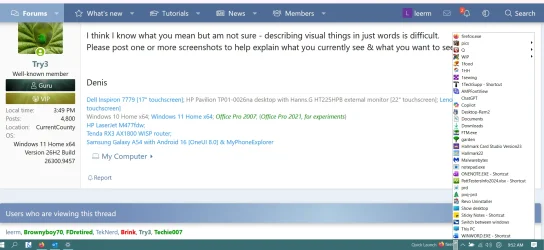
I updated to Windows 11 yesterday and the first thing I looked for was how to get Quick Launch Toolbar. I found out how to do that, and everything I had in Windows 10 is there, BUT, it's all clumped together next to the notification area. I click on it and all the folders are there in a window that pops up, I click on one, then a window flies out to the left. Is there a way to have them visible under (I think it was) the taskbar? This is helpful, but certainly not as convenient as it was in W10.
My Computer
At a glance
Windows 11AMD Ryzen 3 3350U with Radeon Vega Mobile Gfx...20.0 GB (17.9 GB usable)AMD Radeon(TM) Vega 6 Graphics (2 GB)
- OS
- Windows 11
- Computer type
- Laptop
- Manufacturer/Model
- Acer
- CPU
- AMD Ryzen 3 3350U with Radeon Vega Mobile Gfx (2.10 GHz
- Memory
- 20.0 GB (17.9 GB usable)
- Graphics Card(s)
- AMD Radeon(TM) Vega 6 Graphics (2 GB)