Random Crashes to a Black Screen. No Errors.


I'm dont know what "\device\harddisk5\dr8" is. I dont have a hard drive with that name. I have Local C: | "Main Drive" D: | "Secondary" E: | "Work" F: drives. Nothing named "harddisk5 or DR8.
It's symbolic nomenclature and is unlikely to be any of the drives that remained attached from 08/13 - 08/31.

Plan to monitor the second RAM pair.
 

My Computer

System One

  • OS
    Windows 10
    Computer type
    Laptop
    Manufacturer/Model
    HP
    CPU
    Intel(R) Core(TM) i7-4800MQ CPU @ 2.70GHz
    Motherboard
    Product : 190A Version : KBC Version 94.56
    Memory
    16 GB Total: Manufacturer : Samsung MemoryType : DDR3 FormFactor : SODIMM Capacity : 8GB Speed : 1600
    Graphics Card(s)
    NVIDIA Quadro K3100M; Intel(R) HD Graphics 4600
    Sound Card
    IDT High Definition Audio CODEC; PNP Device ID HDAUDIO\FUNC_01&VEN_111D&DEV_76E0
    Hard Drives
    Model Hitachi HTS727575A9E364
    Antivirus
    Microsoft Defender
    Other Info
    Mobile Workstation

According to this source How to identify drive device from event log (Harddisk#\DR#)? (I've found many matching sources for "HardDisk#", not for "DR#", although I trust this page more than others I've seen):

- HardDisk5 means the disk (not partition or "volume") named as "Disk 5" by Disk Management and similarly by DiskPart and other parts of Windows, in the moment the log report or whatever is generated. As disks are counted from "0", this means a 6th disk, but you might have had or not 6 disks (including pendrives) in such moment, as a disconnected disk leaves a gap in the numeration if it isn't the last one, that will be reused by other disk(s) (any new connected disk gets the lowest number available).

- DR8 means the 8th disk (or pendrive) connected during the Windows session. DR numbers also start by "0" but they aren't reused. New connected disks get the DR number of the just previously connected unit plus one. The same disk will get different and increasing DR numbers if it's disconnected and connected again.
 

My Computer

System One

  • OS
    Windows 11
    Manufacturer/Model
    MeLE Quieter 2Q (fanless miniPC)
    CPU
    Celeron J4125 (10th gen)
    Memory
    8GB DDR4
    Monitor(s) Displays
    Samsung SyncMaster T260
    Screen Resolution
    1920x1200
    Hard Drives
    256GB eMMC (Windows)
    2TB USB3 HDD Toshiba (Data)
3) Run HD Tune (all drives) (old version) > post
images or share links

Plan to monitor the second RAM pair.
Second RAM pair gave me two black screens in the past two days :(

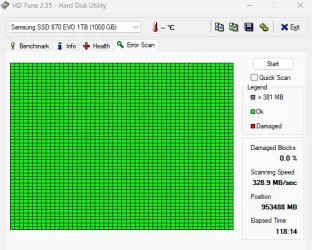
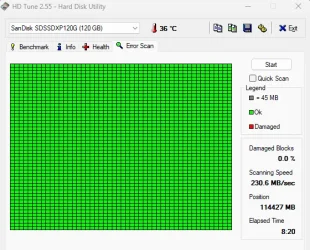
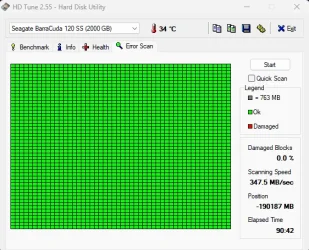
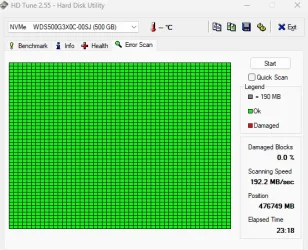
Error scans for all drives.
Samsung_870EVO_ErrorScan_083125.webpSanDisk_120_ErrorScan_083125.webpSeagate_BarraCuda_120_ErrorScan_083125.webpWesternDigital_NVMe_Error Scan_083125.webp

Here's a .zip of the Health .txt documents. The NVMe drive didn't have anything under the health tab.
4) Run Sea Tools Long generic test (all drives) > post images or share links
All drives passed the long generic test.

DR8 means the 8th disk (or pendrive) connected during the Windows session. DR numbers also start by "0" but they aren't reused. New connected disks get the DR number of the just previously connected unit plus one. The same disk will get different and increasing DR numbers if it's disconnected and connected again.
It was probably from one of the usb drives I have. I'm thinking nothings wrong with any of my SSD's.

I do wonder if its a voltage thing? My PSU is from around 2015 and the 3000 series I know recommended a higher wattage than what I actually have, but its also never been a problem before and I've had the 3080 since early 2021. Is there a way I can get a history of voltage usage that will survive a reboot or some sort of overlay so I can look at the voltage up until the black screen appears? Right now if I reboot I lose the numbers I was monitoring and everything is back to normal.

I'm also going to try rolling back video drivers to a version before all these problems started, updating BIOS and uninstalling Vanguard anti-cheat as I've read some games recently have been having conflicting issues with that.
 

My Computer

System One

  • OS
    Windows 11
    Computer type
    PC/Desktop
    Manufacturer/Model
    Custom Built
    CPU
    AMD Ryzen 9 3900X
    Motherboard
    Asus ROG Strix X570-E Gaming
    Memory
    64GB
    Graphics Card(s)
    Asus TUF Gaming OC RTX 3080 10GB
    Monitor(s) Displays
    LG 27" Ultragear
    Screen Resolution
    2560x1440
    PSU
    EVGA SuperNOVA750 G3
    Case
    Fractal Design Define 7
    Cooling
    Fractal Design Celsius+ S24 AIO
Please post a new V2 share link for the second pair of RAM.
 

My Computer

System One

  • OS
    Windows 10
    Computer type
    Laptop
    Manufacturer/Model
    HP
    CPU
    Intel(R) Core(TM) i7-4800MQ CPU @ 2.70GHz
    Motherboard
    Product : 190A Version : KBC Version 94.56
    Memory
    16 GB Total: Manufacturer : Samsung MemoryType : DDR3 FormFactor : SODIMM Capacity : 8GB Speed : 1600
    Graphics Card(s)
    NVIDIA Quadro K3100M; Intel(R) HD Graphics 4600
    Sound Card
    IDT High Definition Audio CODEC; PNP Device ID HDAUDIO\FUNC_01&VEN_111D&DEV_76E0
    Hard Drives
    Model Hitachi HTS727575A9E364
    Antivirus
    Microsoft Defender
    Other Info
    Mobile Workstation

I've seen this kind of problem before. Solved it by doing a clean install of graphics drivers and turning off notifications when gaming. Can't hurt to try.
 

My Computer

System One

  • OS
    Windows 11 22H2 Pro (X-lite Micro 11 version)
    Computer type
    Laptop
    Manufacturer/Model
    Dell/ Precision 7680
    CPU
    i7 13850HX (20 cores, 28 threads)
    Motherboard
    Dell
    Memory
    32GB DDR5
    Graphics Card(s)
    Intel UHD/ RTX 1000 ADA
    Sound Card
    Realtek
    Monitor(s) Displays
    4K UHD Touchscreen
    Screen Resolution
    3840 x 2400
    Hard Drives
    Samsung 512GB system drive
    WD Blue 1TB game drive
    PSU
    240W AC adapter, 1800W when docked
    Internet Speed
    1 gigabit symmetrical
    Browser
    Firefox, Librewolf
    Antivirus
    None. Manully configured so nobody except me can change any critical system files. (Don't ask how, it's probably against some rule somewhere)
The build should consume about 500 W when gaming (you add between 50 and 100W to the sum of the processor 105W and gfx 320W TDPs, this math doesn't require a lot of precision). The PSU recommended is a bit arbitrary and leaned upwards if at all, imo 750W suffices if the PSU has high quality, what it looks like. Wear... it's lower at lower temps, but I'd suspect about the gfx card before the PSU b/c you don't have bad PSU symptoms (POST and bootup difficulties). Idk if monitoring voltages has any value, I've also seen many broken sensors (in this system, +3.3 V -> 2,46 V and DRAM -> 2.23 V lol -DDR3 works at 1.5 V-).

PSUs deteriorate and die pretty fast in my experience. Deterioration of 200-300W cheap PSUs used in very old times was instant: you had a totally normal session, normal shut down too, and next power on attempt the rig wouldn't respond at all, you knew you had to replace the PSU. The only modern PSU I've had broken (a 550W one after 13 years of use) had increasing bootup difficulties during some few sessions that I was attibuting to instability, until finally the computer turned on but did not boot (I cannot remember if it did the POST).

I've read that some monitoring tools can save a history of data (that Idk if it would survive a hang), although I've never used it. The overlay you say, also called OSD, isn't very easy to get but it can be got, see post #33, I've recently read from a user that you'd only need HwInfo and MSI Afterburner, not RTSS.
 

My Computer

System One

  • OS
    Windows 11
    Manufacturer/Model
    MeLE Quieter 2Q (fanless miniPC)
    CPU
    Celeron J4125 (10th gen)
    Memory
    8GB DDR4
    Monitor(s) Displays
    Samsung SyncMaster T260
    Screen Resolution
    1920x1200
    Hard Drives
    256GB eMMC (Windows)
    2TB USB3 HDD Toshiba (Data)
Do you have a second monitor to connect to the internal graphics port?
May be useful if it survives black screen on main graphics?
 

My Computer

System One

  • OS
    Windows 11 Pro 25H2
    Computer type
    PC/Desktop
    Manufacturer/Model
    My Self
    CPU
    Intel Alder lake i7 12700K
    Motherboard
    Asus z690 Gaming WiFi D4, Bios Ver 4505
    Memory
    32 Gb Corsair Vengeance LPX DDR4 3200 XMP2
    Graphics Card(s)
    EVGA 3070ti FTW3 Ultra Gaming & Intel Arc
    Sound Card
    Via Display port
    Monitor(s) Displays
    Dell AW2723DF
    Screen Resolution
    2560 x 1440 @ 280Hz G-Sync mode
    Hard Drives
    WD Black SN850 1Tb NVME (Boot Drive)
    WD BLACK SN850X + Heatsink 1Tb NVME
    Samsung 870 Qvo 1Tb SSD,
    Pioneer DVD-RW DVR-219L
    WD Black SN850x NVME 2Tb x3
    PSU
    Corsair RM850
    Case
    Phanteks Enthoo Pro M Tempered Glass
    Cooling
    Be Quiet Shadow Rock 3
    Keyboard
    Logitech G Pro
    Mouse
    Logitech G903, Lightspeed + Powerplay Mat
    Internet Speed
    900Mb/900Mb Fritz!Box 7590ax v2
    Browser
    Firefox
    Antivirus
    MS Defender
    Other Info
    Logitech C930e webcam
    Synology DS218 play 2 x 4Tb Synology HAT3300-4T
Please post a new V2 share link for the second pair of RAM.
Attached is a .zip
I've seen this kind of problem before. Solved it by doing a clean install of graphics drivers and turning off notifications when gaming. Can't hurt to try.
I read about a similar issue though not exactly the same and using DDU to uninstall graphics drivers fixed it. So I used DDU to uinstall graphics drivers and reverted to a driver from December 2024 thats known to be stable yesterday. So far no black screen. I'll keep my fingers crossed but I'm hoping thats it. Probably wont be certain it worked until I can go a week without black screens.
I've read that some monitoring tools can save a history of data (that Idk if it would survive a hang), although I've never used it. The overlay you say, also called OSD, isn't very easy to get but it can be got, see post #33, I've recently read from a user that you'd only need HwInfo and MSI Afterburner, not RTSS.
I was wanting to see a history of voltage because this video talks about power spikes in the 30 series of cards, and the shutdown seen at :23 seconds. I thought if could see if a power spike is happening it might give a clue as to source of the problem.

Do you have a second monitor to connect to the internal graphics port?
May be useful if it survives black screen on main graphics?
I actually do, I completely forgot I had it. Its buried somewhere though so I'll have to dig it out. If I get another black screen i'll try this.
 

My Computer

System One

  • OS
    Windows 11
    Computer type
    PC/Desktop
    Manufacturer/Model
    Custom Built
    CPU
    AMD Ryzen 9 3900X
    Motherboard
    Asus ROG Strix X570-E Gaming
    Memory
    64GB
    Graphics Card(s)
    Asus TUF Gaming OC RTX 3080 10GB
    Monitor(s) Displays
    LG 27" Ultragear
    Screen Resolution
    2560x1440
    PSU
    EVGA SuperNOVA750 G3
    Case
    Fractal Design Define 7
    Cooling
    Fractal Design Celsius+ S24 AIO
I don't think you can catch a voltage spike with an OSD (although I'd consider it to see the temps). It happens too fast. It's like trying to measure the speed of something that destroys an anemometer (like a stone) reading the file of measured speeds. Thanks for the video, although I'm not good with spoken English.
 

My Computer

System One

  • OS
    Windows 11
    Manufacturer/Model
    MeLE Quieter 2Q (fanless miniPC)
    CPU
    Celeron J4125 (10th gen)
    Memory
    8GB DDR4
    Monitor(s) Displays
    Samsung SyncMaster T260
    Screen Resolution
    1920x1200
    Hard Drives
    256GB eMMC (Windows)
    2TB USB3 HDD Toshiba (Data)
Do you have a second monitor to connect to the internal graphics port?
May be useful if it survives black screen on main graphics?
I think I jinxed myself, I got another black screen crash today. Before rebooting I tried an HDMI cable plugged in to my main monitor and I tried plugging in the spare monitor with an HDMI. Nothing. Still a black screen.

@zbook Not sure if the attachment actually went through. Here's a link
 

My Computer

System One

  • OS
    Windows 11
    Computer type
    PC/Desktop
    Manufacturer/Model
    Custom Built
    CPU
    AMD Ryzen 9 3900X
    Motherboard
    Asus ROG Strix X570-E Gaming
    Memory
    64GB
    Graphics Card(s)
    Asus TUF Gaming OC RTX 3080 10GB
    Monitor(s) Displays
    LG 27" Ultragear
    Screen Resolution
    2560x1440
    PSU
    EVGA SuperNOVA750 G3
    Case
    Fractal Design Define 7
    Cooling
    Fractal Design Celsius+ S24 AIO
I think I jinxed myself, I got another black screen crash today. Before rebooting I tried an HDMI cable plugged in to my main monitor and I tried plugging in the spare monitor with an HDMI. Nothing. Still a black screen.

@zbook Not sure if the attachment actually went through. Here's a link

The last recorded was on 08/31.
 

My Computer

System One

  • OS
    Windows 10
    Computer type
    Laptop
    Manufacturer/Model
    HP
    CPU
    Intel(R) Core(TM) i7-4800MQ CPU @ 2.70GHz
    Motherboard
    Product : 190A Version : KBC Version 94.56
    Memory
    16 GB Total: Manufacturer : Samsung MemoryType : DDR3 FormFactor : SODIMM Capacity : 8GB Speed : 1600
    Graphics Card(s)
    NVIDIA Quadro K3100M; Intel(R) HD Graphics 4600
    Sound Card
    IDT High Definition Audio CODEC; PNP Device ID HDAUDIO\FUNC_01&VEN_111D&DEV_76E0
    Hard Drives
    Model Hitachi HTS727575A9E364
    Antivirus
    Microsoft Defender
    Other Info
    Mobile Workstation

My Computer

System One

  • OS
    Windows 11
    Computer type
    PC/Desktop
    Manufacturer/Model
    Custom Built
    CPU
    AMD Ryzen 9 3900X
    Motherboard
    Asus ROG Strix X570-E Gaming
    Memory
    64GB
    Graphics Card(s)
    Asus TUF Gaming OC RTX 3080 10GB
    Monitor(s) Displays
    LG 27" Ultragear
    Screen Resolution
    2560x1440
    PSU
    EVGA SuperNOVA750 G3
    Case
    Fractal Design Define 7
    Cooling
    Fractal Design Celsius+ S24 AIO

My Computer

System One

  • OS
    Windows 10
    Computer type
    Laptop
    Manufacturer/Model
    HP
    CPU
    Intel(R) Core(TM) i7-4800MQ CPU @ 2.70GHz
    Motherboard
    Product : 190A Version : KBC Version 94.56
    Memory
    16 GB Total: Manufacturer : Samsung MemoryType : DDR3 FormFactor : SODIMM Capacity : 8GB Speed : 1600
    Graphics Card(s)
    NVIDIA Quadro K3100M; Intel(R) HD Graphics 4600
    Sound Card
    IDT High Definition Audio CODEC; PNP Device ID HDAUDIO\FUNC_01&VEN_111D&DEV_76E0
    Hard Drives
    Model Hitachi HTS727575A9E364
    Antivirus
    Microsoft Defender
    Other Info
    Mobile Workstation
Black screen
I see, well it did crash to a black screen on the 2nd. Do you have any other ideas what the source of this issue could be?
 

My Computer

System One

  • OS
    Windows 11
    Computer type
    PC/Desktop
    Manufacturer/Model
    Custom Built
    CPU
    AMD Ryzen 9 3900X
    Motherboard
    Asus ROG Strix X570-E Gaming
    Memory
    64GB
    Graphics Card(s)
    Asus TUF Gaming OC RTX 3080 10GB
    Monitor(s) Displays
    LG 27" Ultragear
    Screen Resolution
    2560x1440
    PSU
    EVGA SuperNOVA750 G3
    Case
    Fractal Design Define 7
    Cooling
    Fractal Design Celsius+ S24 AIO

My Computer

System One

  • OS
    Windows 10
    Computer type
    Laptop
    Manufacturer/Model
    HP
    CPU
    Intel(R) Core(TM) i7-4800MQ CPU @ 2.70GHz
    Motherboard
    Product : 190A Version : KBC Version 94.56
    Memory
    16 GB Total: Manufacturer : Samsung MemoryType : DDR3 FormFactor : SODIMM Capacity : 8GB Speed : 1600
    Graphics Card(s)
    NVIDIA Quadro K3100M; Intel(R) HD Graphics 4600
    Sound Card
    IDT High Definition Audio CODEC; PNP Device ID HDAUDIO\FUNC_01&VEN_111D&DEV_76E0
    Hard Drives
    Model Hitachi HTS727575A9E364
    Antivirus
    Microsoft Defender
    Other Info
    Mobile Workstation
Please try the steps in this link:


Report the results for each.
I've been talking to nVidia customer support the past few days and today they asked that I update to their newest driver from ver566.36. Not sure if it was a coincidence since I've gotten black screen on the older driver as well but a couple hours after updating I got a black screen.

I tried these steps in that link you provided. None of them worked. I also tried turning the monitor off and then on again, that didn't work.

Before this black screen today I went down to using 1 stick of RAM (16GB) to see if just one of the RAM sticks is causing a problem. Things were stable for about 3 and half days until today. I'm going to swap to a different stick and see if I get another crash.
 

My Computer

System One

  • OS
    Windows 11
    Computer type
    PC/Desktop
    Manufacturer/Model
    Custom Built
    CPU
    AMD Ryzen 9 3900X
    Motherboard
    Asus ROG Strix X570-E Gaming
    Memory
    64GB
    Graphics Card(s)
    Asus TUF Gaming OC RTX 3080 10GB
    Monitor(s) Displays
    LG 27" Ultragear
    Screen Resolution
    2560x1440
    PSU
    EVGA SuperNOVA750 G3
    Case
    Fractal Design Define 7
    Cooling
    Fractal Design Celsius+ S24 AIO
Please post a new V2 share link into the newest post.
 

My Computer

System One

  • OS
    Windows 10
    Computer type
    Laptop
    Manufacturer/Model
    HP
    CPU
    Intel(R) Core(TM) i7-4800MQ CPU @ 2.70GHz
    Motherboard
    Product : 190A Version : KBC Version 94.56
    Memory
    16 GB Total: Manufacturer : Samsung MemoryType : DDR3 FormFactor : SODIMM Capacity : 8GB Speed : 1600
    Graphics Card(s)
    NVIDIA Quadro K3100M; Intel(R) HD Graphics 4600
    Sound Card
    IDT High Definition Audio CODEC; PNP Device ID HDAUDIO\FUNC_01&VEN_111D&DEV_76E0
    Hard Drives
    Model Hitachi HTS727575A9E364
    Antivirus
    Microsoft Defender
    Other Info
    Mobile Workstation

My Computer

System One

  • OS
    Windows 11
    Computer type
    PC/Desktop
    Manufacturer/Model
    Custom Built
    CPU
    AMD Ryzen 9 3900X
    Motherboard
    Asus ROG Strix X570-E Gaming
    Memory
    64GB
    Graphics Card(s)
    Asus TUF Gaming OC RTX 3080 10GB
    Monitor(s) Displays
    LG 27" Ultragear
    Screen Resolution
    2560x1440
    PSU
    EVGA SuperNOVA750 G3
    Case
    Fractal Design Define 7
    Cooling
    Fractal Design Celsius+ S24 AIO
Would it really show anything different?


If it only shows one thing different, we can use that information.
If it shows no differences, we can use that information.
 

My Computers

System One System Two

  • OS
    Win 11 Home ♦♦♦26200.8655 ♦♦♦♦♦♦♦25H2
    Computer type
    PC/Desktop
    Manufacturer/Model
    Built by Ghot® [May 2020]
    CPU
    AMD Ryzen 7 3700X
    Motherboard
    Asus Pro WS X570-ACE (BIOS 5302)
    Memory
    G.Skill (F4-3200C14D-16GTZKW)
    Graphics Card(s)
    EVGA RTX 2070 (08G-P4-2171-KR)
    Sound Card
    Realtek ALC1220P / ALC S1220A
    Monitor(s) Displays
    Dell U3011 30"
    Screen Resolution
    2560 x 1600
    Hard Drives
    2x Samsung 860 EVO 500GB,
    WD 4TB Black FZBX - SATA III,
    WD 8TB Black FZBX - SATA III,
    DRW-24B1ST CD/DVD Burner
    PSU
    PC Power & Cooling 750W Quad EPS12V
    Case
    Cooler Master ATCS 840 Tower
    Cooling
    CM Hyper 212 EVO (push/pull)
    Keyboard
    Ducky DK9008 Shine II Blue LED
    Mouse
    Logitech Optical M-100
    Internet Speed
    300/300
    Browser
    Firefox (latest)
    Antivirus
    Bitdefender Total Security
    Other Info
    Speakers: Klipsch Pro Media 2.1
  • Operating System
    Windows XP Pro 32bit w/SP3
    Computer type
    PC/Desktop
    Manufacturer/Model
    Built by Ghot® (not in use)
    CPU
    AMD Athlon 64 X2 5000+ (OC'd @ 3.2Ghz)
    Motherboard
    ASUS M2N32-SLI Deluxe Wireless Edition
    Memory
    TWIN2X2048-6400C4DHX (2 x 1GB, DDR2 800)
    Graphics card(s)
    EVGA 256-P2-N758-TR GeForce 8600GT SSC
    Sound Card
    Onboard
    Monitor(s) Displays
    ViewSonic G90FB Black 19" Professional (CRT)
    Screen Resolution
    up to 2048 x 1536
    Hard Drives
    WD 36GB 10,000rpm Raptor SATA
    Seagate 80GB 7200rpm SATA
    Lite-On LTR-52246S CD/RW
    Lite-On LH-18A1P CD/DVD Burner
    PSU
    PC Power & Cooling Silencer 750 Quad EPS12V
    Case
    Generic Beige case, 80mm fans
    Cooling
    ZALMAN 9500A 92mm CPU Cooler
    Keyboard
    Logitech Classic Keybooard 200
    Mouse
    Logitech Optical M-BT96a
    Internet Speed
    300/300
    Browser
    Firefox 3.x ??
    Antivirus
    Symantec (Norton)
    Other Info
    Still assembled, still runs. Haven't turned it on for 15 years?
black screen is gpu driver + stupid mpo overlay disable mpo overlay and its fixed just dont forget to restart after disable to apply had same issue
 

My Computer

System One

  • OS
    Windows 11
    Computer type
    PC/Desktop
    Manufacturer/Model
    -
    CPU
    4770k
    Motherboard
    Asus Maximus Formula VI
    Memory
    16 gb Kingston
    Graphics Card(s)
    2070 super

Latest Support Threads

Back
Top Bottom