random stuttering in windows (WINDOWS ONLY ISSUE)


dookzzz

Member
Member
Local time
10:52 PM
Posts
60
OS
Windows 11
alright. so for some reason i get random stuttering issues. when i'm in my browser, i get random stuttering that doesn't happen too frequently but it does happen and it's kinda weird to me.

this isn't the only stuttering.

when i'm playing a game while in a discord call or do ANYTHING else, i get these stutters and it's very annoying. also when i'm playing a game fullscreened in the background, everything stutters frequently. i have a feeling it's windows having cpu scheduling issues with amd i don't know.
i don't think this is a hardware issue, in linux i get 0 stutters.
 
Windows Build/Version
25H2

My Computer My Computer

At a glance

Windows 11Ryzen 7 3700x16 GB (Slot 1 and 2)RX 6650xt
OS
Windows 11
Computer type
PC/Desktop
Manufacturer/Model
Me
CPU
Ryzen 7 3700x
Motherboard
MSI B550M-VC WIFI
Memory
16 GB (Slot 1 and 2)
Graphics Card(s)
RX 6650xt
Sound Card
Sound Blaster Play! 3
Monitor(s) Displays
1
Screen Resolution
1920x1080 (1080p)
Hard Drives
2 (NVME)
PSU
MSI MAG A650GL 650 W
Case
Montech XR ATX Mid Tower
Cooling
Air
@dookzzz

Here's ten points, just for filling out your computer specs. :-)


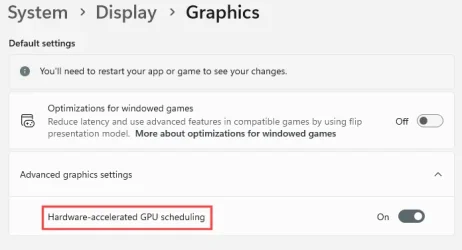
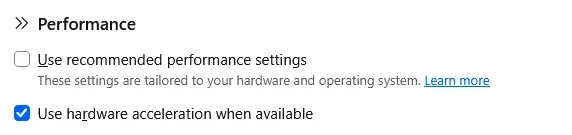
In both browsers and in display settings, there is a hardware acceleration setting.
On my system I have them both set to: Hardware Acceleration

Different computer systems may like them set differently.

In Windows you'll find the setting here...

Image1.webp

Sometimes things are better with it ON... sometimes when it's OFF. You'll just have to try both.


In Firefox it's under Settings > Tabs & Browsing > Performance...

Image1.webp


With two hardware acceleration settings, one in Windows and one in your browser, there's four possible combinations. You need to find the combination that's right for your system.

I don't know where Hardware Acceleration is located in any other browser. I only use Firefox.
 

My Computers My Computers

  • At a glance

    Win 11 Home 26H2 26300.9711AMD Ryzen 7 3700XG.Skill (F4-3200C14D-16GTZKW)EVGA RTX 2070 (08G-P4-2171-KR)
    OS
    Win 11 Home 26H2 26300.9711
    Computer type
    PC/Desktop
    Manufacturer/Model
    Built by Ghot® [May 2020]
    CPU
    AMD Ryzen 7 3700X
    Motherboard
    Asus Pro WS X570-ACE (BIOS 5302)
    Memory
    G.Skill (F4-3200C14D-16GTZKW)
    Graphics Card(s)
    EVGA RTX 2070 (08G-P4-2171-KR)
    Sound Card
    Realtek ALC1220P / ALC S1220A
    Monitor(s) Displays
    Dell U3011 30"
    Screen Resolution
    2560 x 1600
    Hard Drives
    2x Samsung 860 EVO 500GB,
    WD 4TB Black FZBX - SATA III,
    WD 8TB Black FZBX - SATA III,
    DRW-24B1ST CD/DVD Burner
    PSU
    PC Power & Cooling 750W Quad EPS12V
    Case
    Cooler Master ATCS 840 Tower
    Cooling
    CM Hyper 212 EVO (push/pull)
    Keyboard
    Ducky DK9008 Shine II Blue LED
    Mouse
    Logitech Optical M-100
    Internet Speed
    300/300
    Browser
    Firefox (latest)
    Antivirus
    Bitdefender Total Security
    Other Info
    Speakers: Klipsch Pro Media 2.1
  • At a glance

    Windows XP Pro 32bit w/SP3AMD Athlon 64 X2 5000+ (OC'd @ 3.2Ghz)TWIN2X2048-6400C4DHX (2 x 1GB, DDR2 800)EVGA 256-P2-N758-TR GeForce 8600GT SSC
    Operating System
    Windows XP Pro 32bit w/SP3
    Computer type
    PC/Desktop
    Manufacturer/Model
    Built by Ghot® (not in use)
    CPU
    AMD Athlon 64 X2 5000+ (OC'd @ 3.2Ghz)
    Motherboard
    ASUS M2N32-SLI Deluxe Wireless Edition
    Memory
    TWIN2X2048-6400C4DHX (2 x 1GB, DDR2 800)
    Graphics card(s)
    EVGA 256-P2-N758-TR GeForce 8600GT SSC
    Sound Card
    Onboard
    Monitor(s) Displays
    ViewSonic G90FB Black 19" Professional (CRT)
    Screen Resolution
    up to 2048 x 1536
    Hard Drives
    WD 36GB 10,000rpm Raptor SATA
    Seagate 80GB 7200rpm SATA
    Lite-On LTR-52246S CD/RW
    Lite-On LH-18A1P CD/DVD Burner
    PSU
    PC Power & Cooling Silencer 750 Quad EPS12V
    Case
    Generic Beige case, 80mm fans
    Cooling
    ZALMAN 9500A 92mm CPU Cooler
    Keyboard
    Logitech Classic Keybooard 200
    Mouse
    Logitech Optical M-BT96a
    Internet Speed
    300/300
    Browser
    Firefox 3.x ??
    Antivirus
    Symantec (Norton)
    Other Info
    Still assembled, still runs. Haven't turned it on for 15 years?
i turned off hardware acceleration in discord, but also there's no hardware acceleration in windows so i'm gonna try to find the stutters again and see if that helps
 

My Computer My Computer

At a glance

Windows 11Ryzen 7 3700x16 GB (Slot 1 and 2)RX 6650xt
OS
Windows 11
Computer type
PC/Desktop
Manufacturer/Model
Me
CPU
Ryzen 7 3700x
Motherboard
MSI B550M-VC WIFI
Memory
16 GB (Slot 1 and 2)
Graphics Card(s)
RX 6650xt
Sound Card
Sound Blaster Play! 3
Monitor(s) Displays
1
Screen Resolution
1920x1080 (1080p)
Hard Drives
2 (NVME)
PSU
MSI MAG A650GL 650 W
Case
Montech XR ATX Mid Tower
Cooling
Air
i turned off hardware acceleration in discord, but also there's no hardware acceleration in windows so i'm gonna try to find the stutters again and see if that helps
ok i'm testing it and in a call i'm getting stutters still
 

My Computer My Computer

At a glance

Windows 11Ryzen 7 3700x16 GB (Slot 1 and 2)RX 6650xt
OS
Windows 11
Computer type
PC/Desktop
Manufacturer/Model
Me
CPU
Ryzen 7 3700x
Motherboard
MSI B550M-VC WIFI
Memory
16 GB (Slot 1 and 2)
Graphics Card(s)
RX 6650xt
Sound Card
Sound Blaster Play! 3
Monitor(s) Displays
1
Screen Resolution
1920x1080 (1080p)
Hard Drives
2 (NVME)
PSU
MSI MAG A650GL 650 W
Case
Montech XR ATX Mid Tower
Cooling
Air

My Computer My Computer

At a glance

Windows 11 Pro 26H2
OS
Windows 11 Pro 26H2
Computer type
Laptop
Manufacturer/Model
Toshiba
Antivirus
Defender

My Computer My Computer

At a glance

Windows 11Ryzen 7 3700x16 GB (Slot 1 and 2)RX 6650xt
OS
Windows 11
Computer type
PC/Desktop
Manufacturer/Model
Me
CPU
Ryzen 7 3700x
Motherboard
MSI B550M-VC WIFI
Memory
16 GB (Slot 1 and 2)
Graphics Card(s)
RX 6650xt
Sound Card
Sound Blaster Play! 3
Monitor(s) Displays
1
Screen Resolution
1920x1080 (1080p)
Hard Drives
2 (NVME)
PSU
MSI MAG A650GL 650 W
Case
Montech XR ATX Mid Tower
Cooling
Air
I know this is a long shot but do you have any RGB Software installed as Ive heard it can bring on stutters
 

My Computer My Computer

At a glance

Windows 11 ProIntel Core i9 12900KFCorsair 64GB DDR5 Vengeance C40 5200MhzASUS GeForce RTX 3090 ROG Strix OC 24GB
OS
Windows 11 Pro
Computer type
PC/Desktop
Manufacturer/Model
Custom Build
CPU
Intel Core i9 12900KF
Motherboard
ASUS ROG Maximus Z690 Hero
Memory
Corsair 64GB DDR5 Vengeance C40 5200Mhz
Graphics Card(s)
ASUS GeForce RTX 3090 ROG Strix OC 24GB
Sound Card
OnBoard
Monitor(s) Displays
Acer Predator XB323UGP 32" QHD G-SYNC-C 144Hz 1MS IPS LED
Screen Resolution
2560 x 1440
Hard Drives
1x Samsung 980 Pro Series Gen4 250GB M.2 NVMe
1x Samsung 980 Pro Series Gen4 500GB M.2 NVMe
2x Samsung 980 Pro Series Gen4 2TB M.2 NVMe
PSU
Corsair AX1200i 1200W 80PLUS Titanium Modular
Case
Corsair 4000D Black Case w/ Tempered Glass Side Panel
Cooling
Noctua NH-U12A Chromax Black CPU Cooler, 4x Noctua 120mm Fans
Keyboard
Logitech MK545
Mouse
Logitech MX Master 3
Internet Speed
Fixed Wireless 150mbps/75mbps
Browser
Firefox
Antivirus
Kaspersky
Other Info
Thrustmaster TS-PC RACER
Fanatec CSL Elite Pedals with the Load Cell Kit
Yamaha Amp with Bose Speakers
1792545779016.webp
 

My Computer My Computer

At a glance

Windows 11Ryzen 7 3700x16 GB (Slot 1 and 2)RX 6650xt
OS
Windows 11
Computer type
PC/Desktop
Manufacturer/Model
Me
CPU
Ryzen 7 3700x
Motherboard
MSI B550M-VC WIFI
Memory
16 GB (Slot 1 and 2)
Graphics Card(s)
RX 6650xt
Sound Card
Sound Blaster Play! 3
Monitor(s) Displays
1
Screen Resolution
1920x1080 (1080p)
Hard Drives
2 (NVME)
PSU
MSI MAG A650GL 650 W
Case
Montech XR ATX Mid Tower
Cooling
Air

My Computer My Computer

At a glance

Windows 11Ryzen 7 3700x16 GB (Slot 1 and 2)RX 6650xt
OS
Windows 11
Computer type
PC/Desktop
Manufacturer/Model
Me
CPU
Ryzen 7 3700x
Motherboard
MSI B550M-VC WIFI
Memory
16 GB (Slot 1 and 2)
Graphics Card(s)
RX 6650xt
Sound Card
Sound Blaster Play! 3
Monitor(s) Displays
1
Screen Resolution
1920x1080 (1080p)
Hard Drives
2 (NVME)
PSU
MSI MAG A650GL 650 W
Case
Montech XR ATX Mid Tower
Cooling
Air
I know this is a long shot but do you have any RGB Software installed as Ive heard it can bring on stutters
yes i use openrgb, but that's not the issue since BEFORE i got open rgb, this was happening
 

My Computer My Computer

At a glance

Windows 11Ryzen 7 3700x16 GB (Slot 1 and 2)RX 6650xt
OS
Windows 11
Computer type
PC/Desktop
Manufacturer/Model
Me
CPU
Ryzen 7 3700x
Motherboard
MSI B550M-VC WIFI
Memory
16 GB (Slot 1 and 2)
Graphics Card(s)
RX 6650xt
Sound Card
Sound Blaster Play! 3
Monitor(s) Displays
1
Screen Resolution
1920x1080 (1080p)
Hard Drives
2 (NVME)
PSU
MSI MAG A650GL 650 W
Case
Montech XR ATX Mid Tower
Cooling
Air
when i'm playing a game while in a discord call or do ANYTHING else, i get these stutters and it's very annoying.

When you join a Discord call or open/join a live stream Discord will sometimes sets priority from normal to high.

You need to check them and if they changed to high then set them to normal in task manager or you can have stuttering.

Screenshot 2026-10-20 191206.webp
 

My Computer My Computer

At a glance

Windows 11 Pro
OS
Windows 11 Pro
Could that be that the graphics card tries to draw the screen faster than the monitor can handle? See if enabling Vertical Sync in graphics settings (AMD Control Panel) makes any difference. Needless to say I would first make sure I have the latest official AMD drivers installed.
 

My Computers My Computers

  • At a glance

    Windows 11 Pro 23H2 (7584), 26H2 (9711)Mobile DualCore Intel Core 2 Duo T7250, 2000 MHz4GBMobile Intel(R) GMA 4500M (Mobile 4 series)
    OS
    Windows 11 Pro 23H2 (7584), 26H2 (9711)
    Computer type
    Laptop
    Manufacturer/Model
    Acer Extensa 5630EZ
    CPU
    Mobile DualCore Intel Core 2 Duo T7250, 2000 MHz
    Motherboard
    Acer Extensa 5630
    Memory
    4GB
    Graphics Card(s)
    Mobile Intel(R) GMA 4500M (Mobile 4 series)
    Sound Card
    Realtek ALC268 @ Intel 82801IB ICH9 - High Definition Audio Controller
    Monitor(s) Displays
    1
    Screen Resolution
    1280x800
    Hard Drives
    Samsung SSD 850 EVO 250GB SATA Device (250 GB, SATA-III)
    Internet Speed
    802.11g wireless 54 Mbps
    Browser
    MICROSOFT EDGE
    Antivirus
    WINDOWS DEFENDER
    Other Info
    Legacy MBR installation, no TPM, no Secure Boot, no WDDM 2.0 graphics drivers, no SSE4.2, cannot get more unsupported ;) This is only my test laptop. I had installed Windows 11 here before upgrading my main PC. For my main PC I use everyday see my 2nd system specs.
  • At a glance

    Windows 11 Pro 26H2 (build 26300.9711)Intel Core-i7 3770 3.40GHz s1155 (3rd generat...2x Kingston Hyper-X Blu 8GB DDR3-1600GIGABYTE GeForce RTX 3050 WINDFORCE OC V2 6GB...
    Operating System
    Windows 11 Pro 26H2 (build 26300.9711)
    Computer type
    PC/Desktop
    Manufacturer/Model
    Custom-built PC
    CPU
    Intel Core-i7 3770 3.40GHz s1155 (3rd generation)
    Motherboard
    Asus P8H61 s1155 ATX
    Memory
    2x Kingston Hyper-X Blu 8GB DDR3-1600
    Graphics card(s)
    GIGABYTE GeForce RTX 3050 WINDFORCE OC V2 6GB (GV-N3050WF2OCV2-6GD)
    Sound Card
    Realtek HD audio (ALC887)
    Monitor(s) Displays
    Sony Bravia KDL-19L4000 19" LCD TV via VGA
    Screen Resolution
    1440x900 32-bit 60Hz
    Hard Drives
    WD Blue SA510 2.5 1000GB SSD as system disk, Western Digital Caviar Purple 4TB SATA III (WD40PURZ) as second
    PSU
    Thermaltake Litepower RGB 550W Full Wired
    Case
    SUPERCASE MIDI-TOWER
    Cooling
    Deepcool Gamma Archer CPU cooler, 1x 8cm fan at the back
    Keyboard
    Mitsumi 101-key PS/2
    Mouse
    Microsoft Compact Optical Mouse
    Internet Speed
    802.11ac 5GHz wireless 260Mpbs
    Browser
    Microsoft Edge, Mozilla Firefox
    Antivirus
    Microsoft Windows Defender
    Other Info
    Legacy BIOS (MBR) installation, no TPM, no Secure Boot, WDDM 3.0 graphics drivers, WEI score 7.4
have you used capframex? run your game and capture it for 30 seconds. then post your results. make sure all processes not related to the game are ignored. Then show a screen cap of your results. show the sensor data as well. you start/end the capture with f11.
 

My Computer My Computer

At a glance

windows 11AMD 5900x2x16GB Corsair DDR-3200RTX 2060 6GB
OS
windows 11
Computer type
PC/Desktop
Manufacturer/Model
Home Made
CPU
AMD 5900x
Motherboard
MSI MPG X570 GAMING EDGE WIFI (MS-737)
Memory
2x16GB Corsair DDR-3200
Graphics Card(s)
RTX 2060 6GB
Sound Card
none
Monitor(s) Displays
LG 32"
Screen Resolution
1440p
Hard Drives
Corsair MP400 8TB
Samsung 980 Pro 1TB
Cooling
NZXT Kraken AIO
Keyboard
Lily 58 Split
Mouse
Logitech G Pro 2 Wireless
Internet Speed
380/380mbps ATT Fiber
Browser
Firefox
have you used capframex? run your game and capture it for 30 seconds. then post your results. make sure all processes not related to the game are ignored. Then show a screen cap of your results. show the sensor data as well. you start/end the capture with f11.
If you capture the screen and you see a smooth version of the video, this means that your graphics card is OK but your monitor cannot keep up with the rate the graphics card is trying to draw frames. Enable V-Sync as I told you.
 

My Computers My Computers

  • At a glance

    Windows 11 Pro 23H2 (7584), 26H2 (9711)Mobile DualCore Intel Core 2 Duo T7250, 2000 MHz4GBMobile Intel(R) GMA 4500M (Mobile 4 series)
    OS
    Windows 11 Pro 23H2 (7584), 26H2 (9711)
    Computer type
    Laptop
    Manufacturer/Model
    Acer Extensa 5630EZ
    CPU
    Mobile DualCore Intel Core 2 Duo T7250, 2000 MHz
    Motherboard
    Acer Extensa 5630
    Memory
    4GB
    Graphics Card(s)
    Mobile Intel(R) GMA 4500M (Mobile 4 series)
    Sound Card
    Realtek ALC268 @ Intel 82801IB ICH9 - High Definition Audio Controller
    Monitor(s) Displays
    1
    Screen Resolution
    1280x800
    Hard Drives
    Samsung SSD 850 EVO 250GB SATA Device (250 GB, SATA-III)
    Internet Speed
    802.11g wireless 54 Mbps
    Browser
    MICROSOFT EDGE
    Antivirus
    WINDOWS DEFENDER
    Other Info
    Legacy MBR installation, no TPM, no Secure Boot, no WDDM 2.0 graphics drivers, no SSE4.2, cannot get more unsupported ;) This is only my test laptop. I had installed Windows 11 here before upgrading my main PC. For my main PC I use everyday see my 2nd system specs.
  • At a glance

    Windows 11 Pro 26H2 (build 26300.9711)Intel Core-i7 3770 3.40GHz s1155 (3rd generat...2x Kingston Hyper-X Blu 8GB DDR3-1600GIGABYTE GeForce RTX 3050 WINDFORCE OC V2 6GB...
    Operating System
    Windows 11 Pro 26H2 (build 26300.9711)
    Computer type
    PC/Desktop
    Manufacturer/Model
    Custom-built PC
    CPU
    Intel Core-i7 3770 3.40GHz s1155 (3rd generation)
    Motherboard
    Asus P8H61 s1155 ATX
    Memory
    2x Kingston Hyper-X Blu 8GB DDR3-1600
    Graphics card(s)
    GIGABYTE GeForce RTX 3050 WINDFORCE OC V2 6GB (GV-N3050WF2OCV2-6GD)
    Sound Card
    Realtek HD audio (ALC887)
    Monitor(s) Displays
    Sony Bravia KDL-19L4000 19" LCD TV via VGA
    Screen Resolution
    1440x900 32-bit 60Hz
    Hard Drives
    WD Blue SA510 2.5 1000GB SSD as system disk, Western Digital Caviar Purple 4TB SATA III (WD40PURZ) as second
    PSU
    Thermaltake Litepower RGB 550W Full Wired
    Case
    SUPERCASE MIDI-TOWER
    Cooling
    Deepcool Gamma Archer CPU cooler, 1x 8cm fan at the back
    Keyboard
    Mitsumi 101-key PS/2
    Mouse
    Microsoft Compact Optical Mouse
    Internet Speed
    802.11ac 5GHz wireless 260Mpbs
    Browser
    Microsoft Edge, Mozilla Firefox
    Antivirus
    Microsoft Windows Defender
    Other Info
    Legacy BIOS (MBR) installation, no TPM, no Secure Boot, WDDM 3.0 graphics drivers, WEI score 7.4
You need to review all Windows settings and all Applications and their settings.
That is around 500 in number as a broad estimate.
I expect that to take maybe 2 weeks on and off.
Judicious use of Task Manager.

We have no idea what you have installed or the settings so I won't randomly guess at odds of 1:500.
 

My Computer My Computer

At a glance

Windows 11
OS
Windows 11
You need to review all Windows settings and all Applications and their settings.
That is around 500 in number as a broad estimate.
I expect that to take maybe 2 weeks on and off.
Judicious use of Task Manager.

We have no idea what you have installed or the settings so I won't randomly guess at odds of 1:500.
What are all these settings? Just toggle V-Sync on/off and see if that makes any difference. From my past experience, if Windows Update has replaced the graphics driver, then the graphics settings might not be optimal and experience glitches including stutter. First make sure you have the latest official AMD drivers both for your specific AMD chipset and your AMD graphics card and check again. Then toggle V-Sync on/off and compare results. I don't think in a modern computer there are other bottlenecks that can slow down the CPU or the GPU so badly to experience stutter. So first do what I described and then we examine other causes. In an older unsupported computer I would also recommend to disable unnecessary visual effects (transparency, fades, animations) and applications running in the background, but I don't think these will make any difference in a fast computer as the OP's.
 

My Computers My Computers

  • At a glance

    Windows 11 Pro 23H2 (7584), 26H2 (9711)Mobile DualCore Intel Core 2 Duo T7250, 2000 MHz4GBMobile Intel(R) GMA 4500M (Mobile 4 series)
    OS
    Windows 11 Pro 23H2 (7584), 26H2 (9711)
    Computer type
    Laptop
    Manufacturer/Model
    Acer Extensa 5630EZ
    CPU
    Mobile DualCore Intel Core 2 Duo T7250, 2000 MHz
    Motherboard
    Acer Extensa 5630
    Memory
    4GB
    Graphics Card(s)
    Mobile Intel(R) GMA 4500M (Mobile 4 series)
    Sound Card
    Realtek ALC268 @ Intel 82801IB ICH9 - High Definition Audio Controller
    Monitor(s) Displays
    1
    Screen Resolution
    1280x800
    Hard Drives
    Samsung SSD 850 EVO 250GB SATA Device (250 GB, SATA-III)
    Internet Speed
    802.11g wireless 54 Mbps
    Browser
    MICROSOFT EDGE
    Antivirus
    WINDOWS DEFENDER
    Other Info
    Legacy MBR installation, no TPM, no Secure Boot, no WDDM 2.0 graphics drivers, no SSE4.2, cannot get more unsupported ;) This is only my test laptop. I had installed Windows 11 here before upgrading my main PC. For my main PC I use everyday see my 2nd system specs.
  • At a glance

    Windows 11 Pro 26H2 (build 26300.9711)Intel Core-i7 3770 3.40GHz s1155 (3rd generat...2x Kingston Hyper-X Blu 8GB DDR3-1600GIGABYTE GeForce RTX 3050 WINDFORCE OC V2 6GB...
    Operating System
    Windows 11 Pro 26H2 (build 26300.9711)
    Computer type
    PC/Desktop
    Manufacturer/Model
    Custom-built PC
    CPU
    Intel Core-i7 3770 3.40GHz s1155 (3rd generation)
    Motherboard
    Asus P8H61 s1155 ATX
    Memory
    2x Kingston Hyper-X Blu 8GB DDR3-1600
    Graphics card(s)
    GIGABYTE GeForce RTX 3050 WINDFORCE OC V2 6GB (GV-N3050WF2OCV2-6GD)
    Sound Card
    Realtek HD audio (ALC887)
    Monitor(s) Displays
    Sony Bravia KDL-19L4000 19" LCD TV via VGA
    Screen Resolution
    1440x900 32-bit 60Hz
    Hard Drives
    WD Blue SA510 2.5 1000GB SSD as system disk, Western Digital Caviar Purple 4TB SATA III (WD40PURZ) as second
    PSU
    Thermaltake Litepower RGB 550W Full Wired
    Case
    SUPERCASE MIDI-TOWER
    Cooling
    Deepcool Gamma Archer CPU cooler, 1x 8cm fan at the back
    Keyboard
    Mitsumi 101-key PS/2
    Mouse
    Microsoft Compact Optical Mouse
    Internet Speed
    802.11ac 5GHz wireless 260Mpbs
    Browser
    Microsoft Edge, Mozilla Firefox
    Antivirus
    Microsoft Windows Defender
    Other Info
    Legacy BIOS (MBR) installation, no TPM, no Secure Boot, WDDM 3.0 graphics drivers, WEI score 7.4
When you join a Discord call or open/join a live stream Discord will sometimes sets priority from normal to high.

You need to check them and if they changed to high then set them to normal in task manager or you can have stuttering.

View attachment 187372
oh yeah forgot to mention that it isn't discord, it's something else
 

My Computer My Computer

At a glance

Windows 11Ryzen 7 3700x16 GB (Slot 1 and 2)RX 6650xt
OS
Windows 11
Computer type
PC/Desktop
Manufacturer/Model
Me
CPU
Ryzen 7 3700x
Motherboard
MSI B550M-VC WIFI
Memory
16 GB (Slot 1 and 2)
Graphics Card(s)
RX 6650xt
Sound Card
Sound Blaster Play! 3
Monitor(s) Displays
1
Screen Resolution
1920x1080 (1080p)
Hard Drives
2 (NVME)
PSU
MSI MAG A650GL 650 W
Case
Montech XR ATX Mid Tower
Cooling
Air
Could that be that the graphics card tries to draw the screen faster than the monitor can handle? See if enabling Vertical Sync in graphics settings (AMD Control Panel) makes any difference. Needless to say I would first make sure I have the latest official AMD drivers installed.
i do have vertical sync on
 

My Computer My Computer

At a glance

Windows 11Ryzen 7 3700x16 GB (Slot 1 and 2)RX 6650xt
OS
Windows 11
Computer type
PC/Desktop
Manufacturer/Model
Me
CPU
Ryzen 7 3700x
Motherboard
MSI B550M-VC WIFI
Memory
16 GB (Slot 1 and 2)
Graphics Card(s)
RX 6650xt
Sound Card
Sound Blaster Play! 3
Monitor(s) Displays
1
Screen Resolution
1920x1080 (1080p)
Hard Drives
2 (NVME)
PSU
MSI MAG A650GL 650 W
Case
Montech XR ATX Mid Tower
Cooling
Air

My Computer My Computer

At a glance

Windows 11Ryzen 7 3700x16 GB (Slot 1 and 2)RX 6650xt
OS
Windows 11
Computer type
PC/Desktop
Manufacturer/Model
Me
CPU
Ryzen 7 3700x
Motherboard
MSI B550M-VC WIFI
Memory
16 GB (Slot 1 and 2)
Graphics Card(s)
RX 6650xt
Sound Card
Sound Blaster Play! 3
Monitor(s) Displays
1
Screen Resolution
1920x1080 (1080p)
Hard Drives
2 (NVME)
PSU
MSI MAG A650GL 650 W
Case
Montech XR ATX Mid Tower
Cooling
Air
Then some process is keeping the CPU and/or the GPU busy and gives you stutter. Check Task Manager, details. Which process has high CPU percentage? Check if it is set to high and set it to normal. Or check what it is doing and pause it or close the respective application. It's a good idea to disable all startup applications and some non-Microsoft services. It will also make your PC faster.
 

My Computers My Computers

  • At a glance

    Windows 11 Pro 23H2 (7584), 26H2 (9711)Mobile DualCore Intel Core 2 Duo T7250, 2000 MHz4GBMobile Intel(R) GMA 4500M (Mobile 4 series)
    OS
    Windows 11 Pro 23H2 (7584), 26H2 (9711)
    Computer type
    Laptop
    Manufacturer/Model
    Acer Extensa 5630EZ
    CPU
    Mobile DualCore Intel Core 2 Duo T7250, 2000 MHz
    Motherboard
    Acer Extensa 5630
    Memory
    4GB
    Graphics Card(s)
    Mobile Intel(R) GMA 4500M (Mobile 4 series)
    Sound Card
    Realtek ALC268 @ Intel 82801IB ICH9 - High Definition Audio Controller
    Monitor(s) Displays
    1
    Screen Resolution
    1280x800
    Hard Drives
    Samsung SSD 850 EVO 250GB SATA Device (250 GB, SATA-III)
    Internet Speed
    802.11g wireless 54 Mbps
    Browser
    MICROSOFT EDGE
    Antivirus
    WINDOWS DEFENDER
    Other Info
    Legacy MBR installation, no TPM, no Secure Boot, no WDDM 2.0 graphics drivers, no SSE4.2, cannot get more unsupported ;) This is only my test laptop. I had installed Windows 11 here before upgrading my main PC. For my main PC I use everyday see my 2nd system specs.
  • At a glance

    Windows 11 Pro 26H2 (build 26300.9711)Intel Core-i7 3770 3.40GHz s1155 (3rd generat...2x Kingston Hyper-X Blu 8GB DDR3-1600GIGABYTE GeForce RTX 3050 WINDFORCE OC V2 6GB...
    Operating System
    Windows 11 Pro 26H2 (build 26300.9711)
    Computer type
    PC/Desktop
    Manufacturer/Model
    Custom-built PC
    CPU
    Intel Core-i7 3770 3.40GHz s1155 (3rd generation)
    Motherboard
    Asus P8H61 s1155 ATX
    Memory
    2x Kingston Hyper-X Blu 8GB DDR3-1600
    Graphics card(s)
    GIGABYTE GeForce RTX 3050 WINDFORCE OC V2 6GB (GV-N3050WF2OCV2-6GD)
    Sound Card
    Realtek HD audio (ALC887)
    Monitor(s) Displays
    Sony Bravia KDL-19L4000 19" LCD TV via VGA
    Screen Resolution
    1440x900 32-bit 60Hz
    Hard Drives
    WD Blue SA510 2.5 1000GB SSD as system disk, Western Digital Caviar Purple 4TB SATA III (WD40PURZ) as second
    PSU
    Thermaltake Litepower RGB 550W Full Wired
    Case
    SUPERCASE MIDI-TOWER
    Cooling
    Deepcool Gamma Archer CPU cooler, 1x 8cm fan at the back
    Keyboard
    Mitsumi 101-key PS/2
    Mouse
    Microsoft Compact Optical Mouse
    Internet Speed
    802.11ac 5GHz wireless 260Mpbs
    Browser
    Microsoft Edge, Mozilla Firefox
    Antivirus
    Microsoft Windows Defender
    Other Info
    Legacy BIOS (MBR) installation, no TPM, no Secure Boot, WDDM 3.0 graphics drivers, WEI score 7.4
Back
Top Bottom