Receiving C:\Program Files\WindowsApps Error Prompt


Davy49

Well-known member
Member
VIP
Local time
10:50 PM
Posts
273
Location
USA - MS
OS
Windows11Pro (x64)
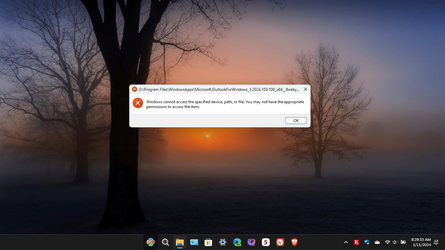
Something has changed on my windows 11 pro computer, and at least so far I'm unable to determine the cause as to what's causing me to receive this error prompt. Hopefully I'll be able to find the cause of this so I won't have to perform a reset of my computer, I'm enclosing a screenshot of the prompt that I'm seeing. Thanks in advance for any & all assistance that might get provided to me.
David
 
Windows Build/Version
22635.3061 / 23H2

Attachments

  • Screenshot (72).png
    Screenshot (72).png
    328.4 KB · Views: 3

My Computers My Computers

  • At a glance

    Windows11Pro (x64)Intel(R) Core(TM) i5-3470 CPU @ 3.20GHz 3.20 GHz8.00 GB (7.88 GB usable)
    OS
    Windows11Pro (x64)
    Computer type
    PC/Desktop
    Manufacturer/Model
    HP/HP8300EliteSFF
    CPU
    Intel(R) Core(TM) i5-3470 CPU @ 3.20GHz 3.20 GHz
    Memory
    8.00 GB (7.88 GB usable)
  • At a glance

    Windows11Pro(x64)Intel(R) Core(TM) i5-3320M CPU @ 2.60GHz 2.60...8.00 GB (7.82 GB usable)Intel (R) HD Graphics 4000
    Operating System
    Windows11Pro(x64)
    Computer type
    Laptop
    Manufacturer/Model
    Lenovo/T430
    CPU
    Intel(R) Core(TM) i5-3320M CPU @ 2.60GHz 2.60 GHz
    Motherboard
    Lenovo 2349KB7
    Memory
    8.00 GB (7.82 GB usable)
    Graphics card(s)
    Intel (R) HD Graphics 4000
    Sound Card
    Realtek High Definition Audio
    Hard Drives
    SSD 222.79 GB
Nothing has changed on your computer.
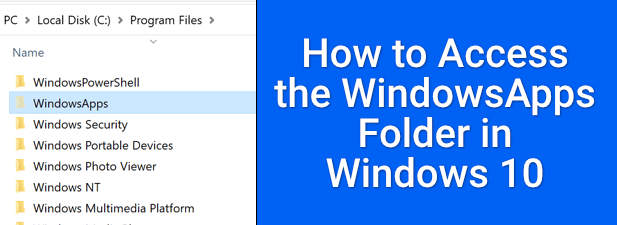
The WindowsApps folder is a hidden folder that is part of Windows and has Permission set so that you won't tinker with it.
But if you must, the instructions are for 10 but it is the same for 11
 

My Computer My Computer

At a glance

Windows 11 Pro Insider 64 bit 25H2 26200.5742Intel Core i7 9700K 3.6016 GBnVidia GEForce RTX 2060 Super
OS
Windows 11 Pro Insider 64 bit 25H2 26200.5742
Computer type
PC/Desktop
Manufacturer/Model
Gigabyte Z390 UD
CPU
Intel Core i7 9700K 3.60
Motherboard
Gigabyte Z390 UD
Memory
16 GB
Graphics Card(s)
nVidia GEForce RTX 2060 Super
Sound Card
onboard
Monitor(s) Displays
Two 27" Dell 4K monitors
Screen Resolution
3840 x 2160
Hard Drives
M.2 NVME SSD, 500 GB; Two 2TB Mechanical HDD's
PSU
850w PSU
Case
Cyberpower PC
Cooling
Water cooled
Keyboard
Backlit Cyberpower gaming keyboard
Mouse
Backlit Cyberpower gaming mouse
Internet Speed
1 GB mbps
Browser
Brave
Antivirus
Windows Security
Just Outlook or the whole folder ?
As Admin
dir C:\Program` Files\WindowsApps\*outl* -s
or
dir C:\Program` Files\WindowsApps\ -s
 

My Computer My Computer

At a glance

Microsoft Windows 11 HomeIntel Core i5-13490F2 x 16 Patriot Memory (PDP Systems) PSD516G56...GIGABYTE GeForce RTX 4070 WINDFORCE OC 12G (G...
OS
Microsoft Windows 11 Home
Computer type
PC/Desktop
Manufacturer/Model
MSI MS-7D98
CPU
Intel Core i5-13490F
Motherboard
MSI B760 GAMING PLUS WIFI
Memory
2 x 16 Patriot Memory (PDP Systems) PSD516G560081 6400MT (32-37-37-74); 1.35V)
Graphics Card(s)
GIGABYTE GeForce RTX 4070 WINDFORCE OC 12G (GV-N4070WF3OC-12GD)
Sound Card
Bluetooth Аудио
Monitor(s) Displays
INNOCN 15K1F
Screen Resolution
1920 x 1080
Hard Drives
WD_BLACK SN770 250GB
KINGSTON SNV2S1000G (ELFK0S.6)
PSU
Thermaltake Toughpower GF3 1000W
Case
CG560 - DeepCool
Cooling
ID-COOLING SE-224-XTS / 2 x 140Mm Fan - rear and top; 3 x 120Mm - front
Keyboard
Corsair K70 RGB TKL
Mouse
Corsair KATAR PRO XT
Internet Speed
100 Mbps
Browser
Firefox
Antivirus
Microsoft Defender Antivirus
Other Info
https://www.userbenchmark.com/UserRun/66553205
Thanks so much for your replies, without getting into all of the details and purely as an experiment I downloaded and installed this software: Tweaking.com - Windows Repair Free/Pro it's recommended to run the application in safe mode w/networking enabled. After scanning for errors and then letting the software repair them my system pretty well seems like it's functioning normal again.
 
Last edited:

My Computers My Computers

  • At a glance

    Windows11Pro (x64)Intel(R) Core(TM) i5-3470 CPU @ 3.20GHz 3.20 GHz8.00 GB (7.88 GB usable)
    OS
    Windows11Pro (x64)
    Computer type
    PC/Desktop
    Manufacturer/Model
    HP/HP8300EliteSFF
    CPU
    Intel(R) Core(TM) i5-3470 CPU @ 3.20GHz 3.20 GHz
    Memory
    8.00 GB (7.88 GB usable)
  • At a glance

    Windows11Pro(x64)Intel(R) Core(TM) i5-3320M CPU @ 2.60GHz 2.60...8.00 GB (7.82 GB usable)Intel (R) HD Graphics 4000
    Operating System
    Windows11Pro(x64)
    Computer type
    Laptop
    Manufacturer/Model
    Lenovo/T430
    CPU
    Intel(R) Core(TM) i5-3320M CPU @ 2.60GHz 2.60 GHz
    Motherboard
    Lenovo 2349KB7
    Memory
    8.00 GB (7.82 GB usable)
    Graphics card(s)
    Intel (R) HD Graphics 4000
    Sound Card
    Realtek High Definition Audio
    Hard Drives
    SSD 222.79 GB
Back
Top Bottom