Recent Windows 23H2, 24H2 builds .MOV thumbnails missing


HHH03

Well-known member
Member
Local time
5:55 AM
Posts
97
OS
Windows 11 Pro
I’ve noticed recently the File Explorer is no longer showing thumbnails for .MOV files. They show inside of the OneDrive folder, but anywhere else… no show. Of course HEVC codec is installed and the files will play normally. The problem first cropped up around end of July. I really don’t want to use a third party app like ICAROS or Shark 007 codec to get these thumbnails back.
Any suggestions anyone?
 
Windows Build/Version
Windows 11 Pro 22631.4249

My Computer My Computer

At a glance

Windows 11 ProThreadripper Pro 3945WX32 GB DDR4 3200/EEC HynixNvidia RTX 2070 Super FE
OS
Windows 11 Pro
Computer type
PC/Desktop
Manufacturer/Model
Lenovo P620
CPU
Threadripper Pro 3945WX
Motherboard
Lenovo 1046
Memory
32 GB DDR4 3200/EEC Hynix
Graphics Card(s)
Nvidia RTX 2070 Super FE
Sound Card
N/A
Monitor(s) Displays
Samsung CRG5
Screen Resolution
1920X1080 240mHz
Hard Drives
Samsung PM9A1 1TB NVMe
Samsung 970 EVO Plus 500 GB NVMe
Samsung 850 EVO 1 TB
Samsung 850 PRO 256 GB
PSU
1000 Watt Lenovo 80 plus Platinum
Keyboard
Corsair K95 Platinum XT
Mouse
M65 Pro RGB
I’ve noticed recently the File Explorer is no longer showing thumbnails for .MOV files. They show inside of the OneDrive folder, but anywhere else… no show. Of course HEVC codec is installed and the files will play normally. The problem first cropped up around end of July. I really don’t want to use a third party app like ICAROS or Shark 007 codec to get these thumbnails back.
Any suggestions anyone?
I have a lot of .MOV files on my PC and all the thumbnails are present and correct. I'm on 24H2.
 

My Computers My Computers

  • At a glance

    Windows 11 Home 24H2 RPIntel I3-1010016 GBNvidia GT 1030
    OS
    Windows 11 Home 24H2 RP
    Computer type
    PC/Desktop
    Manufacturer/Model
    Self-build
    CPU
    Intel I3-10100
    Motherboard
    MSI H410M-PRO
    Memory
    16 GB
    Graphics Card(s)
    Nvidia GT 1030
    Sound Card
    Motherboard default
    Monitor(s) Displays
    Philips 27 inch
    Screen Resolution
    1920x1080
    Hard Drives
    Samsung EVO 970 NVMe SSD 256 Gb
    Samsung QVO 870 SATA SSD 2 Tb
    PSU
    ATX 450W
    Keyboard
    Logitech
    Mouse
    Logitech Wireless
    Internet Speed
    930 Mb down / 120 Mb up
    Browser
    Edge
    Antivirus
    Windows Defender
    Other Info
    Microsoft Office 2021 Plus
  • At a glance

    Windows 11 HomeIntel i3-810016 GbNvidia GT 720
    Operating System
    Windows 11 Home
    Computer type
    PC/Desktop
    Manufacturer/Model
    Self-build
    CPU
    Intel i3-8100
    Motherboard
    Gigabyte Z370 D3
    Memory
    16 Gb
    Graphics card(s)
    Nvidia GT 720
    Sound Card
    Motherboard default
    Monitor(s) Displays
    Philips 27-inch
    Screen Resolution
    1920x1080
    Hard Drives
    Samsung 960 NVMe SSD 256 Gb
    Seagate 2 Tb HDD
    PSU
    ATX 450W
    Keyboard
    Microsoft
    Mouse
    Logitech Wireless
    Internet Speed
    930 Mb down / 120 Mb up
    Browser
    Edge
    Antivirus
    Windows Defender
I have a lot of .MOV files on my PC and all the thumbnails are present and correct. I'm on 24H2.
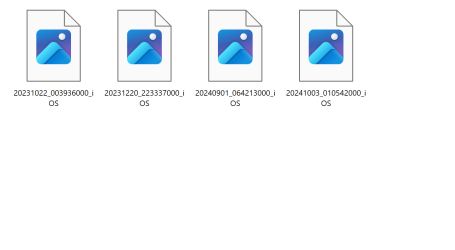
This a screenshot of the .MOV files in a folder on my Desktop. If install ICAROS, the thumbnails will generate.
Screenshot 2024-10-07 154502.png
 

My Computer My Computer

At a glance

Windows 11 ProThreadripper Pro 3945WX32 GB DDR4 3200/EEC HynixNvidia RTX 2070 Super FE
OS
Windows 11 Pro
Computer type
PC/Desktop
Manufacturer/Model
Lenovo P620
CPU
Threadripper Pro 3945WX
Motherboard
Lenovo 1046
Memory
32 GB DDR4 3200/EEC Hynix
Graphics Card(s)
Nvidia RTX 2070 Super FE
Sound Card
N/A
Monitor(s) Displays
Samsung CRG5
Screen Resolution
1920X1080 240mHz
Hard Drives
Samsung PM9A1 1TB NVMe
Samsung 970 EVO Plus 500 GB NVMe
Samsung 850 EVO 1 TB
Samsung 850 PRO 256 GB
PSU
1000 Watt Lenovo 80 plus Platinum
Keyboard
Corsair K95 Platinum XT
Mouse
M65 Pro RGB

My Computers My Computers

  • At a glance

    Windows 11 26200.8968Amd Threadripper 7970X128GB (4 X 32) G.Skill DDR5 6400 (RDIMM)Gigabyte RTX 4090 OC
    OS
    Windows 11 26200.8968
    Computer type
    PC/Desktop
    Manufacturer/Model
    homebuilt
    CPU
    Amd Threadripper 7970X
    Motherboard
    Gigabyte TRX50 Aero D Rev. 1.0
    Memory
    128GB (4 X 32) G.Skill DDR5 6400 (RDIMM)
    Graphics Card(s)
    Gigabyte RTX 4090 OC
    Sound Card
    none (USB to speakers), Realtek
    Monitor(s) Displays
    Innocn 32" OLED
    Screen Resolution
    3840 X 2160 @ 60Hz
    Hard Drives
    Crucial T700 2TB M.2 NVME SSD
    WD 4TB Blue SATA SSD
    Seagate 18TB IronWolf Pro
    PSU
    BeQuiet! Straight Power 12 1500W
    Case
    Lian Li 011 Dynamic Evo XL
    Cooling
    SilverStone Technology XE360-TR5, with 3 Phanteks T30 fans
    Keyboard
    Cherry KC 500 MX LP (mechanical)
    Mouse
    Logitech M500s (wired)
    Internet Speed
    2000/250 Mbps (down/up)
    Other Info
    xFinity gateway
  • At a glance

    windows 11 26200.8968Intel I9-13900K64GB G.Skill DDR5-6000Gigabyte RTX 3090 ti
    Operating System
    windows 11 26200.8968
    Computer type
    PC/Desktop
    Manufacturer/Model
    homebuilt
    CPU
    Intel I9-13900K
    Motherboard
    Asus RoG Strix Z690-E
    Memory
    64GB G.Skill DDR5-6000
    Graphics card(s)
    Gigabyte RTX 3090 ti
    Sound Card
    built in Realtek
    Monitor(s) Displays
    Philips 27E1N8900 27" OLED
    Screen Resolution
    3840 X 2160 @60Hz
    Hard Drives
    WDC SN850 1TB
    8TB Seagate Ironwolf
    4TB Seagate Ironwolf
    PSU
    eVGA SuperNOVA 1300 GT
    Case
    Lian Li 011 Dynamic Evo
    Cooling
    Corsair iCUE H150i ELITE CAPELLIX Liquid CPU Cooler
    Keyboard
    Cherry Streaming (wired)
    Mouse
    Logitech M500s (wired)
I have the thumbnails. (24H2, 256100.1882.)

I have the Microsoft Raw Image extension, the free K-Lite codec pack (full version) installed, plus the paid FastPictureViewer. I don't know which is responsible for creating thumbs for .MOV files.
Originally, Windows itself generated them without any difficulty. Then Windows 10 1703 or 1709 removed QuickTime native support, and you needed the HEVC codec installed to generate them. The HEVC codec worked since then except for recently.
 

My Computer My Computer

At a glance

Windows 11 ProThreadripper Pro 3945WX32 GB DDR4 3200/EEC HynixNvidia RTX 2070 Super FE
OS
Windows 11 Pro
Computer type
PC/Desktop
Manufacturer/Model
Lenovo P620
CPU
Threadripper Pro 3945WX
Motherboard
Lenovo 1046
Memory
32 GB DDR4 3200/EEC Hynix
Graphics Card(s)
Nvidia RTX 2070 Super FE
Sound Card
N/A
Monitor(s) Displays
Samsung CRG5
Screen Resolution
1920X1080 240mHz
Hard Drives
Samsung PM9A1 1TB NVMe
Samsung 970 EVO Plus 500 GB NVMe
Samsung 850 EVO 1 TB
Samsung 850 PRO 256 GB
PSU
1000 Watt Lenovo 80 plus Platinum
Keyboard
Corsair K95 Platinum XT
Mouse
M65 Pro RGB
Those are the icons of the new Photos app? Did you uninstall any default Windows apps?
No, those images are from my desktop in File Explorer. I haven't done anything, it's a clean install with no modifications.
 

My Computer My Computer

At a glance

Windows 11 ProThreadripper Pro 3945WX32 GB DDR4 3200/EEC HynixNvidia RTX 2070 Super FE
OS
Windows 11 Pro
Computer type
PC/Desktop
Manufacturer/Model
Lenovo P620
CPU
Threadripper Pro 3945WX
Motherboard
Lenovo 1046
Memory
32 GB DDR4 3200/EEC Hynix
Graphics Card(s)
Nvidia RTX 2070 Super FE
Sound Card
N/A
Monitor(s) Displays
Samsung CRG5
Screen Resolution
1920X1080 240mHz
Hard Drives
Samsung PM9A1 1TB NVMe
Samsung 970 EVO Plus 500 GB NVMe
Samsung 850 EVO 1 TB
Samsung 850 PRO 256 GB
PSU
1000 Watt Lenovo 80 plus Platinum
Keyboard
Corsair K95 Platinum XT
Mouse
M65 Pro RGB
This a screenshot of the .MOV files in a folder on my Desktop. If install ICAROS, the thumbnails will generate.
View attachment 111487
I have the thumbnails. (24H2, 256100.1882.)

K-Lite codec pack
^ this. Klite mega codec pack - only install the tweak tool. then set thumbnails to enable for all extensions. (ONLY the tweak tool. you dont need the entire codec pack.. there are too many good media player alternatives that play those formats already. this TO ME*** was only useful back in wmp legacy days...)
 
Last edited:

My Computer My Computer

At a glance

Windows 11 Pro
OS
Windows 11 Pro
^ this. Klite mega codec pack - only install the tweak tool. then set thumbnails to enable for all extensions. (ONLY the tweak tool. you dont need the entire codec pack.. there are too many good media player alternatives that play those formats already. this TO ME*** was only useful back in wmp legacy days...
I'm using ICAROS Thumbnail Handler right now... That fixed the Thumbnail issue.
 

My Computer My Computer

At a glance

Windows 11 ProThreadripper Pro 3945WX32 GB DDR4 3200/EEC HynixNvidia RTX 2070 Super FE
OS
Windows 11 Pro
Computer type
PC/Desktop
Manufacturer/Model
Lenovo P620
CPU
Threadripper Pro 3945WX
Motherboard
Lenovo 1046
Memory
32 GB DDR4 3200/EEC Hynix
Graphics Card(s)
Nvidia RTX 2070 Super FE
Sound Card
N/A
Monitor(s) Displays
Samsung CRG5
Screen Resolution
1920X1080 240mHz
Hard Drives
Samsung PM9A1 1TB NVMe
Samsung 970 EVO Plus 500 GB NVMe
Samsung 850 EVO 1 TB
Samsung 850 PRO 256 GB
PSU
1000 Watt Lenovo 80 plus Platinum
Keyboard
Corsair K95 Platinum XT
Mouse
M65 Pro RGB

My Computers My Computers

  • At a glance

    Windows 11 Pro 25H2 26200.8875i9-10900 10 core 20 threads32 gbnone-Intel UHD Graphics 630
    OS
    Windows 11 Pro 25H2 26200.8875
    Computer type
    PC/Desktop
    Manufacturer/Model
    Dell Optiplex 7080
    CPU
    i9-10900 10 core 20 threads
    Motherboard
    DELL 0J37VM
    Memory
    32 gb
    Graphics Card(s)
    none-Intel UHD Graphics 630
    Sound Card
    Integrated Realtek
    Monitor(s) Displays
    Benq 27
    Screen Resolution
    2560x1440
    Hard Drives
    2x1tb Solidigm m.2 nvme /External drives 512gb Samsung m.2 sata+2tb Kingston m2.nvme
    PSU
    500w
    Case
    MT
    Cooling
    Dell Premium
    Keyboard
    Logitech wired
    Mouse
    Logitech wireless
    Internet Speed
    so slow I'm too embarrassed to tell
    Browser
    #1 Edge #2 Firefox
    Antivirus
    Defender+MWB Premium
  • At a glance

    Windows 11 Pro 24H2 26200.8875AMD Ryzen 7 6800U32 gbintegrated
    Operating System
    Windows 11 Pro 24H2 26200.8875
    Computer type
    PC/Desktop
    Manufacturer/Model
    Beelink Mini PC SER5
    CPU
    AMD Ryzen 7 6800U
    Memory
    32 gb
    Graphics card(s)
    integrated
    Sound Card
    integrated
    Monitor(s) Displays
    Benq 27
    Screen Resolution
    2560x1440
    Hard Drives
    1TB Crucial nvme
    Keyboard
    Logitech wired
    Mouse
    Logitech wireless
    Internet Speed
    still too embarrassed to tell
    Browser
    Firefox
    Antivirus
    Defender
    Other Info
    System 3 is non compliant Dell 9020 i7-4770/24gb ram Win11 PRO 26200.8875

My Computer My Computer

At a glance

Windows 11 ProThreadripper Pro 3945WX32 GB DDR4 3200/EEC HynixNvidia RTX 2070 Super FE
OS
Windows 11 Pro
Computer type
PC/Desktop
Manufacturer/Model
Lenovo P620
CPU
Threadripper Pro 3945WX
Motherboard
Lenovo 1046
Memory
32 GB DDR4 3200/EEC Hynix
Graphics Card(s)
Nvidia RTX 2070 Super FE
Sound Card
N/A
Monitor(s) Displays
Samsung CRG5
Screen Resolution
1920X1080 240mHz
Hard Drives
Samsung PM9A1 1TB NVMe
Samsung 970 EVO Plus 500 GB NVMe
Samsung 850 EVO 1 TB
Samsung 850 PRO 256 GB
PSU
1000 Watt Lenovo 80 plus Platinum
Keyboard
Corsair K95 Platinum XT
Mouse
M65 Pro RGB
I have some .mov files, probably from Apple's QuickTIme on Mac OS X, and they show the icon for the VLC program that can open them, not thumbnails.
 

My Computers My Computers

  • At a glance

    Win11 Pro RTM Version 24H2 Build 26100.4202Intel Core i5 11th Gen. 2.40GHz12GB
    OS
    Win11 Pro RTM Version 24H2 Build 26100.4202
    Computer type
    Laptop
    Manufacturer/Model
    Dell Vostro 3400
    CPU
    Intel Core i5 11th Gen. 2.40GHz
    Memory
    12GB
    Hard Drives
    256GB SSD NVMe M.2
  • At a glance

    Win11 Pro RTM Version 24H2 Build 26100.4202Intel Core i5 10th Gen. 2.90GHz16GBOnboard, no VGA, using a DisplayPort-to-VGA a...
    Operating System
    Win11 Pro RTM Version 24H2 Build 26100.4202
    Computer type
    PC/Desktop
    Manufacturer/Model
    Dell Vostro 5890
    CPU
    Intel Core i5 10th Gen. 2.90GHz
    Memory
    16GB
    Graphics card(s)
    Onboard, no VGA, using a DisplayPort-to-VGA adapter
    Monitor(s) Displays
    24" Dell
    Hard Drives
    512GB SSD NVMe, 4TB Seagate HDD
    Browser
    Firefox, Edge
    Antivirus
    Windows Defender/Microsoft Security
I have some .mov files, probably from Apple's QuickTIme on Mac OS X, and they show the icon for the VLC program that can open them, not thumbnails.
When Windows 10 first came out, Microsoft bragged about not needing a codec pack to play media. Then, they removed native QuickTime support requiring the HEVC codec. As iPhones become more advances adding new features, Microsoft has decided to add unwanted features and remove desired functionality in its products.
 

My Computer My Computer

At a glance

Windows 11 ProThreadripper Pro 3945WX32 GB DDR4 3200/EEC HynixNvidia RTX 2070 Super FE
OS
Windows 11 Pro
Computer type
PC/Desktop
Manufacturer/Model
Lenovo P620
CPU
Threadripper Pro 3945WX
Motherboard
Lenovo 1046
Memory
32 GB DDR4 3200/EEC Hynix
Graphics Card(s)
Nvidia RTX 2070 Super FE
Sound Card
N/A
Monitor(s) Displays
Samsung CRG5
Screen Resolution
1920X1080 240mHz
Hard Drives
Samsung PM9A1 1TB NVMe
Samsung 970 EVO Plus 500 GB NVMe
Samsung 850 EVO 1 TB
Samsung 850 PRO 256 GB
PSU
1000 Watt Lenovo 80 plus Platinum
Keyboard
Corsair K95 Platinum XT
Mouse
M65 Pro RGB
Not sure why Microsoft decided to remove the .MOV thumbnail support in Explorer… ICAROS thumbnail generator does fix all the issues I’ve encountered. It seems IOS 18 .MOV files aren’t completely compatible with Windows either, ICAROS fixes the missing properties and GPS data issue inside of the Photos App.
 

My Computer My Computer

At a glance

Windows 11 ProThreadripper Pro 3945WX32 GB DDR4 3200/EEC HynixNvidia RTX 2070 Super FE
OS
Windows 11 Pro
Computer type
PC/Desktop
Manufacturer/Model
Lenovo P620
CPU
Threadripper Pro 3945WX
Motherboard
Lenovo 1046
Memory
32 GB DDR4 3200/EEC Hynix
Graphics Card(s)
Nvidia RTX 2070 Super FE
Sound Card
N/A
Monitor(s) Displays
Samsung CRG5
Screen Resolution
1920X1080 240mHz
Hard Drives
Samsung PM9A1 1TB NVMe
Samsung 970 EVO Plus 500 GB NVMe
Samsung 850 EVO 1 TB
Samsung 850 PRO 256 GB
PSU
1000 Watt Lenovo 80 plus Platinum
Keyboard
Corsair K95 Platinum XT
Mouse
M65 Pro RGB

My Computers My Computers

  • At a glance

    Win11 Pro RTM Version 24H2 Build 26100.4202Intel Core i5 11th Gen. 2.40GHz12GB
    OS
    Win11 Pro RTM Version 24H2 Build 26100.4202
    Computer type
    Laptop
    Manufacturer/Model
    Dell Vostro 3400
    CPU
    Intel Core i5 11th Gen. 2.40GHz
    Memory
    12GB
    Hard Drives
    256GB SSD NVMe M.2
  • At a glance

    Win11 Pro RTM Version 24H2 Build 26100.4202Intel Core i5 10th Gen. 2.90GHz16GBOnboard, no VGA, using a DisplayPort-to-VGA a...
    Operating System
    Win11 Pro RTM Version 24H2 Build 26100.4202
    Computer type
    PC/Desktop
    Manufacturer/Model
    Dell Vostro 5890
    CPU
    Intel Core i5 10th Gen. 2.90GHz
    Memory
    16GB
    Graphics card(s)
    Onboard, no VGA, using a DisplayPort-to-VGA adapter
    Monitor(s) Displays
    24" Dell
    Hard Drives
    512GB SSD NVMe, 4TB Seagate HDD
    Browser
    Firefox, Edge
    Antivirus
    Windows Defender/Microsoft Security
Thank You. I'm on a clean install of 24H2 with all those codecs installed and updated. I have not made any changes, and I can see the MOV thumbnail (sample-mov-files-sample_1920x1080.mov) and it plays in the new Windows Media Player by default.

I don't have any Apple devices and haven't come across MOV/Quicktime for decades. I just wanted to check for others.
The problem appears to be specific to iOS iPhone .MOV files, particularly since the introduction of the HEVC format with iOS 12. Some of my older iPhone .MOV files are unaffected; they were encoded in H264 rather than H265 (HEVC).

Here's a 4K sample from my phone if you want to check for yourself.
 
Last edited:

My Computer My Computer

At a glance

Windows 11 ProThreadripper Pro 3945WX32 GB DDR4 3200/EEC HynixNvidia RTX 2070 Super FE
OS
Windows 11 Pro
Computer type
PC/Desktop
Manufacturer/Model
Lenovo P620
CPU
Threadripper Pro 3945WX
Motherboard
Lenovo 1046
Memory
32 GB DDR4 3200/EEC Hynix
Graphics Card(s)
Nvidia RTX 2070 Super FE
Sound Card
N/A
Monitor(s) Displays
Samsung CRG5
Screen Resolution
1920X1080 240mHz
Hard Drives
Samsung PM9A1 1TB NVMe
Samsung 970 EVO Plus 500 GB NVMe
Samsung 850 EVO 1 TB
Samsung 850 PRO 256 GB
PSU
1000 Watt Lenovo 80 plus Platinum
Keyboard
Corsair K95 Platinum XT
Mouse
M65 Pro RGB

My Computer My Computer

At a glance

Windows 11 ProThreadripper Pro 3945WX32 GB DDR4 3200/EEC HynixNvidia RTX 2070 Super FE
OS
Windows 11 Pro
Computer type
PC/Desktop
Manufacturer/Model
Lenovo P620
CPU
Threadripper Pro 3945WX
Motherboard
Lenovo 1046
Memory
32 GB DDR4 3200/EEC Hynix
Graphics Card(s)
Nvidia RTX 2070 Super FE
Sound Card
N/A
Monitor(s) Displays
Samsung CRG5
Screen Resolution
1920X1080 240mHz
Hard Drives
Samsung PM9A1 1TB NVMe
Samsung 970 EVO Plus 500 GB NVMe
Samsung 850 EVO 1 TB
Samsung 850 PRO 256 GB
PSU
1000 Watt Lenovo 80 plus Platinum
Keyboard
Corsair K95 Platinum XT
Mouse
M65 Pro RGB
Got it, it's the container not the codec. It shows the Media Player icon as thumbnail, and it plays (trees and grass).
It plays fine on my computer too… just no thumbnail shows up. There’s also some incompatibility with the file properties in file Explorer.exe… it doesn’t display complete data as it did in the past.
 

My Computer My Computer

At a glance

Windows 11 ProThreadripper Pro 3945WX32 GB DDR4 3200/EEC HynixNvidia RTX 2070 Super FE
OS
Windows 11 Pro
Computer type
PC/Desktop
Manufacturer/Model
Lenovo P620
CPU
Threadripper Pro 3945WX
Motherboard
Lenovo 1046
Memory
32 GB DDR4 3200/EEC Hynix
Graphics Card(s)
Nvidia RTX 2070 Super FE
Sound Card
N/A
Monitor(s) Displays
Samsung CRG5
Screen Resolution
1920X1080 240mHz
Hard Drives
Samsung PM9A1 1TB NVMe
Samsung 970 EVO Plus 500 GB NVMe
Samsung 850 EVO 1 TB
Samsung 850 PRO 256 GB
PSU
1000 Watt Lenovo 80 plus Platinum
Keyboard
Corsair K95 Platinum XT
Mouse
M65 Pro RGB
Hopefully MS will add support in the future (unless they have to pay a license) Of course properties/metadata all show in MPC-HC and MPC-BE
Until mid-July of this year, everything was working properly, with thumbnails and properties appearing as they should. Yet, by July's end, the thumbnails in File Explorer vanished. After the iPhone iOS 18 update, the properties no longer displayed correctly. Once the Icaros thumbnail/property handler was installed, normalcy was restored. Icaros had a problem with incorrect times, but Xanashi quickly fixed it by releasing a new beta build (Icaros_v3.3.3_b3), which was quite remarkable!
 

My Computer My Computer

At a glance

Windows 11 ProThreadripper Pro 3945WX32 GB DDR4 3200/EEC HynixNvidia RTX 2070 Super FE
OS
Windows 11 Pro
Computer type
PC/Desktop
Manufacturer/Model
Lenovo P620
CPU
Threadripper Pro 3945WX
Motherboard
Lenovo 1046
Memory
32 GB DDR4 3200/EEC Hynix
Graphics Card(s)
Nvidia RTX 2070 Super FE
Sound Card
N/A
Monitor(s) Displays
Samsung CRG5
Screen Resolution
1920X1080 240mHz
Hard Drives
Samsung PM9A1 1TB NVMe
Samsung 970 EVO Plus 500 GB NVMe
Samsung 850 EVO 1 TB
Samsung 850 PRO 256 GB
PSU
1000 Watt Lenovo 80 plus Platinum
Keyboard
Corsair K95 Platinum XT
Mouse
M65 Pro RGB

My Computers My Computers

  • At a glance

    Windows 11 26200.8968Amd Threadripper 7970X128GB (4 X 32) G.Skill DDR5 6400 (RDIMM)Gigabyte RTX 4090 OC
    OS
    Windows 11 26200.8968
    Computer type
    PC/Desktop
    Manufacturer/Model
    homebuilt
    CPU
    Amd Threadripper 7970X
    Motherboard
    Gigabyte TRX50 Aero D Rev. 1.0
    Memory
    128GB (4 X 32) G.Skill DDR5 6400 (RDIMM)
    Graphics Card(s)
    Gigabyte RTX 4090 OC
    Sound Card
    none (USB to speakers), Realtek
    Monitor(s) Displays
    Innocn 32" OLED
    Screen Resolution
    3840 X 2160 @ 60Hz
    Hard Drives
    Crucial T700 2TB M.2 NVME SSD
    WD 4TB Blue SATA SSD
    Seagate 18TB IronWolf Pro
    PSU
    BeQuiet! Straight Power 12 1500W
    Case
    Lian Li 011 Dynamic Evo XL
    Cooling
    SilverStone Technology XE360-TR5, with 3 Phanteks T30 fans
    Keyboard
    Cherry KC 500 MX LP (mechanical)
    Mouse
    Logitech M500s (wired)
    Internet Speed
    2000/250 Mbps (down/up)
    Other Info
    xFinity gateway
  • At a glance

    windows 11 26200.8968Intel I9-13900K64GB G.Skill DDR5-6000Gigabyte RTX 3090 ti
    Operating System
    windows 11 26200.8968
    Computer type
    PC/Desktop
    Manufacturer/Model
    homebuilt
    CPU
    Intel I9-13900K
    Motherboard
    Asus RoG Strix Z690-E
    Memory
    64GB G.Skill DDR5-6000
    Graphics card(s)
    Gigabyte RTX 3090 ti
    Sound Card
    built in Realtek
    Monitor(s) Displays
    Philips 27E1N8900 27" OLED
    Screen Resolution
    3840 X 2160 @60Hz
    Hard Drives
    WDC SN850 1TB
    8TB Seagate Ironwolf
    4TB Seagate Ironwolf
    PSU
    eVGA SuperNOVA 1300 GT
    Case
    Lian Li 011 Dynamic Evo
    Cooling
    Corsair iCUE H150i ELITE CAPELLIX Liquid CPU Cooler
    Keyboard
    Cherry Streaming (wired)
    Mouse
    Logitech M500s (wired)
I downloaded it. Thumbnail shown.

(Jeepers. It's an HDR movie.)
Interesting… can’t understand why I don’t get thumbnails inside of file explorer. My Video thumbnails look like the screenshot I uploaded at the beginning of the post. Unless it’s related to CPU or a Graphics card. My PC has an AMD Threadripper Pro 3945WX and RT-7900 XTX.
 

My Computer My Computer

At a glance

Windows 11 ProThreadripper Pro 3945WX32 GB DDR4 3200/EEC HynixNvidia RTX 2070 Super FE
OS
Windows 11 Pro
Computer type
PC/Desktop
Manufacturer/Model
Lenovo P620
CPU
Threadripper Pro 3945WX
Motherboard
Lenovo 1046
Memory
32 GB DDR4 3200/EEC Hynix
Graphics Card(s)
Nvidia RTX 2070 Super FE
Sound Card
N/A
Monitor(s) Displays
Samsung CRG5
Screen Resolution
1920X1080 240mHz
Hard Drives
Samsung PM9A1 1TB NVMe
Samsung 970 EVO Plus 500 GB NVMe
Samsung 850 EVO 1 TB
Samsung 850 PRO 256 GB
PSU
1000 Watt Lenovo 80 plus Platinum
Keyboard
Corsair K95 Platinum XT
Mouse
M65 Pro RGB
Back
Top Bottom