
Recovery partition 99% full


FTNR21

*Some assembly required, batteries not included
Member
Local time
9:24 PM
Posts
19
OS
Windows 11 Pro, 64 bit
I was getting ready to run a Macrium Reflect image backup on a new laptop after upgrading from Win11 Home to Pro when I discovered that one of the recovery partitions is nearly maxed out. I'm not having any issues at the moment but I'd imagine that this isn't ideal.

Do I need to fix this and if so, what would you recommend? Thank you.
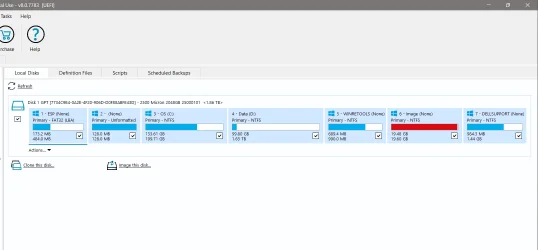
2026-03-07_19-32-29.webp
 
Windows Build/Version
10.0.26200
Last edited:

My Computer

System One

  • OS
    Windows 11 Pro, 64 bit
    Computer type
    Laptop
    Manufacturer/Model
    Dell DC16255
    CPU
    AMD Ryzen™ 7 250 Processor (8 cores, up to 5.1Ghz)
    Memory
    32 GB DDR5, 1 x 32 GB, 5600 MT/s
    Graphics Card(s)
    AMD Radeon Graphics
    Monitor(s) Displays
    16.0" 16:10 FHD+ (1920x1200) Touch 300nits WVA/IPS Display with ComfortView
    Hard Drives
    2TB M.2 PCIe NVMe SSD
    Mouse
    Logitech wireless
    Browser
    Edge
    Antivirus
    MalwareBytes
That is most likely an OEM recovery partition that never will change. So the manufacturer made the partition at the same size as the recovery information to leave as much disk space to the user.

So it is as it should be. :-)
 

My Computers

System One System Two

  • OS
    Linux: Debian, Kali-linux, Alma, Win: 7, 8.1,2012R
    Manufacturer/Model
    HP Elitebook 840, AsusX53, Aspire E1-572. AsusUX32A, HP Pro3130mt+3010mt, HP Proliant ML150, 3xCustom-PC, i3, i5, i7
    CPU
    i3, i5 and i7 From 2gen to 9th gen... Server dual Xenon
    Hard Drives
    Sata, M.2, SAS
  • Operating System
    Retro: 2003server.XPpro, Win2000, Win98SE, Win95, Win3.11, MS-DOS, IBM-DOS
    Manufacturer/Model
    Commodore, AST, Fujitsu, Compaq, etc etc. etc Around 15 desktops and 20 laptops in the collection
    CPU
    Oldest intel 8088 up to P4 dual core
    Hard Drives
    MFM, IDE, SCSI
And yes. As Marie SWE said it contains the factory Image should you ever want to reset your laptop back to the way Dell shipped it to you. There is no need to fix it ( unless you want to delete it and annex it to your C: or use it as another data partition)

If you want to backup your system disk using Macrium Reflect it will be enough to select the ESP partition. the 128MB MSR Partition, OS C: partition, your Data partition D: , the WinRETools partition, and DELLSupport Partition - if you are still using DellSupportAssistant. ( No need to include the large Image Partition since the factory image will never change)

( In fact, if you do a system backup with AOMEI Backupper, it will only select the ESP partition, OS C: , and the WinRETools partition.)

Note: On an elevated command prompt run reagentc /info and check whether it is enabled. If you decide to change the partition structure, you may have to disable the recovery agent from the current WinRETools partition number and after the partition changes reenable the recovery agent pointing to the changed WinRETools partition number.
 

My Computers

System One System Two

  • OS
    Windows 11 Pro Version:25H2 OS Build: 26200.8524
    Computer type
    PC/Desktop
    Manufacturer/Model
    Beelink Mini PC Model: SEi12
    CPU
    12th Gen Intel core i5-1235U(Alder
    Motherboard
    SEi (manufactured by AZW)
    Memory
    16*2 (32 GB) DDR 4-3200(1600MHz) Crucial Technology
    Graphics Card(s)
    Intel Iris Xe Graphics (Internal)
    Sound Card
    Internal
    Monitor(s) Displays
    BenQ GW2283
    Screen Resolution
    1920*1080
    Hard Drives
    500GB NVME (Kingston SNV2S500G)
    1TB (Crucial CT1000BX500SSD1)
    PSU
    Power Brick 19V-6.32A , 120.08W
    Keyboard
    Dell KB3322Wi (Wireless)
    Mouse
    Dell WM118t (Wireless)
    Internet Speed
    4G/5G
    Browser
    MS Edge, Chrome
    Antivirus
    Malwarebytes Premium - Subscription
  • Operating System
    Windows 11 Home Version 25H2 Build 26200.8524
    Computer type
    PC/Desktop
    Manufacturer/Model
    Dell Inspiron 3280 AIO 22"
    CPU
    Intel Core i3 8145U
    Motherboard
    Dell inc. 027W48
    Memory
    Intel Optane 16GB module + DDR 4 16GB (Optane disabled.)
    Graphics card(s)
    Intel UHD Graphics 620
    Sound Card
    Internal
    Monitor(s) Displays
    Dell Monitor 22"
    Screen Resolution
    1920x1080
    Hard Drives
    Crucial CT1000BX500SSD1 ; 1000,2 GB
    PSU
    Power Brick
    Case
    All-in one
    Keyboard
    Dell Wireless KM636
    Mouse
    Dell Wireless KM 636
    Internet Speed
    4G
    Browser
    Edge, Chrome
    Antivirus
    Malwarebytes
    Other Info
    Upgraded from Windows 10 Home to Windows 11 Home on 28 Oct 2023
@FTNR21

Here's ten points, just for filling out your computer specs. :-)
 

My Computers

System One System Two

  • OS
    Win 11 Home ♦♦♦26200.8457 ♦♦♦♦♦♦♦25H2
    Computer type
    PC/Desktop
    Manufacturer/Model
    Built by Ghot® [May 2020]
    CPU
    AMD Ryzen 7 3700X
    Motherboard
    Asus Pro WS X570-ACE (BIOS 5302)
    Memory
    G.Skill (F4-3200C14D-16GTZKW)
    Graphics Card(s)
    EVGA RTX 2070 (08G-P4-2171-KR)
    Sound Card
    Realtek ALC1220P / ALC S1220A
    Monitor(s) Displays
    Dell U3011 30"
    Screen Resolution
    2560 x 1600
    Hard Drives
    2x Samsung 860 EVO 500GB,
    WD 4TB Black FZBX - SATA III,
    WD 8TB Black FZBX - SATA III,
    DRW-24B1ST CD/DVD Burner
    PSU
    PC Power & Cooling 750W Quad EPS12V
    Case
    Cooler Master ATCS 840 Tower
    Cooling
    CM Hyper 212 EVO (push/pull)
    Keyboard
    Ducky DK9008 Shine II Blue LED
    Mouse
    Logitech Optical M-100
    Internet Speed
    300/300
    Browser
    Firefox (latest)
    Antivirus
    Bitdefender Total Security
    Other Info
    Speakers: Klipsch Pro Media 2.1
  • Operating System
    Windows XP Pro 32bit w/SP3
    Computer type
    PC/Desktop
    Manufacturer/Model
    Built by Ghot® (not in use)
    CPU
    AMD Athlon 64 X2 5000+ (OC'd @ 3.2Ghz)
    Motherboard
    ASUS M2N32-SLI Deluxe Wireless Edition
    Memory
    TWIN2X2048-6400C4DHX (2 x 1GB, DDR2 800)
    Graphics card(s)
    EVGA 256-P2-N758-TR GeForce 8600GT SSC
    Sound Card
    Onboard
    Monitor(s) Displays
    ViewSonic G90FB Black 19" Professional (CRT)
    Screen Resolution
    up to 2048 x 1536
    Hard Drives
    WD 36GB 10,000rpm Raptor SATA
    Seagate 80GB 7200rpm SATA
    Lite-On LTR-52246S CD/RW
    Lite-On LH-18A1P CD/DVD Burner
    PSU
    PC Power & Cooling Silencer 750 Quad EPS12V
    Case
    Generic Beige case, 80mm fans
    Cooling
    ZALMAN 9500A 92mm CPU Cooler
    Keyboard
    Logitech Classic Keybooard 200
    Mouse
    Logitech Optical M-BT96a
    Internet Speed
    300/300
    Browser
    Firefox 3.x ??
    Antivirus
    Symantec (Norton)
    Other Info
    Still assembled, still runs. Haven't turned it on for 15 years?
I discovered that one of the recovery partitions is nearly maxed out. I'm not having any issues at the moment but I'd imagine that this isn't ideal.

Do I need to fix this.....


If the Macrium backup images are available then you can restore that image and not lose preferred settings, applications, updates, files, etc.

Having a disk partition for factory reset is then an extra recovery option.


Some Dell computers have the factory recovery also available by download:


My Computer

System One

  • OS
    Windows 10
    Computer type
    Laptop
    Manufacturer/Model
    HP
    CPU
    Intel(R) Core(TM) i7-4800MQ CPU @ 2.70GHz
    Motherboard
    Product : 190A Version : KBC Version 94.56
    Memory
    16 GB Total: Manufacturer : Samsung MemoryType : DDR3 FormFactor : SODIMM Capacity : 8GB Speed : 1600
    Graphics Card(s)
    NVIDIA Quadro K3100M; Intel(R) HD Graphics 4600
    Sound Card
    IDT High Definition Audio CODEC; PNP Device ID HDAUDIO\FUNC_01&VEN_111D&DEV_76E0
    Hard Drives
    Model Hitachi HTS727575A9E364
    Antivirus
    Microsoft Defender
    Other Info
    Mobile Workstation
Thank you all for your very insightful replies. I'm very relieved to see that this isn't a problem, especially on a laptop that I've only had for a week.
 

My Computer

System One

  • OS
    Windows 11 Pro, 64 bit
    Computer type
    Laptop
    Manufacturer/Model
    Dell DC16255
    CPU
    AMD Ryzen™ 7 250 Processor (8 cores, up to 5.1Ghz)
    Memory
    32 GB DDR5, 1 x 32 GB, 5600 MT/s
    Graphics Card(s)
    AMD Radeon Graphics
    Monitor(s) Displays
    16.0" 16:10 FHD+ (1920x1200) Touch 300nits WVA/IPS Display with ComfortView
    Hard Drives
    2TB M.2 PCIe NVMe SSD
    Mouse
    Logitech wireless
    Browser
    Edge
    Antivirus
    MalwareBytes

Latest Support Threads

Back
Top Bottom


