Redirect Pending Printout


Alonzo Mosley

Man of Action
Member
VIP
Local time
8:37 AM
Posts
185
Location
Pacific Northwest
OS
Windows 11
Lots of times, because I am an idiot, I will hit "Print" and not realize I've sent it to the wrong printer (e.g., I'm at work and it wants to print at home; I'm at home and it wants to print at work; I'm in my emergency backup beach home and it wants to print to my emergency backup ski chalet).

So then I have to double-click on the printer thingy and cancel the print before (hopefully) re-submitting the job to the correct printer.

It's 2025, people! Can't we have a way to click on the printer thingy and say "Whoops, let's do this printer instead!"?
 

My Computer My Computer

At a glance

Windows 1111th Gen Intel(R) Core(TM) i7-1185G7 @ 3.00GH16GB
OS
Windows 11
Computer type
Laptop
Manufacturer/Model
MSFT Surface Pro 8
CPU
11th Gen Intel(R) Core(TM) i7-1185G7 @ 3.00GH
Memory
16GB
I have 2 printers attached to my Router, have to be sure to select which one to use. Windows needs to have one selected as the Default System printer, sometimes automatically chooses the last one used.
 

My Computers My Computers

  • At a glance

    Win11 Pro RTM Version 24H2 Build 26100.4202Intel Core i5 11th Gen. 2.40GHz12GB
    OS
    Win11 Pro RTM Version 24H2 Build 26100.4202
    Computer type
    Laptop
    Manufacturer/Model
    Dell Vostro 3400
    CPU
    Intel Core i5 11th Gen. 2.40GHz
    Memory
    12GB
    Hard Drives
    256GB SSD NVMe M.2
  • At a glance

    Win11 Pro RTM Version 24H2 Build 26100.4202Intel Core i5 10th Gen. 2.90GHz16GBOnboard, no VGA, using a DisplayPort-to-VGA a...
    Operating System
    Win11 Pro RTM Version 24H2 Build 26100.4202
    Computer type
    PC/Desktop
    Manufacturer/Model
    Dell Vostro 5890
    CPU
    Intel Core i5 10th Gen. 2.90GHz
    Memory
    16GB
    Graphics card(s)
    Onboard, no VGA, using a DisplayPort-to-VGA adapter
    Monitor(s) Displays
    24" Dell
    Hard Drives
    512GB SSD NVMe, 4TB Seagate HDD
    Browser
    Firefox, Edge
    Antivirus
    Windows Defender/Microsoft Security
I don't believe for a second you have two printers that both work at the same time. That sounds like science fiction.
 

My Computer My Computer

At a glance

Windows 1111th Gen Intel(R) Core(TM) i7-1185G7 @ 3.00GH16GB
OS
Windows 11
Computer type
Laptop
Manufacturer/Model
MSFT Surface Pro 8
CPU
11th Gen Intel(R) Core(TM) i7-1185G7 @ 3.00GH
Memory
16GB
Maybe one of these could help?


My Computers My Computers

  • At a glance

    Windows 11 Pro 25H2 Build 26200.8655Intel(R) Core(TM) i7-4770K CPU @ 3.50GHz32.0 GB of I forget and the box is in storage.Gigabyte nVidia GeForce GTX 1660 Super OC 6GB
    OS
    Windows 11 Pro 25H2 Build 26200.8655
    Computer type
    PC/Desktop
    Manufacturer/Model
    Sin-built 2013
    CPU
    Intel(R) Core(TM) i7-4770K CPU @ 3.50GHz
    Motherboard
    ASUS ROG Maximus VI Formula
    Memory
    32.0 GB of I forget and the box is in storage.
    Graphics Card(s)
    Gigabyte nVidia GeForce GTX 1660 Super OC 6GB
    Sound Card
    ROG SupremeFX Formula 8-Channel High Definition Audio
    Monitor(s) Displays
    5 x LG 25MS500-B - 1 x 24MK430H-B - 1 x Wacom Pro 22" Touch Screen Tablet
    Screen Resolution
    All over the place
    Hard Drives
    Too many to list. OS on Samsung 1TB 870 QVO SATA
    PSU
    Silverstone 1500
    Case
    NZXT Phantom 820 Full-Tower Case
    Cooling
    Noctua NH-D15 Elite Class Dual Tower CPU Cooler / 6 x EziDIY 120mm / 2 x Corsair 140mm somethings / 1 x 140mm Thermaltake something / 2 x 200mm Corsair.
    Keyboard
    Corsair K95 / Logitech diNovo Edge Wireless
    Mouse
    Logitech: G402 / G502 / Mx Masters / Mx Air Cordless
    Internet Speed
    2000/500Mbps
    Browser
    All sorts
    Antivirus
    Kaspersky Premium
    Other Info
    ㅤㅤㅤㅤㅤㅤㅤㅤㅤㅤㅤㅤㅤㅤㅤㅤㅤㅤㅤㅤㅤㅤㅤㅤㅤㅤㅤㅤㅤㅤㅤㅤㅤㅤㅤㅤㅤㅤㅤㅤ⠀⠀⠀⠀⠀⠀⠀⠀⠀⠀
    TP-Link BE9300 WiFi 7 Bluetooth 5.4 (Archer TBE550E)
    TP-Link TX201 V1 2.5GB Lan

    Grandstream HT812 - VoIP
    ASUS DSL-AX82U - Mesh
    ASUS RT-AC68U - Mesh
    ASUS RT-BE88U Router

    Brother MFC-L2880DW Printer

    I’m on a horse.
  • At a glance

    Windows 11 Pro 25H2 Build 26200.8655 (Wifes)13th Generation Intel® Core™ i5-1340P Process...16GB LPDDR5-52001x Intel® Iris® Xe Graphics
    Operating System
    Windows 11 Pro 25H2 Build 26200.8655 (Wifes)
    Computer type
    Laptop
    Manufacturer/Model
    LENOVO Yoga 7 14IRL8 - Type 82YL
    CPU
    13th Generation Intel® Core™ i5-1340P Processor(Core™ i5-1340P)
    Memory
    16GB LPDDR5-5200
    Graphics card(s)
    1x Intel® Iris® Xe Graphics
    Sound Card
    Optimized with Dolby Atmos®
    Screen Resolution
    QHD 2880 x 1800 OLED
    Hard Drives
    M.2 512 GB SSD PCIe
    Mouse
    Logiteck MX Master 3S
    Internet Speed
    2000/500
    Antivirus
    Defender / Malwarebytes
    Other Info
    …still on a horse.


    Wireless Network: Wi-Fi 6E 2x2 AX; Bluetooth® 5.1 or above
    Ports: 1x 1 Novo button; 2 in 1 Audio Combo jack; Micro SD Card Reader; HDMI 1.4b; 2 x USB Type-C (TBT4)
    USB 3.2 Gen 2 DP 1.4a
    PD 3.0); 1 x USB 3.2 Gen1 Type A
    Camera
    1x 1080P FHD IR/RGB Hybrid with Privacy Shutter and Dual Array Microphone
    Graphics
    1x Intel® Iris® Xe Graphics
    Monitor
    14" WUXGA
    Form Factor
    Convertible Notebook
  • Windows 11 Pro 25H2 Build 26200.8655 (Wifes)

    Yoga 7 2-in-1 14IML9 - Type 83DJ

    Processor: Intel® Core™ Ultra 7 155H Processor(Core™ Ultra 7 155H)

    Memory: 32GB LPD5X-7467

    Hard Drive: 1 TB SSD PCIe

    Wireless Network: 1x Wi-Fi 6E 2x2 AX; Bluetooth® 5.1 or above

    Ports: 1 x HDMI 2.1 TMDS; 1 x Novo Button; 1 x Combo Audio Jack
    2 x USB-C (USB 4.0)
    1 x USB-A 3.2 Gen 1

    Camera: 1080P FHD IR Hybrid with Dual Microphone

    Graphics: Intel® Arc™ Graphics

    Monitor: 14" 2.8K

    ...Where's my horse?
I have more than one printer as well.
Also, I "Print" to Adobe PDF "printer" and it creates a .PDF file.
In the Print Dialog box, I have to choose which printer.

To stop Windows from automatically using the last printer, go to Settings > Devices > Printers & scanners, and uncheck "Let Windows manage my default printer." This will allow you to choose a printer manually each time you print.


My Computer My Computer

At a glance

Windows 11 Pro Insider 64 bit 25H2 26200.5742Intel Core i7 9700K 3.6016 GBnVidia GEForce RTX 2060 Super
OS
Windows 11 Pro Insider 64 bit 25H2 26200.5742
Computer type
PC/Desktop
Manufacturer/Model
Gigabyte Z390 UD
CPU
Intel Core i7 9700K 3.60
Motherboard
Gigabyte Z390 UD
Memory
16 GB
Graphics Card(s)
nVidia GEForce RTX 2060 Super
Sound Card
onboard
Monitor(s) Displays
Two 27" Dell 4K monitors
Screen Resolution
3840 x 2160
Hard Drives
M.2 NVME SSD, 500 GB; Two 2TB Mechanical HDD's
PSU
850w PSU
Case
Cyberpower PC
Cooling
Water cooled
Keyboard
Backlit Cyberpower gaming keyboard
Mouse
Backlit Cyberpower gaming mouse
Internet Speed
1 GB mbps
Browser
Brave
Antivirus
Windows Security
I don't believe for a second you have two printers that both work at the same time. That sounds like science fiction.
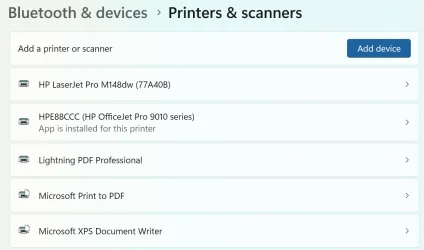
Oh? That's one of the advantages of the LAN I have.

1744677732889.webp
 

My Computers My Computers

  • At a glance

    Win11 Pro RTM Version 24H2 Build 26100.4202Intel Core i5 11th Gen. 2.40GHz12GB
    OS
    Win11 Pro RTM Version 24H2 Build 26100.4202
    Computer type
    Laptop
    Manufacturer/Model
    Dell Vostro 3400
    CPU
    Intel Core i5 11th Gen. 2.40GHz
    Memory
    12GB
    Hard Drives
    256GB SSD NVMe M.2
  • At a glance

    Win11 Pro RTM Version 24H2 Build 26100.4202Intel Core i5 10th Gen. 2.90GHz16GBOnboard, no VGA, using a DisplayPort-to-VGA a...
    Operating System
    Win11 Pro RTM Version 24H2 Build 26100.4202
    Computer type
    PC/Desktop
    Manufacturer/Model
    Dell Vostro 5890
    CPU
    Intel Core i5 10th Gen. 2.90GHz
    Memory
    16GB
    Graphics card(s)
    Onboard, no VGA, using a DisplayPort-to-VGA adapter
    Monitor(s) Displays
    24" Dell
    Hard Drives
    512GB SSD NVMe, 4TB Seagate HDD
    Browser
    Firefox, Edge
    Antivirus
    Windows Defender/Microsoft Security
I understand how to change printers.

I'm just surprised that there isn't a way to redirect an "active" job from one printer to another. Something like the second link that @antspants posted, but instead of just seeing what's in the queues, being able to drag and drop to a different printer.

Seems like with all the useless technology out there, something like this would be helpful and easy.

(Ever send something to a shared printer right after Ryan from Payables sends last month's GL by mistake?)
 

My Computer My Computer

At a glance

Windows 1111th Gen Intel(R) Core(TM) i7-1185G7 @ 3.00GH16GB
OS
Windows 11
Computer type
Laptop
Manufacturer/Model
MSFT Surface Pro 8
CPU
11th Gen Intel(R) Core(TM) i7-1185G7 @ 3.00GH
Memory
16GB
Oh? That's one of the advantages of the LAN I have.

View attachment 131298

Oh, I believe you have many printers installed. Just I find it statistically impossible that more than one works. What's next, flying cars? Great-tasting, less-filling beer?
 

My Computer My Computer

At a glance

Windows 1111th Gen Intel(R) Core(TM) i7-1185G7 @ 3.00GH16GB
OS
Windows 11
Computer type
Laptop
Manufacturer/Model
MSFT Surface Pro 8
CPU
11th Gen Intel(R) Core(TM) i7-1185G7 @ 3.00GH
Memory
16GB
Actually, I've had 2 printers working since early '95. First printer in '92 was a Panasonic KXP2124 dot-matrix with the optional color ribbon adapter then 2 years later while working in a computer store I got a demo copy of a Lexmark Optra R laserjet printer [black only]. Both were parallel-port connected so I added a second port via an add-in card.
 

My Computers My Computers

  • At a glance

    Win11 Pro RTM Version 24H2 Build 26100.4202Intel Core i5 11th Gen. 2.40GHz12GB
    OS
    Win11 Pro RTM Version 24H2 Build 26100.4202
    Computer type
    Laptop
    Manufacturer/Model
    Dell Vostro 3400
    CPU
    Intel Core i5 11th Gen. 2.40GHz
    Memory
    12GB
    Hard Drives
    256GB SSD NVMe M.2
  • At a glance

    Win11 Pro RTM Version 24H2 Build 26100.4202Intel Core i5 10th Gen. 2.90GHz16GBOnboard, no VGA, using a DisplayPort-to-VGA a...
    Operating System
    Win11 Pro RTM Version 24H2 Build 26100.4202
    Computer type
    PC/Desktop
    Manufacturer/Model
    Dell Vostro 5890
    CPU
    Intel Core i5 10th Gen. 2.90GHz
    Memory
    16GB
    Graphics card(s)
    Onboard, no VGA, using a DisplayPort-to-VGA adapter
    Monitor(s) Displays
    24" Dell
    Hard Drives
    512GB SSD NVMe, 4TB Seagate HDD
    Browser
    Firefox, Edge
    Antivirus
    Windows Defender/Microsoft Security
You want to be able to drag and drop your current print job from one queue to another? I don't think I've ever encountered such a need.
Why not just cancel from one queue and re-print to the other printer?
I'm just surprised that there isn't a way to redirect an "active" job from one printer to another. Something like the second link that @antspants posted, but instead of just seeing what's in the queues, being able to drag and drop to a different printer.
 

My Computer My Computer

At a glance

Windows 10 Pro, Windows 11 Proi7-8700k24GB DDR4 (3/4 banks populated (yes, I'm aware))RTX 2070
OS
Windows 10 Pro, Windows 11 Pro
Computer type
PC/Desktop
Manufacturer/Model
N/A
CPU
i7-8700k
Motherboard
MSI Z370-A PRO
Memory
24GB DDR4 (3/4 banks populated (yes, I'm aware))
Graphics Card(s)
RTX 2070
Monitor(s) Displays
VG27AQ1A // G2460P
Screen Resolution
2560 x 1440 // 1920 x 1080
Case
Lian Li O11
Mouse
G502 Hero
You just need something to take the spooled job out of the queue for one and put it in the other... e.g.,


My Computer My Computer

At a glance

Windows 11 Pro 25H212th Gen Core i7-1260P64 GB Micron PC4-25600Intel Iris Xe Graphics
OS
Windows 11 Pro 25H2
Computer type
PC/Desktop
Manufacturer/Model
Intel NUC12WSHi7
CPU
12th Gen Core i7-1260P
Motherboard
NUC12WSBi7
Memory
64 GB Micron PC4-25600
Graphics Card(s)
Intel Iris Xe Graphics
Sound Card
on-board Realtek HD Audio
Monitor(s) Displays
Dell U3219Q
Screen Resolution
3840 x 2160
Hard Drives
Samsung SSD 990 PRO 1TB
Crucial MX500 2 TB
Antivirus
Microsoft Defender
You want to be able to drag and drop your current print job from one queue to another? I don't think I've ever encountered such a need.
Why not just cancel from one queue and re-print to the other printer?
Do you drag and drop files from one folder to another?
Why not just open up the original program, navigate to the file, "Save As..." to a new location, close the program, open up a cmd (or PowerShell) window, type
Code:
dir/w
cd..
dir/w
cd [filepath]
until you find the file and then type
Code:
del [filepath]
y
exit
 

My Computer My Computer

At a glance

Windows 1111th Gen Intel(R) Core(TM) i7-1185G7 @ 3.00GH16GB
OS
Windows 11
Computer type
Laptop
Manufacturer/Model
MSFT Surface Pro 8
CPU
11th Gen Intel(R) Core(TM) i7-1185G7 @ 3.00GH
Memory
16GB
You just need something to take the spooled job out of the queue for one and put it in the other... e.g.,

That looks like something that would be helpful.

I was about to say, "I don't understand why that's not part of Windows" but then I re-read my first sentence.
 

My Computer My Computer

At a glance

Windows 1111th Gen Intel(R) Core(TM) i7-1185G7 @ 3.00GH16GB
OS
Windows 11
Computer type
Laptop
Manufacturer/Model
MSFT Surface Pro 8
CPU
11th Gen Intel(R) Core(TM) i7-1185G7 @ 3.00GH
Memory
16GB

Latest Support Threads

Back
Top Bottom