Reinstating File Explorer Shortcuts


cosmarchy

New member
Local time
11:27 AM
Posts
6
OS
Windows 11
Hi,

I'm finding out the hard way that Windows 11 is very much a different beast to Windows 10!!

So far, I've managed to delete a number of folders from my File Explorer whilst trying to prevent OneDrive backing up my computer...

Could anyone tell me how put my Desktop and Picture icons where the green arrow is please?
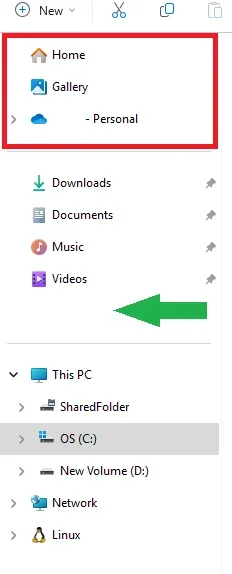
Screenshot 2025-05-14 213109.webp

Also, is it possible to get rid of the red area above?

I've tried WinAero Tweaker so see if I can address both of these issues but it doesn't look like it can, so not sure whether that is an option or not.

Thanks
 

My Computer

System One

  • OS
    Windows 11
The area that you are pointing to is known as "Quick access". To pin something there, right click the folder in the right pane of File Explorer and select "Pin to Quick access".

As for the upper section, I am not certain. I know that for "Gallery" you need to go into the registry to hide it. I'll research this a little bit and report if I find anything helpful.
 

My Computers

System One System Two

  • OS
    Win11 Pro 25H2 (RTM+)
    Computer type
    PC/Desktop
    Manufacturer/Model
    Acemagic
    CPU
    Intel i7-14650HX
    Memory
    32 GB
    Graphics Card(s)
    No GPU - Built-in Intel Graphics
    Sound Card
    Integrated
    Monitor(s) Displays
    Varies as machine will often be moved to locations with different monitors
    Screen Resolution
    Varies
    Hard Drives
    1 x 1TB Gen 4 NVMe SSD
    PSU
    120W Power Brick
    Keyboard
    Corsair K70 Max RGB Magnetic Keyboard
    Mouse
    Logitech MX Master 3
    Internet Speed
    1Gb Up / 1 Gb Down
    Browser
    Edge
    Antivirus
    Windows Defender
  • Operating System
    Win11 Pro 25H2 (RTM+)
    Computer type
    Laptop
    Manufacturer/Model
    Lenovo ThinkBook 13x Gen 2
    CPU
    Intel i7-1255U
    Memory
    16 GB
    Graphics card(s)
    Intel Iris Xe Graphics
    Sound Card
    Realtek® ALC3306-CG codec
    Monitor(s) Displays
    13.3-inch IPS Display
    Screen Resolution
    WQXGA (2560 x 1600)
    Hard Drives
    2 TB 4 x 4 NVMe SSD
    PSU
    USB-C / Thunderbolt 4 Power / Charging
    Keyboard
    Backlit, spill resistant keyboard
    Mouse
    Buttonless Glass Precision Touchpad
    Internet Speed
    1Gb Up / 1Gb Down
    Browser
    Edge
    Antivirus
    Windows Defender
    Other Info
    WiFi 6e / Bluetooth 5.1 / Facial Recognition / Fingerprint Sensor / ToF (Time of Flight) Human Presence Sensor
I'm finding out the hard way that Windows 11 is very much a different beast to Windows 10!!
Welcome to the forum. This "beast" is different in some ways but the same in others.


My Computers

System One System Two

  • OS
    Windows 11 Pro 25H2
    Computer type
    PC/Desktop
    Manufacturer/Model
    Dell Optiplex 7080
    CPU
    i9-10900 10 core 20 threads
    Motherboard
    DELL 0J37VM
    Memory
    32 gb
    Graphics Card(s)
    none-Intel UHD Graphics 630
    Sound Card
    Integrated Realtek
    Monitor(s) Displays
    Benq 27
    Screen Resolution
    2560x1440
    Hard Drives
    2x1tb Solidigm m.2 nvme /External drives 512gb Samsung m.2 sata+2tb Kingston m2.nvme
    PSU
    500w
    Case
    MT
    Cooling
    Dell Premium
    Keyboard
    Logitech wired
    Mouse
    Logitech wireless
    Internet Speed
    so slow I'm too embarrassed to tell
    Browser
    #1 Edge #2 Firefox
    Antivirus
    Defender+MWB Premium
  • Operating System
    Windows 11 Pro 24H2 26200.8457
    Computer type
    PC/Desktop
    Manufacturer/Model
    Beelink Mini PC SER5
    CPU
    AMD Ryzen 7 6800U
    Memory
    32 gb
    Graphics card(s)
    integrated
    Sound Card
    integrated
    Monitor(s) Displays
    Benq 27
    Screen Resolution
    2560x1440
    Hard Drives
    1TB Crucial nvme
    Keyboard
    Logitech wired
    Mouse
    Logitech wireless
    Internet Speed
    still too embarrassed to tell
    Browser
    Firefox
    Antivirus
    Defender
    Other Info
    System 3 is non compliant Dell 9020 i7-4770/24gb ram Win11 PRO 26200.8457
Right, most everything in the Navigation pane above This PC are shortcuts to the actual files/folders. Right-click of one and Properties will show the path to the actual file/folder, default is the items in C:\Users\USERNAMEHERE\.
 

My Computers

System One System Two

  • OS
    Win11 Pro RTM Version 24H2 Build 26100.4202
    Computer type
    Laptop
    Manufacturer/Model
    Dell Vostro 3400
    CPU
    Intel Core i5 11th Gen. 2.40GHz
    Memory
    12GB
    Hard Drives
    256GB SSD NVMe M.2
  • Operating System
    Win11 Pro RTM Version 24H2 Build 26100.4202
    Computer type
    PC/Desktop
    Manufacturer/Model
    Dell Vostro 5890
    CPU
    Intel Core i5 10th Gen. 2.90GHz
    Memory
    16GB
    Graphics card(s)
    Onboard, no VGA, using a DisplayPort-to-VGA adapter
    Monitor(s) Displays
    24" Dell
    Hard Drives
    512GB SSD NVMe, 4TB Seagate HDD
    Browser
    Firefox, Edge
    Antivirus
    Windows Defender/Microsoft Security
Welcome to the forum. This "beast" is different in some ways but the same in others.

Thank you.

You're most certainly right on that one. There are a few things which I like and are an improvement but other things such as shortcuts which aren't and you only realise after deleting it that the files within are gone :oops:.

Horray for backups is all I can say 😃
 

My Computer

System One

  • OS
    Windows 11
The area that you are pointing to is known as "Quick access". To pin something there, right click the folder in the right pane of File Explorer and select "Pin to Quick access".

As for the upper section, I am not certain. I know that for "Gallery" you need to go into the registry to hide it. I'll research this a little bit and report if I find anything helpful.

Thanks for this.

It's quite useful to know how these are supposed to be added without trying to find out by trial and error 😃
 

My Computer

System One

  • OS
    Windows 11
but other things such as shortcuts which aren't and you only realise after deleting it that the files within are gone
Are these files/folders you are relating to located in Onedrive?

When using a MS account the default location for Documents, Desktop, Pictures, and Videos is Onedrive, NOT on your system drive as you have always been accustomed to.
For those who understand how Onedrive works, that is fine. But for those who do not, which is a majority of people, it can be a nightmare. I call it the "Onedrive trap".

You can find out by right clicking on a folder, select properties, look at the location section. For example, right click on your desktop folder. If it says Onedrive in the folder path, you are syncing to Onedrive. If you have other computers also syncing to Onedrive if you delete something from your desktop, it will also delete it from the other computers and vice versa.. The same goes for ALL your other user folders as well.

If you find this to be true as I suspect, there is a procedure I can give you to stop syncing your devices and get you files back on your system drive. Doing this will make all your computers independent of each other as most of us want them to be..
 

My Computers

System One System Two

  • OS
    Windows 11 Pro 25H2
    Computer type
    PC/Desktop
    Manufacturer/Model
    Dell Optiplex 7080
    CPU
    i9-10900 10 core 20 threads
    Motherboard
    DELL 0J37VM
    Memory
    32 gb
    Graphics Card(s)
    none-Intel UHD Graphics 630
    Sound Card
    Integrated Realtek
    Monitor(s) Displays
    Benq 27
    Screen Resolution
    2560x1440
    Hard Drives
    2x1tb Solidigm m.2 nvme /External drives 512gb Samsung m.2 sata+2tb Kingston m2.nvme
    PSU
    500w
    Case
    MT
    Cooling
    Dell Premium
    Keyboard
    Logitech wired
    Mouse
    Logitech wireless
    Internet Speed
    so slow I'm too embarrassed to tell
    Browser
    #1 Edge #2 Firefox
    Antivirus
    Defender+MWB Premium
  • Operating System
    Windows 11 Pro 24H2 26200.8457
    Computer type
    PC/Desktop
    Manufacturer/Model
    Beelink Mini PC SER5
    CPU
    AMD Ryzen 7 6800U
    Memory
    32 gb
    Graphics card(s)
    integrated
    Sound Card
    integrated
    Monitor(s) Displays
    Benq 27
    Screen Resolution
    2560x1440
    Hard Drives
    1TB Crucial nvme
    Keyboard
    Logitech wired
    Mouse
    Logitech wireless
    Internet Speed
    still too embarrassed to tell
    Browser
    Firefox
    Antivirus
    Defender
    Other Info
    System 3 is non compliant Dell 9020 i7-4770/24gb ram Win11 PRO 26200.8457
Back
Top Bottom