Remove Xbox from WIN11


CKavanagh

Member
Local time
3:31 PM
Posts
31
OS
Window 11 Pro
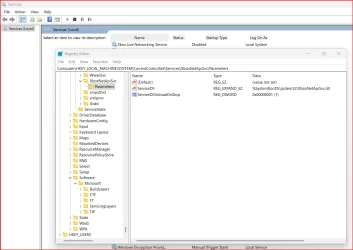
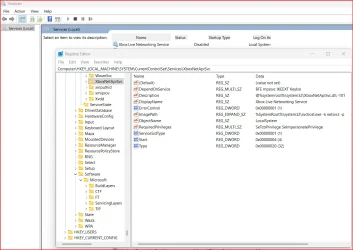
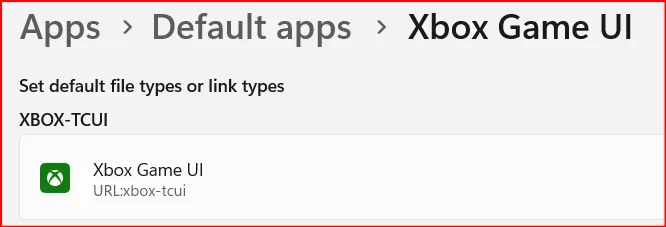
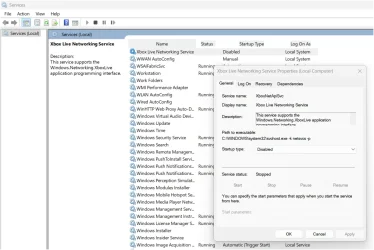
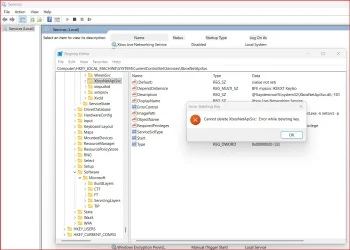
I do not game. I do not want Xbox on my laptop. I was able to uninstall Xbox and Gamebar from installed apps. I also ran the PowerShell commands as admin. I still saw 4 Xbox Live services in services.msc which I stopped and disabled. In regedit, I found the services location and was able to delete 3 of the 4 Xbox services successfully. Only one remains and I am unable to delete it. How do I do this? Also, in default apps I see Xbox Game UI (url:xboxtcui) How do I delete this?
 

Attachments

  • Error.webp
    Error.webp
    84.9 KB · Views: 2
  • Parameters.webp
    Parameters.webp
    66.2 KB · Views: 3
  • Services.webp
    Services.webp
    85.4 KB · Views: 2
  • Xbox Game UI.webp
    Xbox Game UI.webp
    9.3 KB · Views: 3
  • Xbox Properties.webp
    Xbox Properties.webp
    88.9 KB · Views: 2

My Computer

System One

  • OS
    Window 11 Pro
    Computer type
    Laptop
    Manufacturer/Model
    HP Elitebook 8

The service is disabled; there’s really no need to delete it. There’s definitely a line between “let’s shut off things we don’t use” and “ah, crap, now I’ve created a stability nightmare for myself.”
 

My Computer

System One

  • OS
    Windows 11 Pro 25H2
    Computer type
    PC/Desktop
    Manufacturer/Model
    Intel NUC12WSHi7
    CPU
    12th Gen Core i7-1260P
    Motherboard
    NUC12WSBi7
    Memory
    64 GB Micron PC4-25600
    Graphics Card(s)
    Intel Iris Xe Graphics
    Sound Card
    on-board Realtek HD Audio
    Monitor(s) Displays
    Dell U3219Q
    Screen Resolution
    3840 x 2160
    Hard Drives
    Samsung SSD 990 PRO 1TB
    Crucial MX500 2 TB
    Antivirus
    Microsoft Defender
The service is disabled; there’s really no need to delete it. There’s definitely a line between “let’s shut off things we don’t use” and “ah, crap, now I’ve created a stability nightmare for myself.”
Why Not? The EU can remove EDGE?? This should be permitted by anyone no matter where they live!
 

My Computers

System One System Two

  • OS
    Windows11 Pro 26200.8655
    Computer type
    PC/Desktop
    Manufacturer/Model
    Dell Alienware Aurora R16
    CPU
    Intel Core i9 14900F (24 -Core, 68 MB Total Cache)
    Motherboard
    Dell Alienware
    Memory
    32GB DDR5
    Graphics Card(s)
    RTX 4080 Super w/581.95
    Sound Card
    Realtec
    Monitor(s) Displays
    Corsair XENEON 32QHD165
    Screen Resolution
    2560 X 1440
    Hard Drives
    1-2TB Samsung 990 Pro PCIe NVMe M2 SSD
    1-4TB Samsung 990 Pro PCIe NVMe M2 SSD
    PSU
    1000 Watt Platinum Dell
    Case
    Alienware
    Cooling
    Liquid Closed Loop
    Keyboard
    Corsair Strafe RGB
    Mouse
    Logitech MK270 Wireless
    Internet Speed
    100Gb's Down-20 Up
    Browser
    Firefox 152.0
    Antivirus
    Defender
    Other Info
    Very Quiet And Fast
    CyberPower UPS CP1500PFCLCD
  • Operating System
    PClinuxOS Mate (2025.7)
    Computer type
    PC/Desktop
    Manufacturer/Model
    Intel
    CPU
    13th Gen Inter(R) Core(TM) i3-1315U
    Motherboard
    Intel
    Memory
    64 GB DDR4 @3200 MHz.
    Graphics card(s)
    Internal
    Sound Card
    None
    Monitor(s) Displays
    Dell 2419HGCF
    Screen Resolution
    1920 X 1080
    Hard Drives
    SAMSUNG 980 PRO SSD 2TB, PCIe 4.0 M.2 2280
    PSU
    Chicony 30 Watt
    Case
    Small
    Keyboard
    Dell
    Mouse
    Razor
    Internet Speed
    1GB
    Browser
    Slimjet
Why Not? The EU can remove EDGE?? This should be permitted by anyone no matter where they live!
Not only the EU. ;-)
If you modify IntegratedServicesRegionPolicySet.json, you can uninstall it, but we diverge.

Screenshot 2025-09-14 182428.webp
 
Last edited:

My Computers

System One System Two

  • OS
    All Branches but Release
    Computer type
    Laptop
    Manufacturer/Model
    Acer Nitro ANV15-51
    CPU
    AMD Ryzen 7 7735HS 3200-4500 Mhz 8 cores x 2
    Motherboard
    Sportage_RBH
    Memory
    32 GB DDR5
    Graphics Card(s)
    Radeon Graphic / NVIDIA GeForce RTX 4060 8 GB GDDR6
    Sound Card
    AMD/Realtek(R) Audio
    Monitor(s) Displays
    Integrated Monitor (15.3"vis)
    Screen Resolution
    FHD 1920X1080 16:9 144Hz
    Hard Drives
    KINGSTON OM8SEP4512Q-AA 1TB
    Western Digital 256GB
    PSU
    19V DC 6.32 A 120 W
    Cooling
    Dual Fans
    Mouse
    MS Bluetooth
    Internet Speed
    Fiber 1GB Cox -us & 1GB Orange-fr
    Browser
    Edge Canary- Firefox Nightly-Chrome Dev-Chrome Dev
    Antivirus
    Windows Defender
  • Operating System
    Windows 11 Beta
    Computer type
    Laptop
    Manufacturer/Model
    Asus X751BP
    CPU
    AMD A9-9420
    Memory
    8 GB of DDR4
    Graphics card(s)
    AMD Radeon R5
    Screen Resolution
    1600x900
    Hard Drives
    Seagate 1 TB
Personally, I use Autoruns64 to disable most of the XBox stuff from the registry and startup and that seems to work well enough.

Another option is something like Bulk Crap Uninstaller to outright remove them, but I have to agree with @pseymour that it is probably best to just stop the items from loading as that could have unintended consequences (there may be interactions between the XBox software and a number of other apps you may have installed) so it's always best to err with caution and disable rather than remove.
 

My Computer

System One

  • OS
    Windows 11 Pro 25H2 (26200.8457)
    Computer type
    PC/Desktop
    Manufacturer/Model
    Pre-built
    CPU
    AMD Ryzen 7 7800X3D
    Motherboard
    MSI Pro B650-VC WiFi
    Memory
    32gb Team Group (T-Force) DDR5-6000
    Graphics Card(s)
    Zotac nVidia GeForce RTX 4070 SUPER - 12gb
    Sound Card
    Sound BlasterX G6
    Monitor(s) Displays
    Koorui G2421V and ViewSonic VX2453
    Screen Resolution
    P:2560x1440 S:1920x1080
    Hard Drives
    WD Blue SN5000 - 500gb NVME
    WD Blue SN580 - 2TB NVME
    Seagate 4TB HDD - ST4000VN008-2DR166
    Keyboard
    Mountain Everest
    Mouse
    Logitech G502 Hero
    Internet Speed
    T-Mobile Home Internet
    Browser
    Firefox
    Other Info
    QNAP TS-469 Pro NAS
    TP-Link W7200 (2 unit mesh network)
    Elgato Streamdeck
Personally, I use Autoruns64 to disable most of the XBox stuff from the registry and startup and that seems to work well enough.

Another option is something like Bulk Crap Uninstaller to outright remove them, but I have to agree with @pseymour that it is probably best to just stop the items from loading as that could have unintended consequences (there may be interactions between the XBox software and a number of other apps you may have installed) so it's always best to err with caution and disable rather than remove.
I did what OAT suggested in post 4 without any problems. I do not use XBOX and never will.
 

My Computers

System One System Two

  • OS
    Windows11 Pro 26200.8655
    Computer type
    PC/Desktop
    Manufacturer/Model
    Dell Alienware Aurora R16
    CPU
    Intel Core i9 14900F (24 -Core, 68 MB Total Cache)
    Motherboard
    Dell Alienware
    Memory
    32GB DDR5
    Graphics Card(s)
    RTX 4080 Super w/581.95
    Sound Card
    Realtec
    Monitor(s) Displays
    Corsair XENEON 32QHD165
    Screen Resolution
    2560 X 1440
    Hard Drives
    1-2TB Samsung 990 Pro PCIe NVMe M2 SSD
    1-4TB Samsung 990 Pro PCIe NVMe M2 SSD
    PSU
    1000 Watt Platinum Dell
    Case
    Alienware
    Cooling
    Liquid Closed Loop
    Keyboard
    Corsair Strafe RGB
    Mouse
    Logitech MK270 Wireless
    Internet Speed
    100Gb's Down-20 Up
    Browser
    Firefox 152.0
    Antivirus
    Defender
    Other Info
    Very Quiet And Fast
    CyberPower UPS CP1500PFCLCD
  • Operating System
    PClinuxOS Mate (2025.7)
    Computer type
    PC/Desktop
    Manufacturer/Model
    Intel
    CPU
    13th Gen Inter(R) Core(TM) i3-1315U
    Motherboard
    Intel
    Memory
    64 GB DDR4 @3200 MHz.
    Graphics card(s)
    Internal
    Sound Card
    None
    Monitor(s) Displays
    Dell 2419HGCF
    Screen Resolution
    1920 X 1080
    Hard Drives
    SAMSUNG 980 PRO SSD 2TB, PCIe 4.0 M.2 2280
    PSU
    Chicony 30 Watt
    Case
    Small
    Keyboard
    Dell
    Mouse
    Razor
    Internet Speed
    1GB
    Browser
    Slimjet
Thanks everyone. There are so many remnants leftover and I don't think I'll be able to completely delete it. I may just reinstall Xbox and revert registry changes to before I started messing around with this!
 

My Computer

System One

  • OS
    Window 11 Pro
    Computer type
    Laptop
    Manufacturer/Model
    HP Elitebook 8
  • Like
Reactions: OAT
Thanks everyone. There are so many remnants leftover and I don't think I'll be able to completely delete it. I may just reinstall Xbox and revert registry changes to before I started messing around with this!


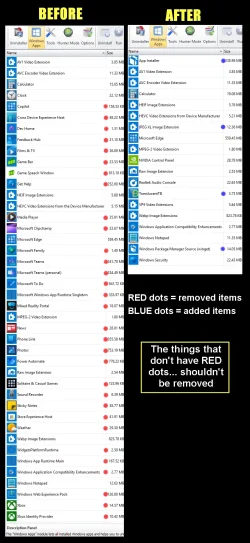
Use REVO uninstaller (free)... it even gets the leftovers.

See the pic below for what I removed with REVO... XBox etc., is in the Windows Apps section.


00000 REVO Junk Removal.webp


When REVO uninstalls something, it will then pop up a "Scan" button, that removes the leftovers.


My Computers

System One System Two

  • OS
    Win 11 Home ♦♦♦26200.8655 ♦♦♦♦♦♦♦25H2
    Computer type
    PC/Desktop
    Manufacturer/Model
    Built by Ghot® [May 2020]
    CPU
    AMD Ryzen 7 3700X
    Motherboard
    Asus Pro WS X570-ACE (BIOS 5302)
    Memory
    G.Skill (F4-3200C14D-16GTZKW)
    Graphics Card(s)
    EVGA RTX 2070 (08G-P4-2171-KR)
    Sound Card
    Realtek ALC1220P / ALC S1220A
    Monitor(s) Displays
    Dell U3011 30"
    Screen Resolution
    2560 x 1600
    Hard Drives
    2x Samsung 860 EVO 500GB,
    WD 4TB Black FZBX - SATA III,
    WD 8TB Black FZBX - SATA III,
    DRW-24B1ST CD/DVD Burner
    PSU
    PC Power & Cooling 750W Quad EPS12V
    Case
    Cooler Master ATCS 840 Tower
    Cooling
    CM Hyper 212 EVO (push/pull)
    Keyboard
    Ducky DK9008 Shine II Blue LED
    Mouse
    Logitech Optical M-100
    Internet Speed
    300/300
    Browser
    Firefox (latest)
    Antivirus
    Bitdefender Total Security
    Other Info
    Speakers: Klipsch Pro Media 2.1
  • Operating System
    Windows XP Pro 32bit w/SP3
    Computer type
    PC/Desktop
    Manufacturer/Model
    Built by Ghot® (not in use)
    CPU
    AMD Athlon 64 X2 5000+ (OC'd @ 3.2Ghz)
    Motherboard
    ASUS M2N32-SLI Deluxe Wireless Edition
    Memory
    TWIN2X2048-6400C4DHX (2 x 1GB, DDR2 800)
    Graphics card(s)
    EVGA 256-P2-N758-TR GeForce 8600GT SSC
    Sound Card
    Onboard
    Monitor(s) Displays
    ViewSonic G90FB Black 19" Professional (CRT)
    Screen Resolution
    up to 2048 x 1536
    Hard Drives
    WD 36GB 10,000rpm Raptor SATA
    Seagate 80GB 7200rpm SATA
    Lite-On LTR-52246S CD/RW
    Lite-On LH-18A1P CD/DVD Burner
    PSU
    PC Power & Cooling Silencer 750 Quad EPS12V
    Case
    Generic Beige case, 80mm fans
    Cooling
    ZALMAN 9500A 92mm CPU Cooler
    Keyboard
    Logitech Classic Keybooard 200
    Mouse
    Logitech Optical M-BT96a
    Internet Speed
    300/300
    Browser
    Firefox 3.x ??
    Antivirus
    Symantec (Norton)
    Other Info
    Still assembled, still runs. Haven't turned it on for 15 years?
The service is disabled; there’s really no need to delete it. There’s definitely a line between “let’s shut off things we don’t use” and “ah, crap, now I’ve created a stability nightmare for myself.”
lol That's what I told her. . Nobody listens to me 🤣 🤣 🤣 🤣
 

My Computers

System One System Two

  • OS
    Windows 11 Pro x64 24H2 v26200.5074
    Computer type
    PC/Desktop
    Manufacturer/Model
    Built Myself in 2025
    CPU
    AMD Ryzen 9 3600X 12-Core @ 3.80GHz
    Motherboard
    MSI X570 Gaming Plus
    Memory
    Corsair 32GB DDR4
    Graphics Card(s)
    EVGA GeForce gtx 1660 Super
    Sound Card
    On Board
    Monitor(s) Displays
    2 X AOC 27" , Dell 27"
    Screen Resolution
    1920 X 1080
    Hard Drives
    ~~~~~~~~~~~~~~~~~~~~~~~~~~
    ~ P34A60 512GB NVMe PCIe Gen3x4 M.2
    ~ 6TB Toshiba HDD
    ~ 6TB HDD (Backup)
    ~ SanDisk 250GB SSD
    ~ 2 X 1TB HDD
    ~~~~~~~~~~
    PSU
    eVGA 750w G+
    Case
    GAMDIAS White ATX Mid Tower Gaming Computer PC Case w/Tempered Glass
    Cooling
    AMD Wraith Prism
    Keyboard
    Nulea RT05 Wireless Ergonomic
    Mouse
    Nulea MD280 Wireless Vertical Mouse
    Internet Speed
    761Mbps (Download) / 692Mbps (Upload)
    Browser
    Firefox
    Antivirus
    Malwarebytes
    Other Info
    *This is my Main Computer That I use*
  • Operating System
    Windows 11 Pro x64 24H2 v26100.2894
    Computer type
    PC/Desktop
    CPU
    AMD Ryzen 7 1800X @ 3.60Ghz
    Motherboard
    Asus Crosshair VI Hero
    Memory
    16GB
    Graphics card(s)
    AMD RX580
    Sound Card
    onBoard
    Monitor(s) Displays
    LG 27UK650-W 27", eMachine 22"
    Screen Resolution
    1920 X 1080
    Hard Drives
    250GB SSD
    PSU
    CORSAIR RM850
    Case
    GAMDIAS Black ATX Mid Tower Gaming Computer PC Case w/Tempered Glass
    Cooling
    Liquid
    Keyboard
    Nulea RT05 Wireless Ergonomic
    Mouse
    Nulea MD280 Wireless Vertical Mouse
    Internet Speed
    752Mbps (Download) / 537Mbps (Upload)
    Browser
    Firefox
    Antivirus
    Malwarebytes
    Other Info
    I use this computer for photo/video editing and to track severe weather
Xbox Game UI is marked as a non-removable package. You need special magic, not REVO Uninstaller.
Unzip this batch script, and run it. This will remove all Xbox packages, and delete all services.

If you ever need to restore Xbox, then you'll have to perform a Windows repair install.
 

Attachments

My Computer

System One

  • OS
    Windows 7
Ugh. I reinstalled Xbox, Gamebar and Gaming Services from the downloads under my Microsoft Store. Now Xbox crashes when launching, wont open. Guessing I'll just uninstall and let it be until I feel like reseting Win11 again to get it back. And leave it alone.
 
Last edited:

My Computer

System One

  • OS
    Window 11 Pro
    Computer type
    Laptop
    Manufacturer/Model
    HP Elitebook 8
Xbox Game UI is marked as a non-removable package. You need special magic, not REVO Uninstaller.
Unzip this batch script, and run it. This will remove all Xbox packages, and delete all services.

If you ever need to restore Xbox, then you'll have to perform a Windows repair install.
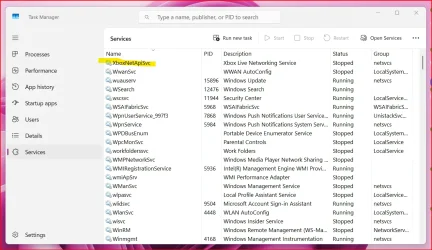
Thanks. I already had Xbox, GameBar and Gaming Services uninstalled. I ran your script to see if it removed the 1 service stull in Task Manager and Services. It didn't.
 

Attachments

  • Error.webp
    Error.webp
    77.3 KB · Views: 4
  • Task Manager.webp
    Task Manager.webp
    117.3 KB · Views: 3

My Computer

System One

  • OS
    Window 11 Pro
    Computer type
    Laptop
    Manufacturer/Model
    HP Elitebook 8
Thanks to everyone that tried to help me. I truly appreciate the assistance. I was irritated by files left over from uninstalling software showing in Task Manager, Services and Regedit. I have learned it is near impossible to rid of some files. I have learned alot about regedit, powershell, cmd, services and task manager. I am now quite proficient in laptop reset and configurations with my personalized prefences 4x in 1week! Due to the Xbox debacle and the left over files I thought maybe just reinstall it along with Gaming Services and Gamebar but then the app crashes at launch. So one last reset removing everything again to start fresh but will now just leave well enough alone...
 

My Computer

System One

  • OS
    Window 11 Pro
    Computer type
    Laptop
    Manufacturer/Model
    HP Elitebook 8
Back
Top Bottom