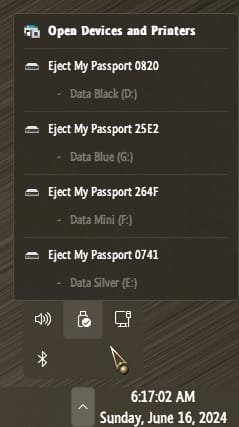
I only want the external SSD NOT showing up in the Safely Hardware Removal , must be possible ...........I still have never received a response to my query. I wanted to know what the end goal is. Is there some reason that the mere existence of this icon disturbs you? Just because it exists does not mean you need to use it. I simply ensure that it is only in the overflow area, so it doesn't even show up on my taskbar.
Besides , cant remove it anyway , " in use ".................
Still searching for the solution !
My Computers
-
At a glance
Windows11 Pro 25H2i732GBnVidia- OS
- Windows11 Pro 25H2
- Computer type
- PC/Desktop
- Manufacturer/Model
- Asus
- CPU
- i7
- Motherboard
- z97k
- Memory
- 32GB
- Graphics Card(s)
- nVidia
- Sound Card
- Realtek
- Hard Drives
- 3
- Cooling
- air
- Browser
- Edge
- Antivirus
- ESET
-
At a glance
Windows11 ProIntel i516GBIntel- Operating System
- Windows11 Pro
- Computer type
- PC/Desktop
- Manufacturer/Model
- ASUS
- CPU
- Intel i5
- Motherboard
- ASUS Basic
- Memory
- 16GB
- Graphics card(s)
- Intel
- Sound Card
- Realtek
- Monitor(s) Displays
- Samsung
- Hard Drives
- one intern , 0ne extern, OS on SSD
- Cooling
- air
- Keyboard
- wireless Logitech
- Mouse
- wireless Logitech
- Internet Speed
- 1GB
- Browser
- Edge
- Antivirus
- ESET


 Apple 13" Macbook Pro 2020 (m1)





 !
!