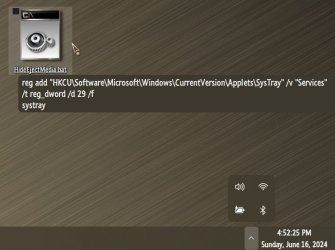
How ( ??) to try this ......??I'd try
0
1
2
3
4
5
6
7
and don't use any of those that refers to a CD/DVD.
Remember to make an image of your C: drive (at least) before you do this registry hacking.
Dont want to remove this external ( USB3) SSD , cant remove it either , so WHY (??) always visible in the Eject Media applet.............??
My Computers
-
At a glance
Windows11 Pro 25H2i732GBnVidia- OS
- Windows11 Pro 25H2
- Computer type
- PC/Desktop
- Manufacturer/Model
- Asus
- CPU
- i7
- Motherboard
- z97k
- Memory
- 32GB
- Graphics Card(s)
- nVidia
- Sound Card
- Realtek
- Hard Drives
- 3
- Cooling
- air
- Browser
- Edge
- Antivirus
- ESET
-
At a glance
Windows11 ProIntel i516GBIntel- Operating System
- Windows11 Pro
- Computer type
- PC/Desktop
- Manufacturer/Model
- ASUS
- CPU
- Intel i5
- Motherboard
- ASUS Basic
- Memory
- 16GB
- Graphics card(s)
- Intel
- Sound Card
- Realtek
- Monitor(s) Displays
- Samsung
- Hard Drives
- one intern , 0ne extern, OS on SSD
- Cooling
- air
- Keyboard
- wireless Logitech
- Mouse
- wireless Logitech
- Internet Speed
- 1GB
- Browser
- Edge
- Antivirus
- ESET


 Apple 13" Macbook Pro 2020 (m1)