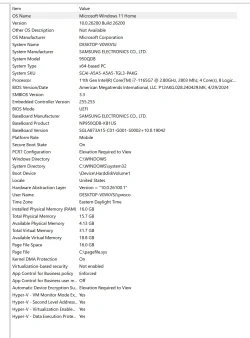
There were many V2 files that were not collected.
1) Please run administrative command prompt > post a share link
fltmc
sc qc OptionsPlusUpdaterService
2) Search for > post zipped share links
C:\Windows\MEMORY.DMP
C:\Windows\Minidump
C:\windows\livekernelreports
3) Add WMIC:
Code:
DISM /Online /Add-Capability /CapabilityName:WMIC~~~~
This tutorial will show you how to add or remove the WMIC command as an optional feature for all users in Windows 11. The WMI command-line (WMIC) utility provides a command-line interface for Windows Management Instrumentation (WMI). WMIC is compatible with existing shells and utility commands...

www.elevenforum.com
4) Run Tuneup plus > post a share link
Information This thread is for use by the BSOD team to store batch files that can be used to collect additional data, fix settings or anything else that is useful in debugging BSOD problems in Windows 10. The way I see it working is the first

www.tenforums.com
Information This thread is for use by the BSOD team to store batch files that can be used to collect additional data, fix settings or anything else that is useful in debugging BSOD problems in Windows 10. The way I see it working is the first
www.tenforums.com
5) Rerun the V2 log collector > post a share link into the newest post
6) Reinstall logi-options
Discover Logi Options Plus, Logitech’s customization software for mice and keyboards. Personalize settings, create shortcuts, and enhance everyday productivity. Download now for free.

www.logitech.com
7) Run Samsung update software / drivers
Software updates are a vital part of keeping your laptop or notebook running its best. Your Samsung laptop or notebook allows you to quickly check and apply updates.

www.samsung.com
8) Find drive K:
Open administrative command prompt and copy and paste:
chkdsk /b /v
Run this chkdsk switch chkdsk /b /v K:
C:\WINDOWS\system32>chkdsk /b /v
The type of the file system is NTFS.
Cannot lock current drive.
Chkdsk cannot run because the volume is in use by another
process. Would you like to schedule this volume to be
checked the next time the system restarts? (Y/N)
Type: Y
Reboot as needed.
9) After completing chkdsk /b /v run:
https://www.tenforums.com/attachmen...-files-use-bsod-debugging-chkdskfromevent.bat
Batch files for use in BSOD debugging - Windows 10 Help Forums
Batch files for use in BSOD debugging - Windows 10 Help Forums
Code:
Event[4174]
  Log Name: System
  Source: Microsoft-Windows-Ntfs
  Date: 2026-07-14T12:15:39.9470000Z
  Event ID: 98
  Task: N/A
  Level: Error
  Opcode: Info
  Keyword: N/A
  User: S-1-5-18
  User Name: NT AUTHORITY\SYSTEM
  Computer: DESKTOP-V0VKVSJ
  Description:
Volume K: (\Device\PGPdisks\PGPdiskVolume2) needs to be taken offline to perform a Full Chkdsk.  Please run "CHKDSK /F" locally via the command line, or run "REPAIR-VOLUME <drive:>" locally or remotely via PowerShell.

Event[4175]
  Log Name: System
  Source: Ntfs
  Date: 2026-07-14T12:19:54.6300000Z
  Event ID: 55
  Task: N/A
  Level: Error
  Opcode: Info
  Keyword: N/A
  User: S-1-5-18
  User Name: NT AUTHORITY\SYSTEM
  Computer: DESKTOP-V0VKVSJ
  Description:
A corruption was discovered in the file system structure on volume K:.

The Master File Table (MFT) contains a corrupted file record.  The file reference number is 0x12600000000003f.  The name of the file is "<unable to determine file name>".
Code:
Event[147]
  Log Name: System
  Source: Service Control Manager
  Date: 2026-06-27T08:17:54.1160000Z
  Event ID: 7000
  Task: N/A
  Level: Error
  Opcode: N/A
  Keyword: Classic,
  User: N/A
  User Name: N/A
  Computer: DESKTOP-V0VKVSJ
  Description:
The OptionsPlusUpdaterService service failed to start due to the following error:
The file or directory is corrupted and unreadable.