Repeated Crashes on Samsung 360 Laptop


pwscott61

Active member
Local time
4:06 PM
Posts
37
OS
Windows 11
I seem to repeatedly get crashes on one of my laptops. Would very much appreciate some guidance on fixing this. I believe all Windows updates are applied.

This is SYSTEM #2, not my desktop which is #1 in my profile.

Thank you!

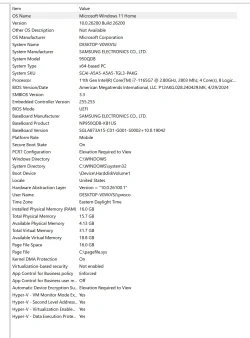
System specs below:

1785069621227.webp
 

Attachments

My Computers My Computers

  • At a glance

    Windows 11i9 10850K @ 3.6GHz64GB DDR4NVIDIA GeForce RTX 3090
    OS
    Windows 11
    Computer type
    PC/Desktop
    Manufacturer/Model
    HP Omen 30L
    CPU
    i9 10850K @ 3.6GHz
    Motherboard
    HP 8703 UU3E1)
    Memory
    64GB DDR4
    Graphics Card(s)
    NVIDIA GeForce RTX 3090
    Monitor(s) Displays
    Samsung
    Screen Resolution
    2560 x 1440
  • At a glance

    Windows 11 Home11th Gen Intel(R) Core(TM) i7-1165G7 @ 2.80GH...16GBIntel Iris(R) Xe Graphics
    Operating System
    Windows 11 Home
    Computer type
    Laptop
    Manufacturer/Model
    Samsung NP950QDB
    CPU
    11th Gen Intel(R) Core(TM) i7-1165G7 @ 2.80GHz, 2803 Mhz, 4 Core(s), 8 Logical Processor(s)
    Motherboard
    Samsung NP950QDB-KB1US
    Memory
    16GB
    Graphics card(s)
    Intel Iris(R) Xe Graphics
    Sound Card
    Realtek
    Monitor(s) Displays
    Onboard screen, sometimes Samsung 4K 27" monitor
    Screen Resolution
    1920 x 1080
    Hard Drives
    1TB SSD
    PSU
    laptop Power Supply USB-C 65W
    Case
    laptop
    Cooling
    integral fan
    Keyboard
    US Integral
    Mouse
    Logitech MX Master 3S
    Internet Speed
    1Gb x 1Gb
    Browser
    Chrome
    Antivirus
    Norton 360
    Other Info
    Malware Bytes
There were many V2 files that were not collected.


1) Please run administrative command prompt > post a share link

fltmc
sc qc OptionsPlusUpdaterService


2) Search for > post zipped share links

C:\Windows\MEMORY.DMP
C:\Windows\Minidump
C:\windows\livekernelreports


3) Add WMIC:

Code:
DISM /Online /Add-Capability /CapabilityName:WMIC~~~~


4) Run Tuneup plus > post a share link


5) Rerun the V2 log collector > post a share link into the newest post


6) Reinstall logi-options


7) Run Samsung update software / drivers


8) Find drive K:

Open administrative command prompt and copy and paste:

chkdsk /b /v

Run this chkdsk switch chkdsk /b /v K:


C:\WINDOWS\system32>chkdsk /b /v
The type of the file system is NTFS.
Cannot lock current drive.
Chkdsk cannot run because the volume is in use by another
process. Would you like to schedule this volume to be
checked the next time the system restarts? (Y/N)

Type: Y

Reboot as needed.


9) After completing chkdsk /b /v run:

https://www.tenforums.com/attachmen...-files-use-bsod-debugging-chkdskfromevent.bat

Batch files for use in BSOD debugging - Windows 10 Help Forums

Batch files for use in BSOD debugging - Windows 10 Help Forums


Code:
Event[4174]
  Log Name: System
  Source: Microsoft-Windows-Ntfs
  Date: 2026-07-14T12:15:39.9470000Z
  Event ID: 98
  Task: N/A
  Level: Error
  Opcode: Info
  Keyword: N/A
  User: S-1-5-18
  User Name: NT AUTHORITY\SYSTEM
  Computer: DESKTOP-V0VKVSJ
  Description:
Volume K: (\Device\PGPdisks\PGPdiskVolume2) needs to be taken offline to perform a Full Chkdsk.  Please run "CHKDSK /F" locally via the command line, or run "REPAIR-VOLUME <drive:>" locally or remotely via PowerShell.

Event[4175]
  Log Name: System
  Source: Ntfs
  Date: 2026-07-14T12:19:54.6300000Z
  Event ID: 55
  Task: N/A
  Level: Error
  Opcode: Info
  Keyword: N/A
  User: S-1-5-18
  User Name: NT AUTHORITY\SYSTEM
  Computer: DESKTOP-V0VKVSJ
  Description:
A corruption was discovered in the file system structure on volume K:.

The Master File Table (MFT) contains a corrupted file record.  The file reference number is 0x12600000000003f.  The name of the file is "<unable to determine file name>".

Code:
Event[147]
  Log Name: System
  Source: Service Control Manager
  Date: 2026-06-27T08:17:54.1160000Z
  Event ID: 7000
  Task: N/A
  Level: Error
  Opcode: N/A
  Keyword: Classic,
  User: N/A
  User Name: N/A
  Computer: DESKTOP-V0VKVSJ
  Description:
The OptionsPlusUpdaterService service failed to start due to the following error:
The file or directory is corrupted and unreadable.

 
Last edited:

My Computer My Computer

At a glance

Windows 10Intel(R) Core(TM) i7-4800MQ CPU @ 2.70GHz16 GB Total: Manufacturer : Samsung MemoryTyp...NVIDIA Quadro K3100M; Intel(R) HD Graphics 4600
OS
Windows 10
Computer type
Laptop
Manufacturer/Model
HP
CPU
Intel(R) Core(TM) i7-4800MQ CPU @ 2.70GHz
Motherboard
Product : 190A Version : KBC Version 94.56
Memory
16 GB Total: Manufacturer : Samsung MemoryType : DDR3 FormFactor : SODIMM Capacity : 8GB Speed : 1600
Graphics Card(s)
NVIDIA Quadro K3100M; Intel(R) HD Graphics 4600
Sound Card
IDT High Definition Audio CODEC; PNP Device ID HDAUDIO\FUNC_01&VEN_111D&DEV_76E0
Hard Drives
Model Hitachi HTS727575A9E364
Antivirus
Microsoft Defender
Other Info
Mobile Workstation
Thanks very much for looking at my info. I think I understand the instructions, but have a question:

Regarding these:

Search for > post zipped share links

C:\Windows\MEMORY.DMP
C:\Windows\Minidump
C:\windows\livekernelreports


I believe you're asking me, after the steps above this point, to create a .Zip archive with those three files....I only see one of the files in my c:\Windows - just the MEMORY.DMP, the others are not in the c:|Windows directory....Do I post just the one, or have I gone astray already?

Thanks...more when I understand this step. I appreciate your patience and guidance on this.
 

My Computers My Computers

  • At a glance

    Windows 11i9 10850K @ 3.6GHz64GB DDR4NVIDIA GeForce RTX 3090
    OS
    Windows 11
    Computer type
    PC/Desktop
    Manufacturer/Model
    HP Omen 30L
    CPU
    i9 10850K @ 3.6GHz
    Motherboard
    HP 8703 UU3E1)
    Memory
    64GB DDR4
    Graphics Card(s)
    NVIDIA GeForce RTX 3090
    Monitor(s) Displays
    Samsung
    Screen Resolution
    2560 x 1440
  • At a glance

    Windows 11 Home11th Gen Intel(R) Core(TM) i7-1165G7 @ 2.80GH...16GBIntel Iris(R) Xe Graphics
    Operating System
    Windows 11 Home
    Computer type
    Laptop
    Manufacturer/Model
    Samsung NP950QDB
    CPU
    11th Gen Intel(R) Core(TM) i7-1165G7 @ 2.80GHz, 2803 Mhz, 4 Core(s), 8 Logical Processor(s)
    Motherboard
    Samsung NP950QDB-KB1US
    Memory
    16GB
    Graphics card(s)
    Intel Iris(R) Xe Graphics
    Sound Card
    Realtek
    Monitor(s) Displays
    Onboard screen, sometimes Samsung 4K 27" monitor
    Screen Resolution
    1920 x 1080
    Hard Drives
    1TB SSD
    PSU
    laptop Power Supply USB-C 65W
    Case
    laptop
    Cooling
    integral fan
    Keyboard
    US Integral
    Mouse
    Logitech MX Master 3S
    Internet Speed
    1Gb x 1Gb
    Browser
    Chrome
    Antivirus
    Norton 360
    Other Info
    Malware Bytes
Yes, please zip the dump file then post a share link.
 

My Computer My Computer

At a glance

Windows 10Intel(R) Core(TM) i7-4800MQ CPU @ 2.70GHz16 GB Total: Manufacturer : Samsung MemoryTyp...NVIDIA Quadro K3100M; Intel(R) HD Graphics 4600
OS
Windows 10
Computer type
Laptop
Manufacturer/Model
HP
CPU
Intel(R) Core(TM) i7-4800MQ CPU @ 2.70GHz
Motherboard
Product : 190A Version : KBC Version 94.56
Memory
16 GB Total: Manufacturer : Samsung MemoryType : DDR3 FormFactor : SODIMM Capacity : 8GB Speed : 1600
Graphics Card(s)
NVIDIA Quadro K3100M; Intel(R) HD Graphics 4600
Sound Card
IDT High Definition Audio CODEC; PNP Device ID HDAUDIO\FUNC_01&VEN_111D&DEV_76E0
Hard Drives
Model Hitachi HTS727575A9E364
Antivirus
Microsoft Defender
Other Info
Mobile Workstation

Latest Support Threads

Back
Top Bottom