Personalization Reset and Re-register Windows Spotlight in Windows 11


Windows_Spotlight-new_header.webp

This tutorial will show you how to reset and re-register Windows Spotlight for your account in Windows 11.

In Windows 11, you can have Windows Spotlight as a theme and display different background images on your desktop and lock screen, and occasionally offers suggestions on the lock screen.

If Windows Spotlights stops working and/or stops changing the background image, you can reset and re-register Windows Spotlight to fix it.


Windows Spotlight will not work while connected to a metered network (ethernet or wireless), or in Battery Saver mode.

Windows Spotlight requires Background Apps to be turned on.

Country or region and Device setup region must be the same for Spotlight to work.
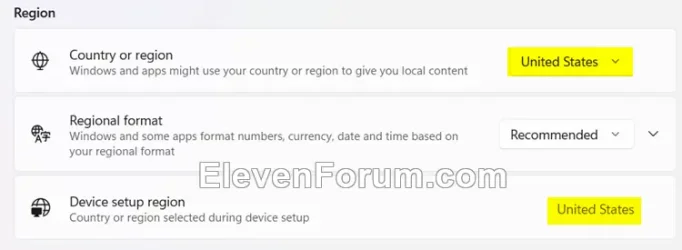
Region.webp


Sometimes it may take 24 to 48 hours after resetting for Windows Spotlight to sync again.


Another option is to use the Windows spotlight, dynamic images theme.

OR:


EXAMPLE: Windows Spotlight on Desktop and Lock screen

Windows_Spotlight_desktop_background.jpg
Windows_Spotlight_lock_screen.jpg


Here's How:

1 Change your desktop background to something other than Windows Spotlight. (see screenshot below)


Windows_Spotlight_desktop_background-1.png

2 Change your lock screen background to something other than Windows Spotlight. (see screenshot below)


Windows_Spotlight_lock_screen_background-1.png

3 Click/tap on the download button below to download the file below.

Reset_and_re-register_Windows_Spotlight.zip


(Contents of BAT file for reference)
Code:
:: Turn on background apps
reg delete "HKEY_CURRENT_USER\Software\Microsoft\Windows\CurrentVersion\BackgroundAccessApplications" /v GlobalUserDisabled /f
reg delete "HKEY_CURRENT_USER\Software\Microsoft\Windows\CurrentVersion\Search" /v BackgroundAppGlobalToggle /f

:: Reset Windows Spotlight
DEL /F /S /Q /A "%USERPROFILE%/AppData\Local\Packages\MicrosoftWindows.Client.CBS_cw5n1h2txyewy\LocalCache\Microsoft\IrisService"
DEL /F /S /Q /A "%USERPROFILE%/AppData\Local\Packages\Microsoft.Windows.ContentDeliveryManager_cw5n1h2txyewy\LocalCache\Microsoft\IrisService"
DEL /F /S /Q /A "%USERPROFILE%/AppData\Local\Packages\Microsoft.Windows.ContentDeliveryManager_cw5n1h2txyewy\LocalState\Assets"
DEL /F /S /Q /A "%USERPROFILE%/AppData\Local\Packages\Microsoft.Windows.ContentDeliveryManager_cw5n1h2txyewy\Settings"

:: Re-register Windows Spotlight
PowerShell -ExecutionPolicy Unrestricted -Command "& {$manifest = (Get-AppxPackage *ContentDeliveryManager*).InstallLocation + '\AppxManifest.xml' ; Add-AppxPackage -DisableDevelopmentMode -Register $manifest}"
PowerShell -ExecutionPolicy Unrestricted -Command "& {$manifest = (Get-AppxPackage *MicrosoftWindows.Client.CBS*).InstallLocation + '\AppxManifest.xml' ; Add-AppxPackage -DisableDevelopmentMode -Register $manifest}"

4 Save the ZIP file to your desktop.

5 Unblock the ZIP file.

6 Extract the BAT file from the ZIP file.

7 Run the BAT file.

8 Restart the computer to apply.

9 After you sign in, you can change your desktop background back to Windows Spotlight if wanted. (see screenshot below)


Windows_Spotlight_desktop_background-2.png

10 Change your lock screen background back to Windows Spotlight if wanted. (see screenshot below)


Windows_Spotlight_lock_screen_background-2.png


That's it,
Shawn Brink


Attachments

Last edited:
:)
 

My Computer My Computer

At a glance

win 11AMD Ryzen3200G16VegaRadeon 8
OS
win 11
Computer type
PC/Desktop
CPU
AMD Ryzen3200G
Motherboard
ASRock A320M
Memory
16
Graphics Card(s)
VegaRadeon 8
I've applied all the steps but unfortunately didn't work for me.
 
I've applied all the steps but unfortunately didn't work for me.
Be patient. It can take up to 24 hours for Spotlight to get its first new image after a reset.
 

My Computers My Computers

  • At a glance

    Windows 11 HomeAMD Athlon Silver 3050U8GBRadeon Graphics
    OS
    Windows 11 Home
    Computer type
    Laptop
    Manufacturer/Model
    Acer Aspire 3 A315-23-R9VY
    CPU
    AMD Athlon Silver 3050U
    Memory
    8GB
    Graphics Card(s)
    Radeon Graphics
    Monitor(s) Displays
    laptop screen
    Screen Resolution
    1366x768 native resolution, up to 2560x1440 with Radeon Virtual Super Resolution
    Hard Drives
    1TB Samsung EVO 870 SSD (from April 2026: 250GB EVO 850)
    Internet Speed
    150 Mbps
    Browser
    Edge, Firefox
    Antivirus
    Defender
    Other Info
    fully 'Windows 11 ready' laptop. Windows 10 C: partition migrated from my old unsupported 'main machine' then upgraded to 11. A test migration ran Insider builds for 2 months. When 11 was released on 5th October 2021 it was re-imaged back to 10 and was offered the upgrade in Windows Update on 20th October. Windows Update offered the 22H2 Feature Update on 20th September 2022. It got the 23H2 Feature Update on 4th November 2023 through Windows Update, 24H2 on 3rd October 2024 through Windows Update by setting the Target Release Version for 24H2, and 25H2 on 30th September 2025 through Windows Update by setting the Target Release Version for 25H2.

    UPDATE - 11 April 2026: due to mechanical deterioration this PC has been retired from active duty. The OS with all software and files has been migrated to my System Seven in 'Other systems' to carry on as my general purpose 'main machine'.

    I've now clean installed 25H2 and used Garlin's scripts to update Secure Boot to CA 2023 and revoke the PCA 2011 certificates. It's new role is to test secure boot issues.
  • At a glance

    Windows 11 ProIntel® Core™ i5-520M8GB(integrated graphics) Intel HD Graphics
    Operating System
    Windows 11 Pro
    Computer type
    Laptop
    Manufacturer/Model
    Dell Latitude E4310
    CPU
    Intel® Core™ i5-520M
    Motherboard
    0T6M8G
    Memory
    8GB
    Graphics card(s)
    (integrated graphics) Intel HD Graphics
    Screen Resolution
    1366x768
    Hard Drives
    500GB Crucial MX500 SSD
    Browser
    Firefox, Edge
    Antivirus
    Defender
    Other Info
    unsupported machine: Legacy bios, MBR, TPM 1.2, upgraded from W10 to W11 using W10/W11 hybrid install media workaround.

    In-place upgrade to 22H2 using ISO and a workaround.
    Feature Update to 23H2 by manually installing the Enablement Package.
    In-place upgrade to 24H2 using hybrid 23H2/24H2 install media.
    Upgraded to 25H2 by Enablement Package.

    Also running Insider Dev, and Canary builds and Windows 10 as native boot .vhdx.
  • My SYSTEM THREE is a Dell Latitude 5410, i7-10610U, 32GB RAM, 512GB NVMe ssd, supported device running Windows 11 Pro.

    My SYSTEM FOUR is a 2-in-1 convertible Lenovo Yoga 11e 20DA, Celeron N2930, 8GB RAM, 256GB ssd. Unsupported device: currently running Win10 Pro, plus Win11 Pro RTM and Insider Dev, Beta, and RP 24H2 as native boot vhdx.

    My SYSTEM FIVE is a Dell Latitude 3190 2-in-1, Pentium Silver N5030, 8GB RAM, 1TB NVMe ssd, supported device running Windows 11 Pro, plus Insider Beta, Dev, and Canary builds (and a few others) as a native boot .vhdx.

    My SYSTEM SIX is a Dell Latitude 5550, Core Ultra 7 165H, 64GB RAM, 1TB NVMe SSD, supported device, Windows 11 Pro 24H2, Hyper-V host machine. Updated to 25H2 on 30th September 2025.

    My SYSTEM SEVEN is a Lenovo Thinkpad T580, Intel Core i7-8650U, 16GB RAM, 512GB NVMe SSD + 2nd 512GB NVMe SSD, a supported device for Windows 11. This is my current general purpose 'main machine'. The installed Windows 11 Home from my System One has been migrated to this machine.
Somehow Spotlight doesn't seem to work on my windows 11, whereas it works flawlessly in my windows 10 installation
 

My Computer My Computer

At a glance

Windows 11 23H2Intel i7-7700k16 GBIntel 630 onboard
OS
Windows 11 23H2
Computer type
PC/Desktop
Manufacturer/Model
Assembled
CPU
Intel i7-7700k
Motherboard
Asrock Z270 Taichi
Memory
16 GB
Graphics Card(s)
Intel 630 onboard
Sound Card
Onboard
Monitor(s) Displays
Benq 1080p
Screen Resolution
1920*1080
Hard Drives
NVMe, SSD and HDD
Case
Cooler Master
Keyboard
Asus wireless
Mouse
Asus Wireless
Internet Speed
75 Mbps
Browser
Chrome, Edge, Arc
Antivirus
Windows Defender
Applied your patch .bat file to my Desktop as you instructed and for me, it fixed the corrupt Windows Spotlight file. The problem occurs when we visit bad websites. My system has caught many trojan files but they can infiltrate windows system files such as Spotlight even after being quarantined.
 

My Computer My Computer

At a glance

Windows 11 Home11th Gen Intel(R) Core(TM) i7-1165G7 @ 2.80GH...16 GBIntel® Iris® Xᵉ Graphics
OS
Windows 11 Home
Computer type
Laptop
Manufacturer/Model
HP - ENVY 17-ch0500sa
CPU
11th Gen Intel(R) Core(TM) i7-1165G7 @ 2.80GHz 1.69 GHz
Motherboard
HP 88B5
Memory
16 GB
Graphics Card(s)
Intel® Iris® Xᵉ Graphics
Sound Card
Microphone Array (Intel® Smart Sound Technology)
Monitor(s) Displays
Touchscreen
Screen Resolution
1920 x 1080 x 60 hertz
Hard Drives
1 TB PCIe® NVMe™ M.2 SSD
PSU
65 W AC power adapter
Keyboard
HP
Mouse
Microsoft
Internet Speed
1,000 MBs
Browser
Microsoft Edge
Antivirus
Malwarebytes Premium
My Windows Spotlight stopped working and just shows the fixed blue picture. I reset using the batch file in this tutorial. On restart, the lock screen was a plain gray background but it soon changed back to the fixed blue picture (see screenshot). What's going on here?
screenshot.jpg
 

My Computer My Computer

At a glance

Windows 11 ProCore i7-13700K64 GB Kingston Fury Beast DDR5Gigabyte GeForce RTX 2060 Super Gaming OC 8G
OS
Windows 11 Pro
Computer type
PC/Desktop
Manufacturer/Model
Self build
CPU
Core i7-13700K
Motherboard
Asus TUF Gaming Plus WiFi Z790
Memory
64 GB Kingston Fury Beast DDR5
Graphics Card(s)
Gigabyte GeForce RTX 2060 Super Gaming OC 8G
Sound Card
Realtek S1200A
Monitor(s) Displays
Viewsonic VP2770 & Dell (secondary)
Screen Resolution
2560 x 1440
Hard Drives
Kingston KC3000 2TB NVME SSD & SATA HDDs & SSD
PSU
EVGA SuperNova G2 850W
Case
Nanoxia Deep Silence 1
Cooling
Noctua NH-D14
Keyboard
Microsoft Digital Media Pro
Mouse
Logitech Wireless
Internet Speed
80 Mb / s
Browser
Chrome
Antivirus
Defender, Malwarebytes Free & AdwCleaner
My Windows Spotlight stopped working and just shows the fixed blue picture. I reset using the batch file in this tutorial. On restart, the lock screen was a plain gray background but it soon changed back to the fixed blue picture (see screenshot). What's going on here?
___________________________________________________________________________________________________________________________________________________________________________________________
Go to 'Get Help' and seek 'Contact Support' who will try to resolve your issue with remote viewing.
 

My Computer My Computer

At a glance

Windows 11 Home11th Gen Intel(R) Core(TM) i7-1165G7 @ 2.80GH...16 GBIntel® Iris® Xᵉ Graphics
OS
Windows 11 Home
Computer type
Laptop
Manufacturer/Model
HP - ENVY 17-ch0500sa
CPU
11th Gen Intel(R) Core(TM) i7-1165G7 @ 2.80GHz 1.69 GHz
Motherboard
HP 88B5
Memory
16 GB
Graphics Card(s)
Intel® Iris® Xᵉ Graphics
Sound Card
Microphone Array (Intel® Smart Sound Technology)
Monitor(s) Displays
Touchscreen
Screen Resolution
1920 x 1080 x 60 hertz
Hard Drives
1 TB PCIe® NVMe™ M.2 SSD
PSU
65 W AC power adapter
Keyboard
HP
Mouse
Microsoft
Internet Speed
1,000 MBs
Browser
Microsoft Edge
Antivirus
Malwarebytes Premium
Go to 'Get Help' and seek 'Contact Support' who will try to resolve your issue with remote viewing.
I ended up just restoring from my Reflect backup up from an hour ago. I'm configuring a new PC and a failed attempt to uninstall MS Flight Simulator 2002 must have screwed something up. I've learned to backup frequently as I configure a new PC!
 

My Computer My Computer

At a glance

Windows 11 ProCore i7-13700K64 GB Kingston Fury Beast DDR5Gigabyte GeForce RTX 2060 Super Gaming OC 8G
OS
Windows 11 Pro
Computer type
PC/Desktop
Manufacturer/Model
Self build
CPU
Core i7-13700K
Motherboard
Asus TUF Gaming Plus WiFi Z790
Memory
64 GB Kingston Fury Beast DDR5
Graphics Card(s)
Gigabyte GeForce RTX 2060 Super Gaming OC 8G
Sound Card
Realtek S1200A
Monitor(s) Displays
Viewsonic VP2770 & Dell (secondary)
Screen Resolution
2560 x 1440
Hard Drives
Kingston KC3000 2TB NVME SSD & SATA HDDs & SSD
PSU
EVGA SuperNova G2 850W
Case
Nanoxia Deep Silence 1
Cooling
Noctua NH-D14
Keyboard
Microsoft Digital Media Pro
Mouse
Logitech Wireless
Internet Speed
80 Mb / s
Browser
Chrome
Antivirus
Defender, Malwarebytes Free & AdwCleaner
I ended up just restoring from my Reflect backup up from an hour ago. I'm configuring a new PC and a failed attempt to uninstall MS Flight Simulator 2002 must have screwed something up. I've learned to backup frequently as I configure a new PC!
Always do a 'System Image Backup'. Its an entire and complete copy of the whole hard drive, including all your movies/music/photos.
 

My Computer My Computer

At a glance

Windows 11 Home11th Gen Intel(R) Core(TM) i7-1165G7 @ 2.80GH...16 GBIntel® Iris® Xᵉ Graphics
OS
Windows 11 Home
Computer type
Laptop
Manufacturer/Model
HP - ENVY 17-ch0500sa
CPU
11th Gen Intel(R) Core(TM) i7-1165G7 @ 2.80GHz 1.69 GHz
Motherboard
HP 88B5
Memory
16 GB
Graphics Card(s)
Intel® Iris® Xᵉ Graphics
Sound Card
Microphone Array (Intel® Smart Sound Technology)
Monitor(s) Displays
Touchscreen
Screen Resolution
1920 x 1080 x 60 hertz
Hard Drives
1 TB PCIe® NVMe™ M.2 SSD
PSU
65 W AC power adapter
Keyboard
HP
Mouse
Microsoft
Internet Speed
1,000 MBs
Browser
Microsoft Edge
Antivirus
Malwarebytes Premium
I ended up just restoring from my Reflect backup up from an hour ago. I'm configuring a new PC and a failed attempt to uninstall MS Flight Simulator 2002 must have screwed something up. I've learned to backup frequently as I configure a new PC!
Run this .bat file that worked for my Windows 11.
 

Attachments

My Computer My Computer

At a glance

Windows 11 Home11th Gen Intel(R) Core(TM) i7-1165G7 @ 2.80GH...16 GBIntel® Iris® Xᵉ Graphics
OS
Windows 11 Home
Computer type
Laptop
Manufacturer/Model
HP - ENVY 17-ch0500sa
CPU
11th Gen Intel(R) Core(TM) i7-1165G7 @ 2.80GHz 1.69 GHz
Motherboard
HP 88B5
Memory
16 GB
Graphics Card(s)
Intel® Iris® Xᵉ Graphics
Sound Card
Microphone Array (Intel® Smart Sound Technology)
Monitor(s) Displays
Touchscreen
Screen Resolution
1920 x 1080 x 60 hertz
Hard Drives
1 TB PCIe® NVMe™ M.2 SSD
PSU
65 W AC power adapter
Keyboard
HP
Mouse
Microsoft
Internet Speed
1,000 MBs
Browser
Microsoft Edge
Antivirus
Malwarebytes Premium

My Computers My Computers

  • At a glance

    Windows 11 Pro for WorkstationsIntel i7-8700K 5 GHz64 GB (4x16GB) G.SKILL TridentZ RGB DDR4 3600...ASUS ROG-STRIX-GTX1080TI-O11G-GAMING (11GB GD...
    OS
    Windows 11 Pro for Workstations
    Computer type
    PC/Desktop
    Manufacturer/Model
    Custom self build
    CPU
    Intel i7-8700K 5 GHz
    Motherboard
    ASUS ROG Maximus XI Formula Z390
    Memory
    64 GB (4x16GB) G.SKILL TridentZ RGB DDR4 3600 MHz (F4-3600C18D-32GTZR)
    Graphics Card(s)
    ASUS ROG-STRIX-GTX1080TI-O11G-GAMING (11GB GDDR5X)
    Sound Card
    Integrated Digital Audio (S/PDIF)
    Monitor(s) Displays
    2 x Samsung Odyssey G75 27"
    Screen Resolution
    2560x1440
    Hard Drives
    1TB Samsung 990 PRO M.2,
    4TB Samsung 990 PRO M.2,
    TerraMaster F8 SSD Plus NAS
    PSU
    Seasonic Prime Titanium 850W
    Case
    Thermaltake Core P3 wall mounted
    Cooling
    Corsair Hydro H115i
    Keyboard
    Amazon Basics Wired Full Keyboard MD005
    Mouse
    Logitech MX Master 4
    Internet Speed
    2 Gbps Download and 100 Mbps Upload
    Browser
    Chrome and Edge
    Antivirus
    Microsoft Defender
    Other Info
    Logitech Z625 speaker system,
    Logitech BRIO 4K Pro webcam,
    HP Color LaserJet Pro MFP M477fdn,
    CyberPower CP1500PFCLCD
    Galaxy S23 Plus phone
  • At a glance

    Windows 11 ProSnapdragon X Elite (12 core) 3.42 GHz16 GB LPDDR5x-7467 MHz
    Operating System
    Windows 11 Pro
    Computer type
    Laptop
    Manufacturer/Model
    Surface Laptop 7 Copilot+ PC
    CPU
    Snapdragon X Elite (12 core) 3.42 GHz
    Memory
    16 GB LPDDR5x-7467 MHz
    Monitor(s) Displays
    15" HDR
    Screen Resolution
    2496 x 1664
    Hard Drives
    1 TB SSD
    Internet Speed
    Wi-Fi 7 and Bluetooth 5.4
    Browser
    Chrome and Edge
    Antivirus
    Microsoft Defender
Hello, :alien:

Same as what the BAT in the tutorial does.
Slight variation...

:: Created by: Peter James
:: Created on: March 13, 2023

:: Re-register Windows Spotlight
PowerShell -ExecutionPolicy Unrestricted -Command "& {$manifest = (Get-AppxPackage *ContentDeliveryManager*).InstallLocation + '\AppxManifest.xml' ; Add-AppxPackage -DisableDevelopmentMode -Register $manifest}"

:: Reset Windows Spotlight
DEL /F /S /Q /A "%USERPROFILE%/AppData\Local\Packages\Microsoft.Windows.ContentDeliveryManager_cw5n1h2txyewy\LocalState\Assets"
DEL /F /S /Q /A "%USERPROFILE%/AppData\Local\Packages\Microsoft.Windows.ContentDeliveryManager_cw5n1h2txyewy\Settings"

:: Re-register Windows Spotlight
PowerShell -ExecutionPolicy Unrestricted -Command "& {$manifest = (Get-AppxPackage *ContentDeliveryManager*).InstallLocation + '\AppxManifest.xml' ; Add-AppxPackage -DisableDevelopmentMode -Register $manifest}"
 

My Computer My Computer

At a glance

Windows 11 Home11th Gen Intel(R) Core(TM) i7-1165G7 @ 2.80GH...16 GBIntel® Iris® Xᵉ Graphics
OS
Windows 11 Home
Computer type
Laptop
Manufacturer/Model
HP - ENVY 17-ch0500sa
CPU
11th Gen Intel(R) Core(TM) i7-1165G7 @ 2.80GHz 1.69 GHz
Motherboard
HP 88B5
Memory
16 GB
Graphics Card(s)
Intel® Iris® Xᵉ Graphics
Sound Card
Microphone Array (Intel® Smart Sound Technology)
Monitor(s) Displays
Touchscreen
Screen Resolution
1920 x 1080 x 60 hertz
Hard Drives
1 TB PCIe® NVMe™ M.2 SSD
PSU
65 W AC power adapter
Keyboard
HP
Mouse
Microsoft
Internet Speed
1,000 MBs
Browser
Microsoft Edge
Antivirus
Malwarebytes Premium

My Computers My Computers

  • At a glance

    Windows 11 Pro for WorkstationsIntel i7-8700K 5 GHz64 GB (4x16GB) G.SKILL TridentZ RGB DDR4 3600...ASUS ROG-STRIX-GTX1080TI-O11G-GAMING (11GB GD...
    OS
    Windows 11 Pro for Workstations
    Computer type
    PC/Desktop
    Manufacturer/Model
    Custom self build
    CPU
    Intel i7-8700K 5 GHz
    Motherboard
    ASUS ROG Maximus XI Formula Z390
    Memory
    64 GB (4x16GB) G.SKILL TridentZ RGB DDR4 3600 MHz (F4-3600C18D-32GTZR)
    Graphics Card(s)
    ASUS ROG-STRIX-GTX1080TI-O11G-GAMING (11GB GDDR5X)
    Sound Card
    Integrated Digital Audio (S/PDIF)
    Monitor(s) Displays
    2 x Samsung Odyssey G75 27"
    Screen Resolution
    2560x1440
    Hard Drives
    1TB Samsung 990 PRO M.2,
    4TB Samsung 990 PRO M.2,
    TerraMaster F8 SSD Plus NAS
    PSU
    Seasonic Prime Titanium 850W
    Case
    Thermaltake Core P3 wall mounted
    Cooling
    Corsair Hydro H115i
    Keyboard
    Amazon Basics Wired Full Keyboard MD005
    Mouse
    Logitech MX Master 4
    Internet Speed
    2 Gbps Download and 100 Mbps Upload
    Browser
    Chrome and Edge
    Antivirus
    Microsoft Defender
    Other Info
    Logitech Z625 speaker system,
    Logitech BRIO 4K Pro webcam,
    HP Color LaserJet Pro MFP M477fdn,
    CyberPower CP1500PFCLCD
    Galaxy S23 Plus phone
  • At a glance

    Windows 11 ProSnapdragon X Elite (12 core) 3.42 GHz16 GB LPDDR5x-7467 MHz
    Operating System
    Windows 11 Pro
    Computer type
    Laptop
    Manufacturer/Model
    Surface Laptop 7 Copilot+ PC
    CPU
    Snapdragon X Elite (12 core) 3.42 GHz
    Memory
    16 GB LPDDR5x-7467 MHz
    Monitor(s) Displays
    15" HDR
    Screen Resolution
    2496 x 1664
    Hard Drives
    1 TB SSD
    Internet Speed
    Wi-Fi 7 and Bluetooth 5.4
    Browser
    Chrome and Edge
    Antivirus
    Microsoft Defender
True. It re-registers twice, but shouldn't make any difference.
The batch file also didn't work. It only took 2 minutes to restore from Reflect backup!
 

My Computer My Computer

At a glance

Windows 11 ProCore i7-13700K64 GB Kingston Fury Beast DDR5Gigabyte GeForce RTX 2060 Super Gaming OC 8G
OS
Windows 11 Pro
Computer type
PC/Desktop
Manufacturer/Model
Self build
CPU
Core i7-13700K
Motherboard
Asus TUF Gaming Plus WiFi Z790
Memory
64 GB Kingston Fury Beast DDR5
Graphics Card(s)
Gigabyte GeForce RTX 2060 Super Gaming OC 8G
Sound Card
Realtek S1200A
Monitor(s) Displays
Viewsonic VP2770 & Dell (secondary)
Screen Resolution
2560 x 1440
Hard Drives
Kingston KC3000 2TB NVME SSD & SATA HDDs & SSD
PSU
EVGA SuperNova G2 850W
Case
Nanoxia Deep Silence 1
Cooling
Noctua NH-D14
Keyboard
Microsoft Digital Media Pro
Mouse
Logitech Wireless
Internet Speed
80 Mb / s
Browser
Chrome
Antivirus
Defender, Malwarebytes Free & AdwCleaner
This problem happened again on another PC using the same MS account and on my new PC again. Whatever I do, I see this image despite having Spotlight enabled. What's happening?
LockScreen_9e2fc6b1239b46b7bf28cafc860d4582278765d9b80e84fd3e4617cbb0730ed0.jpg
 

My Computer My Computer

At a glance

Windows 11 ProCore i7-13700K64 GB Kingston Fury Beast DDR5Gigabyte GeForce RTX 2060 Super Gaming OC 8G
OS
Windows 11 Pro
Computer type
PC/Desktop
Manufacturer/Model
Self build
CPU
Core i7-13700K
Motherboard
Asus TUF Gaming Plus WiFi Z790
Memory
64 GB Kingston Fury Beast DDR5
Graphics Card(s)
Gigabyte GeForce RTX 2060 Super Gaming OC 8G
Sound Card
Realtek S1200A
Monitor(s) Displays
Viewsonic VP2770 & Dell (secondary)
Screen Resolution
2560 x 1440
Hard Drives
Kingston KC3000 2TB NVME SSD & SATA HDDs & SSD
PSU
EVGA SuperNova G2 850W
Case
Nanoxia Deep Silence 1
Cooling
Noctua NH-D14
Keyboard
Microsoft Digital Media Pro
Mouse
Logitech Wireless
Internet Speed
80 Mb / s
Browser
Chrome
Antivirus
Defender, Malwarebytes Free & AdwCleaner
This problem happened again on another PC using the same MS account and on my new PC again. Whatever I do, I see this image despite having Spotlight enabled. What's happening?
View attachment 58404
That's your Personalisation > Background for Spotlight. toggle it to Picture instead, mine shows the same image if you toggle back to Spotlight. The important section is Personalisation > Lock screen. Ensure that is always set to Windows spotlight. The image will change here, once everyday on startup.
 

My Computer My Computer

At a glance

Windows 11 Home11th Gen Intel(R) Core(TM) i7-1165G7 @ 2.80GH...16 GBIntel® Iris® Xᵉ Graphics
OS
Windows 11 Home
Computer type
Laptop
Manufacturer/Model
HP - ENVY 17-ch0500sa
CPU
11th Gen Intel(R) Core(TM) i7-1165G7 @ 2.80GHz 1.69 GHz
Motherboard
HP 88B5
Memory
16 GB
Graphics Card(s)
Intel® Iris® Xᵉ Graphics
Sound Card
Microphone Array (Intel® Smart Sound Technology)
Monitor(s) Displays
Touchscreen
Screen Resolution
1920 x 1080 x 60 hertz
Hard Drives
1 TB PCIe® NVMe™ M.2 SSD
PSU
65 W AC power adapter
Keyboard
HP
Mouse
Microsoft
Internet Speed
1,000 MBs
Browser
Microsoft Edge
Antivirus
Malwarebytes Premium
I now 3 PCs showing that blue screen but only for accounts using my main Microsoft account. All are set to Spotlight and I haven't changed anything. I've ret Spotlight but the issue remains. It's weird it only happens for the same Microsoft account.
 

My Computer My Computer

At a glance

Windows 11 ProCore i7-13700K64 GB Kingston Fury Beast DDR5Gigabyte GeForce RTX 2060 Super Gaming OC 8G
OS
Windows 11 Pro
Computer type
PC/Desktop
Manufacturer/Model
Self build
CPU
Core i7-13700K
Motherboard
Asus TUF Gaming Plus WiFi Z790
Memory
64 GB Kingston Fury Beast DDR5
Graphics Card(s)
Gigabyte GeForce RTX 2060 Super Gaming OC 8G
Sound Card
Realtek S1200A
Monitor(s) Displays
Viewsonic VP2770 & Dell (secondary)
Screen Resolution
2560 x 1440
Hard Drives
Kingston KC3000 2TB NVME SSD & SATA HDDs & SSD
PSU
EVGA SuperNova G2 850W
Case
Nanoxia Deep Silence 1
Cooling
Noctua NH-D14
Keyboard
Microsoft Digital Media Pro
Mouse
Logitech Wireless
Internet Speed
80 Mb / s
Browser
Chrome
Antivirus
Defender, Malwarebytes Free & AdwCleaner
The Lock screen Personalisation > Lock screen will change every day to a new photo. I can't make out why you are having issues. Personalisation > Background is also shown in these examples.
 

Attachments

  • WhatsApp Image 2023-04-22 at 01.48.39.jpg
    WhatsApp Image 2023-04-22 at 01.48.39.jpg
    52.3 KB · Views: 199
  • WhatsApp Image 2023-04-22 at 01.56.12.jpg
    WhatsApp Image 2023-04-22 at 01.56.12.jpg
    65.6 KB · Views: 161

My Computer My Computer

At a glance

Windows 11 Home11th Gen Intel(R) Core(TM) i7-1165G7 @ 2.80GH...16 GBIntel® Iris® Xᵉ Graphics
OS
Windows 11 Home
Computer type
Laptop
Manufacturer/Model
HP - ENVY 17-ch0500sa
CPU
11th Gen Intel(R) Core(TM) i7-1165G7 @ 2.80GHz 1.69 GHz
Motherboard
HP 88B5
Memory
16 GB
Graphics Card(s)
Intel® Iris® Xᵉ Graphics
Sound Card
Microphone Array (Intel® Smart Sound Technology)
Monitor(s) Displays
Touchscreen
Screen Resolution
1920 x 1080 x 60 hertz
Hard Drives
1 TB PCIe® NVMe™ M.2 SSD
PSU
65 W AC power adapter
Keyboard
HP
Mouse
Microsoft
Internet Speed
1,000 MBs
Browser
Microsoft Edge
Antivirus
Malwarebytes Premium
I lost my lockscreen (only place where I use it ) Spotlight some months ago and it has never came back. I tried A LOT of steps and it seems to never work again.
 

My Computer My Computer

At a glance

Windows 11 ProRyzen 7 5800X16GB (2x8GB) 3200 MHzRTX 3080 FE
OS
Windows 11 Pro
Computer type
PC/Desktop
Manufacturer/Model
Custom
CPU
Ryzen 7 5800X
Motherboard
MSI B550-A Pro
Memory
16GB (2x8GB) 3200 MHz
Graphics Card(s)
RTX 3080 FE
Sound Card
Onboard
Back
Top Bottom