Personalization Reset and Re-register Windows Spotlight in Windows 11


Windows_Spotlight-new_header.webp

This tutorial will show you how to reset and re-register Windows Spotlight for your account in Windows 11.

In Windows 11, you can have Windows Spotlight as a theme and display different background images on your desktop and lock screen, and occasionally offers suggestions on the lock screen.

If Windows Spotlights stops working and/or stops changing the background image, you can reset and re-register Windows Spotlight to fix it.

Windows Spotlight will not work while connected to a metered network (ethernet or wireless), or in Battery Saver mode.

Windows Spotlight requires Background Apps to be turned on.

Country or region and Device setup region must be the same for Spotlight to work.
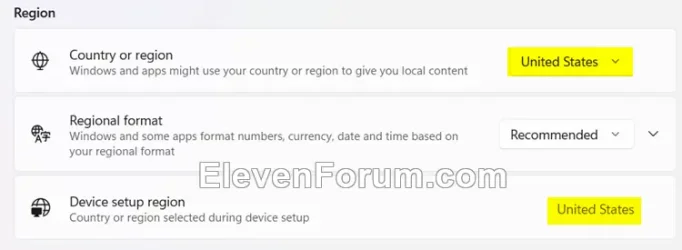
Region.webp


Sometimes it may take 24 to 48 hours after resetting for Windows Spotlight to sync again.


Another option is to use the Windows spotlight, dynamic images theme.

OR:


EXAMPLE: Windows Spotlight on Desktop and Lock screen

Windows_Spotlight_desktop_background.jpg
Windows_Spotlight_lock_screen.jpg


Here's How:

1 Change your desktop background to something other than Windows Spotlight. (see screenshot below)


Windows_Spotlight_desktop_background-1.png

2 Change your lock screen background to something other than Windows Spotlight. (see screenshot below)


Windows_Spotlight_lock_screen_background-1.png

3 Click/tap on the download button below to download the file below.

Reset_and_re-register_Windows_Spotlight.zip


(Contents of BAT file for reference)
Code:
:: Turn on background apps
reg delete "HKEY_CURRENT_USER\Software\Microsoft\Windows\CurrentVersion\BackgroundAccessApplications" /v GlobalUserDisabled /f
reg delete "HKEY_CURRENT_USER\Software\Microsoft\Windows\CurrentVersion\Search" /v BackgroundAppGlobalToggle /f

:: Reset Windows Spotlight
DEL /F /S /Q /A "%USERPROFILE%/AppData\Local\Packages\MicrosoftWindows.Client.CBS_cw5n1h2txyewy\LocalCache\Microsoft\IrisService"
DEL /F /S /Q /A "%USERPROFILE%/AppData\Local\Packages\Microsoft.Windows.ContentDeliveryManager_cw5n1h2txyewy\LocalCache\Microsoft\IrisService"
DEL /F /S /Q /A "%USERPROFILE%/AppData\Local\Packages\Microsoft.Windows.ContentDeliveryManager_cw5n1h2txyewy\LocalState\Assets"
DEL /F /S /Q /A "%USERPROFILE%/AppData\Local\Packages\Microsoft.Windows.ContentDeliveryManager_cw5n1h2txyewy\Settings"

:: Re-register Windows Spotlight
PowerShell -Command "Get-AppxPackage -AllUsers *Microsoft.Windows.ContentDeliveryManager* | Reset-AppxPackage"
PowerShell -Command "Get-AppxPackage -AllUsers *MicrosoftWindows.Client.CBS* | Reset-AppxPackage"

PowerShell -ExecutionPolicy Unrestricted -Command "& {$manifest = (Get-AppxPackage *ContentDeliveryManager*).InstallLocation + '\AppxManifest.xml' ; Add-AppxPackage -DisableDevelopmentMode -Register $manifest}"
PowerShell -ExecutionPolicy Unrestricted -Command "& {$manifest = (Get-AppxPackage *MicrosoftWindows.Client.CBS*).InstallLocation + '\AppxManifest.xml' ; Add-AppxPackage -DisableDevelopmentMode -Register $manifest}"

4 Save the ZIP file to your desktop.

5 Unblock the ZIP file.

6 Extract the BAT file from the ZIP file.

7 Run the BAT file.

8 Restart the computer to apply.

9 After you sign in, you can change your desktop background back to Windows Spotlight if wanted. (see screenshot below)


Windows_Spotlight_desktop_background-2.png

10 Change your lock screen background back to Windows Spotlight if wanted. (see screenshot below)


Windows_Spotlight_lock_screen_background-2.png


That's it,
Shawn Brink


Attachments

Last edited:
I've followed guides across various websites, as usual for Eleven Forums has the best guides and do know whilst this is the folder the Lock screen images. It isn't for the Wallpaper images.

My current Wallpaper images remain when I run the batch file, so know they're being stored elsewhere, but have never been able to find out which folder. The lock screen images get deleted from the folder/from the lockscreen and return in minutes.

For me it cycles through about 5 images but never downloads further ones. Lock screen images cycle fine. I've followed the instructions exactly as written three times.

Any thoughts? Thanks.

p.s. Windows 11 25H2: Build 26200.8246

Hello, :alien:

You might consider using the Windows spotlight, dynamic images theme or this below for more reliable Spotlight images.


My Computers My Computers

  • At a glance

    Windows 11 Pro for WorkstationsIntel i7-8700K 5 GHz64 GB (4x16GB) G.SKILL TridentZ RGB DDR4 3600...ASUS ROG-STRIX-GTX1080TI-O11G-GAMING (11GB GD...
    OS
    Windows 11 Pro for Workstations
    Computer type
    PC/Desktop
    Manufacturer/Model
    Custom self build
    CPU
    Intel i7-8700K 5 GHz
    Motherboard
    ASUS ROG Maximus XI Formula Z390
    Memory
    64 GB (4x16GB) G.SKILL TridentZ RGB DDR4 3600 MHz (F4-3600C18D-32GTZR)
    Graphics Card(s)
    ASUS ROG-STRIX-GTX1080TI-O11G-GAMING (11GB GDDR5X)
    Sound Card
    Integrated Digital Audio (S/PDIF)
    Monitor(s) Displays
    2 x Samsung Odyssey G75 27"
    Screen Resolution
    2560x1440
    Hard Drives
    1TB Samsung 990 PRO M.2,
    4TB Samsung 990 PRO M.2,
    TerraMaster F8 SSD Plus NAS
    PSU
    Seasonic Prime Titanium 850W
    Case
    Thermaltake Core P3 wall mounted
    Cooling
    Corsair Hydro H115i
    Keyboard
    Amazon Basics Wired Full Keyboard MD005
    Mouse
    Logitech MX Master 4
    Internet Speed
    2 Gbps Download and 100 Mbps Upload
    Browser
    Chrome and Edge
    Antivirus
    Microsoft Defender
    Other Info
    Logitech Z625 speaker system,
    Logitech BRIO 4K Pro webcam,
    HP Color LaserJet Pro MFP M477fdn,
    CyberPower CP1500PFCLCD
    Galaxy S23 Plus phone
  • At a glance

    Windows 11 ProSnapdragon X Elite (12 core) 3.42 GHz16 GB LPDDR5x-7467 MHz
    Operating System
    Windows 11 Pro
    Computer type
    Laptop
    Manufacturer/Model
    Surface Laptop 7 Copilot+ PC
    CPU
    Snapdragon X Elite (12 core) 3.42 GHz
    Memory
    16 GB LPDDR5x-7467 MHz
    Monitor(s) Displays
    15" HDR
    Screen Resolution
    2496 x 1664
    Hard Drives
    1 TB SSD
    Internet Speed
    Wi-Fi 7 and Bluetooth 5.4
    Browser
    Chrome and Edge
    Antivirus
    Microsoft Defender
Hi Brink,

Thanks. This seems to do the same really, just enable Spotlight via a theme instead of manually turning it on.

or this below for more reliable Spotlight images.

Dynamic Theme is great. Thanks. I've not replied for a day or so to see if it's working.

It's fixed my issue perfectly. I like how much you can customise it. I'm not using it for the Lockscreen as this isn't broken.

I'm unsure how it runs in the background when it's not visibly in Task Manager/Services. It's in TM when the App is open, not when closed I can see. I suspect it's in TM when closed but isn't an obvious name.
 

My Computer My Computer

At a glance

Windows 11 ProSnapdragon® X Plus (10 Core)16GB
OS
Windows 11 Pro
Computer type
Laptop
Manufacturer/Model
Microsoft Surface Laptop 7 (ARM)
CPU
Snapdragon® X Plus (10 Core)
Memory
16GB
Hard Drives
512GB SSD
Hi Brink,

Thanks. This seems to do the same really, just enable Spotlight via a theme instead of manually turning it on.

Dynamic Theme is great. Thanks. I've not replied for a day or so to see if it's working.

It's fixed my issue perfectly. I like how much you can customise it. I'm not using it for the Lockscreen as this isn't broken.

I'm unsure how it runs in the background when it's not visibly in Task Manager/Services. It's in TM when the App is open, not when closed I can see. I suspect it's in TM when closed but isn't an obvious name.

Great news.
 

My Computers My Computers

  • At a glance

    Windows 11 Pro for WorkstationsIntel i7-8700K 5 GHz64 GB (4x16GB) G.SKILL TridentZ RGB DDR4 3600...ASUS ROG-STRIX-GTX1080TI-O11G-GAMING (11GB GD...
    OS
    Windows 11 Pro for Workstations
    Computer type
    PC/Desktop
    Manufacturer/Model
    Custom self build
    CPU
    Intel i7-8700K 5 GHz
    Motherboard
    ASUS ROG Maximus XI Formula Z390
    Memory
    64 GB (4x16GB) G.SKILL TridentZ RGB DDR4 3600 MHz (F4-3600C18D-32GTZR)
    Graphics Card(s)
    ASUS ROG-STRIX-GTX1080TI-O11G-GAMING (11GB GDDR5X)
    Sound Card
    Integrated Digital Audio (S/PDIF)
    Monitor(s) Displays
    2 x Samsung Odyssey G75 27"
    Screen Resolution
    2560x1440
    Hard Drives
    1TB Samsung 990 PRO M.2,
    4TB Samsung 990 PRO M.2,
    TerraMaster F8 SSD Plus NAS
    PSU
    Seasonic Prime Titanium 850W
    Case
    Thermaltake Core P3 wall mounted
    Cooling
    Corsair Hydro H115i
    Keyboard
    Amazon Basics Wired Full Keyboard MD005
    Mouse
    Logitech MX Master 4
    Internet Speed
    2 Gbps Download and 100 Mbps Upload
    Browser
    Chrome and Edge
    Antivirus
    Microsoft Defender
    Other Info
    Logitech Z625 speaker system,
    Logitech BRIO 4K Pro webcam,
    HP Color LaserJet Pro MFP M477fdn,
    CyberPower CP1500PFCLCD
    Galaxy S23 Plus phone
  • At a glance

    Windows 11 ProSnapdragon X Elite (12 core) 3.42 GHz16 GB LPDDR5x-7467 MHz
    Operating System
    Windows 11 Pro
    Computer type
    Laptop
    Manufacturer/Model
    Surface Laptop 7 Copilot+ PC
    CPU
    Snapdragon X Elite (12 core) 3.42 GHz
    Memory
    16 GB LPDDR5x-7467 MHz
    Monitor(s) Displays
    15" HDR
    Screen Resolution
    2496 x 1664
    Hard Drives
    1 TB SSD
    Internet Speed
    Wi-Fi 7 and Bluetooth 5.4
    Browser
    Chrome and Edge
    Antivirus
    Microsoft Defender
For me spotlight was not working because the device region (the one you setup in oobe) was different from the "country or region" you have in windows settings.
 

My Computer My Computer

At a glance

Windows 10Ultra Core Ultra 9 185H32GBIntel Arc
OS
Windows 10
Computer type
Laptop
Manufacturer/Model
Lenovo Yoga 7 Pro
CPU
Ultra Core Ultra 9 185H
Motherboard
Lenovo
Memory
32GB
Graphics Card(s)
Intel Arc
I just had to reset Spotlight for Desktop as it got stuck for a couple days.
Did the reset command, followed by reregister after reboot:
Powershell:
Get-AppxPackage -allusers *MicrosoftWindows.Client.CBS* | Reset-AppxPackage
Get-AppxPackage -allusers *MicrosoftWindows.Client.CBS* | Add-AppxPackage -Register -DisableDevelopmentMode
And waited something like a day and a half before I got a new, non-stock image. Sometimes you just have to wait.

I do have another (minor) annoyance, though: Spotlight for Lock Screen works with no issue, as images have been unerringly updated every single day, but for some reason, I only see one widget (Weather) out of four. Daily Wonder, Daily Discovery and This Day in History are missing in action. Any suggestions as to how to bring them back? These options do not even show up in the Personalization > Lock Screen window; I only have the option to use Weather or nothing at all.


Also, for those interested, I made a small .bat file to retrieve Lock screen pictures, as I like to collect them.
Inside a new folder on your desktop, create a SpotlightRetriever.bat file and fill it with the following instructions:
Batch:
xcopy "%LOCALAPPDATA%\Packages\Microsoft.Windows.ContentDeliveryManager_cw5n1h2txyewy\LocalState\Assets\*" "%~dp0" /E /H /K /Y
powershell.exe -NoProfile -ExecutionPolicy Bypass -Command "Get-ChildItem -File '%~dp0' | Where-Object { $_.Extension -eq '' } | Rename-Item -NewName { $_.Name + '.jpg' }"
It'll fetch the pictures and rename them to .jpg.
 

My Computers My Computers

  • At a glance

    Windows 11 25H2 ProAMD Ryzen 7 9700X32GB Crucial Pro DDR5-6000-CL36 UDIMM OC Gami...ASUS Prime GeForce RTX 4070 Super OC
    OS
    Windows 11 25H2 Pro
    Computer type
    PC/Desktop
    Manufacturer/Model
    Custom
    CPU
    AMD Ryzen 7 9700X
    Motherboard
    Asus ROG Strix X870E-E Gaming Wifi7 NEO
    Memory
    32GB Crucial Pro DDR5-6000-CL36 UDIMM OC Gaming Memory (2 x CP16G60C36U5B), CL36-38-38-80
    Graphics Card(s)
    ASUS Prime GeForce RTX 4070 Super OC
    Monitor(s) Displays
    LG UltraGear 27GS85Q-B/EU 27'' Fast IPS
    Screen Resolution
    2560x1440
    Hard Drives
    1 Kingston Fury Renegade (gen4) 1TB + 1 Kingston Fury Renegade G5 2TB + 1 WD_Black SN850X 1TB + 1 Samsung 870 EVO 1TB + 3 x Western Digital Green 2TB
    PSU
    Be Quiet! Pure Power 12M 850W + Be Quiet! 12V-2X6/12VHPWR 90° Reversed cable
    Case
    Lian Li Lancool III Black
    Cooling
    Thermalright Phantom Spirit 120 SE ARGB
    Keyboard
    Logitech Deluxe 250
    Mouse
    Logitech G502X Black
    Other Info
    Work in progress. Hoping to upgrade to a Zen 7 and 60/70-series GPU in the future...if either scenario ever eventuates.
  • At a glance

    Windows 10 Pro 22H2Intel Core i5-25008GB Kingston HyperX Black DDR3-1600 (KHX16C9B...MSI GeForce GTX970 GAMING 4G
    Operating System
    Windows 10 Pro 22H2
    Computer type
    PC/Desktop
    CPU
    Intel Core i5-2500
    Motherboard
    Asus P8P67LE B3 LGA1155
    Memory
    8GB Kingston HyperX Black DDR3-1600 (KHX16C9B1BK2/8X)
    Graphics card(s)
    MSI GeForce GTX970 GAMING 4G
    Monitor(s) Displays
    ASUS VS238N 24''
    Screen Resolution
    1920x1080px
    Hard Drives
    1 x Samsung 850 Pro 128GB MZ-7KE128 2.5'' SATA SSD
    1 x Western Digital Green 2TB WD20EZRX-00DC0B0 3.5'' SATA HDD
    2 x Western Digital Green 2TB WD20EZRX-00D8PB0 3.5'' SATA HDD
    PSU
    Be Quiet! Pure Power L8-630W 80+ Bronze
    Case
    CoolerMaster Gladiator 600
    Cooling
    CoolerMaster Hyper 212 EVO single-tower CPU air cooler
    Keyboard
    Logitech 250 Deluxe
    Mouse
    Logitech M500
    Other Info
    Bought in summer of 2012. Permanently decommissioned and stripped of its parts in January 2025.
    RIP old boy.
Also, for those interested, I made a small .bat file to retrieve Lock screen pictures, as I like to collect them.
Inside a new folder on your desktop, create a SpotlightRetriever.bat file and fill it with the following instructions:
Batch:
xcopy "%LOCALAPPDATA%\Packages\Microsoft.Windows.ContentDeliveryManager_cw5n1h2txyewy\LocalState\Assets\*" "%~dp0" /E /H /K /Y
powershell.exe -NoProfile -ExecutionPolicy Bypass -Command "Get-ChildItem -File '%~dp0' | Where-Object { $_.Extension -eq '' } | Rename-Item -NewName { $_.Name + '.jpg' }"
It'll fetch the pictures and rename them to .jpg.
Thanks for the .bat file.
 

My Computer My Computer

At a glance

Windows 11 Pro 25H2Intel i5-1450016 GBIntel
OS
Windows 11 Pro 25H2
Computer type
PC/Desktop
Manufacturer/Model
ASRock B760M Pro RS/D4 motherboard
CPU
Intel i5-14500
Motherboard
ASRock
Memory
16 GB
Graphics Card(s)
Intel
Hard Drives
1 TB Samsung M.2 SSD
1 TB WD HDD
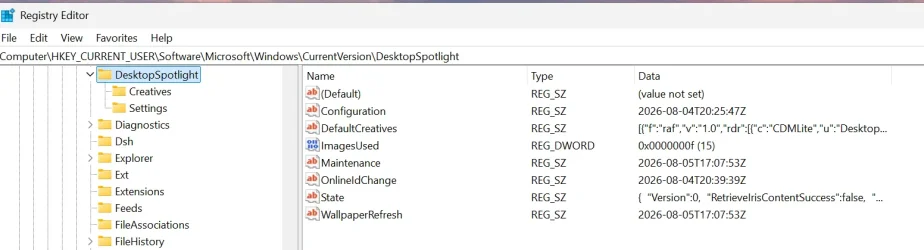
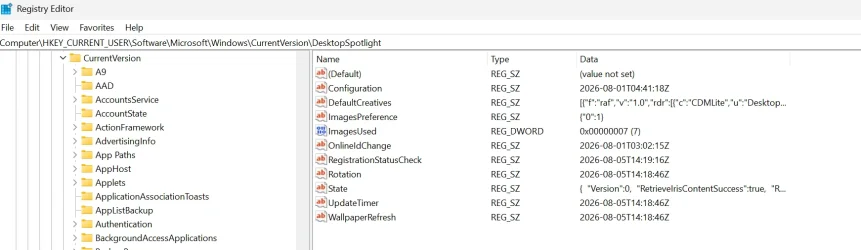
There's something different with Desktop Spotlight on 25H2 build 26200.8973. I have two user accounts, my Desktop spotlight is working correctly, but the second account is working basically except the desktop images aren't being updated and only using the default images. Lock Screen Spotlight is working perfectly in both accounts. All the normal fixes listed here don't seem to work... it seems Microsoft has to decide to download images to the IrisService folder for any new images and if it decides not to download the images, you get the standard default images.

The Desktop registry entry shows the registry state value is false for the non working account. But how can we get Microsoft to download the images? I prefer not using Bing Wallpapers or any other program to do this. Is the fix simply to wait for Microsoft to download the images or is their another way to nudge it to do so.
 

Attachments

  • Screenshot 2026-08-05 134529.webp
    Screenshot 2026-08-05 134529.webp
    60.5 KB · Views: 8
  • Screenshot 2026-08-05 134706.webp
    Screenshot 2026-08-05 134706.webp
    78.7 KB · Views: 10

My Computer My Computer

At a glance

Windows 11 ProThreadripper Pro 3945WX32 GB DDR4 3200/EEC HynixNvidia RTX 2070 Super FE
OS
Windows 11 Pro
Computer type
PC/Desktop
Manufacturer/Model
Lenovo P620
CPU
Threadripper Pro 3945WX
Motherboard
Lenovo 1046
Memory
32 GB DDR4 3200/EEC Hynix
Graphics Card(s)
Nvidia RTX 2070 Super FE
Sound Card
N/A
Monitor(s) Displays
Samsung CRG5
Screen Resolution
1920X1080 240mHz
Hard Drives
Samsung PM9A1 1TB NVMe
Samsung 970 EVO Plus 500 GB NVMe
Samsung 850 EVO 1 TB
Samsung 850 PRO 256 GB
PSU
1000 Watt Lenovo 80 plus Platinum
Keyboard
Corsair K95 Platinum XT
Mouse
M65 Pro RGB
Okay, this is starting to vex me.
Less than a month ago, I performed a motherboard swap on my PC and, as part of the due process, went for a clean Windows install, thinking going clean slate would also do a world of good for me on the UX side of things.
But...not quite.

Desktop Spotlight works without any issue.
However: lockscreen Spotlight just isn't updating - it's still displaying the blue stock wallpaper. I tried the batch script on front page many times and made sure both LocalCache locations had a "Microsoft/IrisService" folder inside of them. Did proper resets and registers.
Still nothing being downloaded into Microsoft.Windows.ContentDeliveryManager_cw5n1h2txyewy\LocalState\Assets\

I just had a new batch of four desktop wallpapers this morning, but lockscreen is still stock blue.

Additionally, I have also noticed that I no longer have the ability to decide _which_ widgets can figure at the bottom of the lockscreen. I'm only given three options: "None", "Dev Home" and "Weather and more". No further personalization allowed. I know Windows is overhauling the way it presents widgets on its UI, but my mother's laptop is also up to date and still allows customizing widgets, so I'm not sure what's wrong here.

I did several Powershell resets of Microsoft.LockApp, Microsoft.Windows.ContentDeliveryManager and MicrosoftWindows.Client.CBS just to be sure, but no joy.


May I ask for some help?
 

My Computers My Computers

  • At a glance

    Windows 11 25H2 ProAMD Ryzen 7 9700X32GB Crucial Pro DDR5-6000-CL36 UDIMM OC Gami...ASUS Prime GeForce RTX 4070 Super OC
    OS
    Windows 11 25H2 Pro
    Computer type
    PC/Desktop
    Manufacturer/Model
    Custom
    CPU
    AMD Ryzen 7 9700X
    Motherboard
    Asus ROG Strix X870E-E Gaming Wifi7 NEO
    Memory
    32GB Crucial Pro DDR5-6000-CL36 UDIMM OC Gaming Memory (2 x CP16G60C36U5B), CL36-38-38-80
    Graphics Card(s)
    ASUS Prime GeForce RTX 4070 Super OC
    Monitor(s) Displays
    LG UltraGear 27GS85Q-B/EU 27'' Fast IPS
    Screen Resolution
    2560x1440
    Hard Drives
    1 Kingston Fury Renegade (gen4) 1TB + 1 Kingston Fury Renegade G5 2TB + 1 WD_Black SN850X 1TB + 1 Samsung 870 EVO 1TB + 3 x Western Digital Green 2TB
    PSU
    Be Quiet! Pure Power 12M 850W + Be Quiet! 12V-2X6/12VHPWR 90° Reversed cable
    Case
    Lian Li Lancool III Black
    Cooling
    Thermalright Phantom Spirit 120 SE ARGB
    Keyboard
    Logitech Deluxe 250
    Mouse
    Logitech G502X Black
    Other Info
    Work in progress. Hoping to upgrade to a Zen 7 and 60/70-series GPU in the future...if either scenario ever eventuates.
  • At a glance

    Windows 10 Pro 22H2Intel Core i5-25008GB Kingston HyperX Black DDR3-1600 (KHX16C9B...MSI GeForce GTX970 GAMING 4G
    Operating System
    Windows 10 Pro 22H2
    Computer type
    PC/Desktop
    CPU
    Intel Core i5-2500
    Motherboard
    Asus P8P67LE B3 LGA1155
    Memory
    8GB Kingston HyperX Black DDR3-1600 (KHX16C9B1BK2/8X)
    Graphics card(s)
    MSI GeForce GTX970 GAMING 4G
    Monitor(s) Displays
    ASUS VS238N 24''
    Screen Resolution
    1920x1080px
    Hard Drives
    1 x Samsung 850 Pro 128GB MZ-7KE128 2.5'' SATA SSD
    1 x Western Digital Green 2TB WD20EZRX-00DC0B0 3.5'' SATA HDD
    2 x Western Digital Green 2TB WD20EZRX-00D8PB0 3.5'' SATA HDD
    PSU
    Be Quiet! Pure Power L8-630W 80+ Bronze
    Case
    CoolerMaster Gladiator 600
    Cooling
    CoolerMaster Hyper 212 EVO single-tower CPU air cooler
    Keyboard
    Logitech 250 Deluxe
    Mouse
    Logitech M500
    Other Info
    Bought in summer of 2012. Permanently decommissioned and stripped of its parts in January 2025.
    RIP old boy.
Hello @Osmium, :alien:

You might see if using the Windows spotlight, dynamic images theme or this below may work better for more reliable Spotlight images.


My Computers My Computers

  • At a glance

    Windows 11 Pro for WorkstationsIntel i7-8700K 5 GHz64 GB (4x16GB) G.SKILL TridentZ RGB DDR4 3600...ASUS ROG-STRIX-GTX1080TI-O11G-GAMING (11GB GD...
    OS
    Windows 11 Pro for Workstations
    Computer type
    PC/Desktop
    Manufacturer/Model
    Custom self build
    CPU
    Intel i7-8700K 5 GHz
    Motherboard
    ASUS ROG Maximus XI Formula Z390
    Memory
    64 GB (4x16GB) G.SKILL TridentZ RGB DDR4 3600 MHz (F4-3600C18D-32GTZR)
    Graphics Card(s)
    ASUS ROG-STRIX-GTX1080TI-O11G-GAMING (11GB GDDR5X)
    Sound Card
    Integrated Digital Audio (S/PDIF)
    Monitor(s) Displays
    2 x Samsung Odyssey G75 27"
    Screen Resolution
    2560x1440
    Hard Drives
    1TB Samsung 990 PRO M.2,
    4TB Samsung 990 PRO M.2,
    TerraMaster F8 SSD Plus NAS
    PSU
    Seasonic Prime Titanium 850W
    Case
    Thermaltake Core P3 wall mounted
    Cooling
    Corsair Hydro H115i
    Keyboard
    Amazon Basics Wired Full Keyboard MD005
    Mouse
    Logitech MX Master 4
    Internet Speed
    2 Gbps Download and 100 Mbps Upload
    Browser
    Chrome and Edge
    Antivirus
    Microsoft Defender
    Other Info
    Logitech Z625 speaker system,
    Logitech BRIO 4K Pro webcam,
    HP Color LaserJet Pro MFP M477fdn,
    CyberPower CP1500PFCLCD
    Galaxy S23 Plus phone
  • At a glance

    Windows 11 ProSnapdragon X Elite (12 core) 3.42 GHz16 GB LPDDR5x-7467 MHz
    Operating System
    Windows 11 Pro
    Computer type
    Laptop
    Manufacturer/Model
    Surface Laptop 7 Copilot+ PC
    CPU
    Snapdragon X Elite (12 core) 3.42 GHz
    Memory
    16 GB LPDDR5x-7467 MHz
    Monitor(s) Displays
    15" HDR
    Screen Resolution
    2496 x 1664
    Hard Drives
    1 TB SSD
    Internet Speed
    Wi-Fi 7 and Bluetooth 5.4
    Browser
    Chrome and Edge
    Antivirus
    Microsoft Defender
May I ask for some help?
Maybe not much help… perhaps some of my experiences with something similar.

The new Widget Panel from my experience is actually the old Widget panel with a new button “New Look”. I had the new Widget panel for about 5 minutes and then it turned into the old Widget with the “New Look” button.
I did a clean install about 4 days ago. In my case, lock screen works perfectly. From all the diagnostics and PowerShell scripts I’ve run, the possibilities are simply the last two Windows builds have issues with their features not enabling… The second is Microsoft likes turning things on A/B testing, and nothing is being told to enable. Microsoft did have a big outage about 2-3 weeks ago, perhaps things aren’t working right yet. That’s the only answer I have because all the known fixes don’t seem to help right now.
 

My Computer My Computer

At a glance

Windows 11 ProThreadripper Pro 3945WX32 GB DDR4 3200/EEC HynixNvidia RTX 2070 Super FE
OS
Windows 11 Pro
Computer type
PC/Desktop
Manufacturer/Model
Lenovo P620
CPU
Threadripper Pro 3945WX
Motherboard
Lenovo 1046
Memory
32 GB DDR4 3200/EEC Hynix
Graphics Card(s)
Nvidia RTX 2070 Super FE
Sound Card
N/A
Monitor(s) Displays
Samsung CRG5
Screen Resolution
1920X1080 240mHz
Hard Drives
Samsung PM9A1 1TB NVMe
Samsung 970 EVO Plus 500 GB NVMe
Samsung 850 EVO 1 TB
Samsung 850 PRO 256 GB
PSU
1000 Watt Lenovo 80 plus Platinum
Keyboard
Corsair K95 Platinum XT
Mouse
M65 Pro RGB
Okay, this is starting to vex me.
Less than a month ago, I performed a motherboard swap on my PC and, as part of the due process, went for a clean Windows install, thinking going clean slate would also do a world of good for me on the UX side of things.
But...not quite.

Desktop Spotlight works without any issue.
However: lockscreen Spotlight just isn't updating - it's still displaying the blue stock wallpaper. I tried the batch script on front page many times and made sure both LocalCache locations had a "Microsoft/IrisService" folder inside of them. Did proper resets and registers.
Still nothing being downloaded into Microsoft.Windows.ContentDeliveryManager_cw5n1h2txyewy\LocalState\Assets\

I just had a new batch of four desktop wallpapers this morning, but lockscreen is still stock blue.

Additionally, I have also noticed that I no longer have the ability to decide _which_ widgets can figure at the bottom of the lockscreen. I'm only given three options: "None", "Dev Home" and "Weather and more". No further personalization allowed. I know Windows is overhauling the way it presents widgets on its UI, but my mother's laptop is also up to date and still allows customizing widgets, so I'm not sure what's wrong here.

I did several Powershell resets of Microsoft.LockApp, Microsoft.Windows.ContentDeliveryManager and MicrosoftWindows.Client.CBS just to be sure, but no joy.


May I ask for some help?
I did another clean install last weekend and It's Wednesday making it 4 days since the clean install. Still no new images for the desktop spotlight. Lock screen is working perfectly and every attempt to reset everything always results in lock screen being updated and working... with no images for the desktop being downloaded. My system has never created the "Microsoft/IrisService" folders where the desktop images are stored. I have to assume windows spotlight isn't working currently. After the big Microsoft Server crash on July 23, 2026, desktop spotlight hasn't worked for me since. I've been using Theme content for the time being like I did long before Spotlight was introduced.
 

My Computer My Computer

At a glance

Windows 11 ProThreadripper Pro 3945WX32 GB DDR4 3200/EEC HynixNvidia RTX 2070 Super FE
OS
Windows 11 Pro
Computer type
PC/Desktop
Manufacturer/Model
Lenovo P620
CPU
Threadripper Pro 3945WX
Motherboard
Lenovo 1046
Memory
32 GB DDR4 3200/EEC Hynix
Graphics Card(s)
Nvidia RTX 2070 Super FE
Sound Card
N/A
Monitor(s) Displays
Samsung CRG5
Screen Resolution
1920X1080 240mHz
Hard Drives
Samsung PM9A1 1TB NVMe
Samsung 970 EVO Plus 500 GB NVMe
Samsung 850 EVO 1 TB
Samsung 850 PRO 256 GB
PSU
1000 Watt Lenovo 80 plus Platinum
Keyboard
Corsair K95 Platinum XT
Mouse
M65 Pro RGB
I did another clean install last weekend and It's Wednesday making it 4 days since the clean install. Still no new images for the desktop spotlight. Lock screen is working perfectly and every attempt to reset everything always results in lock screen being updated and working... with no images for the desktop being downloaded. My system has never created the "Microsoft/IrisService" folders where the desktop images are stored. I have to assume windows spotlight isn't working currently. After the big Microsoft Server crash on July 23, 2026, desktop spotlight hasn't worked for me since. I've been using Theme content for the time being like I did long before Spotlight was introduced.
Huh.
So it's the reverse of what I'm seeing. Desktop!Spotlight is working as intended - batch of four with a daily rotation - and Lockscreen!Spotlight is, for all intents and purposes, deader than yesterday's fish and still defaulting to the stock blue wallpaper.
I've tried re-registering Microsoft.Windows.ContentDeliveryManager and Microsoft.LockApp (both through cmd.exe and PowerShell), but no change. Even resetting them or deleting the /Settings files doesn't seem to do anything.

I was hoping yesterday's patch to 26200.9168 could have given Spotlight a wee push in the right direction, but nope.

...I'm not expecting much, but I'll wait a couple more days. I noticed that, after some resets and sometimes after 24-48h, *something* clicks.
It certainly hasn't clicked since I swapped motherboards, but who knows.
 

My Computers My Computers

  • At a glance

    Windows 11 25H2 ProAMD Ryzen 7 9700X32GB Crucial Pro DDR5-6000-CL36 UDIMM OC Gami...ASUS Prime GeForce RTX 4070 Super OC
    OS
    Windows 11 25H2 Pro
    Computer type
    PC/Desktop
    Manufacturer/Model
    Custom
    CPU
    AMD Ryzen 7 9700X
    Motherboard
    Asus ROG Strix X870E-E Gaming Wifi7 NEO
    Memory
    32GB Crucial Pro DDR5-6000-CL36 UDIMM OC Gaming Memory (2 x CP16G60C36U5B), CL36-38-38-80
    Graphics Card(s)
    ASUS Prime GeForce RTX 4070 Super OC
    Monitor(s) Displays
    LG UltraGear 27GS85Q-B/EU 27'' Fast IPS
    Screen Resolution
    2560x1440
    Hard Drives
    1 Kingston Fury Renegade (gen4) 1TB + 1 Kingston Fury Renegade G5 2TB + 1 WD_Black SN850X 1TB + 1 Samsung 870 EVO 1TB + 3 x Western Digital Green 2TB
    PSU
    Be Quiet! Pure Power 12M 850W + Be Quiet! 12V-2X6/12VHPWR 90° Reversed cable
    Case
    Lian Li Lancool III Black
    Cooling
    Thermalright Phantom Spirit 120 SE ARGB
    Keyboard
    Logitech Deluxe 250
    Mouse
    Logitech G502X Black
    Other Info
    Work in progress. Hoping to upgrade to a Zen 7 and 60/70-series GPU in the future...if either scenario ever eventuates.
  • At a glance

    Windows 10 Pro 22H2Intel Core i5-25008GB Kingston HyperX Black DDR3-1600 (KHX16C9B...MSI GeForce GTX970 GAMING 4G
    Operating System
    Windows 10 Pro 22H2
    Computer type
    PC/Desktop
    CPU
    Intel Core i5-2500
    Motherboard
    Asus P8P67LE B3 LGA1155
    Memory
    8GB Kingston HyperX Black DDR3-1600 (KHX16C9B1BK2/8X)
    Graphics card(s)
    MSI GeForce GTX970 GAMING 4G
    Monitor(s) Displays
    ASUS VS238N 24''
    Screen Resolution
    1920x1080px
    Hard Drives
    1 x Samsung 850 Pro 128GB MZ-7KE128 2.5'' SATA SSD
    1 x Western Digital Green 2TB WD20EZRX-00DC0B0 3.5'' SATA HDD
    2 x Western Digital Green 2TB WD20EZRX-00D8PB0 3.5'' SATA HDD
    PSU
    Be Quiet! Pure Power L8-630W 80+ Bronze
    Case
    CoolerMaster Gladiator 600
    Cooling
    CoolerMaster Hyper 212 EVO single-tower CPU air cooler
    Keyboard
    Logitech 250 Deluxe
    Mouse
    Logitech M500
    Other Info
    Bought in summer of 2012. Permanently decommissioned and stripped of its parts in January 2025.
    RIP old boy.
Huh.
So it's the reverse of what I'm seeing. Desktop!Spotlight is working as intended - batch of four with a daily rotation - but Lockscreen!Spotlight is, for all intents and purposes, deader than yesterday's fish and still defaulting to the stock blue wallpaper.
I've tried re-registering Microsoft.Windows.ContentDeliveryManager and Microsoft.LockApp (both through cmd.exe and PowerShell), but no change. Even resetting them or deleting the /Settings files doesn't seem to do anything.

I was hoping yesterday's patch to 26200.9168 could have given Spotlight a little push, but nope.
My desktop Spotlight works with the 4 default images, but no new images have been downloaded since I did a clean install.
 

My Computer My Computer

At a glance

Windows 11 ProThreadripper Pro 3945WX32 GB DDR4 3200/EEC HynixNvidia RTX 2070 Super FE
OS
Windows 11 Pro
Computer type
PC/Desktop
Manufacturer/Model
Lenovo P620
CPU
Threadripper Pro 3945WX
Motherboard
Lenovo 1046
Memory
32 GB DDR4 3200/EEC Hynix
Graphics Card(s)
Nvidia RTX 2070 Super FE
Sound Card
N/A
Monitor(s) Displays
Samsung CRG5
Screen Resolution
1920X1080 240mHz
Hard Drives
Samsung PM9A1 1TB NVMe
Samsung 970 EVO Plus 500 GB NVMe
Samsung 850 EVO 1 TB
Samsung 850 PRO 256 GB
PSU
1000 Watt Lenovo 80 plus Platinum
Keyboard
Corsair K95 Platinum XT
Mouse
M65 Pro RGB
My desktop Spotlight works with the 4 default images, but no new images have been downloaded since I did a clean install.

Resetting MicrosoftWindows.Client.CBS doesn't do anything? Mine just rotated to a new wallpaper not even 15m ago.
Also, are MicrosoftWindows.Client.CBS and Microsoft.Windows.ContentDeliveryManager supposed to work independently of one another or are they connected/chatting together? I find it strange that one works while the other stalls or vice versa, despite having similar duties and pulling content from more or less the same digital repository.
 

My Computers My Computers

  • At a glance

    Windows 11 25H2 ProAMD Ryzen 7 9700X32GB Crucial Pro DDR5-6000-CL36 UDIMM OC Gami...ASUS Prime GeForce RTX 4070 Super OC
    OS
    Windows 11 25H2 Pro
    Computer type
    PC/Desktop
    Manufacturer/Model
    Custom
    CPU
    AMD Ryzen 7 9700X
    Motherboard
    Asus ROG Strix X870E-E Gaming Wifi7 NEO
    Memory
    32GB Crucial Pro DDR5-6000-CL36 UDIMM OC Gaming Memory (2 x CP16G60C36U5B), CL36-38-38-80
    Graphics Card(s)
    ASUS Prime GeForce RTX 4070 Super OC
    Monitor(s) Displays
    LG UltraGear 27GS85Q-B/EU 27'' Fast IPS
    Screen Resolution
    2560x1440
    Hard Drives
    1 Kingston Fury Renegade (gen4) 1TB + 1 Kingston Fury Renegade G5 2TB + 1 WD_Black SN850X 1TB + 1 Samsung 870 EVO 1TB + 3 x Western Digital Green 2TB
    PSU
    Be Quiet! Pure Power 12M 850W + Be Quiet! 12V-2X6/12VHPWR 90° Reversed cable
    Case
    Lian Li Lancool III Black
    Cooling
    Thermalright Phantom Spirit 120 SE ARGB
    Keyboard
    Logitech Deluxe 250
    Mouse
    Logitech G502X Black
    Other Info
    Work in progress. Hoping to upgrade to a Zen 7 and 60/70-series GPU in the future...if either scenario ever eventuates.
  • At a glance

    Windows 10 Pro 22H2Intel Core i5-25008GB Kingston HyperX Black DDR3-1600 (KHX16C9B...MSI GeForce GTX970 GAMING 4G
    Operating System
    Windows 10 Pro 22H2
    Computer type
    PC/Desktop
    CPU
    Intel Core i5-2500
    Motherboard
    Asus P8P67LE B3 LGA1155
    Memory
    8GB Kingston HyperX Black DDR3-1600 (KHX16C9B1BK2/8X)
    Graphics card(s)
    MSI GeForce GTX970 GAMING 4G
    Monitor(s) Displays
    ASUS VS238N 24''
    Screen Resolution
    1920x1080px
    Hard Drives
    1 x Samsung 850 Pro 128GB MZ-7KE128 2.5'' SATA SSD
    1 x Western Digital Green 2TB WD20EZRX-00DC0B0 3.5'' SATA HDD
    2 x Western Digital Green 2TB WD20EZRX-00D8PB0 3.5'' SATA HDD
    PSU
    Be Quiet! Pure Power L8-630W 80+ Bronze
    Case
    CoolerMaster Gladiator 600
    Cooling
    CoolerMaster Hyper 212 EVO single-tower CPU air cooler
    Keyboard
    Logitech 250 Deluxe
    Mouse
    Logitech M500
    Other Info
    Bought in summer of 2012. Permanently decommissioned and stripped of its parts in January 2025.
    RIP old boy.
Resetting MicrosoftWindows.Client.CBS doesn't do anything? Mine just rotated to a new wallpaper not even 15m ago.
Also, are MicrosoftWindows.Client.CBS and Microsoft.Windows.ContentDeliveryManager supposed to work independently of one another or are they connected/chatting together? I find it strange that one works while the other stalls or vice versa, despite having similar duties and pulling content from more or less the same digital repository.
If you have the procedure to do the reset, I’d like the commands that you used. I’ve tried a few different methods, perhaps I missed something.
 

My Computer My Computer

At a glance

Windows 11 ProThreadripper Pro 3945WX32 GB DDR4 3200/EEC HynixNvidia RTX 2070 Super FE
OS
Windows 11 Pro
Computer type
PC/Desktop
Manufacturer/Model
Lenovo P620
CPU
Threadripper Pro 3945WX
Motherboard
Lenovo 1046
Memory
32 GB DDR4 3200/EEC Hynix
Graphics Card(s)
Nvidia RTX 2070 Super FE
Sound Card
N/A
Monitor(s) Displays
Samsung CRG5
Screen Resolution
1920X1080 240mHz
Hard Drives
Samsung PM9A1 1TB NVMe
Samsung 970 EVO Plus 500 GB NVMe
Samsung 850 EVO 1 TB
Samsung 850 PRO 256 GB
PSU
1000 Watt Lenovo 80 plus Platinum
Keyboard
Corsair K95 Platinum XT
Mouse
M65 Pro RGB
I believe I used:
Powershell:
Get-AppxPackage -allusers *Microsoft.Windows.ContentDeliveryManager* | Reset-AppxPackage
Get-AppxPackage -allusers *MicrosoftWindows.Client.CBS* | Reset-AppxPackage
Do note that, IIRC, after using Reset on either Client.CBS or ContentDeliveryManager, the targeted folder itself (within %LOCALAPPDATA%\Packages\) will be deleted and only re-created after rebooting, so any re-register command will fail afterwards because there is no folder to operate on. Then, for good measure after a reboot:
Powershell:
Get-AppxPackage -allusers *Microsoft.Windows.ContentDeliveryManager* | Add-AppxPackage -Register -DisableDevelopmentMode
Get-AppxPackage -allusers *MicrosoftWindows.Client.CBS* | Add-AppxPackage -Register -DisableDevelopmentMode
If you're using cmd.exe:
Batch:
PowerShell -Command "Get-AppxPackage -AllUsers *Microsoft.Windows.ContentDeliveryManager* | Reset-AppxPackage"
PowerShell -Command "Get-AppxPackage -AllUsers *MicrosoftWindows.Client.CBS* | Reset-AppxPackage"
Batch:
PowerShell -ExecutionPolicy Unrestricted -Command "& {$manifest = (Get-AppxPackage *MicrosoftWindows.Client.CBS*).InstallLocation + '\AppxManifest.xml' ; Add-AppxPackage -DisableDevelopmentMode -Register $manifest}"
PowerShell -ExecutionPolicy Unrestricted -Command "& {$manifest = (Get-AppxPackage *ContentDeliveryManager*).InstallLocation + '\AppxManifest.xml' ; Add-AppxPackage -DisableDevelopmentMode -Register $manifest}"

Only other recourse past that, that I could think of, is fiddling with the Registry. Maybe some key got borked?
 
Last edited:

My Computers My Computers

  • At a glance

    Windows 11 25H2 ProAMD Ryzen 7 9700X32GB Crucial Pro DDR5-6000-CL36 UDIMM OC Gami...ASUS Prime GeForce RTX 4070 Super OC
    OS
    Windows 11 25H2 Pro
    Computer type
    PC/Desktop
    Manufacturer/Model
    Custom
    CPU
    AMD Ryzen 7 9700X
    Motherboard
    Asus ROG Strix X870E-E Gaming Wifi7 NEO
    Memory
    32GB Crucial Pro DDR5-6000-CL36 UDIMM OC Gaming Memory (2 x CP16G60C36U5B), CL36-38-38-80
    Graphics Card(s)
    ASUS Prime GeForce RTX 4070 Super OC
    Monitor(s) Displays
    LG UltraGear 27GS85Q-B/EU 27'' Fast IPS
    Screen Resolution
    2560x1440
    Hard Drives
    1 Kingston Fury Renegade (gen4) 1TB + 1 Kingston Fury Renegade G5 2TB + 1 WD_Black SN850X 1TB + 1 Samsung 870 EVO 1TB + 3 x Western Digital Green 2TB
    PSU
    Be Quiet! Pure Power 12M 850W + Be Quiet! 12V-2X6/12VHPWR 90° Reversed cable
    Case
    Lian Li Lancool III Black
    Cooling
    Thermalright Phantom Spirit 120 SE ARGB
    Keyboard
    Logitech Deluxe 250
    Mouse
    Logitech G502X Black
    Other Info
    Work in progress. Hoping to upgrade to a Zen 7 and 60/70-series GPU in the future...if either scenario ever eventuates.
  • At a glance

    Windows 10 Pro 22H2Intel Core i5-25008GB Kingston HyperX Black DDR3-1600 (KHX16C9B...MSI GeForce GTX970 GAMING 4G
    Operating System
    Windows 10 Pro 22H2
    Computer type
    PC/Desktop
    CPU
    Intel Core i5-2500
    Motherboard
    Asus P8P67LE B3 LGA1155
    Memory
    8GB Kingston HyperX Black DDR3-1600 (KHX16C9B1BK2/8X)
    Graphics card(s)
    MSI GeForce GTX970 GAMING 4G
    Monitor(s) Displays
    ASUS VS238N 24''
    Screen Resolution
    1920x1080px
    Hard Drives
    1 x Samsung 850 Pro 128GB MZ-7KE128 2.5'' SATA SSD
    1 x Western Digital Green 2TB WD20EZRX-00DC0B0 3.5'' SATA HDD
    2 x Western Digital Green 2TB WD20EZRX-00D8PB0 3.5'' SATA HDD
    PSU
    Be Quiet! Pure Power L8-630W 80+ Bronze
    Case
    CoolerMaster Gladiator 600
    Cooling
    CoolerMaster Hyper 212 EVO single-tower CPU air cooler
    Keyboard
    Logitech 250 Deluxe
    Mouse
    Logitech M500
    Other Info
    Bought in summer of 2012. Permanently decommissioned and stripped of its parts in January 2025.
    RIP old boy.
I believe I used:
Powershell:
Get-AppxPackage -allusers *Microsoft.Windows.ContentDeliveryManager* | Reset-AppxPackage
Get-AppxPackage -allusers *MicrosoftWindows.Client.CBS* | Reset-AppxPackage
Do note that, IIRC, after using Reset on either Client.CBS or ContentDeliveryManager, the targeted folder itself (within %LOCALAPPDATA%\Packages\) will be deleted and only re-created after rebooting, so any re-register command will fail afterwards because there is no folder to operate on. Then, for good measure after a reboot:
Powershell:
Get-AppxPackage -allusers *Microsoft.Windows.ContentDeliveryManager* | Add-AppxPackage -Register -DisableDevelopmentMode
Get-AppxPackage -allusers *MicrosoftWindows.Client.CBS* | Add-AppxPackage -Register -DisableDevelopmentMode
If you're using cmd.exe:
Batch:
PowerShell -Command "Get-AppxPackage -AllUsers *Microsoft.Windows.ContentDeliveryManager* | Reset-AppxPackage"
PowerShell -Command "Get-AppxPackage -AllUsers *MicrosoftWindows.Client.CBS* | Reset-AppxPackage"
Batch:
PowerShell -ExecutionPolicy Unrestricted -Command "& {$manifest = (Get-AppxPackage *MicrosoftWindows.Client.CBS*).InstallLocation + '\AppxManifest.xml' ; Add-AppxPackage -DisableDevelopmentMode -Register $manifest}"
PowerShell -ExecutionPolicy Unrestricted -Command "& {$manifest = (Get-AppxPackage *ContentDeliveryManager*).InstallLocation + '\AppxManifest.xml' ; Add-AppxPackage -DisableDevelopmentMode -Register $manifest}"

Only other recourse past that, that I could think of, is fiddling with the Registry. Maybe some key got borked?
I’ve been using AI to help me research the problem and did about 20 PowerShell scripts it suggested. The results are nothing is broken… all internet connections are present. The only finding is that Windows just hasn’t run the request to build the “Microsoft/IrisService” folder for the desktop images. It has done so for the Lock Screen.
Seems like these Spotlight systems used two different delivery methods to get images… maybe the reason one works and other doesn’t. Idk.
 

My Computer My Computer

At a glance

Windows 11 ProThreadripper Pro 3945WX32 GB DDR4 3200/EEC HynixNvidia RTX 2070 Super FE
OS
Windows 11 Pro
Computer type
PC/Desktop
Manufacturer/Model
Lenovo P620
CPU
Threadripper Pro 3945WX
Motherboard
Lenovo 1046
Memory
32 GB DDR4 3200/EEC Hynix
Graphics Card(s)
Nvidia RTX 2070 Super FE
Sound Card
N/A
Monitor(s) Displays
Samsung CRG5
Screen Resolution
1920X1080 240mHz
Hard Drives
Samsung PM9A1 1TB NVMe
Samsung 970 EVO Plus 500 GB NVMe
Samsung 850 EVO 1 TB
Samsung 850 PRO 256 GB
PSU
1000 Watt Lenovo 80 plus Platinum
Keyboard
Corsair K95 Platinum XT
Mouse
M65 Pro RGB
Possibly related question: does localization play a role in which wallpapers you get, if at all?

I redid the whole re-register shebang, and once again, desktop produces a new batch of four wallpapers, but the lockscreen remains as dead as this year's hopes of getting decently-priced RAM sticks.
I'm just stumped.
 

My Computers My Computers

  • At a glance

    Windows 11 25H2 ProAMD Ryzen 7 9700X32GB Crucial Pro DDR5-6000-CL36 UDIMM OC Gami...ASUS Prime GeForce RTX 4070 Super OC
    OS
    Windows 11 25H2 Pro
    Computer type
    PC/Desktop
    Manufacturer/Model
    Custom
    CPU
    AMD Ryzen 7 9700X
    Motherboard
    Asus ROG Strix X870E-E Gaming Wifi7 NEO
    Memory
    32GB Crucial Pro DDR5-6000-CL36 UDIMM OC Gaming Memory (2 x CP16G60C36U5B), CL36-38-38-80
    Graphics Card(s)
    ASUS Prime GeForce RTX 4070 Super OC
    Monitor(s) Displays
    LG UltraGear 27GS85Q-B/EU 27'' Fast IPS
    Screen Resolution
    2560x1440
    Hard Drives
    1 Kingston Fury Renegade (gen4) 1TB + 1 Kingston Fury Renegade G5 2TB + 1 WD_Black SN850X 1TB + 1 Samsung 870 EVO 1TB + 3 x Western Digital Green 2TB
    PSU
    Be Quiet! Pure Power 12M 850W + Be Quiet! 12V-2X6/12VHPWR 90° Reversed cable
    Case
    Lian Li Lancool III Black
    Cooling
    Thermalright Phantom Spirit 120 SE ARGB
    Keyboard
    Logitech Deluxe 250
    Mouse
    Logitech G502X Black
    Other Info
    Work in progress. Hoping to upgrade to a Zen 7 and 60/70-series GPU in the future...if either scenario ever eventuates.
  • At a glance

    Windows 10 Pro 22H2Intel Core i5-25008GB Kingston HyperX Black DDR3-1600 (KHX16C9B...MSI GeForce GTX970 GAMING 4G
    Operating System
    Windows 10 Pro 22H2
    Computer type
    PC/Desktop
    CPU
    Intel Core i5-2500
    Motherboard
    Asus P8P67LE B3 LGA1155
    Memory
    8GB Kingston HyperX Black DDR3-1600 (KHX16C9B1BK2/8X)
    Graphics card(s)
    MSI GeForce GTX970 GAMING 4G
    Monitor(s) Displays
    ASUS VS238N 24''
    Screen Resolution
    1920x1080px
    Hard Drives
    1 x Samsung 850 Pro 128GB MZ-7KE128 2.5'' SATA SSD
    1 x Western Digital Green 2TB WD20EZRX-00DC0B0 3.5'' SATA HDD
    2 x Western Digital Green 2TB WD20EZRX-00D8PB0 3.5'' SATA HDD
    PSU
    Be Quiet! Pure Power L8-630W 80+ Bronze
    Case
    CoolerMaster Gladiator 600
    Cooling
    CoolerMaster Hyper 212 EVO single-tower CPU air cooler
    Keyboard
    Logitech 250 Deluxe
    Mouse
    Logitech M500
    Other Info
    Bought in summer of 2012. Permanently decommissioned and stripped of its parts in January 2025.
    RIP old boy.
Possibly related question: does localization play a role in which wallpapers you get, if at all?

I redid the whole re-register shebang, and once again, desktop produces a new batch of four wallpapers, but the lockscreen remains as dead as this year's hopes of getting decently-priced RAM sticks.
I'm just stumped.
I have two user accounts on my computer… my account is working now with both desktop and lock screen. I did a reinstall of Windows on Friday evening and my account started working Saturday morning. The second user account had lock screen working, but stopped suddenly and the blue wave background appeared even with the asset folder full of images. I ran the script at the beginning of this thread, and it started working again within 5 minutes. But, the desktop background hasn’t changed or updated yet... stuck with the default 4 images right now.
I guess I have to wait until whatever is needed from Microsoft decides to enable the feature and download the images. Maybe a reinstall is needed too… idk.

Edit… in the past a Window install had these Spot Light features working right away before all the updates were even installed. Seems like after that Microsoft server crash on July 23rd, things haven’t worked as they did before.
 

My Computer My Computer

At a glance

Windows 11 ProThreadripper Pro 3945WX32 GB DDR4 3200/EEC HynixNvidia RTX 2070 Super FE
OS
Windows 11 Pro
Computer type
PC/Desktop
Manufacturer/Model
Lenovo P620
CPU
Threadripper Pro 3945WX
Motherboard
Lenovo 1046
Memory
32 GB DDR4 3200/EEC Hynix
Graphics Card(s)
Nvidia RTX 2070 Super FE
Sound Card
N/A
Monitor(s) Displays
Samsung CRG5
Screen Resolution
1920X1080 240mHz
Hard Drives
Samsung PM9A1 1TB NVMe
Samsung 970 EVO Plus 500 GB NVMe
Samsung 850 EVO 1 TB
Samsung 850 PRO 256 GB
PSU
1000 Watt Lenovo 80 plus Platinum
Keyboard
Corsair K95 Platinum XT
Mouse
M65 Pro RGB
I believe I used:
Powershell:
Get-AppxPackage -allusers *Microsoft.Windows.ContentDeliveryManager* | Reset-AppxPackage
Get-AppxPackage -allusers *MicrosoftWindows.Client.CBS* | Reset-AppxPackage
Do note that, IIRC, after using Reset on either Client.CBS or ContentDeliveryManager, the targeted folder itself (within %LOCALAPPDATA%\Packages\) will be deleted and only re-created after rebooting, so any re-register command will fail afterwards because there is no folder to operate on. Then, for good measure after a reboot:
Powershell:
Get-AppxPackage -allusers *Microsoft.Windows.ContentDeliveryManager* | Add-AppxPackage -Register -DisableDevelopmentMode
Get-AppxPackage -allusers *MicrosoftWindows.Client.CBS* | Add-AppxPackage -Register -DisableDevelopmentMode
If you're using cmd.exe:
Batch:
PowerShell -Command "Get-AppxPackage -AllUsers *Microsoft.Windows.ContentDeliveryManager* | Reset-AppxPackage"
PowerShell -Command "Get-AppxPackage -AllUsers *MicrosoftWindows.Client.CBS* | Reset-AppxPackage"
Batch:
PowerShell -ExecutionPolicy Unrestricted -Command "& {$manifest = (Get-AppxPackage *MicrosoftWindows.Client.CBS*).InstallLocation + '\AppxManifest.xml' ; Add-AppxPackage -DisableDevelopmentMode -Register $manifest}"
PowerShell -ExecutionPolicy Unrestricted -Command "& {$manifest = (Get-AppxPackage *ContentDeliveryManager*).InstallLocation + '\AppxManifest.xml' ; Add-AppxPackage -DisableDevelopmentMode -Register $manifest}"

Only other recourse past that, that I could think of, is fiddling with the Registry. Maybe some key got borked?
You need to run both commands if Desktop Spotlight is not working?
 

My Computer My Computer

At a glance

Windows 11Ryzen 7945HX
OS
Windows 11
Computer type
Laptop
Manufacturer/Model
MSI Raider A18 HX
CPU
Ryzen 7945HX

Latest Support Threads

Back
Top Bottom