Personalization Restore Classic Start Menu in Windows 11


Start_banner.png

The method in this tutorial no longer works starting with Windows 11 build 22000.65.


The Start menu contains shortcuts of all your apps, settings, and files.

Windows 11 comes with a new Start menu without live tiles.

If you do not like the new Start menu in Windows 11, you can restore the classic Start menu similar to the Windows 10 Start menu.

This tutorial will show you how to restore the classic Start menu for your account in Windows 11.

EXAMPLE: Default and classic Start menu in Windows 11

Default_Start_menu_in_Windows_11.jpg
Classic_Start_menu_in_Windows_11.jpg


Here's How:

The downloadable .bat files below will modify the DWORD value in the registry key below.

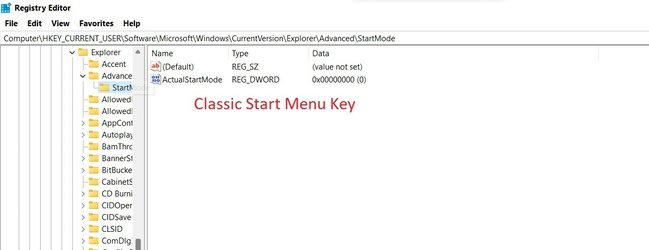
HKEY_CURRENT_USER\Software\Microsoft\Windows\CurrentVersion\Explorer\Advanced

Start_ShowClassicMode DWORD

0 or <delete> = Default Start menu
1 = Classic Start menu


1 Do step 2 (classic) or step 3 (default) below for what you would like to do.


2 To Restore Classic Start Menu in Windows 11

A) Click/tap on the Download button below to download the file below, and go to step 4 below.

Restore_classic_Start_menu_in_Windows_11.bat


3 To Restore Default Start Menu in Windows 11

This is the default setting.


A) Click/tap on the Download button below to download the file below, and go to step 4 below.

Restore_default_Start_menu_in_Windows_11.bat


4 Save the .bat file to your desktop.

5 Unblock the .bat file.

6 Run the .bat file

7 You will now notice your screen flicker and a command prompt quickly opens and closes as the explorer process is restarted to apply the registry changes.

8 You can now delete the downloaded .bat file if you like.


That's it,
Shawn Brink
 

Attachments

Last edited:
John,

Thanks for those suggestions. I've noted them all for investigation.

Denis
 

My Computer My Computer

At a glance

Windows 11 Home x64 Version 25H2 Build 26200....
OS
Windows 11 Home x64 Version 25H2 Build 26200.9168
Cool.

However, I really do hope they bring that functionality back - I missed in your ss the first 10 times I looked at it that you were clicking on the bar beside the Menus 'button' - and then the light bulb went off.

I doubt they will bring it back - but it's still an early dev build, so.....
 

My Computers My Computers

  • At a glance

    Windows 11 23H2 Current buildAMD Ryzen 9 3950X4 * 32 GB - Corsair Vengeance 3600 MHzEVGA GeForce RTX 3080 Ti XC3 ULTRA GAMING (12...
    OS
    Windows 11 23H2 Current build
    Computer type
    PC/Desktop
    Manufacturer/Model
    HomeBrew
    CPU
    AMD Ryzen 9 3950X
    Motherboard
    MSI MEG X570 GODLIKE
    Memory
    4 * 32 GB - Corsair Vengeance 3600 MHz
    Graphics Card(s)
    EVGA GeForce RTX 3080 Ti XC3 ULTRA GAMING (12G-P5-3955-KR)
    Sound Card
    Realtek® ALC1220 Codec
    Monitor(s) Displays
    2x Eve Spectrum ES07D03 4K Gaming Monitor (Matte) | Eve Spectrum ES07DC9 4K Gaming Monitor (Glossy)
    Screen Resolution
    3x 3840 x 2160
    Hard Drives
    3x Samsung 980 Pro NVMe PCIe 4 M.2 2 TB SSD (MZ-V8P2T0B/AM) } 3x Sabrent Rocket NVMe 4.0 1 TB SSD (USB)
    PSU
    PC Power & Cooling’s Silencer Series 1050 Watt, 80 Plus Platinum
    Case
    Fractal Design Define 7 XL Dark ATX Full Tower Case
    Cooling
    Arctic Liquid Freezer III 420 RGB + Air 3x 140mm case fans (pull front) + 1x 120 mm (push back) and 1 x 120 mm (pull bottom)
    Keyboard
    SteelSeries Apex Pro Wired Gaming Keyboard
    Mouse
    Logitech MX Master 3S | MX Master 3 for Business
    Internet Speed
    AT&T LightSpeed Gigabit Duplex Ftth
    Browser
    Nightly (default) + Firefox (stable), Chrome, Edge , Arc
    Antivirus
    Defender + MB 5 Beta
  • At a glance

    ChromeOS Flex Dev Channel (current)Intel(R) Core(TM) i5-6300U CPU @ 2.40GHz, 250...16 GBIntel(R) HD Graphics 520
    Operating System
    ChromeOS Flex Dev Channel (current)
    Computer type
    Laptop
    Manufacturer/Model
    Dell Latitude E5470
    CPU
    Intel(R) Core(TM) i5-6300U CPU @ 2.40GHz, 2501 Mhz, 2 Core(s), 4 Logical Processor(s)
    Motherboard
    Dell
    Memory
    16 GB
    Graphics card(s)
    Intel(R) HD Graphics 520
    Sound Card
    Intel(R) HD Graphics 520 + RealTek Audio
    Monitor(s) Displays
    Dell laptop display 15"
    Screen Resolution
    1920 * 1080
    Hard Drives
    Toshiba 128GB M.2 22300 drive
    INTEL Cherryville 520 Series SSDSC2CW180A 180 GB SATA III SSD
    PSU
    Dell
    Case
    Dell
    Cooling
    Dell
    Keyboard
    Dell
    Mouse
    Logitech MX Master 3S (shared w. Sys 1) | Dell TouchPad
    Internet Speed
    AT&T LightSpeed Gigabit Duplex Ftth
So, Win 8/10 start menus are considered "classic" now. Fuggin fantastic. :cautious:
Yep, win10 is "classic". In 10 I use classic shell to get win7 start button. Does work in win11
 

My Computer My Computer

At a glance

win 11
OS
win 11
Yep, win10 is "classic". In 10 I use classic shell to get win7 start button. Does work in win11
I have Classic Shell too. Good to know it'll work in Win11. ;)
 

My Computer My Computer

At a glance

Windows 10 Home 64bitIntel Core i7 8700K32GB 2666MHz DDR4nVidea GeForce GTX 1080Ti
OS
Windows 10 Home 64bit
Computer type
PC/Desktop
Manufacturer/Model
Alienware Aurora R7
CPU
Intel Core i7 8700K
Motherboard
Z370
Memory
32GB 2666MHz DDR4
Graphics Card(s)
nVidea GeForce GTX 1080Ti
Sound Card
NVIDIA High Definition Audio
Monitor(s) Displays
HP 27es / ACER 27
Screen Resolution
1920x1080
Hard Drives
Toshiba 256GB M.2 PCIe NVMe SSD (boot)
Toshiba 1TB DT01ACA100 SATA (storage)
Seagate Backup 4TB (Macrium)
In 10 I use classic shell ... Does work in win11
Sorry, are you saying, "It does work in Win11.", or are you asking, "Does it work in Win11?"?

Denis
 

My Computer My Computer

At a glance

Windows 11 Home x64 Version 25H2 Build 26200....
OS
Windows 11 Home x64 Version 25H2 Build 26200.9168
I don't understand this obsession with the start menu, the only time I go near it is once a week or so to reboot my pc, everything useful is pinned to my taskbar or I use the search.
I completely agree!
 

My Computers My Computers

  • At a glance

    Windows 11AMD Ryzen 7 3800XT32GBEVGA GeForce GTX 1080 Ti
    OS
    Windows 11
    Computer type
    PC/Desktop
    Manufacturer/Model
    Homebuilt
    CPU
    AMD Ryzen 7 3800XT
    Motherboard
    ASUS ROG Crosshair VII Hero (WiFi)
    Memory
    32GB
    Graphics Card(s)
    EVGA GeForce GTX 1080 Ti
  • At a glance

    Windows 11 EducationIntel i7-8550U32GBNvidia Geforce MX150
    Operating System
    Windows 11 Education
    Computer type
    Laptop
    Manufacturer/Model
    Dell Inspiron 7773
    CPU
    Intel i7-8550U
    Memory
    32GB
    Graphics card(s)
    Nvidia Geforce MX150
    Sound Card
    Realtek
    Monitor(s) Displays
    17"
    Screen Resolution
    1920 x 1080
    Hard Drives
    Toshiba 512GB NVMe SSD
    SK Hynix 512GB SATA SSD
    Internet Speed
    Fast!
Sorry, are you saying, "It does work in Win11.", or are you asking, "Does it work in Win11?"?

Denis
It works in win11 ( at least for me)
 

My Computer My Computer

At a glance

win 11
OS
win 11
Fair warning for those that want install "classic shell" in win11. It will add the start button on the left. It my get in conflict with win11 start button if you switch taskbar to left
 

My Computer My Computer

At a glance

win 11
OS
win 11
Restore classic no longer seems to work with the July 8th 22000.65 build
 

My Computers My Computers

  • At a glance

    Windows 11 ProIntel Core i9 14900K 5800/4500 P/E96GB (2x48) G.skill Ripjaws 6800Asus ROG Strix 4070 Ti OC
    OS
    Windows 11 Pro
    Computer type
    PC/Desktop
    Manufacturer/Model
    DIY Photoshop/Audio/Game/tinker
    CPU
    Intel Core i9 14900K 5800/4500 P/E
    Motherboard
    Asus ROG Maximus Z790 Dark Hero
    Memory
    96GB (2x48) G.skill Ripjaws 6800
    Graphics Card(s)
    Asus ROG Strix 4070 Ti OC
    Sound Card
    B&W 606 S3 speakers; Audiolabs 7000a integrated amp; RSL 10S Mk2 sub
    Monitor(s) Displays
    Eizo CG2730 ColorEdge, ViewSonic VP2768
    Screen Resolution
    2560 x 1440 x 2
    Hard Drives
    nvme: WDC SN850X 4TB, SN850 1TB, SK-Hynix 2 TB P41
    Spinners: Sabrent USB-C DS-SC5B 5-bay docking station, 6TB WDC Black, 6TB Ironwolf Pro 2x 2TB WDC Black
    PSU
    850W Seasonic Vertex PX-850
    Case
    FD North XL Mesh, Black Walnut
    Cooling
    EK Nucleus black 360 AIO w/Phanteks T30 fans; 2 Noctua NF-A14 Chromax ; T30 for memory
    Keyboard
    Keychron Q3 Max TKL w/GMK Redsuns Red Samuri keycaps
    Mouse
    Logitech G305 wireless gaming
    Internet Speed
    575 Mb/s down | 25 Mb/s up
    Browser
    Firefox
    Antivirus
    Defender, Macrium Reflect X
    Other Info
    Phangkey Amaterasu V2 Desk Mat
  • At a glance

    Apple M1
    Computer type
    Laptop
    Manufacturer/Model
    💻 Apple 13" Macbook Pro 2020 (m1)
    CPU
    Apple M1
    Screen Resolution
    2560x1600
    Browser
    Firefox
Restore classic no longer seems to work with the July 8th 22000.65 build
It's no longer working for me either. :(
 

My Computers My Computers

  • At a glance

    Windows 11 Pro for WorkstationsIntel i7-8700K 5 GHz64 GB (4x16GB) G.SKILL TridentZ RGB DDR4 3600...ASUS ROG-STRIX-GTX1080TI-O11G-GAMING (11GB GD...
    OS
    Windows 11 Pro for Workstations
    Computer type
    PC/Desktop
    Manufacturer/Model
    Custom self build
    CPU
    Intel i7-8700K 5 GHz
    Motherboard
    ASUS ROG Maximus XI Formula Z390
    Memory
    64 GB (4x16GB) G.SKILL TridentZ RGB DDR4 3600 MHz (F4-3600C18D-32GTZR)
    Graphics Card(s)
    ASUS ROG-STRIX-GTX1080TI-O11G-GAMING (11GB GDDR5X)
    Sound Card
    Integrated Digital Audio (S/PDIF)
    Monitor(s) Displays
    2 x Samsung Odyssey G75 27"
    Screen Resolution
    2560x1440
    Hard Drives
    1TB Samsung 990 PRO M.2,
    4TB Samsung 990 PRO M.2,
    TerraMaster F8 SSD Plus NAS
    PSU
    Seasonic Prime Titanium 850W
    Case
    Thermaltake Core P3 wall mounted
    Cooling
    Corsair Hydro H115i
    Keyboard
    Amazon Basics Wired Full Keyboard MD005
    Mouse
    Logitech MX Master 4
    Internet Speed
    2 Gbps Download and 100 Mbps Upload
    Browser
    Chrome and Edge
    Antivirus
    Microsoft Defender
    Other Info
    Logitech Z625 speaker system,
    Logitech BRIO 4K Pro webcam,
    HP Color LaserJet Pro MFP M477fdn,
    CyberPower CP1500PFCLCD
    Galaxy S23 Plus phone
  • At a glance

    Windows 11 ProSnapdragon X Elite (12 core) 3.42 GHz16 GB LPDDR5x-7467 MHz
    Operating System
    Windows 11 Pro
    Computer type
    Laptop
    Manufacturer/Model
    Surface Laptop 7 Copilot+ PC
    CPU
    Snapdragon X Elite (12 core) 3.42 GHz
    Memory
    16 GB LPDDR5x-7467 MHz
    Monitor(s) Displays
    15" HDR
    Screen Resolution
    2496 x 1664
    Hard Drives
    1 TB SSD
    Internet Speed
    Wi-Fi 7 and Bluetooth 5.4
    Browser
    Chrome and Edge
    Antivirus
    Microsoft Defender
was so excited when i woke up getting the notice from windows update for the new build...

was hoping there would some bits of improvement from the taskbar/explorer....

and....

mygod. im just gonna laugh it out.

effin bs.


:(
 

My Computer My Computer

At a glance

Windows 11 x64 v23H2 Build 22631.3958
OS
Windows 11 x64 v23H2 Build 22631.3958
Computer type
PC/Desktop
Manufacturer/Model
Acer
Restore classic no longer seems to work with the July 8th 22000.65 build
I'm more concerned with 'Classic Start'.
WTF is 'Restore Classic'?
 

My Computer My Computer

At a glance

Windows 10 Home 64bitIntel Core i7 8700K32GB 2666MHz DDR4nVidea GeForce GTX 1080Ti
OS
Windows 10 Home 64bit
Computer type
PC/Desktop
Manufacturer/Model
Alienware Aurora R7
CPU
Intel Core i7 8700K
Motherboard
Z370
Memory
32GB 2666MHz DDR4
Graphics Card(s)
nVidea GeForce GTX 1080Ti
Sound Card
NVIDIA High Definition Audio
Monitor(s) Displays
HP 27es / ACER 27
Screen Resolution
1920x1080
Hard Drives
Toshiba 256GB M.2 PCIe NVMe SSD (boot)
Toshiba 1TB DT01ACA100 SATA (storage)
Seagate Backup 4TB (Macrium)
I'm more concerned with 'Classic Start'.
WTF is 'Restore Classic'?
Restore Classic... is the topic of this thread, that's WTF.
 

My Computers My Computers

  • At a glance

    Windows 11 ProIntel Core i9 14900K 5800/4500 P/E96GB (2x48) G.skill Ripjaws 6800Asus ROG Strix 4070 Ti OC
    OS
    Windows 11 Pro
    Computer type
    PC/Desktop
    Manufacturer/Model
    DIY Photoshop/Audio/Game/tinker
    CPU
    Intel Core i9 14900K 5800/4500 P/E
    Motherboard
    Asus ROG Maximus Z790 Dark Hero
    Memory
    96GB (2x48) G.skill Ripjaws 6800
    Graphics Card(s)
    Asus ROG Strix 4070 Ti OC
    Sound Card
    B&W 606 S3 speakers; Audiolabs 7000a integrated amp; RSL 10S Mk2 sub
    Monitor(s) Displays
    Eizo CG2730 ColorEdge, ViewSonic VP2768
    Screen Resolution
    2560 x 1440 x 2
    Hard Drives
    nvme: WDC SN850X 4TB, SN850 1TB, SK-Hynix 2 TB P41
    Spinners: Sabrent USB-C DS-SC5B 5-bay docking station, 6TB WDC Black, 6TB Ironwolf Pro 2x 2TB WDC Black
    PSU
    850W Seasonic Vertex PX-850
    Case
    FD North XL Mesh, Black Walnut
    Cooling
    EK Nucleus black 360 AIO w/Phanteks T30 fans; 2 Noctua NF-A14 Chromax ; T30 for memory
    Keyboard
    Keychron Q3 Max TKL w/GMK Redsuns Red Samuri keycaps
    Mouse
    Logitech G305 wireless gaming
    Internet Speed
    575 Mb/s down | 25 Mb/s up
    Browser
    Firefox
    Antivirus
    Defender, Macrium Reflect X
    Other Info
    Phangkey Amaterasu V2 Desk Mat
  • At a glance

    Apple M1
    Computer type
    Laptop
    Manufacturer/Model
    💻 Apple 13" Macbook Pro 2020 (m1)
    CPU
    Apple M1
    Screen Resolution
    2560x1600
    Browser
    Firefox
Same here, Start Menu returned to default and no obvious way back. That would be an epic fail because I rely on the Start Menu so heavily.
 

My Computer My Computer

At a glance

W11 Pro x64 ongoing Canary 29500 latest buildsIntel i58GbIntel HD Graphics
OS
W11 Pro x64 ongoing Canary 29500 latest builds
Computer type
Laptop
Manufacturer/Model
Dell 7760 Mobile Precision 17"
CPU
Intel i5
Motherboard
Unknown
Memory
8Gb
Graphics Card(s)
Intel HD Graphics
Sound Card
Realtek
Monitor(s) Displays
Internal
Hard Drives
2 x 256Gb SSD
PSU
Dell 240 watt
Mouse
Dell Premier Bluetooth
Internet Speed
50Mbps
Browser
Edge
Antivirus
Default Microsoft Security
The Winareo Tweak does not work for me no more as well.

I hope some one comes up with a solution I much prefer classic start menu full screen and grouped Apps.
 

My Computer My Computer

At a glance

win11
OS
win11
The Winareo Tweak does not work for me no more as well.

I hope some one comes up with a solution I much prefer classic start menu full screen and grouped Apps.
Most definitely. I would urge everyone to report this via the Feedback Hub as well.

I'm a bit out of my comfort zone altering reg keys but I did look at the key before and after the update (I have an image backup chain and so could undo the problem. Also deferred updates until August 8th).

These are the keys from before and after the update and I double checked they are not mixed up. The Classic key seems to have a 0 as value and the value changes after the update to a 1.

Those in the working system seem to be the opposite of the values mentioned at the thread start for a system with Classic Start Menu.

After the update I do indeed see a 1 which agrees with the TUT but of course it is not working. What I am saying is the update has changed the 0 to a 1

I also exported the working key from before the update and tried applying it after the update but no good. Curiously the key from after the update does not seem to change the Classic menu back to Default when it is applied.
 

Attachments

  • Classic Start Menu Reg Key.jpg
    Classic Start Menu Reg Key.jpg
    65.7 KB · Views: 201
  • Default Start Menu Reg Key.jpg
    Default Start Menu Reg Key.jpg
    42.9 KB · Views: 223

My Computer My Computer

At a glance

W11 Pro x64 ongoing Canary 29500 latest buildsIntel i58GbIntel HD Graphics
OS
W11 Pro x64 ongoing Canary 29500 latest builds
Computer type
Laptop
Manufacturer/Model
Dell 7760 Mobile Precision 17"
CPU
Intel i5
Motherboard
Unknown
Memory
8Gb
Graphics Card(s)
Intel HD Graphics
Sound Card
Realtek
Monitor(s) Displays
Internal
Hard Drives
2 x 256Gb SSD
PSU
Dell 240 watt
Mouse
Dell Premier Bluetooth
Internet Speed
50Mbps
Browser
Edge
Antivirus
Default Microsoft Security
Noooooooooo I want the Win10 start menu back 😭😭
 

My Computer My Computer

At a glance

Windows 11Intel Core i7 8700 @ 3.20GHz Coffee Lake 14nm...32,0 GB 3200 Mhz Kingston3071MB NVIDIA GeForce GTX 1060 3GB
OS
Windows 11
CPU
Intel Core i7 8700 @ 3.20GHz Coffee Lake 14nm Tech
Motherboard
MEDION B360H4-EM (U3E1)
Memory
32,0 GB 3200 Mhz Kingston
Graphics Card(s)
3071MB NVIDIA GeForce GTX 1060 3GB
Sound Card
Realtek High Definition Audio
Monitor(s) Displays
TCL SMART TV
Screen Resolution
3840 x 2160 60 Hz
Hard Drives
931GB TOSHIBA DT01ACA100 (SATA )
119GB FORESEE 128GB SSD (SATA (SSD))
1862GB Western Digital WD Elements 10B8 USB Device (USB (SATA)
3725GB Western Digital WD My Passport 25E1 USB Device (USB (SATA) (SSD)
1862GB Western Digital WD Elements 25A3 USB Device (USB (SATA))
Browser
Firefox Beta 64 Bits
Antivirus
Windows Defender
Is StarkIsBack working for you on Windows 11 22000.100?
 

My Computer My Computer

At a glance

Windows 11i5-8265U12 GBNVIDIA GeForce MX150 2GB
OS
Windows 11
Computer type
Laptop
Manufacturer/Model
ASUS Vivobook S15
CPU
i5-8265U
Memory
12 GB
Graphics Card(s)
NVIDIA GeForce MX150 2GB
Antivirus
NOD32

My Computers My Computers

  • At a glance

    Windows 11 Pro
    OS
    Windows 11 Pro
    Computer type
    PC/Desktop
    Manufacturer/Model
    ASUS ROG Strix
  • At a glance

    Windows 11 Pro
    Operating System
    Windows 11 Pro
    Computer type
    Laptop
    Manufacturer/Model
    ASUS VivoBook
  • ASUS VivoBook 'Lite' ~ Windows 11 Home

Latest Support Threads

Back
Top Bottom