Restore MS Word & Excel File Types to New Context Menu


compupix

Well-known member
Member
Local time
8:31 AM
Posts
72
OS
Windows 11
Google Drive hijacked my new file type options in the File Explorer context menu:

(From within a folder, right-click in an open space and select New.)

Google Drive set it to:
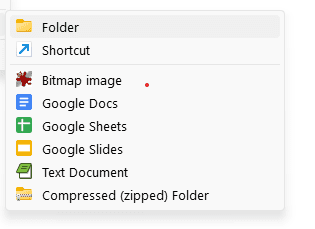
new.png

I tried to remove the Google options using Regedit, but they kept coming back!

Uninstalling Google Drive removed them:
2.png


Now, how do I add back Word .docx and Excel .xlxs options to the New context menu?
I tried reinstalling MS Office. It didn't make any changes to the New context menu.

Microsoft Office Home and Student 2019
Word & Excel v. 2307 Build 16626.20170 Click-to-Run

Thanks!
 
Windows Build/Version
11 Home; 10.0.22621 Build 22621

My Computer My Computer

At a glance

Windows 11Intel 7-1070016gb
OS
Windows 11
Computer type
PC/Desktop
Manufacturer/Model
Del XPS 8940
CPU
Intel 7-10700
Motherboard
Dell 0KV3RP
Memory
16gb
Keyboard
Microsoft Natural Ergonomic Keyboard 4000
Mouse
Kensington Expert Mouse KB64325
If you have a restore point prior to when Google Drive was installed you can attemp system restore
OR
You can manually fix it.

First go to Settings>Apps>Default apps. Scroll to bottom and click Choose defaults by file type.

Find .docx in list. Make sure it says "Microsoft Word Document". If it doesn't click on that file type and change it.

Do the same thing of file type .xlsx. Make sure it says Microsoft Excel Worksheet.

Browse to C:\Program Files Or Program Files (x86) if you are using 32 bit version. Select Microsoft Office. Verify the Office version. I believe it should say Office 16 (but I am not certain of that as MS versions don't always agree with the year)


BACKUP YOUR REGISTRY.
Then use this article for creating registry entries for BOTH file types.
NOTE-This was written pertaining to Word in Office 2007 (ie office version 12) You will have to substitute 12 with whatever version yours is. You will also have to substitute the path in the registry to the path where Office is located on your computer.


My Computers My Computers

  • At a glance

    Windows 11 Pro 25H2 26200.8875i9-10900 10 core 20 threads32 gbnone-Intel UHD Graphics 630
    OS
    Windows 11 Pro 25H2 26200.8875
    Computer type
    PC/Desktop
    Manufacturer/Model
    Dell Optiplex 7080
    CPU
    i9-10900 10 core 20 threads
    Motherboard
    DELL 0J37VM
    Memory
    32 gb
    Graphics Card(s)
    none-Intel UHD Graphics 630
    Sound Card
    Integrated Realtek
    Monitor(s) Displays
    Benq 27
    Screen Resolution
    2560x1440
    Hard Drives
    2x1tb Solidigm m.2 nvme /External drives 512gb Samsung m.2 sata+2tb Kingston m2.nvme
    PSU
    500w
    Case
    MT
    Cooling
    Dell Premium
    Keyboard
    Logitech wired
    Mouse
    Logitech wireless
    Internet Speed
    so slow I'm too embarrassed to tell
    Browser
    #1 Edge #2 Firefox
    Antivirus
    Defender+MWB Premium
  • At a glance

    Windows 11 Pro 24H2 26200.8875AMD Ryzen 7 6800U32 gbintegrated
    Operating System
    Windows 11 Pro 24H2 26200.8875
    Computer type
    PC/Desktop
    Manufacturer/Model
    Beelink Mini PC SER5
    CPU
    AMD Ryzen 7 6800U
    Memory
    32 gb
    Graphics card(s)
    integrated
    Sound Card
    integrated
    Monitor(s) Displays
    Benq 27
    Screen Resolution
    2560x1440
    Hard Drives
    1TB Crucial nvme
    Keyboard
    Logitech wired
    Mouse
    Logitech wireless
    Internet Speed
    still too embarrassed to tell
    Browser
    Firefox
    Antivirus
    Defender
    Other Info
    System 3 is non compliant Dell 9020 i7-4770/24gb ram Win11 PRO 26200.8875
Those instructions are not very clear for my version of Office.
"Create a black Microsoft word .docx file with name WORD12.docx and it copy to
C:\Program Files (x86)\Microsoft Office\root\vfs\Windows\SHELLNEW folder"

I'll assume "black" should be "blank."
As you said, x86 doesn't apply for someone running a 64 bit version of Office. So, I don't have:
C:\Program Files (x86)\Microsoft Office\root\vfs\Windows\SHELLNEW folder
I do have:
C:\Program Files\Microsoft Office 15
and
C:\Program Files\Microsoft Office 15\ClientX64

In Regedit, I have no folder "Computer\HKEY_CLASSES_ROOT\.docx"
At this point I had too many issues with those instructions to feel comfortable creating a new folder in the registry.
 

My Computer My Computer

At a glance

Windows 11Intel 7-1070016gb
OS
Windows 11
Computer type
PC/Desktop
Manufacturer/Model
Del XPS 8940
CPU
Intel 7-10700
Motherboard
Dell 0KV3RP
Memory
16gb
Keyboard
Microsoft Natural Ergonomic Keyboard 4000
Mouse
Kensington Expert Mouse KB64325
Uninstalling Microsoft Office then reinstalling it adds the Microsoft Office programs to the New context menu.
I don't know if my personal program customizations have been lost in the process.
 

My Computer My Computer

At a glance

Windows 11Intel 7-1070016gb
OS
Windows 11
Computer type
PC/Desktop
Manufacturer/Model
Del XPS 8940
CPU
Intel 7-10700
Motherboard
Dell 0KV3RP
Memory
16gb
Keyboard
Microsoft Natural Ergonomic Keyboard 4000
Mouse
Kensington Expert Mouse KB64325

My Computer My Computer

At a glance

Windows 11 Home x64 Version 25H2 Build 26200....
OS
Windows 11 Home x64 Version 25H2 Build 26200.8037

Latest Support Threads

Back
Top Bottom