Restore PC with Acronis true image


Bikeit

Well-known member
Member
VIP
Local time
6:41 PM
Posts
259
OS
Windows 11 pro
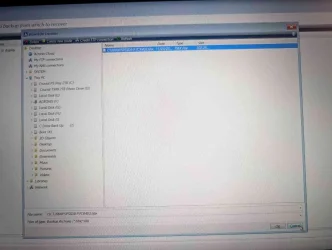
My PC wont boot into windows but I have an image of the C drive on an external drive which I create every week, I can get into the Acronis recovery window can find the back up on the external drive but what do I do now.
 
Windows Build/Version
Windows 11

Attachments

  • 1000004511.webp
    1000004511.webp
    86 KB · Views: 1

My Computer

System One

  • OS
    Windows 11 pro
    Computer type
    Laptop
    Manufacturer/Model
    HP Zbook
    CPU
    Intel(R) Core(TM) i7-8850H CPU @ 2.60GHz 2.59 GHz
    Motherboard
    HP 842D
    Memory
    32GB
    Graphics Card(s)
    Nvidia Quadro P3200
    Hard Drives
    Samsung 980 1TB M.2
    Toshiba KXG50ZNV512G M.2
    Crucial P5 Plus 2TB M.2
    Mouse
    MX Master 3
    Internet Speed
    500MBPS
    Browser
    Chrome, Edge
    Antivirus
    Windows defender
I quit Acronis many years ago so see if this will help.
 

My Computers

System One System Two

  • OS
    Windows 11 Pro 25H2
    Computer type
    PC/Desktop
    Manufacturer/Model
    Dell Optiplex 7080
    CPU
    i9-10900 10 core 20 threads
    Motherboard
    DELL 0J37VM
    Memory
    32 gb
    Graphics Card(s)
    none-Intel UHD Graphics 630
    Sound Card
    Integrated Realtek
    Monitor(s) Displays
    Benq 27
    Screen Resolution
    2560x1440
    Hard Drives
    2x1tb Solidigm m.2 nvme /External drives 512gb Samsung m.2 sata+2tb Kingston m2.nvme
    PSU
    500w
    Case
    MT
    Cooling
    Dell Premium
    Keyboard
    Logitech wired
    Mouse
    Logitech wireless
    Internet Speed
    so slow I'm too embarrassed to tell
    Browser
    #1 Edge #2 Firefox
    Antivirus
    Defender+MWB Premium
  • Operating System
    Windows 11 Pro 24H2 26200.8457
    Computer type
    PC/Desktop
    Manufacturer/Model
    Beelink Mini PC SER5
    CPU
    AMD Ryzen 7 6800U
    Memory
    32 gb
    Graphics card(s)
    integrated
    Sound Card
    integrated
    Monitor(s) Displays
    Benq 27
    Screen Resolution
    2560x1440
    Hard Drives
    1TB Crucial nvme
    Keyboard
    Logitech wired
    Mouse
    Logitech wireless
    Internet Speed
    still too embarrassed to tell
    Browser
    Firefox
    Antivirus
    Defender
    Other Info
    System 3 is non compliant Dell 9020 i7-4770/24gb ram Win11 PRO 26200.8457
The screenie was taken from booted acronis recovery media.
 

My Computers

System One System Two

  • OS
    Win7,Win11
    Computer type
    PC/Desktop
    CPU
    i7-9700
    Motherboard
    gigabyte b365m ds3h
    Memory
    2x16gb 3600mhz
    Monitor(s) Displays
    benq gw2480
    PSU
    bequiet pure power 11 400CM
    Cooling
    cryorig m9i
  • Operating System
    win7,win11
    Computer type
    PC/Desktop
    CPU
    i5-8400
    Motherboard
    gigabyte b365m ds3h
    Memory
    2x8gb 3200
    PSU
    xfx pro 450
The screenie was taken from booted acronis recovery media.
@Bikeit SIW2 is right, you have already performed the first step and that was to open the Recovery program. You have the backup highlighted. Should you not just Click OK and continue? That's what you wanted to do, right?
 

My Computers

System One System Two

  • OS
    Windows 11 Home, ver 25H2 build 26200.8246
    Computer type
    Laptop
    Manufacturer/Model
    Hewlett-Packard Spectre 13-4001 x360 convertable
    CPU
    Intel Core i5 5200U @ 2.20GH
    Motherboard
    Hewlett-Packard 802D
    Memory
    4 GB
    Graphics Card(s)
    Intel HD Graphics 5500 on board
    Sound Card
    Intel Smart Sound Technology (Intel SST)
    Hard Drives
    Micron 256GB M.2 2280 NGFF SSD MTFDDAV256TBN, (SATA 6.0 Gb/s)
    Keyboard
    Model # G01KB
    Antivirus
    Microsoft Defender
    Other Info
    born on date: 25 Feb 2016
  • Operating System
    Win 11 Home 25H2 build 26200.7922
    Computer type
    PC/Desktop
    Manufacturer/Model
    Asus Desktop model M32AD-US019S (DOM: 6/9/2014 )
    CPU
    Intel Core i7 4th Gen 4790 (3.60GHz), Haswell 22nm Technology, SOCKET 1150
    Motherboard
    H81M-E/M51AD/DP_MB
    Memory
    Samsung 16 GB DDR3 (8GB in 2 modules)
    Graphics card(s)
    NVIDIA GeForce GTX 760, 3GB, and on-board Intel HD Graphics 4600 Rev 6
    Monitor(s) Displays
    HP EliteDisplay E241i LED; HP EliteDisplay E243
    Hard Drives
    Samsung 500GB SSD, 870 EVO (SATA 6.0 )
    Micron 250GB SSD, CT250MX500
    Toshiba HDD, 3GB (original drive w/PC)
    Case
    ASUS
    Keyboard
    ASUS-------------------------
    Antivirus
    MS Defender
    Other Info
    Additional Laptops:

    HEWLETT PACKARD
    HP OmniBook X Flip NGAI (Next Gen AI),
    Model: 16-as0023dx
    PT# B5UH1UA#ABA Product #: B5UH1UA
    delivered and setup 7/25/25
    16" 2K Touch-Screen Laptop
    Intel Core Ultra 7 256V '24 Series 2 - CPU
    Boost Clock Frequency 4.8 gigahertz; Neural Processing Unit (NPU) Yes;
    16GB Memory, LPDDR5X
    1TB SSD PCIe 4.0
    Graphics: Intel Arc 140V
    1 x HDMI 2.1
    1 x Thunderbolt 4
    2K Touch-Screen display, LED, IPS; 1920 x 1200 (Full HD+)
    USB Ports: 1 x USB-C 3.1, 2 x USB-A 3.1
    Wi-Fi 6E
    weight 4.15 pounds

    DELL
    Model:I7591-7483BLK-PUS 2-in-1 (7000 Series)
    purchased 12/3/2019,
    15.6 inch 2-IN-1;
    4K Ultra HD Touch-Screen, 3840 x 2160,
    Intel Core i7 10510U CPU 1.80GHz,
    16GB RAM DDR4 SDRAM 2400 megahert (2 slots),
    dedicated graphics Nvidia GeForce MX250 2 GB Graphics,
    PCIe 512GB Intel SSD + 32GB Optane Memory (Intel Optane Memory H10 with solid-state storage),
    wireless-AX & Bluetooth
    Battery: 68wh, Type 4VGMP 4 cell
Yes but I'm worried I will lose all my work, never done anything like this before can't afford to lose anything as I need pc for my job
 

My Computer

System One

  • OS
    Windows 11 pro
    Computer type
    Laptop
    Manufacturer/Model
    HP Zbook
    CPU
    Intel(R) Core(TM) i7-8850H CPU @ 2.60GHz 2.59 GHz
    Motherboard
    HP 842D
    Memory
    32GB
    Graphics Card(s)
    Nvidia Quadro P3200
    Hard Drives
    Samsung 980 1TB M.2
    Toshiba KXG50ZNV512G M.2
    Crucial P5 Plus 2TB M.2
    Mouse
    MX Master 3
    Internet Speed
    500MBPS
    Browser
    Chrome, Edge
    Antivirus
    Windows defender
Yes but I'm worried I will lose all my work, never done anything like this before can't afford to lose anything as I need pc for my job
What other options do you have? You can't boot.
That is what recovery & imaging software is there for.
 

My Computers

System One System Two

  • OS
    All Branches but Release
    Computer type
    Laptop
    Manufacturer/Model
    Acer Nitro ANV15-51
    CPU
    AMD Ryzen 7 7735HS 3200-4500 Mhz 8 cores x 2
    Motherboard
    Sportage_RBH
    Memory
    32 GB DDR5
    Graphics Card(s)
    Radeon Graphic / NVIDIA GeForce RTX 4060 8 GB GDDR6
    Sound Card
    AMD/Realtek(R) Audio
    Monitor(s) Displays
    Integrated Monitor (15.3"vis)
    Screen Resolution
    FHD 1920X1080 16:9 144Hz
    Hard Drives
    KINGSTON OM8SEP4512Q-AA 1TB
    Western Digital 256GB
    PSU
    19V DC 6.32 A 120 W
    Cooling
    Dual Fans
    Mouse
    MS Bluetooth
    Internet Speed
    Fiber 1GB Cox -us & 1GB Orange-fr
    Browser
    Edge Canary- Firefox Nightly-Chrome Dev-Chrome Dev
    Antivirus
    Windows Defender
  • Operating System
    Windows 11 Beta
    Computer type
    Laptop
    Manufacturer/Model
    Asus X751BP
    CPU
    AMD A9-9420
    Memory
    8 GB of DDR4
    Graphics card(s)
    AMD Radeon R5
    Screen Resolution
    1600x900
    Hard Drives
    Seagate 1 TB
Yes but I'm worried I will lose all my work, never done anything like this before can't afford to lose anything as I need pc for my job
If you mean work you did after after the date of that backup which looks like November 24th then yes you will lose it.
What you should do is make another backup of the system first then do the restore of the 24th.
After restore you can browse the new backup image to recover any work/files after the 24th.
 

My Computer

System One

  • OS
    Windows 11 Pro
Any work files created after the 24 I'm not really worried about as I only worked 2 days from then as I was away on a holiday
 

My Computer

System One

  • OS
    Windows 11 pro
    Computer type
    Laptop
    Manufacturer/Model
    HP Zbook
    CPU
    Intel(R) Core(TM) i7-8850H CPU @ 2.60GHz 2.59 GHz
    Motherboard
    HP 842D
    Memory
    32GB
    Graphics Card(s)
    Nvidia Quadro P3200
    Hard Drives
    Samsung 980 1TB M.2
    Toshiba KXG50ZNV512G M.2
    Crucial P5 Plus 2TB M.2
    Mouse
    MX Master 3
    Internet Speed
    500MBPS
    Browser
    Chrome, Edge
    Antivirus
    Windows defender
If you mean work you did after after the date of that backup which looks like November 24th then yes you will lose it.
What you should do is make another backup of the system first then do the restore of the 24th.
After restore you can browse the new backup image to recover any work/files after the 24th.
I would also add that if you are concerned about emails you've received in the meantime HASLEO can do a folder backup, so you should run that to copy your email profile folder and restore it after you restore your C drive.
 

My Computers

System One System Two

  • OS
    Windows 11 Home, ver 25H2 build 26200.8246
    Computer type
    Laptop
    Manufacturer/Model
    Hewlett-Packard Spectre 13-4001 x360 convertable
    CPU
    Intel Core i5 5200U @ 2.20GH
    Motherboard
    Hewlett-Packard 802D
    Memory
    4 GB
    Graphics Card(s)
    Intel HD Graphics 5500 on board
    Sound Card
    Intel Smart Sound Technology (Intel SST)
    Hard Drives
    Micron 256GB M.2 2280 NGFF SSD MTFDDAV256TBN, (SATA 6.0 Gb/s)
    Keyboard
    Model # G01KB
    Antivirus
    Microsoft Defender
    Other Info
    born on date: 25 Feb 2016
  • Operating System
    Win 11 Home 25H2 build 26200.7922
    Computer type
    PC/Desktop
    Manufacturer/Model
    Asus Desktop model M32AD-US019S (DOM: 6/9/2014 )
    CPU
    Intel Core i7 4th Gen 4790 (3.60GHz), Haswell 22nm Technology, SOCKET 1150
    Motherboard
    H81M-E/M51AD/DP_MB
    Memory
    Samsung 16 GB DDR3 (8GB in 2 modules)
    Graphics card(s)
    NVIDIA GeForce GTX 760, 3GB, and on-board Intel HD Graphics 4600 Rev 6
    Monitor(s) Displays
    HP EliteDisplay E241i LED; HP EliteDisplay E243
    Hard Drives
    Samsung 500GB SSD, 870 EVO (SATA 6.0 )
    Micron 250GB SSD, CT250MX500
    Toshiba HDD, 3GB (original drive w/PC)
    Case
    ASUS
    Keyboard
    ASUS-------------------------
    Antivirus
    MS Defender
    Other Info
    Additional Laptops:

    HEWLETT PACKARD
    HP OmniBook X Flip NGAI (Next Gen AI),
    Model: 16-as0023dx
    PT# B5UH1UA#ABA Product #: B5UH1UA
    delivered and setup 7/25/25
    16" 2K Touch-Screen Laptop
    Intel Core Ultra 7 256V '24 Series 2 - CPU
    Boost Clock Frequency 4.8 gigahertz; Neural Processing Unit (NPU) Yes;
    16GB Memory, LPDDR5X
    1TB SSD PCIe 4.0
    Graphics: Intel Arc 140V
    1 x HDMI 2.1
    1 x Thunderbolt 4
    2K Touch-Screen display, LED, IPS; 1920 x 1200 (Full HD+)
    USB Ports: 1 x USB-C 3.1, 2 x USB-A 3.1
    Wi-Fi 6E
    weight 4.15 pounds

    DELL
    Model:I7591-7483BLK-PUS 2-in-1 (7000 Series)
    purchased 12/3/2019,
    15.6 inch 2-IN-1;
    4K Ultra HD Touch-Screen, 3840 x 2160,
    Intel Core i7 10510U CPU 1.80GHz,
    16GB RAM DDR4 SDRAM 2400 megahert (2 slots),
    dedicated graphics Nvidia GeForce MX250 2 GB Graphics,
    PCIe 512GB Intel SSD + 32GB Optane Memory (Intel Optane Memory H10 with solid-state storage),
    wireless-AX & Bluetooth
    Battery: 68wh, Type 4VGMP 4 cell
If you are paranoid put another disk in the machine and restore the image to that so your original disk isnt affected by the restore. You could even take any other disks out first if you think you might select the wrong one.
 

My Computers

System One System Two

  • OS
    Win7,Win11
    Computer type
    PC/Desktop
    CPU
    i7-9700
    Motherboard
    gigabyte b365m ds3h
    Memory
    2x16gb 3600mhz
    Monitor(s) Displays
    benq gw2480
    PSU
    bequiet pure power 11 400CM
    Cooling
    cryorig m9i
  • Operating System
    win7,win11
    Computer type
    PC/Desktop
    CPU
    i5-8400
    Motherboard
    gigabyte b365m ds3h
    Memory
    2x8gb 3200
    PSU
    xfx pro 450
Before you start restoring backup images, you need to evaluate what you have and how old the backup is.

FWIW, this is exactly why my data files are on a different logical drive from my Windows boot. I make daily backups of my data files, and they're also synchronized with the cloud storage up to the minute.

You should also test your backup scheme before you need it to make sure that you have the ability to recover.
 

My Computers

System One System Two

  • OS
    Win 11 Pro 25H2, Build 26200.8524
    Computer type
    PC/Desktop
    Manufacturer/Model
    Home Brew
    CPU
    Intel Core i5 14500
    Motherboard
    Gigabyte B760M G P WIFI
    Memory
    64GB DDR4
    Graphics Card(s)
    GeForce RTX 4060
    Sound Card
    Chipset Realtek
    Monitor(s) Displays
    LG 45" Ultragear, Acer 24" 1080p
    Screen Resolution
    5120x1440, 1920x1080
    Hard Drives
    Crucial P310 2TB 2280 PCIe Gen4 3D NAND NVMe M.2 SSD (O/S)
    Silicon Power 2TB US75 NVMe PCIe Gen4 M.2 2280 SSD (backup)
    Crucial BX500 2TB 3D NAND (2nd backup)
    Seagate 4TB Ironwolf, rotating HDD archive files
    External off-line backup Drives: 2 NVMe 4TB drives in external enclosures
    PSU
    Thermaltake Toughpower GF3 750W
    Case
    LIAN LI LANCOOL 216 E-ATX PC Case
    Cooling
    Lots of fans!
    Keyboard
    Microsoft Comfort Curve 2000
    Mouse
    Logitech G305
    Internet Speed
    Verizon FiOS 1GB
    Browser
    Firefox
    Antivirus
    Malware Bytes & Windows Defender Security
  • Operating System
    Win 11 Pro 25H2, Build 26200.8524
    Computer type
    PC/Desktop
    Manufacturer/Model
    Home Brew
    CPU
    Intel Core i5 14400
    Motherboard
    Gigabyte B760M DS3H AX
    Memory
    32GB DDR5
    Graphics card(s)
    Intel 700 Embedded GPU
    Sound Card
    Realtek Embedded
    Monitor(s) Displays
    27" HP 1080p
    Screen Resolution
    1920x1080
    Hard Drives
    Crucial P310 2TB 2280 PCIe Gen4 eD NAND PCIe SSD
    Samsung EVO 990 2TB NVMe Gen4 SSD
    Samsung 2TB SATA SSD
    PSU
    Thermaltake Smart BM3 650W
    Case
    Okinos Micro ATX Case
    Cooling
    Fans
    Keyboard
    Microsoft Comfort Curve 2000
    Mouse
    Logitech G305
    Internet Speed
    Verizon FiOS 1GB
    Browser
    Firefox
    Antivirus
    Malware Bytes & Windows Defender Security
If you are pranoid put another fisk in the machine and restore the image to that
Yeah, put another fisk in there if you are pranoid.
What is a fisk? a pranoid? :p
Should I worry about those?
 

My Computers

System One System Two

  • OS
    All Branches but Release
    Computer type
    Laptop
    Manufacturer/Model
    Acer Nitro ANV15-51
    CPU
    AMD Ryzen 7 7735HS 3200-4500 Mhz 8 cores x 2
    Motherboard
    Sportage_RBH
    Memory
    32 GB DDR5
    Graphics Card(s)
    Radeon Graphic / NVIDIA GeForce RTX 4060 8 GB GDDR6
    Sound Card
    AMD/Realtek(R) Audio
    Monitor(s) Displays
    Integrated Monitor (15.3"vis)
    Screen Resolution
    FHD 1920X1080 16:9 144Hz
    Hard Drives
    KINGSTON OM8SEP4512Q-AA 1TB
    Western Digital 256GB
    PSU
    19V DC 6.32 A 120 W
    Cooling
    Dual Fans
    Mouse
    MS Bluetooth
    Internet Speed
    Fiber 1GB Cox -us & 1GB Orange-fr
    Browser
    Edge Canary- Firefox Nightly-Chrome Dev-Chrome Dev
    Antivirus
    Windows Defender
  • Operating System
    Windows 11 Beta
    Computer type
    Laptop
    Manufacturer/Model
    Asus X751BP
    CPU
    AMD A9-9420
    Memory
    8 GB of DDR4
    Graphics card(s)
    AMD Radeon R5
    Screen Resolution
    1600x900
    Hard Drives
    Seagate 1 TB
You should be very worried, run far
 

My Computers

System One System Two

  • OS
    Win7,Win11
    Computer type
    PC/Desktop
    CPU
    i7-9700
    Motherboard
    gigabyte b365m ds3h
    Memory
    2x16gb 3600mhz
    Monitor(s) Displays
    benq gw2480
    PSU
    bequiet pure power 11 400CM
    Cooling
    cryorig m9i
  • Operating System
    win7,win11
    Computer type
    PC/Desktop
    CPU
    i5-8400
    Motherboard
    gigabyte b365m ds3h
    Memory
    2x8gb 3200
    PSU
    xfx pro 450
Any work files created after the 24 I'm not really worried about as I only worked 2 days from then as I was away on a holiday

you can use a live Linux distro by creating a bootable USB
you will then be able to access your drive and transfer any data from the drive to another location
that way before you start the rescue mission to restore the image all your data is safe.

the Linux live distro does not install anything to your computer it runs completely from the bootable USB.
best of luck Steve ..
 

My Computers

System One System Two

  • OS
    Windows 11 Home
    Computer type
    PC/Desktop
    Manufacturer/Model
    HP 24" AiO
    CPU
    Ryzen 7 5825u
    Motherboard
    HP
    Memory
    64GB DDR4 3200
    Graphics Card(s)
    Ryzen 7 5825u
    Sound Card
    RealTek
    Monitor(s) Displays
    24" HP AiO
    Screen Resolution
    1920 x 1080 @60 Hz
    Hard Drives
    1TB WD Blue SN580 M2 SSD Partitioned.
    2x 1TB USB HDD External Backup/Storage.
    PSU
    90W external power brick
    Case
    24" All in One
    Cooling
    Default Air Cooling
    Keyboard
    HP WiFi UK extended
    Mouse
    HP WiFi 3 Button
    Internet Speed
    1GB full fibre
    Browser
    Edge & Firefox
    Antivirus
    AVG Internet Security/Windows Defender
    Other Info
    Mainly Open Source Software
  • Operating System
    Ubuntu 22.04.5 LTS
    Computer type
    Laptop
    Manufacturer/Model
    Dell 13" Latitude 2017
    CPU
    i5 7200u
    Motherboard
    Dell
    Memory
    16GB DDR4
    Graphics card(s)
    Intel
    Sound Card
    Intel
    Monitor(s) Displays
    13" Dell Laptop
    Hard Drives
    250GB Crucial 2.5" SSD
    Mouse
    Generic WiFi 3 button
    Internet Speed
    WiFi only
    Browser
    Firefox
    Antivirus
    ClamAV TK
    Other Info
    Mainly Open Source Software
I've have/had been using Acronis since 2009, not any more. I always booted with Acronis on a flash drive from the boot menu, and once you get into the programs menu, you just select recover, select D drive, click on the tibx file, and you're off to the races. I've gone to using ssd drives and just cloned to them, bought me these two things and they work great! Amazon.com Amazon.com If you are concerned about having to pull your M.2 well just buy a Pcie adaptor card, lot easier to pull. Yes, this is not the best way for everyone, but it's been the best way for me, especially since I've never had the doors on any of my PC's. Hope you can get it figured out, just thought I would mention an alternative to a software backup.
 

My Computer

System One

  • OS
    Windows XP (Stable, iconic) 7/8.1/10/11
    Computer type
    PC/Desktop
    Manufacturer/Model
    Alienware PC
    CPU
    Intel i7 4790K
    Motherboard
    ASROCK Z97 EXTREME4
    Memory
    32GB DDR3 1600 MHz
    Graphics Card(s)
    ATI Radeon HD 7770 2GB GDDR5
    Sound Card
    Onboard
    Monitor(s) Displays
    SAMSUNG UE57 Series 28-Inch 4K UHD
    Hard Drives
    SAMSUNG 970 EVO PLUS M.2
    PSU
    EVGA 850 watt
    Case
    Alienware Area 51 Black Tower Case
    Keyboard
    HyperX - Alloy Elite 2 Mechanical Gaming Keyboard.
    Mouse
    Microsoft Wireless
    Internet Speed
    1.2 GHz
    Browser
    Chrome..Edge..Firefox
Any work files created after the 24 I'm not really worried about as I only worked 2 days from then as I was away on a holiday
You could always decide to use the bootable media to create a backup of individual folders first. So you don't necessarily have to lose your 2 days of work. To learn how this can be done, just click on "Backing up with Acronis bootable media" near the bottom of this page:

I am guessing that the image of your C drive that you want to restore also includes all the other partitions that are needed to make Windows fully functional. If they are not, they can still be re-created after the restore. However, if you also have a separate data partition on the same physical disk (e.g., drive letter C is the Windows partition in question and drive letter D is a data partition where you store some of your important personal files and/or where you have installed some of applications that you don't want to lose), then be sure to also have a backup of that partition. This is just to avoid the potential risk of losing the partition during the restore operation.

Restoring the Windows partition plus all the partitions that make Windows fully functional again is pretty straightforward. You already figured out how to select the source (i.e., in this particular case anyway, the image file that you want to restore) so, next, you only have to make sure that you don't pick the wrong destination (i.e., where you want to restore to). The rescue media lets you browse pretty much all of the stuff that you currently have on your computer. This should easily let you figure out what destination you're going to select for the restore. It really isn't that hard IMO.
 

My Computers

System One System Two

  • OS
    11 Home
    Computer type
    Laptop
    Manufacturer/Model
    Asus TUF Gaming F16 (2024)
    CPU
    i7 13650HX
    Memory
    16GB DDR5
    Graphics Card(s)
    GeForce RTX 4060 Mobile
    Sound Card
    Eastern Electric MiniMax DAC Supreme; Emotiva UMC-200; Astell & Kern AK240
    Monitor(s) Displays
    Sony Bravia XR-55X90J
    Screen Resolution
    3840×2160
    Hard Drives
    512GB SSD internal
    37TB external
    PSU
    Li-ion
    Cooling
    2× Arc Flow Fans, 4× exhaust vents, 5× heatpipes
    Keyboard
    Logitech K800
    Mouse
    Logitech G402
    Internet Speed
    30Mbit/s up, 500Mbit/s down
    Browser
    FF
    Antivirus
    What's an antivirus?
  • Operating System
    11 Home
    Computer type
    Laptop
    Manufacturer/Model
    Medion S15450
    CPU
    i5 1135G7
    Memory
    16GB DDR4
    Graphics card(s)
    Intel Iris Xe
    Sound Card
    Eastern Electric MiniMax DAC Supreme; Emotiva UMC-200; Astell & Kern AK240
    Monitor(s) Displays
    Sony Bravia XR-55X90J
    Screen Resolution
    3840×2160
    Hard Drives
    2TB SSD internal
    37TB external
    PSU
    Li-ion
    Keyboard
    Logitech K800
    Mouse
    Logitech G402
    Internet Speed
    30Mbit/s up, 500Mbit/s down
    Browser
    FF
Update: I ran the recovery image on the external drive, it took around 25 minutes and booted into windows, all is now restored, its was very slow to open programs but after using the PC for a while its getting faster. thanks to you all who offered advise
 

My Computer

System One

  • OS
    Windows 11 pro
    Computer type
    Laptop
    Manufacturer/Model
    HP Zbook
    CPU
    Intel(R) Core(TM) i7-8850H CPU @ 2.60GHz 2.59 GHz
    Motherboard
    HP 842D
    Memory
    32GB
    Graphics Card(s)
    Nvidia Quadro P3200
    Hard Drives
    Samsung 980 1TB M.2
    Toshiba KXG50ZNV512G M.2
    Crucial P5 Plus 2TB M.2
    Mouse
    MX Master 3
    Internet Speed
    500MBPS
    Browser
    Chrome, Edge
    Antivirus
    Windows defender
Store all your precious data to an external drive. Keep the drive somewhere safe.

You can use a synchronizer to mirror the files so they will be exactly the same as the originals.

My take on this.

With regards to ATI, I would choose MR over it every time. It is a truly reliable backup software that has yet to fail me.
 

My Computer

System One

  • OS
    Win 7,8.1,10,11, Mint, Kde Plasma, Debian
    Computer type
    Laptop
    Manufacturer/Model
    Dell
    CPU
    Intel(R) Core(TM) i7-6500U CPU @ 2.50GHz
    Memory
    16 GB
    Graphics Card(s)
    Intel(R) HD Graphics 520/Nvidia GeForce 930M
    Sound Card
    Intel(R) Display Audio/RealtekAudio
    Monitor(s) Displays
    Generic Pnp Monitor
    Screen Resolution
    1366 X 768
    Hard Drives
    ST2000LM024-1EJ164
    Keyboard
    Eng (US)
    Mouse
    Sanwa Supply
    Browser
    Firefox
    Antivirus
    Avast One
    Other Info
    Too many laptops with different system specifications.

Latest Support Threads

Back
Top Bottom