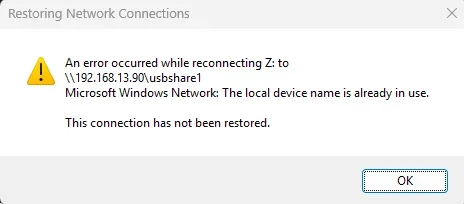
Restoring Network Connections - An error reconnecting to ...


d4005

Well-known member
Member
Local time
3:23 PM
Posts
115
OS
Win11 Pro 25H2
I've got a permanent drive mapping of Z: to a network drive (it's a USB drive that is plugged into a Synology NAS that's always switched on).

After waking up my Windows 11 Pro (25H2 26200.7462) from its "Sleep", that message below always pops up. After clicking OK and going to Explorer, I see the drive Z is there and accessible. There seems to be a window of time where it tries to connect and is unable to, pops up that message, and then some short time after that it finds it is unable to. If it wasn't a modal dialog it might have the ability to take it away.

Thoughts - this has been a very frequent thing for me, I've had it when that drive was plugged directly into my router, and on my previous Windows computers too. In the case of this particular one, I disabled the built-in wifi because it was too slow and have a much faster external USB wifi thing with antennas on it. I wonder if connecting to the remote drive happens before that USB is enabled. I doubt this because it happened prior to having this. I don't suspect the Synology NAS because it also happened when I had the drive plugged into the router (but stopped that because transfer rates were slow).

I'm hoping I can delay that reconnecting to the drive by a second and then this won't happen. Any ideas? Oh, and yes I do realize that "if this is my only problem I should feel grateful", yes I do, but it doesn't hurt to ask if this is a known issue.
1767343494330.webp
 

My Computer

System One

  • OS
    Win11 Pro 25H2
    Computer type
    Laptop
    Manufacturer/Model
    Lenovo ThinkBook 16p G6 IAX
    CPU
    Intel Core Ultra 9 275HX
    Memory
    32GB
    Graphics Card(s)
    NVIDIA® GeForce RTX™ 5060 Laptop GPU
    Monitor(s) Displays
    3 external monitors, Samsung 43" super widescreen (providing 2x 1080p via separate inputs), 1x LG 27" 1080p
    Screen Resolution
    2560x1600 and 3x 1920x1080
    Hard Drives
    1TB SSD internal, 2x4TB SSD external
    Keyboard
    Logitech illuminated and silent thing
    Mouse
    Traditional MS Intellimouse
    Internet Speed
    256Mb down/50Mb up
    Browser
    Chrome mostly, Edge for PDF's, Brave for YouTube
    Antivirus
    MalwareBytes/Defender
    Other Info
    Also an m4 Mac Mini for work dev stuff that I operate remotely via HelpWire.
One thing to add, this only happens if I've previously put my computer to sleep. If I instead just do WindowsKey + L to lock it, I don't get this. Makes sense because it's basically fully running and is just stopping the screen output.
 

My Computer

System One

  • OS
    Win11 Pro 25H2
    Computer type
    Laptop
    Manufacturer/Model
    Lenovo ThinkBook 16p G6 IAX
    CPU
    Intel Core Ultra 9 275HX
    Memory
    32GB
    Graphics Card(s)
    NVIDIA® GeForce RTX™ 5060 Laptop GPU
    Monitor(s) Displays
    3 external monitors, Samsung 43" super widescreen (providing 2x 1080p via separate inputs), 1x LG 27" 1080p
    Screen Resolution
    2560x1600 and 3x 1920x1080
    Hard Drives
    1TB SSD internal, 2x4TB SSD external
    Keyboard
    Logitech illuminated and silent thing
    Mouse
    Traditional MS Intellimouse
    Internet Speed
    256Mb down/50Mb up
    Browser
    Chrome mostly, Edge for PDF's, Brave for YouTube
    Antivirus
    MalwareBytes/Defender
    Other Info
    Also an m4 Mac Mini for work dev stuff that I operate remotely via HelpWire.
Screenshot 2026-01-02 095242.webp
 

My Computers

System One System Two

  • OS
    Windows 11 Pro 25H2
    Computer type
    PC/Desktop
    Manufacturer/Model
    Dell Optiplex 7080
    CPU
    i9-10900 10 core 20 threads
    Motherboard
    DELL 0J37VM
    Memory
    32 gb
    Graphics Card(s)
    none-Intel UHD Graphics 630
    Sound Card
    Integrated Realtek
    Monitor(s) Displays
    Benq 27
    Screen Resolution
    2560x1440
    Hard Drives
    2x1tb Solidigm m.2 nvme /External drives 512gb Samsung m.2 sata+2tb Kingston m2.nvme
    PSU
    500w
    Case
    MT
    Cooling
    Dell Premium
    Keyboard
    Logitech wired
    Mouse
    Logitech wireless
    Internet Speed
    so slow I'm too embarrassed to tell
    Browser
    #1 Edge #2 Firefox
    Antivirus
    Defender+MWB Premium
  • Operating System
    Windows 11 Pro 24H2 26200.8457
    Computer type
    PC/Desktop
    Manufacturer/Model
    Beelink Mini PC SER5
    CPU
    AMD Ryzen 7 6800U
    Memory
    32 gb
    Graphics card(s)
    integrated
    Sound Card
    integrated
    Monitor(s) Displays
    Benq 27
    Screen Resolution
    2560x1440
    Hard Drives
    1TB Crucial nvme
    Keyboard
    Logitech wired
    Mouse
    Logitech wireless
    Internet Speed
    still too embarrassed to tell
    Browser
    Firefox
    Antivirus
    Defender
    Other Info
    System 3 is non compliant Dell 9020 i7-4770/24gb ram Win11 PRO 26200.8457

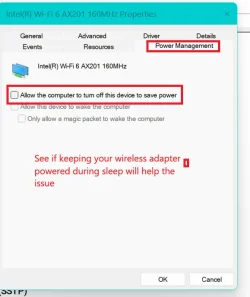
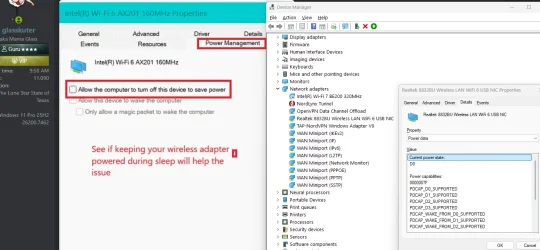
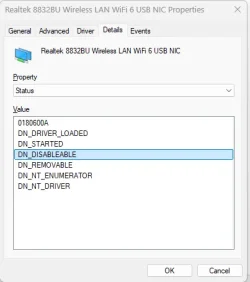
I absolutely believe you're onto something there, but the device manager options for my remote/USB wifi isn't offering me the Power Management tab for some unknown reason. Maybe it only offers that for internal devices. I did notice that it was unpowered just now when I came back to the computer, it had no lights on. As soon as I pressed the keyboard the wifi device lit up. Maybe it has a slow boot-up time and can't take connections as quickly as it can turn its LED on.

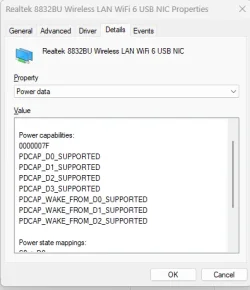
I've shown the screenshot of the device manager properties with no Power tab, and a couple of screenshots of some of the other fields I found that might be relevant. Maybe it's something that can only be achieved via registry fields. Note that the first Network Adaptor is the built-in wifi and is perma-disabled.

1767370262388.webp

1767370280330.webp 1767370291947.webp
 

My Computer

System One

  • OS
    Win11 Pro 25H2
    Computer type
    Laptop
    Manufacturer/Model
    Lenovo ThinkBook 16p G6 IAX
    CPU
    Intel Core Ultra 9 275HX
    Memory
    32GB
    Graphics Card(s)
    NVIDIA® GeForce RTX™ 5060 Laptop GPU
    Monitor(s) Displays
    3 external monitors, Samsung 43" super widescreen (providing 2x 1080p via separate inputs), 1x LG 27" 1080p
    Screen Resolution
    2560x1600 and 3x 1920x1080
    Hard Drives
    1TB SSD internal, 2x4TB SSD external
    Keyboard
    Logitech illuminated and silent thing
    Mouse
    Traditional MS Intellimouse
    Internet Speed
    256Mb down/50Mb up
    Browser
    Chrome mostly, Edge for PDF's, Brave for YouTube
    Antivirus
    MalwareBytes/Defender
    Other Info
    Also an m4 Mac Mini for work dev stuff that I operate remotely via HelpWire.
Then try to use power management to keep power on both your USB host controller and USB hub.
 

My Computers

System One System Two

  • OS
    Windows 11 Pro 25H2
    Computer type
    PC/Desktop
    Manufacturer/Model
    Dell Optiplex 7080
    CPU
    i9-10900 10 core 20 threads
    Motherboard
    DELL 0J37VM
    Memory
    32 gb
    Graphics Card(s)
    none-Intel UHD Graphics 630
    Sound Card
    Integrated Realtek
    Monitor(s) Displays
    Benq 27
    Screen Resolution
    2560x1440
    Hard Drives
    2x1tb Solidigm m.2 nvme /External drives 512gb Samsung m.2 sata+2tb Kingston m2.nvme
    PSU
    500w
    Case
    MT
    Cooling
    Dell Premium
    Keyboard
    Logitech wired
    Mouse
    Logitech wireless
    Internet Speed
    so slow I'm too embarrassed to tell
    Browser
    #1 Edge #2 Firefox
    Antivirus
    Defender+MWB Premium
  • Operating System
    Windows 11 Pro 24H2 26200.8457
    Computer type
    PC/Desktop
    Manufacturer/Model
    Beelink Mini PC SER5
    CPU
    AMD Ryzen 7 6800U
    Memory
    32 gb
    Graphics card(s)
    integrated
    Sound Card
    integrated
    Monitor(s) Displays
    Benq 27
    Screen Resolution
    2560x1440
    Hard Drives
    1TB Crucial nvme
    Keyboard
    Logitech wired
    Mouse
    Logitech wireless
    Internet Speed
    still too embarrassed to tell
    Browser
    Firefox
    Antivirus
    Defender
    Other Info
    System 3 is non compliant Dell 9020 i7-4770/24gb ram Win11 PRO 26200.8457
I just looked at your specs. Sorry I should have done that first. More than likely that laptop does not sleep (S3) but uses modern standby instead (S0).
Give this a gander.
 

My Computers

System One System Two

  • OS
    Windows 11 Pro 25H2
    Computer type
    PC/Desktop
    Manufacturer/Model
    Dell Optiplex 7080
    CPU
    i9-10900 10 core 20 threads
    Motherboard
    DELL 0J37VM
    Memory
    32 gb
    Graphics Card(s)
    none-Intel UHD Graphics 630
    Sound Card
    Integrated Realtek
    Monitor(s) Displays
    Benq 27
    Screen Resolution
    2560x1440
    Hard Drives
    2x1tb Solidigm m.2 nvme /External drives 512gb Samsung m.2 sata+2tb Kingston m2.nvme
    PSU
    500w
    Case
    MT
    Cooling
    Dell Premium
    Keyboard
    Logitech wired
    Mouse
    Logitech wireless
    Internet Speed
    so slow I'm too embarrassed to tell
    Browser
    #1 Edge #2 Firefox
    Antivirus
    Defender+MWB Premium
  • Operating System
    Windows 11 Pro 24H2 26200.8457
    Computer type
    PC/Desktop
    Manufacturer/Model
    Beelink Mini PC SER5
    CPU
    AMD Ryzen 7 6800U
    Memory
    32 gb
    Graphics card(s)
    integrated
    Sound Card
    integrated
    Monitor(s) Displays
    Benq 27
    Screen Resolution
    2560x1440
    Hard Drives
    1TB Crucial nvme
    Keyboard
    Logitech wired
    Mouse
    Logitech wireless
    Internet Speed
    still too embarrassed to tell
    Browser
    Firefox
    Antivirus
    Defender
    Other Info
    System 3 is non compliant Dell 9020 i7-4770/24gb ram Win11 PRO 26200.8457
I just looked at your specs. Sorry I should have done that first. More than likely that laptop does not sleep (S3) but uses modern standby instead (S0).
Give this a gander.

Thanks for that. I tried all the different methods in there and ensured there was no power saving enabled for any of my USB devices, still no luck.

I at least discovered during this that I can avoid the situation by just WinKey + L locking it instead of putting it to sleep. It's powered 24/7 so battery never comes into it. As I wrote in the original post, it's not a huge problem and I can live with it even without the WinKey + L that already makes it better.
 

My Computer

System One

  • OS
    Win11 Pro 25H2
    Computer type
    Laptop
    Manufacturer/Model
    Lenovo ThinkBook 16p G6 IAX
    CPU
    Intel Core Ultra 9 275HX
    Memory
    32GB
    Graphics Card(s)
    NVIDIA® GeForce RTX™ 5060 Laptop GPU
    Monitor(s) Displays
    3 external monitors, Samsung 43" super widescreen (providing 2x 1080p via separate inputs), 1x LG 27" 1080p
    Screen Resolution
    2560x1600 and 3x 1920x1080
    Hard Drives
    1TB SSD internal, 2x4TB SSD external
    Keyboard
    Logitech illuminated and silent thing
    Mouse
    Traditional MS Intellimouse
    Internet Speed
    256Mb down/50Mb up
    Browser
    Chrome mostly, Edge for PDF's, Brave for YouTube
    Antivirus
    MalwareBytes/Defender
    Other Info
    Also an m4 Mac Mini for work dev stuff that I operate remotely via HelpWire.
Back
Top Bottom