Solved Rpc server is unavailable at login


Tom1234

New member
Local time
5:04 PM
Posts
4
OS
Windows 11
I cannot login to my hp laptop as a message pops up when I enter my password that says rpc server is unavailable". I tried to restart and shut it down but that took me back to the login screen
 

My Computer My Computer

At a glance

Windows 11
OS
Windows 11
Hi Tom,
at the lock screen, right bottom corner, select restart while holding the shift key.
This will take you to recovery mode where you can boot in safe mode.
A service by HP is probably trying to communicate to one of their servers which might be having issues.
From safe mode, change the way you log in, at least temporarily.
 

My Computers My Computers

  • At a glance

    All Branches but ReleaseAMD Ryzen 7 7735HS 3200-4500 Mhz 8 cores x 232 GB DDR5Radeon Graphic / NVIDIA GeForce RTX 4060 8 GB...
    OS
    All Branches but Release
    Computer type
    Laptop
    Manufacturer/Model
    Acer Nitro ANV15-51
    CPU
    AMD Ryzen 7 7735HS 3200-4500 Mhz 8 cores x 2
    Motherboard
    Sportage_RBH
    Memory
    32 GB DDR5
    Graphics Card(s)
    Radeon Graphic / NVIDIA GeForce RTX 4060 8 GB GDDR6
    Sound Card
    AMD/Realtek(R) Audio
    Monitor(s) Displays
    Integrated Monitor (15.3"vis)
    Screen Resolution
    FHD 1920X1080 16:9 144Hz
    Hard Drives
    KINGSTON OM8SEP4512Q-AA 1TB
    Western Digital 256GB
    PSU
    19V DC 6.32 A 120 W
    Cooling
    Dual Fans
    Mouse
    MS Bluetooth
    Internet Speed
    Fiber 1GB Cox -us & 1GB Orange-fr
    Browser
    Edge Canary- Firefox Nightly-Chrome Dev-Chrome Dev
    Antivirus
    Windows Defender
  • At a glance

    Windows 11 BetaAMD A9-94208 GB of DDR4AMD Radeon R5
    Operating System
    Windows 11 Beta
    Computer type
    Laptop
    Manufacturer/Model
    Asus X751BP
    CPU
    AMD A9-9420
    Memory
    8 GB of DDR4
    Graphics card(s)
    AMD Radeon R5
    Screen Resolution
    1600x900
    Hard Drives
    Seagate 1 TB
Thanks OAT, I just tried doing that and it still does the same thing, it takes me back to the login screen.
 

My Computer My Computer

At a glance

Windows 11
OS
Windows 11
Please boot into safe mode. Your login should work then.
The link is valid for Windows 11 as well:


My Computers My Computers

  • At a glance

    All Branches but ReleaseAMD Ryzen 7 7735HS 3200-4500 Mhz 8 cores x 232 GB DDR5Radeon Graphic / NVIDIA GeForce RTX 4060 8 GB...
    OS
    All Branches but Release
    Computer type
    Laptop
    Manufacturer/Model
    Acer Nitro ANV15-51
    CPU
    AMD Ryzen 7 7735HS 3200-4500 Mhz 8 cores x 2
    Motherboard
    Sportage_RBH
    Memory
    32 GB DDR5
    Graphics Card(s)
    Radeon Graphic / NVIDIA GeForce RTX 4060 8 GB GDDR6
    Sound Card
    AMD/Realtek(R) Audio
    Monitor(s) Displays
    Integrated Monitor (15.3"vis)
    Screen Resolution
    FHD 1920X1080 16:9 144Hz
    Hard Drives
    KINGSTON OM8SEP4512Q-AA 1TB
    Western Digital 256GB
    PSU
    19V DC 6.32 A 120 W
    Cooling
    Dual Fans
    Mouse
    MS Bluetooth
    Internet Speed
    Fiber 1GB Cox -us & 1GB Orange-fr
    Browser
    Edge Canary- Firefox Nightly-Chrome Dev-Chrome Dev
    Antivirus
    Windows Defender
  • At a glance

    Windows 11 BetaAMD A9-94208 GB of DDR4AMD Radeon R5
    Operating System
    Windows 11 Beta
    Computer type
    Laptop
    Manufacturer/Model
    Asus X751BP
    CPU
    AMD A9-9420
    Memory
    8 GB of DDR4
    Graphics card(s)
    AMD Radeon R5
    Screen Resolution
    1600x900
    Hard Drives
    Seagate 1 TB
Boot your computer into recovery environment and use System Restore tool and Startup Repair tool.

If none of those are working open the SYSTEM registry hive and navigate to HKEY_LOCAL_MACHINE\Temp\CurrentControlSet\services\RpcSs
Here, double-click Start in the right pane and set its Value Data to 2.

Do the same for DcomLaunch and RpcEptMapper

In this video, i will explain in detail how to edit the Windows registry offline from a Windows Recovery Environment.


My Computer My Computer

At a glance

Windows 11AMD Ryzen 7 5700GMicron Technology DDR4-3200 16GBNVIDIA GeForce RTX 3060
OS
Windows 11
Computer type
PC/Desktop
Manufacturer/Model
HP Pavilion
CPU
AMD Ryzen 7 5700G
Motherboard
Erica6
Memory
Micron Technology DDR4-3200 16GB
Graphics Card(s)
NVIDIA GeForce RTX 3060
Sound Card
Realtek ALC671
Monitor(s) Displays
Samsung SyncMaster U28E590
Screen Resolution
3840 x 2160
Hard Drives
SAMSUNG MZVLQ1T0HALB-000H1

My Computer My Computer

At a glance

Win11 Ver 25H2 26200.6899Intel i58gb
OS
Win11 Ver 25H2 26200.6899
Computer type
Laptop
Manufacturer/Model
Dell
CPU
Intel i5
Memory
8gb
Screen Resolution
1920x1080
Hard Drives
256gb
Browser
Firefox
Antivirus
Windows Defender

My Computer My Computer

At a glance

Windows 11AMD Ryzen 7 5700GMicron Technology DDR4-3200 16GBNVIDIA GeForce RTX 3060
OS
Windows 11
Computer type
PC/Desktop
Manufacturer/Model
HP Pavilion
CPU
AMD Ryzen 7 5700G
Motherboard
Erica6
Memory
Micron Technology DDR4-3200 16GB
Graphics Card(s)
NVIDIA GeForce RTX 3060
Sound Card
Realtek ALC671
Monitor(s) Displays
Samsung SyncMaster U28E590
Screen Resolution
3840 x 2160
Hard Drives
SAMSUNG MZVLQ1T0HALB-000H1
I don't know how is that site going to help if OP cannot login into Windows 11.
Assumed he would eventually boot using Safe Mode/Recovery. Seems useful in determining what may have caused the issue.
 

My Computer My Computer

At a glance

Win11 Ver 25H2 26200.6899Intel i58gb
OS
Win11 Ver 25H2 26200.6899
Computer type
Laptop
Manufacturer/Model
Dell
CPU
Intel i5
Memory
8gb
Screen Resolution
1920x1080
Hard Drives
256gb
Browser
Firefox
Antivirus
Windows Defender
I'm afraid that the solutions provided in these links are for when I have logged onto my laptop, I cannot even log on to my laptop. I tried to boot my computer into Safe mode but it does not work, I tried restarting it by pressing the shift key while pressing the restart button but it didn't work. So I am praying that there's someone out there with the solution to this problem🙏🏽
 

My Computer My Computer

At a glance

Windows 11
OS
Windows 11
Thanks OAT, I just tried doing that and it still does the same thing, it takes me back to the login screen.
It will always take you back to the login screen, but did you try to log in, and did you get the same error in safe mode?
 

My Computers My Computers

  • At a glance

    All Branches but ReleaseAMD Ryzen 7 7735HS 3200-4500 Mhz 8 cores x 232 GB DDR5Radeon Graphic / NVIDIA GeForce RTX 4060 8 GB...
    OS
    All Branches but Release
    Computer type
    Laptop
    Manufacturer/Model
    Acer Nitro ANV15-51
    CPU
    AMD Ryzen 7 7735HS 3200-4500 Mhz 8 cores x 2
    Motherboard
    Sportage_RBH
    Memory
    32 GB DDR5
    Graphics Card(s)
    Radeon Graphic / NVIDIA GeForce RTX 4060 8 GB GDDR6
    Sound Card
    AMD/Realtek(R) Audio
    Monitor(s) Displays
    Integrated Monitor (15.3"vis)
    Screen Resolution
    FHD 1920X1080 16:9 144Hz
    Hard Drives
    KINGSTON OM8SEP4512Q-AA 1TB
    Western Digital 256GB
    PSU
    19V DC 6.32 A 120 W
    Cooling
    Dual Fans
    Mouse
    MS Bluetooth
    Internet Speed
    Fiber 1GB Cox -us & 1GB Orange-fr
    Browser
    Edge Canary- Firefox Nightly-Chrome Dev-Chrome Dev
    Antivirus
    Windows Defender
  • At a glance

    Windows 11 BetaAMD A9-94208 GB of DDR4AMD Radeon R5
    Operating System
    Windows 11 Beta
    Computer type
    Laptop
    Manufacturer/Model
    Asus X751BP
    CPU
    AMD A9-9420
    Memory
    8 GB of DDR4
    Graphics card(s)
    AMD Radeon R5
    Screen Resolution
    1600x900
    Hard Drives
    Seagate 1 TB
I'm afraid that the solutions provided in these links are for when I have logged onto my laptop, I cannot even log on to my laptop. I tried to boot my computer into Safe mode but it does not work, I tried restarting it by pressing the shift key while pressing the restart button but it didn't work. So I am praying that there's someone out there with the solution to this problem🙏🏽
I already giving you the one option you can do, have you tried it?
 

My Computer My Computer

At a glance

Windows 11AMD Ryzen 7 5700GMicron Technology DDR4-3200 16GBNVIDIA GeForce RTX 3060
OS
Windows 11
Computer type
PC/Desktop
Manufacturer/Model
HP Pavilion
CPU
AMD Ryzen 7 5700G
Motherboard
Erica6
Memory
Micron Technology DDR4-3200 16GB
Graphics Card(s)
NVIDIA GeForce RTX 3060
Sound Card
Realtek ALC671
Monitor(s) Displays
Samsung SyncMaster U28E590
Screen Resolution
3840 x 2160
Hard Drives
SAMSUNG MZVLQ1T0HALB-000H1
  • Like
Reactions: OAT
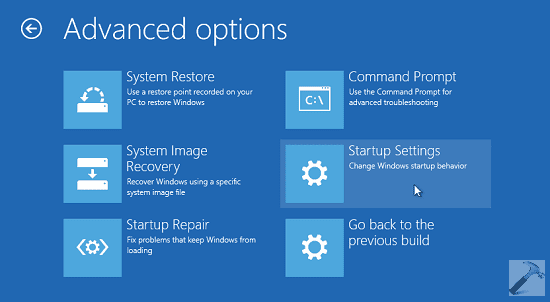
I solved the problem. I waited till my laptop shut down and then I connected the charger and as soon as it switched on I pressed on the escape key. That took me to the startup menu, there I pressed on system restore. From there I looked for the option which allowed me to restore the laptop to the condition it was before the rpc server error occured and it worked. Thanks once again for the solutions, I appreciated them
 

My Computer My Computer

At a glance

Windows 11
OS
Windows 11
Back
Top Bottom