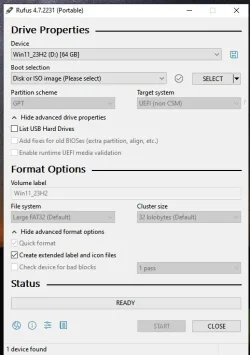
I had installed on a USB once before a few days ago. I erased the drive and tried to install it again and I get the following error:

I clicked "yes" (not sure I should have done that) and then when I tried to re-map to the ISO, everything is greyed-out:

I can't hit START or anything. How to fix?
Thanks
I clicked "yes" (not sure I should have done that) and then when I tried to re-map to the ISO, everything is greyed-out:
I can't hit START or anything. How to fix?
Thanks
- Windows Build/Version
- 23H2 Pro
My Computers
-
At a glance
Windows 11 Pro 25H232GB- OS
- Windows 11 Pro 25H2
- Computer type
- Laptop
- Manufacturer/Model
- Microsoft Surface Pro
- Memory
- 32GB
-
At a glance
Windows 11 Pro 25H2 Pro (OS Build 262000.9711)Intel Core Ultra 764GBIntel Integrated Graphics- Operating System
- Windows 11 Pro 25H2 Pro (OS Build 262000.9711)
- Computer type
- Laptop
- Manufacturer/Model
- Dell Pro 14 - PC14250
- CPU
- Intel Core Ultra 7
- Memory
- 64GB
- Graphics card(s)
- Intel Integrated Graphics
- Hard Drives
- SanDisk PC_SN500S NVMe 1TB
- Browser
- Firefox, Brave
- Antivirus
- ESET