Solved RunOnceEX is no longer executed


DMD

Well-known member
Member
Local time
11:16 PM
Posts
218
OS
W11
Good morning.
I am struggling with a strange RunOnceEx situation.
I have been using this procedure for years from W7 up to W11 22H2 and it works regularly on both HOST PC and virtual machine, but these days an unexplainable thing happens to me.
When I run this procedure on a newly built pc with Ryzen 9 7950X and still running W11 22H2, the RunOceEx does not run, when I try the same ISO with RunOnceEx on another PC or virtual machine it runs.
I have been going crazy for a few days and can't figure out why and don't know what solution to look for.
Any ideas?
This is the "setupcomplete.cmd" script that I have always uitilized.
Screenshot-003.png


Code:
@echo off
for %%w IN (D E F G H I J K L M N O P Q R S T U V W X Y Z) DO IF EXIST %%w:\sources\install.wim SET CDROM=%%

REG ADD HKLM\SOFTWARE\Microsoft\Windows\CurrentVersion\RunOnceEx
SET KEY=HKLM\SOFTWARE\Microsoft\Windows\CurrentVersion\RunOnceEx

REG ADD %KEY% /v Flags /t REG_DWORD /d "20" /f

REG ADD %KEY% /V Title /D "Post Installation..." /f  >NUl

REG ADD %KEY%\06 /VE /D "Calculator Legacy" /f  >NUL
REG ADD %KEY%\06 /V 1 /D "%CDROM%\Software\Calculator_Legacy_2.0.exe" /f  >NUL

REG ADD %KEY%\07 /VE /D "7-Zip 22.01" /f  >NUL
REG ADD %KEY%\07 /V 1 /D "%CDROM%\Software\7z2201.msi /quiet /norestart" /f  >NUL

EXIT

Sincerely thank you
 

My Computer

System One

  • OS
    W11
    Computer type
    PC/Desktop
    CPU
    CPU AMD Ryzen 9 7950X
    Motherboard
    ASUS ROG Strix X670E-F Gaming WiFi
    Memory
    G.Skill Flare X5 32GB Kit DDR5-6000 CL32 (F5-6000J3238F16GX2-FX5)
    Monitor(s) Displays
    LG E2381VR
    Screen Resolution
    1920x1080
    Hard Drives
    1x Samsung Memorie MZ-V8P1T0B 980 PRO SSD 1TB
    2x Western Digital WD Red Nas 4TB
    PSU
    SEASONIC FOCUS PX-850 Plus Platinum
    Case
    Corsair 4000D Airflow
    Cooling
    ARCTIC Liquid Freezer II 280 A-RGB
    Keyboard
    Logitech G510
    Mouse
    Logitech G502 HERO
    Browser
    Firefox
    Antivirus
    Avg free
    Other Info
    Download: 90 Mbps
    Upload: 20Mbps
@DMD
Did not work for me either until I changed

Code:
for %%w IN (D E F G H I J K L M N O P Q R S T U V W X Y Z) DO IF EXIST %%w:\sources\install.wim SET CDROM=%%
to
Code:
for %%w IN (D E F G H I J K L M N O P Q R S T U V W X Y Z) DO IF EXIST %%w:\sources\install.wim SET CDROM=%%w:
 

My Computers

System One System Two

  • OS
    All Branches but Release
    Computer type
    Laptop
    Manufacturer/Model
    Acer Nitro ANV15-51
    CPU
    AMD Ryzen 7 7735HS 3200-4500 Mhz 8 cores x 2
    Motherboard
    Sportage_RBH
    Memory
    32 GB DDR5
    Graphics Card(s)
    Radeon Graphic / NVIDIA GeForce RTX 4060 8 GB GDDR6
    Sound Card
    AMD/Realtek(R) Audio
    Monitor(s) Displays
    Integrated Monitor (15.3"vis)
    Screen Resolution
    FHD 1920X1080 16:9 144Hz
    Hard Drives
    KINGSTON OM8SEP4512Q-AA 1TB
    Western Digital 256GB
    PSU
    19V DC 6.32 A 120 W
    Cooling
    Dual Fans
    Mouse
    MS Bluetooth
    Internet Speed
    Fiber 1GB Cox -us & 1GB Orange-fr
    Browser
    Edge Canary- Firefox Nightly-Chrome Dev-Chrome Dev
    Antivirus
    Windows Defender
  • Operating System
    Windows 11 Beta
    Computer type
    Laptop
    Manufacturer/Model
    Asus X751BP
    CPU
    AMD A9-9420
    Memory
    8 GB of DDR4
    Graphics card(s)
    AMD Radeon R5
    Screen Resolution
    1600x900
    Hard Drives
    Seagate 1 TB
THANK YOU.
i tried the correct script
Code:
for %%w IN (D E F G H I J K L M N O P Q R S T U V W X Y Z) DO IF EXIST %%w:\sources\install.wim SET CDROM=%%w:
Unfortunately I still have the same problem.
 

My Computer

System One

  • OS
    W11
    Computer type
    PC/Desktop
    CPU
    CPU AMD Ryzen 9 7950X
    Motherboard
    ASUS ROG Strix X670E-F Gaming WiFi
    Memory
    G.Skill Flare X5 32GB Kit DDR5-6000 CL32 (F5-6000J3238F16GX2-FX5)
    Monitor(s) Displays
    LG E2381VR
    Screen Resolution
    1920x1080
    Hard Drives
    1x Samsung Memorie MZ-V8P1T0B 980 PRO SSD 1TB
    2x Western Digital WD Red Nas 4TB
    PSU
    SEASONIC FOCUS PX-850 Plus Platinum
    Case
    Corsair 4000D Airflow
    Cooling
    ARCTIC Liquid Freezer II 280 A-RGB
    Keyboard
    Logitech G510
    Mouse
    Logitech G502 HERO
    Browser
    Firefox
    Antivirus
    Avg free
    Other Info
    Download: 90 Mbps
    Upload: 20Mbps
Before we go further, where is your installation media?
As you can see, mine is on G: using the corrected script.
Written to the registry correctly.

Screenshot 2023-01-23 143634.jpg

Using the original script I get this:
Screenshot 2023-01-23 144155.jpg
 

My Computers

System One System Two

  • OS
    All Branches but Release
    Computer type
    Laptop
    Manufacturer/Model
    Acer Nitro ANV15-51
    CPU
    AMD Ryzen 7 7735HS 3200-4500 Mhz 8 cores x 2
    Motherboard
    Sportage_RBH
    Memory
    32 GB DDR5
    Graphics Card(s)
    Radeon Graphic / NVIDIA GeForce RTX 4060 8 GB GDDR6
    Sound Card
    AMD/Realtek(R) Audio
    Monitor(s) Displays
    Integrated Monitor (15.3"vis)
    Screen Resolution
    FHD 1920X1080 16:9 144Hz
    Hard Drives
    KINGSTON OM8SEP4512Q-AA 1TB
    Western Digital 256GB
    PSU
    19V DC 6.32 A 120 W
    Cooling
    Dual Fans
    Mouse
    MS Bluetooth
    Internet Speed
    Fiber 1GB Cox -us & 1GB Orange-fr
    Browser
    Edge Canary- Firefox Nightly-Chrome Dev-Chrome Dev
    Antivirus
    Windows Defender
  • Operating System
    Windows 11 Beta
    Computer type
    Laptop
    Manufacturer/Model
    Asus X751BP
    CPU
    AMD A9-9420
    Memory
    8 GB of DDR4
    Graphics card(s)
    AMD Radeon R5
    Screen Resolution
    1600x900
    Hard Drives
    Seagate 1 TB
I also replaced install.wim by install.??? in case the file is .esd
 

My Computers

System One System Two

  • OS
    All Branches but Release
    Computer type
    Laptop
    Manufacturer/Model
    Acer Nitro ANV15-51
    CPU
    AMD Ryzen 7 7735HS 3200-4500 Mhz 8 cores x 2
    Motherboard
    Sportage_RBH
    Memory
    32 GB DDR5
    Graphics Card(s)
    Radeon Graphic / NVIDIA GeForce RTX 4060 8 GB GDDR6
    Sound Card
    AMD/Realtek(R) Audio
    Monitor(s) Displays
    Integrated Monitor (15.3"vis)
    Screen Resolution
    FHD 1920X1080 16:9 144Hz
    Hard Drives
    KINGSTON OM8SEP4512Q-AA 1TB
    Western Digital 256GB
    PSU
    19V DC 6.32 A 120 W
    Cooling
    Dual Fans
    Mouse
    MS Bluetooth
    Internet Speed
    Fiber 1GB Cox -us & 1GB Orange-fr
    Browser
    Edge Canary- Firefox Nightly-Chrome Dev-Chrome Dev
    Antivirus
    Windows Defender
  • Operating System
    Windows 11 Beta
    Computer type
    Laptop
    Manufacturer/Model
    Asus X751BP
    CPU
    AMD A9-9420
    Memory
    8 GB of DDR4
    Graphics card(s)
    AMD Radeon R5
    Screen Resolution
    1600x900
    Hard Drives
    Seagate 1 TB
The installation file and on USB stick , burned with RUFUS and the file is in "wim" format
 

My Computer

System One

  • OS
    W11
    Computer type
    PC/Desktop
    CPU
    CPU AMD Ryzen 9 7950X
    Motherboard
    ASUS ROG Strix X670E-F Gaming WiFi
    Memory
    G.Skill Flare X5 32GB Kit DDR5-6000 CL32 (F5-6000J3238F16GX2-FX5)
    Monitor(s) Displays
    LG E2381VR
    Screen Resolution
    1920x1080
    Hard Drives
    1x Samsung Memorie MZ-V8P1T0B 980 PRO SSD 1TB
    2x Western Digital WD Red Nas 4TB
    PSU
    SEASONIC FOCUS PX-850 Plus Platinum
    Case
    Corsair 4000D Airflow
    Cooling
    ARCTIC Liquid Freezer II 280 A-RGB
    Keyboard
    Logitech G510
    Mouse
    Logitech G502 HERO
    Browser
    Firefox
    Antivirus
    Avg free
    Other Info
    Download: 90 Mbps
    Upload: 20Mbps
Mine is also on a USB stick and the reg keys get created.
Did you check the reg to see if the keys get created?
(see above screenshots)

BTW, when you say 'it doesn't work'.
What do you expect to happen?
The script you provided is passive and does not execute anything and sets values only.
 

My Computers

System One System Two

  • OS
    All Branches but Release
    Computer type
    Laptop
    Manufacturer/Model
    Acer Nitro ANV15-51
    CPU
    AMD Ryzen 7 7735HS 3200-4500 Mhz 8 cores x 2
    Motherboard
    Sportage_RBH
    Memory
    32 GB DDR5
    Graphics Card(s)
    Radeon Graphic / NVIDIA GeForce RTX 4060 8 GB GDDR6
    Sound Card
    AMD/Realtek(R) Audio
    Monitor(s) Displays
    Integrated Monitor (15.3"vis)
    Screen Resolution
    FHD 1920X1080 16:9 144Hz
    Hard Drives
    KINGSTON OM8SEP4512Q-AA 1TB
    Western Digital 256GB
    PSU
    19V DC 6.32 A 120 W
    Cooling
    Dual Fans
    Mouse
    MS Bluetooth
    Internet Speed
    Fiber 1GB Cox -us & 1GB Orange-fr
    Browser
    Edge Canary- Firefox Nightly-Chrome Dev-Chrome Dev
    Antivirus
    Windows Defender
  • Operating System
    Windows 11 Beta
    Computer type
    Laptop
    Manufacturer/Model
    Asus X751BP
    CPU
    AMD A9-9420
    Memory
    8 GB of DDR4
    Graphics card(s)
    AMD Radeon R5
    Screen Resolution
    1600x900
    Hard Drives
    Seagate 1 TB
Thank you very much for the valuable information, in the meantime I have performed numerous tests and installations, and found the cause and solution to the problem.
Since a few days to save the number usb sticks, I created the bootable usb stick not as I always did with RUFUS but with Ventoy so that I can put in more ISOs of operating systems and tools.
And it is precisely the usb pen created with Ventoy that does not allow me to run the RunOnceEx, the usb pen created with Rufus works without problems, maybe it interacts with the ISO, I don't know what to think.
 

My Computer

System One

  • OS
    W11
    Computer type
    PC/Desktop
    CPU
    CPU AMD Ryzen 9 7950X
    Motherboard
    ASUS ROG Strix X670E-F Gaming WiFi
    Memory
    G.Skill Flare X5 32GB Kit DDR5-6000 CL32 (F5-6000J3238F16GX2-FX5)
    Monitor(s) Displays
    LG E2381VR
    Screen Resolution
    1920x1080
    Hard Drives
    1x Samsung Memorie MZ-V8P1T0B 980 PRO SSD 1TB
    2x Western Digital WD Red Nas 4TB
    PSU
    SEASONIC FOCUS PX-850 Plus Platinum
    Case
    Corsair 4000D Airflow
    Cooling
    ARCTIC Liquid Freezer II 280 A-RGB
    Keyboard
    Logitech G510
    Mouse
    Logitech G502 HERO
    Browser
    Firefox
    Antivirus
    Avg free
    Other Info
    Download: 90 Mbps
    Upload: 20Mbps

Thank you very much for the valuable information, in the meantime I have performed numerous tests and installations, and found the cause and solution to the problem.
Since a few days to save the number usb sticks, I created the bootable usb stick not as I always did with RUFUS but with Ventoy so that I can put in more ISOs of operating systems and tools.
And it is precisely the usb pen created with Ventoy that does not allow me to run the RunOnceEx, the usb pen created with Rufus works without problems, maybe it interacts with the ISO, I don't know what to think.
Just some info about Ventoy. I did exactly the same with Rescuezilla iso on it. It would refuse to boot from as secure boot refused it. Creating the Rescuezilla bootable USB flash drive with Rufus and had no issues.
 

My Computers

System One System Two

  • OS
    Win 11 Pro
    Computer type
    Laptop
    Manufacturer/Model
    ASUS Vivobook
    CPU
    AMD Ryzen™ 7 7730U
    Motherboard
    M1605YA
    Memory
    24GB Dual-Channel DDR4 @ 1596MHz (22-22-22-52)
    Graphics Card(s)
    512MB ATI AMD Radeon Graphics (ASUStek Computer Inc)
    Monitor(s) Displays
    Generic PnP Monitor (1920x1200@60Hz) - P1 PLUS (1920x1080@59Hz)
    Screen Resolution
    1920 X 1200
    Hard Drives
    953GB Western Digital WD
    PSU
    45 Watts
    Mouse
    Lenovo Bluetooth.
    Internet Speed
    500 Mbps
    Browser
    Edge
    Antivirus
    Defender
  • Operating System
    Windows 11
    Computer type
    Laptop
    Manufacturer/Model
    ACER NITRO
    CPU
    AMD Ryzen 7 5800H / 3.2 GHz
    Motherboard
    CZ Scala_CAS (FP6)
    Memory
    32 GB DDR4 SDRAM 3200 MHz
    Graphics card(s)
    NVIDIA GeForce RTX 3060 6 GB GDDR6 SDRAM
    Sound Card
    Realtek Audio. NVIDIA High Definition Audio
    Monitor(s) Displays
    15.6" LED backlight 1920 x 1080 (Full HD) 144 Hz
    Screen Resolution
    1920 x 1080 (Full HD)
    Hard Drives
    Samsung 970 Evo Plus 2TB NVMe M.2
    PSU
    180 Watt, 19.5 V
    Mouse
    Lenovo Bluetooth
    Internet Speed
    500 Mbps
    Browser
    Edge
    Antivirus
    Defender
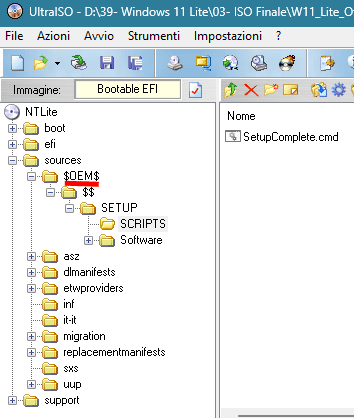
I found the script solution to make the RunOnceEx procedure work on Ventoy as well.
It involves synthesizing the "Software" folder in the Windows directoty
and then when the Windows installation is finished, when you enter the user name via the registry the programs in the "Software" folder are installed and when it finishes all the installations, the "Software" folder is deleted.

Setupcomplete
Code:
@echo off

SET CDROM=%WINDIR%\Setup

REG ADD HKLM\SOFTWARE\Microsoft\Windows\CurrentVersion\RunOnceEx
SET KEY=HKLM\SOFTWARE\Microsoft\Windows\CurrentVersion\RunOnceEx

REG ADD %KEY% /v Flags /t REG_DWORD /d "20" /f

REG ADD %KEY% /V Title /D "Post Installation..." /f  >NUL

REG ADD %KEY%\06 /VE /D "Calcolatrice Legacy" /f  >NUL
REG ADD %KEY%\06 /V 1 /D "%CDROM%\Software\Calcolatrice_Legacy_2.0.exe" /f  >NUL

REG ADD %KEY%\42 /VE /D "Deleting Setup folder" /f  >NUL
REG ADD %KEY%\42 /V 1 /D "%CDROM%\Software\Deleting Setup folder.bat" /f  >NUL

EXIT

Deleting_Setup_folder
Code:
echo off
cls

rem -----Deleting_Setup_folder--------
rd "%windir%\Setup" /S /Q

exit
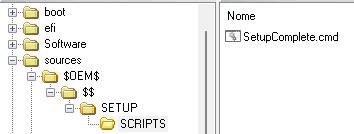
Also very important thing the structure of the ISO, the folder "Software" should be placed inside the folder "SETUP"

Senza-titulo-1.png
 

My Computer

System One

  • OS
    W11
    Computer type
    PC/Desktop
    CPU
    CPU AMD Ryzen 9 7950X
    Motherboard
    ASUS ROG Strix X670E-F Gaming WiFi
    Memory
    G.Skill Flare X5 32GB Kit DDR5-6000 CL32 (F5-6000J3238F16GX2-FX5)
    Monitor(s) Displays
    LG E2381VR
    Screen Resolution
    1920x1080
    Hard Drives
    1x Samsung Memorie MZ-V8P1T0B 980 PRO SSD 1TB
    2x Western Digital WD Red Nas 4TB
    PSU
    SEASONIC FOCUS PX-850 Plus Platinum
    Case
    Corsair 4000D Airflow
    Cooling
    ARCTIC Liquid Freezer II 280 A-RGB
    Keyboard
    Logitech G510
    Mouse
    Logitech G502 HERO
    Browser
    Firefox
    Antivirus
    Avg free
    Other Info
    Download: 90 Mbps
    Upload: 20Mbps

Latest Support Threads

Back
Top Bottom