
'Safely Remove Hardware and Eject Media' Not Working Properly with USB Portable DVD Drive?


BuddhaNature

Well-known member
Member
VIP
Local time
7:21 AM
Posts
136
Location
Scotland
OS
Win 11 Pro. 25H2
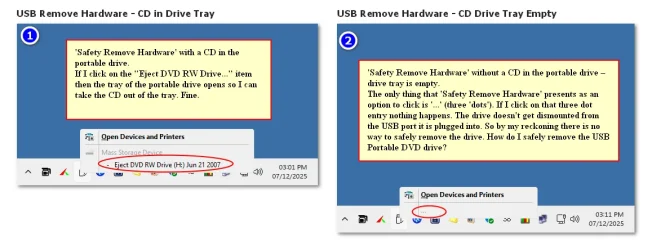
I just got a Portable USB DVD drive. However, I find that there is no way to eject it from the USB port on my computer. My screenshot here shows what the problem is.
USB Remove Hardware - CD Drive (Combined).webp

In the end to remove the drive from the USB port it seems I just have to make sure the CD tray is empty and then just manually unplug the drive from the port (no 'Safely Remove' involved). Is this the right way do this? Or am I missing something here in thinking that Windows Safely Remove Hardware should be involved in this, when, in fact, it shouldn't be involved at all and my drive and Windows are working properly?
 
Windows Build/Version
Windows 11 Pro. 25H2 (26200.7171)
Last edited:

My Computers

System One System Two

  • OS
    Win 11 Pro. 25H2
    Computer type
    PC/Desktop
    Manufacturer/Model
    Customised "Chillblast Apex Intel Core i7 Office PC"
    CPU
    Intel Core i7-14700 (Raptor Lake)
    Motherboard
    ASUS Prime B760M-A WiFi D4
    Memory
    32GB Corsair Vengeance LPX (DDR4)
    Graphics Card(s)
    Intel UHD 770 — onboard standard as supplied by Intel/Asus
    Monitor(s) Displays
    Dell P2421 24 inch WUXGA (1920x1200) 16:10 Monitor
    Screen Resolution
    1920x1200
    Hard Drives
    First (Boot Drive Only): 2TB Samsung SSD 990 Pro.
    Second (Data Drive) 2TB Samsung SSD 990 Pro.
    PSU
    850W Corsair RM850x 80 Plus Gold
    Cooling
    Just standard fans for both the case and CPU.
    Keyboard
    Unicomp Model M (IBM Style keyboard)
    Mouse
    Wired Mouse
    Internet Speed
    1.6 MB/s
    Browser
    Firefox
    Antivirus
    Microsoft's Defender
  • Operating System
    Win 11 Pro. 25H2
    Computer type
    Laptop
    Manufacturer/Model
    Lenovo Legion Pro 7i Gen 9 (16" Intel)
    CPU
    14th Generation Intel® Core™ i9-14900HX
    Memory
    32 GB DDR5-5600MHz
    Graphics card(s)
    NVIDIA® GeForce RTX™ 4080 Laptop GPU 12GB GDDR6
    Monitor(s) Displays
    16" WQXGA (2560 x 1600), IPS, Anti-Glare, Non-Touch, HDR 40
    Screen Resolution
    2560 x 1600
    Hard Drives
    First (Boot): 1 TB SSD M.2 2280 PCIe Gen4 TLC
    Second (Data): 1 TB SSD M.2 2280 PCIe Gen4 TLC
    Keyboard
    Per-Key RGB-Coloured Backlit - English (UK)
    Mouse
    Wired Mouse
    Internet Speed
    1.6 MB/s
    Browser
    Firefox
    Antivirus
    Microsoft's Defender
Just unplug it, disc or no disc.
 

My Computers

System One System Two

  • OS
    Windows 11 Pro
    Computer type
    PC/Desktop
    Manufacturer/Model
    ASUS ROG Strix
  • Operating System
    Windows 11 Pro
    Computer type
    Laptop
    Manufacturer/Model
    ASUS VivoBook
Well yes, that is what I am forced to do. But does anyone know why Windows is acting this way with these portable USB DVD drives?

I have now tried it with two such DVD drives and get the same result for both.
 

My Computers

System One System Two

  • OS
    Win 11 Pro. 25H2
    Computer type
    PC/Desktop
    Manufacturer/Model
    Customised "Chillblast Apex Intel Core i7 Office PC"
    CPU
    Intel Core i7-14700 (Raptor Lake)
    Motherboard
    ASUS Prime B760M-A WiFi D4
    Memory
    32GB Corsair Vengeance LPX (DDR4)
    Graphics Card(s)
    Intel UHD 770 — onboard standard as supplied by Intel/Asus
    Monitor(s) Displays
    Dell P2421 24 inch WUXGA (1920x1200) 16:10 Monitor
    Screen Resolution
    1920x1200
    Hard Drives
    First (Boot Drive Only): 2TB Samsung SSD 990 Pro.
    Second (Data Drive) 2TB Samsung SSD 990 Pro.
    PSU
    850W Corsair RM850x 80 Plus Gold
    Cooling
    Just standard fans for both the case and CPU.
    Keyboard
    Unicomp Model M (IBM Style keyboard)
    Mouse
    Wired Mouse
    Internet Speed
    1.6 MB/s
    Browser
    Firefox
    Antivirus
    Microsoft's Defender
  • Operating System
    Win 11 Pro. 25H2
    Computer type
    Laptop
    Manufacturer/Model
    Lenovo Legion Pro 7i Gen 9 (16" Intel)
    CPU
    14th Generation Intel® Core™ i9-14900HX
    Memory
    32 GB DDR5-5600MHz
    Graphics card(s)
    NVIDIA® GeForce RTX™ 4080 Laptop GPU 12GB GDDR6
    Monitor(s) Displays
    16" WQXGA (2560 x 1600), IPS, Anti-Glare, Non-Touch, HDR 40
    Screen Resolution
    2560 x 1600
    Hard Drives
    First (Boot): 1 TB SSD M.2 2280 PCIe Gen4 TLC
    Second (Data): 1 TB SSD M.2 2280 PCIe Gen4 TLC
    Keyboard
    Per-Key RGB-Coloured Backlit - English (UK)
    Mouse
    Wired Mouse
    Internet Speed
    1.6 MB/s
    Browser
    Firefox
    Antivirus
    Microsoft's Defender
Seems correct to me. In the second case there is no recordable media to eject. With no Disc you are just removing hardware rather than say a USB flash drive which is recordable media.

You can go to Settings > Bluetooth & Devices > Devices > Other devices > Select and remove if you wish.

Also look at Settings > System > Notifications.
 

My Computer

System One

  • OS
    Windows 11
Thank you Helmut. This was my own line of thinking on what was going on.
 

My Computers

System One System Two

  • OS
    Win 11 Pro. 25H2
    Computer type
    PC/Desktop
    Manufacturer/Model
    Customised "Chillblast Apex Intel Core i7 Office PC"
    CPU
    Intel Core i7-14700 (Raptor Lake)
    Motherboard
    ASUS Prime B760M-A WiFi D4
    Memory
    32GB Corsair Vengeance LPX (DDR4)
    Graphics Card(s)
    Intel UHD 770 — onboard standard as supplied by Intel/Asus
    Monitor(s) Displays
    Dell P2421 24 inch WUXGA (1920x1200) 16:10 Monitor
    Screen Resolution
    1920x1200
    Hard Drives
    First (Boot Drive Only): 2TB Samsung SSD 990 Pro.
    Second (Data Drive) 2TB Samsung SSD 990 Pro.
    PSU
    850W Corsair RM850x 80 Plus Gold
    Cooling
    Just standard fans for both the case and CPU.
    Keyboard
    Unicomp Model M (IBM Style keyboard)
    Mouse
    Wired Mouse
    Internet Speed
    1.6 MB/s
    Browser
    Firefox
    Antivirus
    Microsoft's Defender
  • Operating System
    Win 11 Pro. 25H2
    Computer type
    Laptop
    Manufacturer/Model
    Lenovo Legion Pro 7i Gen 9 (16" Intel)
    CPU
    14th Generation Intel® Core™ i9-14900HX
    Memory
    32 GB DDR5-5600MHz
    Graphics card(s)
    NVIDIA® GeForce RTX™ 4080 Laptop GPU 12GB GDDR6
    Monitor(s) Displays
    16" WQXGA (2560 x 1600), IPS, Anti-Glare, Non-Touch, HDR 40
    Screen Resolution
    2560 x 1600
    Hard Drives
    First (Boot): 1 TB SSD M.2 2280 PCIe Gen4 TLC
    Second (Data): 1 TB SSD M.2 2280 PCIe Gen4 TLC
    Keyboard
    Per-Key RGB-Coloured Backlit - English (UK)
    Mouse
    Wired Mouse
    Internet Speed
    1.6 MB/s
    Browser
    Firefox
    Antivirus
    Microsoft's Defender
Back
Top Bottom




