Safely Remove Hardware Icon on Taskbar - Window to disconnect pendrive/device does not open.


JeffersonMor

Active member
Local time
11:58 AM
Posts
17
OS
Windows 11
Goodnight. I just reinstalled Windows 11 on my Dell Alienware M15 R6 machine. I have a problem with the taskbar. The "safely remove hardware icon" appears on the taskbar when I insert a pendrive into the USB port, but when clicking the mouse on the icon on the taskbar, the window for disconnecting the pendrive does not open. I can only disconnect the pendrive in the window by clicking "eject" or through the context menu on the pendrive's drive letter. I can't use the taskbar. Although the icon appears. I have already reinstalled the USB drives in Hardware Manager. Any ideas on how to go about fixing this?
 

My Computer My Computer

At a glance

Windows 11
OS
Windows 11
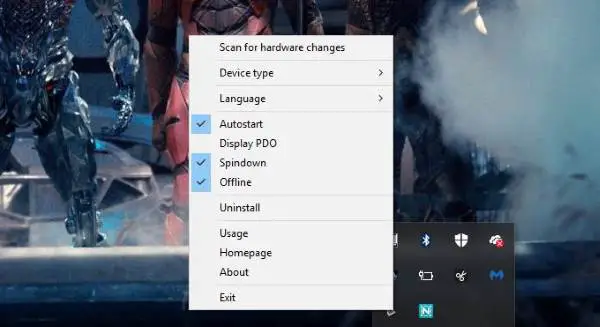
Sounds like a glitch or a formatting issue (as in windows does not recognize it as a removable drive). Grab HotSwap! Portable program and see what that recognizes it as (as hotswap can eject disks, hence the name).


My Computer My Computer

At a glance

Windows 11 Pro
OS
Windows 11 Pro
It recognizes it as a removable device and works normally. It's not the case. The problem is when disconnecting, I can't do it through the taskbar. Do not open the window to click and disconnect the device. By other means I can disconnect the removable device.
 

My Computer My Computer

At a glance

Windows 11
OS
Windows 11
Open the SysTray twice in a row, then you'll get it...

0005929.png
 

My Computers My Computers

  • At a glance

    Windows 11 Pro
    OS
    Windows 11 Pro
    Computer type
    PC/Desktop
    Manufacturer/Model
    ASUS ROG Strix
  • At a glance

    Windows 11 Pro
    Operating System
    Windows 11 Pro
    Computer type
    Laptop
    Manufacturer/Model
    ASUS VivoBook
  • ASUS VivoBook 'Lite' ~ Windows 11 Home
It doesn´t work here.
 

My Computer My Computer

At a glance

Windows 11
OS
Windows 11
Did you check hotswap…..
 

My Computer My Computer

At a glance

Windows 11 Pro
OS
Windows 11 Pro
With hotswap it works, but i like to fix my sytem. Any idea?
 

My Computer My Computer

At a glance

Windows 11
OS
Windows 11
What does hotswap recognize it as? Right click the task tray icon and narrow down the types of drives it is allowed to eject
 

My Computer My Computer

At a glance

Windows 11 Pro
OS
Windows 11 Pro
Have you done the obvious, restart explorer? Also have you tested the function with a different usb drive?
 

My Computers My Computers

  • At a glance

    Windows 11 Pro 25H2 26200.8875i9-10900 10 core 20 threads32 gbnone-Intel UHD Graphics 630
    OS
    Windows 11 Pro 25H2 26200.8875
    Computer type
    PC/Desktop
    Manufacturer/Model
    Dell Optiplex 7080
    CPU
    i9-10900 10 core 20 threads
    Motherboard
    DELL 0J37VM
    Memory
    32 gb
    Graphics Card(s)
    none-Intel UHD Graphics 630
    Sound Card
    Integrated Realtek
    Monitor(s) Displays
    Benq 27
    Screen Resolution
    2560x1440
    Hard Drives
    2x1tb Solidigm m.2 nvme /External drives 512gb Samsung m.2 sata+2tb Kingston m2.nvme
    PSU
    500w
    Case
    MT
    Cooling
    Dell Premium
    Keyboard
    Logitech wired
    Mouse
    Logitech wireless
    Internet Speed
    so slow I'm too embarrassed to tell
    Browser
    #1 Edge #2 Firefox
    Antivirus
    Defender+MWB Premium
  • At a glance

    Windows 11 Pro 24H2 26200.8875AMD Ryzen 7 6800U32 gbintegrated
    Operating System
    Windows 11 Pro 24H2 26200.8875
    Computer type
    PC/Desktop
    Manufacturer/Model
    Beelink Mini PC SER5
    CPU
    AMD Ryzen 7 6800U
    Memory
    32 gb
    Graphics card(s)
    integrated
    Sound Card
    integrated
    Monitor(s) Displays
    Benq 27
    Screen Resolution
    2560x1440
    Hard Drives
    1TB Crucial nvme
    Keyboard
    Logitech wired
    Mouse
    Logitech wireless
    Internet Speed
    still too embarrassed to tell
    Browser
    Firefox
    Antivirus
    Defender
    Other Info
    System 3 is non compliant Dell 9020 i7-4770/24gb ram Win11 PRO 26200.8875
Yes to both. Hotswap recognizes the pendrive as removable media. It works perfectly! I would just like to fix the native Windows function. Just that.
 

My Computer My Computer

At a glance

Windows 11
OS
Windows 11
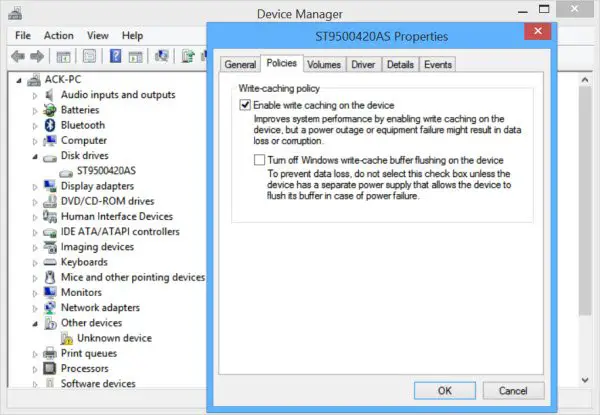
See if any ideas here. Safely Remove Hardware not working in Windows 11/10

I would also make sure you have no corrupt system files that is causing this problem. Open a command prompt as administrator and type sfc /scannow
Pay attention to the scan results to see if SFC found anything it could not repair. If it found corruption it could not fix followup with this command (note the spaces)
dism /online /cleanup-image /restorehealth
Restart computer
 

My Computers My Computers

  • At a glance

    Windows 11 Pro 25H2 26200.8875i9-10900 10 core 20 threads32 gbnone-Intel UHD Graphics 630
    OS
    Windows 11 Pro 25H2 26200.8875
    Computer type
    PC/Desktop
    Manufacturer/Model
    Dell Optiplex 7080
    CPU
    i9-10900 10 core 20 threads
    Motherboard
    DELL 0J37VM
    Memory
    32 gb
    Graphics Card(s)
    none-Intel UHD Graphics 630
    Sound Card
    Integrated Realtek
    Monitor(s) Displays
    Benq 27
    Screen Resolution
    2560x1440
    Hard Drives
    2x1tb Solidigm m.2 nvme /External drives 512gb Samsung m.2 sata+2tb Kingston m2.nvme
    PSU
    500w
    Case
    MT
    Cooling
    Dell Premium
    Keyboard
    Logitech wired
    Mouse
    Logitech wireless
    Internet Speed
    so slow I'm too embarrassed to tell
    Browser
    #1 Edge #2 Firefox
    Antivirus
    Defender+MWB Premium
  • At a glance

    Windows 11 Pro 24H2 26200.8875AMD Ryzen 7 6800U32 gbintegrated
    Operating System
    Windows 11 Pro 24H2 26200.8875
    Computer type
    PC/Desktop
    Manufacturer/Model
    Beelink Mini PC SER5
    CPU
    AMD Ryzen 7 6800U
    Memory
    32 gb
    Graphics card(s)
    integrated
    Sound Card
    integrated
    Monitor(s) Displays
    Benq 27
    Screen Resolution
    2560x1440
    Hard Drives
    1TB Crucial nvme
    Keyboard
    Logitech wired
    Mouse
    Logitech wireless
    Internet Speed
    still too embarrassed to tell
    Browser
    Firefox
    Antivirus
    Defender
    Other Info
    System 3 is non compliant Dell 9020 i7-4770/24gb ram Win11 PRO 26200.8875
Try these fixes


My Computer My Computer

At a glance

Windows 11 Pro
OS
Windows 11 Pro

Latest Support Threads

Back
Top Bottom