Samsung Newsroom:
Samsung Electronics today announced the latest update to SmartThings, its global connected living platform now serving 470 million registered users and supporting 430+ Works with SmartThings (WWST)-certified brands worldwide. The update introduces SmartThings Now at the top of the Home tab, refreshes the app’s Home tab experience, and expands local control capabilities — helping users access relevant information, take action more easily, and manage connected devices with greater reliability.
“This update marks another step in SmartThings’ ongoing efforts to move beyond a home experience where users search for and launch features,” said Jaeyeon Jung, Executive Vice President and Head of the SmartThings Team, AI Platform Center, Samsung Electronics. “By delivering relevant information and controls at the right time, SmartThings is pushing the boundaries of more intelligent home experiences and empowering users to manage their everyday lives more naturally.”
A Redesigned Home Tab Experience, Led by SmartThings Now
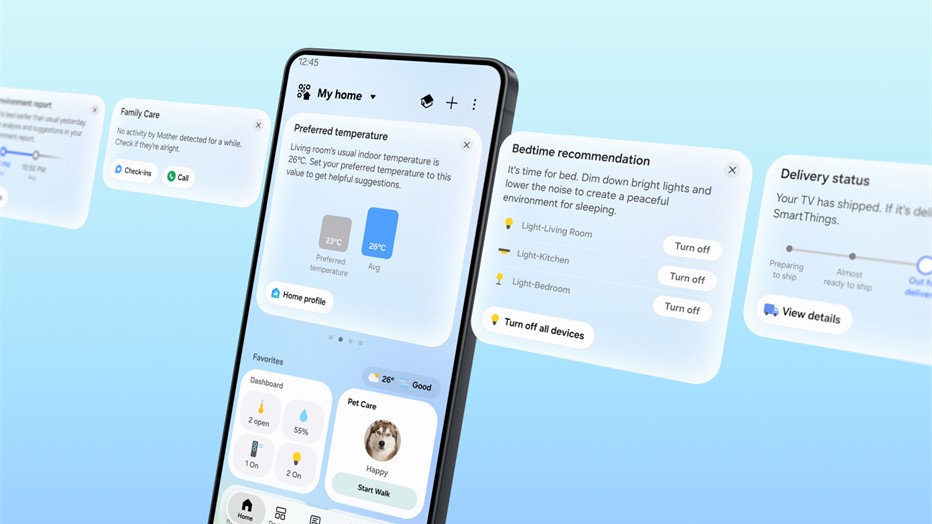
SmartThings Now appears as cards at the top of the Home tab, building on Home Insight to offer greater personalization by combining relevant information with actions users can take right away. It suggests the right information and immediately actionable controls based on the user’s current situation, delivering an experience that is easier and more intuitive.If a Family Care member, such as an older parent, shows no device activity for an extended period, SmartThings Now surfaces a care card for the caregiver with options to check in or call. When the user arrives near a home location pre-registered in the SmartThings app, SmartThings Now suggests turning on lights and air purifiers in advance. Once the user acts, it prompts them to create a routine so the same actions can run automatically going forward. This is all part of an experience designed to naturally guide users to the next relevant step based on their choices and context, making it easier to discover and use the features they need.
SmartThings Now also supports personalized optimization based on usage patterns. It analyzes the past week’s activity to suggest updates to Home tab Favorites, including devices, services, and routines. For example, it may recommend removing an air conditioner card as usage drops heading into cooler months, or adding an AirDresser card as the user’s air dresser becomes more frequently used during the change of seasons. Users can manage their routines through the Routine Insight card in SmartThings Now,1 as well, by navigating to a detailed view of their routine activity over the past week to review and delete routines they no longer need.
The updated Home tab reorganizes key information into a more streamlined view, covering dashboards, device cards, and service cards, with each type displayed in a format optimized for easier browsing.2
Service cards use a more space-efficient design to clearly display more services on a single screen and present information like device status and numerical readings. Additionally, Live Wallpaper changes naturally throughout the day, adding a more dynamic visual touch to the experience.
The update also introduces a Floating Bar that places frequently used features within easier reach at the bottom of the screen, improving one-handed use on larger smartphones and reflecting the latest One UI design direction.
Enhanced Local Control Helps Keep Devices Responsive, Even When Offline
SmartThings is now introducing local control technology that helps users continue to operate connected devices more reliably when there are changes to the home network environment or disruptions to external internet service.3When a mobile device and a SmartThings Hub are connected to the same Wi-Fi network, the mobile device can communicate directly with the hub rather than routing controls through the cloud. Compared to cloud-based control, local control can improve response times by approximately 30%. This helps enable continued control of connected devices during temporary network fluctuations.4
SmartThings automatically switches between local and cloud-based remote control based on whether the user’s mobile device is at home or away. The updated Offline Device Diagnostics page helps users restore devices that have gone offline by updating new network information across all registered devices at once.
Samsung has also added support for Matter 1.6, the latest smart home connectivity standard from the Connectivity Standards Alliance (CSA), enhancing stability and Group Control performance. The update adds support for four new device categories, as well:
- Energy Meters for real-time power monitoring
- Closures for specialized door and gate types
- Irrigation devices such as sprinkler systems
- Soil Sensors for measuring ground conditions.
Source:
Samsung Introduces ‘SmartThings Now’ in New Platform Update That Brings More Intuitive User Experiences - Samsung Global Newsroom
SmartThings Now leads a redesigned Home tab experience by delivering personalized informat